trunk Hyundai Azera 2015 Owner's Manual
[x] Cancel search | Manufacturer: HYUNDAI, Model Year: 2015, Model line: Azera, Model: Hyundai Azera 2015Pages: 473, PDF Size: 11.92 MB
Page 13 of 473
23
Your vehicle at a glance
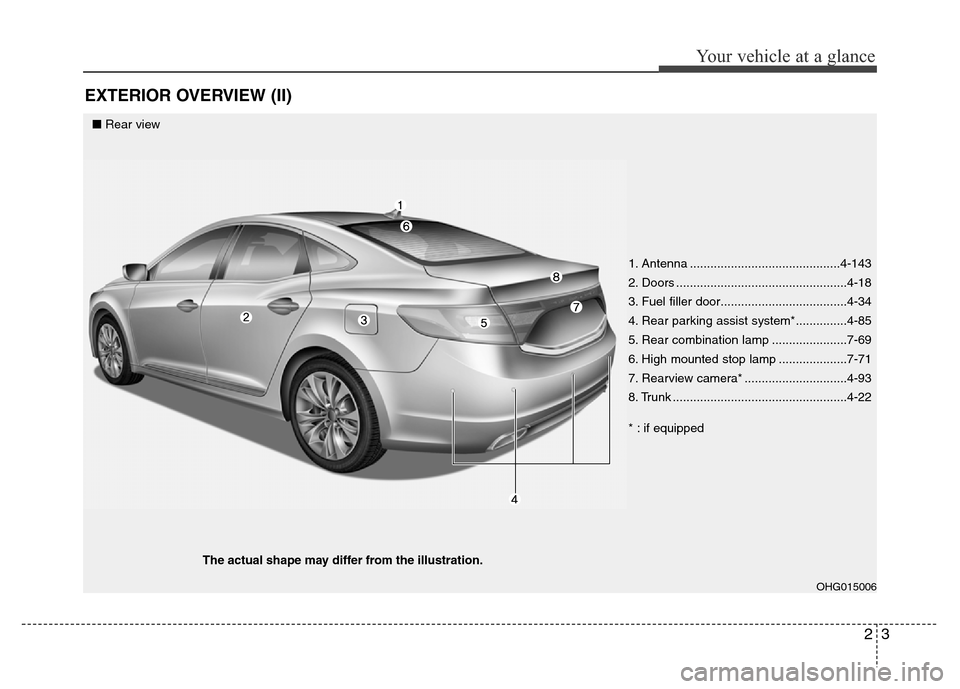
EXTERIOR OVERVIEW (II)
OHG015006
■Rear view
The actual shape may differ from the illustration.
1. Antenna ............................................4-143
2. Doors ..................................................4-18
3. Fuel filler door.....................................4-34
4. Rear parking assist system*...............4-85
5. Rear combination lamp ......................7-69
6. High mounted stop lamp ....................7-71
7. Rearview camera* ..............................4-93
8. Trunk ...................................................4-22
* : if equipped
Page 14 of 473
Your vehicle at a glance
4 2
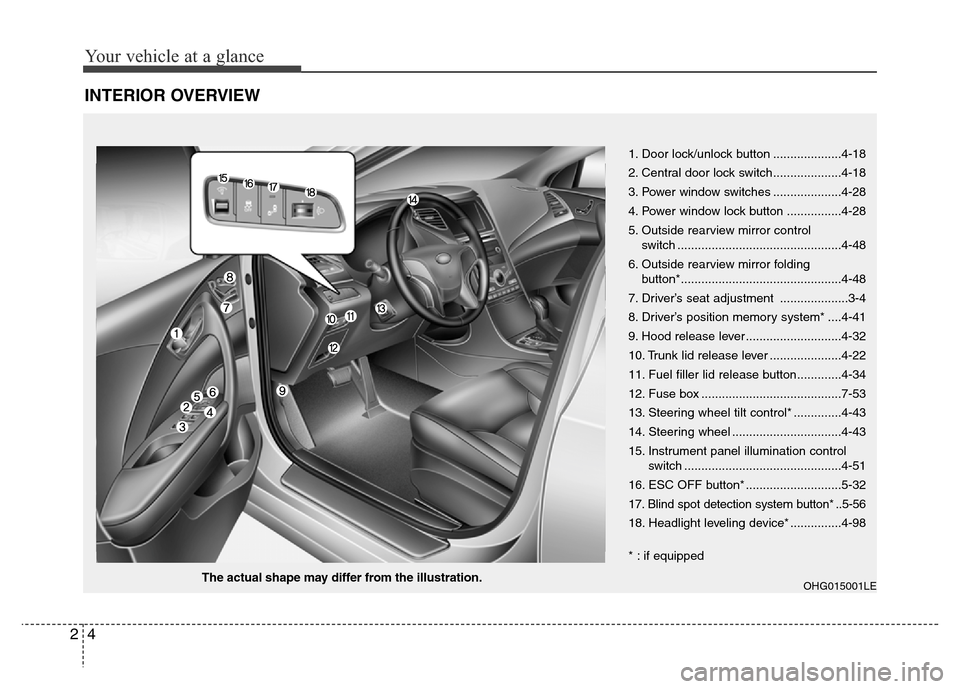
INTERIOR OVERVIEW
OHG015001LEThe actual shape may differ from the illustration.1. Door lock/unlock button ....................4-18
2. Central door lock switch....................4-18
3. Power window switches ....................4-28
4. Power window lock button ................4-28
5. Outside rearview mirror control
switch ................................................4-48
6. Outside rearview mirror folding
button*...............................................4-48
7. Driver’s seat adjustment ....................3-4
8. Driver’s position memory system* ....4-41
9. Hood release lever ............................4-32
10. Trunk lid release lever .....................4-22
11. Fuel filler lid release button.............4-34
12. Fuse box .........................................7-53
13. Steering wheel tilt control* ..............4-43
14. Steering wheel ................................4-43
15. Instrument panel illumination control
switch ..............................................4-51
16. ESC OFF button* ............................5-32
17. Blind spot detection system button* ..5-56
18. Headlight leveling device* ...............4-98
* : if equipped
Page 78 of 473
4
Keys / 4-3
Smart key / 4-7
Remote keyless entry / 4-12
Theft-alarm system / 4-15
Door locks / 4-18
Trunk / 4-22
Smart trunk / 4-24
Windows / 4-28
Hood / 4-32
Fuel filler lid / 4-34
Panorama sunroof / 4-37
Driver position memory system / 4-41
Steering wheel / 4-43
Mirrors / 4-46
Instrument cluster / 4-50
LCD display / 4-55
Trip computer / 4-64
Warnings and indicators / 4-68
Rear parking assist system / 4-85
Parking assist system / 4-89
Rearview camera / 4-93
Hazard warning flasher / 4-93
Lighting / 4-94
Features of your vehicle
Page 81 of 473
Features of your vehicle
4 4
Restrictions in handling keys
When leaving keys with parking lot and
valet attendants, the following proce-
dures will ensure that your vehicle’s trunk
and glove box compartment can not be
opened in your absence.
To activate the trunk lock system so that
the trunk can only be opened with the
main key, perform the following:
1. Unlock the glove box by using the
main key then open it.
2. Set the trunk lid control button to the
OFF position (unpressed).
3. Close and lock the glove box using the
main key.When leaving your keys with a parking lot
or valet attendant, perform steps 1 to 3
above, and leave the sub key with the
attendant. In this manner the sub key can
only be used to start the engine and
operate door locks.
Lock release
To release the trunk lock feature, open
the glove box with the main key and set
the trunk lid control button to the ON
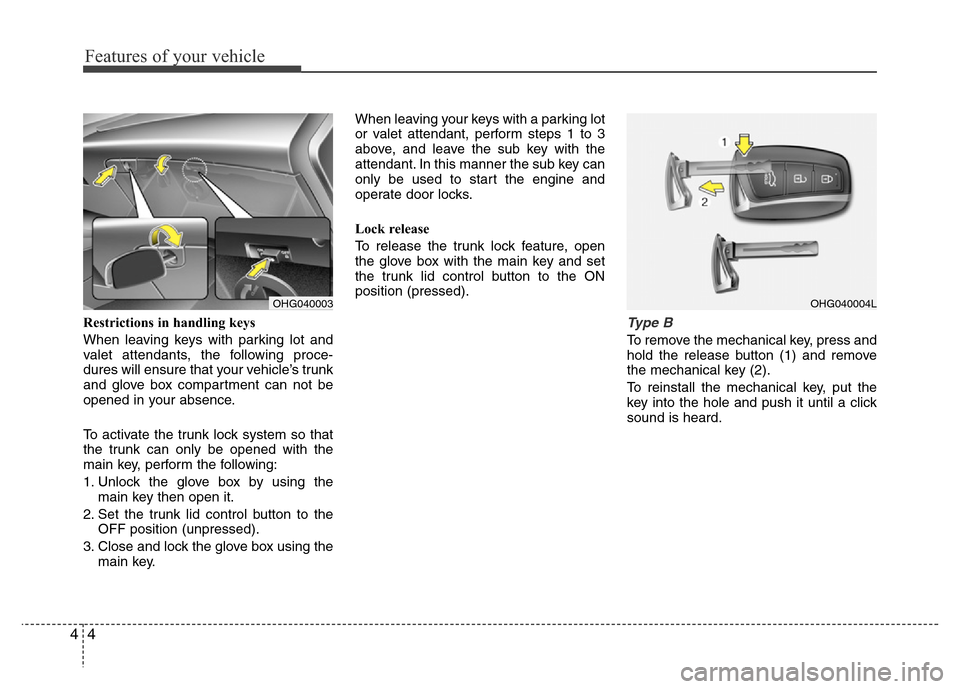
position (pressed).Type B
To remove the mechanical key, press and
hold the release button (1) and remove
the mechanical key (2).
To reinstall the mechanical key, put the
key into the hole and push it until a click
sound is heard.
OHG040003OHG040004L
Page 82 of 473
45
Features of your vehicle
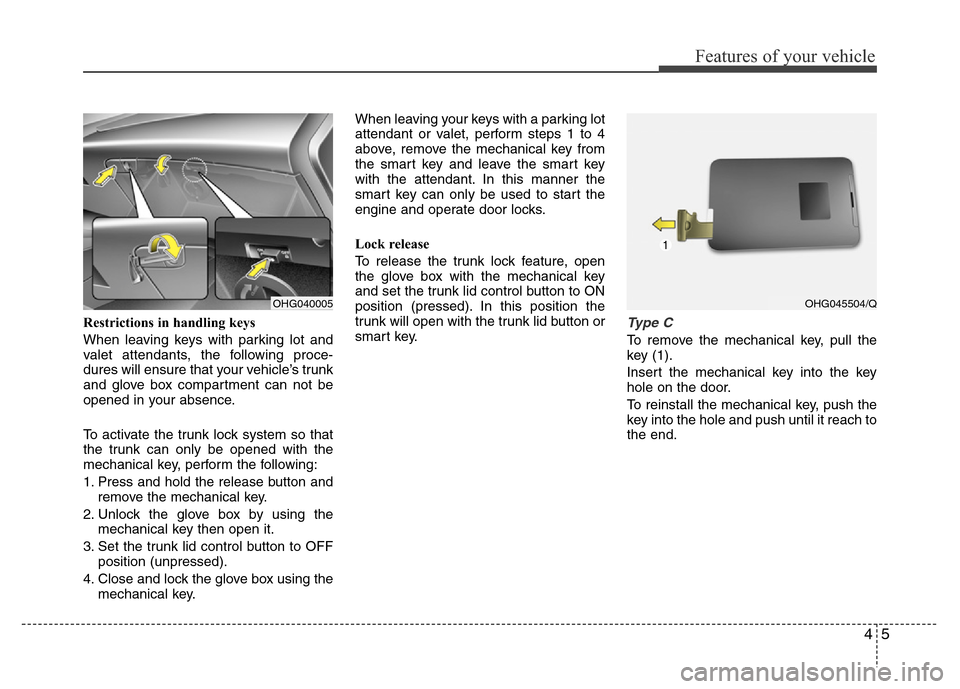
Restrictions in handling keys
When leaving keys with parking lot and
valet attendants, the following proce-
dures will ensure that your vehicle’s trunk
and glove box compartment can not be
opened in your absence.
To activate the trunk lock system so that
the trunk can only be opened with the
mechanical key, perform the following:
1.
Press and hold the release button and
remove the mechanical key.
2. Unlock the glove box by using the
mechanical key then open it.
3. Set the trunk lid control button to OFF
position (unpressed).
4. Close and lock the glove box using the
mechanical key.When leaving your keys with a parking lot
attendant or valet, perform steps 1 to 4
above, remove the mechanical key from
the smart key and leave the smart key
with the attendant. In this manner the
smart key can only be used to start the
engine and operate door locks.
Lock release
To release the trunk lock feature, open
the glove box with the mechanical key
and set the trunk lid control button to ON
position (pressed). In this position the
trunk will open with the trunk lid button or
smart key.
Type C
To remove the mechanical key, pull the
key (1).
Insert the mechanical key into the key
hole on the door.
To reinstall the mechanical key, push the
key into the hole and push until it reach to
the end.
OHG040005OHG045504/Q
Page 83 of 473
Features of your vehicle
6 4
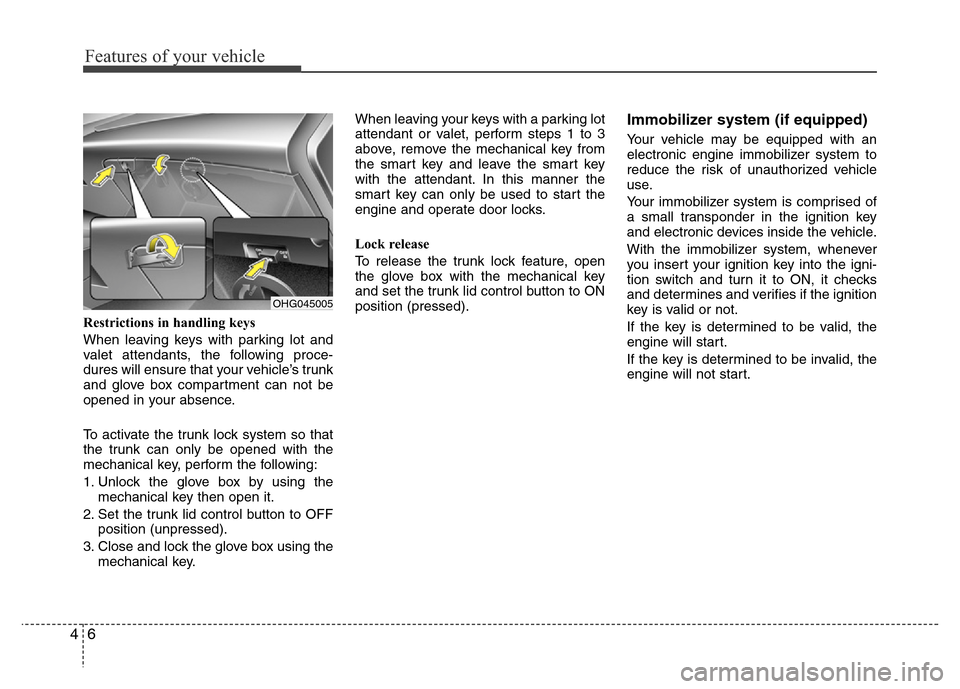
Restrictions in handling keys
When leaving keys with parking lot and
valet attendants, the following proce-
dures will ensure that your vehicle’s trunk
and glove box compartment can not be
opened in your absence.
To activate the trunk lock system so that
the trunk can only be opened with the
mechanical key, perform the following:
1. Unlock the glove box by using the
mechanical key then open it.
2. Set the trunk lid control button to OFF
position (unpressed).
3. Close and lock the glove box using the
mechanical key.When leaving your keys with a parking lot
attendant or valet, perform steps 1 to 3
above, remove the mechanical key from
the smart key and leave the smart key
with the attendant. In this manner the
smart key can only be used to start the
engine and operate door locks.
Lock release
To release the trunk lock feature, open
the glove box with the mechanical key
and set the trunk lid control button to ON
position (pressed).
Immobilizer system (if equipped)
Your vehicle may be equipped with an
electronic engine immobilizer system to
reduce the risk of unauthorized vehicle
use.
Your immobilizer system is comprised of
a small transponder in the ignition key
and electronic devices inside the vehicle.
With the immobilizer system, whenever
you insert your ignition key into the igni-
tion switch and turn it to ON, it checks
and determines and verifies if the ignition
key is valid or not.
If the key is determined to be valid, the
engine will start.
If the key is determined to be invalid, the
engine will not start.
OHG045005
Page 85 of 473
Features of your vehicle
8 4
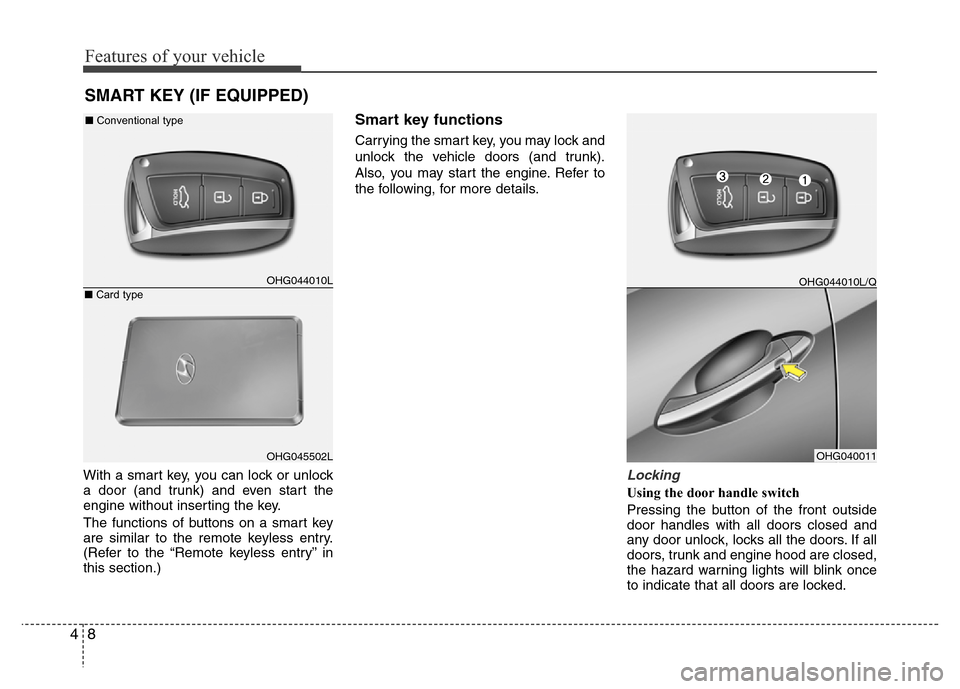
With a smart key, you can lock or unlock
a door (and trunk) and even start the
engine without inserting the key.
The functions of buttons on a smart key
are similar to the remote keyless entry.
(Refer to the “Remote keyless entry” in
this section.)
Smart key functions
Carrying the smart key, you may lock and
unlock the vehicle doors (and trunk).
Also, you may start the engine. Refer to
the following, for more details.
Locking
Using the door handle switch
Pressing the button of the front outside
door handles with all doors closed and
any door unlock, locks all the doors. If all
doors, trunk and engine hood are closed,
the hazard warning lights will blink once
to indicate that all doors are locked.
SMART KEY (IF EQUIPPED)
OHG044010L
OHG045502LOHG040011 ■Conventional type
■Card type
OHG044010L/Q
Page 86 of 473
49
Features of your vehicle
Also, the outside rearview mirror will auto-
matically fold if the outside rearview mirror
folding switch is in the AUTO position (if
equipped).
However, if any door, trunk or engine hood
remains open, the hazard warning lights will
not operate. If all doors, trunk and engine
hood are closed after the lock button is
pressed, the hazard warning lights will blink
once.
The button will only operate when the smart
key is within 0.7~1 m (28~40 in.) from the
outside door handle. If you want to make
sure that a door has locked or not, you
should check the door lock button inside the
vehicle or pull the outside door handle.
Even though you press the outside door
handle buttons, the doors will not lock and
the chime will sound for 3 seconds if any of
following occur:
• The smart key is in the vehicle.
• The ignition switch is in ACC or ON
position.
• Any door except the trunk is open.
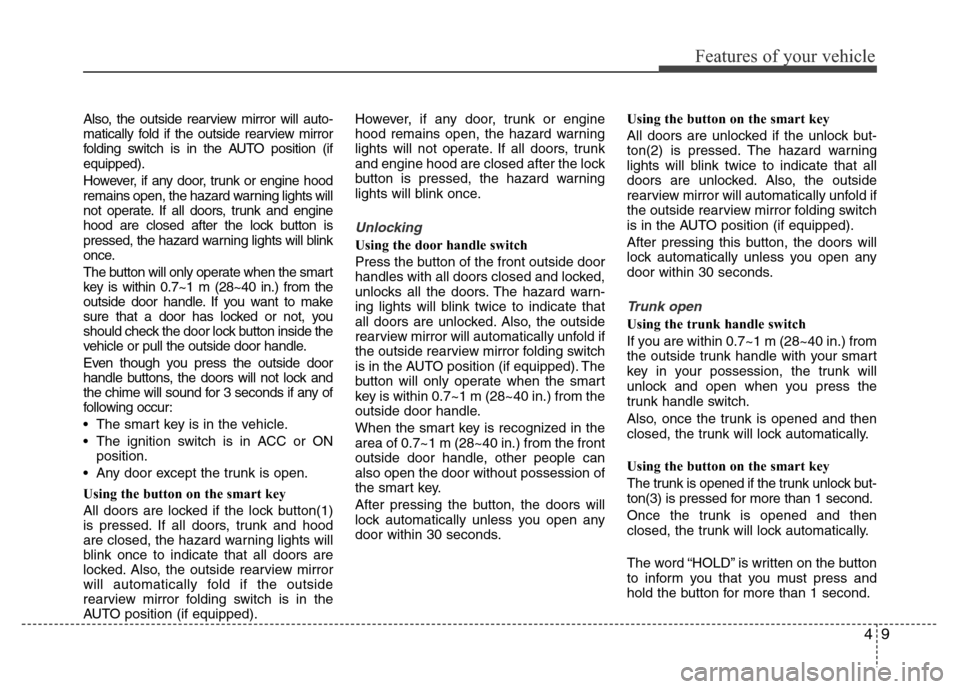
Using the button on the smart key
All doors are locked if the lock button(1)
is pressed. If all doors, trunk and hood
are closed, the hazard warning lights will
blink once to indicate that all doors are
locked. Also, the outside rearview mirror
will automatically fold if the outside
rearview mirror folding switch is in the
AUTO position (if equipped).However, if any door, trunk or engine
hood remains open, the hazard warning
lights will not operate. If all doors, trunk
and engine hood are closed after the lock
button is pressed, the hazard warning
lights will blink once.
Unlocking
Using the door handle switch
Press the button of the front outside door
handles with all doors closed and locked,
unlocks all the doors. The hazard warn-
ing lights will blink twice to indicate that
all doors are unlocked. Also, the outside
rearview mirror will automatically unfold if
the outside rearview mirror folding switch
is in the AUTO position (if equipped). The
button will only operate when the smart
key is within 0.7~1 m (28~40 in.) from the
outside door handle.
When the smart key is recognized in the
area of 0.7~1 m (28~40 in.) from the front
outside door handle, other people can
also open the door without possession of
the smart key.
After pressing the button, the doors will
lock automatically unless you open any
door within 30 seconds.Using the button on the smart key
All doors are unlocked if the unlock but-
ton(2) is pressed. The hazard warning
lights will blink twice to indicate that all
doors are unlocked. Also, the outside
rearview mirror will automatically unfold if
the outside rearview mirror folding switch
is in the AUTO position (if equipped).
After pressing this button, the doors will
lock automatically unless you open any
door within 30 seconds.
Trunk open
Using the trunk handle switch
If you are within 0.7~1 m (28~40 in.) from
the outside trunk handle with your smart
key in your possession, the trunk will
unlock and open when you press the
trunk handle switch.
Also, once the trunk is opened and then
closed, the trunk will lock automatically.
Using the button on the smart key
The trunk is opened if the trunk unlock but-
ton(3) is pressed for more than 1 second.
Once the trunk is opened and then
closed, the trunk will lock automatically.
The word “HOLD” is written on the button
to inform you that you must press and
hold the button for more than 1 second.
Page 89 of 473
Features of your vehicle
12 4
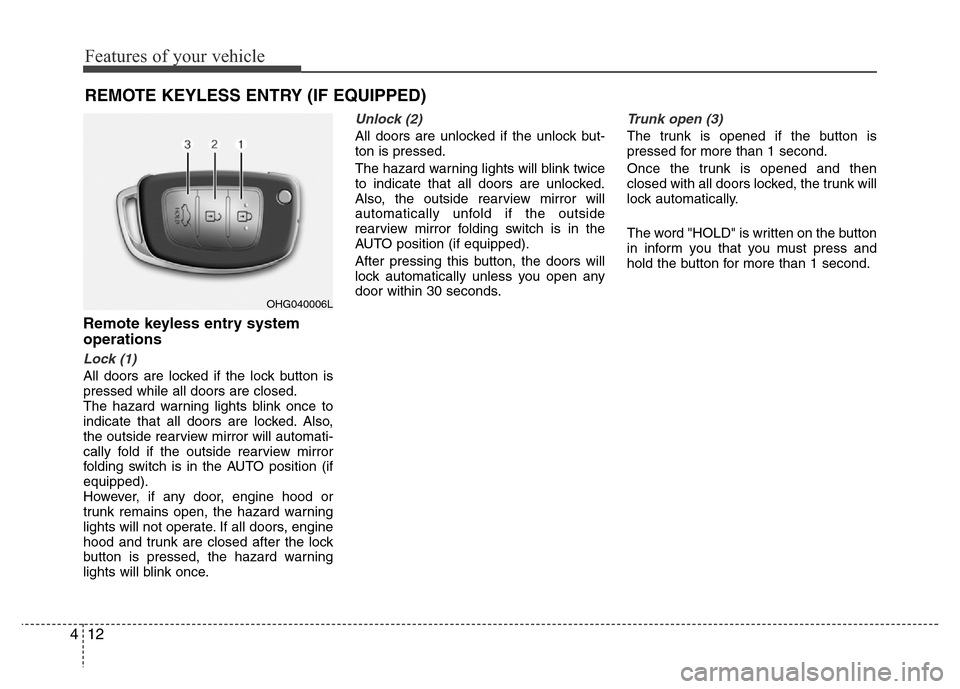
REMOTE KEYLESS ENTRY (IF EQUIPPED)
Remote keyless entry system
operations
Lock (1)
All doors are locked if the lock button is
pressed while all doors are closed.
The hazard warning lights blink once to
indicate that all doors are locked. Also,
the outside rearview mirror will automati-
cally fold if the outside rearview mirror
folding switch is in the AUTO position (if
equipped).
However, if any door, engine hood or
trunk remains open, the hazard warning
lights will not operate. If all doors, engine
hood and trunk are closed after the lock
button is pressed, the hazard warning
lights will blink once.
Unlock (2)
All doors are unlocked if the unlock but-
ton is pressed.
The hazard warning lights will blink twice
to indicate that all doors are unlocked.
Also, the outside rearview mirror will
automatically unfold if the outside
rearview mirror folding switch is in the
AUTO position (if equipped).
After pressing this button, the doors will
lock automatically unless you open any
door within 30 seconds.
Trunk open (3)
The trunk is opened if the button is
pressed for more than 1 second.
Once the trunk is opened and then
closed with all doors locked, the trunk will
lock automatically.
The word "HOLD" is written on the button
in inform you that you must press and
hold the button for more than 1 second.
OHG040006L
Page 92 of 473
415
Features of your vehicle
THEFT-ALARM SYSTEM (IF EQUIPPED)
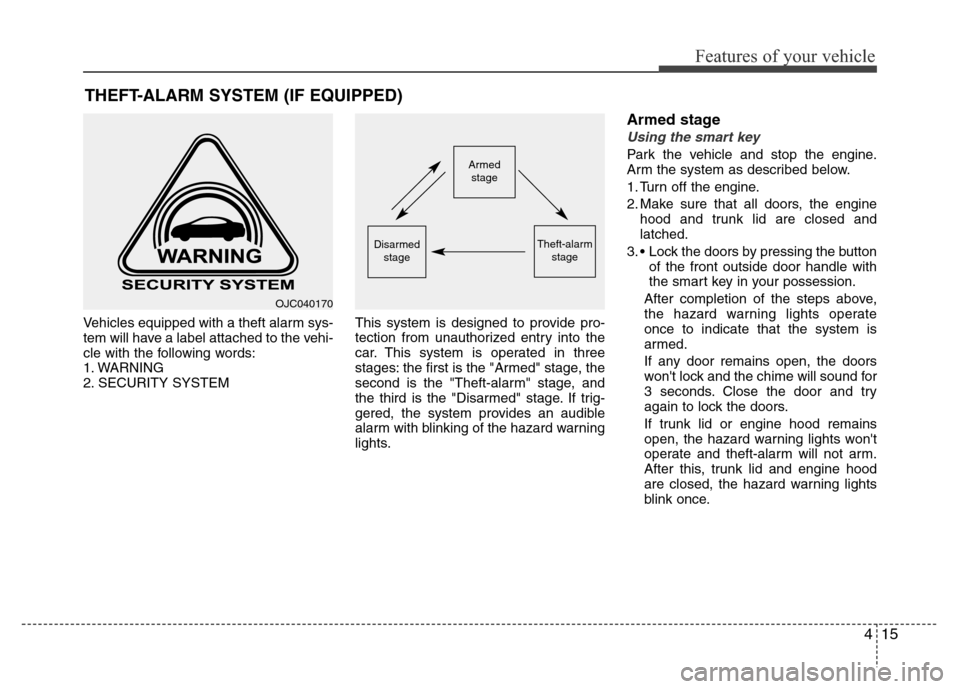
Vehicles equipped with a theft alarm sys-
tem will have a label attached to the vehi-
cle with the following words:
1. WARNING
2. SECURITY SYSTEMThis system is designed to provide pro-
tection from unauthorized entry into the
car. This system is operated in three
stages: the first is the "Armed" stage, the
second is the "Theft-alarm" stage, and
the third is the "Disarmed" stage. If trig-
gered, the system provides an audible
alarm with blinking of the hazard warning
lights.
Armed stage
Using the smart key
Park the vehicle and stop the engine.
Arm the system as described below.
1. Turn off the engine.
2. Make sure that all doors, the engine
hood and trunk lid are closed and
latched.
3. • Lock the doors by pressing the button
of the front outside door handle with
the smart key in your possession.
After completion of the steps above,
the hazard warning lights operate
once to indicate that the system is
armed.
If any door remains open, the doors
won't lock and the chime will sound for
3 seconds. Close the door and try
again to lock the doors.
If trunk lid or engine hood remains
open, the hazard warning lights won't
operate and theft-alarm will not arm.
After this, trunk lid and engine hood
are closed, the hazard warning lights
blink once.Armed
stage
Theft-alarm
stageDisarmed
stage
OJC040170