ECO mode Hyundai Azera 2016 User Guide
[x] Cancel search | Manufacturer: HYUNDAI, Model Year: 2016, Model line: Azera, Model: Hyundai Azera 2016Pages: 521, PDF Size: 16.54 MB
Page 144 of 521
Features of your vehicle
64
4
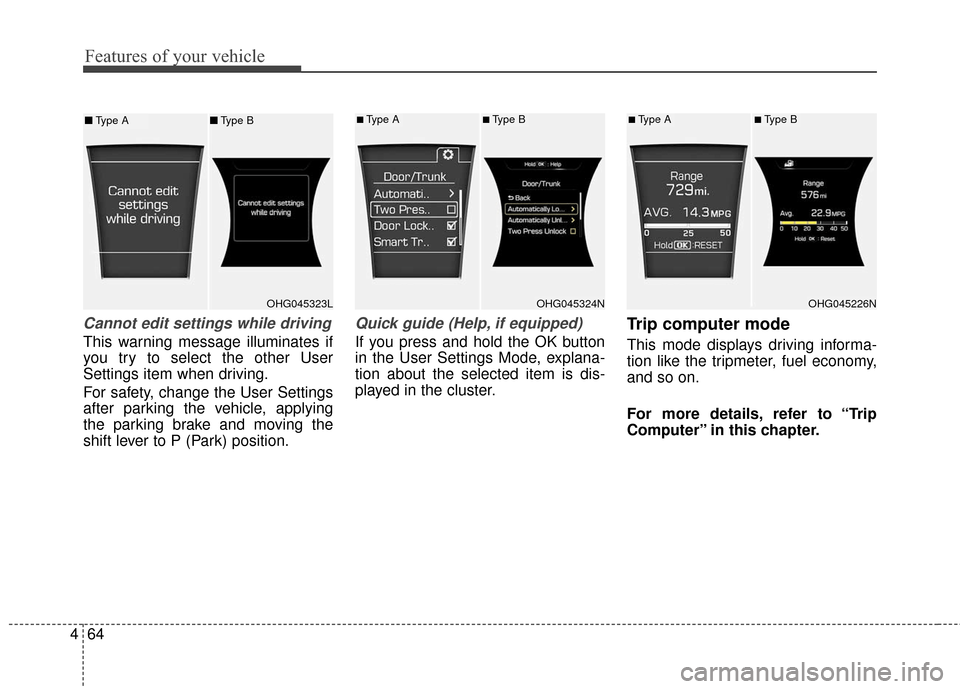
Cannot edit settings while driving
This warning message illuminates if
you try to select the other User
Settings item when driving.
For safety, change the User Settings
after parking the vehicle, applying
the parking brake and moving the
shift lever to P (Park) position.
Quick guide (Help, if equipped)
If you press and hold the OK button
in the User Settings Mode, explana-
tion about the selected item is dis-
played in the cluster.
Trip computer mode
This mode displays driving informa-
tion like the tripmeter, fuel economy,
and so on.
For more details, refer to “Trip
Computer” in this chapter.
OHG045323LOHG045324N
■Type A■Type B
OHG045226N
■Type A■Type B■ Type A ■Type B
Page 146 of 521
Features of your vehicle
66
4
Information mode
Service interval
Service in
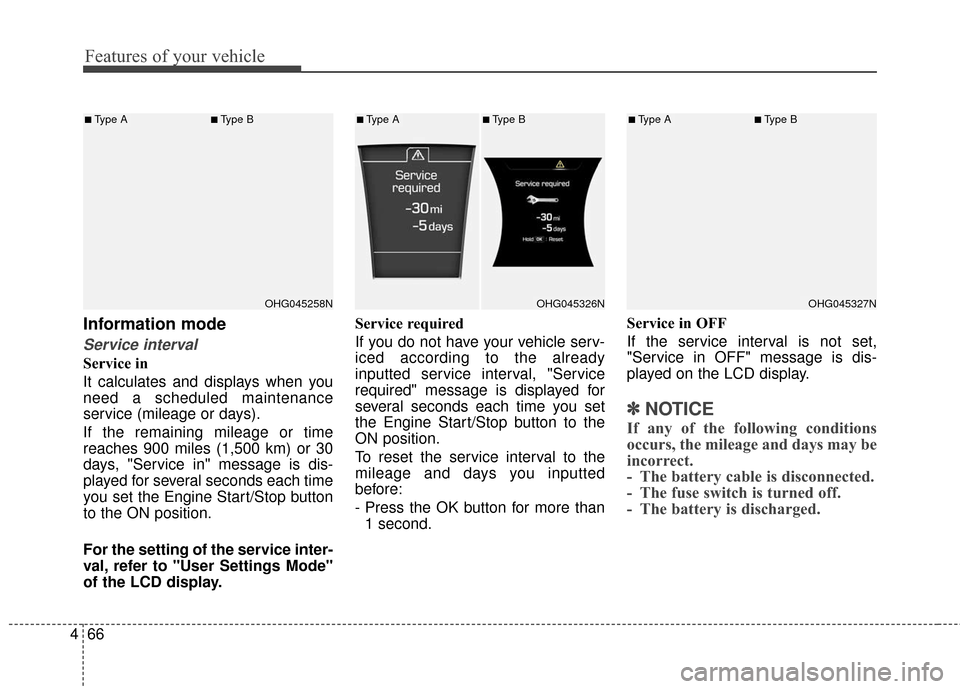
It calculates and displays when you
need a scheduled maintenance
service (mileage or days).
If the remaining mileage or time
reaches 900 miles (1,500 km) or 30
days, "Service in" message is dis-
played for several seconds each time
you set the Engine Start/Stop button
to the ON position.
For the setting of the service inter-
val, refer to "User Settings Mode"
of the LCD display. Service required
If you do not have your vehicle serv-
iced according to the already
inputted service interval, "Service
required" message is displayed for
several seconds each time you set
the Engine Start/Stop button to the
ON position.
To reset the service interval to the
mileage and days you inputted
before:
- Press the OK button for more than
1 second. Service in OFF
If the service interval is not set,
"Service in OFF" message is dis-
played on the LCD display.
✽ ✽
NOTICE
If any of the following conditions
occurs, the mileage and days may be
incorrect.
- The battery cable is disconnected.
- The fuse switch is turned off.
- The battery is discharged.
OHG045258N
■Type A■Type B
OHG045326N
■Type A■Type B
OHG045327N
■Type A■Type B
Page 153 of 521
473
Features of your vehicle
TRIP COMPUTER
Overview
Description
The trip computer is a microcomput-
er-controlled driver information sys-
tem that displays information related
to driving.
✽ ✽NOTICE
Some driving information stored in
the trip computer (for example
Average Vehicle Speed) resets if the
battery is disconnected.
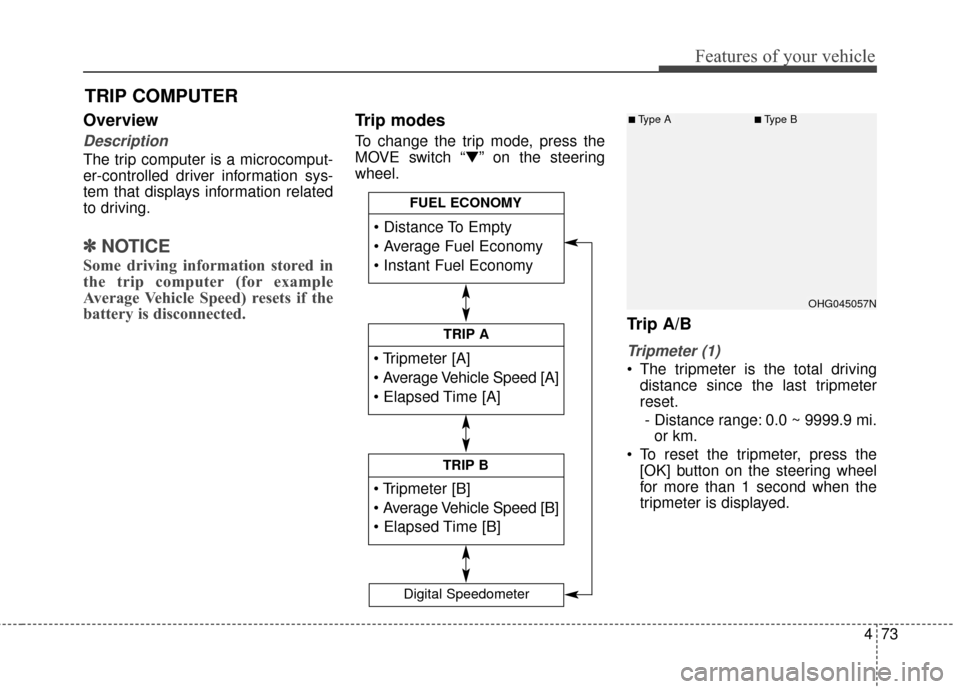
Trip modes
To change the trip mode, press the
MOVE switch “▼” on the steering
wheel.
Trip A/B
Tripmeter (1)
The tripmeter is the total driving
distance since the last tripmeter
reset.
- Distance range: 0.0 ~ 9999.9 mi. or km.
To reset the tripmeter, press the [OK] button on the steering wheel
for more than 1 second when the
tripmeter is displayed.
TRIP A
TRIP B
FUEL ECONOMY
Digital Speedometer
OHG045057N
■Type A■Type B
Page 155 of 521
475
Features of your vehicle
✽
✽NOTICE
• If the vehicle is not on level ground
or the battery power has been
interrupted, the distance to empty
function may not operate correct-
ly.
• The distance to empty may differ from the actual driving distance as
it is an estimate of the available
driving distance.
• The trip computer may not regis- ter additional fuel if less than 1.6
gallons (6 liters) of fuel are added
to the vehicle.
• The fuel economy and distance to empty may vary significantly
based on driving conditions, driv-
ing habits, and condition of the
vehicle.
Average Fuel Economy (2)
The average fuel economy is calcu-
lated by the total driving distance
and fuel consumption since the last
average fuel economy reset.
- Fuel economy range: 0.0 ~ 99.9MPG or L/100km, km/L
The average fuel economy can be reset both manually and automati-
cally.
Manual reset
To clear the average fuel economy
manually, press the [OK] button on
the steering wheel for more than 1
second when the average fuel econo-
my is displayed. Automatic reset
To make the average fuel economy
be reset automatically whenever refu-
eling, select the “Auto Reset” mode in
User Setting menu of the LCD display
(Refer to “LCD Display”).
Under “Auto Reset” mode, the aver-
age fuel economy will be cleared to
zero (---) when the vehicle speed
exceeds 1 km/h after refueling more
than 1.6 gallons (6 liters).
✽ ✽
NOTICE
The average fuel economy is not dis-
played for more accurate calculation
if the vehicle does not drive more
than 10 seconds or 0.19 miles (300
meters) since the Engine Start/Stop
button is turned to ON.
Instant Fuel Economy (3)
This mode displays the instant fuel
economy during the last few sec-
onds when the vehicle speed is
more than 6.2 MPH (10 km/h).
- Fuel economy range: 0 ~ 50 MPGor 0 ~ 30 L/100km
Page 156 of 521
Features of your vehicle
76
4
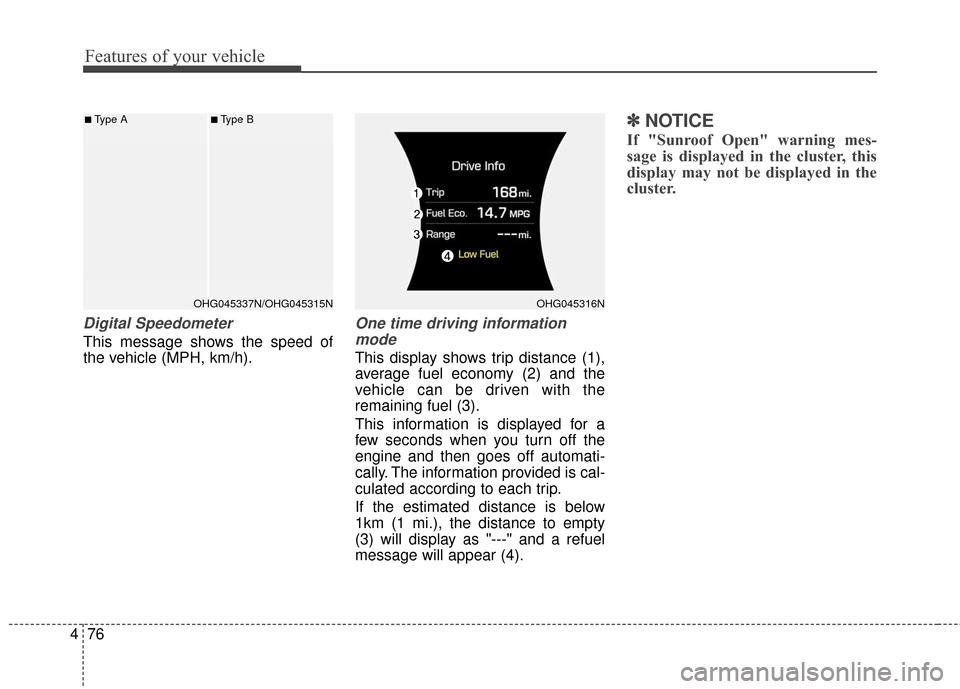
Digital Speedometer
This message shows the speed of
the vehicle (MPH, km/h).
One time driving information
mode
This display shows trip distance (1),
average fuel economy (2) and the
vehicle can be driven with the
remaining fuel (3).
This information is displayed for a
few seconds when you turn off the
engine and then goes off automati-
cally. The information provided is cal-
culated according to each trip.
If the estimated distance is below
1km (1 mi.), the distance to empty
(3) will display as "---" and a refuel
message will appear (4).
✽ ✽ NOTICE
If "Sunroof Open" warning mes-
sage is displayed in the cluster, this
display may not be displayed in the
cluster.
■Type A■Type B
OHG045316NOHG045337N/OHG045315N
Page 165 of 521
485
Features of your vehicle
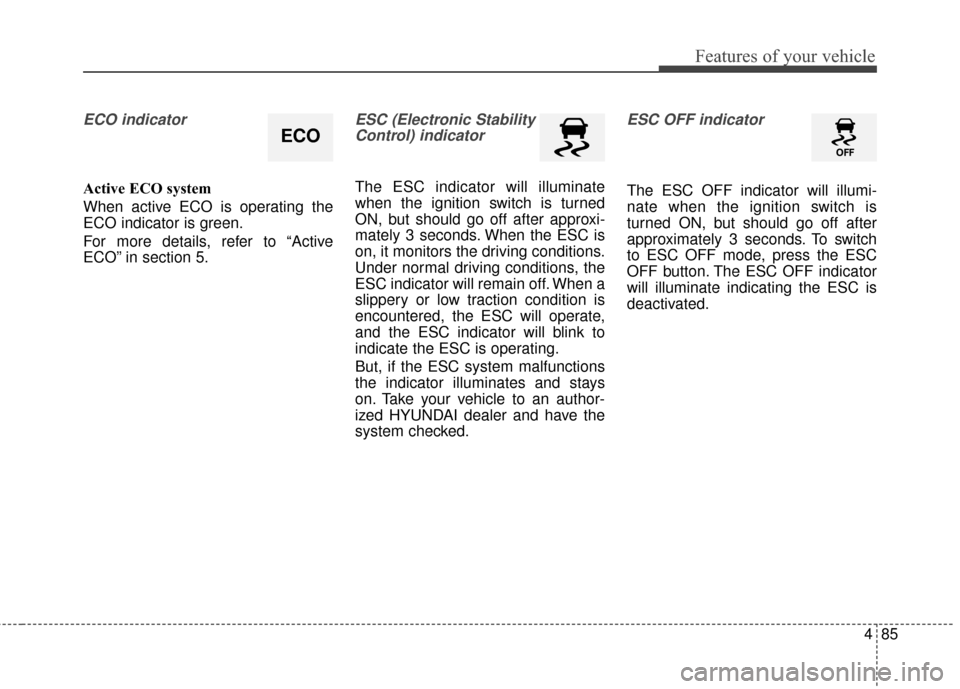
ECO indicator
Active ECO system
When active ECO is operating the
ECO indicator is green.
For more details, refer to “Active
ECO” in section 5.
ESC (Electronic StabilityControl) indicator
The ESC indicator will illuminate
when the ignition switch is turned
ON, but should go off after approxi-
mately 3 seconds. When the ESC is
on, it monitors the driving conditions.
Under normal driving conditions, the
ESC indicator will remain off. When a
slippery or low traction condition is
encountered, the ESC will operate,
and the ESC indicator will blink to
indicate the ESC is operating.
But, if the ESC system malfunctions
the indicator illuminates and stays
on. Take your vehicle to an author-
ized HYUNDAI dealer and have the
system checked.
ESC OFF indicator
The ESC OFF indicator will illumi-
nate when the ignition switch is
turned ON, but should go off after
approximately 3 seconds. To switch
to ESC OFF mode, press the ESC
OFF button. The ESC OFF indicator
will illuminate indicating the ESC is
deactivated.
ECO
Page 181 of 521
4101
Features of your vehicle
Headlight (Headlamp) escort
function
If you turn the ignition switch to the
ACC or OFF position with the head-
lights ON, the headlights (and/or
parking light) remain on for about 5
minutes. However, if the driver’s door
is opened and closed, the headlights
(and/or parking light) turn off after 15
seconds.
The headlights (and/or parking light)
can be turned off by pressing the
lock button on the smart key twice or
turning the light switch to the OFF or
Parking light position.
You can activate or deactivate this
feature. Refer to “User Settings
Mode” in this section.
Headlight (Headlamp) welcome
function
When the headlight is in the ON or
AUTO position and all doors (and
trunk) are closed and locked, if you
press the door unlock button on the
smart key, the headlights (and/or
parking light) will come on for about
15 seconds. At this time, if you press
the door lock or unlock button, the
headlights (and/or parking light) will
turn off immediately.
You can activate or deactivate this
feature. Refer to “User Settings
Mode” in this section.
Daytime running light
Daytime Running Lights (DRL) can
make it easier for others to see the
front of your vehicle during the day.
DRL can be helpful in many different
driving conditions, and it is especially
helpful after dawn and before sunset.
The DRL system turns ON when:1. The light switch is in the AUTO light position.
2. The light switch is in the Parking light position.
The DRL system turns OFF when: 1. The multifunction switch is in the DRL OFF position.
2. The headlights are ON.
3. The turn signal is ON. (the blink- ing side of the DRL will turn off)
4. The hazard warning light is ON.
5. The parking brake is applied.
6. Engine stops.
Page 198 of 521
Features of your vehicle
118
4
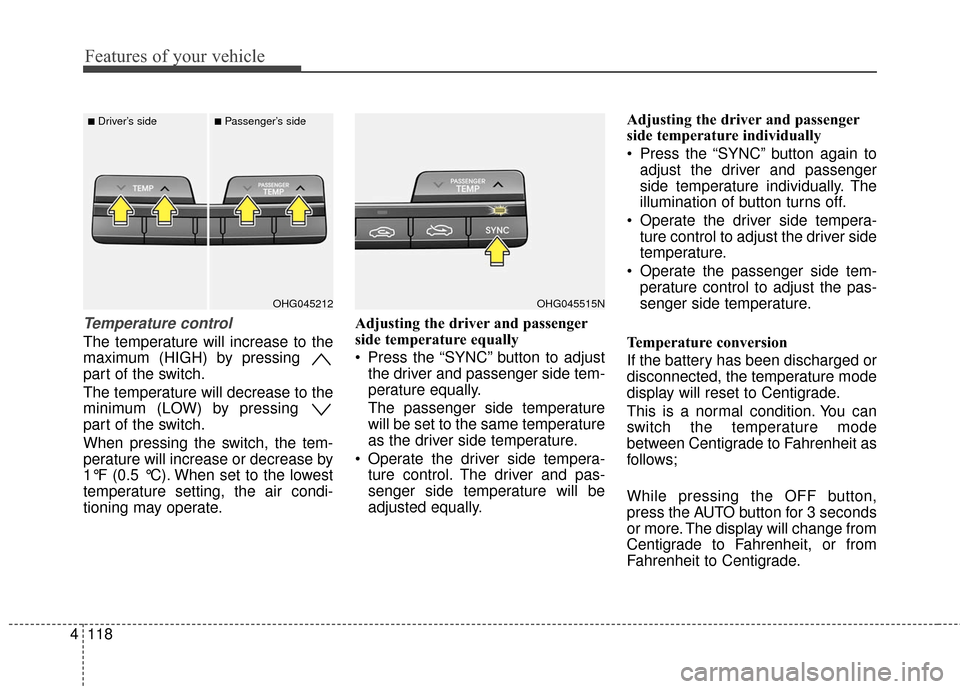
Temperature control
The temperature will increase to the
maximum (HIGH) by pressing
part of the switch.
The temperature will decrease to the
minimum (LOW) by pressing
part of the switch.
When pressing the switch, the tem-
perature will increase or decrease by
1°F (0.5 °C). When set to the lowest
temperature setting, the air condi-
tioning may operate. Adjusting the driver and passenger
side temperature equally
Press the “SYNC” button to adjust
the driver and passenger side tem-
perature equally.
The passenger side temperature
will be set to the same temperature
as the driver side temperature.
Operate the driver side tempera- ture control. The driver and pas-
senger side temperature will be
adjusted equally. Adjusting the driver and passenger
side temperature individually
Press the “SYNC” button again to
adjust the driver and passenger
side temperature individually. The
illumination of button turns off.
Operate the driver side tempera- ture control to adjust the driver side
temperature.
Operate the passenger side tem- perature control to adjust the pas-
senger side temperature.
Temperature conversion
If the battery has been discharged or
disconnected, the temperature mode
display will reset to Centigrade.
This is a normal condition. You can
switch the temperature mode
between Centigrade to Fahrenheit as
follows;
While pressing the OFF button,
press the AUTO button for 3 seconds
or more. The display will change from
Centigrade to Fahrenheit, or from
Fahrenheit to Centigrade.
OHG045515NOHG045212
■Driver’s side■Passenger’s side
Page 202 of 521
Features of your vehicle
122
4
Air conditioning
HYUNDAI Air Conditioning Systems
are filled with environmentally friend-
ly R-134a refrigerant.
1. Start the engine. Press the air
conditioning button.
2. Set the mode to the position.
3. Set the air intake control to the outside air or recirculated air posi-
tion.
4. Adjust the fan speed control and temperature control to maintain
maximum comfort.
✽ ✽NOTICE- Excessive A/C
When using the air conditioning sys-
tem, monitor the engine coolant
closely while driving up hills or in
heavy traffic when outside tempera-
tures are high. Air conditioning sys-
tem operation may cause engine
overheating and potential engine
damage. Continue to use the blower
fan but turn the air conditioning
system off if the engine coolant tem-
perature gauge indicates engine
overheating.
Air conditioning system operation tips
If the vehicle has been parked in
direct sunlight during hot weather,
open the windows for a short time
to let the hot air inside the vehicle
escape.
To help reduce moisture inside of the windows on rainy or humid
days, decrease the humidity inside
the vehicle by operating the air
conditioning system.
During air conditioning system operation, you may occasionally
notice a slight change in engine
speed as the air conditioning com-
pressor cycles. This is a normal
system operation characteristic.
Use the air conditioning system every month only for a few minutes
to ensure maximum system per-
formance.
When using the air conditioning system, you may notice clear water
dripping (or even puddling) on the
ground under the passenger side
of the vehicle. This is a normal sys-
tem operation characteristic. Operating the air conditioning sys-
tem in the recirculated air position
provides maximum cooling, how-
ever, continual operation in this
mode may cause the air inside the
vehicle to become stale.
After sufficient cooling has been
achieved, switch back from the
recirculated air to the fresh outside
air position.
During cooling operation, you may occasionally notice a misty air flow
because of rapid cooling and
humid air intake. This is a normal
system operation characteristic.
Page 209 of 521
4129
Features of your vehicle
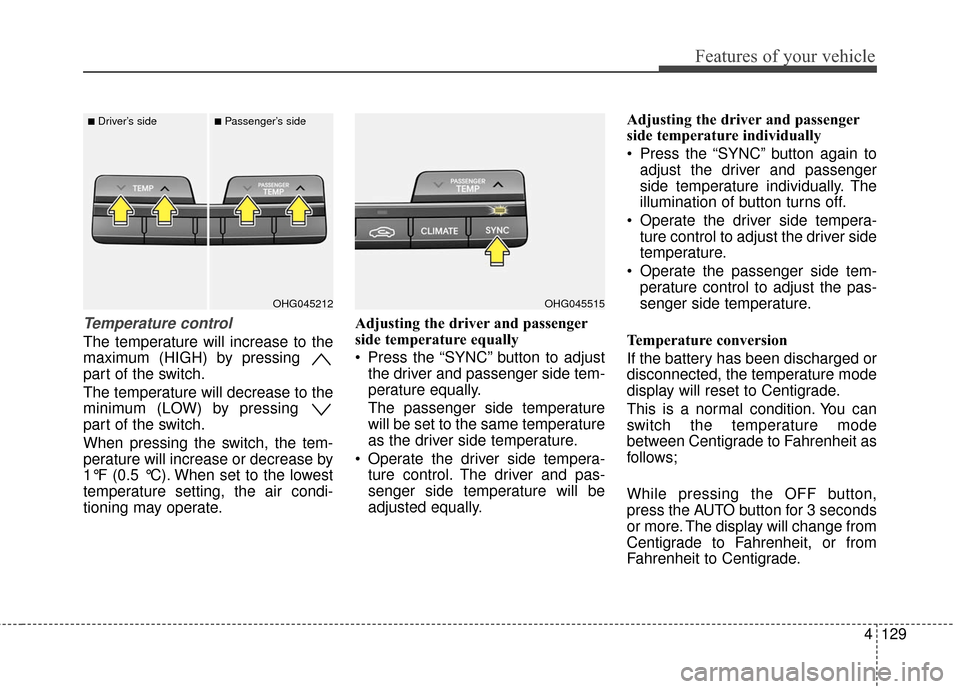
Temperature control
The temperature will increase to the
maximum (HIGH) by pressing
part of the switch.
The temperature will decrease to the
minimum (LOW) by pressing
part of the switch.
When pressing the switch, the tem-
perature will increase or decrease by
1°F (0.5 °C). When set to the lowest
temperature setting, the air condi-
tioning may operate.Adjusting the driver and passenger
side temperature equally
Press the “SYNC” button to adjust
the driver and passenger side tem-
perature equally.
The passenger side temperature
will be set to the same temperature
as the driver side temperature.
Operate the driver side tempera- ture control. The driver and pas-
senger side temperature will be
adjusted equally. Adjusting the driver and passenger
side temperature individually
Press the “SYNC” button again to
adjust the driver and passenger
side temperature individually. The
illumination of button turns off.
Operate the driver side tempera- ture control to adjust the driver side
temperature.
Operate the passenger side tem- perature control to adjust the pas-
senger side temperature.
Temperature conversion
If the battery has been discharged or
disconnected, the temperature mode
display will reset to Centigrade.
This is a normal condition. You can
switch the temperature mode
between Centigrade to Fahrenheit as
follows;
While pressing the OFF button,
press the AUTO button for 3 seconds
or more. The display will change from
Centigrade to Fahrenheit, or from
Fahrenheit to Centigrade.
OHG045515OHG045212
■Driver’s side■Passenger’s side