side mirror Hyundai Azera 2016 User Guide
[x] Cancel search | Manufacturer: HYUNDAI, Model Year: 2016, Model line: Azera, Model: Hyundai Azera 2016Pages: 521, PDF Size: 16.54 MB
Page 216 of 521
Features of your vehicle
136
4
For maximum defrosting, set the
temperature control to the extreme
right/hot position and the fan speed
control to the highest speed.
If warm air to the floor is desired while defrosting or defogging, set the
mode to the floor-defrost position.
Before driving, clear all snow and ice from the windshield, rear window,
outside rear view mirrors, and all
side windows.
Clear all snow and ice from the hood and air inlet in the cowl grill to
improve heater and defroster effi-
ciency and to reduce the probabili-
ty of fogging up the inside of the
windshield.
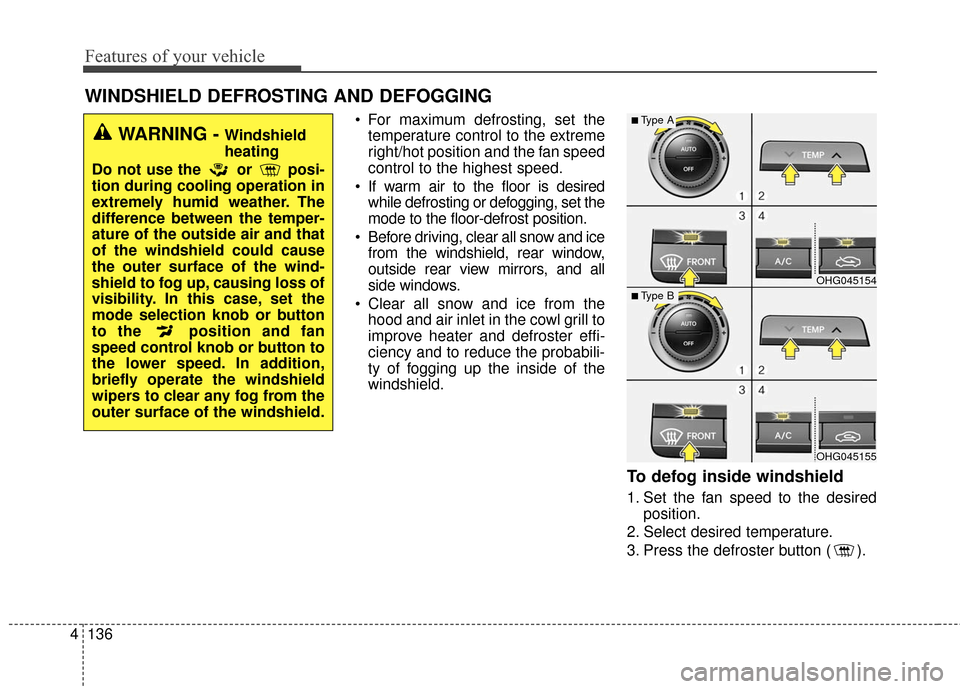
To defog inside windshield
1. Set the fan speed to the desired position.
2. Select desired temperature.
3. Press the defroster button ( ).
WINDSHIELD DEFROSTING AND DEFOGGING
OHG045154
OHG045155
■Type A
■Type B
WARNING - Windshield
heating
Do not use the or posi-
tion during cooling operation in
extremely humid weather. The
difference between the temper-
ature of the outside air and that
of the windshield could cause
the outer surface of the wind-
shield to fog up, causing loss of
visibility. In this case, set the
mode selection knob or button
to the position and fan
speed control knob or button to
the lower speed. In addition,
briefly operate the windshield
wipers to clear any fog from the
outer surface of the windshield.
Page 219 of 521
4139
Features of your vehicle
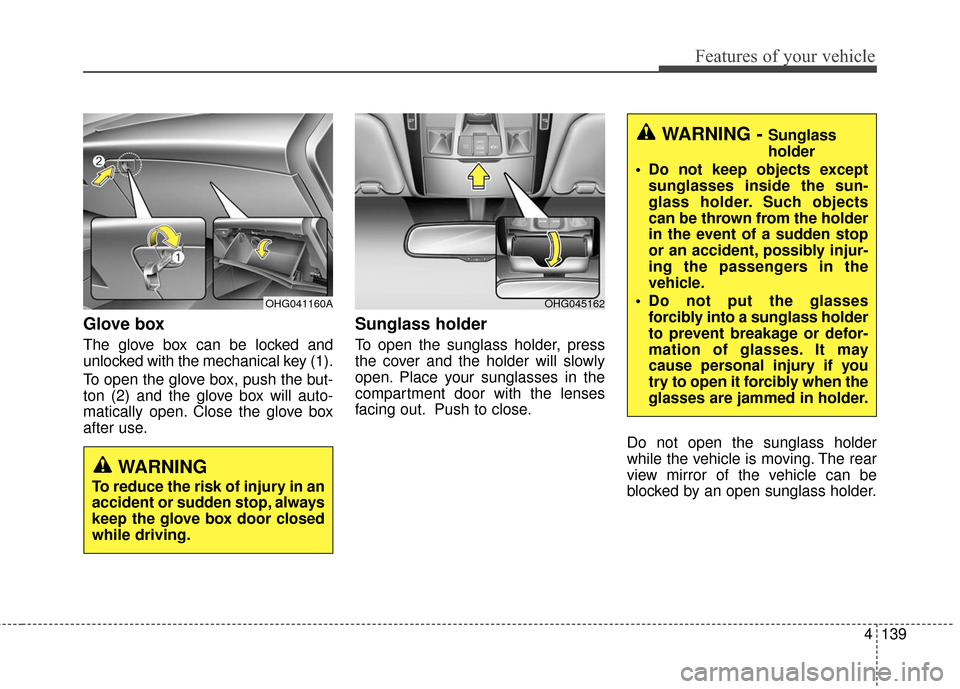
Glove box
The glove box can be locked and
unlocked with the mechanical key (1).
To open the glove box, push the but-
ton (2) and the glove box will auto-
matically open. Close the glove box
after use.
Sunglass holder
To open the sunglass holder, press
the cover and the holder will slowly
open. Place your sunglasses in the
compartment door with the lenses
facing out. Push to close.Do not open the sunglass holder
while the vehicle is moving. The rear
view mirror of the vehicle can be
blocked by an open sunglass holder.
OHG045162
WARNING - Sunglass
holder
Do not keep objects except sunglasses inside the sun-
glass holder. Such objects
can be thrown from the holder
in the event of a sudden stop
or an accident, possibly injur-
ing the passengers in the
vehicle.
Do not put the glasses forcibly into a sunglass holder
to prevent breakage or defor-
mation of glasses. It may
cause personal injury if you
try to open it forcibly when the
glasses are jammed in holder.
WARNING
To reduce the risk of injury in an
accident or sudden stop, always
keep the glove box door closed
while driving.
OHG041160A
Page 221 of 521
4141
Features of your vehicle
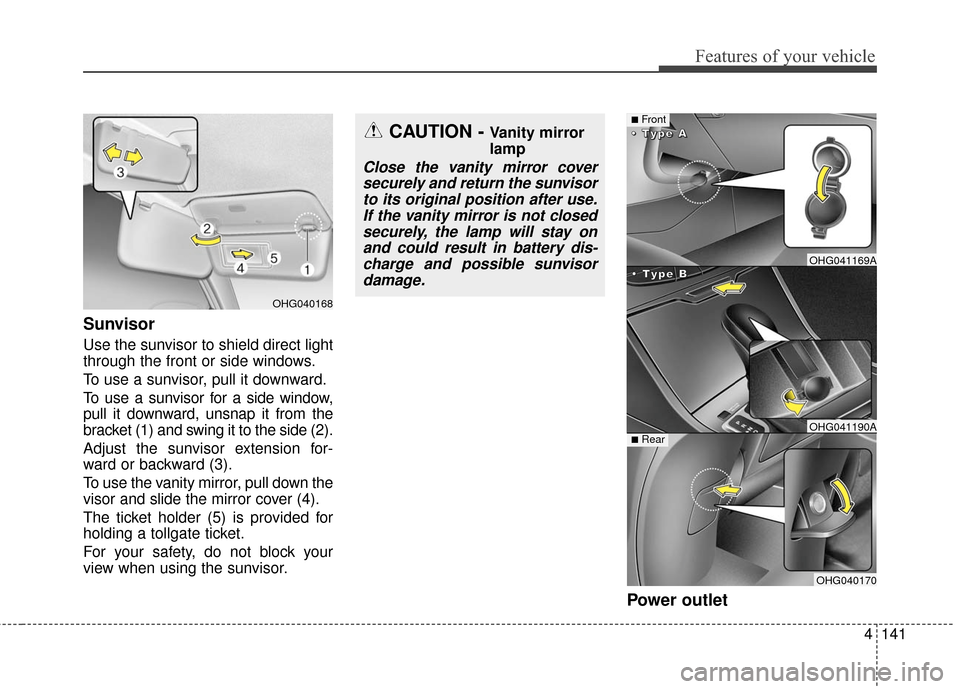
Sunvisor
Use the sunvisor to shield direct light
through the front or side windows.
To use a sunvisor, pull it downward.
To use a sunvisor for a side window,
pull it downward, unsnap it from the
bracket (1) and swing it to the side (2).
Adjust the sunvisor extension for-
ward or backward (3).
To use the vanity mirror, pull down the
visor and slide the mirror cover (4).
The ticket holder (5) is provided for
holding a tollgate ticket.
For your safety, do not block your
view when using the sunvisor.
Power outlet
OHG040168
CAUTION - Vanity mirror
lamp
Close the vanity mirror coversecurely and return the sunvisorto its original position after use.If the vanity mirror is not closedsecurely, the lamp will stay onand could result in battery dis-charge and possible sunvisordamage.
■Front
•
•
•
•
T
T
T
T
y
y
y
y
p
p
p
p
e
e
e
e
B
B
B
B
•
•
•
•
T
T
T
T
y
y
y
y
p
p
p
p
e
e
e
e
A
A
A
A
■Rear
OHG041169A
OHG041190A
OHG040170
Page 308 of 521
53
Driving your vehicle
Before entering vehicle
• Be sure that all windows, outsidemirror(s), and outside lights are
clean.
Check the condition of the tires.
Check under the vehicle for any sign of leaks.
Be sure there are no obstacles behind you if you intend to back up.
Necessary inspections
Fluid levels, such as engine oil,
engine coolant, brake fluid, and
washer fluid should be checked on a
regular basis, with the exact interval
depending on the fluid. Further
details are provided in section 7,
“Maintenance”.
Before starting
Close and lock all doors.
Position the seat so that all con-trols are easily reached.
Adjust the inside and outside rearview mirrors.
Be sure that all lights work.
Check all gauges.
Check the operation of warning lights when the ignition switch is
changed to the ON position.
Release the parking brake and make sure the brake warning light
goes out.
For safe operation, be sure you are
familiar with your vehicle and its
equipment.
BEFORE DRIVING
WARNING - Distracted
driving
Focus on the road while driving.
The driver's primary responsi-
bility is in the safe and legal
operation of the vehicle. Use of
any hand-held devices, other
equipment or vehicle systems
that distract the driver should
not be used during vehicle
operation. Distracted driving
can result in injuries or death.
WARNING
All passengers must be proper-
ly belted whenever the vehicle
is moving. Refer to “Seat belts”
in section 3 for more informa-
tion on their proper use.
Page 363 of 521
Driving your vehicle
58
5
BSD (Blind Spot Detection) /
LCA (Lane Change Assist)
Operating conditions
To operate:
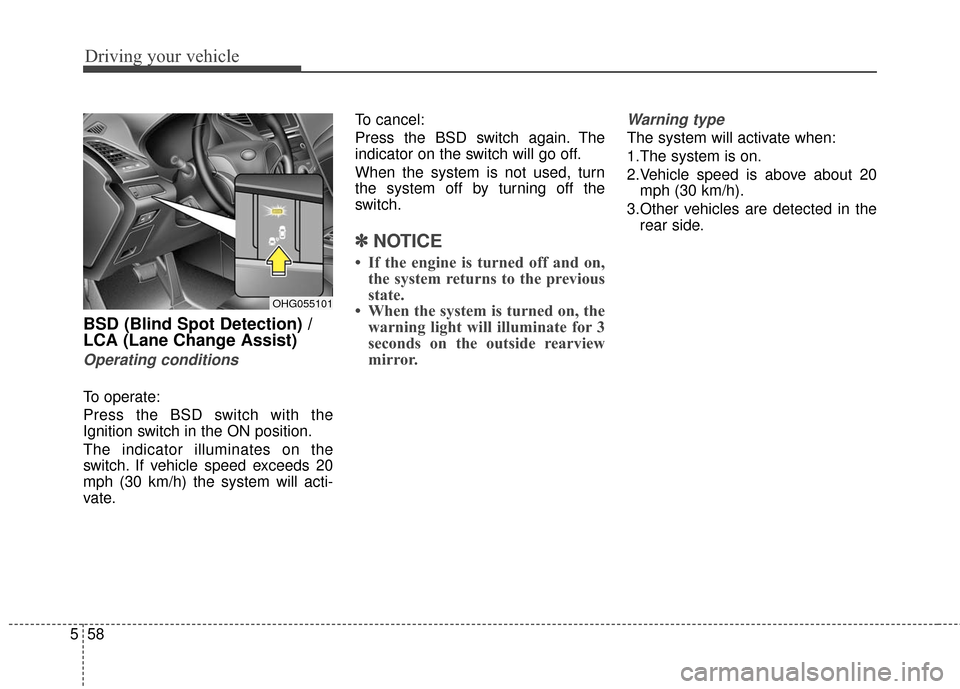
Press the BSD switch with the
Ignition switch in the ON position.
The indicator illuminates on the
switch. If vehicle speed exceeds 20
mph (30 km/h) the system will acti-
vate. To cancel:
Press the BSD switch again. The
indicator on the switch will go off.
When the system is not used, turn
the system off by turning off the
switch.
✽ ✽
NOTICE
• If the engine is turned off and on,
the system returns to the previous
state.
• When the system is turned on, the warning light will illuminate for 3
seconds on the outside rearview
mirror.
Warning type
The system will activate when:
1.The system is on.
2.Vehicle speed is above about 20
mph (30 km/h).
3.Other vehicles are detected in the rear side.
OHG055101
Page 364 of 521
559
Driving your vehicle
First stage alert
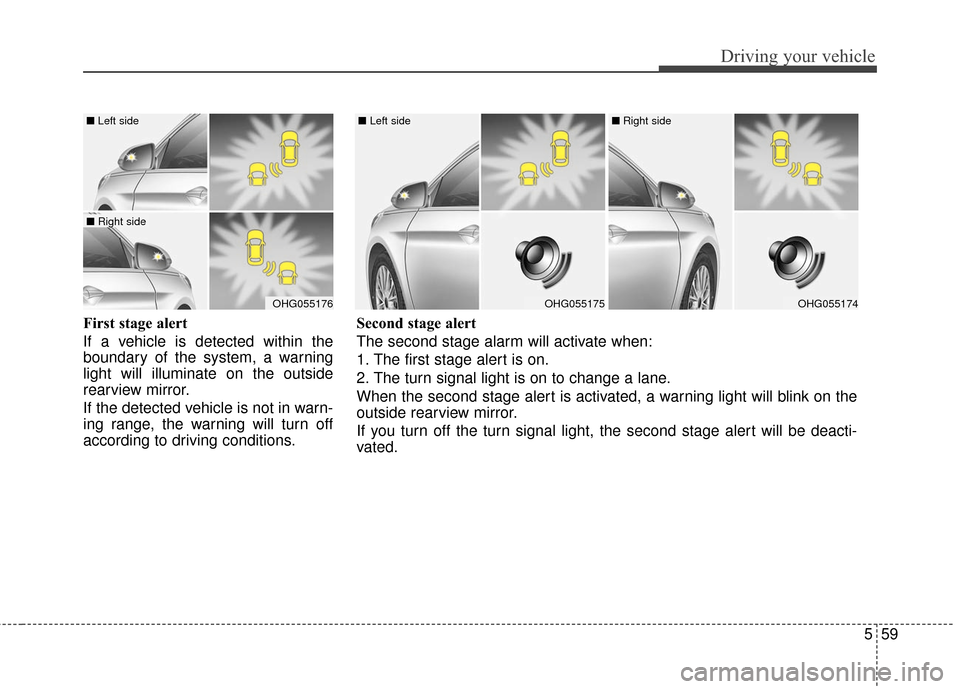
If a vehicle is detected within the
boundary of the system, a warning
light will illuminate on the outside
rearview mirror.
If the detected vehicle is not in warn-
ing range, the warning will turn off
according to driving conditions.
OHG055176
■ Left side
■ Right side
OHG055175
■ Left side
OHG055174
■ Right side
Second stage alert
The second stage alarm will activate when:
1. The first stage alert is on.
2. The turn signal light is on to change a lane.
When the second stage alert is activated, a warning light will blink on the
outside rearview mirror.
If you turn off the turn signal light, the second stage alert will be deacti-
vated.
Page 366 of 521
561
Driving your vehicle
RCTA (Rear Cross Traffic Alert)
Operating conditions
To operate:
Go to the User Settings Mode
(Driving Assist) and select RCTA
(Rear Cross Traffic Alert) on the LCD
display (For more details, refer to
"LCD Display" in chapter 4.) . The
system will turn on and standby to
activate. The system will activate
when vehicle speed is below 6.2
mph (10 km/h) with the shift lever in
R (Reverse).
✽ ✽ NOTICE
The RCTA (Rear Cross Traffic
Alert) detecting range is about 1.64
ft (0.5m) ~ 65 ft (20m). A vehicle will
be detected if the vehicle speed is 2.5
mph (4 km/h) ~ 22.4 mph (36 km/h)
within the detecting range. However,
the detecting range may change
under different conditions. Always
pay attention to the surroundings.
Warning type
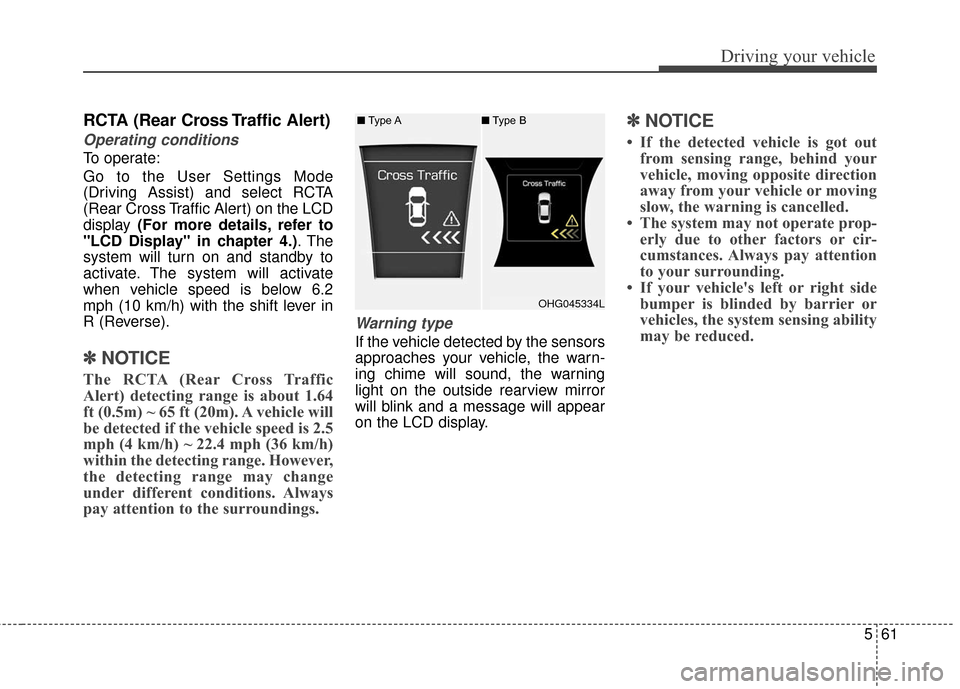
If the vehicle detected by the sensors
approaches your vehicle, the warn-
ing chime will sound, the warning
light on the outside rearview mirror
will blink and a message will appear
on the LCD display.
✽ ✽NOTICE
• If the detected vehicle is got out
from sensing range, behind your
vehicle, moving opposite direction
away from your vehicle or moving
slow, the warning is cancelled.
• The system may not operate prop- erly due to other factors or cir-
cumstances. Always pay attention
to your surrounding.
• If your vehicle's left or right side bumper is blinded by barrier or
vehicles, the system sensing ability
may be reduced.
OHG045334L
■
Type A ■Type B
Page 367 of 521
Driving your vehicle
62
5
WARNING
The warning light on the out-
side rearview mirror will illu-
minate whenever a vehicle is
detected at the rear side by
the system.
To avoid accidents, do not
focus only on the warning
light and neglect to see the
surrounding of the vehicle.
Drive safely even though the vehicle is equipped with a
Blind Spot Detection System
(BSD) and Rear Cross Traffic
Alert (RCTA). Do not solely
rely on the system but check
your surrounding before
changing lanes or backing the
vehicle up.
The system may not alert the
driver in some conditions so
always check the surround-
ings while driving.
(Continued)
(Continued)
The Blind Spot DetectionSystem (BSD) and Rear Cross
Traffic Alert (RCTA) are not a
substitute for proper and safe
driving practices. Always
drive safely and use caution
when changing lanes or back-
ing the vehicles up. The Blind
Spot Detection System (BSD)
may not detect every object
alongside the vehicle.CAUTION
The system may not work properly if the bumper hasbeen replaced or if repair workhas been done near the sen-sor.
The detection area differs according to the roads width.If the road is narrow the sys-tem may detect other vehiclesin the next lane. In addition, ifthe road is very wide the sys-tem may not detect other vehi-cles.
The system may turn off due to strong electromagneticwaves.
Page 368 of 521
563
Driving your vehicle
Non-operating condition
Outside rearview mirror may not
alert the driver when:
- The outside rearview mirror hous-ing is damaged or covered with
debris.
- The window is covered with debris.
- The windows are severely tinted.DRIVER'S ATTENTION
The driver must be cautious in the
below situations for the system
may not detect other vehicles or
objects in certain circumstances.
- Curved roads, tollgates, etc.
- The surrounding of the sensor is polluted with rain, snow, mud,
etc
- The rear bumper near the sensor is covered or hidden with a for-
eign matter such as a sticker,
bumper guard, bicycle stand etc.
- The rear bumper is damaged or the sensor is out of place.
- The height of the vehicle is altered such as when the trunk is
loaded with heavy objects, or
there is low tire pressure etc.
- Bad weather such as heavy rain or snow.
- A fixed object is near such as a guardrail, tunnel, human and ani-
mal etc.
- Metal substances are near the vehicles such as in a construc-
tion area.
(Continued)(Continued)
- A big vehicle is near such as a
bus or truck.
- A motorcycle or bicycle is near.
- A flat trailer is near.
- If the vehicle has started at the same time as the vehicle next to
you and has accelerated.
- When the other vehicle passes by at a higher rate of speed.
- When changing lanes.
- When going down or up a steep road where the height of the lane
is different.
- When the other vehicle drives very close.
- When a trailer or carrier is installed.
- When the temperature of the rear bumper is high.
- When the sensors are covered by a wall or a pillar of a parking
lot.
- When your vehicle is backing up, if the detected vehicle also backs
up.
(Continued)
Page 373 of 521
Driving your vehicle
68
5
The surrounding of the inside rear
view mirror temperature is high
due to a direct ray of light.
The lane is very wide or narrow.
The lane line is damaged or indis- tinct.
The windshield is fogged by humid air in the vehicle.
The shadow is on the lane line by a median strip.
The sensor cannot distinguish the lane from the road due to the dust.
There is a mark similar to a lane line.
There is a boundary structure.
The distance from vehicle ahead is very short or the vehicle ahead
drives hiding the lane line.
The vehicle vibrates heavily due to road conditions.
The lane number increases or decreases or the lane lines are
crossing.
Putting something on the dash- board.
Driving with the sun in front of you. Driving in areas under construc-
tion.
The lane line is more than two in either side (Left/Right) This device complies with Part 15
of the FCC rules.
Operation is subject to the following
two conditions:
1. This device may not cause harm-
ful interference, and
2. This device must accept any inter- ference received, including inter-
ference that may cause undesired
operation.