battery Hyundai Azera 2017 Owner's Guide
[x] Cancel search | Manufacturer: HYUNDAI, Model Year: 2017, Model line: Azera, Model: Hyundai Azera 2017Pages: 520, PDF Size: 16.33 MB
Page 217 of 520
Features of your vehicle
138
4
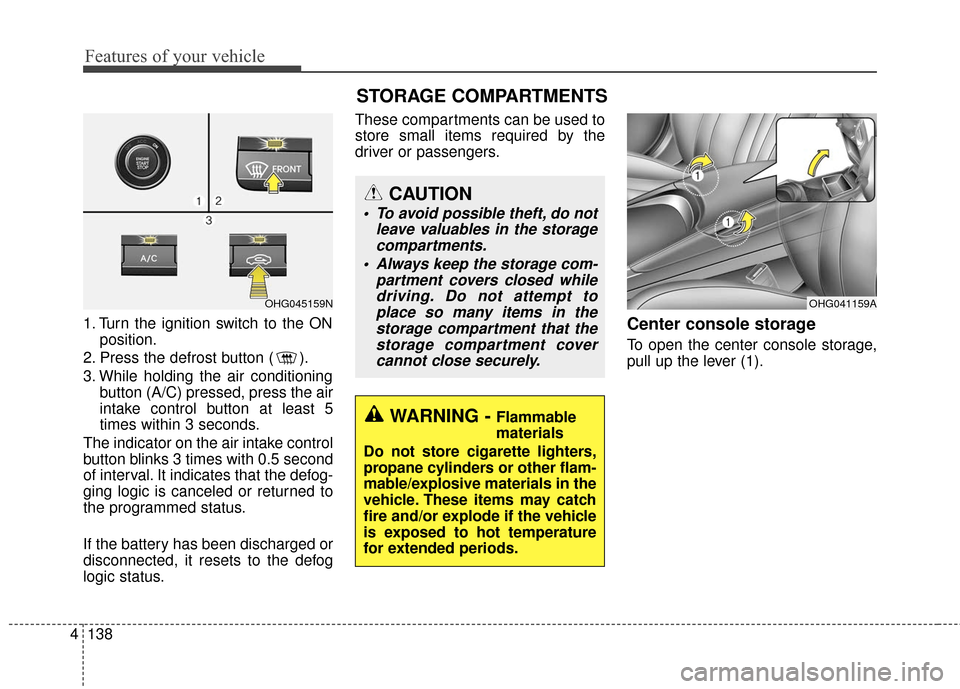
1. Turn the ignition switch to the ON
position.
2. Press the defrost button ( ).
3. While holding the air conditioning button (A/C) pressed, press the air
intake control button at least 5
times within 3 seconds.
The indicator on the air intake control
button blinks 3 times with 0.5 second
of interval. It indicates that the defog-
ging logic is canceled or returned to
the programmed status.
If the battery has been discharged or
disconnected, it resets to the defog
logic status. These compartments can be used to
store small items required by the
driver or passengers.Center console storage
To open the center console storage,
pull up the lever (1).
OHG041159A
WARNING - Flammable
materials
Do not store cigarette lighters,
propane cylinders or other flam-
mable/explosive materials in the
vehicle. These items may catch
fire and/or explode if the vehicle
is exposed to hot temperature
for extended periods.
CAUTION
To avoid possible theft, do not leave valuables in the storagecompartments.
Always keep the storage com- partment covers closed whiledriving. Do not attempt toplace so many items in thestorage compartment that thestorage compartment covercannot close securely.
OHG045159N
STORAGE COMPARTMENTS
Page 220 of 520
4141
Features of your vehicle
Sunvisor
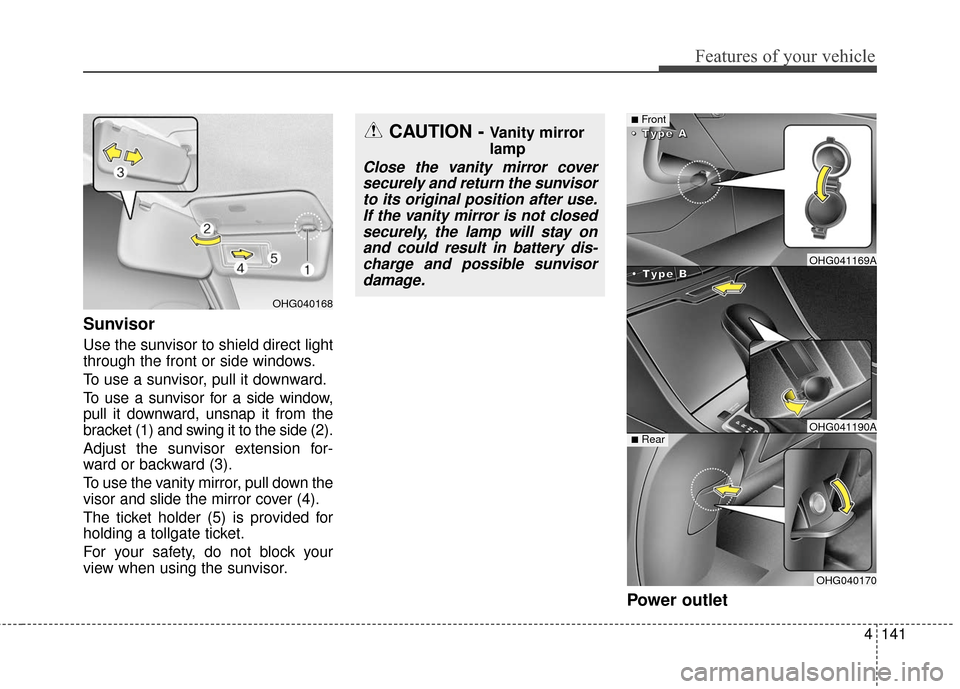
Use the sunvisor to shield direct light
through the front or side windows.
To use a sunvisor, pull it downward.
To use a sunvisor for a side window,
pull it downward, unsnap it from the
bracket (1) and swing it to the side (2).
Adjust the sunvisor extension for-
ward or backward (3).
To use the vanity mirror, pull down the
visor and slide the mirror cover (4).
The ticket holder (5) is provided for
holding a tollgate ticket.
For your safety, do not block your
view when using the sunvisor.
Power outlet
OHG040168
CAUTION - Vanity mirror
lamp
Close the vanity mirror coversecurely and return the sunvisorto its original position after use.If the vanity mirror is not closedsecurely, the lamp will stay onand could result in battery dis-charge and possible sunvisordamage.
■Front
•
•
•
•
T
T
T
T
y
y
y
y
p
p
p
p
e
e
e
e
B
B
B
B
•
•
•
•
T
T
T
T
y
y
y
y
p
p
p
p
e
e
e
e
A
A
A
A
■Rear
OHG041169A
OHG041190A
OHG040170
Page 221 of 520
Features of your vehicle
142
4
The power outlet is designed to pro-
vide power for mobile telephones or
other devices designed to operate
with vehicle electrical systems. The
devices should draw less than 10
amps with the engine running.
Use the power outlet only when the
engine is running and remove the
accessory plug after use. Using the
accessory plug for prolonged peri-
ods of time with the engine off could
cause the battery to discharge.
Only use 12V electric accessories which are less than 10A in electric
capacity. If not, it could lead to an
overheated power outlet or electric
wiring in the vehicle and electric
systems may malfunction.
Adjust the air-conditioner or heater to the lowest operating level when
using the power outlet.
Close the cover when not in use.
Some electronic devices can cause electronic interference when
plugged into a vehicle’s power
outlet. These devices may cause
excessive audio static and malfunc-
tions in other electronic systems or
devices used in your vehicle.Digital clock (if equipped)
Whenever the battery terminals or
related fuses are disconnected, you
must reset the time.
Detailed information on setting the
clock is described in Audio system
section 4.
WARNING
Do not adjust the clock while
driving. You may lose your
steering control and cause an
accident that results in severe
personal injury or death.
WARNING - Electricshock
Do not put fingers or objects
(pin, coin, etc.) into a power out-
let and do not touch with wet
hands. You may get an electric
shock.
CAUTION
Make sure that the electric devices are plugged in secure-ly. If not, it could cause a mal-function of electric systems.
If you use an electric device with a battery, electric currentmay flow from the electricdevice into the vehicle andmay cause a malfunction ofelectric systems. Only useelectric devices which couldprevent inverse current.
Page 232 of 520
CAUTION
Operating the device whiledriving could lead to acci-dents due to a lack of atten-tion to external surroundings.First park the vehicle beforeoperating the device.
Adjust the volume to levels that allow the driver to hearsounds from outside of thevehicle. Driving in a statewhere external sounds cannotbe heard may lead to acci-dents.
Pay attention to the volume setting when turning thedevice on. A sudden output ofextreme volume upon turningthe device on could lead tohearing impairment. (Adjustthe volume to a suitable levelsbefore turning off the device.)
(Continued)
WARNING
Do not stare at the screenwhile driving. Staring at the
screen for prolonged periods
of time could lead to traffic
accidents.
Do not disassemble, assem- ble, or modify the audio sys-
tem. Such acts could result in
accidents, fire, or electric
shock.
Using the phone while driving may lead to a lack of attention
of traffic conditions and
increase the likelihood of
accidents. Use the phone
feature after parking the vehi-
cle.
Heed caution not to spill water or introduce foreign objects
into the device. Such acts
could lead to smoke, fire, or
product malfunction.
(Continued)
(Continued)
Please refrain from use if thescreen is blank or no sound
can be heard as these signs
may indicate product mal-
function. Continued use in
such conditions could lead to
accidents(fires, electric
shock) or product malfunc-
tions.
Do not touch the antenna dur- ing thunder or lightening as
such acts may lead to light-
ning induced electric shock.
Do not stop or park in park- ing-restricted areas to operate
the product. Such acts could
lead to traffic accidents.
Use the system with the vehi- cle ignition turned on.
Prolonged use with the igni-
tion turned off could result in
battery discharge.
Features of your vehicle
153
4
Page 233 of 520
4154
Features of your vehicle
(Continued) If you want to change the posi- tion of device installation,please inquire with your placeof purchase or service mainte-nance center. Technicalexpertise is required to installor disassemble the device.
Turn on the car ignition before using this device. Do not oper-ate the audio system for longperiods of time with the igni-tion turned off as such opera-tions may lead to battery dis-charge.
Do not subject the device to severe shock or impact. Directpressure onto the front side ofthe monitor may cause dam-age to the LCD or touchscreen.
(Continued)(Continued) When cleaning the device, make sure to turn off thedevice and use a dry andsmooth cloth. Never usetough materials, chemicalcloths, or solvents (alcohol,benzene, thinners, etc.) assuch materials may damagethe device panel or cause col-or/quality deterioration
Do not place beverages close to the audio system. Spillingbeverages may lead to systemmalfunction.
In case of product malfunc- tion, please contact your placeof purchase or After Servicecenter.
Placing the audio system within an electromagneticenvironment may result innoise interference.
Page 237 of 520
✽
✽NOTICE - USING THE iPod®
DEVICE
• iPod®is a registered trademark
of Apple Inc.
• In order to use the iPod while operating the keys, you must use
a dedicated iPod cable. (the
cable that is supplied when pur-
chasing iPod/iPhone products)
• If the iPod is connected to the vehicle while it is playing, a high
pitch sound could occur for
approximately 1-2 seconds
immediately after connecting. If
possible, connect the iPod to the
vehicle with the iPod
stopped/paused.
• During ACC ON state, connect- ing the iPod through the iPod
cable will charge the iPod
through the car audio system.
• When connecting with the iPod cable, make sure to fully insert
the jack to prevent communica-
tion interference. (Continued)(Continued)
• When the EQ features of an
external device, such as the
iPod, and the audio system are
both active, EQ effects could
overlap and cause sound deteri-
oration and distortion.
Whenever possible, turn off the
EQ feature within the external
device upon use by connecting
with the audio system.
• Noise may occur when an iPod or AUX device is connected.
When such devices are not
being used, disconnect the
device for storage.
• When the iPod or AUX device power is connected to the power
jack, playing the external device
may result in noise. In such cas-
es, disconnect the power connec-
tion before use.
• Skipping or improper operation may occur depending on the
characteristics of your
iPod/Phone device. (Continued)(Continued)
• If your iPhone is connected to
both the Bluetooth®Wireless
Technology and USB, the sound
may not be properly played. In
your iPhone, select the Dock
connector or Bluetooth
®
Wireless Technology to change
the sound output (source).
• iPod mode cannot be operated when the iPod cannot be recog-
nized due to versions that do not
support communication proto-
cols.
• For fifth generation iPod Nano devices, the iPod may not be
recognized when the battery
level is low. Please charge the
iPod for use.
• Search/play orders shown with- in the iPod device may differ
with the orders shown within
the audio system.
• If the iPod malfunctions due to an iPod device defect, reset the
iPod and try again. (To learn
more, refer to your iPod manual) (Continued)
4158
Features of your vehicle
Page 239 of 520
✽
✽NOTICE - USING UPON
CONNECTING
Bluetooth®
Wireless Technology PHONE
• Before connecting the car audio system with the mobile phone,
check to see that the mobile phone
supports Bluetooth
®Wireless
Technology features.
• Even if the phone supports Bluetooth
®Wireless Technology,
the phone will not be found during
device searches if the phone has
been set to hidden state or the
Bluetooth
®Wireless Technology
power is turned off. Disable the
hidden state or turn on the
Bluetooth
®Wireless Technology
power prior to searching/connect-
ing with the car audio system.
• If you do not want to automatical- ly connect your Bluetooth
®
Wireless Technology phone, try
the following.
1. Turn off the Bluetooth
®feature
in your mobile phone. (Continued)(Continued)
- For more information onBluetooth
®Wireless Technology
features within your mobile,
refer to your mobile phone user’s
manual.
2. Turn off the Bluetooth
®
Wireless Technology feature in
your car audio system.
- To turn off the Bluetooth
®
Wireless Technology feature in
your car audio system, go to [Phone] and [turn off]
the Bluetooth
®Wireless
Technology feature.
• Park the vehicle when connecting the car audio system with your
mobile phone.
• Bluetooth
®Wireless Technology
connection may become intermit-
tently disconnected in some
mobile phones. Follow these steps
to try again.
1. Turn the Bluetooth
®Wireless
Technology function within the
mobile phone off/on and try
again.
2. Turn the mobile phone power Off/On and try again. (Continued)(Continued)
3. Completely remove the mobile phone battery, reboot, and then
again.
4. Reboot the audio system and try again.
5. Delete all paired devices, pair and try again.
• The Handsfree call volume and quality may differ depending on
the mobile phone.
• Bluetooth
®Wireless Technology
features supported within the
vehicle are as follows. Some fea-
tures may not be supported
depending on your Bluetooth
®
Wireless Technologydevice.
- Answering and placing
Bluetooth
®Wireless Technology
Handsfree calls
- Menu operation during call (Switch to Private, Switch to call
waiting, Outgoing volume)
- Download Call History
- Download Mobile Phone book
- Phone book/Call History Auto Download (Continued)
SETUP
4160
Features of your vehicle
Page 310 of 520
Driving your vehicle
65
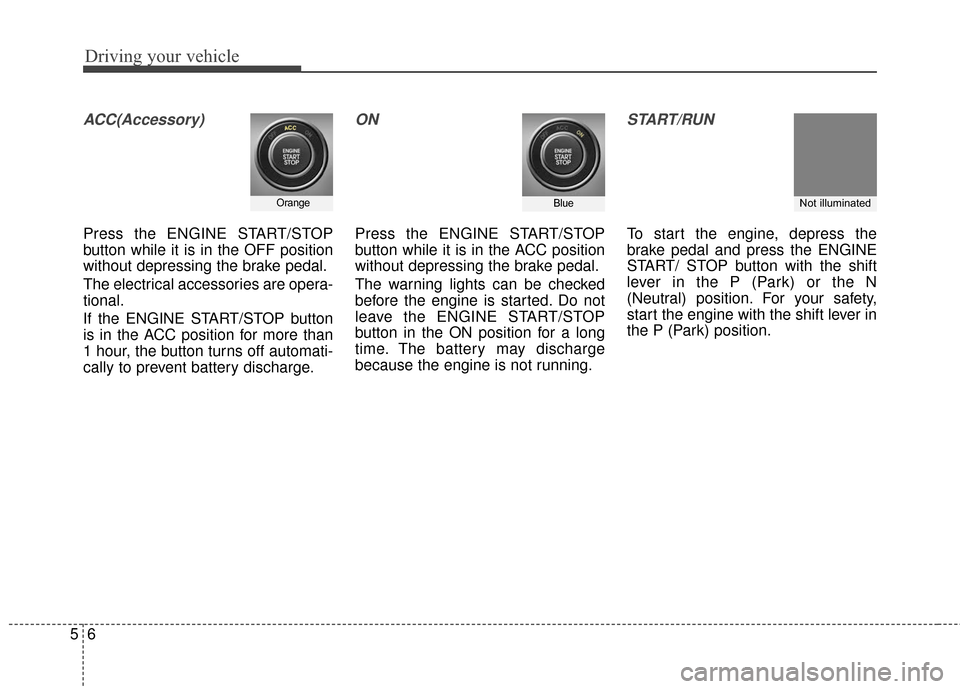
ACC(Accessory)
Press the ENGINE START/STOP
button while it is in the OFF position
without depressing the brake pedal.
The electrical accessories are opera-
tional.
If the ENGINE START/STOP button
is in the ACC position for more than
1 hour, the button turns off automati-
cally to prevent battery discharge.
ON
Press the ENGINE START/STOP
button while it is in the ACC position
without depressing the brake pedal.
The warning lights can be checked
before the engine is started. Do not
leave the ENGINE START/STOP
button in the ON position for a long
time. The battery may discharge
because the engine is not running.
START/RUN
To start the engine, depress the
brake pedal and press the ENGINE
START/ STOP button with the shift
lever in the P (Park) or the N
(Neutral) position. For your safety,
start the engine with the shift lever in
the P (Park) position.
OrangeBlueNot illuminated
Page 312 of 520
Driving your vehicle
85
Even if the smart key is in the vehi-cle, if it is far away from you, the
engine may not start.
When the ENGINE START/STOP button is in the ACC or ON posi-
tion, if any door is opened, the sys-
tem checks for the smart key. If the
smart key is not in the vehicle, the
warning "Key not in vehicle" will
illuminate on the LCD display. If all
doors are closed, the chime will
sound for 5 seconds. The warning
will turn off while the vehicle is
moving or the smart key is detect-
ed in the vehicle. Always have the
smart key with you.
The engine will start, only when the
smart key is in the vehicle. If the engine stalls while the vehicle
is in motion, do not attempt to move
the shift lever to the P (Park) posi-
tion. If the traffic and road conditions
permit, you may put the shift lever in
the N (Neutral) position while the
vehicle is still moving and press the
ENGINE START/STOP button in an
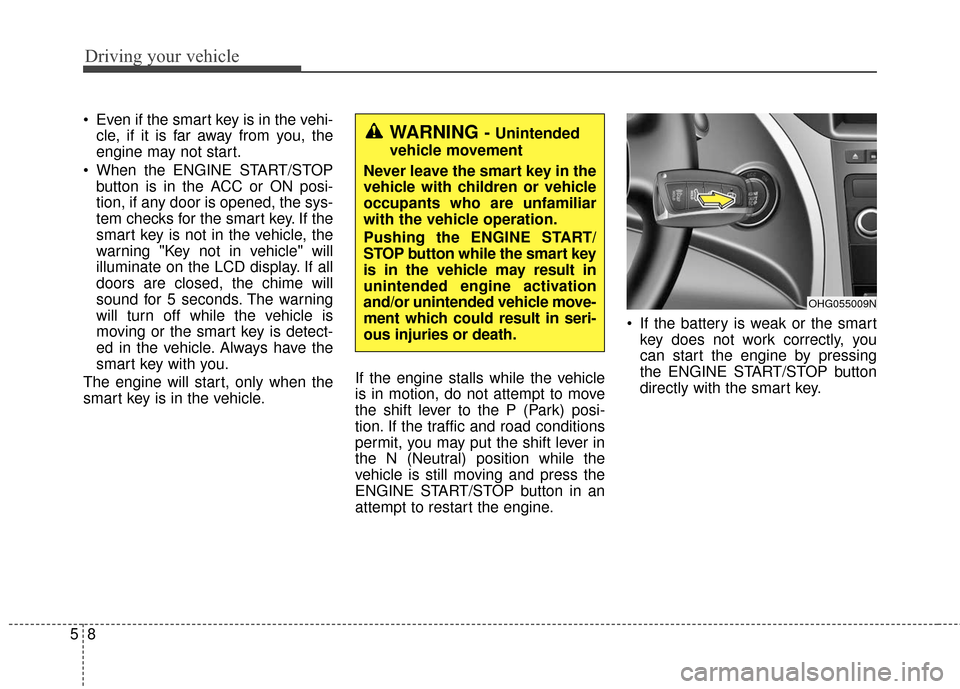
attempt to restart the engine. If the battery is weak or the smart
key does not work correctly, you
can start the engine by pressing
the ENGINE START/STOP button
directly with the smart key.WARNING - Unintended
vehicle movement
Never leave the smart key in the
vehicle with children or vehicle
occupants who are unfamiliar
with the vehicle operation.
Pushing the ENGINE START/
STOP button while the smart key
is in the vehicle may result in
unintended engine activation
and/or unintended vehicle move-
ment which could result in seri-
ous injuries or death.
OHG055009N
Page 328 of 520
Driving your vehicle
24
5
Emergency braking
If there is a problem with the brake
pedal while driving, emergency brak-
ing is possible by pulling up and
holding the EPB switch. Braking is
possible only while you are holding
the EPB switch.
✽ ✽
NOTICE
During emergency braking by the
EPB, the parking brake warning
light will illuminate to indicate that
the system is operating.
WARNING
Do not operate the parking
brake while the vehicle is mov-
ing except in an emergency sit-
uation.
CAUTION
The EPB warning light may
illuminate if the EPB switch isoperated abnormally or EPB isoperated while the battery isweak due to personallyinstalled equipment and soon. Shut the engine off andturn it on again after a fewseconds. Then wait for a while,pull the EPB switch and pushthe EPB switch with brakepedal depressed. The warninglight will go off and the EPBwill operate normally. If AutoHold lamp is yellow, then shutthe engine off and turn it ononce more. However, if theEPB warning light is still on,we recommend that the sys-tem be checked by an author-ized HYUNDAI dealer.
If the parking brake warning light does not illuminate orblinks even though the EPBswitch was pulled, the EPB isnot applied.
(Continued)
(Continued) If the parking brake warning light blinks when the EPBwarning light is on, press theswitch firmly then let it goback to its original positionand pull it up. If the EPB warn-ing does not go off, we recom-mend that the system bechecked by an authorizedHYUNDAI dealer.
CAUTION
If you continuously notice anoise or burning smell when theEPB is used for emergencybraking, we recommend that thesystem be checked by anauthorized HYUNDAI dealer.