change time Hyundai Azera 2017 Owner's Guide
[x] Cancel search | Manufacturer: HYUNDAI, Model Year: 2017, Model line: Azera, Model: Hyundai Azera 2017Pages: 520, PDF Size: 16.33 MB
Page 259 of 520
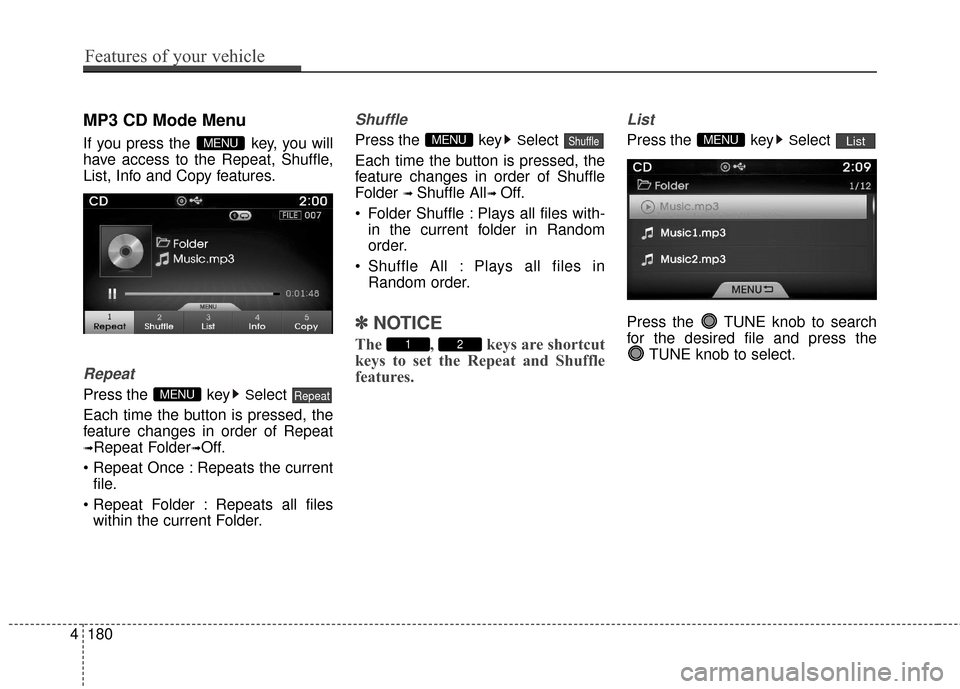
MP3 CD Mode Menu
If you press the key, you will
have access to the Repeat, Shuffle,
List, Info and Copy features.
Repeat
Press the keySelect
Each time the button is pressed, the
feature changes in order of Repeat
➟Repeat Folder➟Off.
Repeats the current file.
: Repeats all files within the current Folder.
Shuffle
Press the keySelect
Each time the button is pressed, the
feature changes in order of Shuffle
Folder
➟ Shuffle All➟ Off.
Folder Shuffle : Plays all files with- in the current folder in Random
order.
Shuffle All : Plays all files in Random order.
✽ ✽ NOTICE
The , keys are shortcut
keys to set the Repeat and Shuffle
features.
List
Press the keySelect
Press the TUNE knob to search
for the desired file and press the TUNE knob to select.ListMENU
21
ShuffleMENU
RepeatMENU
MENU
4180
Features of your vehicle
Page 261 of 520
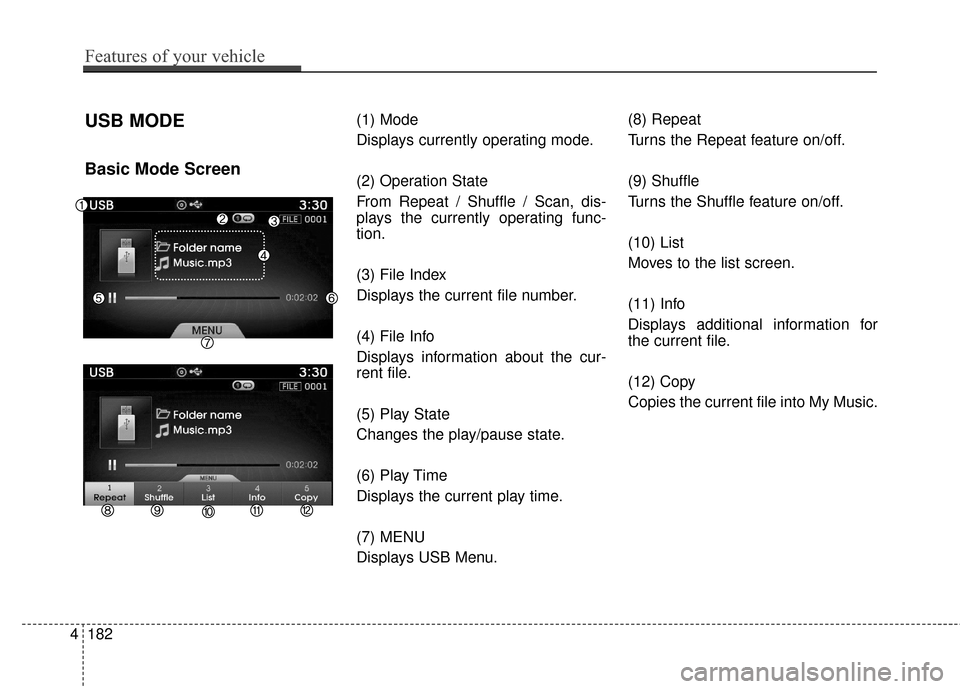
USB MODE
Basic Mode Screen
(1) Mode
Displays currently operating mode.
(2) Operation State
From Repeat / Shuffle / Scan, dis-
plays the currently operating func-
tion.
(3) File Index
Displays the current file number.
(4) File Info
Displays information about the cur-
rent file.
(5) Play State
Changes the play/pause state.
(6) Play Time
Displays the current play time.
(7) MENU
Displays USB Menu.(8) Repeat
Turns the Repeat feature on/off.
(9) Shuffle
Turns the Shuffle feature on/off.
(10) List
Moves to the list screen.
(11) Info
Displays additional information for
the current file.
(12) Copy
Copies the current file into My Music.
4182
Features of your vehicle
Page 263 of 520
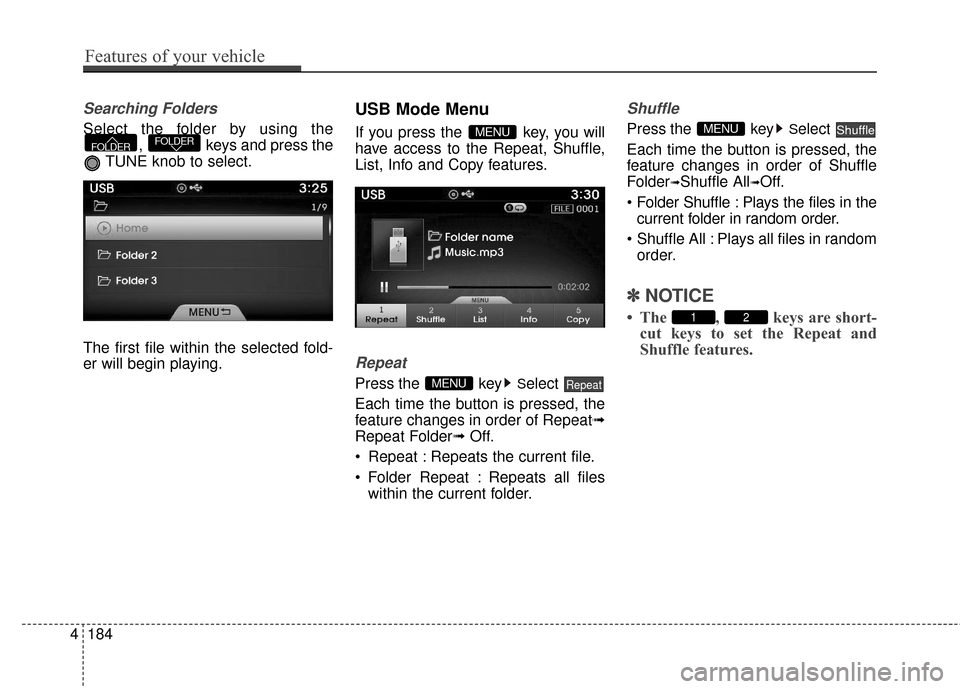
Searching Folders
Select the folder by using the, keys and press the
TUNE knob to select.
The first file within the selected fold-
er will begin playing.
USB Mode Menu
If you press the key, you will
have access to the Repeat, Shuffle,
List, Info and Copy features.
Repeat
Press the keySelect
Each time the button is pressed, the
feature changes in order of Repeat➟
Repeat Folder➟ Off.
Repeat : Repeats the current file.
Folder Repeat : Repeats all files within the current folder.
Shuffle
Press the keySelect
Each time the button is pressed, the
feature changes in order of Shuffle
Folder
➟Shuffle All➟Off.
: Plays the files in the current folder in random order.
All : Plays all files in random order.
✽ ✽ NOTICE
• The , keys are short-
cut keys to set the Repeat and
Shuffle features.21
ShuffleMENU
RepeatMENU
MENUFOLDERFOLDER
4184
Features of your vehicle
Page 265 of 520
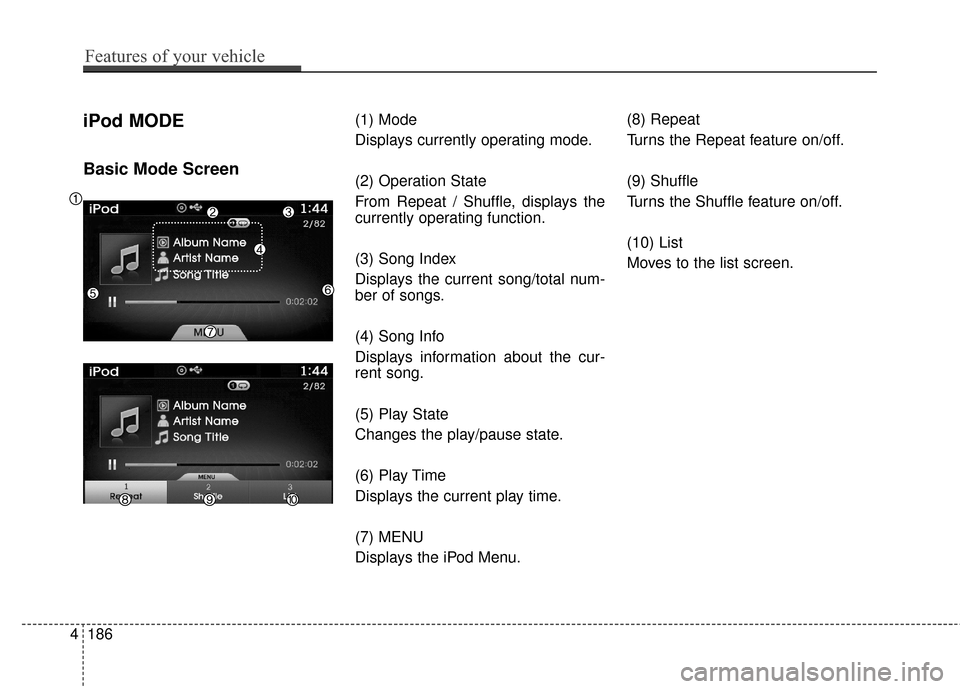
iPod MODE
Basic Mode Screen
(1) Mode
Displays currently operating mode.
(2) Operation State
From Repeat / Shuffle, displays the
currently operating function.
(3) Song Index
Displays the current song/total num-
ber of songs.
(4) Song Info
Displays information about the cur-
rent song.
(5) Play State
Changes the play/pause state.
(6) Play Time
Displays the current play time.
(7) MENU
Displays the iPod Menu.(8) Repeat
Turns the Repeat feature on/off.
(9) Shuffle
Turns the Shuffle feature on/off.
(10) List
Moves to the list screen.
4186
Features of your vehicle
Page 294 of 520
![Hyundai Azera 2017 Owners Guide 4215
Features of your vehicle
Clock/Calendar Setting
Clock Setting
Press the key Select [Clock/
Calendar] Select [Clock Settings]
Use the TUNE knob to select the
Hour, Minutes and AM/PM setting
and](/img/35/14459/w960_14459-293.png "Hyundai Azera 2017 Owners Guide 4215
Features of your vehicle
Clock/Calendar Setting
Clock Setting
Press the key Select [Clock/
Calendar] Select [Clock Settings]
Use the TUNE knob to select the
Hour, Minutes and AM/PM setting
and")
4215
Features of your vehicle
Clock/Calendar Setting
Clock Setting
Press the key Select [Clock/
Calendar] Select [Clock Settings]
Use the TUNE knob to select the
Hour, Minutes and AM/PM setting
and use TUNE knob to change
settings.
Calendar Setting
Press the key Select [Clock/
Calendar] Select [Calendar
Settings]
Use the TUNE knob to select the
Month, Day, and Year and use TUNE knob to change settings.
Time Format
Press the key Select [Clock/
Calendar] Select [Time Format]
This feature is used to change the
clock format between 12hr or 24hr.
Clock Display
Press the key Select [Clock/
Calendar] Select [Clock Display
(Power off)]
This feature is used to display a clock
on the screen when the audio sys-
tem is turned off.SETUP
SETUP SETUP
SETUP
Page 306 of 520
Driving your vehicle
25
Be sure the exhaust system does
not leak.
The exhaust system should be
checked whenever the vehicle is
raised to change the oil or for any
other purpose. If you hear a change in
the sound of the exhaust or if you
drive over something that strikes the
underside of the vehicle, have the
exhaust system checked as soon as
possible by an authorized HYUNDAI
dealer.
WARNING - Engine
exhaust
Do not inhale exhaust fumes or
leave your engine running in a
enclosed area for a prolonged
time. Exhaust fumes contain
carbon monoxide, a colorless,
odorless gas that can cause
unconsciousness and death by
asphyxiation.
WARNING - Open trunk
Do not drive with the trunk
open. Poisonous exhaust gases
can enter the passenger com-
partment.
If you must drive with the trunk
open proceed as follows:
1. Close all windows.
2. Open side vents.
3. Set the air intake control at "Fresh", the air flow control at
"Floor" or "Face" and the fan
at the highest speed.
To assure proper operation of
the ventilation system, be sure
the ventilation air intakes locat-
ed just in front of the windshield
are kept clear of snow, ice,
leaves or other obstructions.WARNING - California
proposition 65
Engine exhaust and a wide vari-
ety of automobile components
and parts, including compo-
nents found in the interior fur-
nishings in a vehicle, contain or
emit chemicals known to the
State of California to cause can-
cer and birth defects and repro-
ductive harm. In addition, cer-
tain fluids contained in vehicles
and certain products of compo-
nent wear contain or emit chem-
icals known to the State of
California to cause cancer and
birth defects or other reproduc-
tive harm.
Page 309 of 520
55
Driving your vehicle
Illuminated ENGINE
START/STOP button
(if equipped)
Whenever the front door is opened,
the ENGINE START/STOP button
will illuminate for your convenience.
The light will go off after about 30
seconds when the door is closed. It
will also go off immediately when the
theft-alarm system is armed.
ENGINE START/STOP button
position
OFF
To turn off the engine (START/RUN
position) or vehicle power (ON posi-
tion), press the ENGINE START/
STOP button with the shift lever in
the P (Park) position. When you
press the ENGINE START/STOP
button without the shift lever in the P
(Park) position, the ENGINE
START/STOP button will not change
to the OFF position but to the ACC
position.
✽ ✽
NOTICE
In an emergency situation while the
vehicle is in motion, you are able to
turn the engine off and to the ACC
position by pressing the ENGINE
START/STOP button for more than
2 seconds or 3 times successively
within 3 seconds. If the vehicle is still
moving, you can restart the engine
without depressing the brake pedal
by pressing the ENGINE START/
STOP button with the shift lever in
the N (Neutral) position.
ENGINE START/STOP BUTTON
OHG055004N
White
Page 311 of 520
57
Driving your vehicle
✽
✽
NOTICE
• If you press the ENGINE START/
STOP button without depressing
the brake pedal the engine will not
start and the ENGINE START/
STOP button changes as follows:
OFF
➔ACC ➔ON ➔OFF
• If you leave the ENGINE START/ STOP button in the ACC or ON
position for a long time, the bat-
tery will discharge.
Starting the engine
✽ ✽
NOTICE - Kick down switch
If your vehicle is equipped with a
kick down switch in the accelerator
pedal, it prevents you from driving
at full throttle unintentionally by
making the driver require increased
effort to depress the accelerator
pedal. However, if you depress the
pedal more than approximately
80%, the accelerator pedal can be
depressed down further to full throt-
tle. This is not a malfunction but a
normal condition.
1.Carry the smart key or leave it
inside the vehicle.
2.Make sure the parking brake is firmly applied.
3.Place the shift lever in the P (Park) position.
4.Press the ENGINE START/STOP button while depressing the brake
pedal.
It should be started without depress-
ing the accelerator pedal.
5.Do not wait for the engine to warm up while the vehicle remains sta-
tionary.
Start driving at moderate engine
speeds. (Steep accelerating and
decelerating should be avoided.)
WARNING
Never press the ENGINE START/
STOP button while the vehicle is
in motion. This would result in
loss of directional control and
braking function, which could
cause an accident.
WARNING - Proper
footwear
Always wear appropriate shoes
when operating your vehicle.
Unsuitable shoes (high heels,
ski boots, sandals, etc.) may
interfere with your ability to use
the brake and accelerator pedal.
The inability to properly operate
the pedals could result in seri-
ous injuries or death.
Page 330 of 520
Driving your vehicle
26
5
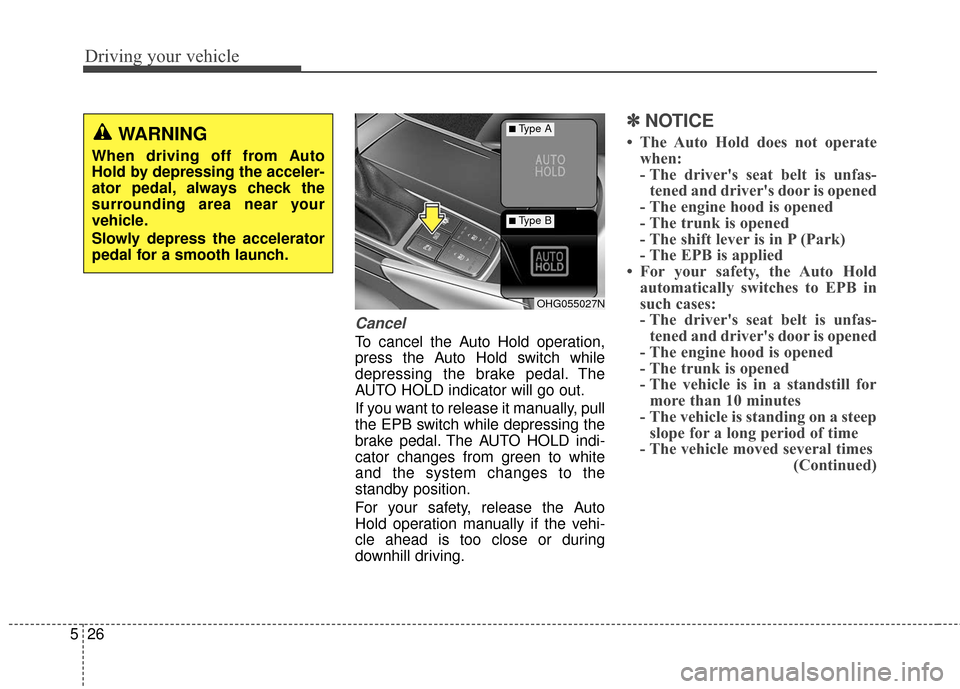
Cancel
To cancel the Auto Hold operation,
press the Auto Hold switch while
depressing the brake pedal. The
AUTO HOLD indicator will go out.
If you want to release it manually, pull
the EPB switch while depressing the
brake pedal. The AUTO HOLD indi-
cator changes from green to white
and the system changes to the
standby position.
For your safety, release the Auto
Hold operation manually if the vehi-
cle ahead is too close or during
downhill driving.
✽ ✽
NOTICE
• The Auto Hold does not operate
when:
- The driver's seat belt is unfas-tened and driver's door is opened
- The engine hood is opened
- The trunk is opened
- The shift lever is in P (Park)
- The EPB is applied
• For your safety, the Auto Hold automatically switches to EPB in
such cases:
- The driver's seat belt is unfas-tened and driver's door is opened
- The engine hood is opened
- The trunk is opened
- The vehicle is in a standstill for more than 10 minutes
- The vehicle is standing on a steep slope for a long period of time
- The vehicle moved several times (Continued)
OHG055027N
■Type A
■Type B
WARNING
When driving off from Auto
Hold by depressing the acceler-
ator pedal, always check the
surrounding area near your
vehicle.
Slowly depress the accelerator
pedal for a smooth launch.
Page 344 of 520
Driving your vehicle
40
5
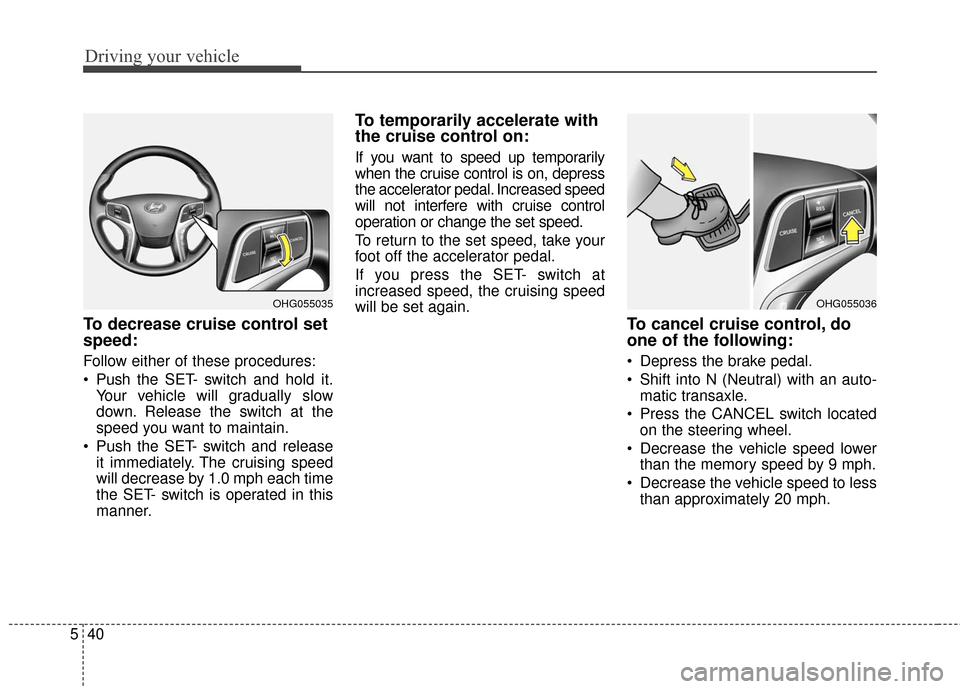
To decrease cruise control set
speed:
Follow either of these procedures:
Push the SET- switch and hold it.
Your vehicle will gradually slow
down. Release the switch at the
speed you want to maintain.
Push the SET- switch and release it immediately. The cruising speed
will decrease by 1.0 mph each time
the SET- switch is operated in this
manner.
To temporarily accelerate with
the cruise control on:
If you want to speed up temporarily
when the cruise control is on, depress
the accelerator pedal. Increased speed
will not interfere with cruise control
operation or change the set speed.
To return to the set speed, take your
foot off the accelerator pedal.
If you press the SET- switch at
increased speed, the cruising speed
will be set again.
To cancel cruise control, do
one of the following:
Depress the brake pedal.
Shift into N (Neutral) with an auto-matic transaxle.
Press the CANCEL switch located on the steering wheel.
Decrease the vehicle speed lower than the memory speed by 9 mph.
Decrease the vehicle speed to less than approximately 20 mph.
OHG055036OHG055035