wheel Hyundai Azera 2017 Owner's Guide
[x] Cancel search | Manufacturer: HYUNDAI, Model Year: 2017, Model line: Azera, Model: Hyundai Azera 2017Pages: 520, PDF Size: 16.33 MB
Page 150 of 520
471
Features of your vehicle
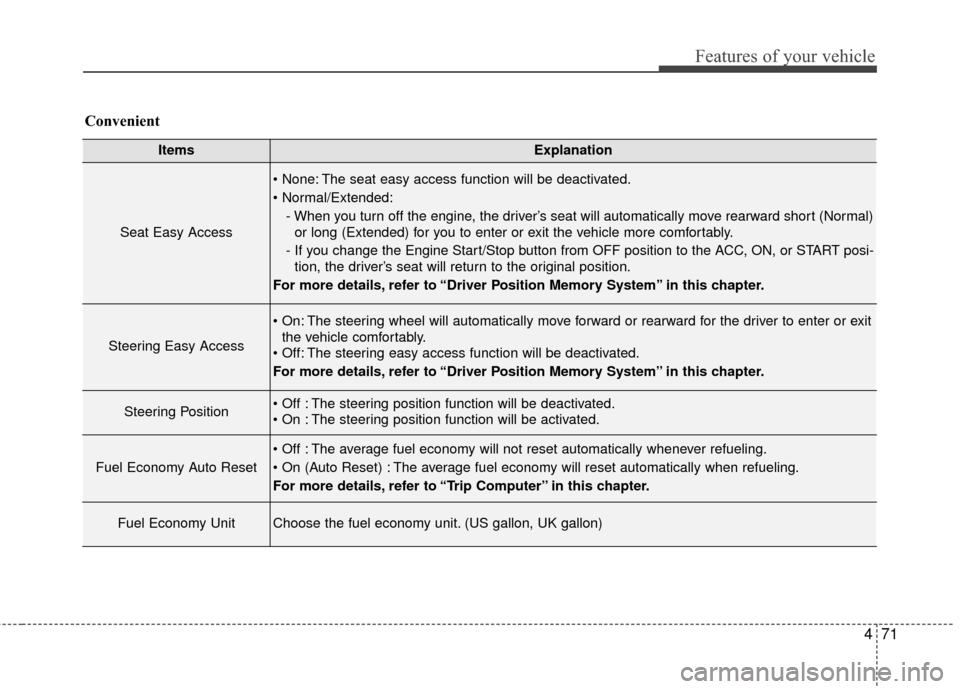
ItemsExplanation
Seat Easy Access
The seat easy access function will be deactivated.
- When you turn off the engine, the driver’s seat will automatically move rearward short (Normal)or long (Extended) for you to enter or exit the vehicle more comfortably.
- If you change the Engine Start/Stop button from OFF position to the ACC, ON, or START posi- tion, the driver’s seat will return to the original position.
For more details, refer to “Driver Position Memory System” in this chapter.
Steering Easy Access
The steering wheel will automatically move forward or rearward for the driver to enter or exit the vehicle comfortably.
The steering easy access function will be deactivated.
For more details, refer to “Driver Position Memory System” in this chapter.
Steering Position The steering position function will be deactivated.
The steering position function will be activated.
Fuel Economy Auto Reset
The average fuel economy will not reset automatically whenever refueling.
The average fuel economy will reset automatically when refueling.
For more details, refer to “Trip Computer” in this chapter.
Fuel Economy UnitChoose the fuel economy unit. (US gallon, UK gallon)
Convenient
Page 152 of 520
473
Features of your vehicle
TRIP COMPUTER
Overview
Description
The trip computer is a microcomput-
er-controlled driver information sys-
tem that displays information related
to driving.
✽ ✽NOTICE
Some driving information stored in
the trip computer (for example
Average Vehicle Speed) resets if the
battery is disconnected.
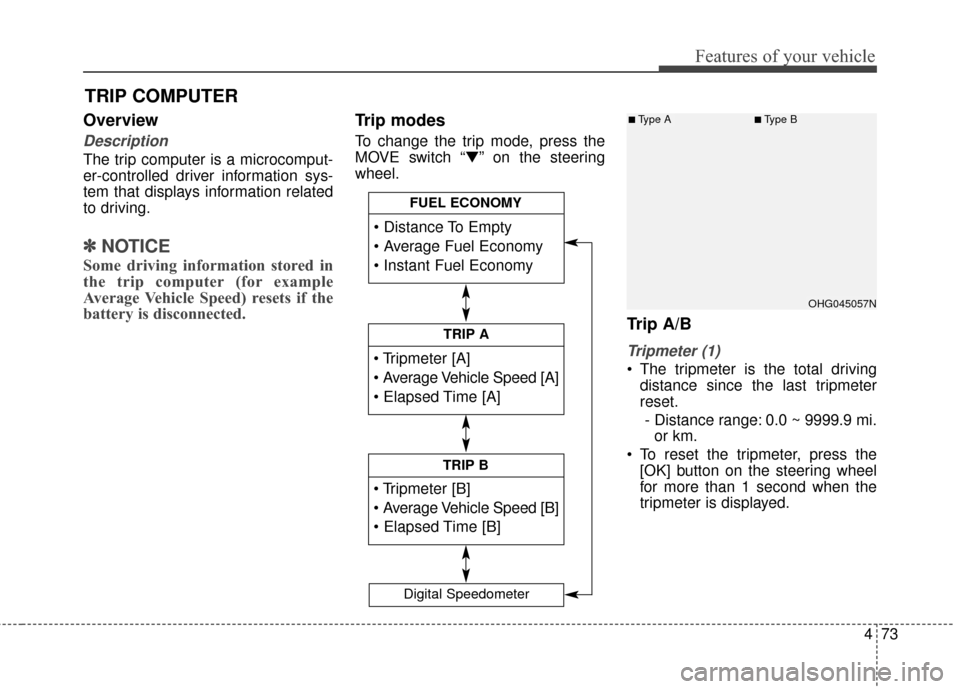
Trip modes
To change the trip mode, press the
MOVE switch “▼” on the steering
wheel.
Trip A/B
Tripmeter (1)
The tripmeter is the total driving
distance since the last tripmeter
reset.
- Distance range: 0.0 ~ 9999.9 mi. or km.
To reset the tripmeter, press the [OK] button on the steering wheel
for more than 1 second when the
tripmeter is displayed.
TRIP A
TRIP B
FUEL ECONOMY
Digital Speedometer
OHG045057N
■Type A■Type B
Page 153 of 520
Features of your vehicle
74
4
Average Vehicle Speed (2)
The average vehicle speed is cal-
culated by the total driving dis-
tance and driving time since the
last average vehicle speed reset.
- Speed range: 0 ~ 999 MPH or km/h
To reset the average vehicle speed, press the [OK] button on the steer-
ing wheel for more than 1 second
when the average vehicle speed is
displayed.
✽ ✽ NOTICE
• The average vehicle speed is not dis-
played if the driving distance is less
than 0.19 miles (300 meters) or the
driving time is less than 10 seconds
since the Engine Start/Stop button is
turned to ON.
• Even if the vehicle is not in motion, the average vehicle speed
keeps calculating while the engine
is running.
Elapsed Time (3)
The elapsed time is the total driv-
ing time since the last elapsed time
reset.
- Time range (hh:mm): 00:00 ~ 99:59
To reset the elapsed time, press the [OK] button on the steering
wheel for more than 1 second
when the elapsed time is dis-
played.
✽ ✽ NOTICE
Even if the vehicle is not in motion,
the elapsed time keeps calculating
while the engine is running.Fuel economy
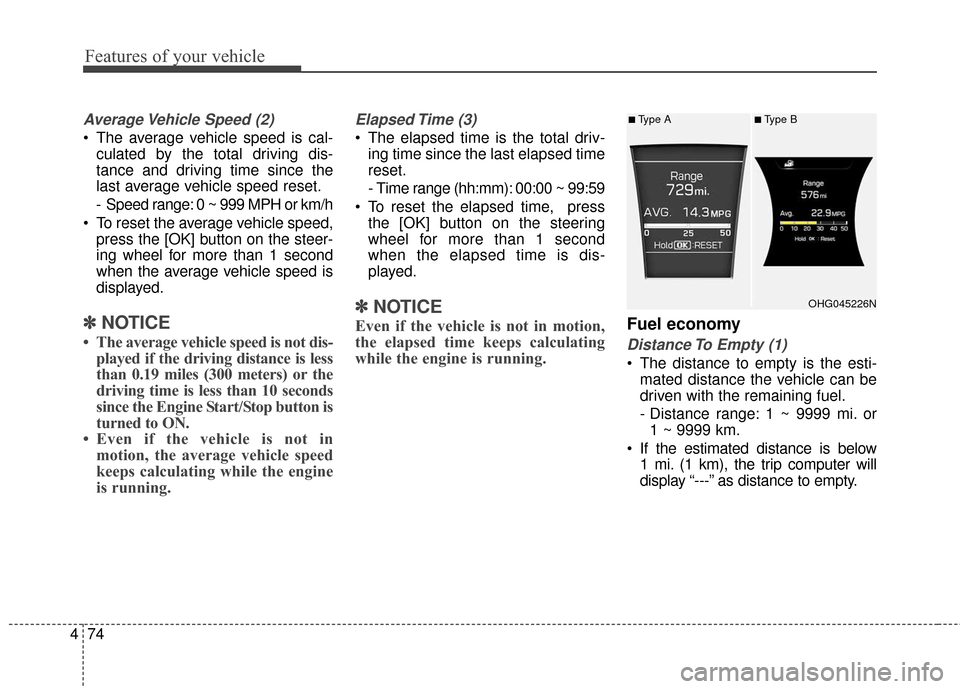
Distance To Empty (1)
The distance to empty is the esti-
mated distance the vehicle can be
driven with the remaining fuel.
- Distance range: 1 ~ 9999 mi. or1 ~ 9999 km.
If the estimated distance is below 1 mi. (1 km), the trip computer will
display “---” as distance to empty.
OHG045226N
■Type A■Type B
Page 154 of 520
475
Features of your vehicle
✽
✽NOTICE
• If the vehicle is not on level ground
or the battery power has been
interrupted, the distance to empty
function may not operate correct-
ly.
• The distance to empty may differ from the actual driving distance as
it is an estimate of the available
driving distance.
• The trip computer may not regis- ter additional fuel if less than 1.6
gallons (6 liters) of fuel are added
to the vehicle.
• The fuel economy and distance to empty may vary significantly
based on driving conditions, driv-
ing habits, and condition of the
vehicle.
Average Fuel Economy (2)
The average fuel economy is calcu-
lated by the total driving distance
and fuel consumption since the last
average fuel economy reset.
- Fuel economy range: 0.0 ~ 99.9MPG or L/100km, km/L
The average fuel economy can be reset both manually and automati-
cally.
Manual reset
To clear the average fuel economy
manually, press the [OK] button on
the steering wheel for more than 1
second when the average fuel econo-
my is displayed. Automatic reset
To make the average fuel economy
be reset automatically whenever refu-
eling, select the “Auto Reset” mode in
User Setting menu of the LCD display
(Refer to “LCD Display”).
Under “Auto Reset” mode, the aver-
age fuel economy will be cleared to
zero (---) when the vehicle speed
exceeds 1 km/h after refueling more
than 1.6 gallons (6 liters).
✽ ✽
NOTICE
The average fuel economy is not dis-
played for more accurate calculation
if the vehicle does not drive more
than 10 seconds or 0.19 miles (300
meters) since the Engine Start/Stop
button is turned to ON.
Instant Fuel Economy (3)
This mode displays the instant fuel
economy during the last few sec-
onds when the vehicle speed is
more than 6.2 MPH (10 km/h).
- Fuel economy range: 0 ~ 50 MPGor 0 ~ 30 L/100km
Page 159 of 520
Features of your vehicle
80
4
Parking brake & brake
fluid warning light
Parking brake warning
This light is illuminated when the
parking brake is applied with the igni-
tion switch in the START or ON posi-
tion. The warning light should go off
when the parking brake is released
while the engine is running.
The parking brake warning chime will
sound to remind you that the parking
brake is applied when you are driving
above 6 mph (10 km/h). Always release
the parking brake before you drive.
Low brake fluid level warning
If the warning light remains on, it may
indicate that the brake fluid level in
the reservoir is low.
If the warning light remains on:
1. Drive carefully to the nearest safe location and stop your vehicle.
2. With the engine stopped, check the brake fluid level immediately and
add fluid as required. Then check all
brake components for fluid leaks. 3. Do not drive the vehicle if leaks
are found, the warning light
remains on or the brakes do not
operate properly. Have the vehicle
towed to any authorized HYUNDAI
dealer for a brake system inspec-
tion and necessary repairs.
Your vehicle is equipped with dual-
diagonal braking systems. This
means you still have braking on two
wheels even if one of the dual sys-
tems should fail. With only one of the
dual system working, more than nor-
mal pedal travel and greater pedal
pressure are required to stop the car.
Also, the car will not stop in as short
a distance with only a portion of the
brake system working. If the brakes
fail while you are driving, shift to a
lower gear for additional engine brak-
ing and stop the car as soon as it is
safe to do so.
To check bulb operation, check
whether the parking brake and brake
fluid warning light illuminates when
the ignition switch is in the ON posi-
tion.
Anti-lock brake system (ABS) warning light
This light illuminates if the ignition
switch is turned ON and goes off in
approximately 3 seconds if the sys-
tem is operating normally.
If the ABS warning light remains on,
comes on while driving, or does not
come on when the ignition switch is
turned to the ON position, this indi-
cates that there may be a malfunc-
tion with the ABS.
If this occurs, have your vehicle
checked by an authorized HYUNDAI
dealer as soon as possible. The nor-
mal braking system will still be oper-
ational, but without the assistance of
the anti-lock brake system.
Page 165 of 520
Features of your vehicle
86
4
Cruise indicator (if equipped)
CRUISE indicator
The indicator light illuminates when
the cruise control system is enabled.
The cruise indicator light in the
instrument cluster is illuminated
when the cruise control CRUISE but-
ton on the steering wheel is pushed.
The indicator light turns off when the
cruise control CRUISE button is
pushed again.
For more details, refer to "Cruise
Control System" in section 5. Cruise SET indicator
The indicator light illuminates when
the cruise function switch (SET- or
RES+) is ON. The cruise SET indica-
tor light in the instrument cluster is
illuminated when the cruise control
switch (SET- or RES+) is pushed.
The cruise SET indicator light does
not illuminate when the cruise con-
trol switch (CANCEL) is pushed or
the system is disengaged.
For more details, refer to “Cruise
Control System” in section 5.
TPMS (Tire Pressure Monitoring
System) indicator
Low tire pressure telltale /
TPMS malfunction indica-
tor
The low tire pressure telltale/TPMS
malfunction indicator comes on for 3
seconds after the ignition switch is in
the ON position.
The TPMS malfunction indicator will
illuminate after it blinks for approxi-
mately 1 minute when there is a
problem with the Tire Pressure
Monitoring System.
If this occurs, have the system
checked by an authorized HYUNDAI
dealer as soon as possible.
For more details, refer to “TPMS” in
section 6.
SET
CRUISE
■Type A■Type B
Page 172 of 520
493
Features of your vehicle
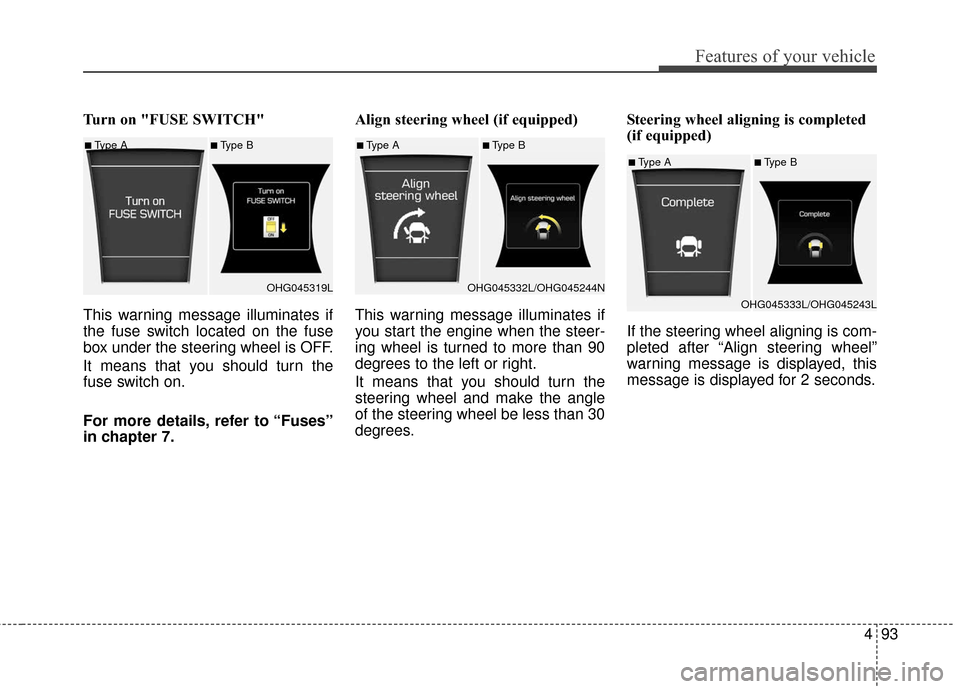
Turn on "FUSE SWITCH"
This warning message illuminates if
the fuse switch located on the fuse
box under the steering wheel is OFF.
It means that you should turn the
fuse switch on.
For more details, refer to “Fuses”
in chapter 7.Align steering wheel (if equipped)
This warning message illuminates if
you start the engine when the steer-
ing wheel is turned to more than 90
degrees to the left or right.
It means that you should turn the
steering wheel and make the angle
of the steering wheel be less than 30
degrees.
Steering wheel aligning is completed
(if equipped)
If the steering wheel aligning is com-
pleted after “Align steering wheel”
warning message is displayed, this
message is displayed for 2 seconds.
■Type A■Type B
OHG045319L■Type A■Type B
OHG045332L/OHG045244N
■Type A■Type B
OHG045333L/OHG045243L
Page 196 of 520

4117
Features of your vehicle
Floor-Level (A, C, D, E)
Most of the air flow is directed to the
floor, with a small amount of air
directed to the windshield and side
window defrosters.
Bi-Level (B, C, D, E, F)
Air flow is directed towards the face
and the floor.
Face-Level (B, C, D, E, F)
Air flow is directed toward the upper
body and face. Additionally, each
outlet can be controlled to direct the
air discharged from the outlet.
Floor & Defrost (A, C, D, E)
Most of the air flow is directed to the
floor and the windshield with a small
amount directed to the side window
defrosters. Defrost-Level
Most of the air flow is directed to the
windshield with a small amount of air
directed to the side window defrosters.
✽ ✽
NOTICE
The defrost mode is more effective
when a warmer air temperature set-
ting is selected.
Instrument panel vents
The outlet vents can be opened or
closed separately using the thumb-
wheel.
Also, you can adjust the direction of
air delivery from these vents using
the vent control lever as shown.
OHG045135OHG045211
Page 207 of 520
Features of your vehicle
128
4
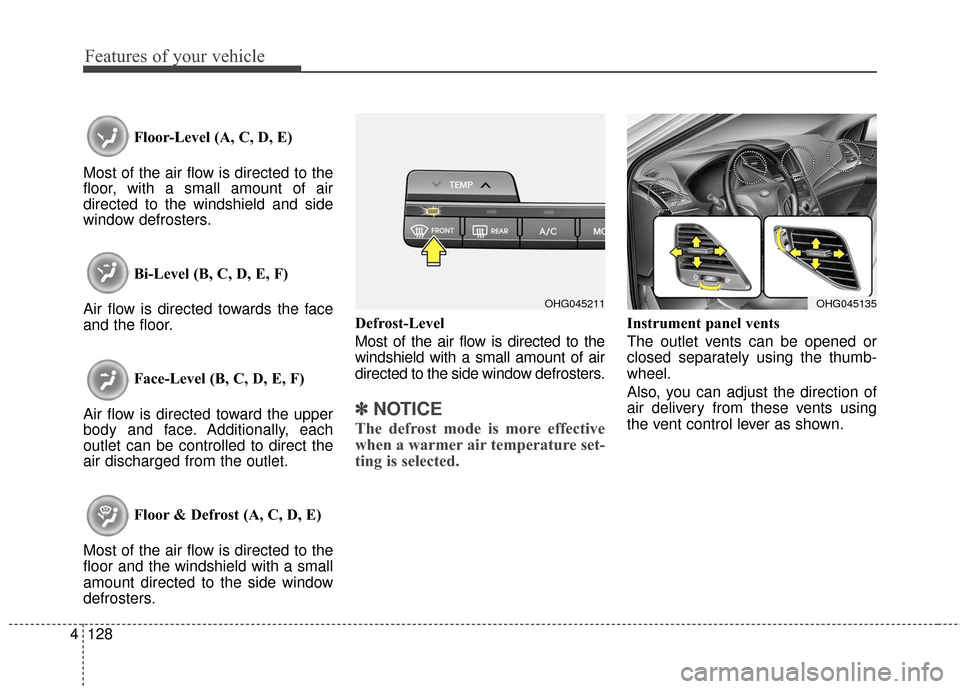
Floor-Level (A, C, D, E)
Most of the air flow is directed to the
floor, with a small amount of air
directed to the windshield and side
window defrosters.
Bi-Level (B, C, D, E, F)
Air flow is directed towards the face
and the floor.
Face-Level (B, C, D, E, F)
Air flow is directed toward the upper
body and face. Additionally, each
outlet can be controlled to direct the
air discharged from the outlet.
Floor & Defrost (A, C, D, E)
Most of the air flow is directed to the
floor and the windshield with a small
amount directed to the side window
defrosters. Defrost-Level
Most of the air flow is directed to the
windshield with a small amount of air
directed to the side window defrosters.
✽ ✽
NOTICE
The defrost mode is more effective
when a warmer air temperature set-
ting is selected.
Instrument panel vents
The outlet vents can be opened or
closed separately using the thumb-
wheel.
Also, you can adjust the direction of
air delivery from these vents using
the vent control lever as shown.
OHG045135OHG045211
Page 225 of 520
Features of your vehicle
146
4
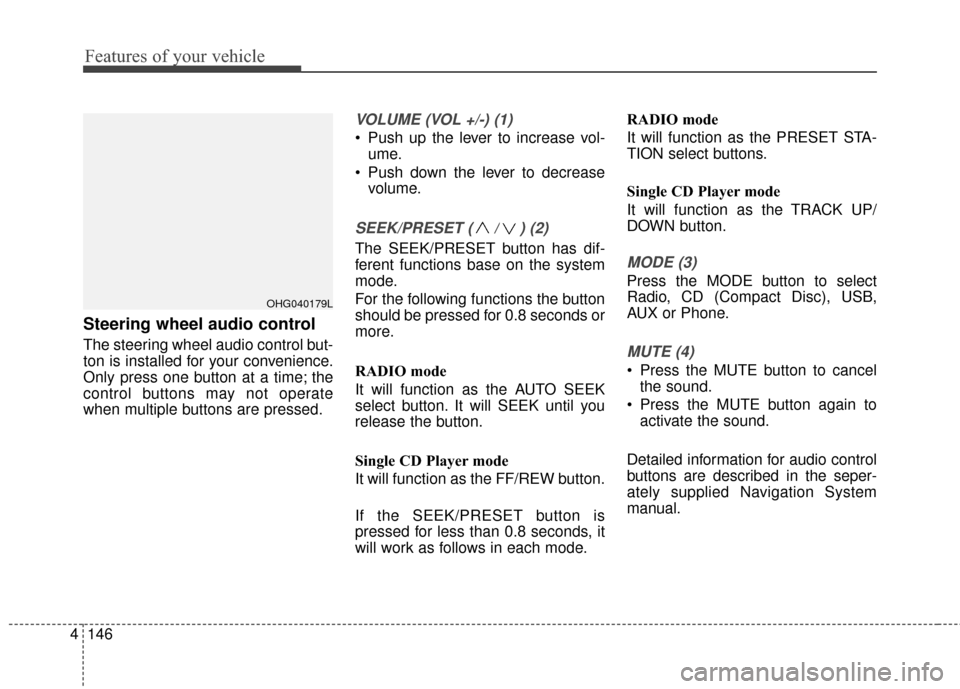
Steering wheel audio control
The steering wheel audio control but-
ton is installed for your convenience.
Only press one button at a time; the
control buttons may not operate
when multiple buttons are pressed.
VOLUME (VOL +/-) (1)
Push up the lever to increase vol-
ume.
Push down the lever to decrease volume.
SEEK/PRESET ( / ) (2)
The SEEK/PRESET button has dif-
ferent functions base on the system
mode.
For the following functions the button
should be pressed for 0.8 seconds or
more.
RADIO mode
It will function as the AUTO SEEK
select button. It will SEEK until you
release the button.
Single CD Player mode
It will function as the FF/REW button.
If the SEEK/PRESET button is
pressed for less than 0.8 seconds, it
will work as follows in each mode. RADIO mode
It will function as the PRESET STA-
TION select buttons.
Single CD Player mode
It will function as the TRACK UP/
DOWN button.MODE (3)
Press the MODE button to select
Radio, CD (Compact Disc), USB,
AUX or Phone.
MUTE (4)
Press the MUTE button to cancel
the sound.
Press the MUTE button again to activate the sound.
Detailed information for audio control
buttons are described in the seper-
ately supplied Navigation System
manual.
OHG040179L