cooling Hyundai Coupe 2002 Owner's Manual
[x] Cancel search | Manufacturer: HYUNDAI, Model Year: 2002, Model line: Coupe, Model: Hyundai Coupe 2002Pages: 140, PDF Size: 1.45 MB
Page 32 of 140
CONTROLS AND EQUIPMENT
1- 24 8
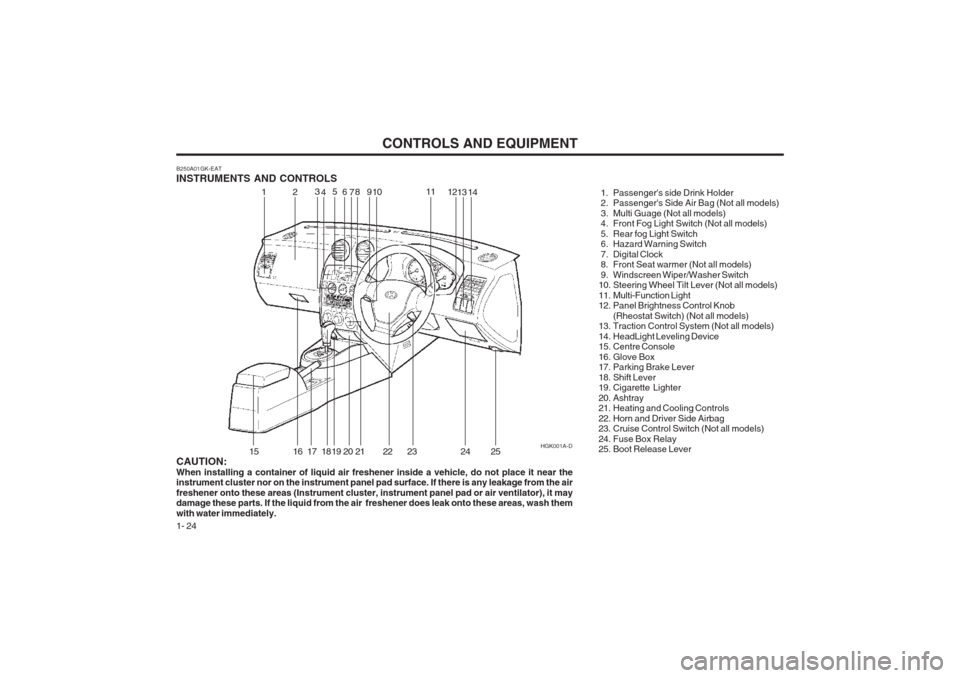
B250A01GK-EAT INSTRUMENTS AND CONTROLS
1. Passenger's side Drink Holder
2. Passenger's Side Air Bag (Not all models)
3. Multi Guage (Not all models)
4. Front Fog Light Switch (Not all models)
5. Rear fog Light Switch
6. Hazard Warning Switch
7. Digital Clock
8. Front Seat warmer (Not all models)
9. Windscreen Wiper/Washer Switch
10. Steering Wheel Tilt Lever (Not all models)
11. Multi-Function Light
12. Panel Brightness Control Knob(Rheostat Switch) (Not all models)
13. Traction Control System (Not all models)
14. HeadLight Leveling Device
15. Centre Console
16. Glove Box
17. Parking Brake Lever
18. Shift Lever
19. Cigarette Lighter
20. Ashtray
21. Heating and Cooling Controls
22. Horn and Driver Side Airbag
23. Cruise Control Switch (Not all models)
24. Fuse Box Relay
25. Boot Release Lever
CAUTION: When installing a container of liquid air freshener inside a vehicle, do not place it near the instrument cluster nor on the instrument panel pad surface. If there is any leakage from the air freshener onto these areas (Instrument cluster, instrument panel pad or air ventilator), it may damage these parts. If the liquid from the air freshener does leak onto these areas, wash them with water immediately. HGK001A-D
12
3
4 5
69 10 11
1213
15
16 17 18 19 20 21 22 23 24
714
25
Page 37 of 140
CONTROLS AND EQUIPMENT1- 29
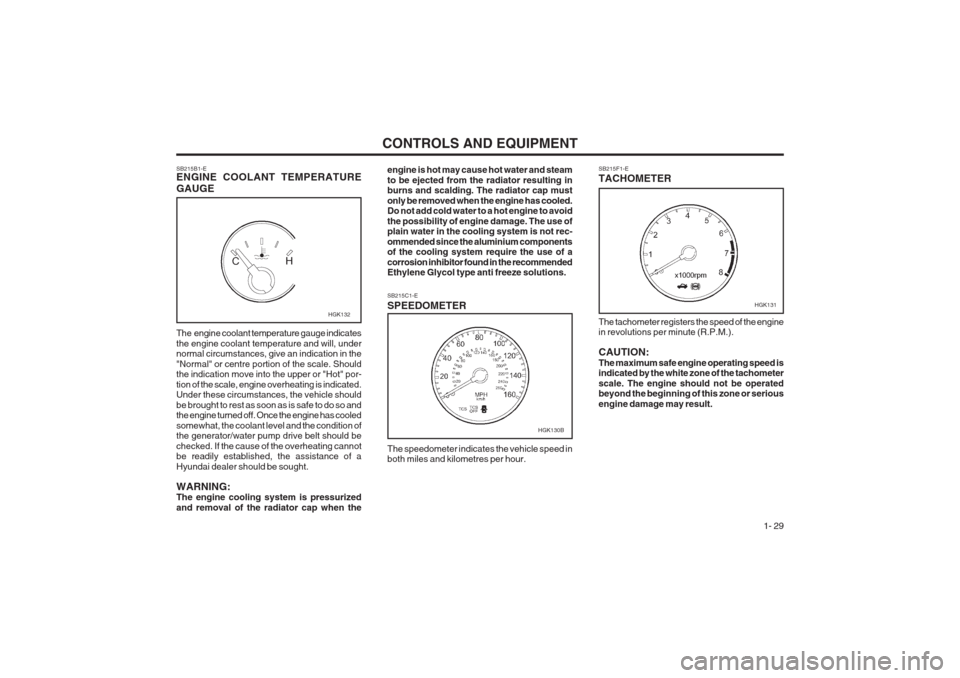
SB215F1-E TACHOMETER
SB215B1-E ENGINE COOLANT TEMPERATURE GAUGE engine is hot may cause hot water and steam to be ejected from the radiator resulting in burns and scalding. The radiator cap must only be removed when the engine has cooled. Do not add cold water to a hot engine to avoid the possibility of engine damage. The use of plain water in the cooling system is not rec- ommended since the aluminium components of the cooling system require the use of a corrosion inhibitor found in the recommended Ethylene Glycol type anti freeze solutions.
The engine coolant temperature gauge indicates the engine coolant temperature and will, under normal circumstances, give an indication in the "Normal" or centre portion of the scale. Should the indication move into the upper or "Hot" por- tion of the scale, engine overheating is indicated. Under these circumstances, the vehicle should be brought to rest as soon as is safe to do so and the engine turned off. Once the engine has cooled somewhat, the coolant level and the condition of the generator/water pump drive belt should be checked. If the cause of the overheating cannot be readily established, the assistance of a Hyundai dealer should be sought. WARNING: The engine cooling system is pressurized and removal of the radiator cap when the The tachometer registers the speed of the engine in revolutions per minute (R.P.M.). CAUTION: The maximum safe engine operating speed is indicated by the white zone of the tachometer scale. The engine should not be operated beyond the beginning of this zone or serious engine damage may result.
SB215C1-E SPEEDOMETER The speedometer indicates the vehicle speed in both miles and kilometres per hour.
HGK132HGK131
HGK130B
Page 58 of 140
CONTROLS AND EQUIPMENT
1- 50
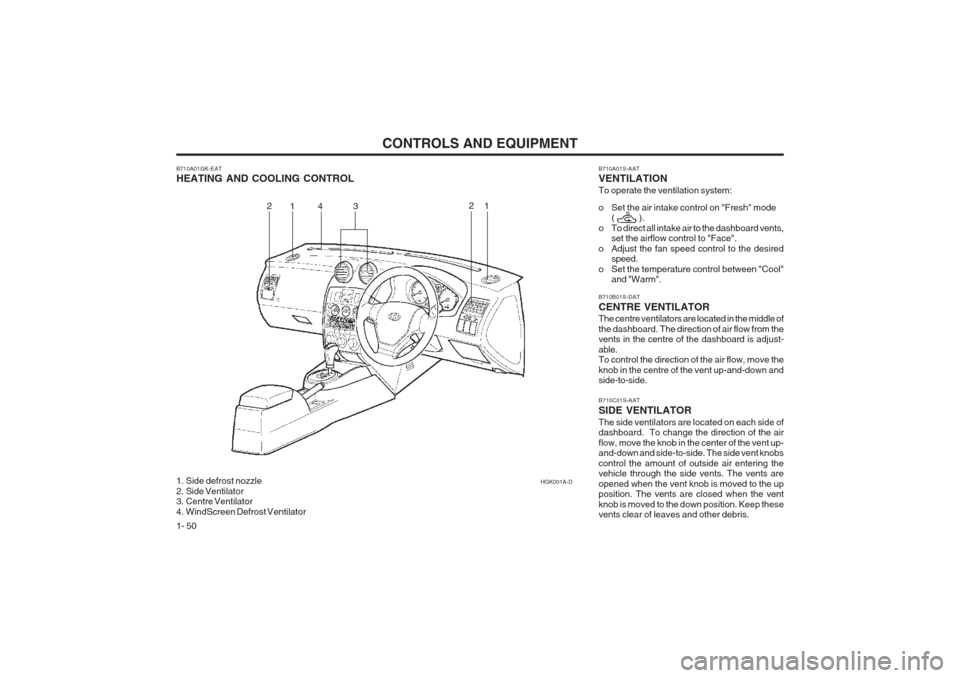
B710A01GK-EAT HEATING AND COOLING CONTROL
1. Side defrost nozzle
2. Side Ventilator
3. Centre Ventilator
4. WindScreen Defrost VentilatorHGK001A-D
1
2
3
1
2 B710A01S-AAT VENTILATION To operate the ventilation system:
o Set the air intake control on "Fresh" mode
( ).
o To direct all intake air to the dashboard vents, set the airflow control to "Face".
o Adjust the fan speed control to the desired speed.
o Set the temperature control between "Cool" and "Warm".
B710C01S-AAT SIDE VENTILATORThe side ventilators are located on each side of dashboard. To change the direction of the air flow, move the knob in the center of the vent up- and-down and side-to-side. The side vent knobs control the amount of outside air entering the vehicle through the side vents. The vents are opened when the vent knob is moved to the up position. The vents are closed when the vent knob is moved to the down position. Keep these vents clear of leaves and other debris.
B710B01S-DAT CENTRE VENTILATOR The centre ventilators are located in the middle of the dashboard. The direction of air flow from the vents in the centre of the dashboard is adjust- able. To control the direction of the air flow, move the knob in the centre of the vent up-and-down and side-to-side.4
Page 62 of 140
CONTROLS AND EQUIPMENT
1- 54
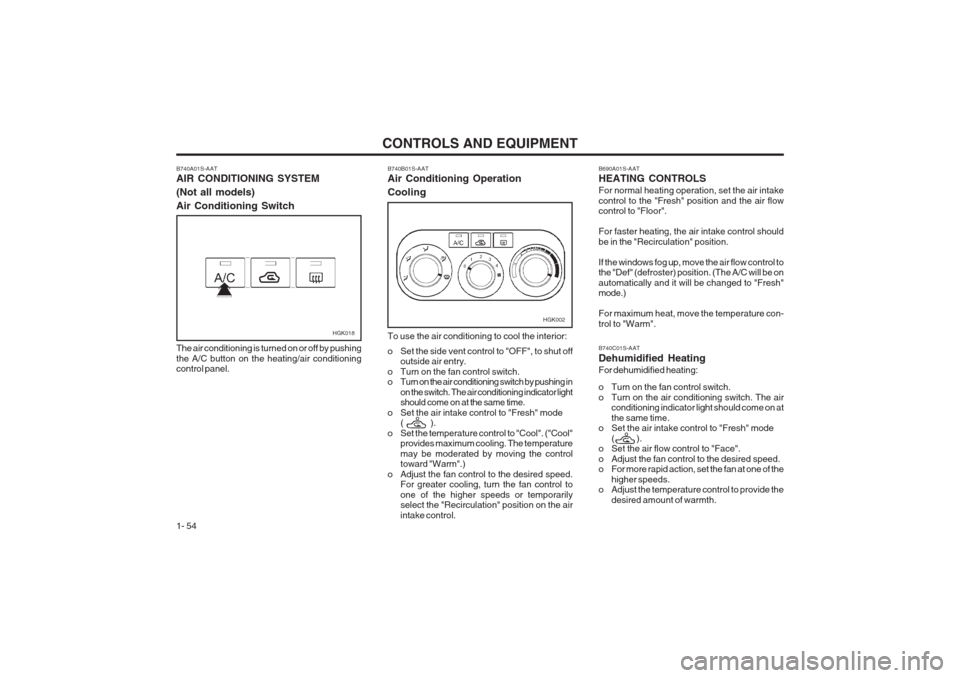
B740A01S-AAT AIR CONDITIONING SYSTEM (Not all models)Air Conditioning Switch
HGK018
The air conditioning is turned on or off by pushing the A/C button on the heating/air conditioning control panel.
HGK002
B740B01S-AAT Air Conditioning Operation Cooling To use the air conditioning to cool the interior:
o Set the side vent control to "OFF", to shut off outside air entry.
o Turn on the fan control switch.
o Turn on the air conditioning switch by pushing in on the switch. The air conditioning indicator lightshould come on at the same time.
o Set the air intake control to "Fresh" mode ( ).
o Set the temperature control to "Cool". ("Cool" provides maximum cooling. The temperature may be moderated by moving the control toward "Warm".)
o Adjust the fan control to the desired speed. For greater cooling, turn the fan control to one of the higher speeds or temporarily select the "Recirculation" position on the air intake control.B690A01S-AAT HEATING CONTROLS For normal heating operation, set the air intake control to the "Fresh" position and the air flow control to "Floor". For faster heating, the air intake control should be in the "Recirculation" position. If the windows fog up, move the air flow control to the "Def" (defroster) position. (The A/C will be on automatically and it will be changed to "Fresh" mode.) For maximum heat, move the temperature con- trol to "Warm". B740C01S-AAT Dehumidified HeatingFor dehumidified heating:
o Turn on the fan control switch.
o Turn on the air conditioning switch. The airconditioning indicator light should come on atthe same time.
o Set the air intake control to "Fresh" mode
( ).
o Set the air flow control to "Face".
o Adjust the fan control to the desired speed.
o For more rapid action, set the fan at one of the
higher speeds.
o Adjust the temperature control to provide the
desired amount of warmth.
Page 63 of 140
CONTROLS AND EQUIPMENT1- 55
B730A01FC-EAT Operation Tips
o To keep dust or unpleasant fumes from enter-
ing the car through the ventilation system, temporarily set the air intake control at "Recir- culation". Be sure to return the control to "Fresh" when the irritation has passed to keep fresh air in the vehicle. This will helpkeep the driver alert and comfortable.
o Air for the heating/cooling system is drawn in through the grilles just ahead of the wind- screen. Care should be taken that these are not blocked by leaves, snow, ice or other obstructions.
o To prevent interior fog on the windscreen, set
the air intake control to the fresh air ( ) position and fan speed to the desi-red posi- tion.
NOTE:When the A/C is operated continuously on the floor-defrost level (
) or defrost level
(), it may cause fog to form on the exterior
windscreen by the temperature differential. At this time set the air flow control to the face level position (
)and fan speed control to the
low position.
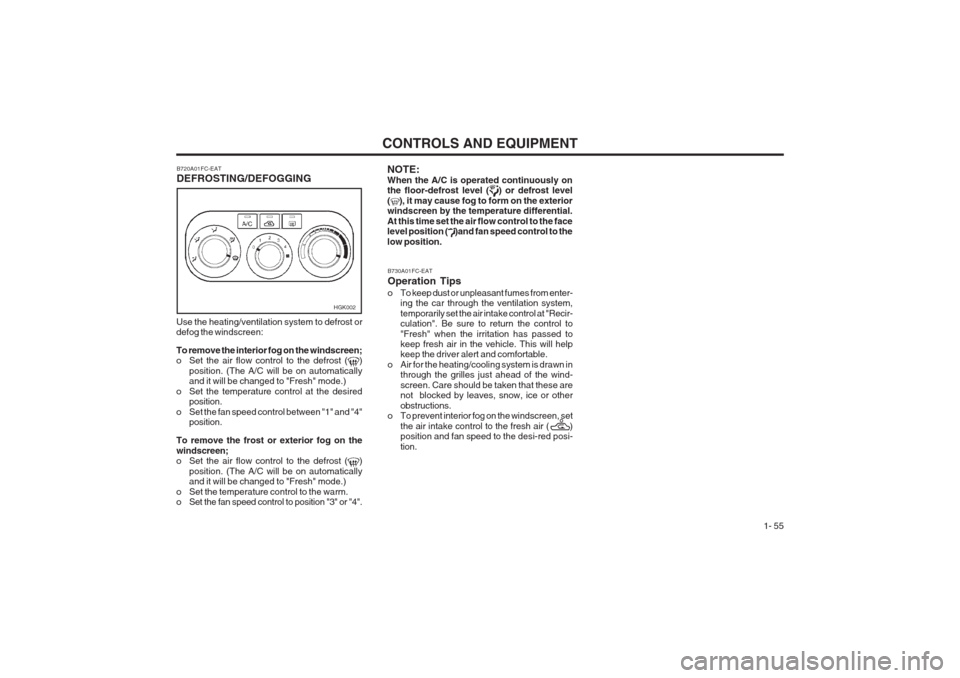
Use the heating/ventilation system to defrost or defog the windscreen: To remove the interior fog on the windscreen;
o Set the air flow control to the defrost (
)
position. (The A/C will be on automatically and it will be changed to "Fresh" mode.)
o Set the temperature control at the desired position.
o Set the fan speed control between "1" and "4" position.
To remove the frost or exterior fog on the windscreen;
o Set the air flow control to the defrost (
)
position. (The A/C will be on automatically and it will be changed to "Fresh" mode.)
o Set the temperature control to the warm.
o Set the fan speed control to position "3" or "4". B720A01FC-EAT DEFROSTING/DEFOGGING
HGK002
Page 64 of 140
CONTROLS AND EQUIPMENT
1- 56
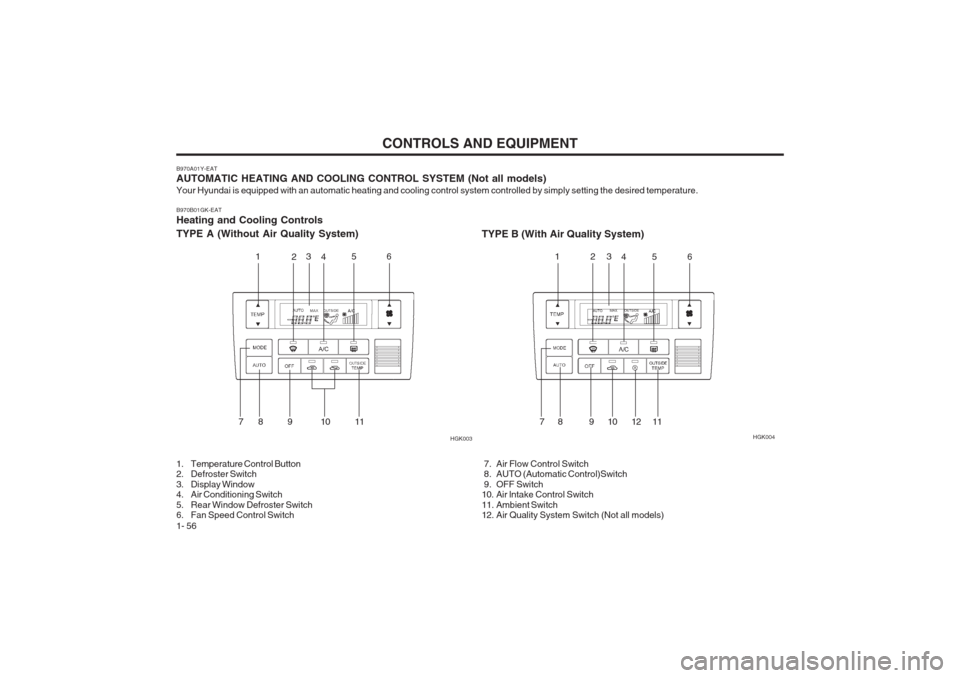
B970A01Y-EAT AUTOMATIC HEATING AND COOLING CONTROL SYSTEM (Not all models) Your Hyundai is equipped with an automatic heating and cooling control system controlled by simply setting the desired temperat
ure.
B970B01GK-EATHeating and Cooling Controls TYPE A (Without Air Quality System) TYPE B (With Air Quality System)
1. Temperature Control Button
2. Defroster Switch
3. Display Window
4. Air Conditioning Switch
5. Rear Window Defroster Switch
6. Fan Speed Control Switch 7. Air Flow Control Switch
8. AUTO (Automatic Control)Switch
9. OFF Switch
10. Air lntake Control Switch
11. Ambient Switch
12. Air Quality System Switch (Not all models)HGK004
HGK003
1 235
4 6
78 9 10 11 12
3
45 6
78 910 1211
Page 65 of 140
CONTROLS AND EQUIPMENT1- 57
B970C02E-AAT Automatic Operation
HGK020
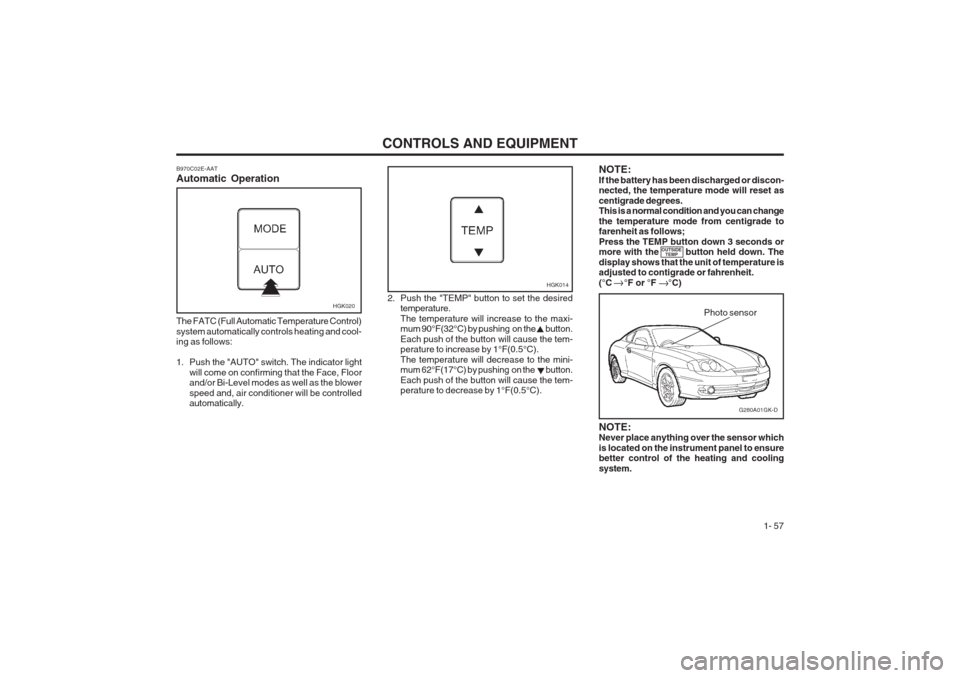
The FATC (Full Automatic Temperature Control) system automatically controls heating and cool- ing as follows:
1. Push the "AUTO" switch. The indicator light will come on confirming that the Face, Floor and/or Bi-Level modes as well as the blower speed and, air conditioner will be controlled automatically. 2. Push the "TEMP" button to set the desired
temperature. The temperature will increase to the maxi- mum 90°F(32°C) by pushing on the button. Each push of the button will cause the tem- perature to increase by 1°F(0.5°C). The temperature will decrease to the mini- mum 62°F(17°C) by pushing on the button. Each push of the button will cause the tem- perature to decrease by 1°F(0.5°C).
G280A01GK-D
Photo sensor
HGK014
NOTE: Never place anything over the sensor which is located on the instrument panel to ensure better control of the heating and cooling system.
NOTE:If the battery has been discharged or discon- nected, the temperature mode will reset as centigrade degrees. This is a normal condition and you can change the temperature mode from centigrade to farenheit as follows; Press the TEMP button down 3 seconds or more with the button held down. The display shows that the unit of temperature is adjusted to contigrade or fahrenheit. (°C °F or °F °C)
OUTSIDE
TEMP
Page 66 of 140
CONTROLS AND EQUIPMENT
1- 58 B980B01Y-AAT Fan Speed Control Switch
HGK015
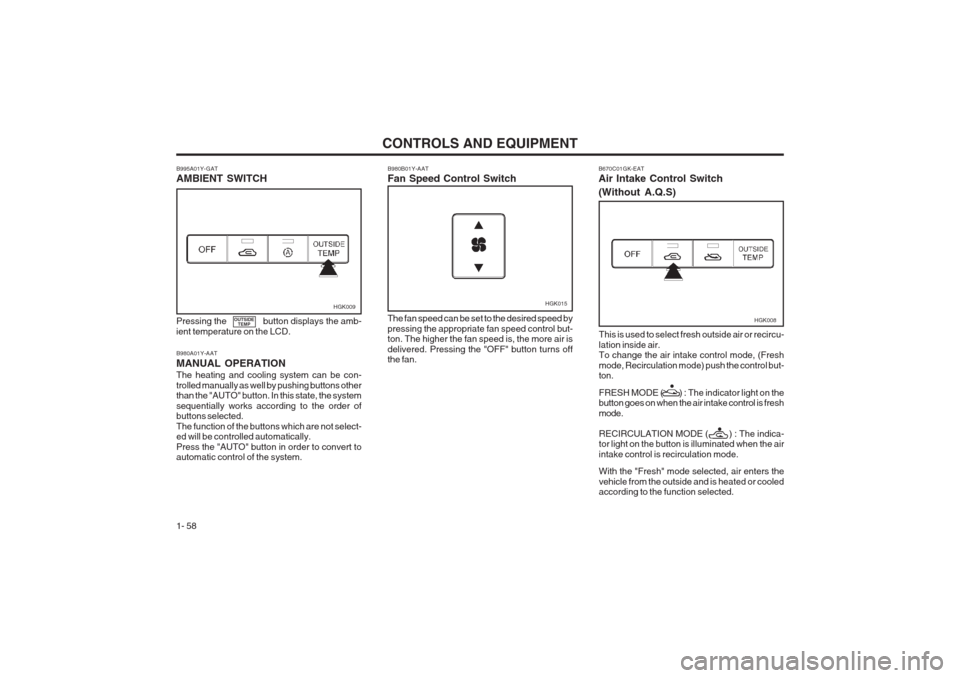
The fan speed can be set to the desired speed by pressing the appropriate fan speed control but- ton. The higher the fan speed is, the more air is delivered. Pressing the "OFF" button turns off the fan.
B980A01Y-AAT MANUAL OPERATION The heating and cooling system can be con- trolled manually as well by pushing buttons other than the "AUTO" button. In this state, the system sequentially works according to the order of buttons selected. The function of the buttons which are not select- ed will be controlled automatically. Press the "AUTO" button in order to convert to automatic control of the system.
Pressing the button displays the amb- ient temperature on the LCD.
B995A01Y-GAT AMBIENT SWITCHHGK009
B670C01GK-EAT Air Intake Control Switch (Without A.Q.S)
HGK008
This is used to select fresh outside air or recircu- lation inside air. To change the air intake control mode, (Fresh mode, Recirculation mode) push the control but- ton. FRESH MODE ( ) : The indicator light on the button goes on when the air intake control is fresh mode. RECIRCULATION MODE ( ) : The indica- tor light on the button is illuminated when the air intake control is recirculation mode. With the "Fresh" mode selected, air enters the vehicle from the outside and is heated or cooled according to the function selected.OUTSIDE TEMP
Page 68 of 140
CONTROLS AND EQUIPMENT
1- 60
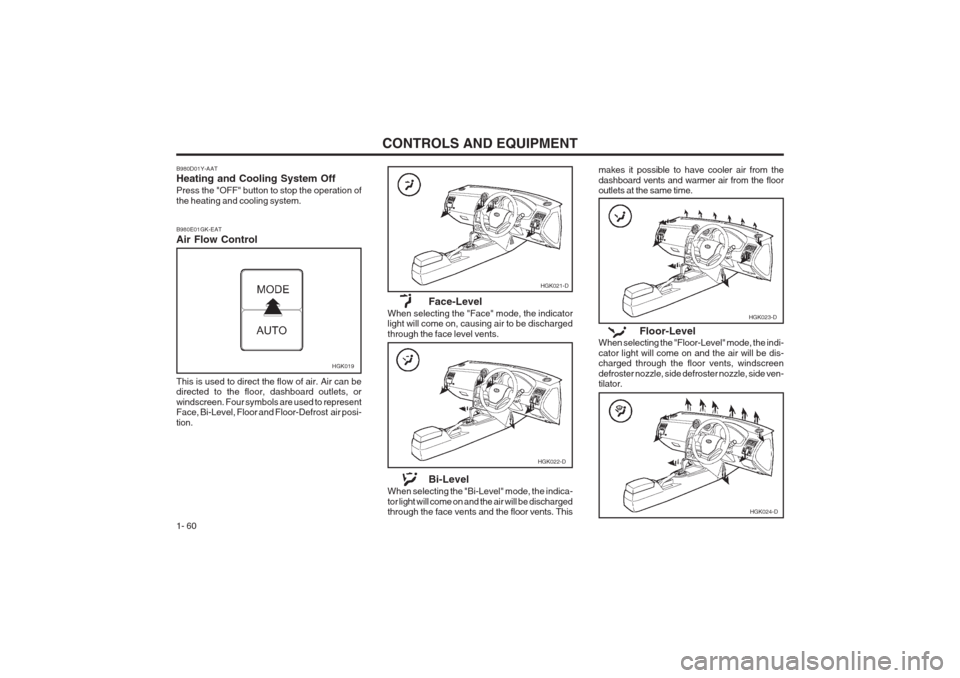
This is used to direct the flow of air. Air can be directed to the floor, dashboard outlets, or windscreen. Four symbols are used to represent Face, Bi-Level, Floor and Floor-Defrost air posi- tion.
B980D01Y-AAT Heating and Cooling System Off Press the "OFF" button to stop the operation of the heating and cooling system. B980E01GK-EAT Air Flow Control
HGK019
HGK021-D
HGK022-D
Face-Level
When selecting the "Face" mode, the indicator light will come on, causing air to be discharged through the face level vents.
Bi-Level
When selecting the "Bi-Level" mode, the indica-tor light will come on and the air will be discharged
through the face vents and the floor vents. Thismakes it possible to have cooler air from the dashboard vents and warmer air from the floor outlets at the same time.
Floor-Level
When selecting the "Floor-Level" mode, the indi- cator light will come on and the air will be dis- charged through the floor vents, windscreen defroster nozzle, side defroster nozzle, side ven- tilator.
HGK023-D
HGK024-D
Page 85 of 140
DRIVING YOUR HYUNDAI 2- 11
o Remember, your car does not require ex-
tended warm-up. As soon as the engine is running smoothly, you can drive away. In very cold weather, however, give your en- gine a slightly longer warm-up period.
o Don't "lug" or "over-rev" the engine. Lugging
is driving too slowly in too high a gearresulting in the engine bucking. If this hap- pens to you, shift to a lower gear. Over-revving is racing the engine beyond its safe limit. This can be avoided by shifting at the recommended speeds.
o Use your air conditioning sparingly. The air conditioning system is operated by the en-gine power so your fuel economy is reduced when you use it.
SC160A1-F SMOOTH CORNERINGAvoid braking or gear changing in corners, especially when roads are wet. Ideally, corners should always be taken under gentle accelera- tion. If you follow these suggestions, tire wear will be held to a minimum. SC170A1-E WINTER MOTORINGThe onset of winter conditions subject motor vehicles to greater operating demands. There- fore, the following suggestions will assist in maintaining peak performance and reliability during these periods: ZC170B1-E Electrical SystemWinter conditions impose severe demands upon vehicle electrical systems, particularly the charg- ing circuit. The battery condition and perfor- mance along with the alternator performance and drive belt condition should be checked prior to the onset of winter. ZC170C1-E Anti-freeze/Corrosion inhibitorThe cooling system must always contain an Ethylene-Glycol based anti-freeze solution. The system is filled during manufacture with solu- tion of the correct strength which should be checked before the onset of winter and adjust- ed or changed as required. NOTE: The anti-freeze solution contains a corro- sion inhibitor to prevent degradation of the aluminum castings contained within the engine. Therefore, never, drain the system and refill with water only. In addition, anti-freeze solution must ALWAYS be used in vehicles fitted with air conditioning, to prevent the heater matrix from freezing and subsequently bursting with the refrigeration sys- tem in use.
ZC170D1-E Door LocksShould the door lock mechanism become fro- zen, a proprietary lock de-icer should be used. Alternatively, warming the door key may thaw the door lock. However, the key should be handled carefully to avoid burning the fingers. Never attempt to thaw a frozen door lock using hot water, since the water will eventually freeze and compound the problem. NOTE: The proper temperature for using the immo-bilizer key is from -40°F (-40°C) to 176°F (80°C). If you heat the immobilizer key over 176°F (80°C) to open the frozen lock, it may cause damage to the transponder in its head. SC170E1-E Windscreen Washers and WipersThe windscreen washer bottle should be filled with a solution of water and a proprietary winter screen wash additive. The windscreen wipers should not be used if the blades are frozen to the windscreen or if they are covered with snow, before this is removed. NOTE: Never allow undiluted screen washer fluid additive to spill upon the paintwork or use engine coolant anti-freeze since damage to the paintwork may result.