radio Hyundai Coupe 2004 User Guide
[x] Cancel search | Manufacturer: HYUNDAI, Model Year: 2004, Model line: Coupe, Model: Hyundai Coupe 2004Pages: 389, PDF Size: 10.22 MB
Page 90 of 389

FEATURES OF YOUR HYUNDAI
1- 82
6.Adjust Treble Press
button and then multifunction button
(2) "-" or "+". TREB and the set value are dis- played. Set the desired treble via both buttons. Center setting: Press both buttons simulta- neously.
7. Adjust Balance Press
button and then multifunction button (3)
" " or " ". BAL and the set value are displayed. Set the desired balance via both buttons. Center setting: Press both buttons simulta- neously.
8. Fader Press
button and then multifunction button (4)
" " or " ". FAD and the set value are displayed. Set the desired fade level via both buttons. Center setting: Press both buttons simulta- neously.
9. Loudness On / Off Press
button and then multifunction button (5)
"LD". LOUD ON or LOUD OFF are displayed. The loudness can be switched on or off alter-nately by pressing the multifunction button.
10.Linear Adjustment It controls the amplification ratio from high to low tone. Activate tone menu. Then again press andhold button
for more than 2 seconds. The
tone values for the set signal source (e.g. radio/ FM) are set to an average value FM LINEAR.Press and hold
button for more than 4 sec-
onds. All tone values for the signal sources radio and tape /CD are set to an average value ALLLINEAR. 11.Adjust Mono /Stereo Three different reception optimization setting can be set in order to suppress reception dependentinterference and reflections.Repeatedly press multifunction button (6) "ST" intone menu until the desired optimization is set. AUTO: Setting for normal operation - i.e., the unit switches from stereo to mono and back depend-ing upon reception location (provides the opti-mum setting for almost all reception areas). STEREO: Setting for unusual reception situa- tions - i.e. the unit is set permanently to stereo(e.g. for private radio stations in city areas) MONO: Setting for reception conditions in which reflections constantly occur - i.e., the unit is setconstantly to mono.The setting is effective immediately after press-ing the multifunction button "ST" and is alsoretained on switching off.
B260D01GK-GAT RADIO OPERATION
1. Select operating Mode Press
Button. The operating mode. Radio,
CD can be selected. The last selected operating mode is selectedafter the button is pressed for the first time. If theother operating modes are to be selected, pressthe
button quickly and repeatedly until the
desired operating mode is selected.
2. Select Waveband Press
button repeatedly until desired
waveband FM 1, FM 2 or AM is selected. When changing the waveband, the last selected stationis selected.
3. Switch on radio menu mode Press
button. The radio menu mode is
switched on and displayed, The unit switches back to the normal display if no buttons arepressed within the next 8 seconds.
4. Radio Operation Setting procedures for station selection. The desired broadcasting station can be se-lected via station search, manual tuning,autostore, direct frequency input and stationbuttons.
Page 91 of 389

FEATURES OF YOUR HYUNDAI 1- 83
5. FM, AM station search Turn the right rotary control to the left/right in desired waveband. The radio searches in de-scending/ascending order.
6. Scan search In the desired waveband (FM or AM) press the right rotary control, SC is displayed. An auto-matic station search is started. The first search isperformed on an insensitive plane, all furthersearches on a sensitive plane. Receivable sta-tions can be heard for 8 seconds. Press the rightrotary control if the received program should beretained.
7. Direct frequency input Select radio menu mode and then, within 8 sec- onds, enter the frequency using the multifunctionbuttons. 8. FM /AM station - retrieve/store Store: 10 frequencies or programs can be stored respectively on each of wavebands FM 1, FM 2and AM.Press multifunction button for 2 - 4 seconds inorder to store the desired station or program. Retrieve: press multifunction button "1-0". The stored station is requested.The frequency is displayed if the station cannotbe identified.
9.AM / FM autostore Select desired wave band. Select radio menu mode by pressing
button. Then Press multi-
function button "AS" repeatedly until AS-SEEK is displayed. The 10 stations with the best recep-tion are stored under the station buttons in orderof quality. The auto store plane is identified on thedisplay by AS. Select radio menu mode in orderto quit the autostore storage plane. Then pressmultifunction button "AS". The radio switchesback to the station button plane. 10.Manual tuning Select radio menu and the turn the right rotary control.Turning steps of 100 kHz (FM) or 9 kHz (AM) areperformer.Pressing the right rotary control switches to finetuning (1 kHz steps) for AM. The function is quitif there is no further actuation within 10 seconds.
B260B04GK
B260E01GK-GAT CD OPERATION 1.CDs - insert / eject Press
button briefly; the display folds down-
wards and the CD slot with the printed side upwards. The unit pulls in the CD automaticallyand begins to play the disc from the first track.Then fold the display up again. After playing thelast track, the unit automatically begins to playthe first track of the CD again. If there is alreadya CD in the CD slot, press
button repeatedly
until CD appears on the display. In order to eject a CD, press
button briefly; the display folds
downward and the CD is ejected. Then remove the CD. Then fold the display up again. NOTE: The CD is not ejected when the unit is switchedoff but remains in the CD slot.
2. Track skip - forwards / reverse Turn right rotary control to right/left. If the track has been playing for longer than 10seconds when the return function is triggered, areturn to the beginning of the track takes place.Through further turning of the right rotary control,several tracks can be skipped over in forward orreverse directions. Skip returns to the first to thelast track.
Page 97 of 389

DRIVING YOUR HYUNDAI
2- 2 C040A01A-AAT KEY POSITIONS WARNING: The engine should not be turned off or thekey removed from the ignition key cylinderwhile the vehicle is in motion. The steeringwheel is locked by removing the key.
C020A01A-AAT BEFORE STARTING THE ENGINEBefore you start the engine, you should always:
1. Look around the vehicle to be sure there are
no flat tires, puddles of oil, water or other indications of possible trouble.
2. After entering the car, check to be sure the parking brake is engaged.
3. Check that all windows, and lights are clean.
4. Check that the interior and exterior mirrors are clean and in position.
5. Check your seat, seatback and headrest to be sure they are in their proper positions.
6. Close all the doors.
7. Fasten your seat belt and be sure that all other occupants have fastened theirs.
8. Turn off all lights and accessories that are not needed.
9. When you turn the ignition switch to "ON", check that all appropriate warning lights areoperating and that you have sufficient fuel.
10. Check the operation of warning lights and all bulbs when key is in the "ON" position. o To start the engine, insert the ignition key and
turn it to the "START" position. Release it assoon as the engine starts. Do not hold the keyin the "START" position for more than 15seconds.
NOTE:For safety, the engine will not start if the shiftlever is not in "P" or "N" Position (AutomaticTransaxle).
C030A01A-GAT COMBINATION IGNITION SWITCH To Start the Engine
o If your Hyundai is equipped with a manual transaxle, place the shift lever in neutral and depress the clutch pedal fully.
o If your Hyundai has an automatic transaxle, place the shift lever in "P" (park). o "START"The engine is started in this position. It will crankuntil you release the key. NOTE: Do not hold the key in the "START" positionfor more than 15 seconds.
o "ON" When the key is in the "ON" position, the ignition is on and all accessories may be turned on. If theengine is not running, the key should not be leftin the "ON" position. This will discharge thebattery and may also damage the ignition sys-tem.
o "ACC" With the key in the "ACC" position, some electri-cal accessories (radio, etc.) may be operated.
o "LOCK" The key can be removed or inserted in thisposition.To protect against theft, the steering wheel locksby removing the key. NOTE: To unlocking the steering wheel, insert thekey, and then turn the steering wheel and keysimultaneously.
C040A01E
LOCK
ACC
ON
START
Page 141 of 389

DO-IT-YOURSELF MAINTENANCE 6-9
G060A02Y-GAT
SPARK PLUGS
YN60100A
V6
Your engine was originally equipped with plati- num-tipped spark plugs. (For 2.7L only). Platinum-tipped spark plugs will last longer than conventional type spark plugs and can be iden-tified by blue lines on the ceramic shell. NOTE: Do not clean or regap platinum-tipped spark plugs. G060B01GK-GAT
Replacing the Spark Plugs
The spark plugs should be changed at the
intervals specified in the vehicle maintenanceschedule in Section 5 or whenever engine per-formance indicates they should be changed.Symptoms that suggest poor spark plug perfor-mance include engine misfiring under load, lossof fuel economy, poor acceleration, etc. Whenspark plugs are replaced, always use sparkplugs recommended by Hyundai. The use ofother spark plugs can result in loss of perfor-mance, radio interference or engine damage.
NOTE: When replacing the spark plugs, genuine
Hyundai replacement parts are recom- mended. Recommended Spark Plugs:
Type
RC10YC4(CHAMPION) BKR5ES-11(NGK) RC10PYPB4(CHAMPION) PFR5N-11(NGK) RC10YC(CHAMPION) BKR5ES(NGK) RC10YC(CHAMPION) BKR5ES(NGK) Remark
Unleaded
Leaded
1.6/2.0L 2.7L*
2.7L
1.6/2.0L
1.0~1.1 mm (0.039 ~ 0.043 in.)*0.7~0.8 mm (0.028 ~ 0.032 in.)*: leaded one DOHC1.0~1.1 mm (0.039 ~ 0.043 in.)
*0.7~0.8 mm (0.028 ~ 0.032 in.)
* Platinum coated. G060C02GK-GAT
Changing the Spark Plugs
You will find it easier to change spark plugs if
the engine is cold. Always change one spark plug at a time. This helps avoid getting the wiresmixed up.
1. Remove the engine rocker cover.
NOTE: It is recommended that the spark plugs for
2.7L Engines should be changed by an au- thorized Hyundai dealer.
2. Using a clean cloth, remove any dirt that has accumulated around the base of the spark plug so it cannot fall into the cylinder whenthe spark plug is removed.
3. To remove the spark plug cable, pull straight up on the insulated connector, not the cable.Pulling on the cable may damage the carboncore conductor.
HGK256
Page 150 of 389

DO-IT-YOURSELF MAINTENANCE
6-18 4. Replace the blown fuse by pressing a new
fuse of the same rating into place. The fuse should be a snug fit. If it is not, have the fuseclip repaired or replaced by a Hyundai dealer.If you do not have a spare fuse, you may beable to borrow a fuse of the same or lowerrating from an accessory you can tempo-rarily get along without (the radio or cigarettelighter, for example). Always remember toreplace the borrowed fuse.
AXA6201B
G200B02A-AAT
Replacing Accessory Fuse The fuse box for the lights and other electrical accessories will be found low on the dashboardon the driver's side. Inside the box you will find alist showing the circuits protected by each fuse. If any of your car's lights or other electrical
accessories stop working, a blown fuse couldbe the reason. If the fuse has burned out, youwill see that the metal strip inside the fuse hasburned through. If you suspect a blown fuse,follow this procedure:
1. Turn off the ignition and all other switches.
2. Open the fuse box and examine each fuse. Remove each fuse by pulling it toward you (a small "fuse puller" tool is contained in thefuse box to simplify this operation).
3. Be sure to check all other fuses even if you find one that appears to have burned out.
HGK185
G200A01A-AAT
CHECKING AND REPLACING FUSES Replacing a Fusible Link
A fusible link will melt if the electrical circuits
from the battery are ever overloaded, thus pre- venting damage to the entire wiring harness.(This could be caused by a short in the systemdrawing too much current.) If this ever happens,have a Hyundai dealer determine the cause,repair the system and replace the fusible link.The fusible links are located in a relay box foreasy inspection.
CAUTION: When replacing a fusible link, never use
anything but a new fusible link with the same or lower amperage rating. Never use apiece of wire or a higher-rated fusible link.This could result in serious damage andcreate a fire hazard.
AS60310A
Good
Bad
Page 167 of 389

INDEX
10-2
Driving
Economical driving ....................................................................... 2-11
Smooth cornering ......................................................................... 2-11
Winter driving ................................................................................ 2-11
E Emissions Control Systems ................................................................ 7-1
Engine Before starting the engine .............................................................. 2-2
Changing the oil and filter .............................................................. 6-6
Compartment .................................................................................. 6-1
Coolant ........................................................................................... 6-7
Coolant temperature gauge .......................................................... 1-29
If the engine overheats ................................................................... 3-2
Number ........................................................................................... 8-1
Oil .................................................................................................. 6-4 Oil consumption .............................................................................. 6-6
Starting ........................................................................................... 2-3
Engine Exhaust Can Be Dangerous ................................................... 2-1
FFog Li ght ........................................................................................... 1-43
Front Seats Adjustable front seats ..................................................................... 1-8
Adjustable headrests ...................................................................... 1-8Adjusting seat forward and rearward ............................................. 1-8
Adjusting seatback angle ...................... ......................................... 1-8
Lumbar support control ............... ................................................... 1-9
Seat cushion height adjustment ..................................................... 1-9
Seat warm er ................................................................................... 1-9
Fuel
Capacity .......................................................................................... 9-1
Gauge ........................................................................................... 1-28
Recommendations .......................................................................... 1-1 Fuel Filler Lid
Remote release ............................................................................ 1-45
Fuse Panel Description .......................................................... 6-23 ~ 6-24
Fuses ................................................................................................ 6-17
GGeneral Everyday Checks .................................................................. 6-4
Glove box .......................................................................................... 1-41
HHazard Warn ing System ................................................................... 1-36
Headlight Bulb ................................................................................... 6-20
Headlight Leveling Device System ................................................... 1-38
Heating and Cooling Control Rotary type ........................................................................ 1-51 ~ 1-56
Automatic type ................................................................... 1-57 ~ 1-62
High-mounted rear stoplight .............................................................. 1-44
Hood Release ................................................................................... 1-44
Horn ................................................................................................ 1-47
IIgnition Switch ..................................................................................... 2-2
Immobilizer System ............................................................................. 1-2
Infinity Sound System (B260) ........................................................... 1-80
Anti-Theft Device .......................................................................... 1-81
General operation ......................................................................... 1-81
Radio operation ............................................................................ 1-82
CD operation ................................................................................ 1-83
Instrument Cluster and Indicator ....................................................... 1-26
Instrument Panel Light Control (Rheostat) .......................................1-37
Instruments and Controls .................................................................. 1-25
Intermittent Wiper .............................................................................. 1-35
Page 168 of 389

INDEX10-3
R Rear Seats
Before Folding the Rear Seats ..................................................... 1-10
Fold down ..................................................................................... 1-10
Rear seat entry ............................................................................. 1-10
Rear Seat Pos itions ....................................................................... 1-9
Rear Window Defroster Switch ......................................................... 1-36
Rear Window Wiper and Switch .. ..................................................... 1-35
SSeat Belts 3-Point type .................................................................................. 1-13
Adjustable height .......................................................................... 1-13
Adjusting your seat belt ................................................................ 1-13
Care of seat belts ......................................................................... 1-12
Precautions ................................................................................... 1-11
Pre-tentioner Seat Belt ................................................................. 1-18
Spark Plugs ........................................................................................ 6-8
Spectacle Case ................................................................................. 1-40
Speedometer ..................................................................................... 1-30
Starting Procedures ............................................................................ 2-3Steering Wheel Free play ...................................................................................... 6-15
Tilt lever ........................................................................................ 1-47
Stereo Radio Operation (H250, H260) ....................................1-65, 1-72
Stereo Sound System ............................................................ 1-63 ~ 1-64Sun Visor .......................................................................................... 1-46
Sunroof .............................................................................................. 1-38
TTachometer ....................................................................................... 1-30
Tail Gate ........................................................................................... 1-45
TCS (Traction control system) .......................................................... 2-10
Theft Alarm System ............................................................................ 1-5
JJump Starting
...................................................................................... 3-1
K
Keys .................................................................................................. 1-2 If you lose your keys .................................................................... 3-10
Positions ......................................................................................... 2-2
L
Light Bulb Replacement .................................................................... 6-20
Lubrication Chart ................................................................................. 9-3
Luggage Net ...................................................................................... 1-47
M Maintenance Intervals Explanation of scheduled maintenance items ....................... 5-5 ~ 5-7
Maintenance under severe usage conditions ................................. 5-4
Scheduled maintenance ................................................................. 5-2
Service requirements ...................................................................... 5-1
Map Light .......................................................................................... 1-40
Mirros Day-night inside rearview ............................................................. 1-42
Outside rearview folding ............................................................... 1-42
Outsde rearview heating .............................................................. 1-41
Multi gauge ........................................................................................ 1-32
OOdometer .......................................................................................... 1-30
PParking Brake ................................................................................... 1-43
Power Steering Fluid Level ............................................................... 6-19
Page 174 of 389
SA040A1-ESA050A1-E
TWO WAY RADIO INSTALLATION
This vehicle is fitted with electronically controlled fuel injection or other micro processor controlled equipment. It is possible for incorrectly installed two way radio equipment including mobiletelephones to adversely affect these systems. Before radio equipment of this kind is installed, please contact your Hyundai dealer for recommendation regarding the suitability of the particular radio equipmentconcerned and the recommended method of installation and equipment location. Incorrectly installed or unsuitable equipment which gives rise to incorrect functioning of or damage to electronic vehicle components will not fall within the scope of thevehicle manufacturers warranty.
CAUTION: MODIFICATIONS TO ORIGINAL VEHICLE SPECIFICATION
Modification to the original vehicle specification may invalidate the manufacturers warranty and may adversely affect the safety and durability of the vehicle. Components which are subject to modification or are added to the original vehiclespecification without the express approval of the manufacturer and result in conse- quential loss or damage are not covered by the vehicle manufacturers warranty.!
Page 253 of 389
1
CONTROLS AND EQUIPMENT
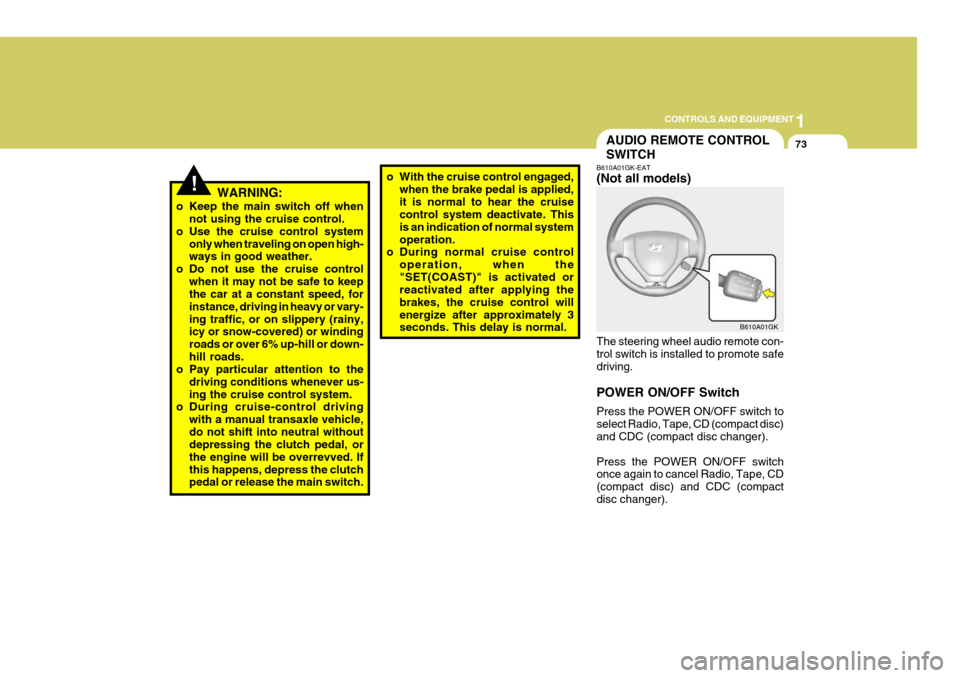
73AUDIO REMOTE CONTROL SWITCH
!WARNING:
o Keep the main switch off when not using the cruise control.
o Use the cruise control system only when traveling on open high- ways in good weather.
o Do not use the cruise control when it may not be safe to keepthe car at a constant speed, for instance, driving in heavy or vary-ing traffic, or on slippery (rainy, icy or snow-covered) or winding roads or over 6% up-hill or down-hill roads.
o Pay particular attention to the
driving conditions whenever us-ing the cruise control system.
o During cruise-control driving
with a manual transaxle vehicle,do not shift into neutral without depressing the clutch pedal, or the engine will be overrevved. Ifthis happens, depress the clutch pedal or release the main switch. o With the cruise control engaged,
when the brake pedal is applied, it is normal to hear the cruise control system deactivate. This is an indication of normal systemoperation.
o During normal cruise control
operation, when the"SET(COAST)" is activated or reactivated after applying the brakes, the cruise control willenergize after approximately 3 seconds. This delay is normal. B610A01GK-EAT (Not all models) The steering wheel audio remote con- trol switch is installed to promote safe driving. POWER ON/OFF Switch Press the POWER ON/OFF switch to select Radio, Tape, CD (compact disc) and CDC (compact disc changer). Press the POWER ON/OFF switch once again to cancel Radio, Tape, CD (compact disc) and CDC (compactdisc changer).B610A01GK
Page 254 of 389
1CONTROLS AND EQUIPMENT
74
SEEK (UP / ) Switch Press the SEEK UP ( ) switch 1 sec. or more.
1. RADIO mode When the SEEK UP ( ) switch is pressed, the unit will automatically tune to the next higher frequency.
2. TAPE mode Pressing the SEEK UP ( ) switch will play the beginning of the next music segment.
3. CD (compact disc)/CDC(compact disc changer) mode
Press the SEEK UP ( ) switch once to skip forward to the beginning of the next track.
VOL ( / ) Switch
o Press the VOL ( ) button to in- crease volume.
o Press the VOL ( ) button to de- cease volume.