auto ac Hyundai Coupe 2004 Owner's Guide
[x] Cancel search | Manufacturer: HYUNDAI, Model Year: 2004, Model line: Coupe, Model: Hyundai Coupe 2004Pages: 389, PDF Size: 10.22 MB
Page 65 of 389

FEATURES OF YOUR HYUNDAI 1- 57
B970C02E-GAT Automatic Operation
HGK020
The FATC (Full Automatic Temperature Control) system automatically controls heating and cool-ing as follows:
1. Push the "AUTO" switch. The indicator light will illuminate confirming that the Face, Floor and/or Bi-Level modes as well as the blowerspeed and, air conditioner will be controlledautomatically. 2. Push the "TEMP" button to set the desired
temperature.The temperature will increase to the maxi-mum 32°C(90°F) by pushing on the button.Each push of the button will cause the tem-perature to increase by 0.5°C(1°F).The temperature will decrease to the mini-mum 17°C(62°F) by pushing on the button.Each push of the button will cause the tem-perature to decrease by 0.5°C(1°F).
G280A01GK
Photo sensor
HGK014
NOTE: Never place anything over the sensor whichis located on the instrument panel to ensurebetter control of the heating and coolingsystem.
NOTE: If the battery has been discharged or discon-nected, the temperature mode will reset tocentigrade degrees.This is a normal condition and you can changethe temperature mode from centigrade tofarenheit as follows;Press the TEMP button down 3 seconds ormore with the button held down. Thedisplay shows that the unit of temperature isadjusted to centigrade or fahrenheit.(°C °F or °F °C)
OUTSIDETEMP
Page 66 of 389

FEATURES OF YOUR HYUNDAI
1- 58 B980B01Y-AAT Fan Speed Control Switch
HGK015
The fan speed can be set to the desired speed by pressing the appropriate fan speed control but-ton. The higher the fan speed is, the more air isdelivered. Pressing the "OFF" button turns offthe fan.
B980A01Y-AAT MANUAL OPERATION The heating and cooling system can be con- trolled manually as well by pushing buttons otherthan the "AUTO" button. In this state, the systemsequentially works according to the order ofbuttons selected.The function of the buttons which are not select-ed will be controlled automatically.Press the "AUTO" button in order to convert toautomatic control of the system.
Pressing the button displays the ambienttemperature on the display.
OUTSIDE
TEMP
B995A01Y-GAT AMBIENT TEMPERATURE SWITCH
HGK009
B670C01GK-AAT Air Intake Control Switch (Without A.Q.S)
HGK008-1
This is used to select fresh outside air or recircu- lation inside air.To change the air intake control mode, (Freshmode, Recirculation mode) push the control but-ton. FRESH MODE ( ) : The indicator light on the button goes on when the air intake control is infresh mode. RECIRCULATION MODE ( ) : The indica- tor light on the button is illuminated when the airintake control is in recirculation mode. With the "Fresh" mode selected, air enters the vehicle from the outside and is heated or cooledaccording to the function selected.
Page 67 of 389

FEATURES OF YOUR HYUNDAI 1- 59
Exhaust gas cutoff mode :
Air enters the vehicle from the outside. But if exhaust gas enters the vehicle from the outside, the exhaust gas cutoff mode ( ) is automa tically converted to the mode, to
prevent exhaust gas from entering the vehicle. NOTE:
o It should be noted that prolonged opera- tion of the heating system in recirculationmode ( ) will give rise to misting ofthe windshield and side windows and theair within the passenger compartment willbecome stale. In addition, prolonged useof the air conditioning with the recircula-
tion mode ( ) selected may result in the air within the passenger compartmentbecoming excessively dry.
o When the ignition switch is turned "ON" the air intake control will change to "Fresh" mode (regardless of the switch position).This is normal operation. The air intakecontrol operates in "AUTO" mode whenturning the ignition to the ON position ifthe "AUTO" mode was used before shut-ting off the engine.
CAUTION:If the windows fog up with the Recirculationor A.Q.S mode selected, set the air intakecontrol to the Fresh air position or A.Q.Scontrol to "OFF".
With the "Recirculation" mode selected, air from within the passenger compartment will be drawnthrough the heating system and heated or cooledaccording to the function selected. NOTE:
o It should be noted that prolonged opera- tion of the heating system in "recircula-tion" mode will give rise to fogging of thewindshield and side windows and the airwithin the passenger compartment willbecome stale. In addition, prolonged useof the air conditioning with the "Recircu-lation" mode selected may result in the airwithin the passenger compartment be-coming excessively dry.
o When the ignition switch is turned "ON" the air intake control will change to " "mode (regardless of switch position). Thisis normal operation. The air intake controloperates in "AUTO" mode when turningthe ignition to the ON position if the"AUTO" mode was used before shuttingoff the engine.
This is used to select fresh outside air or recircu- late inside air automatically.
: OFF
:ON Fresh mode :
Air enters the vehicle from the outside and is heated or cooled according to the function se- lected.
Recirculation mode :
Air from within the passenger compartment will be drawn through the heating system and heated or cooled according to the function selected.
B980C01GK-GAT Air Intake Control Switch (With A.Q.S) (If Installed)
HGK010-1
Page 69 of 389
FEATURES OF YOUR HYUNDAI 1- 61
B760A01E
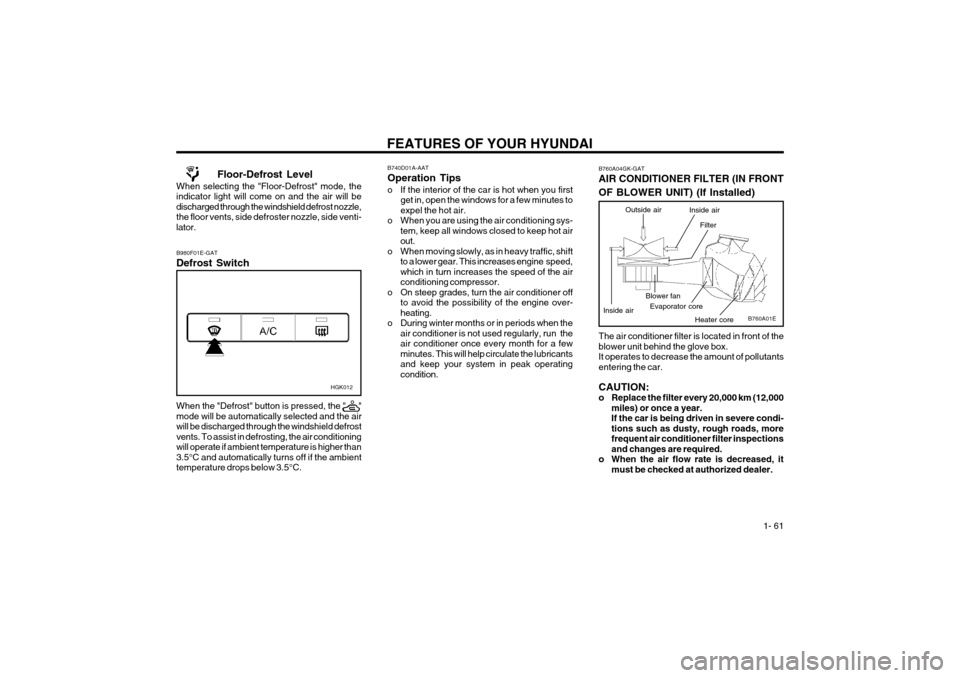
The air conditioner filter is located in front of the blower unit behind the glove box.It operates to decrease the amount of pollutantsentering the car. CAUTION:
o Replace the filter every 20,000 km (12,000miles) or once a year.If the car is being driven in severe condi-tions such as dusty, rough roads, morefrequent air conditioner filter inspectionsand changes are required.
o When the air flow rate is decreased, it must be checked at authorized dealer.
Evaporator coreBlower fan
Heater core
B760A04GK-GAT AIR CONDITIONER FILTER (IN FRONT OF BLOWER UNIT) (If Installed)
Outside air
Filter
Inside air
Inside air
Floor-Defrost Level
When selecting the "Floor-Defrost" mode, the indicator light will come on and the air will bedischarged through the windshield defrost nozzle,the floor vents, side defroster nozzle, side venti-lator. B980F01E-GAT Defrost Switch When the "Defrost" button is pressed, the " " mode will be automatically selected and the airwill be discharged through the windshield defrostvents. To assist in defrosting, the air conditioningwill operate if ambient temperature is higher than3.5°C and automatically turns off if the ambienttemperature drops below 3.5°C.
HGK012
B740D01A-AAT Operation Tips
o If the interior of the car is hot when you first get in, open the windows for a few minutes to expel the hot air.
o When you are using the air conditioning sys- tem, keep all windows closed to keep hot airout.
o When moving slowly, as in heavy traffic, shift to a lower gear. This increases engine speed,which in turn increases the speed of the airconditioning compressor.
o On steep grades, turn the air conditioner off to avoid the possibility of the engine over-heating.
o During winter months or in periods when the air conditioner is not used regularly, run theair conditioner once every month for a fewminutes. This will help circulate the lubricantsand keep your system in peak operatingcondition.
Page 73 of 389

FEATURES OF YOUR HYUNDAI 1- 65
FAD (Fader Control) Knob Pull the treble control knob further out. Turn the control knob counterclockwise to em-
phasize front speaker sound (rear speaker
sound will be attenuated).When the control knob is turned clockwise, rear
speaker sound will be emphasized (front speaker
sound will be attenuated). 4. TUNE (Manual) Select Button Press the side or side to increase or to decrease the frequency. Press either buttonand hold down to continuously scroll. Releasebutton once the desired station is reached. SEEK Operation (Automatic Channel Selection) Press the TUNE select button 1 sec or
more.Releasing it will automatically tune to the
next available station with a beep sound.
When the side is pressed longer than 1
second, releasing will automatically tune to thenext higher frequency and when the side is
pressed longer than 1 second, releasing will
automatically tune to the next lower frequency. 5. BAND Selector
Pressing the button changes the AM, FM1 and FM2 bands. The mode selected is dis-played on LCD.
6. PRESET STATION SELECT Button
Six (6) stations for AM, FM1 and FM2 respec- tively can be preset in the electronic memorycircuit on this unit. HOW TO PRESET STATIONS Six AM and twelve FM stations may be pro- grammed into the memory of the radio. Then, bysimply pressing the band select button and/orone of the six station select buttons, you mayrecall any of these stations instantly. To pro-gram the stations, follow these steps:
o Press band selector to set the band for AM,
FM1, or FM2.
o Select the desired station to be stored by seek or manual tuning.
o Determine the preset station select button you wish to use to access that station.
o Press the station select button for more than two seconds. A select button indicator will show in the display indicating which selectbutton you have depressed. The frequencydisplay will flash after it has been stored into
the memory with a beep sound. You shouldthen release the button, and proceed toprogram the next desired station. A total of18 stations can be programmed by selectingone AM and two FM stations per button.
o When completed, any preset station may be recalled by selecting AM, FM1 or FM2 bandand the appropriate station button.
H240B02A-GAT
1. POWER ON-OFF Control KnobThe radio unit may be operated when the igni- tion key is in the "ACC" or "ON" position. Pressthe knob to switch the power on. The LCDshows the radio frequency in the radio mode orthe tape direction indicator in the tape mode. Toswitch the power off, press the knob again. VOLUME Control Rotate the knob clockwise to increase the vol- ume and turn the knob counterclockwise toreduce the volume. 2. BASS Control Knob Press to pop the knob out and turn to the left or right for the desired bass tone. BAL (Balance Control) Knob Pull the bass control knob further out. Turn the control knob clockwise to emphasize right
speaker sound (left speaker sound will be at-
tenuated).When the control knob is turned counterclock-wise, left speaker sound will be emphasized
(right speaker sound will be attenuated). 3. TREB (Treble Control) Knob Press to pop the knob out and turn to the left or right for the desired treble tone.
FM/AM
Page 75 of 389

FEATURES OF YOUR HYUNDAI 1- 67
H240C01O-GAT CASSETTE TAPE PLAYER OPERATION (H250) (If Installed) H250A01GK
3. TAPE PROGRAM Button
2. AUTO MUSIC SELECT Button
4. EJECT Button
1. FF/REW Button
6. TAPE SLOT
5. DOLBY SELECT Button
Page 76 of 389
FEATURES OF YOUR HYUNDAI
1- 68
H240A02O-AAT 1. FF/REW Button
o The FF (fast forward tape winding) starts when
the button is pressed during PLAY or REW.
o The PLAY starts when the button is press- ed again during FF.
o The REW (rewinding) starts when the bu- tton is pressed during PLAY or FF.
o The PLAY starts when the button is press- ed again during REW.
2. AUTO MUSIC SELECT Button Press the button to find the starting point of each song in a prerecorded music tape.The quiet space between songs (must have atleast a 4 sec. gap) can be identified by the AUTOMUSIC SELECT button.
o Pressing the button will play the beginn- ing of the next music segment.
o Pressing the button will start replay at the beginning of the music just listened to.
3. TAPE PROGRAM Button This allows you to play the reverse side of the tape by merely depressing the program button.An arrow will appear in the display to show tapedirection. NOTE:When tape operation is abnormal or ER8 faultcode is displayed, press the eject buttonmore than 5 seconds to reset the deck func-tion. 4. EJECT Button
o When the EJECT button is pressed with a
cassette loaded, the cassette will eject.
o When the EJECT button is pressed during FF/REW, the cassette will eject.
5. DOLBY SELECT ButtonIf you get background noise during PLAY, you can reduce this considerably by merely pressingDOLBY SELECT button.If you want to release, press the button again. CAUTION:
o Do not insert anything like coins into the player slot as damage to the unit mayoccur.
o Do not place beverages close to the audio system. The playback mechanism may bedamaged if you spill them.
o Do not impact on the audio system, or the playback mechanism could be damaged.
Page 77 of 389

FEATURES OF YOUR HYUNDAI 1- 69
H250A01GK
B250A01GK-GAT CD AUTO CHANGER (H250) (If Installed)
1. CD CHANGER Select Button
4. FF/REW Button
3. TRACK UP/DOWN
5. REPEAT Button
2. DISC Select Button
6. SCAN Button
Page 78 of 389
FEATURES OF YOUR HYUNDAI
1- 70
B260F02GK-AAT The CD auto changer is located in the right side of the quarter trim.
o To use the CD auto changer.
1. Open the sliding lid of the CD auto chang- er.
2. To eject the compact disc magazine, press the EJECT button located inside the CD auto changer.
3. Insert the discs into the magazine.
4. Push the magazine into the CD auto chang- er and close the sliding lid.
o The CD auto changer can be used when the ignition switch is in either the "ON" or "ACC"position.
1. CD Select Button When the CD changer magazine contains discs, press the "CDC" button and the CD changer canbe used even if the radio is being used. TheHyundai CD changer can hold up to eight discs.The disc number will be lit, and the track number,and elapsed time will be displayed. 2. DISC Select Button To select the CD you want, push " " to cha- nge the disc number. o This unit is made of precision parts. Do
not attempt to disassemble or adjust anyparts.
o When driving your vehicle, be sure to keep the volume of the unit set low enough toallow you to hear sounds coming from theoutside.
CAUTION:
o Do not insert warped or poor quality discs into the CD changer as damage to the unitmay occur.
o Do not insert anything like coins into the player slot as damage to the unit mayoccur.
o Do not place beverages close to the audio system. The playback mechanism may bedamaged if you spill them.
o Do not impact on the audio system, or the playback mechanism could be damaged.
o Driving on the off-roads or other vibra- tions may skip your compact disc.Do not use the audio system on off-roadsas the discs could be scratched and dam-aged.
o Do not grip or pull out the disc with your hand while the disc is being pulled into theunit by the self loading mechanism. Thesecan cause poor disc scratching to occuror trouble in the compact disc changer.
o Avoid using CD-Recordable or CD- Rewritable as the player could not be op-erated in recording way of the CD maker.When using the compact disc player, genu-ine CDs are recommended.
TUNEDISC
3. TRACK UP/DOWN
o The desired track on the disc currently being
played can be selected using the track num- ber.
o Press once to skip forward to the begin- ning of the next track. Press once to skipback to the beginning of the track.
4. FF/REW ( / ) If you want to fast forward or reverse through the compact disc track, push and hold in FF ( )or REW ( ) button.When you release the button, the compact discplayer will resume playing. 5. REPEAT
o To repeat the track you are listening to, press the RPT button. To cancel , press again.
o If you do not release RPT operation when the track ends, it will automatically be replayed. This process will be continued until you pushthe button again.
6. SCAN Button
o Press the SCAN button to playback the first 10 seconds of each track.
o Press the SCAN button again within 10 sec. for the desired track.
NOTE:
o When replacing the fuse, replace it with a fuse having the correct capacity.
o This equipment is designed to be used only in a 12 volt DC battery system withnegative ground.
Page 80 of 389

FEATURES OF YOUR HYUNDAI
1- 72 3. BASS Control Knob Press to pop the knob out and turn to the left or right for the desired bass tone. TREB (Treble Control) Knob Pull the bass control knob further out. Turn to the left or right for the desired treble tone.
4. SCAN Button When the scan button is pressed, the frequency will increase and the receivable stations will betuned in one after another, receiving each stationfor 5 seconds. To stop scanning, press the scanbutton again. 5. TUNE (Manual) Select Button Press the ( ) side or ( ) side to increase or to decrease the frequency. Press either button andhold down to continuously scroll. Release buttononce the desired station is reached. SEEK Operation (Automatic Channel Selection) Press the TUNE select button for 1 sec or more. Releasing it will automatically tune to the nextavailable station with a beep sound.When the ( ) side is pressed longer than 1second, releasing will automatically tune to thenext higher frequency and when the ( ) side ispressed longer than 1 second, releasing willautomatically tune to the next lower frequency.
6. BAND Selector Pressing the button changes the AM, FM1 and FM2 bands. The mode selected is displayedon LCD. 7. PRESET STATION SELECT Button Six (6) stations for AM, FM1 or FM2 respectively can be preset in the electronic memory circuit onthis unit. HOW TO PRESET STATIONS Six AM and twelve FM stations may be pro- grammed into the memory of the radio. Then, bysimply pressing the band select button and/orone of the six station select buttons, you mayrecall any of these stations instantly. To programthe stations, follow these steps:
o Press band selector to set the band for AM,
FM1 or FM2.
o Select the desired station to be stored by seek, scan or manual tuning.
o Determine the preset station select button you wish to use to access that station.
o Press the station select button for more than two seconds. A select button indicator will show in the display indicating which selectbutton you have depressed. The frequencydisplay will flash after it has been stored intothe memory.
H260B02E-AAT
1. POWER ON-OFF Control KnobThe radio unit may be operated when the ignition key is in the "ACC" or "ON" position. Press theknob to switch the power on. The LCD shows theradio frequency in the radio mode or the CD trackindicator in either the CD mode or CD AUTOCHANGER mode. To switch the power off, pressthe knob again. VOLUME Control Rotate the knob clockwise to increase the vol- ume and turn the knob counterclockwise to re-duce the volume. BALANCE Control Pull and turn the control knob clockwise to em- phasize right speaker sound (left speaker soundwill be attenuated). When the control knob isturned counterclockwise, left speaker sound willbe emphasized (right speaker sound will beattenuated). 2. FAD (Fader Control) Knob Turn the control knob counterclockwise to em- phasize front speaker sound (rear speaker soundwill be attenuated). When the control knob isturned clockwise, rear speaker sound will beemphasized (front speaker sound will be attenu-ated).
FM/AM