lock Hyundai Coupe 2004 Owner's Guide
[x] Cancel search | Manufacturer: HYUNDAI, Model Year: 2004, Model line: Coupe, Model: Hyundai Coupe 2004Pages: 389, PDF Size: 10.22 MB
Page 48 of 389

FEATURES OF YOUR HYUNDAI
1- 40
3. Push and turn the wrench clockwise to close
or counterclockwise to open the sunroof. B480A01GK-GAT MAP LIGHT
HGK034
(1) Push in the map light switch to turn on the driver side light.
(2) In the "DOOR" position, the interior courtesy light comes on when any door is opened regardless of the ignition key position. Thelight goes out gradually 6 seconds after thedoor is closed.
(3) Push in the map light switch to turn on the passenger side light. B491A01F-GAT SPECTACLE CASE (If Installed)HGK036
The spectacle case is located on the front over- head console.Push the end of the cover to open the spectaclecase. WARNING: Do not open the spectacle case while thevehicle is moving. The rear view mirror of thevehicle can be blocked by an open spectaclecase.(1) (2) (3)
B460E02GK-GAT Resetting the Sunroof SystemIf the battery has been recharged, disconnected or if the sunroof is operated with the hexagonalhead wrench manually, you may need to resetthe sunroof. To do this;
1. Turn the ignition switch "OFF".
2. With pressing "open" "up" button at the same
time, turn the ignition switch "ON". The resetting is failed when the ignition key to the "OFF" within 1.5 seconds.
3. If the sunroof is set like this, the sunroof is reset with tilting up/down automatically oncefor all.
CAUTION:If the sunroof is not reset, it may not beoperated properly.
Page 52 of 389

FEATURES OF YOUR HYUNDAI
1- 44 B620A01S-AAT FRONT DOOR EDGE WARNING LIGHT A red light comes on when the front door is opened. The purpose of this light is to assist when you get in or out and also to warn passingvehicles.
B620A01GK2. Press the secondary latch lever up and lift the
hood.
3. Raise the hood by hand. When closing the hood, slowly close the hood and make sure it locks into place. WARNING:
o Always double check to be sure that the hood is firmly latched before driving away.If it is not latched, the hood could openwhile the vehicle is being driven, causinga total loss of visibility, which might resultin an accident.
o Do not move the vehicle with the hood in the raised position, as vision is obstructedand the hood could fall or be damaged.
B570A01GK-GAT HOOD RELEASE 1. Pull the release knob to unlatch the hood.
HGK106Hood Release Lever
HGK098
B550A01S-GAT HIGH-MOUNTED REAR STOP LIGHT In addition to the lower-mounted rear stoplights on either side of the car, the high mounted rearstoplight in the center of the rear window orinserted in the rear spoiler also lights when thebrakes are applied.
B550A01GK
A Type B Type C Type
Page 53 of 389

FEATURES OF YOUR HYUNDAI 1- 45
B540A01F-AAT TAIL GATE Remote Tail Gate Release To open the tail gate without using the key, pull up
the lid release lever located on the driver's doorpanel.To close, lower the tail gate, then press down on
it until it locks. To be sure the tail gate is securelyfastened, always try to pull it up again. WARNING: The tail gate should always be kept complete-ly closed while the vehicle is in motion. If it isleft open or ajar, poisonous exhaust gasesmay enter the car resulting in serious illnessor death to the occupants. See additionalwarnings concerning exhaust gases on page2-1.
HGK124
WARNING: Gasoline vapors are dangerous. Before refu-
eling, always stop the engine and never allowsparks or open flames near the filler area. Ifyou need to replace the filler cap, use agenuine Hyundai replacement part.If you open the fuel filler cap during highambient temperatures, a slight "pressuresound" may be heard. This is normal and nota cause for concern.Whenever you open the fuel filler cap, turn itslowly.
HGK103
B560A01A-AAT REMOTE FUEL-FILLER LID RELEASE The fuel-filler lid may be opened from inside the vehicle by pulling up on the fuel-filler lid opener
located on the front floor area on the left side ofthe car. NOTE: If the fuel-filler lid will not open because ice
has formed around it, tap lightly or push onthe lid to break the ice and release the lid. Donot pry on the lid. If necessary, spray aroundthe lid with an approved de-icer fluid (do notuse radiator anti-freeze) or move the vehicleto a warm place and allow the ice to melt.
HGK105
Page 54 of 389
FEATURES OF YOUR HYUNDAI
1- 46
B580A02A-AAT SUN VISOR
HGK145
Vanity mirror
Your Hyundai is equipped with sun visors to give the driver and front passenger either frontal orsideward shade. To reduce glare or to shut outdirect rays of the sun, turn the sun visor down. Avanity mirror is provided on the back of the sunvisor for the front passenger. NOTE: The Supplemental Restraint System (SRS)label containing useful information can befound on the back of each sun visor. WARNING: Do not place the sun visor in such a mannerthat it obscures visibility of the roadway,traffic or other objects.
HGK227
WARNING:
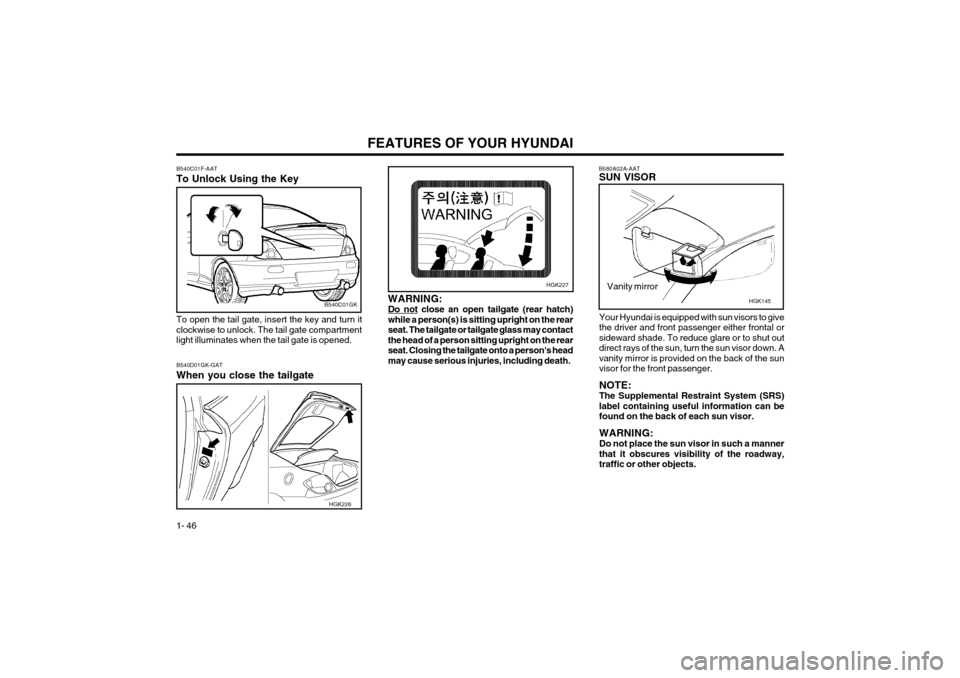
Do not close an open tailgate (rear hatch)
while a person(s) is sitting upright on the rearseat. The tailgate or tailgate glass may contactthe head of a person sitting upright on the rearseat. Closing the tailgate onto a person's headmay cause serious injuries, including death.
B540C01F-AAT To Unlock Using the Key To open the tail gate, insert the key and turn it clockwise to unlock. The tail gate compartmentlight illuminates when the tail gate is opened.
B540C01GK
B540D01GK-GAT When you close the tailgate
HGK226
Page 55 of 389

FEATURES OF YOUR HYUNDAI 1- 47
B610A01S-GAT HORN
HGK141
Press the pad on the steering wheel to sound the horn.
Working Zone
B540D02HP-DAT LUGGAGE NET (If Installed) Some objects can be kept in the net of the luggage compartment.Use the luggage net on the floor or at the back ofthe luggage compartment to prevent objectsfrom sliding. CAUTION: To prevent damage to the goods or the ve-hicle, care should be taken when carryingfragile or bulky objects in the luggage com-partment. WARNING: Avoid eye injury. DO NOT overstretch. AL-WAYS keep face and body out of recoil path.DO NOT use when strap has visible signs ofwear or damage.B600A01HP-AAT STEERING WHEEL TILT LEVER (If installed) To adjust the steering wheel:
1. Pull the lever toward you and hold it to unlock.
2. Raise or lower the steering wheel to the desired position.
3. After adjustment, release the lever. WARNING: Do not attempt to adjust the steering wheelwhile driving as this may result in loss ofcontrol of the vehicle and serious injury ordeath.
HGK127
HGK241
A Type
B Type
Page 62 of 389

FEATURES OF YOUR HYUNDAI
1- 54
B690A02S-AAT HEATING CONTROLSFor normal heating operation, set the air intake control to the "Fresh" position and the air flowcontrol to "Floor". For faster heating, the air intake control should be in the "Recirculation" position. If the windows fog up, move the air flow control to the "Def" (defroster) position. (The A/C will turnon automatically and "Fresh" mode will be acti-vated.) For maximum heat, move the temperature con- trol to "Warm".
B730A01FC-AAT Operation Tips
o To keep dust or unpleasant fumes from enter-
ing the car through the ventilation system, temporarily set the air intake control to "Recir-culation". Be sure to return the control to"Fresh" when the irritation has passed tokeep fresh air in the vehicle. This will helpkeep the driver alert and comfortable.
o Air for the heating/cooling system is drawn in through the grilles just ahead of the wind-shield. Care should be taken that these arenot blocked by leaves, snow, ice or otherobstructions.
o To prevent interior fog on the windshield, set the air intake control to the fresh air ( )position, turn on the air conditioning system,and adjust temperature control to desiredtemperature fan speed to the desired posi-tion.
o Set the temperature control to warm.
o Set the fan speed control to position "3" or "4". NOTE: When the A/C is operated continuously onthe floor-defrost level ( ) or defrost level( ), it may cause fog to form on the exteriorwindshield. If this occurs, set the air flowcontrol to the face level position ( ) and fanspeed control to the low position.
Use the heating/ventilation system to defrost ordefog the windshield: To remove interior fog on the wind- shield:
o Set the air flow control to the defrost (
)
position. (The A/C will turn on automatically and "Fresh" mode will be activated.)
o Set the temperature control to the desired position.
o Set the fan speed control between "1" and "4" position.
To remove frost or exterior fog on the windshield:
o Set the air flow control to the defrost (
)
position. (The A/C will turn on automatically and "Fresh" mode will be activated.)
B720A02FC-GAT DEFROSTING/DEFOGGING
HGK002
Page 71 of 389

FEATURES OF YOUR HYUNDAI 1- 63
SSAR014AB750B02Y-AAT Using a cellular phone or a two-way radio When a cellular phone is used inside the vehicle, noise may be produced from the audio equip-ment. This does not mean that something iswrong with the audio equipment. In such a case,use the cellular phone at a place as far aspossible from the audio equipment. CAUTION: When using a communication system such acellular phone or a radio set inside the vehi-cle, a separate external antenna must befitted. When a cellular phone or a radio set isused with an internal antenna alone, it mayinterfere with the vehicle's electrical systemand adversely affect safe operation of thevehicle. WARNING: Don't use a cellular phone when you aredriving. Stop at a safe place to use a cellularphone.SSAR013A
o Station Swapping - As an FM signal weak-ens, another more powerful signal near the same frequency may begin to play. This isbecause your radio is designed to lock ontothe clearest signal. If this occurs, selectanother station with a stronger signal.
o Multi-Path Cancellation - Radio signals being received from several directions can causedistortion or fluttering. This can be caused bya direct and reflected signal from the samestation, or by signals from two stations withclose frequencies. If this occurs, select an-other station until the condition has passed.
o Fading - As your car moves away from the
radio station, the signal will weaken and soundwill begin to fade. When this occurs, wesuggest that you select another stronger sta-tion.
o Flutter/Static - Weak FM signals or large obstructions between the transmitter and yourradio can disturb the signal causing static orfluttering noises to occur. Reducing the treblelevel may lessen this effect until the distur-bance clears.
Page 73 of 389

FEATURES OF YOUR HYUNDAI 1- 65
FAD (Fader Control) Knob Pull the treble control knob further out. Turn the control knob counterclockwise to em-
phasize front speaker sound (rear speaker
sound will be attenuated).When the control knob is turned clockwise, rear
speaker sound will be emphasized (front speaker
sound will be attenuated). 4. TUNE (Manual) Select Button Press the side or side to increase or to decrease the frequency. Press either buttonand hold down to continuously scroll. Releasebutton once the desired station is reached. SEEK Operation (Automatic Channel Selection) Press the TUNE select button 1 sec or
more.Releasing it will automatically tune to the
next available station with a beep sound.
When the side is pressed longer than 1
second, releasing will automatically tune to thenext higher frequency and when the side is
pressed longer than 1 second, releasing will
automatically tune to the next lower frequency. 5. BAND Selector
Pressing the button changes the AM, FM1 and FM2 bands. The mode selected is dis-played on LCD.
6. PRESET STATION SELECT Button
Six (6) stations for AM, FM1 and FM2 respec- tively can be preset in the electronic memorycircuit on this unit. HOW TO PRESET STATIONS Six AM and twelve FM stations may be pro- grammed into the memory of the radio. Then, bysimply pressing the band select button and/orone of the six station select buttons, you mayrecall any of these stations instantly. To pro-gram the stations, follow these steps:
o Press band selector to set the band for AM,
FM1, or FM2.
o Select the desired station to be stored by seek or manual tuning.
o Determine the preset station select button you wish to use to access that station.
o Press the station select button for more than two seconds. A select button indicator will show in the display indicating which selectbutton you have depressed. The frequencydisplay will flash after it has been stored into
the memory with a beep sound. You shouldthen release the button, and proceed toprogram the next desired station. A total of18 stations can be programmed by selectingone AM and two FM stations per button.
o When completed, any preset station may be recalled by selecting AM, FM1 or FM2 bandand the appropriate station button.
H240B02A-GAT
1. POWER ON-OFF Control KnobThe radio unit may be operated when the igni- tion key is in the "ACC" or "ON" position. Pressthe knob to switch the power on. The LCDshows the radio frequency in the radio mode orthe tape direction indicator in the tape mode. Toswitch the power off, press the knob again. VOLUME Control Rotate the knob clockwise to increase the vol- ume and turn the knob counterclockwise toreduce the volume. 2. BASS Control Knob Press to pop the knob out and turn to the left or right for the desired bass tone. BAL (Balance Control) Knob Pull the bass control knob further out. Turn the control knob clockwise to emphasize right
speaker sound (left speaker sound will be at-
tenuated).When the control knob is turned counterclock-wise, left speaker sound will be emphasized
(right speaker sound will be attenuated). 3. TREB (Treble Control) Knob Press to pop the knob out and turn to the left or right for the desired treble tone.
FM/AM
Page 80 of 389

FEATURES OF YOUR HYUNDAI
1- 72 3. BASS Control Knob Press to pop the knob out and turn to the left or right for the desired bass tone. TREB (Treble Control) Knob Pull the bass control knob further out. Turn to the left or right for the desired treble tone.
4. SCAN Button When the scan button is pressed, the frequency will increase and the receivable stations will betuned in one after another, receiving each stationfor 5 seconds. To stop scanning, press the scanbutton again. 5. TUNE (Manual) Select Button Press the ( ) side or ( ) side to increase or to decrease the frequency. Press either button andhold down to continuously scroll. Release buttononce the desired station is reached. SEEK Operation (Automatic Channel Selection) Press the TUNE select button for 1 sec or more. Releasing it will automatically tune to the nextavailable station with a beep sound.When the ( ) side is pressed longer than 1second, releasing will automatically tune to thenext higher frequency and when the ( ) side ispressed longer than 1 second, releasing willautomatically tune to the next lower frequency.
6. BAND Selector Pressing the button changes the AM, FM1 and FM2 bands. The mode selected is displayedon LCD. 7. PRESET STATION SELECT Button Six (6) stations for AM, FM1 or FM2 respectively can be preset in the electronic memory circuit onthis unit. HOW TO PRESET STATIONS Six AM and twelve FM stations may be pro- grammed into the memory of the radio. Then, bysimply pressing the band select button and/orone of the six station select buttons, you mayrecall any of these stations instantly. To programthe stations, follow these steps:
o Press band selector to set the band for AM,
FM1 or FM2.
o Select the desired station to be stored by seek, scan or manual tuning.
o Determine the preset station select button you wish to use to access that station.
o Press the station select button for more than two seconds. A select button indicator will show in the display indicating which selectbutton you have depressed. The frequencydisplay will flash after it has been stored intothe memory.
H260B02E-AAT
1. POWER ON-OFF Control KnobThe radio unit may be operated when the ignition key is in the "ACC" or "ON" position. Press theknob to switch the power on. The LCD shows theradio frequency in the radio mode or the CD trackindicator in either the CD mode or CD AUTOCHANGER mode. To switch the power off, pressthe knob again. VOLUME Control Rotate the knob clockwise to increase the vol- ume and turn the knob counterclockwise to re-duce the volume. BALANCE Control Pull and turn the control knob clockwise to em- phasize right speaker sound (left speaker soundwill be attenuated). When the control knob isturned counterclockwise, left speaker sound willbe emphasized (right speaker sound will beattenuated). 2. FAD (Fader Control) Knob Turn the control knob counterclockwise to em- phasize front speaker sound (rear speaker soundwill be attenuated). When the control knob isturned clockwise, rear speaker sound will beemphasized (front speaker sound will be attenu-ated).
FM/AM
Page 95 of 389

FEATURES OF YOUR HYUNDAI 1- 87
B870A01A-GAT ANTENNA Fixed Rod Antenna Your car uses a fixed rod antenna to receive both AM and FM broadcast signals.This antenna is a removable type. To remove theantenna, turn the antenna counterclockwise. Toinstall the antenna, turn the antenna clockwise. CAUTION: Be sure to remove the antenna before wash-ing the car in an automatic car wash or theantenna may be damaged.
B870A01F