radio Hyundai Coupe 2005 User Guide
[x] Cancel search | Manufacturer: HYUNDAI, Model Year: 2005, Model line: Coupe, Model: Hyundai Coupe 2005Pages: 478, PDF Size: 13.44 MB
Page 117 of 478
1
FEATURES OF YOUR HYUNDAI
103
!
7. PRESET STATION SELECT
Button
Six (6) stations for AM, FM1 or FM2 respectively can be preset in the elec-tronic memory circuit on this unit. HOW TO PRESET STATIONS Six AM and twelve FM stations may be programmed into the memory of the radio. Then, by simply pressing the band select button and/or one of the sixstation select buttons, you may recall any of these stations instantly. To pro- gram the stations, follow these steps:
o Press band selector to set the band for AM, FM1 or FM2.
o Select the desired station to be stored by seek, scan or manual tuning.
o Determine the preset station select button you wish to use to access that station. o Press the station select button for
more than two seconds. A select button indicator will show in the dis- play indicating which select button you have depressed. The frequencydisplay will flash after it has been stored into the memory. You should then release the button,and proceed to program the next desired station. A total of 18 stations can be programmed by selecting oneAM and two FM stations per button.
o When completed, any preset station
may be recalled by selecting AM,FM1 or FM2 band and the appropri- ate station button.
CAUTION:
o Do not place beverages close to the audio system. The audio sys-tem mechanism may be damaged if you spill them.
o Do not impact on the audio sys- tem, or the audio system mecha-nism could be damaged.
Page 119 of 478

1
FEATURES OF YOUR HYUNDAI
105
B260D02O-AAT
1. Playing CD
o Insert the CD with the label facing upward.
o Insert the CD to start CD playback, during radio operation.
o When a disc is in the CD deck, if you press the play button, the CD player will begin playing even if the radio is being used.
o The CD player can be used when the ignition switch is in either the "ON" or"ACC" position.
2. FF/REW ( / ) If you want to fast forward or reverse through the compact disc track, push and hold the FF ( ) or REW ( ) button.When you release the button, the com- pact disc player will resume playing.
3. TRACK UP/DOWN
o The desired track on the disc cur- rently being played can be selected using the track number.
o Press once to skip forward to the
beginning of the next track. Press once to skip back to the begin-
ning of the track.
4. SCAN Button
o Press the SCAN button to playback the first 10 seconds of each track.
o Press the SCAN button again within 10 sec. when you have reached the desired track.
5. REPEAT Button
o To repeat the track you are currently listening to, press the RPT button. To cancel , press again.
o If you do not release RPT operation
when the track ends, it will automati-cally be replayed. This process will be continued until you push the button again. 6. EJECT Button When the EJECT button is pressed with a CD loaded, the CD will eject. NOTE:
o If the CD does not operate prop-
erly or if the ER2 fault code is displayed, use one of two meth- ods to reset the CD deck function.
- Remove the audio fuse for 5 min-
utes. Then, reinstall the audio fuse.
- Diconnect the negative terminal of
the battery and wait 5 minutes. Then reconnect the negative bat- tery terminal.
o To assure proper operation of the unit, keep the vehicle interior tem-perature within a normal range by using the vehicle's air condition-ing or heating system.
o When replacing the fuse, replace
it with a fuse having the correctcapacity.
o The preset station frequencies are
all erased when the car battery isdisconnected. Therefore, all data will have to be set again if this should occur.
Page 122 of 478
1FEATURES OF YOUR HYUNDAI
108
B260F02GK-AAT The CD auto changer is located in the right side of the quarter trim.
o To use the CD auto changer.
1. Open the sliding lid of the CD autochanger.
2. To eject the compact disc maga- zine, press the EJECT button lo- cated inside the CD auto changer.
3. Insert the discs into the magazine.
4. Push the magazine into the CD auto changer and close the sliding lid.
o The CD auto changer can be used when the ignition switch is in either the "ON" or "ACC" position.
1. CD Select Button When the CD changer magazine con- tains discs, press the "CD" button and the CD changer can be used even if the radio is being used. The Hyundai CDchanger can hold up to eight discs. The disc number will be lit, and the track number, and elapsed time will be dis-played. 2. DISC Select Button To select the CD you want, push " " to change the disc number. 3. TRACK UP/DOWN
o The desired track on the disc cur-
rently being played can be selected using the track number.
o Press once to skip forward to the beginning of the next track. Press
once to skip back to the begin-
ning of the track.
4. FF/REW ( / ) If you want to fast forward or reverse through the compact disc track, push and hold in the FF ( ) or REW ( ) button.When you release the button, the com- pact disc player will resume playing. 5. REPEAT
o To repeat the track you are listening
to, press the RPT button. To cancel , press again.
o If you do not release RPT operation
when the track ends, it will automati-cally be replayed. This process will be continued until you push the button again.
6. SCAN Button
o Press the SCAN button to playback the first 10 seconds of each track.
o Press the SCAN button again within 10 sec. for the desired track.
NOTE:
o When replacing the fuse, replace it with a fuse having the correct capacity.
o This equipment is designed to be used only in a 12 volt DC batterysystem with negative ground.
o This unit is made of precision parts. Do not attempt to disas-semble or adjust any parts.
o When driving your vehicle, be sure
to keep the volume of the unit setlow enough to allow you to hear sounds coming from the outside.
TUNEDISC
Page 124 of 478
1FEATURES OF YOUR HYUNDAI
110
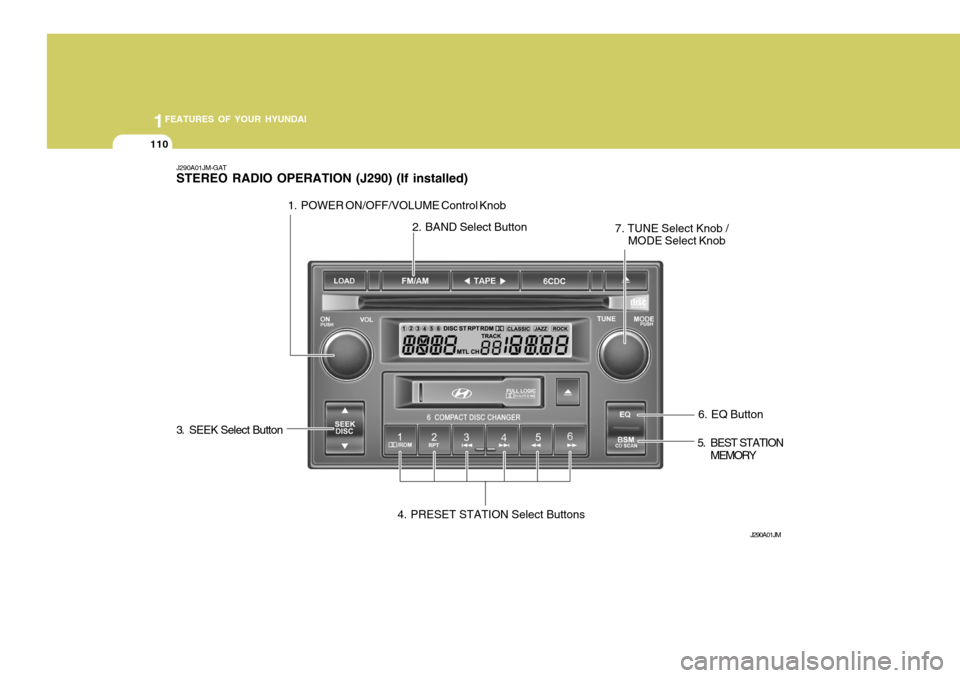
6. EQ Button
J290A01JM-GAT STEREO RADIO OPERATION (J290) (If installed)
J290A01JM
1. POWER ON/OFF/VOLUME Control Knob
2. BAND Select Button
3. SEEK Select Button 4. PRESET STATION Select Buttons 5. BEST STATION
MEMORY
7. TUNE Select Knob /
MODE Select Knob
Page 125 of 478

1
FEATURES OF YOUR HYUNDAI
111
J290B01JM-GAT
1. POWER ON-OFF/VOLUME Control Knob
The radio unit may be operated when the ignition key is in the "ACC" or "ON"position. Press the button to switch the power on. The display shows the radio frequency in the radio mode, the tapedirection indicator in the tape mode, or
CD track in the CD AUTO CHANGER mode. To switch the power off, pressthe button again. VOLUME Control Rotate the knob clockwise to increase the volume and turn the knob counter- clockwise to reduce the volume.
2. BAND Selector Pressing the button changes the AM, FM1 and FM2 bands. The mode se-lected is shown on the display. o Press AM/FM selector to set the
band for AM, FM1 and FM2.
o Select the desired station to be stored by seek, scan or manual tuning.
o Determine the preset station select
button you wish to use to access that station.
o Press the station select button for
more than two seconds. A selectbutton indicator will show in the dis- play indicating which select buttonyou have depressed. The frequency display will flash after it has been stored into the memory. You shouldthen release the button, and proceed to program the next desired station. A total of 18 stations can be pro-grammed by selecting one AM and two FM station per button.
o When completed, any preset station may be recalled by selecting AM,FM1 or FM2 band and the appropri- ate station button.
3. SEEK Select Button
(Automatic Channel Selection)
Press the SEEK select button 1 sec. or
more. When the ( ) side is pressed, theunit will automatically tune to the next
higher frequency and when the ( ) side
is pressed, it will automatically tune to the next lower frequency.
4. PRESET STATION Select
Buttons
Six (6) stations for AM, FM and FM2 respectively can be preset in the elec- tronic memory circuit. HOW TO PRESET STATIONS Six AM and twelve FM stations may be programmed into the memory of the radio. Then, by simply pressing the AM/ FM select button and/or one of the six station select buttons, you may recall any of these stations instantly. To pro-gram the stations, follow these steps:
Page 130 of 478
1FEATURES OF YOUR HYUNDAI
116
J290F01JM-GAT 1. LOAD Button This compact disc playing will accom- modate up to six discs. To insert one disc do the following:
1. Press and release the LOAD Button.
2. Green light on the both side of theslot will be illuminated and the will blink ten times on the display.
3. Load a disc while the is blinking.
Insert a disc partway into the slot,label side up. The player will pull the disc in.
NOTE:
o The disc can be only inserted while the is blinking.
o This CD player is suitable only for
12 cm discs, do not use irregular shaped CDs.
When the disc is inserted, the disc willbegin to play automatically. To insert multiple discs do the follow- ings:
1. Press and hold the LOAD button for
two seconds or more. You will then hear two beeps and the green light on the both side of the slot will be illuminated.
2. Load a disc while the is blinking. Insert a disc partway into the slot,label side up. The player will pull thedisc in. Once the disc is loaded, the num- bers of the vacant disc will blink onthe display continuously. If the next "DISC NO." is appeared on the dis- play with the both side of the slotilluminated, you can then load an- other disc.
3. Load the remaining disc by following the same procedures 1 and 2.When you finished loading 6 discs, the CD player will begin to play thelast CD loaded.
4. To load more than one disc but less
than six, complete Steps 1 and 2.When you have finished loading discs, press LOAD button to cancel the loading function or wait for 10seconds. The CD player will begin to play the last CD loaded. As each CD starts to play, the DISC number will appear on the display. NOTE: The disc player takes up to six discs. Do not try to load more than six.
2. Playing CD
o Press the 6CDC to start CD play-
back, during radio operation or cas- sette tape playing.
o When discs are in the CD deck, if you
press the 6CDC button the CD playerwill begin playing even if the radio or cassette player is being used.
o The CD player can be used when the ignition switch is in either the "ON" or"ACC" position.
3. EJECT Button
o When the EJECT button is pressed with a CD loaded, the CD will eject.
o To eject all of the discs, press this button for 2 seconds or more.
Page 136 of 478
1FEATURES OF YOUR HYUNDAI
122
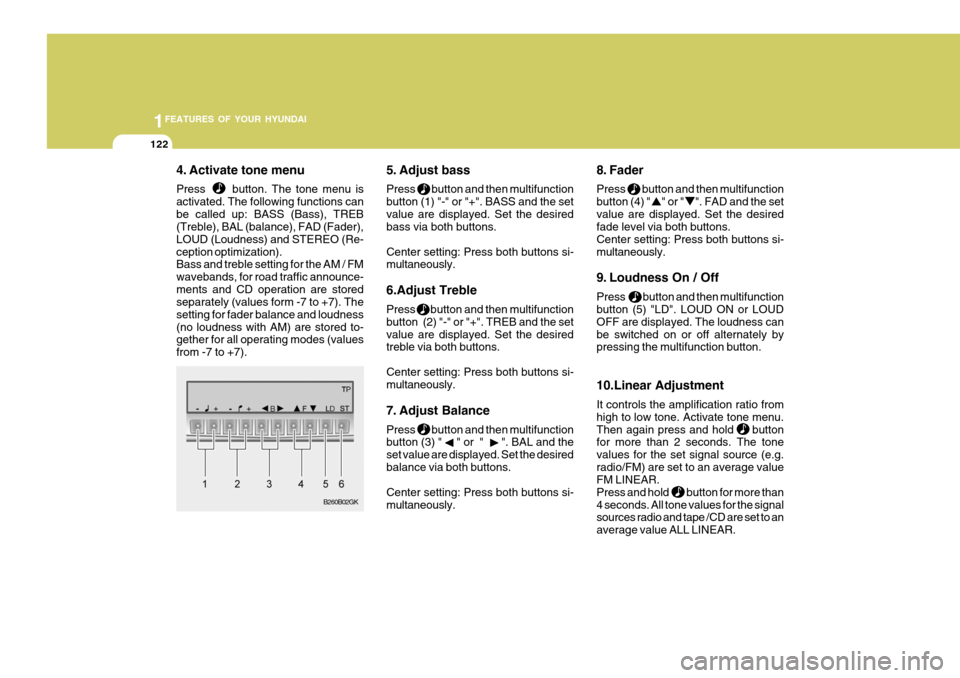
4. Activate tone menu Press button. The tone menu is activated. The following functions canbe called up: BASS (Bass), TREB (Treble), BAL (balance), FAD (Fader), LOUD (Loudness) and STEREO (Re-ception optimization). Bass and treble setting for the AM / FM wavebands, for road traffic announce-ments and CD operation are stored separately (values form -7 to +7). The setting for fader balance and loudness(no loudness with AM) are stored to- gether for all operating modes (values from -7 to +7). 5. Adjust bass Press button and then multifunction button (1) "-" or "+". BASS and the setvalue are displayed. Set the desired bass via both buttons. Center setting: Press both buttons si- multaneously. 6.Adjust Treble Press button and then multifunction button (2) "-" or "+". TREB and the setvalue are displayed. Set the desired treble via both buttons. Center setting: Press both buttons si- multaneously.
7. Adjust Balance Press button and then multifunction button (3) " " or " ". BAL and the set value are displayed. Set the desiredbalance via both buttons. Center setting: Press both buttons si- multaneously. 8. Fader Press button and then multifunction button (4) " " or " ". FAD and the setvalue are displayed. Set the desired fade level via both buttons. Center setting: Press both buttons si-multaneously.
9. Loudness On / Off Press button and then multifunction button (5) "LD". LOUD ON or LOUD OFF are displayed. The loudness canbe switched on or off alternately by pressing the multifunction button. 10.Linear Adjustment It controls the amplification ratio from high to low tone. Activate tone menu.Then again press and hold button for more than 2 seconds. The tone values for the set signal source (e.g.radio/FM) are set to an average value FM LINEAR. Press and hold button for more than4 seconds. All tone values for the signal sources radio and tape /CD are set to an average value ALL LINEAR.
B260B02GK
Page 137 of 478

1
FEATURES OF YOUR HYUNDAI
123
11.Adjust Mono /Stereo Three different reception optimization setting can be set in order to suppressreception dependent interference and reflections. Repeatedly press multifunction button(6) "ST" in tone menu until the desired optimization is set. AUTO: Setting for normal operation - i.e., the unit switches from stereo to mono and back depending upon recep-tion location (provides the optimum setting for almost all reception areas). STEREO: Setting for unusual recep- tion situations - i.e. the unit is set permanently to stereo (e.g. for privateradio stations in city areas) MONO: Setting for reception condi- tions in which reflections constantly occur - i.e., the unit is set constantly to mono.The setting is effective immediately after pressing the multifunction button "ST" and is also retained on switchingoff. B260D01GK-GAT Radio operation
1. Select operating Mode Press Button. The operating mode. Radio, CD can be selected. The last selected operating mode is selected after the button is pressed for
the first time. If
the other operating
modes are to be selected, press the
button quickly and repeatedly until
the desired operating mode is selected.
2. Select Waveband Press button repeatedly until desi- red waveband FM 1, FM 2 or AM is selected. When changing the waveband, the last selected station is selected.
3. Switch on radio menu mode Press button. The radio menu mode is switched on and displayed, The unit switches back to the normal display if no buttons are pressed within the next8 seconds. 4. Radio Operation Setting procedures for station selec- tion.The desired broadcasting station can be selected via station search, manual tuning, autostore, direct frequency in-put and station buttons.
5. FM, AM station search Turn the right rotary control to the left/ right in desired waveband. The radio searches in descending/ascending or-der.
6. Scan search In the desired waveband (FM or AM) press the right rotary control, SC is displayed. An automatic station search is started. The first search is performedon an insensitive plane, all further searches on a sensitive plane. Receiv- able stations can be heard for 8 sec-onds. Press the right rotary control if the received program should be re- tained.
Page 138 of 478
1FEATURES OF YOUR HYUNDAI
124
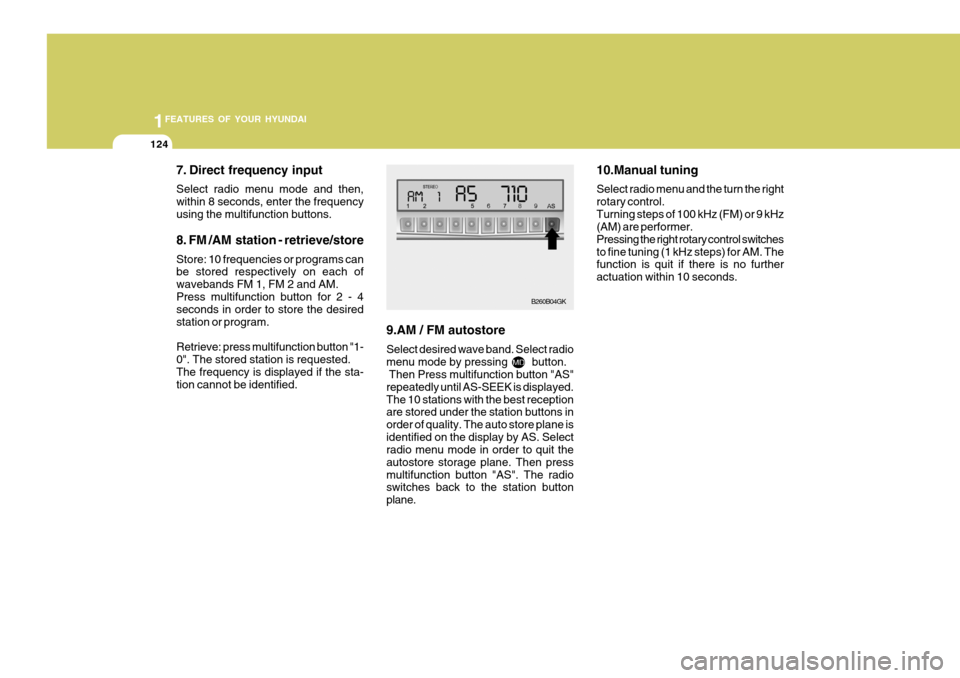
7. Direct frequency input Select radio menu mode and then, within 8 seconds, enter the frequencyusing the multifunction buttons. 8. FM /AM station - retrieve/store Store: 10 frequencies or programs can be stored respectively on each of wavebands FM 1, FM 2 and AM.Press multifunction button for 2 - 4 seconds in order to store the desired station or program. Retrieve: press multifunction button "1- 0". The stored station is requested.The frequency is displayed if the sta- tion cannot be identified. 9.AM / FM autostore Select desired wave band. Select radio menu mode by pressing button. Then Press multifunction button "AS" repeatedly until AS-SEEK is displayed.The 10 stations with the best reception are stored under the station buttons in order of quality. The auto store plane isidentified on the display by AS. Select radio menu mode in order to quit the autostore storage plane. Then pressmultifunction button "AS". The radio switches back to the station button plane. 10.Manual tuning Select radio menu and the turn the right rotary control.Turning steps of 100 kHz (FM) or 9 kHz (AM) are performer. Pressing the right rotary control switchesto fine tuning (1 kHz steps) for AM. The function is quit if there is no further actuation within 10 seconds.
B260B04GK
Page 147 of 478
2 DRIVING YOUR HYUNDAI
4
!
NOTE: Do not hold the key in the "START" position for more than 15 seconds.
o "ON" When the key is in the "ON" position, the ignition is on and all accessories may be turned on. If the engine is notrunning, the key should not be left in the "ON" position. This will discharge the battery and may also damage theignition system.
o "ACC" With the key in the "ACC" position, some electrical accessories (radio, etc.)may be operated.
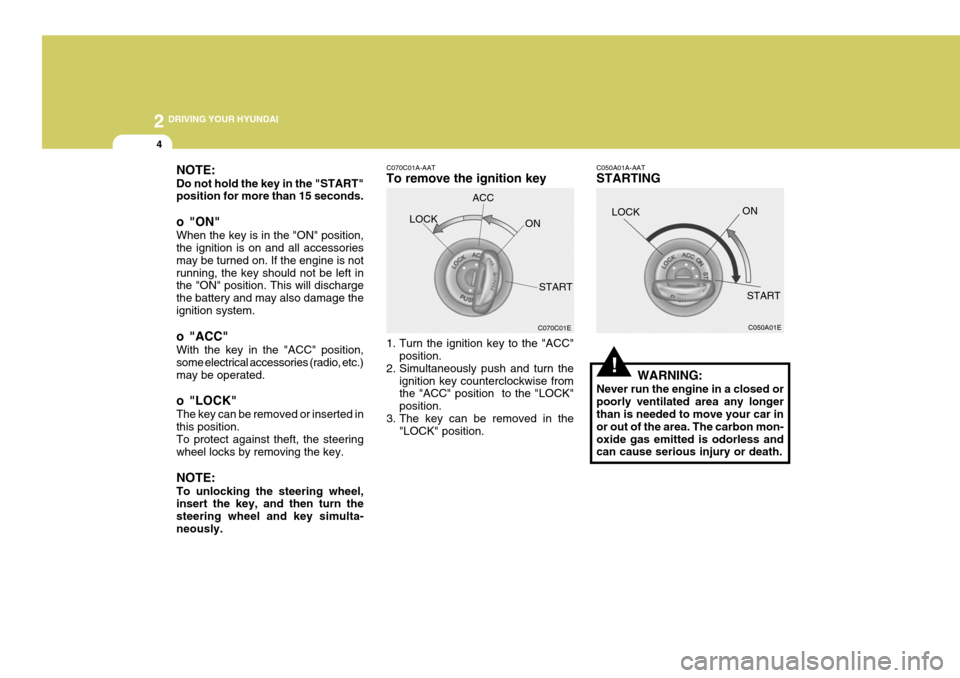
o "LOCK" The key can be removed or inserted in this position. To protect against theft, the steering wheel locks by removing the key. NOTE: To unlocking the steering wheel, insert the key, and then turn the steering wheel and key simulta-neously. C070C01A-AAT To remove the ignition key
1. Turn the ignition key to the "ACC"
position.
2. Simultaneously push and turn the
ignition key counterclockwise from the "ACC" position to the "LOCK" position.
3. The key can be removed in the "LOCK" position.LOCK
C050A01A-AAT STARTING
WARNING:
Never run the engine in a closed or poorly ventilated area any longer than is needed to move your car in or out of the area. The carbon mon-oxide gas emitted is odorless and can cause serious injury or death. LOCK
C070C01E
ACC
ON
START C050A01E
ON
START