radio Hyundai Coupe 2005 Owner's Guide
[x] Cancel search | Manufacturer: HYUNDAI, Model Year: 2005, Model line: Coupe, Model: Hyundai Coupe 2005Pages: 478, PDF Size: 13.44 MB
Page 224 of 478
6 DO-IT-YOURSELF MAINTENANCE
26
!
1. Turn off the ignition and all other
switches.
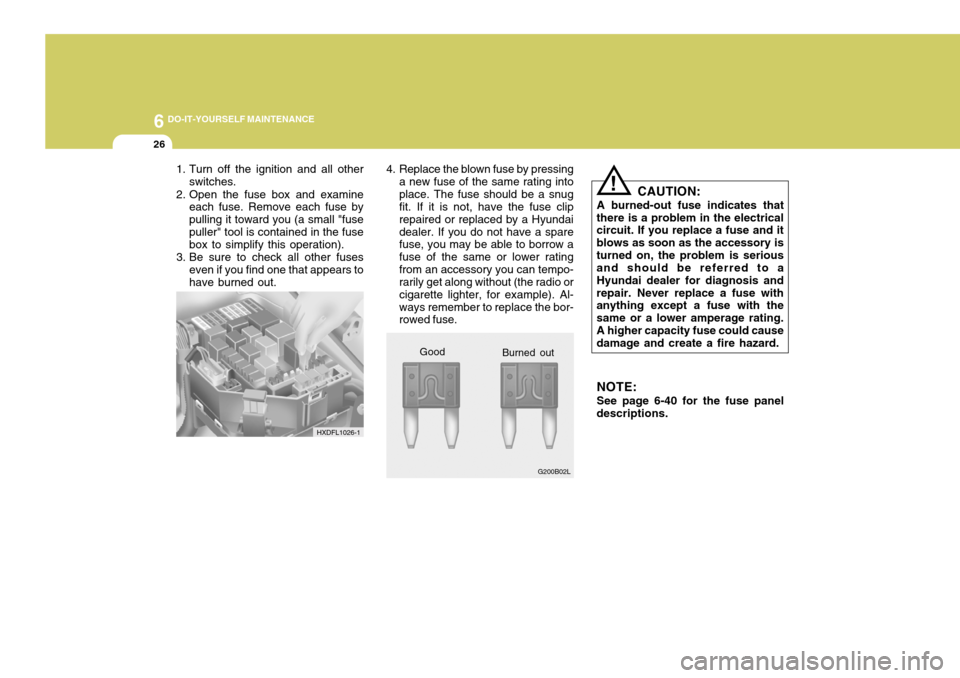
2. Open the fuse box and examine each fuse. Remove each fuse by pulling it toward you (a small "fusepuller" tool is contained in the fuse box to simplify this operation).
3. Be sure to check all other fuses even if you find one that appears to have burned out. 4. Replace the blown fuse by pressing
a new fuse of the same rating intoplace. The fuse should be a snug fit. If it is not, have the fuse clip repaired or replaced by a Hyundaidealer. If you do not have a spare fuse, you may be able to borrow a fuse of the same or lower ratingfrom an accessory you can tempo- rarily get along without (the radio or cigarette lighter, for example). Al-ways remember to replace the bor- rowed fuse. CAUTION:
A burned-out fuse indicates that
there is a problem in the electricalcircuit. If you replace a fuse and it blows as soon as the accessory isturned on, the problem is serious and should be referred to a Hyundai dealer for diagnosis andrepair. Never replace a fuse with anything except a fuse with the same or a lower amperage rating.A higher capacity fuse could cause damage and create a fire hazard.
NOTE: See page 6-40 for the fuse panel
descriptions.
Good
HXDFL1026-1
G200B02L
Burned out
Page 258 of 478

10INDEX
4
H Hazard Warning System ............................................. 1-57
Headlight Leveling Device S ystem .............................1-60
Heating and Air Conditioning Control Rotary type .............................................................. 1-78
Automatic type ........................................................ 1-86
High-mounted rear stoplight ........................................1-66
Hood Release ............................................................. 1-67
Horn 1-71 I Ignition Sw itch ............................................................. 2-4
Immobilizer S ystem ..................................................... 1-4
Infinity Sound System (B260) ................................. 1-120
Anti-Theft Devi ce ................................................. 1-121
General operation ................................................ 1-121
Radio opera tion.................................................... 1-123
CD operation ........................................................ 1-125
Instrument Cluster and Indicator Li ghts................... 1-40
Instrument Panel Light Control (Rheo stat)............... 1-58
Intermittent Wiper ..................................................... 1-55
JJump Starting .............................................................. 3-3 KKeys
............................................................................ 1-4
If you lose your keys .............................................. 3-13
Positions ................................................................... 2-3
L
Light Bulb Replacement .............................................. 6-31
Lubrication Chart .......................................................... 9-4
Luggage Net ............................................................... 1-72
M Maintenance Intervals Explanation of scheduled maintenance items
................................................................................. 5-7
Maintenance under severe usage conditions .......... 5-6Scheduled maintenance ........................................... 5-4
Service requ irements............................................... 5-2
Map Light .................................................................. 1-63
Mirros
Day-night inside rearview ....................................... 1-65
Outside rearview folding ......... ...............................1-65
Outsde rearview heating . .......................................1-65
Multi gauge ............................................................... 1-51
OOdometer .................................................................. 1-48
Page 259 of 478

10
INDEX
5
P Parking Brake ........................................................... 1-66
Power Steering Fluid Level ......................................... 6-29
RRear Seats Before Folding the Rear S eats ..............................1-18
Fold down .............................................................. 1-18
Rear seat entry ...................................................... 1-17
Rear Seat Pos itions............................................... 1-17
Rear Window Defroster Switch ................................ 1-57
Rear Window Wiper and Washer Switc h .................1-55
S Seat Belts 3-Point type ............................................................ 1-22
Adjustable height .................................................... 1-22
Adjusting your seat be lt .........................................1-23
Care of seat belts .................................................. 1-21
Precautions ............................................................ 1-19
Pre-tentioner Seat Belt ..................... ..................... 1-30
Spectacle Ca se .......................................................... 1-63
Speedometer .............................................................. 1-47
Starting Pr ocedures..................................................... 2-5
Steering Wheel
Free play ................................................................. 6-23
Tilt lever .................................................................. 1-71Stereo Radio Operation (H250, H260, J290)
.......................................................... 1-96, 1-101, 1-110
Stereo Sound System ................................................ 1-94
Sun Visor .................................................................... 1-70
Sunroof ....................................................................... 1-61
T Tachometer ............................................................... 1-47
Tail Gat e ................................................................... 1-69
Electronic Stability Program (ESP) ...........................2-14
Theft Alarm System .................................................... 1-9
Tires Balancing .................................................................. 8-5
Chains ...................................................................... 8-4
Changing a flat tire .................................................. 3-6
If you have a flat tire ............................................... 3-6
Information ............................................................... 8-3
Pressure ................................................................... 8-3
Replacement ............................................................ 8-6
Rotation .................................................................... 8-5
Snow tires ................................................................ 8-4
Spare tire ................................................................. 3-5
Traction .................................................................... 8-5
Towing Emergency ............................................................. 3-13
If your car must be towed .....................................3-11
Trailer or vehicle towing .................... ..................... 2-21
Page 265 of 478
SA040A1-ESA050A1-E
TWO WAY RADIO INSTALLATION
This vehicle is fitted with electronically controlled fuel injection or other micro processor controlled equipment. It is possible for incorrectly installed two way radio equipment including mobiletelephones to adversely affect these systems. Before radio equipment of this kind is installed, please contact your Hyundai authorised repairer for recommendation regarding the suitability of the particular radio equipmentconcerned and the recommended method of installation and equipment location. Incorrectly installed or unsuitable equipment which gives rise to incorrect functioning of or damage to electronic vehicle components will not fall within the scope of thevehicle manufacturers warranty.
CAUTION: MODIFICATIONS TO ORIGINAL VEHICLE SPECIFICATION
Modification to the original vehicle specification may invalidate the manufacturers warranty and may adversely affect the safety and durability of the vehicle. Components which are subject to modification or are added to the original vehiclespecification without the express approval of the manufacturer and result in conse- quential loss or damage are not covered by the vehicle manufacturers warranty.!
gkfluk-0.p65 11/21/2005, 3:03 PM
6
Page 344 of 478
1
CONTROLS AND EQUIPMENT
73AUDIO REMOTE CONTROL SWITCH
!WARNING:
o Keep the main switch off when not using the cruise control.
o Use the cruise control system only when traveling on open high- ways in good weather.
o Do not use the cruise control when it may not be safe to keepthe car at a constant speed, for instance, driving in heavy or vary-ing traffic, or on slippery (rainy, icy or snow-covered) or winding roads or over 6% up-hill or down-hill roads.
o Pay particular attention to the
driving conditions whenever us-ing the cruise control system.
o During cruise-control driving
with a manual transaxle vehicle,do not shift into neutral without depressing the clutch pedal, or the engine will be overrevved. Ifthis happens, depress the clutch pedal or release the main switch. o With the cruise control engaged,
when the brake pedal is applied, it is normal to hear the cruise control system deactivate. This is an indication of normal systemoperation.
o During normal cruise control
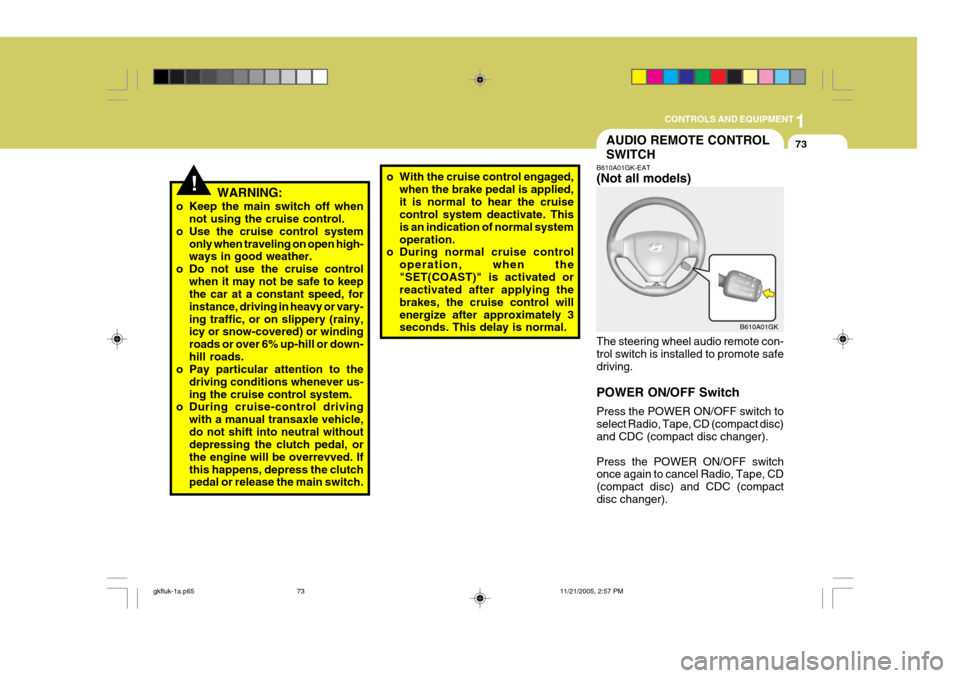
operation, when the"SET(COAST)" is activated or reactivated after applying the brakes, the cruise control willenergize after approximately 3 seconds. This delay is normal. B610A01GK-EAT (Not all models) The steering wheel audio remote con- trol switch is installed to promote safe driving. POWER ON/OFF Switch Press the POWER ON/OFF switch to select Radio, Tape, CD (compact disc) and CDC (compact disc changer). Press the POWER ON/OFF switch once again to cancel Radio, Tape, CD (compact disc) and CDC (compactdisc changer).B610A01GK
gkfluk-1a.p65
11/21/2005, 2:57 PM
73
Page 345 of 478
1CONTROLS AND EQUIPMENT
74
SEEK (UP / ) Switch Press the SEEK UP ( ) switch 1 sec. or more.
1. RADIO mode When the SEEK UP ( ) switch is pressed, the unit will automatically tune to the next higher frequency.
2. TAPE mode Pressing the SEEK UP ( ) switch will play the beginning of the next music segment.
3. CD (compact disc)/CDC(compact disc changer) mode
Press the SEEK UP ( ) switch once to skip forward to the beginning of the next track.
VOL ( / ) Switch
o Press the VOL ( ) button to in- crease volume.
o Press the VOL ( ) button to de- cease volume.
gkfluk-1a.p65 11/21/2005, 2:57 PM
74
Page 363 of 478
1FEATURES OF YOUR HYUNDAI
92STEREO SOUND SYSTEM
AM reception
Ionosphere
FM reception
B750A01L
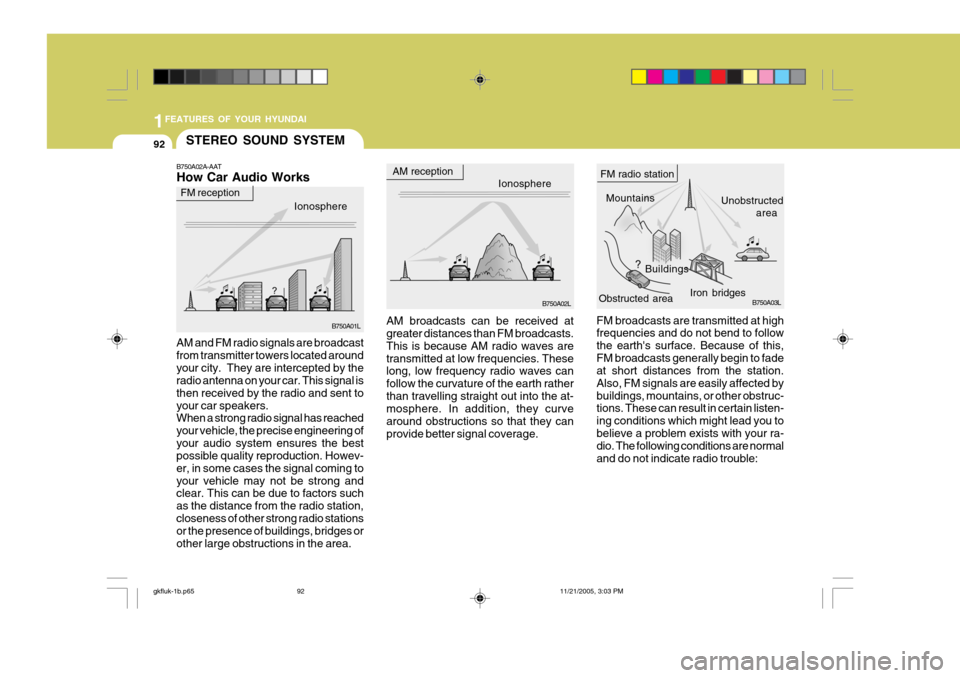
B750A02A-AAT How Car Audio Works
Ionosphere
B750A02L Mountains
Buildings Unobstructed
area
FM radio station
B750A03L
Obstructed area Iron bridges
FM broadcasts are transmitted at high frequencies and do not bend to follow the earth's surface. Because of this,FM broadcasts generally begin to fade at short distances from the station. Also, FM signals are easily affected bybuildings, mountains, or other obstruc- tions. These can result in certain listen- ing conditions which might lead you tobelieve a problem exists with your ra- dio. The following conditions are normal and do not indicate radio trouble:
AM broadcasts can be received at greater distances than FM broadcasts. This is because AM radio waves aretransmitted at low frequencies. These long, low frequency radio waves can follow the curvature of the earth ratherthan travelling straight out into the at- mosphere. In addition, they curve around obstructions so that they canprovide better signal coverage.
AM and FM radio signals are broadcastfrom transmitter towers located aroundyour city. They are intercepted by the radio antenna on your car. This signal is then received by the radio and sent toyour car speakers. When a strong radio signal has reached your vehicle, the precise engineering ofyour audio system ensures the best possible quality reproduction. Howev- er, in some cases the signal coming toyour vehicle may not be strong and clear. This can be due to factors such as the distance from the radio station,closeness of other strong radio stations or the presence of buildings, bridges or other large obstructions in the area.
gkfluk-1b.p65
11/21/2005, 3:03 PM
92
Page 364 of 478
1
FEATURES OF YOUR HYUNDAI
93
!
B750A04L
B750A05L
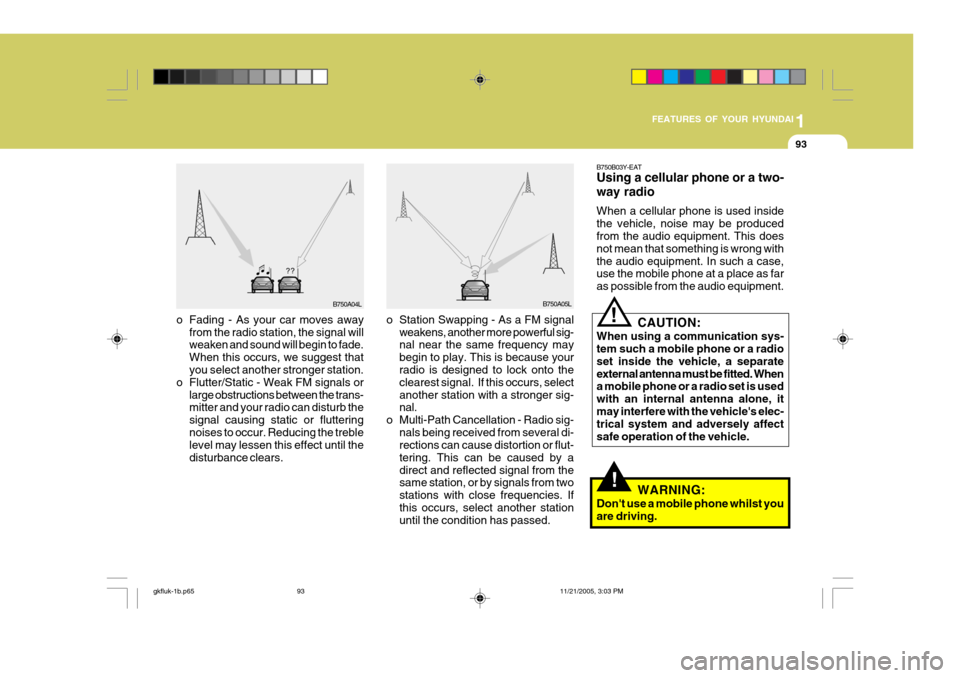
o Station Swapping - As a FM signal weakens, another more powerful sig- nal near the same frequency may begin to play. This is because your radio is designed to lock onto the clearest signal. If this occurs, selectanother station with a stronger sig- nal.
o Multi-Path Cancellation - Radio sig- nals being received from several di-rections can cause distortion or flut- tering. This can be caused by adirect and reflected signal from the same station, or by signals from two stations with close frequencies. Ifthis occurs, select another station until the condition has passed.
o Fading - As your car moves away
from the radio station, the signal willweaken and sound will begin to fade. When this occurs, we suggest that you select another stronger station.
o Flutter/Static - Weak FM signals or large obstructions between the trans-mitter and your radio can disturb the signal causing static or flutteringnoises to occur. Reducing the treble level may lessen this effect until the disturbance clears. B750B03Y-EAT Using a cellular phone or a two- way radio When a cellular phone is used inside the vehicle, noise may be produced from the audio equipment. This does not mean that something is wrong withthe audio equipment. In such a case, use the mobile phone at a place as far as possible from the audio equipment.
!
CAUTION:
When using a communication sys- tem such a mobile phone or a radio set inside the vehicle, a separateexternal antenna must be fitted. When a mobile phone or a radio set is used with an internal antenna alone, itmay interfere with the vehicle's elec- trical system and adversely affect safe operation of the vehicle.
WARNING:
Don't use a mobile phone whilst youare driving.
gkfluk-1b.p65 11/21/2005, 3:03 PM
93
Page 371 of 478
2DRIVING YOUR HYUNDAI
4
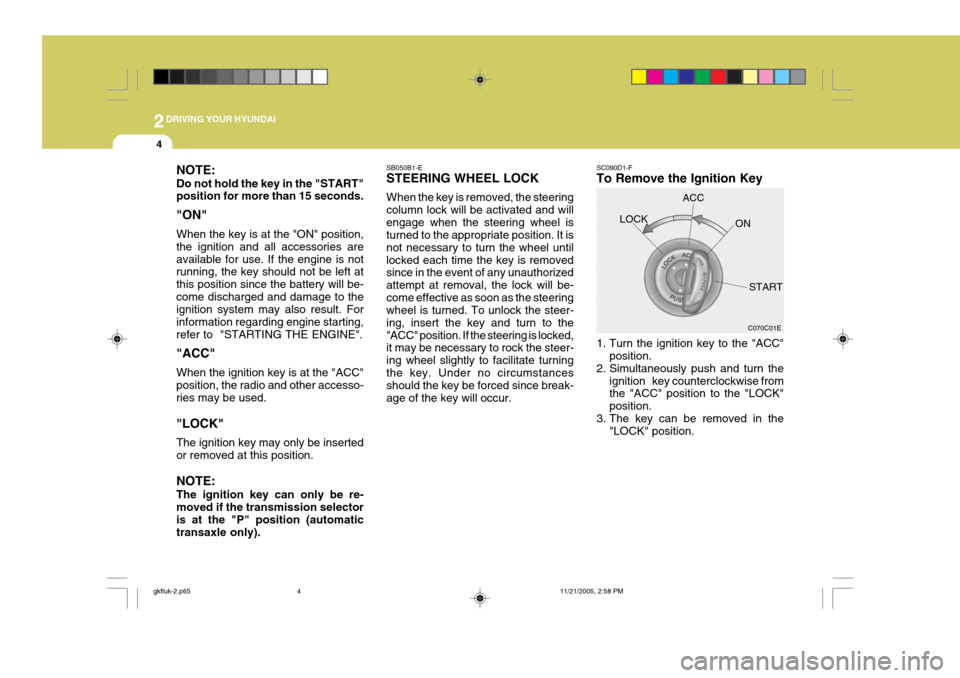
NOTE: Do not hold the key in the "START" position for more than 15 seconds. "ON" When the key is at the "ON" position, the ignition and all accessories areavailable for use. If the engine is not running, the key should not be left at this position since the battery will be-come discharged and damage to the ignition system may also result. For information regarding engine starting,refer to "STARTING THE ENGINE". "ACC" When the ignition key is at the "ACC" position, the radio and other accesso- ries may be used. "LOCK" The ignition key may only be inserted or removed at this position. NOTE: The ignition key can only be re- moved if the transmission selector is at the "P" position (automatictransaxle only). SC090D1-F To Remove the Ignition Key
1. Turn the ignition key to the "ACC"
position.
2. Simultaneously push and turn the
ignition key counterclockwise from the "ACC" position to the "LOCK" position.
3. The key can be removed in the "LOCK" position.LOCK
C070C01E
ACC
ON
START
SB050B1-E STEERING WHEEL LOCK When the key is removed, the steering column lock will be activated and willengage when the steering wheel is turned to the appropriate position. It is not necessary to turn the wheel untillocked each time the key is removed since in the event of any unauthorized attempt at removal, the lock will be-come effective as soon as the steering wheel is turned. To unlock the steer- ing, insert the key and turn to the"ACC" position. If the steering is locked, it may be necessary to rock the steer- ing wheel slightly to facilitate turningthe key. Under no circumstances should the key be forced since break- age of the key will occur.
gkfluk-2.p65
11/21/2005, 2:58 PM
4