display HYUNDAI COUPE 2012 Owner's Guide
[x] Cancel search | Manufacturer: HYUNDAI, Model Year: 2012, Model line: COUPE, Model: HYUNDAI COUPE 2012Pages: 391, PDF Size: 6.88 MB
Page 208 of 391
4131
Features of your vehicle
Using CD Player
1. RANDOM Button
Turns on/off the randomization of the
play list of files in the currently played
DISC. To cancel the mode, press the but-
ton once again.
If loaded CD has a file folder, RANDOM
PLAY button operates below.
play randomized files in folder.
play randomized all files in CD.
2. REPEAT Button
files Repeats the current song when the
button is pressed for less than 0.8 sec-
ond. Repeats all songs in current folder
when the button is pressed for 0.8 sec-
ond or longer.
Repeats current song when the button
is pressed for less than 0.8 second.
Repeats the entire DISC when the but-
ton is pressed for 0.8 second or longer.
3. CD Slot
Insert CD with printed side upward and
gently press in. When the ignition switch
is on ACC or ON and power is off, power
is automatically turned on if the CD is
loaded. This CD supports only 12 cm CD.
If VCD, Data CD are loaded, "Reading
Error" message will appear and CD will
be ejected.
4. CD Eject Button
] button for less than 0.8 sec-ond to eject the CD during CD playback.
] button for 0.8 second or longer to eject all the CD in deck.
switch is off.
5. TRACK Button
] button for less than0.8 second to play from the beginning of
the song currently played and press
again with 1 second to play the previous
song.
Press [TRACK ] button for 0.8 second or longer to initiate reverse direction high
speed sound search of current song.
] button for less than 0.8 second to play the next song. ] button for 0.8 sec-
ond or longer to initiate high speed
sound search of current song.
6. DISC Button
[DISC ] button to change discto the previous disc.
[DISC ] button to change disc to the next disc.
7. CD/AUX Button
If there is a CD in the CD deck it turns to
CD mode, and if a device is connected to
AUX then it toggles.
CD
➟AUX ➟ CD... when the button is
pressed each time. (It will not turn to AUX
if the auxiliary device is not connected.)
8. SCAN Button
Plays first 10 seconds of each song in
the DISC. To cancel the mode, press the
button once again.
9. Display
Displays the current time, mode, play
track number, play time, RDM, RPT and
SCAN status.
procarmanuals.com
Page 209 of 391
![HYUNDAI COUPE 2012 Owners Guide Features of your vehicle
132
4
10. LOAD Button
Press [LOAD] button to load CDs into
available CDC slots (from 1 ~ 6).
Press [LOAD] button for 2 seconds or
longer to load into all available decks. The](/img/35/57911/w960_57911-208.png "HYUNDAI COUPE 2012 Owners Guide Features of your vehicle
132
4
10. LOAD Button
Press [LOAD] button to load CDs into
available CDC slots (from 1 ~ 6).
Press [LOAD] button for 2 seconds or
longer to load into all available decks. The")
Features of your vehicle
132
4
10. LOAD Button
Press [LOAD] button to load CDs into
available CDC slots (from 1 ~ 6).
Press [LOAD] button for 2 seconds or
longer to load into all available decks. The
last CD will play. Idle status for 10 sec-
onds will terminate the loading process.
11. CAT/FOLDER Button
When the loaded CD has file folders,
[CAT/FOLDER / ] button will oper-
ate in the manner described below.
[CAT/FOLDER ] button to
move child folder of the current folder
and display the first song in the folder.
Press [ENTER] button to move to the
folder displayed. It will play the first
song in the folder.
[CAT/FOLDER ] button to move parent folder and display the first
song in the folder. Press [ENTER] but-
ton to move to the folder displayed.
12. TUNE/FILE Button
When the loaded CD contains MP3 or
WMA files, [TUNE/FILE / ] button
will operate in the manner described
below.
] button to selectthe next song and press [ENTER] but-
ton to play.
[TUNE/FILE ] button to select the previous song and press [ENTER]
button to play.
13. INFO Button
Displays the information of the current CD
TRACK in the order of DISC TITLE ➟DISC ARTIST ➟TRACK TITLE ➟TRACK
ARTIST ➟TOTAL TRACK ➟PLAY
SCREEN ➟DISC TITLE... (not displayed
if the information is not available on the
DISC.)
procarmanuals.com
Page 210 of 391
4133
Features of your vehicle
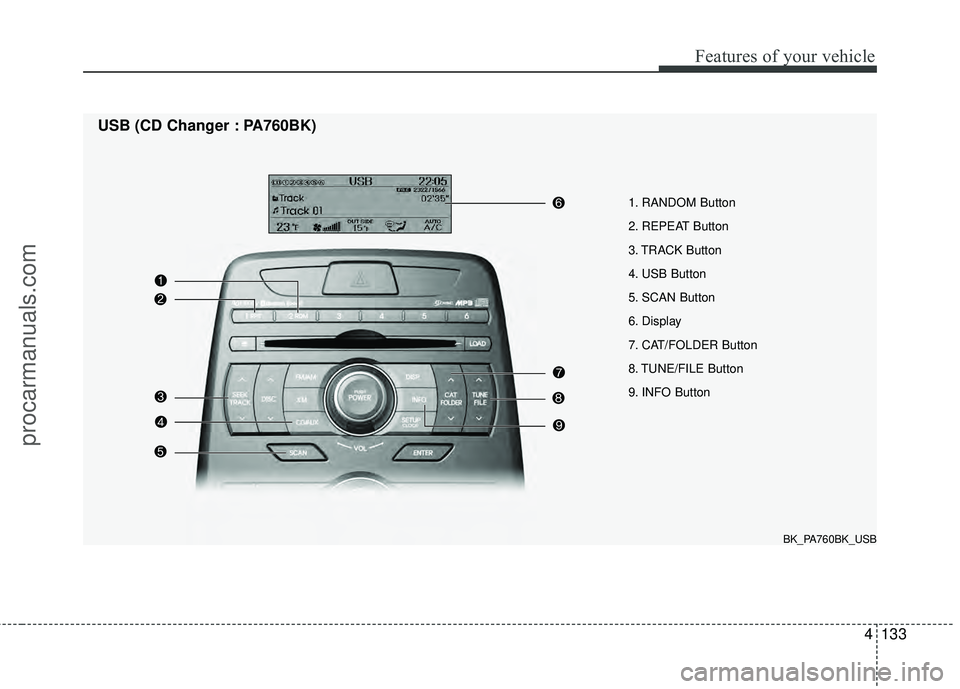
1. RANDOM Button
2. REPEAT Button
3. TRACK Button
4. USB Button
5. SCAN Button
6. Display
7. CAT/FOLDER Button
8. TUNE/FILE Button
9. INFO Button
USB (CD Changer : PA760BK)
BK_PA760BK_USB
procarmanuals.com
Page 211 of 391
Features of your vehicle
134
4
Using USB device
1. RANDOM Button
Press the button for less than 0.8 second
to start or stop the random playback of
the songs in the current folder.
Press the button for more than 0.8 sec-
ond to randomly play the entire songs in
the USB device. Press the button again
to cancel the mode.
2. REPEAT Button
Repeats current song when the button is
pressed for less than 0.8 second.
Repeats all songs in current folder when
the button is pressed for 0.8 second or
longer.
3. TRACK Button
] button for less
than 0.8 second to play from the begin-
ning of the song currently played. press
the button for less than 0.8 second and
press it again within 1 second to move
and play the previous track. press the
button for 0.8 second or longer to rewind
songs reverse direction in fast speed.
] button for less than 0.8 second to move to the next
track. press the button for 0.8 second or longer to fast forward the song in for-
ward direction in fast speed.
4. USB Button
If USB is connected, it switches to the
USB mode from the CD mode to play the
song files stored in the USB. If there is no
CD or no USB device is connected, then
the message "No Media" will be dis-
played and return to the previous mode.
5. SCAN Button
Plays 10 seconds of each song in the
USB device. Press the button again to
cancel scanning.
6. Display
Displays the current time, mode, play
track number, play time, RDM, RPT and
SCAN status.
7. CAT/FOLDER Button
[CAT/FOLDER ] button to
move to the child folder of the current
folder and display the first song in the
folder. Press [ENTER] button to move to
the folder displayed. It will play the first
song in the folder.
[CAT/FOLDER ] button to move to the parent folder and display the first song in the folder. Press
[ENTER] button to move to the folder
displayed.
8. TUNE/FILE Button
] button to select
the next song and press [ENTER] but-
ton to play.
] button to select the previous song and press [ENTER]
button to play.
9. INFO Button
Displays the information of the file cur-
rently played in the order of FILE NAME
➟TITLE ➟ARTIST ➟ALBUM ➟FOLD-
ER ➟TOTAL FILE ➟NORMAL DISPLAY➟FILE NAME... (Displays no information
if the file has no song information.)
procarmanuals.com
Page 214 of 391
4137
Features of your vehicle
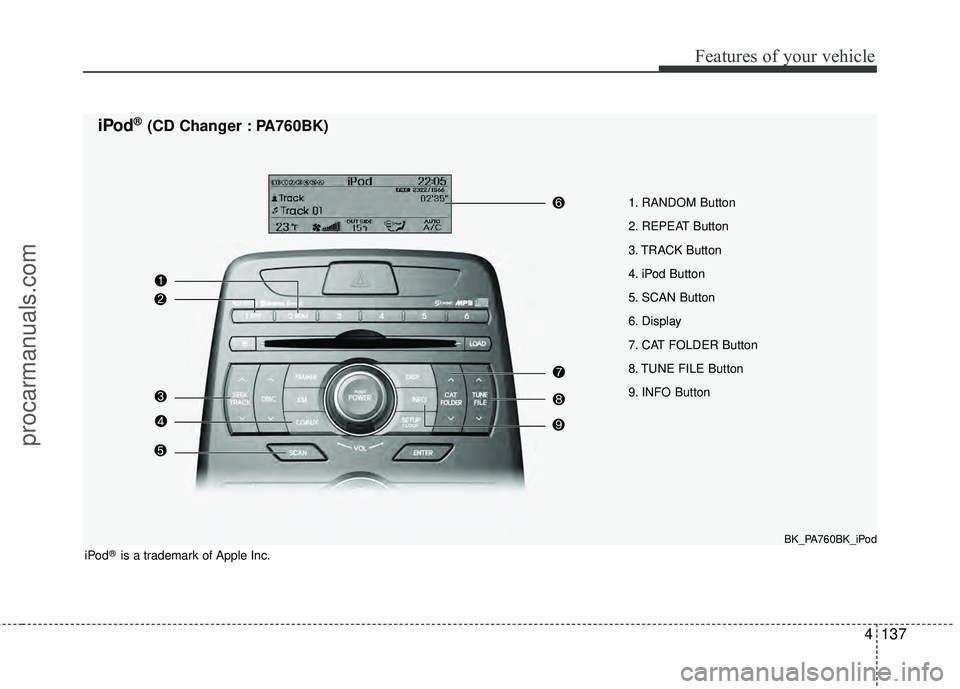
1. RANDOM Button
2. REPEAT Button
3. TRACK Button
4. iPod Button
5. SCAN Button
6. Display
7. CAT FOLDER Button
8. TUNE FILE Button
9. INFO Button
iPod®(CD Changer : PA760BK)
BK_PA760BK_iPod
iPod®is a trademark of Apple Inc.
procarmanuals.com
Page 215 of 391
Features of your vehicle
138
4
Using iPod®
Using an iPod when the exclusive cable
is connected to the multiple terminal
inside the console on the right hand side
of the driver's seat.
1. RANDOM Button
Press the button for less than 0.8 second
to to activate or deactivate the random
playback of the songs within the current
category. Press the button for longer than
0.8 second to randomly play all songs in
the entire album of the iPod. Press the
button once again to cancel the mode.
2. REPEAT Button
Press the button to repeat the song cur-
rently played.
3. TRACK Button
] button for less
than 0.8 second to play from the begin-
ning of the song currently played. Press
the button for less than 0.8 second and
press it again within 1 second to play the
previous track. Press the button for 0.8
second or longer to play songs reverse
direction in fast speed.
] button for less than 0.8 second to move to the next
track. Press the button for 0.8 second or
longer to play the song in forward direc-
tion in fast speed.
4. iPod Button
If iPod is connected, it switches to the
iPod mode from the previous mode to
play the song files stored in the iPod.
If there is no iPod connected, then it dis-
plays the message "No Media" and
returns to the previous mode.
5. SCAN Button
Plays each song in the iPod device for 10
seconds each. Press the button once
again to cancel scanning.
6. Display
Displays the current time, mode, play
track number, play time, RDM, RPT and
SCAN status.
7. CAT/FOLDER Button
[CAT/FOLDER / ] button to
move the category and display the first
song in the category. Press [ENTER]
button to move to the category dis-
played. It will play the first song in the
folder. (PLAYLISTS
➟ARTISTS ➟ALBUMS ➟GENRES ➟SONGS ➟COMPOSERS➟PLAYLISTS...)
8. TUNE/FILE Button
] button to
select the next song and press
[ENTER] button to play.
] button to select the previous song and press
[ENTER] button to play.
9. INFO Button
Displays the information of the file cur-
rently played in the order of TITLE ➟ARTIST ➟ALBUM ➟NORMAL DISPLAY➟TITLE...(Displays no information if the
file has no song information.)
procarmanuals.com
Page 217 of 391
Features of your vehicle
140
4
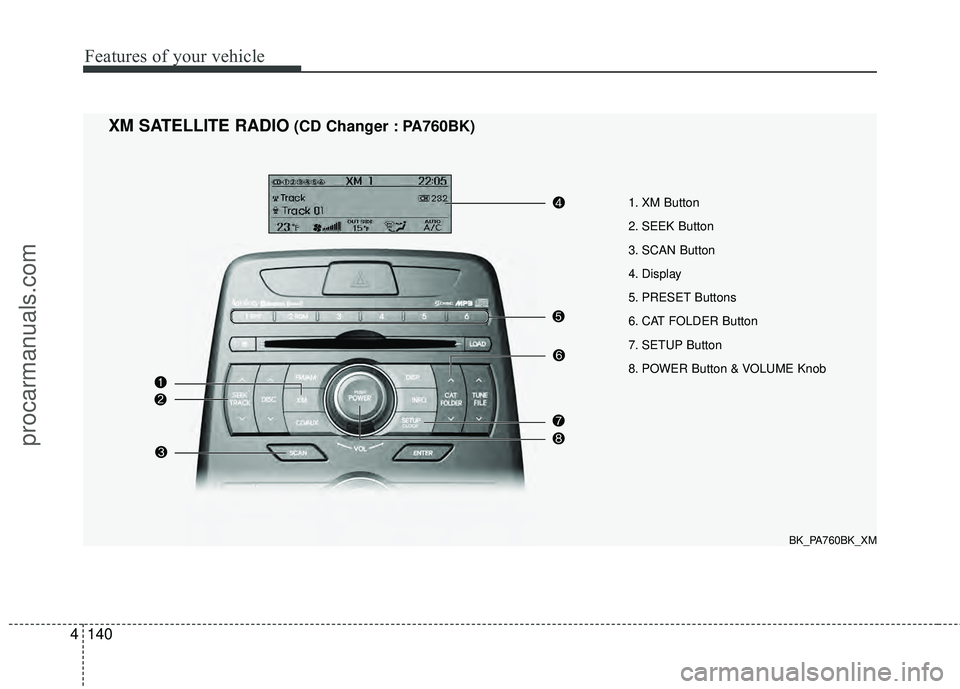
1. XM Button
2. SEEK Button
3. SCAN Button
4. Display
5. PRESET Buttons
6. CAT FOLDER Button
7. SETUP Button
8. POWER Button & VOLUME Knob
XM SATELLITE RADIO(CD Changer : PA760BK)
BK_PA760BK_XM
procarmanuals.com
Page 218 of 391
4141
Features of your vehicle
Using XM Satellite Radio
1. XM Button
Turns to XM Satellite Radio mode and
toggles in the order of XM1 ➟XM2 ➟XM3➟XM1... when the button is pressed each
time.
2. SEEK Button
] button to continu- ously move to the previous channel.
] button to continu- ously move to the next channel.
3. SCAN Button
Press the button to hear a brief sample of
all of the channels. To cancel SCAN
mode, press the button again.
4. Display
Displays the current time, mode, station
name and category.
5. PRESET Buttons
Press [1] ~ [6] buttons less than 0.8 sec-
ond to play the channel saved in each
button. Press [1] ~ [6] button for 0.8 sec-
ond or longer to save current channel to
the respective button with a beep.
6. CAT/FOLDER Button
[CAT/FOLDER ] button tosearch the previous category.
[CAT/FOLDER ] button to search the next category.
To listen to the displayed category, press
the [ENTER] button. To search the chan-
nels within the displayed category, press
the [SEEK / ] button. (The CATE-
GORY icon will be turned on while in
Category mode.)
7. SETUP Button
Press this button to change the CLOCK,
TONE, POSITION, AVC, TEMP, SCROLL
AND BLUETOOTH.
8. POWER Button & VOLUME Knob
Turn on/off the set when the IGNITION
SWITCH is on ACC or ON. If the button
is turned to the right, it increases the vol-
ume and decreases the volume when
turned to the left.
procarmanuals.com
Page 221 of 391
Features of your vehicle
144
4
■Bluetooth®wireless technology
Language Setting
The system language can be changed by
the following steps:
1. Power on the audio system with the
volume set to an audible level.
2. Press and hold button on the steering wheel until the audio displays
“Please Wait”.
- The Bluetooth
®wireless technology
system will reply in currently selected
language that it is changing to the next
language.
- System language cycles between English, US Spanish.
3. When completed, the audio display returns to normal.
4. Repeat steps 2 and 3 for the next lan- guage selection.
NOTE:
The phone needs to be paired again
after changing system language.
- Avoid resting your thumb or fingeron the as the language could
unintentionally change.
■Voice Recognition Activation
in the Bluetooth®wireless technology
System can be activated in the follow-
ing conditions:
- Button Activation The voice recognition system will be
active when the button is pressed
and after the sound of a Beep.
- Active Listening The voice recognition system will be
active for a period of time when the
Voice Recognition system has asked
for a customer response.
from zero to nine while numbers greater
than ten will not be recognized.
system will announce "Pardon" or No
input voice signal from microphone. (No
response)
tion mode in following cases : When
pressing the button and saying
cancel following the beep. When not
making a call and pressing the but-
ton 0.8 second or longer When voice
recognition has failed 3 consecutive
times.
will announce what commands are
available.
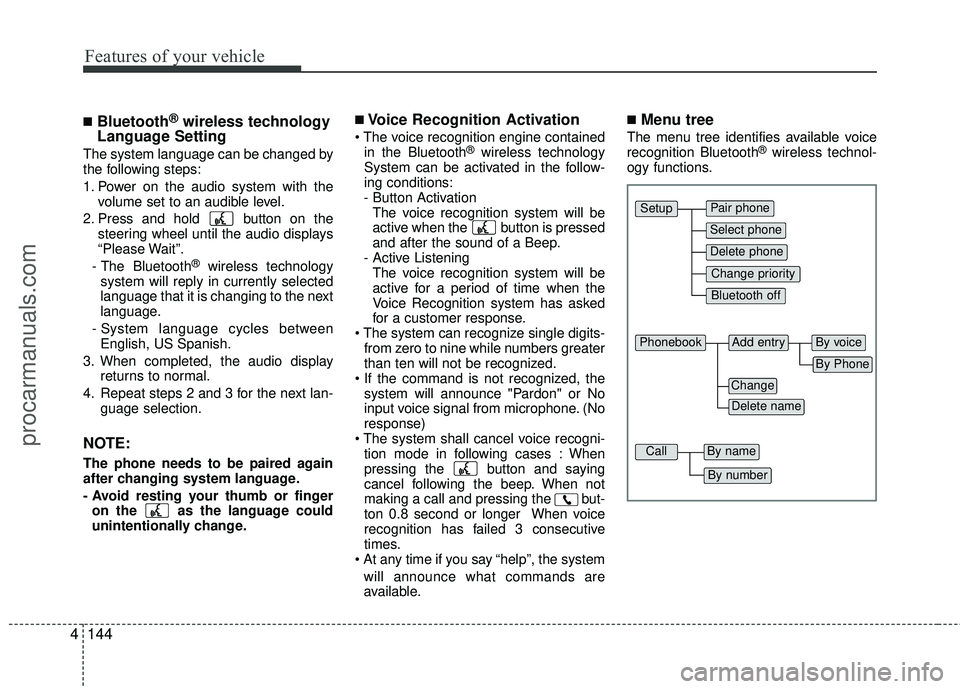
■Menu tree
The menu tree identifies available voice
recognition Bluetooth®wireless technol-
ogy functions.
Pair phone
Select phone
Change priority
Delete phone
Bluetooth off
Setup
Add entryPhonebook
Change
Delete name
By Phone
By voice
CallBy name
By number
procarmanuals.com
Page 222 of 391
4145
Features of your vehicle
■Phone Setup
All Bluetooth®wireless technology relat-
ed operations can be performed by voice
command or by manual operation.
Press button on the steering wheelto activate voice recognition.
Push the TUNE/SETUP knob to enterSETUP mode. Select “BLUETOOTH”
item by rotating the TUNE/SETUP
knob, then push the knob.
Before using Bluetooth
®wireless tech-
nology features, the phone must be
paired (registered) to the audio system.
Up to 5 phones can be paired in the sys-
tem.
NOTE:
varies according to each phone
model. Before attempting to pair
phone, please see your phone’s
User’s Guide for instructions.
pleted, there is no need to pair with
that phone again unless the phone is
deleted manually from the audio sys-
tem (refer “Deleting Phone” sec-
tion)or the vehicle’s information is
removed from the phone.
1. Press button.
2. Say “Set Up”. - The system replies with availablecommands.
- To skip the information message, press again and then a beep is
heard.
3. Say “Pair Phone”
4. Say “Yes” to proceed.
5. Say the name of your phone when prompted.
- Use any name to uniquely describe your phone.
- Use Full name to voice tag.
- Not use to short name or similar to voice command. 6. Bluetooth
®wireless technology sys-
tem will repeat the name you stated.
7. Say "Yes" to confirm.
8. The audio displays “searching ----
passkey: 0000” and asks you to initiate
pairing procedure from the phone.
9. Search the Bluetooth
®wireless tech-
nology system on your phone. Your
phone should display your [vehicle
model name] on the Bluetooth
®wire-
less technology device list. Then
attempt pairing on your phone.
10. After Pairing is completed, your phone will start to transfer phone/contact list
to the audio system.
- This process may take from a few minutes to over 10 minutes depend-
ing on the phone model and number
of entries in the phone/contact list.
11. By manual operation: - Select “PAIR” in PHONE menu, thenproceed from step 5.
NOTE:
Depending on the phone make and
model, the phone book contact list
may not transfer to the audio system.
procarmanuals.com