ESP HYUNDAI COUPE 2014 User Guide
[x] Cancel search | Manufacturer: HYUNDAI, Model Year: 2014, Model line: COUPE, Model: HYUNDAI COUPE 2014Pages: 546, PDF Size: 14.38 MB
Page 98 of 546
3-7
Convenient features of your vehicle
Loss of a smart key
A maximum of three Smart Keys
including Card Type Smart Key can
be registered to a single vehicle. If you
happen to lose your smart key, it is
recommended that you should imme-
diately take the vehicle and remaining
keys to your authorized HYUNDAI
dealer or tow the vehicle, if necessary.
Smart key precautions
The smart key will not work if any of
the following occur:
• The smart key is close to a radio
transmitter such as a radio station
or an airport which can interfere
with normal operation of the trans-
mitter.
• The smart key is near a mobile two
way radio system or a cellular
phone.
• Another vehicle’s smart key is being
operated close to your vehicle.
When the smart key does not work
correctly, open and close the door
with the mechanical key. If you have
a problem with the smart key, it is
recommended that you contact an
authorized HYUNDAI dealer.If the smart key is in close proximity
to your mobile phone, the signal
could be blocked by your mobile
phones normal operational signals.
This is especially important when the
phone is active such as making and
receiving calls, text messaging,
and/or sending/receiving emails.
Avoid placing the smart key and your
mobile phone in the same pants or
jacket pocket and always try to main-
tain an adequate distance between
the two devices.
3
ProCarManuals.com
Page 99 of 546
3-8
✽NOTICE
Changes or modifications not
expressly approved by the party
responsible for compliance could void
the user’s authority to operate the
equipment. If the keyless entry sys-
tem is inoperative due to changes or
modifications not expressly approved
by the party responsible for compli-
ance, it will not be covered by your
manufacturer’s vehicle warranty.
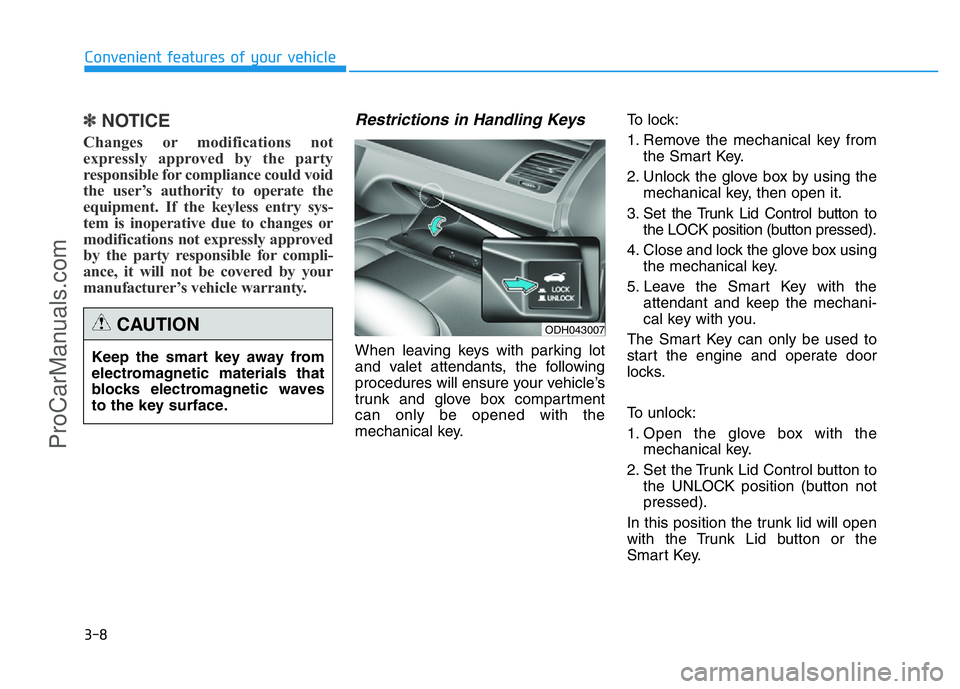
Restrictions in Handling Keys
When leaving keys with parking lot
and valet attendants, the following
procedures will ensure your vehicle’s
trunk and glove box compartment
can only be opened with the
mechanical key.To lock:
1. Remove the mechanical key from
the Smart Key.
2. Unlock the glove box by using the
mechanical key, then open it.
3. Set the Trunk Lid Control button to
the LOCK position (button pressed).
4. Close and lock the glove box using
the mechanical key.
5. Leave the Smart Key with the
attendant and keep the mechani-
cal key with you.
The Smart Key can only be used to
start the engine and operate door
locks.
To unlock:
1. Open the glove box with the
mechanical key.
2. Set the Trunk Lid Control button to
the UNLOCK position (button not
pressed).
In this position the trunk lid will open
with the Trunk Lid button or the
Smart Key.
Convenient features of your vehicle
Keep the smart key away from
electromagnetic materials that
blocks electromagnetic waves
to the key surface.
CAUTIONODH043007
ProCarManuals.com
Page 139 of 546
3-48
Convenient features of your vehicle
(Continued)
•Do not use cellular phones
while refueling. Electric cur-
rent and/or electronic interfer-
ence from cellular phones can
potentially ignite fuel vapors
and cause a fire.
•Do not get back into a vehicle
once you have begun refuel-
ing. You can generate a build-
up of static electricity by touch-
ing, rubbing or sliding against
any item or fabric capable of
producing static electricity.
Static electricity discharge can
ignite fuel vapors causing a
fire. If you must re-enter the
vehicle, you should once again
eliminate potentially danger-
ous static electricity discharge
by touching a metal part of the
vehicle, away from the fuel filler
neck, nozzle or other gasoline
source, with your bare hand.
(Continued)
(Continued)
•When using an approved
portable fuel container, be
sure to place the container on
the ground prior to refueling.
Static electricity discharge
from the container can ignite
fuel vapors causing a fire.
Once refueling has begun,
contact between your bare
hand and the vehicle should
be maintained until the filling
is complete.
•Use only approved portable
plastic fuel containers designed
to carry and store gasoline.
(Continued)
(Continued)
•When refueling, always move
the shift lever to the P (Park)
position, set the parking
brake, and place the Engine
Start/Stop button to the OFF
position. Sparks produced by
electrical components related
to the engine can ignite fuel
vapors causing a fire.
•Do not use matches or a
lighter and do not smoke or
leave a lit cigarette in your
vehicle while at a gas station,
especially during refueling.
•Do not over-fill or top-off your
vehicle tank, which can cause
gasoline spillage.
(Continued)
ProCarManuals.com
Page 199 of 546
3-108
Convenient features of your vehicle
Daytime running light (DRL)
(if equipped)
The Daytime Running Lights (DRL)
can make it easier for others to see
the front of your vehicle during the
day, especially after dawn and before
sunset.
The DRL system will turn the dedi-
cated lamp OFF when:
1. The light switch is in the front fog
lamp or headlamp position, includ-
ing the operation that the head-
lamp is turned on automatically in
the AUTO light position.
2. The engine is turned off.
3. The hazard warning flasher is on.
4. You turn the turn signal light on.
- If you turn on the turn signal light,
only the corresponding daytime
running lights will turn off.
- If you turn on turn signal light with
the position light turned on, the
daytime running lights will turn off
but the position light remains on.
Headlamp leveling device
(if equipped)
It automatically adjusts the headlamp
beam level according to the number
of passengers and loading weight in
the luggage area.
And it offers proper headlamp beam
under various conditions. If the driver gets out of the vehi-
cle through other doors (except
driver's door), the battery saver
function does not operate and
the headlamp delay function
does not turn off automatically.
Therefore, It causes the battery
to be discharged. In this case,
make sure to turn off the lamp
before getting out of the vehicle.
CAUTION
If it does not work properly even
though your car is inclined
backward according to passen-
ger's posture, or the headlight
beam is irradiated to the high or
low position, we recommend
that the system be inspected by
an authorized HYUNDAI dealer.
Do not attempt to inspect or
replace the wiring yourself.
WARNING
ProCarManuals.com
Page 210 of 546
3-119
Convenient features of your vehicle
3
DRIVER ASSIST SYSTEM
Rear view camera
(if equipped)
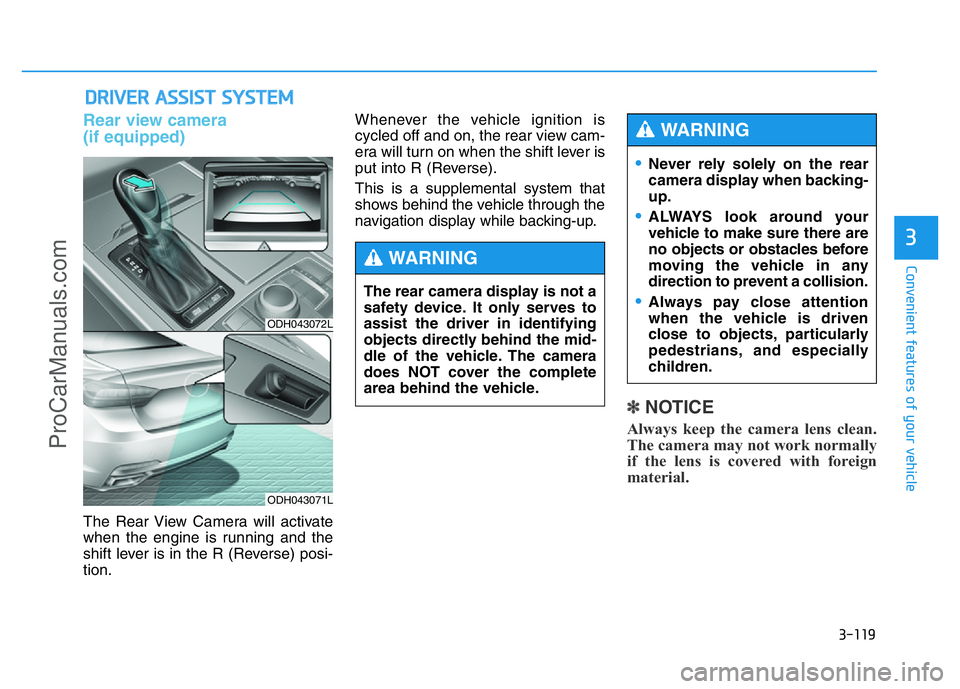
The Rear View Camera will activate
when the engine is running and the
shift lever is in the R (Reverse) posi-
tion.Whenever the vehicle ignition is
cycled off and on, the rear view cam-
era will turn on when the shift lever is
put into R (Reverse).
This is a supplemental system that
shows behind the vehicle through the
navigation display while backing-up.
✽NOTICE
Always keep the camera lens clean.
The camera may not work normally
if the lens is covered with foreign
material.
ODH043072L
ODH043071L
The rear camera display is not a
safety device. It only serves to
assist the driver in identifying
objects directly behind the mid-
dle of the vehicle. The camera
does NOT cover the complete
area behind the vehicle.
WARNING
•Never rely solely on the rear
camera display when backing-
up.
•ALWAYS look around your
vehicle to make sure there are
no objects or obstacles before
moving the vehicle in any
direction to prevent a collision.
•Always pay close attention
when the vehicle is driven
close to objects, particularly
pedestrians, and especially
children.
WARNING
ProCarManuals.com
Page 211 of 546
3-120
Convenient features of your vehicle
Parking Assist System
(if equipped)
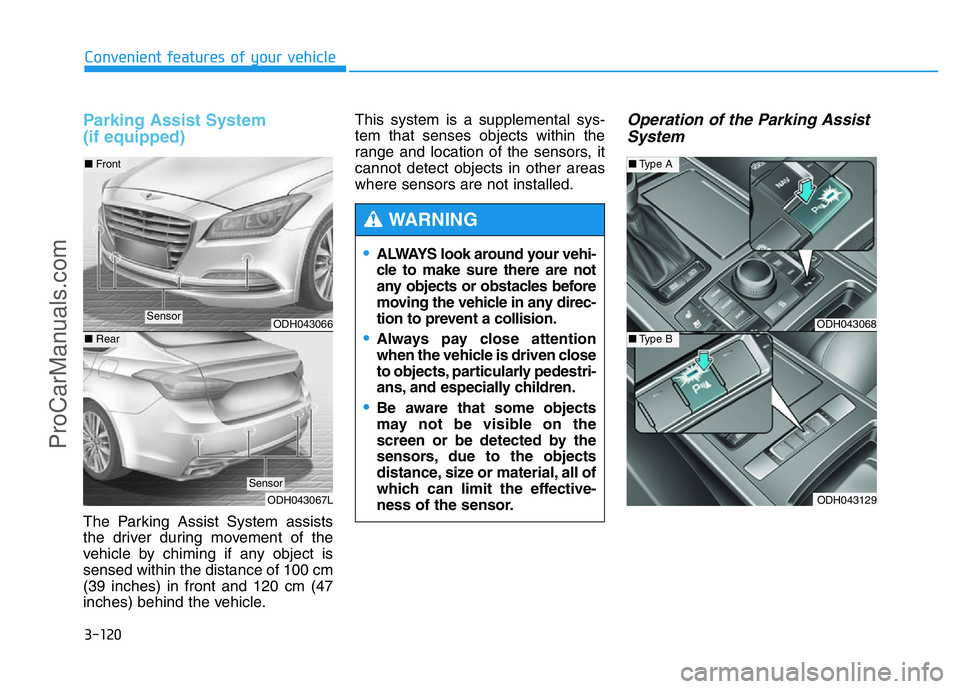
The Parking Assist System assists
the driver during movement of the
vehicle by chiming if any object is
sensed within the distance of 100 cm
(39 inches) in front and 120 cm (47
inches) behind the vehicle.This system is a supplemental sys-
tem that senses objects within the
range and location of the sensors, it
cannot detect objects in other areas
where sensors are not installed.
Operation of the Parking Assist
System
•ALWAYS look around your vehi-
cle to make sure there are not
any objects or obstacles before
moving the vehicle in any direc-
tion to prevent a collision.
•Always pay close attention
when the vehicle is driven close
to objects, particularly pedestri-
ans, and especially children.
•Be aware that some objects
may not be visible on the
screen or be detected by the
sensors, due to the objects
distance, size or material, all of
which can limit the effective-
ness of the sensor.
WARNING
ODH043068
ODH043129
■Type A
■Type BODH043066
ODH043067L
■Front
■Rear
Sensor
Sensor
ProCarManuals.com
Page 215 of 546
3-124
Convenient features of your vehicle
✽NOTICE
• The vehicle will not stop for pedes-
trians or objects that may be in its
path, so the driver must monitor
the maneuver.
• Use the system only in parking lots
and places used for parking.
• The system does not work if there is
no car parked in front of the park-
ing space you are planning to park
or if it is a diagonal parking space.
• After parking your vehicle using
the system, the vehicle may not be
parked at the exact spot you have
wished. For example, the space
between your vehicle and wall
may not be the distance you have
desired.
• Deactivate the system and park
your vehicle manually, when the sit-
uation requires parking manually.
• The Parking Assist System's front
and rear warning sound activates
when the Smart Parking Assist
System is activated.
(Continued)(Continued)
• After searching for a parking
space is completed, the Smart
Parking Assist System will be can-
celed if the Parking Assist System
is cancelled by pressing the button
to the OFF position.
•The Smart Parking Assist
System should only be consid-
ered as a supplementary func-
tion. The driver must check the
front and rear view for objects.
The operational function of the
Smart Parking Assist System
can be affected by many fac-
tors and conditions of the sur-
roundings, so the responsibili-
ty rests always with the driver.
•The system may not operate
normally if the vehicle needs
wheel alignment adjustment.
We recommend that you have
the vehicle checked by an
authorized HYUNDAI dealer.
•If you use a different tire or
wheel size rather than the size
recommended by the HYUNDAI
dealer, the system may not
work properly. Always use the
same size tire and wheel.
•If you use additional frame on
the license plate, SPAS may
generate abnormal warning
sound.
WARNING
ProCarManuals.com
Page 223 of 546
3-132
Convenient features of your vehicle
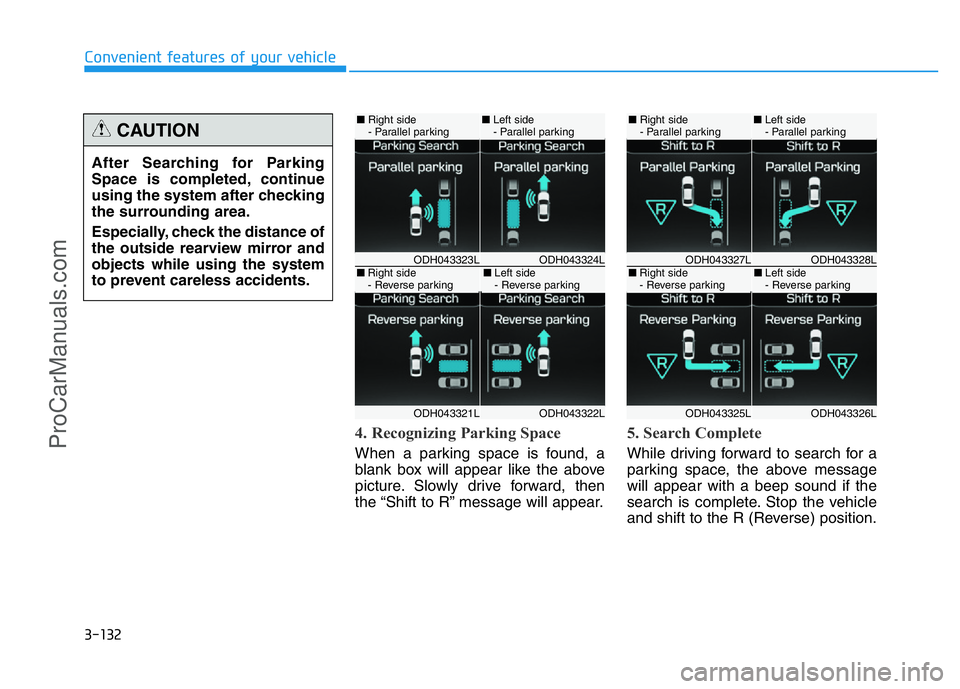
4. Recognizing Parking Space
When a parking space is found, a
blank box will appear like the above
picture. Slowly drive forward, then
the “Shift to R” message will appear.
5. Search Complete
While driving forward to search for a
parking space, the above message
will appear with a beep sound if the
search is complete. Stop the vehicle
and shift to the R (Reverse) position. After Searching for Parking
Space is completed, continue
using the system after checking
the surrounding area.
Especially, check the distance of
the outside rearview mirror and
objects while using the system
to prevent careless accidents.
CAUTION
ODH043324LODH043323L
ODH043322LODH043321L
■Right side
- Parallel parking■Left side
- Parallel parking
■Right side
- Reverse parking■Left side
- Reverse parkingODH043328LODH043327L
ODH043326LODH043325L
■Right side
- Parallel parking■Left side
- Parallel parking
■Right side
- Reverse parking■Left side
- Reverse parking
ProCarManuals.com
Page 233 of 546
3-142
Convenient features of your vehicle
Parking Guide System
(Except Europe, if equipped)
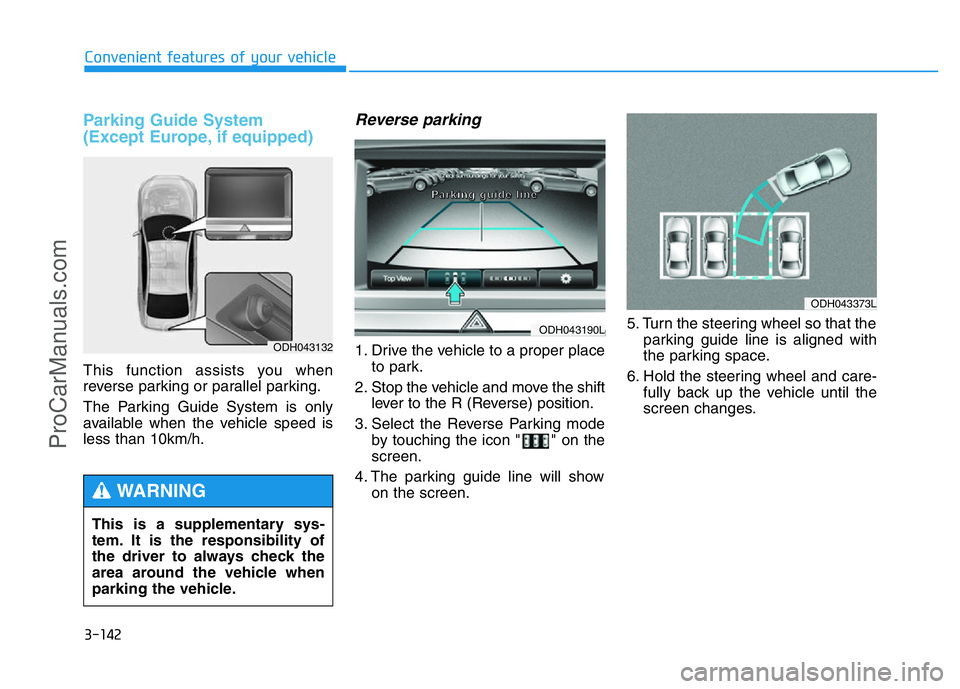
This function assists you when
reverse parking or parallel parking.
The Parking Guide System is only
available when the vehicle speed is
less than 10km/h.
Reverse parking
1. Drive the vehicle to a proper place
to park.
2. Stop the vehicle and move the shift
lever to the R (Reverse) position.
3. Select the Reverse Parking mode
by touching the icon " " on the
screen.
4. The parking guide line will show
on the screen.5. Turn the steering wheel so that the
parking guide line is aligned with
the parking space.
6. Hold the steering wheel and care-
fully back up the vehicle until the
screen changes.ODH043132
This is a supplementary sys-
tem. It is the responsibility of
the driver to always check the
area around the vehicle when
parking the vehicle.
WARNING
ODH043373L
ODH043190L
P P
a a
r r
k k
i i
n n
g g
g g
u u
i i
d d
e e
l l
i i
n n
e e
ProCarManuals.com
Page 236 of 546
3-145
Convenient features of your vehicle
3
Parking Guide System
(For Europe, if equipped)
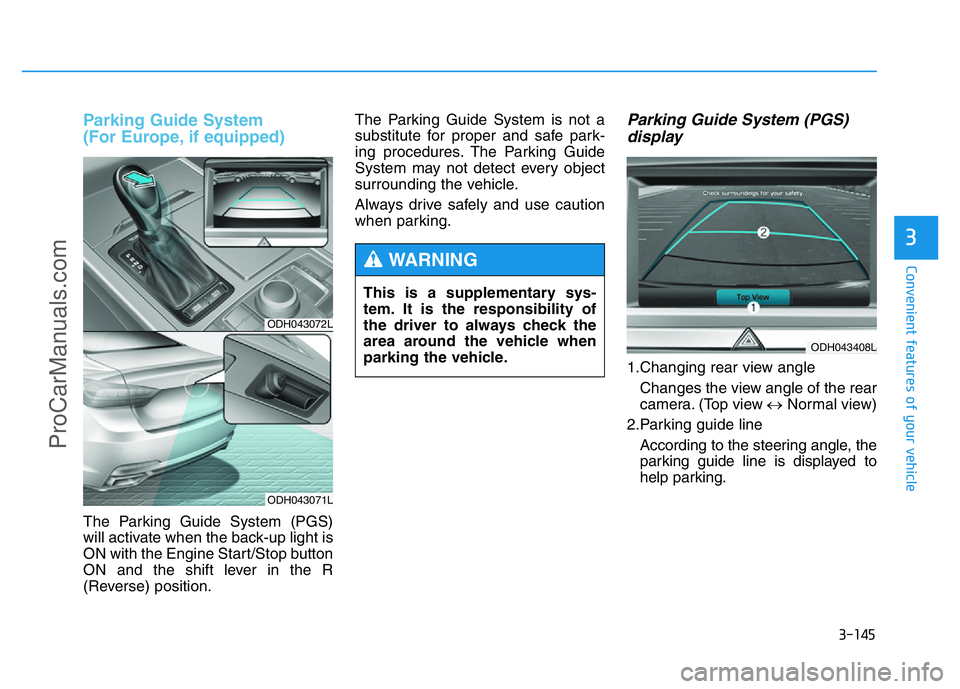
The Parking Guide System (PGS)
will activate when the back-up light is
ON with the Engine Start/Stop button
ON and the shift lever in the R
(Reverse) position.The Parking Guide System is not a
substitute for proper and safe park-
ing procedures. The Parking Guide
System may not detect every object
surrounding the vehicle.
Always drive safely and use caution
when parking.
Parking Guide System (PGS)
display
1.Changing rear view angle
Changes the view angle of the rear
camera. (Top view ↔Normal view)
2.Parking guide line
According to the steering angle, the
parking guide line is displayed to
help parking.
ODH043072L
ODH043071L
This is a supplementary sys-
tem. It is the responsibility of
the driver to always check the
area around the vehicle when
parking the vehicle.
WARNING
ODH043408L
ProCarManuals.com