cruise control HYUNDAI COUPE 2014 Owner's Guide
[x] Cancel search | Manufacturer: HYUNDAI, Model Year: 2014, Model line: COUPE, Model: HYUNDAI COUPE 2014Pages: 546, PDF Size: 14.38 MB
Page 341 of 546
5-65
Driving your vehicle
5
Limitations of the system
The Smart Cruise Control System
may have limits to its ability to detect
distance to the vehicle ahead due to
road and traffic conditions.
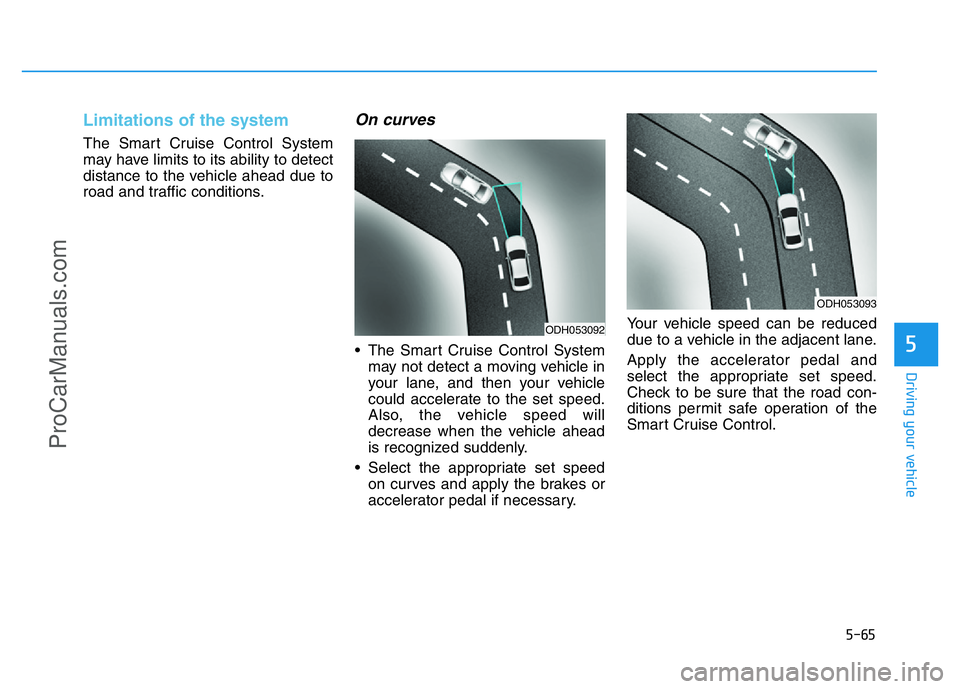
On curves
• The Smart Cruise Control System
may not detect a moving vehicle in
your lane, and then your vehicle
could accelerate to the set speed.
Also, the vehicle speed will
decrease when the vehicle ahead
is recognized suddenly.
• Select the appropriate set speed
on curves and apply the brakes or
accelerator pedal if necessary.Your vehicle speed can be reduced
due to a vehicle in the adjacent lane.
Apply the accelerator pedal and
select the appropriate set speed.
Check to be sure that the road con-
ditions permit safe operation of the
Smart Cruise Control.
ODH053092
ODH053093
ProCarManuals.com
Page 342 of 546
5-66
Driving your vehicle
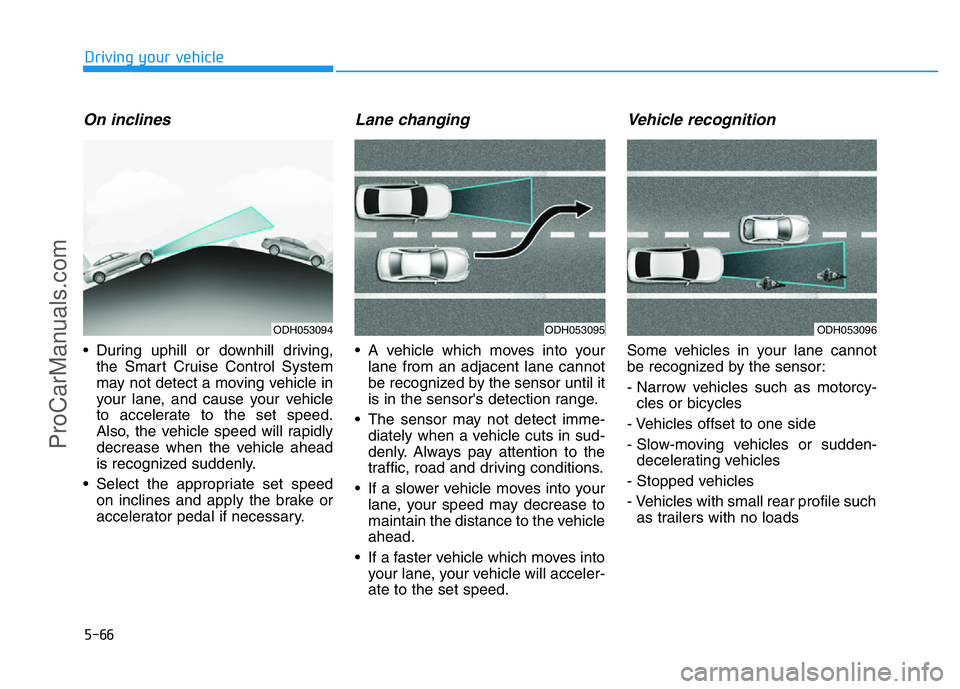
On inclines
• During uphill or downhill driving,
the Smart Cruise Control System
may not detect a moving vehicle in
your lane, and cause your vehicle
to accelerate to the set speed.
Also, the vehicle speed will rapidly
decrease when the vehicle ahead
is recognized suddenly.
• Select the appropriate set speed
on inclines and apply the brake or
accelerator pedal if necessary.
Lane changing
• A vehicle which moves into your
lane from an adjacent lane cannot
be recognized by the sensor until it
is in the sensor's detection range.
• The sensor may not detect imme-
diately when a vehicle cuts in sud-
denly. Always pay attention to the
traffic, road and driving conditions.
• If a slower vehicle moves into your
lane, your speed may decrease to
maintain the distance to the vehicle
ahead.
• If a faster vehicle which moves into
your lane, your vehicle will acceler-
ate to the set speed.
Vehicle recognition
Some vehicles in your lane cannot
be recognized by the sensor:
- Narrow vehicles such as motorcy-
cles or bicycles
- Vehicles offset to one side
- Slow-moving vehicles or sudden-
decelerating vehicles
- Stopped vehicles
- Vehicles with small rear profile such
as trailers with no loads
ODH053094ODH053095ODH053096
ProCarManuals.com
Page 344 of 546
5-68
Driving your vehicle
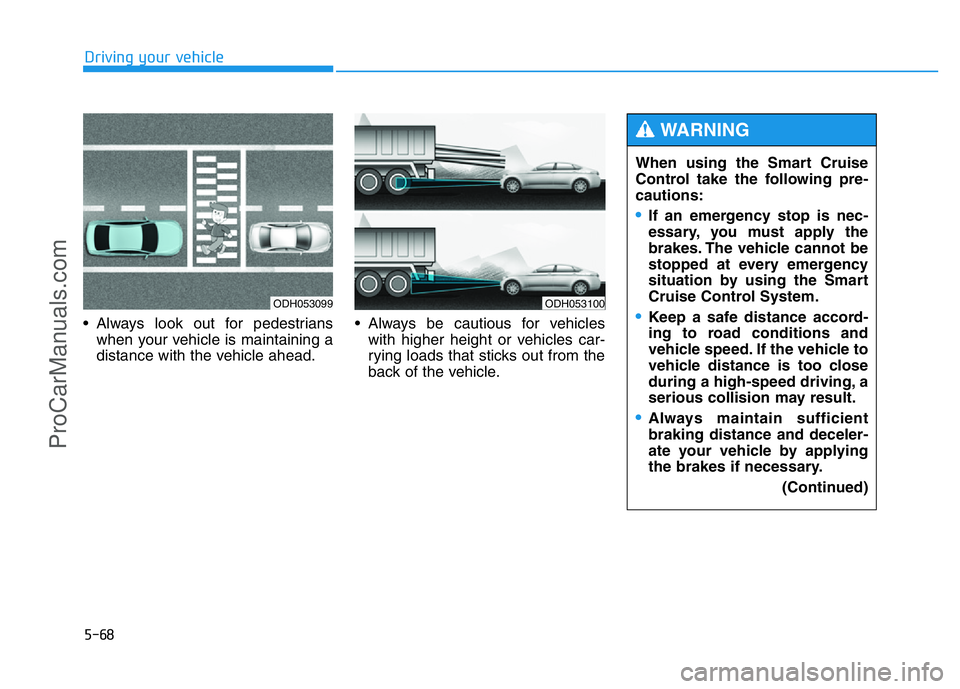
• Always look out for pedestrians
when your vehicle is maintaining a
distance with the vehicle ahead.• Always be cautious for vehicles
with higher height or vehicles car-
rying loads that sticks out from the
back of the vehicle.
ODH053099ODH053100
When using the Smart Cruise
Control take the following pre-
cautions:
•If an emergency stop is nec-
essary, you must apply the
brakes. The vehicle cannot be
stopped at every emergency
situation by using the Smart
Cruise Control System.
•Keep a safe distance accord-
ing to road conditions and
vehicle speed. If the vehicle to
vehicle distance is too close
during a high-speed driving, a
serious collision may result.
•Always maintain sufficient
braking distance and deceler-
ate your vehicle by applying
the brakes if necessary.
(Continued)
WARNING
ProCarManuals.com
Page 345 of 546
5-69
Driving your vehicle
5
(Continued)
•The Smart Cruise Control
System cannot recognize a
stopped vehicle, pedestrians
or an oncoming vehicle.
Always look ahead cautiously
to prevent unexpected and
sudden situations from occur-
ring.
•Vehicles moving in front of
you with a frequent lane
change may cause a delay in
the system's reaction or may
cause the system to react to a
vehicle actually in an adjacent
lane. Always drive cautiously
to prevent unexpected and
sudden situations from occur-
ring.
•Always be aware of the select-
ed speed and vehicle to vehi-
cle distance.
(Continued)
(Continued)
•The Smart Cruise Control
System may not recognize
complex driving situations so
always pay attention to driv-
ing conditions and control
your vehicle speed.
The Smart Cruise Control System
may not operate temporarily due
to electrical interference.
CAUTION
ProCarManuals.com
Page 348 of 546
5-72
Driving your vehicle
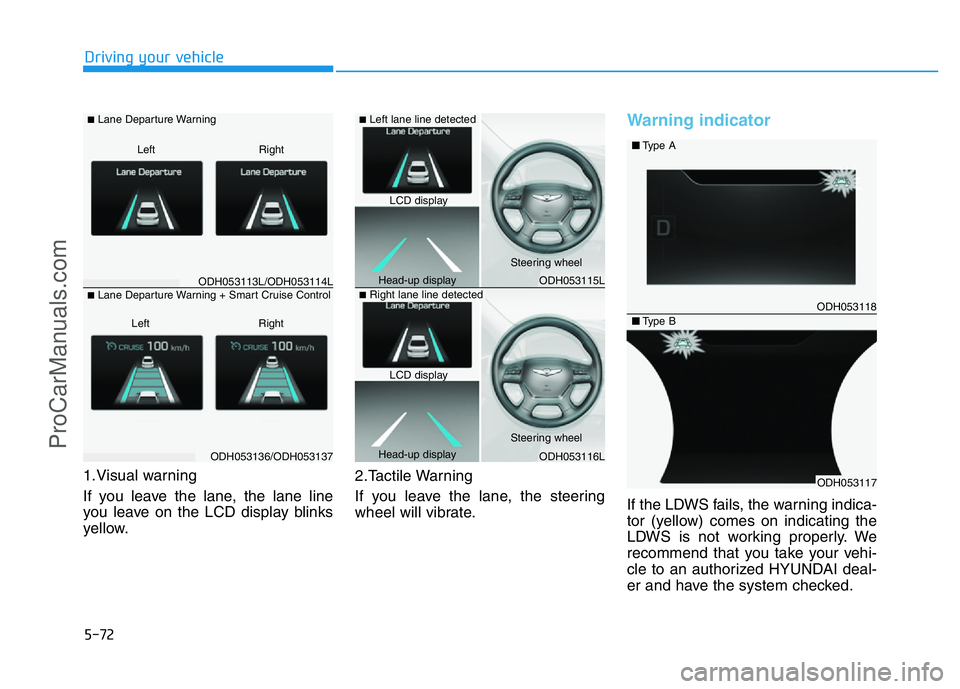
1.Visual warning
If you leave the lane, the lane line
you leave on the LCD display blinks
yellow.2.Tactile Warning
If you leave the lane, the steering
wheel will vibrate.
Warning indicator
If the LDWS fails, the warning indica-
tor (yellow) comes on indicating the
LDWS is not working properly. We
recommend that you take your vehi-
cle to an authorized HYUNDAI deal-
er and have the system checked.
ODH053113L/ODH053114L
ODH053136/ODH053137
■Lane Departure Warning
Right Left
■Lane Departure Warning + Smart Cruise Control
Right Left
ODH053115L
ODH053116L
ODH053118
ODH053117
■Type A
■Type B
■Left lane line detected
■Right lane line detected
LCD display
Head-up displaySteering wheel
Steering wheel
Head-up displayLCD display
ProCarManuals.com
Page 369 of 546
5-93
Driving your vehicle
5
Driving in the rain
Rain and wet roads can make driving
dangerous. Here are a few things to
consider when driving in the rain or
on slick pavement:
• Slow down and allow extra follow-
ing distance. A heavy rainfall
makes it harder to see and increas-
es the distance needed to stop
your vehicle.
• Turn OFF your Cruise Control. (if
equipped)
• Replace your windshield wiper
blades when they show signs of
streaking or missing areas on the
windshield.
• Be sure your tires have enough
tread. If your tires do not have
enough tread, making a quick stop
on wet pavement can cause a skid
and possibly lead to an accident.
See “Tire Tread”in chapter 7.
• Turn on your headlamps to make it
easier for others to see you.
• Driving too fast through large pud-
dles can affect your brakes. If you
must go through puddles, try to
drive through them slowly.• If you believe your brakes may be
wet, apply them lightly while driv-
ing until normal braking operation
returns.
Hydroplaning
If the road is wet enough and you are
going fast enough, your vehicle may
have little or no contact with the road
surface and actually ride on the
water. The best advice is SLOW
DOWN when the road is wet. The
risk of hydroplaning increases as the
depth of tire tread decreases, refer to
“Tire Tread” in chapter 7.
Driving in flooded areas
Avoid driving through flooded areas
unless you are sure the water is no
higher than the bottom of the wheel
hub. Drive through any water slowly.
Allow adequate stopping distance
because brake performance may be
reduced.
After driving through water, dry the
brakes by gently applying them sev-
eral times while the vehicle is moving
slowly.
ProCarManuals.com
Page 501 of 546
7-65
7
Maintenance
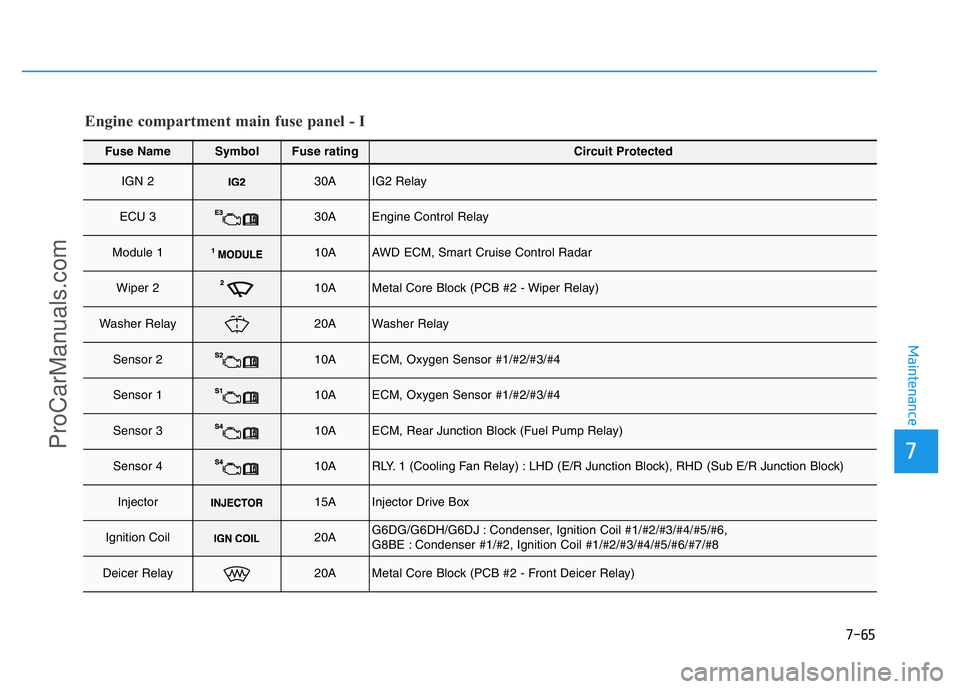
Fuse NameSymbolFuse ratingCircuit Protected
IGN 230AIG2 Relay
ECU 330AEngine Control Relay
Module 110AAWD ECM, Smart Cruise Control Radar
Wiper 210AMetal Core Block (PCB #2 - Wiper Relay)
Washer Relay20AWasher Relay
Sensor 210AECM, Oxygen Sensor #1/#2/#3/#4
Sensor 110AECM, Oxygen Sensor #1/#2/#3/#4
Sensor 310AECM, Rear Junction Block (Fuel Pump Relay)
Sensor 410ARLY. 1 (Cooling Fan Relay) : LHD (E/R Junction Block), RHD (Sub E/R Junction Block)
Injector15AInjector Drive Box
Ignition Coil20AG6DG/G6DH/G6DJ : Condenser, Ignition Coil #1/#2/#3/#4/#5/#6,
G8BE : Condenser #1/#2, Ignition Coil #1/#2/#3/#4/#5/#6/#7/#8
Deicer Relay20AMetal Core Block (PCB #2 - Front Deicer Relay)
Engine compartment main fuse panel - I
ProCarManuals.com
Page 502 of 546
7-66
Maintenance
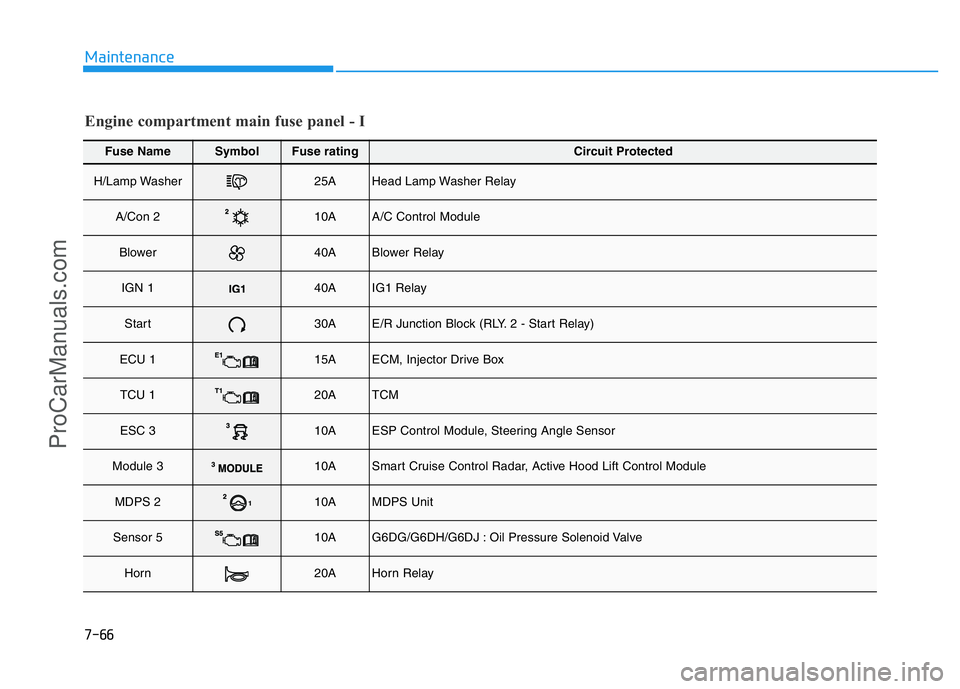
Fuse NameSymbolFuse ratingCircuit Protected
H/Lamp Washer25AHead Lamp Washer Relay
A/Con 210AA/C Control Module
Blower40ABlower Relay
IGN 140AIG1 Relay
Start30AE/R Junction Block (RLY. 2 - Start Relay)
ECU 115AECM, Injector Drive Box
TCU 120ATCM
ESC 310AESP Control Module, Steering Angle Sensor
Module 310ASmart Cruise Control Radar, Active Hood Lift Control Module
MDPS 210AMDPS Unit
Sensor 510AG6DG/G6DH/G6DJ : Oil Pressure Solenoid Valve
Horn20AHorn Relay
Engine compartment main fuse panel - I
ProCarManuals.com