USB HYUNDAI COUPE 2016 User Guide
[x] Cancel search | Manufacturer: HYUNDAI, Model Year: 2016, Model line: COUPE, Model: HYUNDAI COUPE 2016Pages: 475, PDF Size: 14.78 MB
Page 249 of 475
Features of your vehicle
166
4
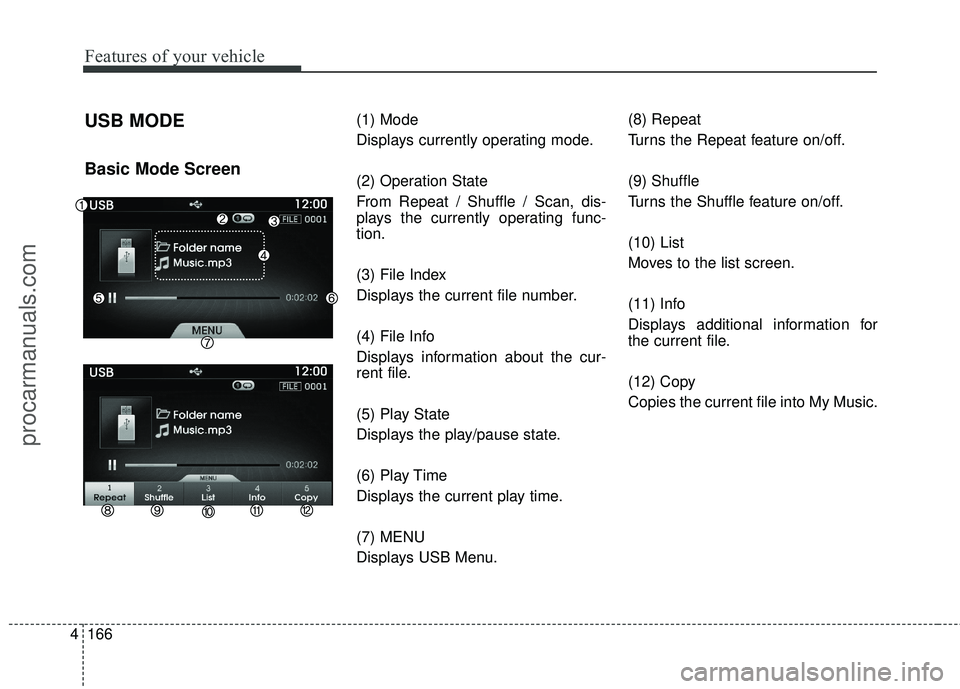
USB MODE
Basic Mode Screen
(1) Mode
Displays currently operating mode.
(2) Operation State
From Repeat / Shuffle / Scan, dis-
plays the currently operating func-
tion.
(3) File Index
Displays the current file number.
(4) File Info
Displays information about the cur-
rent file.
(5) Play State
Displays the play/pause state.
(6) Play Time
Displays the current play time.
(7) MENU
Displays USB Menu. (8) Repeat
Turns the Repeat feature on/off.
(9) Shuffle
Turns the Shuffle feature on/off.
(10) List
Moves to the list screen.
(11) Info
Displays additional information for
the current file.
(12) Copy
Copies the current file into My Music.
procarmanuals.com
Page 250 of 475
4167
Features of your vehicle
Using USB Mode
Playing/Pausing USB Files
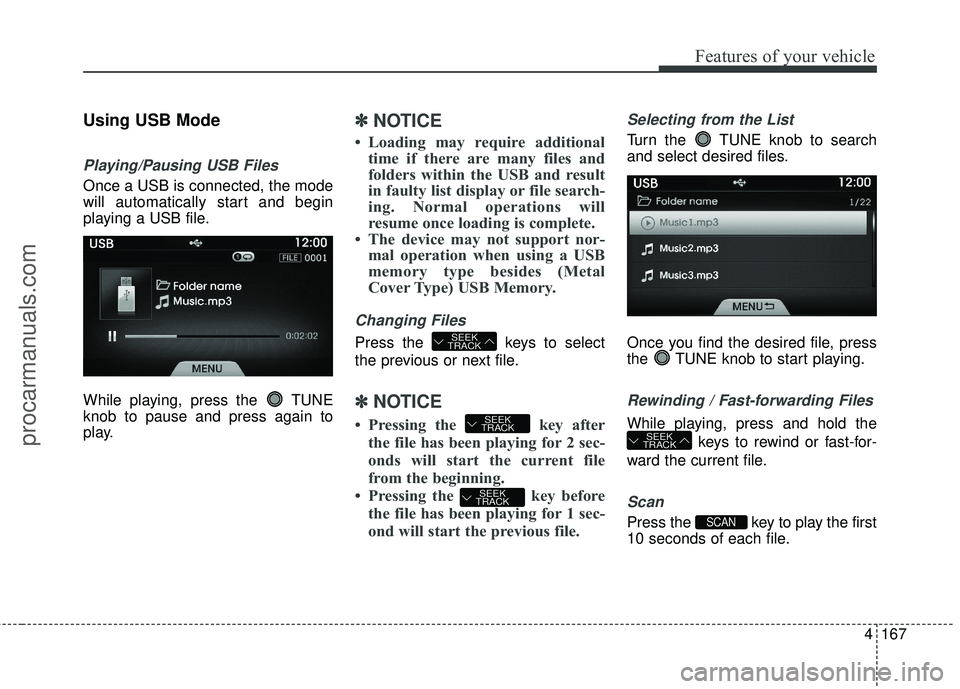
Once a USB is connected, the mode
will automatically start and begin
playing a USB file.
While playing, press the TUNE
knob to pause and press again to
play.
✽ ✽NOTICE
• Loading may require additional
time if there are many files and
folders within the USB and result
in faulty list display or file search-
ing. Normal operations will
resume once loading is complete.
• The device may not support nor- mal operation when using a USB
memory type besides (Metal
Cover Type) USB Memory.
Changing Files
Press the keys to select
the previous or next file.
✽ ✽ NOTICE
• Pressing the key after
the file has been playing for 2 sec-
onds will start the current file
from the beginning.
• Pressing the key before the file has been playing for 1 sec-
ond will start the previous file.
Selecting from the List
Turn the TUNE knob to search
and select desired files.
Once you find the desired file, press
the TUNE knob to start playing.
Rewinding / Fast-forwarding Files
While playing, press and hold the
keys to rewind or fast-for-
ward the current file.
Scan
Press the key to play the first
10 seconds of each file.SCAN
SEEK
TRACK
SEEK
TRACK
SEEK
TRACK
SEEK
TRACK
procarmanuals.com
Page 251 of 475
Features of your vehicle
168
4
Searching Folders
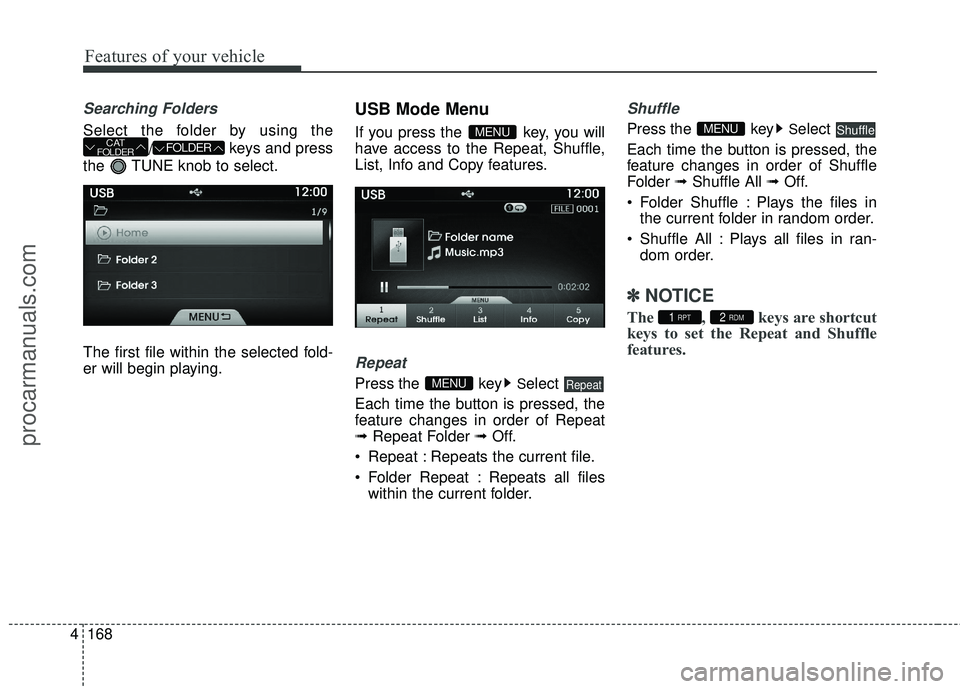
Select the folder by using the
/ keys and press
the TUNE knob to select.
The first file within the selected fold-
er will begin playing.
USB Mode Menu
If you press the key, you will
have access to the Repeat, Shuffle,
List, Info and Copy features.
Repeat
Press the keySelect
Each time the button is pressed, the
feature changes in order of Repeat
➟ Repeat Folder ➟ Off.
Repeat : Repeats the current file.
Folder Repeat : Repeats all files within the current folder.
Shuffle
Press the keySelect
Each time the button is pressed, the
feature changes in order of Shuffle
Folder ➟Shuffle All ➟ Off.
Folder Shuffle : Plays the files in the current folder in random order.
Shuffle All : Plays all files in ran- dom order.
✽ ✽ NOTICE
The , keys are shortcut
keys to set the Repeat and Shuffle
features.2 RDM1 RPT
ShuffleMENU
RepeatMENU
MENUFOLDERCAT
FOLDER
procarmanuals.com
Page 273 of 475
Features of your vehicle
190
4
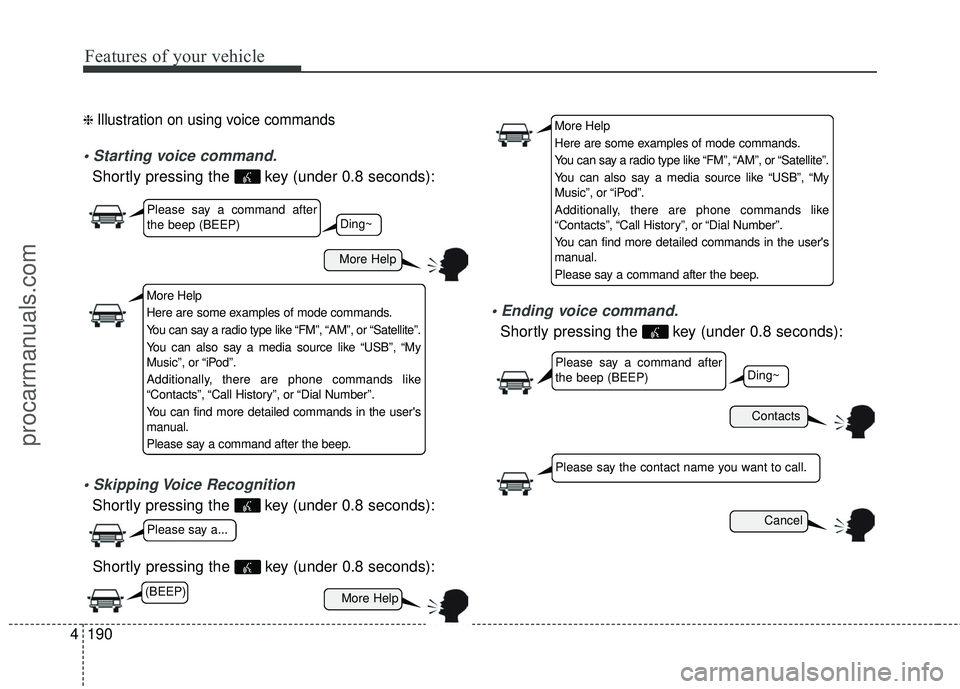
❈ Illustration on using voice commands
Shortly pressing the key (under 0.8 seconds):
Shortly pressing the key (under 0.8 seconds):
Shortly pressing the key (under 0.8 seconds):
voice command.
Shortly pressing the key (under 0.8 seconds):
More Help
Contacts
Cancel
More Help
Please say a command after
the beep (BEEP)
Please say a command after
the beep (BEEP)
Please say a...
Please say the contact name you want to call.
Ding~
Ding~
More Help
Here are some examples of mode commands.
You can say a radio type like “FM”, “AM”, or “Satellite”.
You can also say a media source like “USB”, “My
Music”, or “iPod”.
Additionally, there are phone commands like
“Contacts”, “Call History”, or “Dial Number”.
You can find more detailed commands in the user's
manual.
Please say a command after the beep.
More Help
Here are some examples of mode commands.
You can say a radio type like “FM”, “AM”, or “Satellite”.
You can also say a media source like “USB”, “My
Music”, or “iPod”.
Additionally, there are phone commands like
“Contacts”, “Call History”, or “Dial Number”.
You can find more detailed commands in the user's
manual.
Please say a command after the beep.
(BEEP)
procarmanuals.com
Page 275 of 475
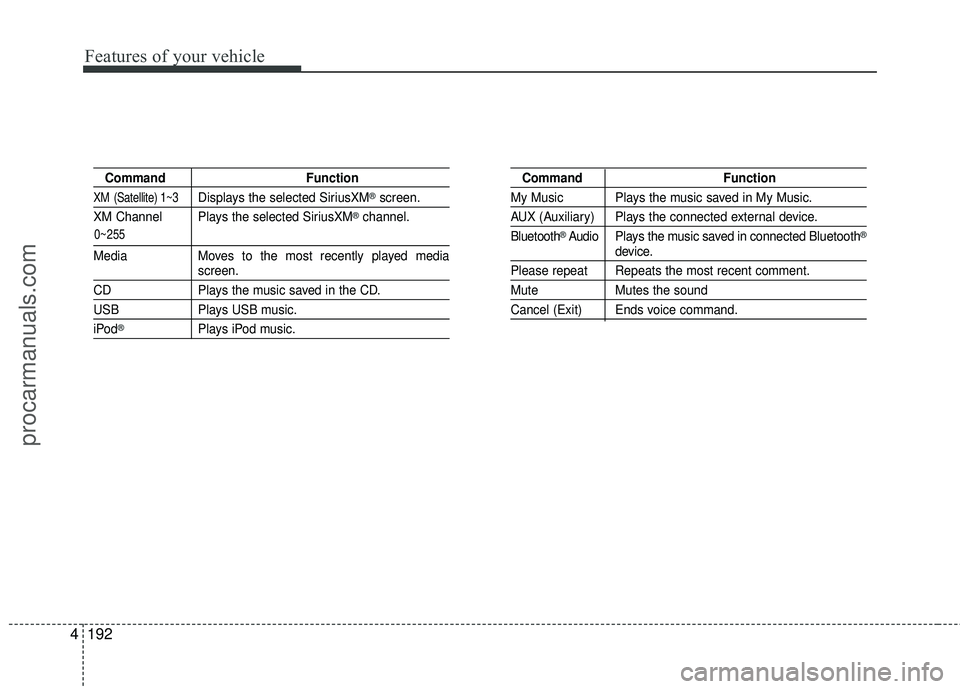
Features of your vehicle
192
4
Command Function
XM (Satellite) 1~3Displays the selected SiriusXM®screen.
XM Channel Plays the selected SiriusXM
®channel.
Media Moves to the most recently played mediascreen.
CD Plays the music saved in the CD.
USBPlays USB music.
iPod®Plays iPod music.
Command Function
My Music Plays the music saved in My Music.
AUX (Auxiliary) Plays the connected external device.
Bluetooth
®Audio Plays the music saved in connected Bluetooth®
device.
Please repeat Repeats the most recent comment.
Mute Mutes the sound
Cancel (Exit) Ends voice command.
0~255
procarmanuals.com
Page 277 of 475
Features of your vehicle
194
4
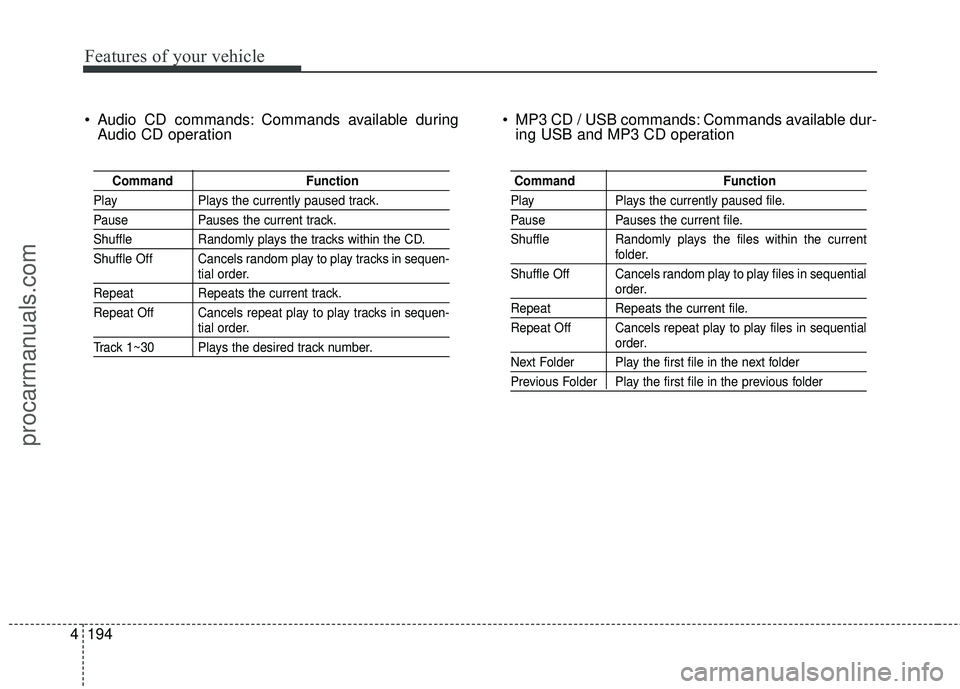
Audio CD commands: Commands available during
Audio CD operation MP3 CD / USB commands: Commands available dur-
ing USB and MP3 CD operation
Command Function
PlayPlays the currently paused track.
PausePauses the current track.
ShuffleRandomly plays the tracks within the CD.
Shuffle Off Cancels random play to play tracks in sequen-
tial order.
Repeat Repeats the current track.
Repeat Off Cancels repeat play to play tracks in sequen-
tial order.
Track 1~30 Plays the desired track number.
Command Function
PlayPlays the currently paused file.
PausePauses the current file.
Shuffle Randomly plays the files within the current
folder.
Shuffle Off Cancels random play to play files in sequential
order.
Repeat Repeats the current file.
Repeat Off Cancels repeat play to play files in sequential
order.
Next Folder Play the first file in the next folder
Previous Folder Play the first file in the previous folder
procarmanuals.com
Page 280 of 475
![HYUNDAI COUPE 2016 User Guide 4197
Features of your vehicle
MP3 Information Display
Press the key Select [Display]Select [Media Display]
This feature is used to change the
information displayed within USB
and MP3 CD modes.
(1) Fo](/img/35/57912/w960_57912-279.png "HYUNDAI COUPE 2016 User Guide 4197
Features of your vehicle
MP3 Information Display
Press the key Select [Display]Select [Media Display]
This feature is used to change the
information displayed within USB
and MP3 CD modes.
(1) Fo")
4197
Features of your vehicle
MP3 Information Display
Press the key Select [Display]Select [Media Display]
This feature is used to change the
information displayed within USB
and MP3 CD modes.
(1) Folder File : Displays file name and folder name
(2) Album Artist Song : Displays album name/artist name/song
Sound Settings
Press the key Select [Sound]
Tone
This menu allows you to set the
Bass, Middle, Treble.
Select [Tone] Select menu through TUNE knob Turn TUNE knob
left/right to set
Bass, Middle, Treble : Selects the sound tone.
Default : Restores default settings.
SETUP
SETUP
procarmanuals.com
Page 466 of 475
··················\
···········5-29
Active headrest ··················\
··················\
···")
Index
2I
ABS (Anti-lock brake system)··················\
···········5-29
Active headrest ··················\
··················\
············3-9
Air bag warning labels ··················\
··················\
· ·3-63
Air bag warning light ··················\
··················\
·· ·3-40
Air bags ··················\
··················\
··················\
·3-36
Air bag warning labels ··················\
··············· ·3-63
Air bag warning light ··················\
················· ·3-40
Collision sensors ··················\
··················\
···· ·3-55
Curtain air bag ··················\
··················\
······· ·3-54
Driver's and passenger's front air bag ·················3-48
Occupant classification system ··················\
·······3-43
Side impact air bag ··················\
··················\
·· ·3-52
SRS components and functions ··················\
······3-39
Air cleaner ··················\
··················\
··············· ·7-32
Alarm system(see the Theft-alarm system) ··············4-14
alcohol and methanol ··················\
··················\
·····1-4
Antenna (Glass) ··················\
··················\
······· ·4-128
Anti-lock brake system (ABS) ··················\
···········5-29
Appearance care Exterior care ··················\
··················\
········· ·7-76
Interior care ··················\
··················\
·········· ·7-82
Appearance care ··················\
··················\
·········7-76
Ashtray ··················\
··················\
················· ·4-122
Audio control ··················\
··················\
·········· ·4-146
Audio system ··················\
··················\
·········· ·4-128
Audio control ··················\
··················\
······· ·4-146Bluetooth Hands free
··················\
················ ·4-181
Bluetooth
®Wireless Technology ··················\
···4-178
Glass antenna ··················\
··················\
······· ·4-128
IPOD··················\
··················\
················· ·4-170
Steering wheel audio control ··················\
········4-129
USB device ··················\
··················\
········· ·4-166
Sirius XM satellite Radio ··················\
············4-153
Auto Cruise (see the cruise control system) ·············5-37
Automatic climate control system ··················\
·····4-102
Air conditioning ··················\
··················\
·····4-111
Climate control air filter · · · ··················\
····4-100, 112
Automatic tranmission ··················\
··················\
· ·5-17
Shift lock ··················\
··················\
··············5-22
Sports mode ··················\
··················\
·········· ·5-20
Automatic tranmission fluid ··················\
·············7-31
Aux, USB and iPod port ··················\
··············· ·4-127
Base curb weight··················\
··················\
·········5-57
Battery ··················\
··················\
··················\
·· ·7-39
Battery saver function ··················\
··················\
·· ·4-82
Before driving ··················\
··················\
············ ·5-3
Bluetooth Hands free ··················\
··················\
· ·4-181
Bluetooth
®Wireless Technology ··················\
·······4-178
Bottle holders, see cup holders ··················\
·········4-122
A
B
procarmanuals.com
Page 470 of 475

Index
6I
Headlight escort function··················\
················ ·4-82
Headrest ··················\
··················\
··················\
··3-7
Highway driving ··················\
··················\
·········5-46
HomeLink system ··················\
··················\
······ ·4-38
Hood ··················\
··················\
··················\
···· ·4-26
Horn ··················\
··················\
··················\
···· ·4-34
How to use this manual ··················\
··················\
··1-2
Immobilizer system ··················\
··················\
·······4-4
Indicator symbols on the instrument cluster ··············1-8
Indicators and warnings ··················\
················· ·4-61
Inside rearview mirror ··················\
··················\
· ·4-35
Instrument cluster ··················\
··················\
······· ·4-45
Engine coolant temperature gauge ··················\
···4-47
Fuel gauge ··················\
··················\
············ ·4-48
Instrument panel illumination ··················\
········4-46
LCD display warning ··················\
················· ·4-56
Odometer ··················\
··················\
··············4-49
Speedometer ··················\
··················\
········· ·4-46
Tachometer ··················\
··················\
··········· ·4-47
Trip computer ··················\
··················\
·········4-49
User setting mode ··················\
··················\
··· ·4-53
Warning and indicators ··················\
··············· ·4-61
Instrument panel fuse ··················\
··················\
·· ·7-56
Instrument panel fuse label ··················\
···············7-59 Instrument panel illumination
··················\
············4-46
Instrument panel overview ··················\
················ ·2-5
Interior care ··················\
··················\
·············· ·7-82
Interior features ··················\
··················\
·········4-121
Ashtray ··················\
··················\
·············· ·4-122
Aux, USB and iPod port ··················\
············ ·4-127
Cigarette lighter ··················\
··················\
···· ·4-121
Cup holder ··················\
··················\
·········· ·4-122
Digital clock ··················\
··················\
······· ·4-124
Floor mat anchor(s) ··················\
··················\
·4-125
Outside thermometer ··················\
················ ·4-125
Power outlet ··················\
··················\
·········4-124
Sunvisor ··················\
··················\
··············4-123
Interior light ··················\
··················\
··············4-89
Glove box lamp ··················\
··················\
······ ·4-90
Map lamp ··················\
··················\
··············4-89
T
runk room lamp ··················\
··················\
···· ·4-90
Vanity mirror lamp ··················\
··················\
·· ·4-90
Interior overview ··················\
··················\
········· ·2-4
IPOD ··················\
··················\
··················\
···4-170
Jack and tools ··················\
··················\
··········· ·6-12
Jump starting ··················\
··················\
·············· ·6-4
J
I
procarmanuals.com
Page 474 of 475

Index
10I
Steering wheel··················\
··················\
··········· ·4-33
Horn ··················\
··················\
··················\
· ·4-34
Power steering ··················\
··················\
······· ·4-33
Tilt & Telescope steering ··················\
··············4-34
Steering wheel audio control ··················\
···········4-129
Steps For Determining Correct Load Limit ··············5-53
Storage compartment ··················\
··················\
· ·4-120
Center console storage ··················\
···············4-120
Glove box ··················\
··················\
··········· ·4-120
Luggage net ··················\
··················\
········· ·4-126
Sunglass holder ··················\
··················\
···· ·4-121
Sunglass holder ··················\
··················\
·········4-121
Sunroof ··················\
··················\
··················\
· ·4-30
Sunvisor ··················\
··················\
·················4-123
Tachometer ··················\
··················\
·············· ·4-47
Tether anchor system ··················\
··················\
··· ·3-32
Theft-alarm system ··················\
··················\
····· ·4-14
Tilt & Telescope steering ··················\
················ ·4-34
Tire and loading information label ··················\
······5-52
Tire chains ··················\
··················\
··············· ·5-49
Tire pressure monitoring system (TPMS) ·················6-7
Tire specification and pressure label ··················\
·····8-7
Tires and wheels ··················\
··················\
··· ·7-41, 8-3
Checking tire inflation pressure ··················\
······7-42
Compact spare tire replacement ··················\
······7-46Recommended cold tire inflation pressures
··········7-41
Tire care ··················\
··················\
·············· ·7-41
Tire maintenance ··················\
··················\
···· ·7-47
Tire replacement ··················\
··················\
····· ·7-45
Tire rotation ··················\
··················\
·········· ·7-43
Tire sidewall labeling ··················\
················· ·7-47
Tire traction ··················\
··················\
·········· ·7-47
Wheel alignment and tire balance ··················\
···7-44
Wheel replacement ··················\
··················\
·· ·7-46
Towing ··················\
··················\
··················\
· ·6-20
Removable towing hook ··················\
··············6-21
T
owing capacity ··················\
··················\
········· ·5-53
Towing hook ··················\
··················\
··············6-21
TPMS ··················\
··················\
··················\
···· ·6-7
Trailer Towing ··················\
··················\
··········· ·5-58
Trip computer ··················\
··················\
··········· ·4-50
Trunk · · · · · · · · · · · · · · · · · · · · · · · · · · ··················\
··············4-20
Trunk emergency safety release ··················\
·········4-21
Trunk room lamp ··················\
··················\
······· ·4-90
Ttranmission Automatic tranmission ··················\
················ ·5-17
Manual tranmission ··················\
··················\
· ·5-13
USB device ··················\
··················\
············ ·4-166
User setting mode ··················\
··················\
······ ·4-53
T
U
procarmanuals.com