radio HYUNDAI COUPE 2016 Owner's Manual
[x] Cancel search | Manufacturer: HYUNDAI, Model Year: 2016, Model line: COUPE, Model: HYUNDAI COUPE 2016Pages: 475, PDF Size: 14.78 MB
Page 239 of 475
Features of your vehicle
156
4
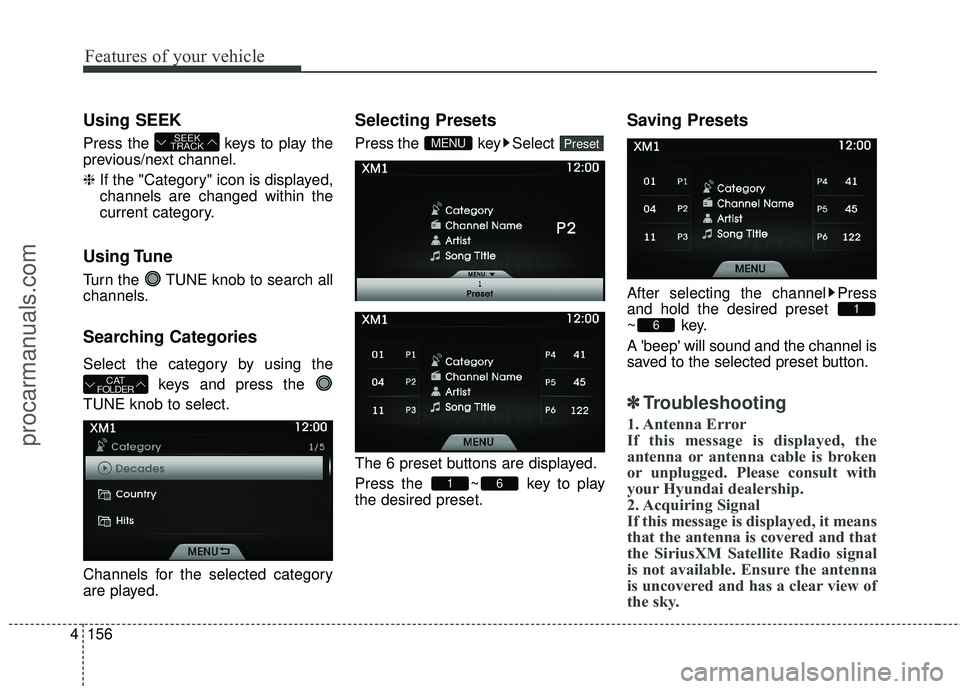
Using SEEK
Press the keys to play the
previous/next channel.
❈ If the "Category" icon is displayed,
channels are changed within the
current category.
Using Tune
Turn the TUNE knob to search all
channels.
Searching Categories
Select the category by using the
keys and press the
TUNE knob to select.
Channels for the selected category
are played.
Selecting Presets
Press the key Select
The 6 preset buttons are displayed.
Press the ~ key to play
the desired preset.
Saving Presets
After selecting the channel Press
and hold the desired preset
~key.
A 'beep' will sound and the channel is
saved to the selected preset button.
✽ ✽ Troubleshooting
1. Antenna Error
If this message is displayed, the
antenna or antenna cable is broken
or unplugged. Please consult with
your Hyundai dealership.
2. Acquiring Signal
If this message is displayed, it means
that the antenna is covered and that
the SiriusXM Satellite Radio signal
is not available. Ensure the antenna
is uncovered and has a clear view of
the sky.
6
1
61
PresetMENU
CAT
FOLDER
SEEK
TRACK
procarmanuals.com
Page 273 of 475
Features of your vehicle
190
4
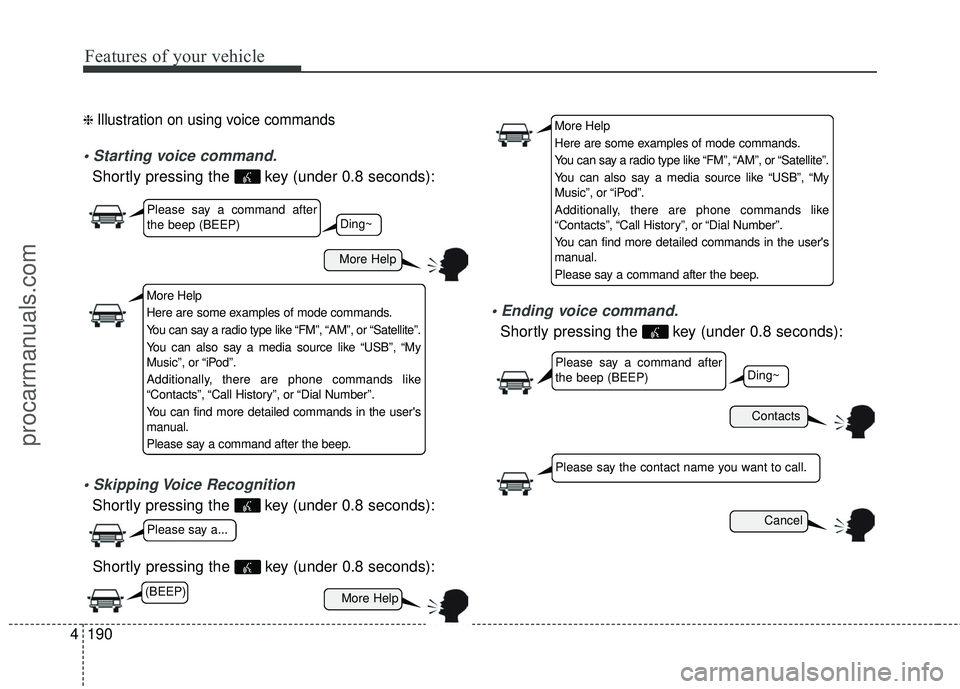
❈ Illustration on using voice commands
Shortly pressing the key (under 0.8 seconds):
Shortly pressing the key (under 0.8 seconds):
Shortly pressing the key (under 0.8 seconds):
voice command.
Shortly pressing the key (under 0.8 seconds):
More Help
Contacts
Cancel
More Help
Please say a command after
the beep (BEEP)
Please say a command after
the beep (BEEP)
Please say a...
Please say the contact name you want to call.
Ding~
Ding~
More Help
Here are some examples of mode commands.
You can say a radio type like “FM”, “AM”, or “Satellite”.
You can also say a media source like “USB”, “My
Music”, or “iPod”.
Additionally, there are phone commands like
“Contacts”, “Call History”, or “Dial Number”.
You can find more detailed commands in the user's
manual.
Please say a command after the beep.
More Help
Here are some examples of mode commands.
You can say a radio type like “FM”, “AM”, or “Satellite”.
You can also say a media source like “USB”, “My
Music”, or “iPod”.
Additionally, there are phone commands like
“Contacts”, “Call History”, or “Dial Number”.
You can find more detailed commands in the user's
manual.
Please say a command after the beep.
(BEEP)
procarmanuals.com
Page 274 of 475
4191
Features of your vehicle
CommandFunction
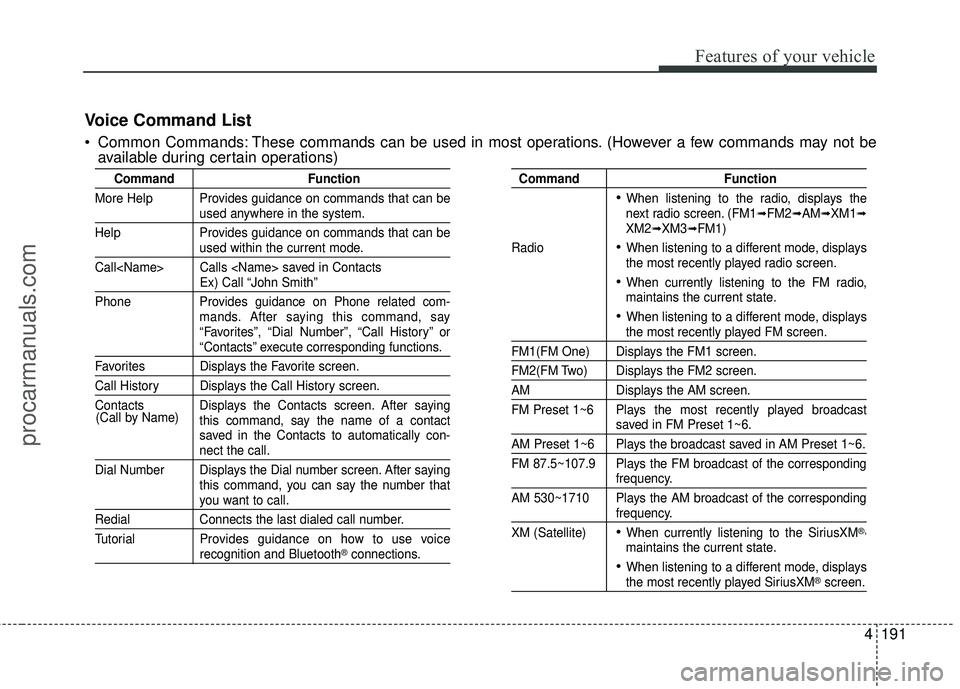
More Help Provides guidance on commands that can be
used anywhere in the system.
Help Provides guidance on commands that can be
used within the current mode.
Call
Ex) Call “John Smith”
Phone Provides guidance on Phone related com- mands. After saying this command, say
“Favorites”, “Dial Number”, “Call History” or
“Contacts” execute corresponding functions.
Favorites Displays the Favorite screen.
Call History Displays the Call History screen.
Contacts Displays the Contacts screen. After sayingthis command, say the name of a contact
saved in the Contacts to automatically con-
nect the call.
Dial Number Displays the Dial number screen. After saying this command, you can say the number that
you want to call.
RedialConnects the last dialed call number.
Tutorial Pro vides guidance on how to use voice
recognition and Bluetooth®connections.
Command Function
When listening to the radio, displays the
next radio screen. (FM1➟FM2➟AM➟XM1➟XM2➟XM3➟FM1)
Radio
When listening to a different mode, displays
the most recently played radio screen.
When currently listening to the FM radio,
maintains the current state.
When listening to a different mode, displaysthe most recently played FM screen.
FM1(FM One) Displays the FM1 screen.
FM2(FM Two) Displays the FM2 screen.
AM Displays the AM screen.
FM Preset 1~6 Plays the most recently played broadcast
saved in FM Preset 1~6.
AM Preset 1~6 Plays the broadcast saved in AM Preset 1~6.
FM 87.5~107.9 Plays the FM broadcast of the corresponding
frequency.
AM 530~1710 Plays the AM broadcast of the corresponding
frequency.
XM (Satellite)
When currently listening to the SiriusXM®,
maintains the current state.
When listening to a different mode, displaysthe most recently played SiriusXM®screen.
(Call by Name)
Voice Command List
Common Commands: These commands can be used in most operations. (However a few commands may not be
available during certain operations)
procarmanuals.com
Page 276 of 475
4193
Features of your vehicle
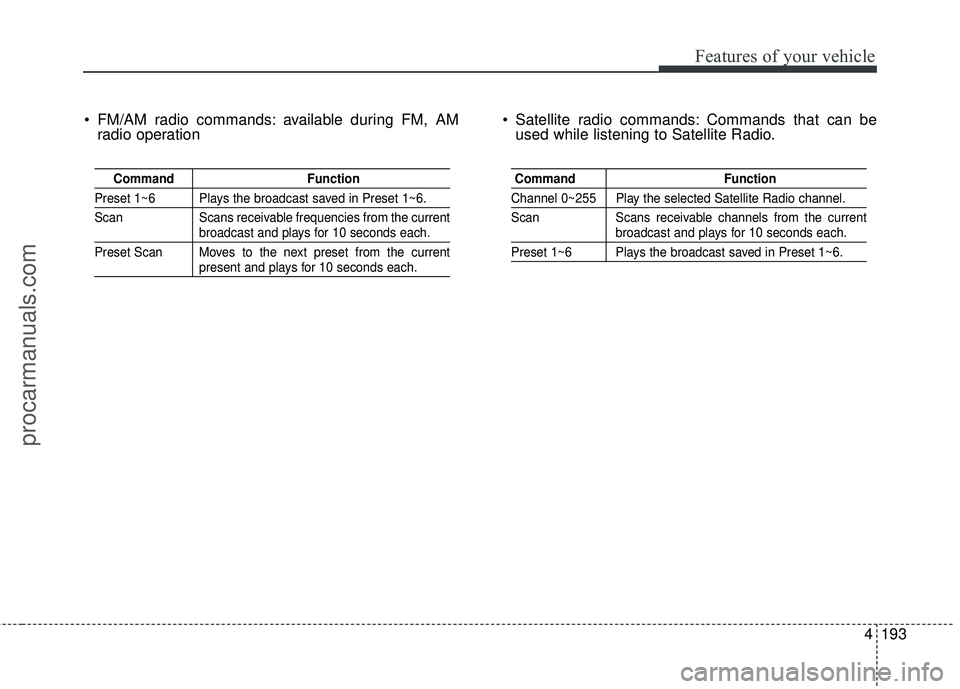
FM/AM radio commands: available during FM, AMradio operation Satellite radio commands: Commands that can be
used while listening to Satellite Radio.
Command Function
Preset 1~6 Plays the broadcast saved in Preset 1~6.
Scan Scans receivable frequencies from the current
broadcast and plays for 10 seconds each.
Preset Scan Moves to the next preset from the current
present and plays for 10 seconds each.
Command Function
Channel 0~255 Play the selected Satellite Radio channel.
Scan Scans receivable channels from the current
broadcast and plays for 10 seconds each.
Preset 1~6 Plays the broadcast saved in Preset 1~6.
procarmanuals.com
Page 279 of 475
![HYUNDAI COUPE 2016 Owners Manual Features of your vehicle
196
4
SETUP
Starting Mode
Press the key to display the
Setup screen.
You can select and control options
related to [Display], [Sound], [Clock /
Calendar], [Phone] and [System](/img/35/57912/w960_57912-278.png "HYUNDAI COUPE 2016 Owners Manual Features of your vehicle
196
4
SETUP
Starting Mode
Press the key to display the
Setup screen.
You can select and control options
related to [Display], [Sound], [Clock /
Calendar], [Phone] and [System")
Features of your vehicle
196
4
SETUP
Starting Mode
Press the key to display the
Setup screen.
You can select and control options
related to [Display], [Sound], [Clock /
Calendar], [Phone] and [System].
✽ ✽
NOTICE
Once settings have been changed,
press the key to return to the
previous menu.
Display Settings
Adjusting the Brightness
Press the key Select [Display]
Select [Brightness]
Use the TUNE knob to adjust the
screen brightness or set the
Brightness on Automatic, Daylight, or
Night mode.
(1) Automatic : Adjusts the bright- ness automatically
(2) Day : Always maintains the bright- ness on high
(3) Night : Always maintains the brightness on low
Mode Pop-up
Press the key Select [Display]
Select [Mode Pop up]
This feature is used to display the
Mode Pop-up screen when entering
radio and media modes.
When this feature is turned on,
pressing the or key
will display the Mode Pop-up screen.
✽ ✽ NOTICE
The media Mode Pop-up screen can
be displayed only when two or more
media modes have been connected.
MEDIA RADIO
SETUP
SETUP
MENU
SETUP
procarmanuals.com
Page 355 of 475
What to do in an emergency
10
6
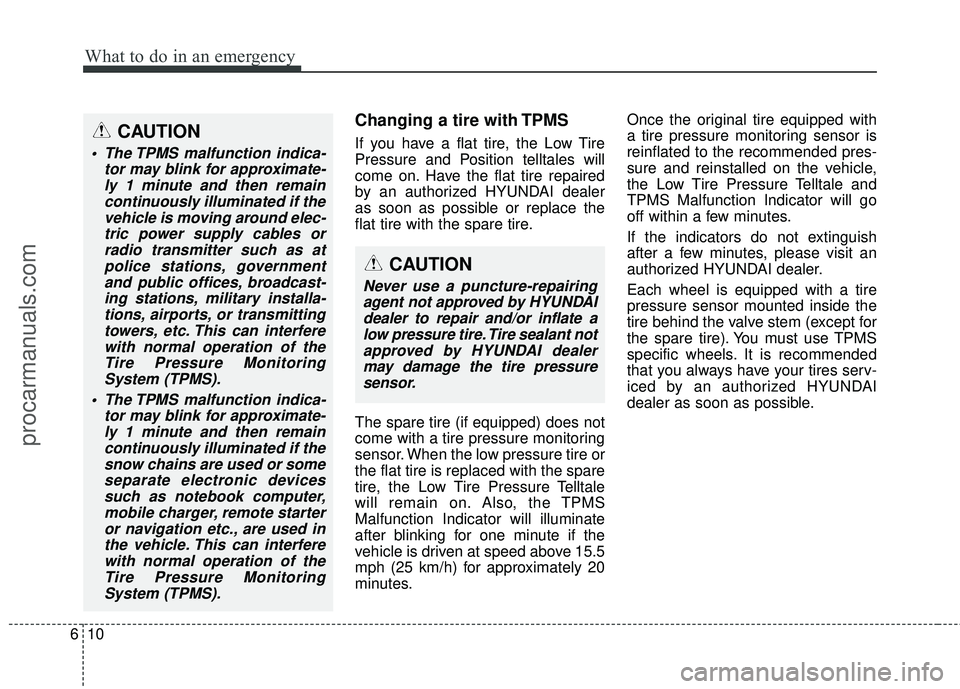
Changing a tire with TPMS
If you have a flat tire, the Low Tire
Pressure and Position telltales will
come on. Have the flat tire repaired
by an authorized HYUNDAI dealer
as soon as possible or replace the
flat tire with the spare tire.
The spare tire (if equipped) does not
come with a tire pressure monitoring
sensor. When the low pressure tire or
the flat tire is replaced with the spare
tire, the Low Tire Pressure Telltale
will remain on. Also, the TPMS
Malfunction Indicator will illuminate
after blinking for one minute if the
vehicle is driven at speed above 15.5
mph (25 km/h) for approximately 20
minutes. Once the original tire equipped with
a tire pressure monitoring sensor is
reinflated to the recommended pres-
sure and reinstalled on the vehicle,
the Low Tire Pressure Telltale and
TPMS Malfunction Indicator will go
off within a few minutes.
If the indicators do not extinguish
after a few minutes, please visit an
authorized HYUNDAI dealer.
Each wheel is equipped with a tire
pressure sensor mounted inside the
tire behind the valve stem (except for
the spare tire). You must use TPMS
specific wheels. It is recommended
that you always have your tires serv-
iced by an authorized HYUNDAI
dealer as soon as possible.CAUTION
The TPMS malfunction indica-
tor may blink for approximate-ly 1 minute and then remaincontinuously illuminated if thevehicle is moving around elec-tric power supply cables orradio transmitter such as atpolice stations, governmentand public offices, broadcast-ing stations, military installa-tions, airports, or transmittingtowers, etc. This can interferewith normal operation of theTire Pressure MonitoringSystem (TPMS).
The TPMS malfunction indica- tor may blink for approximate-ly 1 minute and then remaincontinuously illuminated if thesnow chains are used or someseparate electronic devicessuch as notebook computer,mobile charger, remote starteror navigation etc., are used inthe vehicle. This can interferewith normal operation of theTire Pressure MonitoringSystem (TPMS).
CAUTION
Never use a puncture-repairingagent not approved by HYUNDAIdealer to repair and/or inflate alow pressure tire. Tire sealant notapproved by HYUNDAI dealermay damage the tire pressuresensor.
procarmanuals.com
Page 466 of 475
··················\
···········5-29
Active headrest ··················\
··················\
···")
Index
2I
ABS (Anti-lock brake system)··················\
···········5-29
Active headrest ··················\
··················\
············3-9
Air bag warning labels ··················\
··················\
· ·3-63
Air bag warning light ··················\
··················\
·· ·3-40
Air bags ··················\
··················\
··················\
·3-36
Air bag warning labels ··················\
··············· ·3-63
Air bag warning light ··················\
················· ·3-40
Collision sensors ··················\
··················\
···· ·3-55
Curtain air bag ··················\
··················\
······· ·3-54
Driver's and passenger's front air bag ·················3-48
Occupant classification system ··················\
·······3-43
Side impact air bag ··················\
··················\
·· ·3-52
SRS components and functions ··················\
······3-39
Air cleaner ··················\
··················\
··············· ·7-32
Alarm system(see the Theft-alarm system) ··············4-14
alcohol and methanol ··················\
··················\
·····1-4
Antenna (Glass) ··················\
··················\
······· ·4-128
Anti-lock brake system (ABS) ··················\
···········5-29
Appearance care Exterior care ··················\
··················\
········· ·7-76
Interior care ··················\
··················\
·········· ·7-82
Appearance care ··················\
··················\
·········7-76
Ashtray ··················\
··················\
················· ·4-122
Audio control ··················\
··················\
·········· ·4-146
Audio system ··················\
··················\
·········· ·4-128
Audio control ··················\
··················\
······· ·4-146Bluetooth Hands free
··················\
················ ·4-181
Bluetooth
®Wireless Technology ··················\
···4-178
Glass antenna ··················\
··················\
······· ·4-128
IPOD··················\
··················\
················· ·4-170
Steering wheel audio control ··················\
········4-129
USB device ··················\
··················\
········· ·4-166
Sirius XM satellite Radio ··················\
············4-153
Auto Cruise (see the cruise control system) ·············5-37
Automatic climate control system ··················\
·····4-102
Air conditioning ··················\
··················\
·····4-111
Climate control air filter · · · ··················\
····4-100, 112
Automatic tranmission ··················\
··················\
· ·5-17
Shift lock ··················\
··················\
··············5-22
Sports mode ··················\
··················\
·········· ·5-20
Automatic tranmission fluid ··················\
·············7-31
Aux, USB and iPod port ··················\
··············· ·4-127
Base curb weight··················\
··················\
·········5-57
Battery ··················\
··················\
··················\
·· ·7-39
Battery saver function ··················\
··················\
·· ·4-82
Before driving ··················\
··················\
············ ·5-3
Bluetooth Hands free ··················\
··················\
· ·4-181
Bluetooth
®Wireless Technology ··················\
·······4-178
Bottle holders, see cup holders ··················\
·········4-122
A
B
procarmanuals.com
Page 473 of 475

I9
Index
Satellite Radio··················\
··················\
········· ·4-153
Scheduled maintenance service ··················\
···········7-7
Maintenance under severe usage conditions ·········7-19
Normal maintenance schedule ··················\
·········7-8
Seat belt warning ··················\
··················\
······· ·3-17
Seat belts ··················\
··················\
················· ·3-16
Pre-tensioner seat belt ··················\
················ ·3-20
Seat belt - Driver's 3-point system ··················\
···3-18
Seat belt warning ··················\
··················\
···· ·3-17
Shoulder belt extension guide ··················\
········3-20
Seat Warmer ··················\
··················\
··············3-10
Seatback pocket ··················\
··················\
··········3-11
Seating capacity ··················\
··················\
········· ·5-52
Seats ··················\
··················\
··················\
·······3-2
Active headrest ··················\
··················\
·········3-9
Folding the rear seat ··················\
··················\
·3-13
Front seat adjustment (manual) ··················\
········3-4
Front seat adjustment (Power) ··················\
·········3-5
Headrest ··················\
··················\
·················3-7
Lumbar support ··················\
··················\
········3-9
Rear seat ··················\
··················\
··············3-13
Rear seat entry ··················\
··················\
······· ·3-12
Seatback pocket ··················\
··················\
·······3-11
Walk in device ··················\
··················\
······· ·3-12
Warmer ··················\
··················\
··············· ·3-10Security indicator
··················\
··················\
······· ·4-16
Shift Lock ··················\
··················\
·················5-22
Shoulder belt extension guide ··················\
···········3-20
Side impact air bag ··················\
··················\
····· ·3-52
Sirius XM satellite Radio ··················\
···············4-153
Smart key ··················\
··················\
··················\
·4-6
Smart key battery replacement ··················\
·········4-8
Smart key battery replacement ··················\
············4-8
Smooth cornering ··················\
··················\
······· ·5-44
Snow tires ··················\
··················\
·················5-48
Spare tire Compact spare tire replacement ··················\
······7-47
Removing and storing the spare tire ··················\
·6-13
Special driving conditions ··················\
··············· ·5-43
Driving at night ··················\
··················\
······ ·5-44
Driving in flooded areas ··················\
···············5-46
Driving in the rain ··················\
··················\
··· ·5-45
Driving of
f-road ··················\
··················\
····· ·5-46
Hazardous driving conditions ··················\
········5-43
Highway driving ··················\
··················\
····· ·5-46
Rocking the vehicle ··················\
··················\
· ·5-43
Smooth cornering ··················\
··················\
··· ·5-44
Speed sensing door lock system ··················\
·········4-19
Speedometer ··················\
··················\
··············4-46
Sports mode ··················\
··················\
··············5-20
SRS components and functions ··················\
··········3-39
Starting difficulties, see engine will not start ·············6-3
S
procarmanuals.com