reset HYUNDAI COUPE 2016 Owner's Manual
[x] Cancel search | Manufacturer: HYUNDAI, Model Year: 2016, Model line: COUPE, Model: HYUNDAI COUPE 2016Pages: 475, PDF Size: 14.78 MB
Page 238 of 475
4155
Features of your vehicle
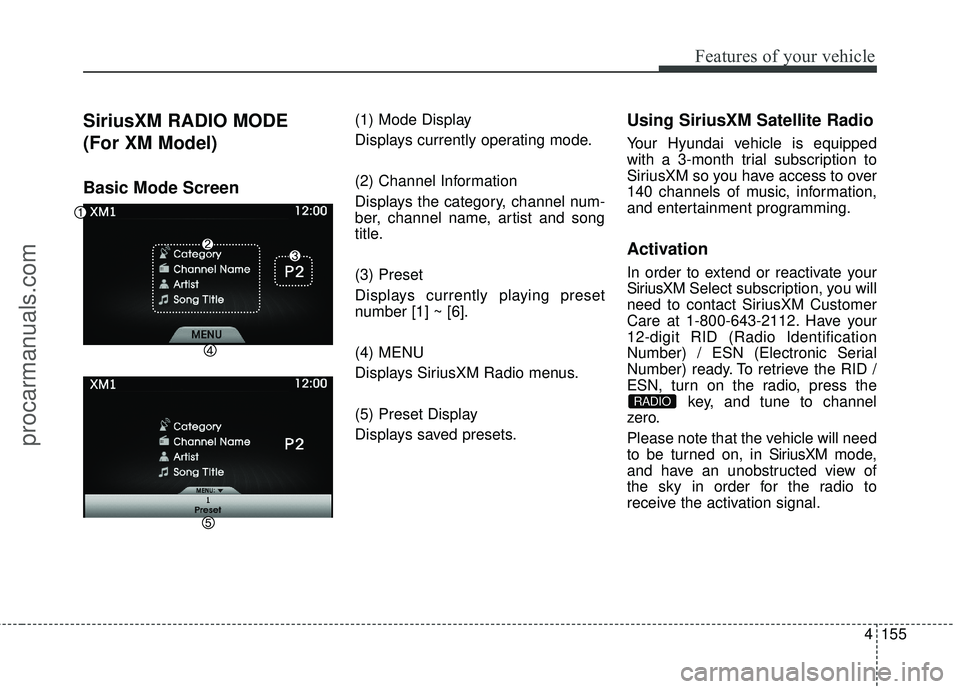
SiriusXM RADIO MODE
(For XM Model)
Basic Mode Screen
(1) Mode Display
Displays currently operating mode.
(2) Channel Information
Displays the category, channel num-
ber, channel name, artist and song
title.
(3) Preset
Displays currently playing preset
number [1] ~ [6].
(4) MENU
Displays SiriusXM Radio menus.
(5) Preset Display
Displays saved presets.Using SiriusXM Satellite Radio
Your Hyundai vehicle is equipped
with a 3-month trial subscription to
SiriusXM so you have access to over
140 channels of music, information,
and entertainment programming.
Activation
In order to extend or reactivate your
SiriusXMSelect subscription, you will
need to contact SiriusXM Customer
Care at 1-800-643-2112. Have your
12-digit RID (Radio Identification
Number) / ESN (Electronic Serial
Number) ready. To retrieve the RID /
ESN, turn on the radio, press the key, and tune to channel
zero.
Please note that the vehicle will need
to be turned on, in Sir iusXMmode,
and have an unobstructed view of
the sky in order for the radio to
receive the activation signal.
RADIO
procarmanuals.com
Page 239 of 475
Features of your vehicle
156
4
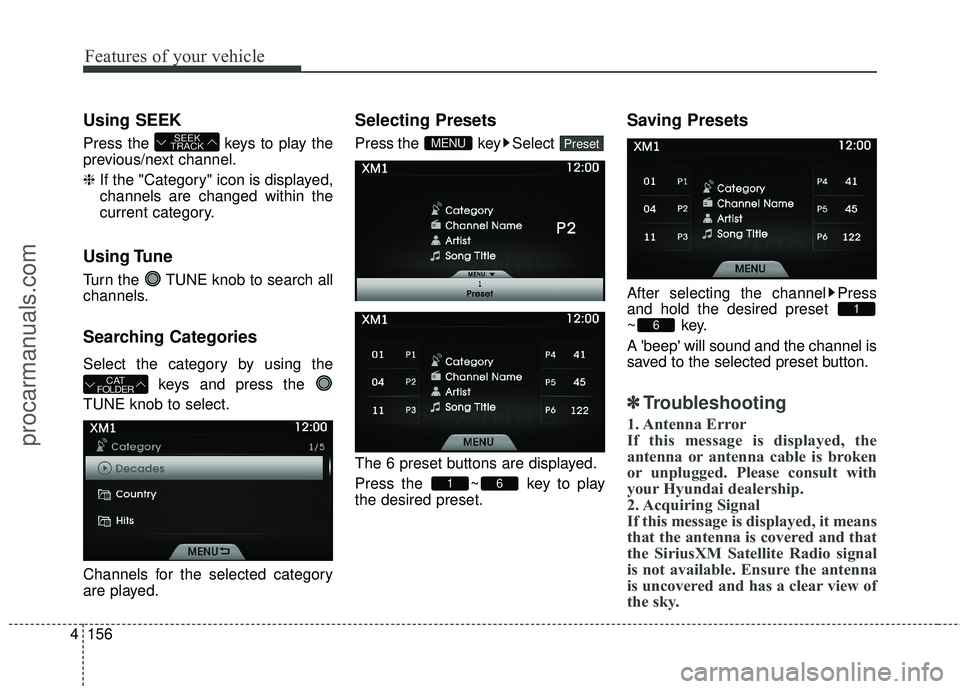
Using SEEK
Press the keys to play the
previous/next channel.
❈ If the "Category" icon is displayed,
channels are changed within the
current category.
Using Tune
Turn the TUNE knob to search all
channels.
Searching Categories
Select the category by using the
keys and press the
TUNE knob to select.
Channels for the selected category
are played.
Selecting Presets
Press the key Select
The 6 preset buttons are displayed.
Press the ~ key to play
the desired preset.
Saving Presets
After selecting the channel Press
and hold the desired preset
~key.
A 'beep' will sound and the channel is
saved to the selected preset button.
✽ ✽ Troubleshooting
1. Antenna Error
If this message is displayed, the
antenna or antenna cable is broken
or unplugged. Please consult with
your Hyundai dealership.
2. Acquiring Signal
If this message is displayed, it means
that the antenna is covered and that
the SiriusXM Satellite Radio signal
is not available. Ensure the antenna
is uncovered and has a clear view of
the sky.
6
1
61
PresetMENU
CAT
FOLDER
SEEK
TRACK
procarmanuals.com
Page 264 of 475
4181
Features of your vehicle
✽
✽NOTICE
•Bluetooth®Wireless Technology
features supported within the
vehicle are as follows. Some fea-
tures may not be supported
depending on your Bluetooth
®
Wireless Technology device.
- Outgoing/Incoming Handsfree
calls
- Operations during a call (Switch to Private, Switch to
call waiting, MIC on/off)
- Downloading Call History
- Downloading Mobile Contacts
- Bluetooth
®Wireless Technology
device auto connection
- Bluetooth Audio Streaming
• Up to five Bluetooth
®Wireless
Technology devices can be paired
to the Car Handsfree system.
• Only one Bluetooth
®Wireless
Technology device can be connect-
ed at a time.
• Other devices cannot be paired while a Bluetooth
®Wireless
Technology device is connected. (Continued)(Continued)
• Only
Bluetooth
®Wireless
Technology Handsfree and
Bluetooth audio related features
are supported.
• Bluetooth related operations are possible only within devices that
support Handsfree or audio fea-
tures, such as a Bluetooth
®
Wireless Technology mobile phone
or a Bluetooth audio device.
• If a connected Bluetooth
®Wireless
Technology device becomes dis-
connected due to being out of com-
munication range, turning the
device OFF, or a Bluetooth
®
Wireless Technology communica-
tion error, corresponding
Bluetooth
®Wireless Technology
devices are automatically searched
and reconnected.
• If the system becomes unstable due to communication errors
between the car Handsfree and the
Bluetooth
®Wireless Technology
device, reset the device by turning
off and back on again. Upon reset-
ting Bluetooth
®Wireless
Technology device, the system will
be restored. (Continued)(Continued)
• After pairing is complete, a con-
tacts download request is sent
once to the mobile phone. Some
mobile phones may require confir-
mation upon receiving a download
request, ensure your mobile phone
accepts the connection. Refer to
your phones user’s manual for
additional information regarding
phone pairing and connections.
procarmanuals.com
Page 274 of 475
4191
Features of your vehicle
CommandFunction
More Help Provides guidance on commands that can be
used anywhere in the system.
Help Provides guidance on commands that can be
used within the current mode.
Call
Ex) Call “John Smith”
Phone Provides guidance on Phone related com- mands. After saying this command, say
“Favorites”, “Dial Number”, “Call History” or
“Contacts” execute corresponding functions.
Favorites Displays the Favorite screen.
Call History Displays the Call History screen.
Contacts Displays the Contacts screen. After sayingthis command, say the name of a contact
saved in the Contacts to automatically con-
nect the call.
Dial Number Displays the Dial number screen. After saying this command, you can say the number that
you want to call.
RedialConnects the last dialed call number.
Tutorial Pro vides guidance on how to use voice
recognition and Bluetooth®connections.
Command Function
When listening to the radio, displays the
next radio screen. (FM1➟FM2➟AM➟XM1➟XM2➟XM3➟FM1)
Radio
When listening to a different mode, displays
the most recently played radio screen.
When currently listening to the FM radio,
maintains the current state.
When listening to a different mode, displaysthe most recently played FM screen.
FM1(FM One) Displays the FM1 screen.
FM2(FM Two) Displays the FM2 screen.
AM Displays the AM screen.
FM Preset 1~6 Plays the most recently played broadcast
saved in FM Preset 1~6.
AM Preset 1~6 Plays the broadcast saved in AM Preset 1~6.
FM 87.5~107.9 Plays the FM broadcast of the corresponding
frequency.
AM 530~1710 Plays the AM broadcast of the corresponding
frequency.
XM (Satellite)
When currently listening to the SiriusXM®,
maintains the current state.
When listening to a different mode, displaysthe most recently played SiriusXM®screen.
(Call by Name)
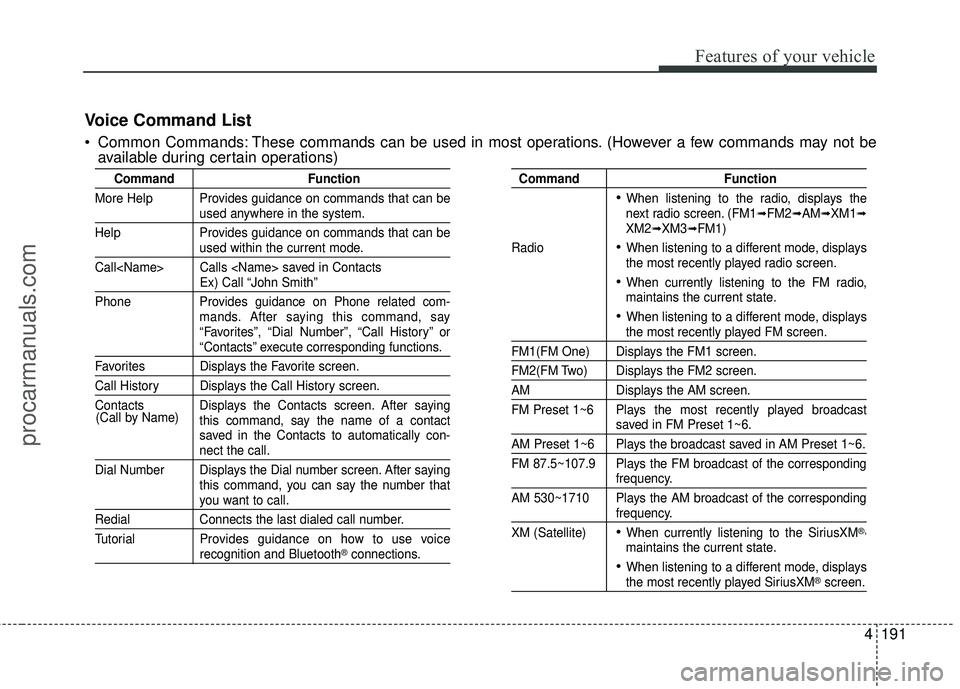
Voice Command List
Common Commands: These commands can be used in most operations. (However a few commands may not be
available during certain operations)
procarmanuals.com
Page 276 of 475
4193
Features of your vehicle
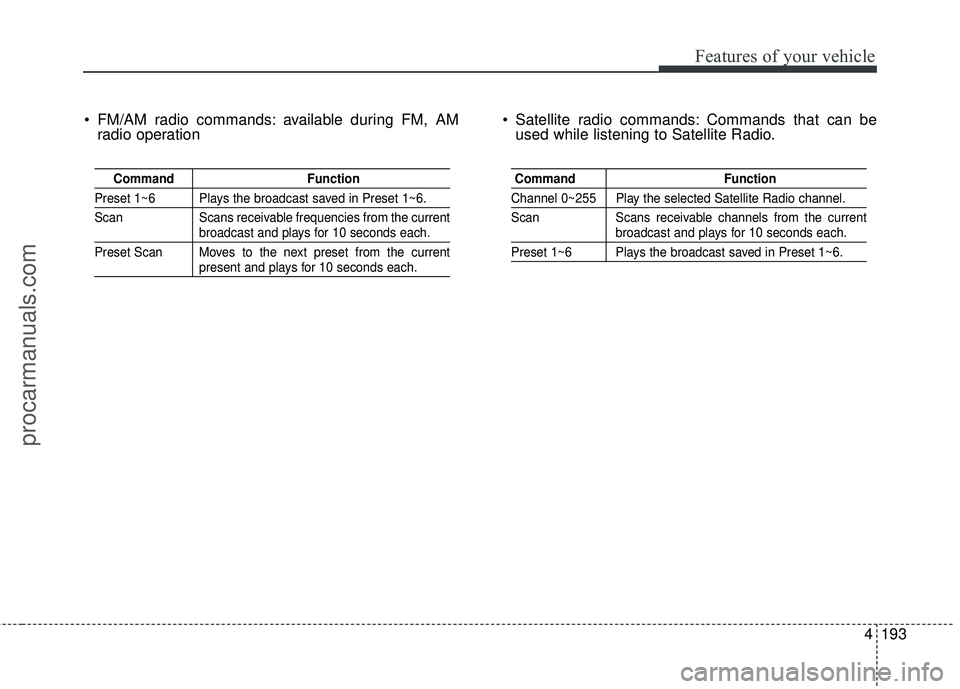
FM/AM radio commands: available during FM, AMradio operation Satellite radio commands: Commands that can be
used while listening to Satellite Radio.
Command Function
Preset 1~6 Plays the broadcast saved in Preset 1~6.
Scan Scans receivable frequencies from the current
broadcast and plays for 10 seconds each.
Preset Scan Moves to the next preset from the current
present and plays for 10 seconds each.
Command Function
Channel 0~255 Play the selected Satellite Radio channel.
Scan Scans receivable channels from the current
broadcast and plays for 10 seconds each.
Preset 1~6 Plays the broadcast saved in Preset 1~6.
procarmanuals.com
Page 327 of 475
Driving your vehicle
40
5
Operate the parking brake. Do not
operate the parking brake while
driving except in an emergency sit-
uation.
Each of these actions will cancelcruise control operation (the SETindicator light in the instrument clus-ter will go off), but it will not turn thesystem off. If you wish to resumecruise control operation, move thelever up (to RES+). You will return toyour previously preset speed.
To resume cruising speed at
more than approximately 40
km/h (25 mph):
If any method other than the cruise
switch was used to cancel cruising
speed and the system is still activat-
ed, the most recent set speed will
automatically resume when you
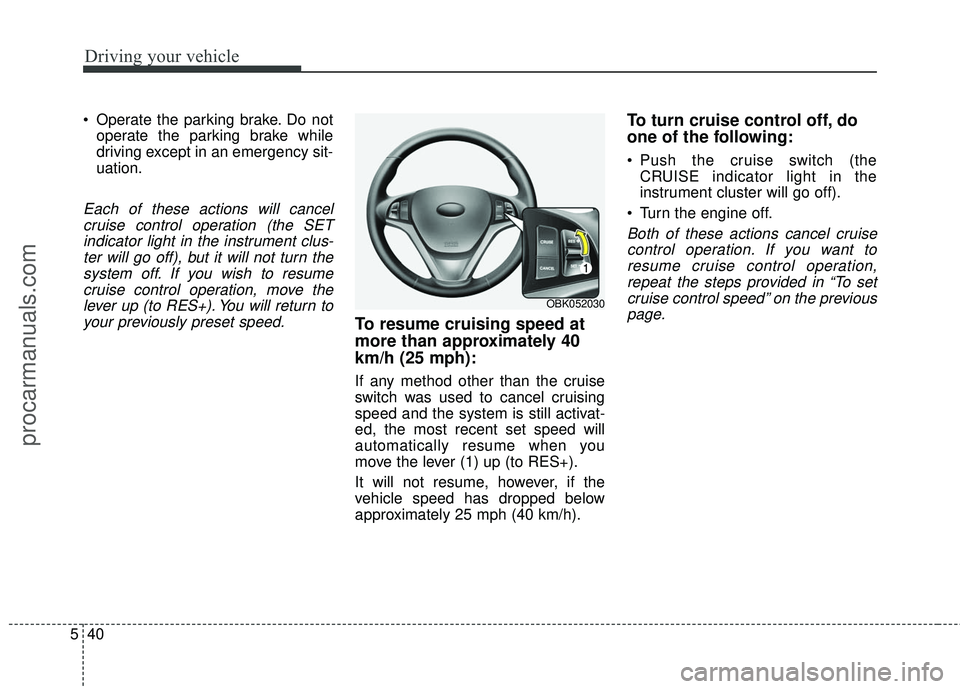
move the lever (1) up (to RES+).
It will not resume, however, if the
vehicle speed has dropped below
approximately 25 mph (40 km/h).
To turn cruise control off, do
one of the following:
Push the cruise switch (the CRUISE indicator light in the
instrument cluster will go off).
Turn the engine off.
Both of these actions cancel cruise control operation. If you want toresume cruise control operation,repeat the steps provided in “To setcruise control speed” on the previouspage.
OBK052030
procarmanuals.com
Page 409 of 475
Maintenance
40
7
Reset items
Items should be reset after the bat-
tery has been discharged or the bat-
tery has been disconnected.
Sunroof (See section 4)
Trip computer (See section 4)
Climate control system
(See section 4)
Clock (See section 4)
Audio (See section 4)
Auto up/down window (See section 4)WARNING
Before performing mainte-nance or recharging the bat-
tery, turn off all accessories
and stop the engine.
The negative battery cable must be removed first and
installed last when the battery
is disconnected.
Operation related to the bat- tery should be done in an
authorized HYUNDAI dealer.
CAUTION
Keep the battery away from water or any liquid.
Use genuine HYUNDAI batter- ies, available at HYUNDAIdealers, when you replace thebattery.
(Continued)
Watch the battery during charg- ing, and stop or reduce the
charging rate if the battery cells
begin gassing (boiling) violent-
ly or if the temperature of the
electrolyte of any cell exceeds
120°F (49°C).
Wear eye protection when checking the battery during
charging.
Disconnect the battery charger in the following order.
1. Turn off the battery charger main switch.
2. Unhook the negative clamp from the negative battery ter-
minal.
3. Unhook the positive clamp from the positive battery ter-
minal.
procarmanuals.com
Page 413 of 475
Maintenance
44
7
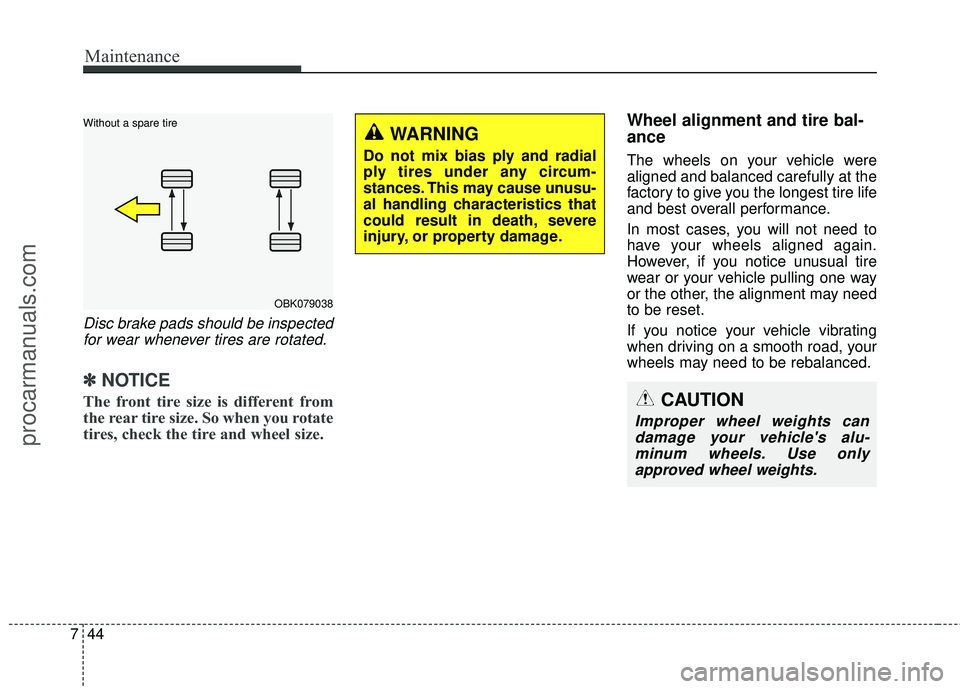
Disc brake pads should be inspected
for wear whenever tires are rotated.
✽
✽ NOTICE
The front tire size is different from
the rear tire size. So when you rotate
tires, check the tire and wheel size.
Wheel alignment and tire bal-
ance
The wheels on your vehicle were
aligned and balanced carefully at the
factory to give you the longest tire life
and best overall performance.
In most cases, you will not need to
have your wheels aligned again.
However, if you notice unusual tire
wear or your vehicle pulling one way
or the other, the alignment may need
to be reset.
If you notice your vehicle vibrating
when driving on a smooth road, your
wheels may need to be rebalanced.
OBK079038
Without a spare tire
WARNING
Do not mix bias ply and radial
ply tires under any circum-
stances. This may cause unusu-
al handling characteristics that
could result in death, severe
injury, or property damage.
CAUTION
Improper wheel weights can
damage your vehicle's alu-minum wheels. Use onlyapproved wheel weights.
procarmanuals.com
Page 426 of 475
757
Maintenance
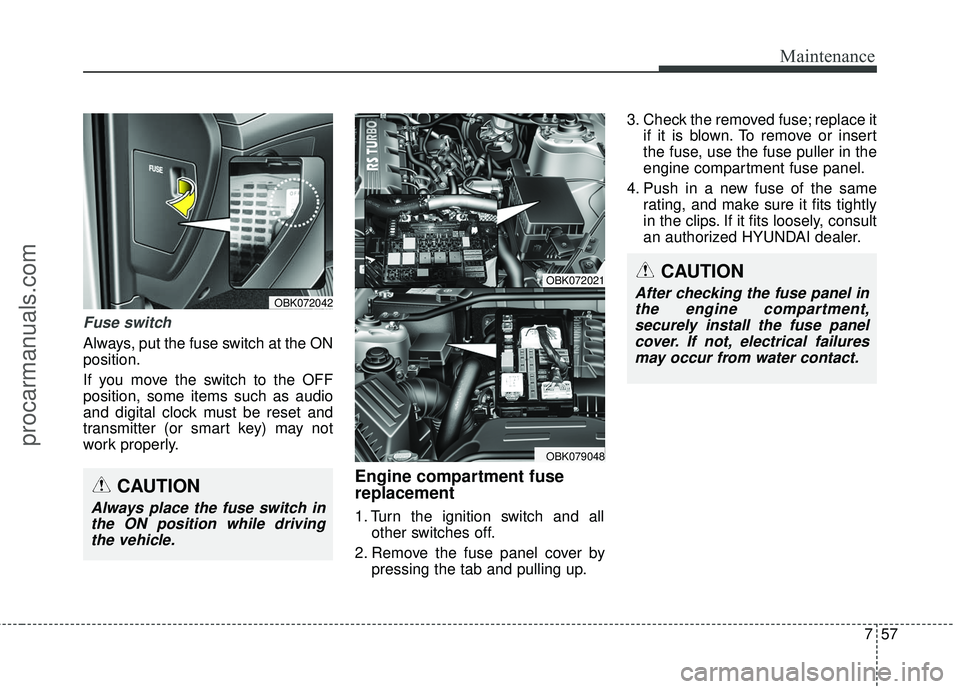
Fuse switch
Always, put the fuse switch at the ON
position.
If you move the switch to the OFF
position, some items such as audio
and digital clock must be reset and
transmitter (or smart key) may not
work properly.
Engine compartment fuse
replacement
1. Turn the ignition switch and allother switches off.
2. Remove the fuse panel cover by pressing the tab and pulling up. 3. Check the removed fuse; replace it
if it is blown. To remove or insert
the fuse, use the fuse puller in the
engine compartment fuse panel.
4. Push in a new fuse of the same rating, and make sure it fits tightly
in the clips. If it fits loosely, consult
an authorized HYUNDAI dealer.
CAUTION
Always place the fuse switch inthe ON position while drivingthe vehicle.
OBK072042
OBK072021
OBK079048
CAUTION
After checking the fuse panel inthe engine compartment,securely install the fuse panelcover. If not, electrical failuresmay occur from water contact.
procarmanuals.com