display HYUNDAI COUPE 2016 Repair Manual
[x] Cancel search | Manufacturer: HYUNDAI, Model Year: 2016, Model line: COUPE, Model: HYUNDAI COUPE 2016Pages: 475, PDF Size: 14.78 MB
Page 284 of 475
4201
Features of your vehicle
✽
✽NOTICE - BEFORE DOWN-
LOADING CONTACTS
• Only contacts within connected phones can be downloaded. Also
check to see that your mobile
phone supports the download fea-
ture.
• To learn more about whether your mobile phone supports contacts
downloads, refer to your mobile
phone user’s manual.
• The contacts for only the connect- ed phone can be downloaded.
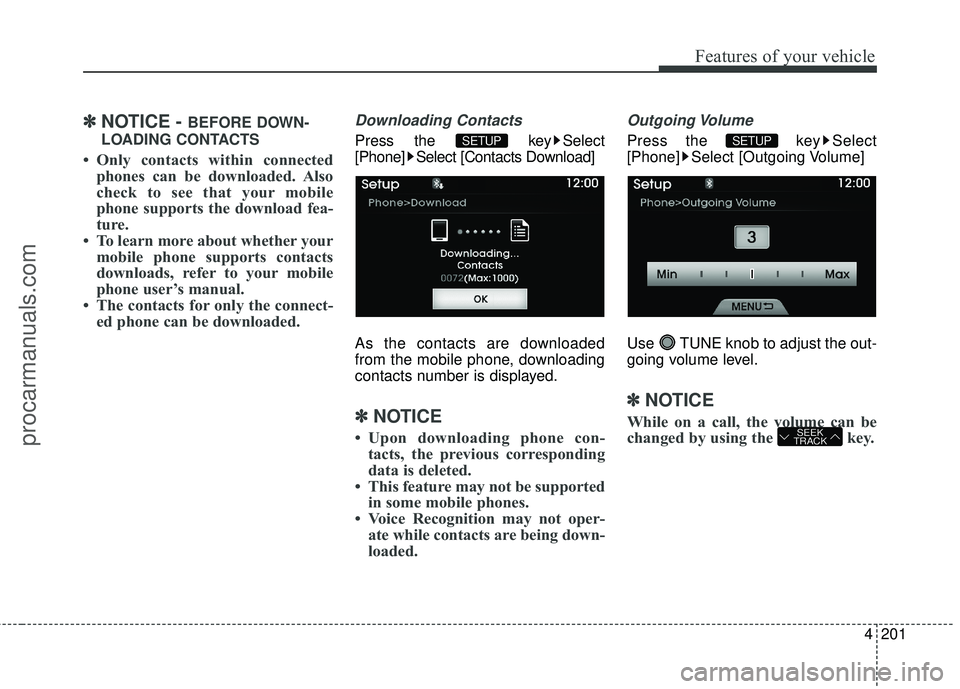
Downloading Contacts
Press the key Select
[Phone] Select [Contacts Download]
As the contacts are downloaded
from the mobile phone, downloading
contacts number is displayed.
✽ ✽ NOTICE
• Upon downloading phone con-
tacts, the previous corresponding
data is deleted.
• This feature may not be supported in some mobile phones.
• Voice Recognition may not oper- ate while contacts are being down-
loaded.
Outgoing Volume
Press the key Select
[Phone] Select [Outgoing Volume]
Use TUNE knob to adjust the out-
going volume level.
✽ ✽ NOTICE
While on a call, the volume can be
changed by using the key.SEEK
TRACK
SETUP SETUP
procarmanuals.com
Page 286 of 475
![HYUNDAI COUPE 2016 Repair Manual 4203
Features of your vehicle
System Setting
Memory Information
Press the key Select [System]Select [Memory Information]
This feature displays information
related to system memory.
(1) Using : Displa](/img/35/57912/w960_57912-285.png "HYUNDAI COUPE 2016 Repair Manual 4203
Features of your vehicle
System Setting
Memory Information
Press the key Select [System]Select [Memory Information]
This feature displays information
related to system memory.
(1) Using : Displa")
4203
Features of your vehicle
System Setting
Memory Information
Press the key Select [System]Select [Memory Information]
This feature displays information
related to system memory.
(1) Using : Displays capacity current- ly in use
(2) Capacity : Displays total capacity
Prompt Feedback
Press the key Select
[System] Select [Prompt Feedback]
This feature is used to select the
desired prompt feedback option from
Normal and Expert.
(1) ON : When using voice recogni- tion, provides detailed guidance
prompts
(2) OFF : When using voice recogni- tion, omits some guidance
prompts
Language
Press the key Select [System]
Select [Language]
This feature is used to change the
system and voice recognition lan-
guage.
If the language is changed, the sys-
tem will restart and apply the select-
ed language.SETUP SETUP
SETUP
procarmanuals.com
Page 306 of 475
519
Driving your vehicle
Transmission ranges
The indicator in the instrument cluster
displays the shift lever position when
the ignition switch is in the ON posi-
tion.
P (Park)
Always come to a complete stop
before shifting into P (Park). This posi-
tion locks the transmission and pre-
vents the drive wheels from rotating.R (Reverse)
Use this position to drive the vehicle
backward.
N (Neutral)
The wheels and transmission are not
engaged. The vehicle will roll freely
even on the slightest incline unless
the parking brake or service brakes
are applied.(Continued)
Before leaving the driver’s
seat, always make sure the
shift lever is in the P (Park)
position. Set the parking
brake fully, shut the engine off
and take the key with you.
Unexpected and sudden vehi-
cle movement can occur if
you do not follow these pre-
cautions in the order speci-
fied.
WARNING
Shifting into P (Park) while thevehicle is in motion will cause
the drive wheels to lock which
will cause you to lose control
of the vehicle.
Do not use the P (Park) posi- tion in place of the parking
brake. Always make sure the
shift lever is latched in the P
(Park) position and set the
parking brake fully.
Never leave a child unattend- ed in a vehicle.
(Continued)CAUTION
The transmission may be dam-aged if you shift into P (Park)while the vehicle is in motion.
CAUTION
Always come to a complete stopbefore shifting into or out of R(Reverse); you may damage thetransmission if you shift into Rwhile the vehicle is in motion,except as explained in “Rockingthe vehicle” in this section.
procarmanuals.com
Page 353 of 475
What to do in an emergency
86
Always check the TPMS malfunction
telltale after replacing one or more
tires or wheels on your vehicle to
ensure that the replacement or alter-
nate tires and wheels allow the TPMS
to continue to function properly.
✽ ✽NOTICE
If any of the below happens, we rec-
ommend that the system be checked
by an authorized HYUNDAI dealer.
1.The low tire pressure telltale/
TPMS malfunction indicator does
not illuminate for 3 seconds when
the ignition switch is turned to the
ON or engine is running.
2. The TPMS malfunction indicator remains illuminated after blinking
for approximately 1 minute.
3. The Low tire pressure position telltale remains illuminated.
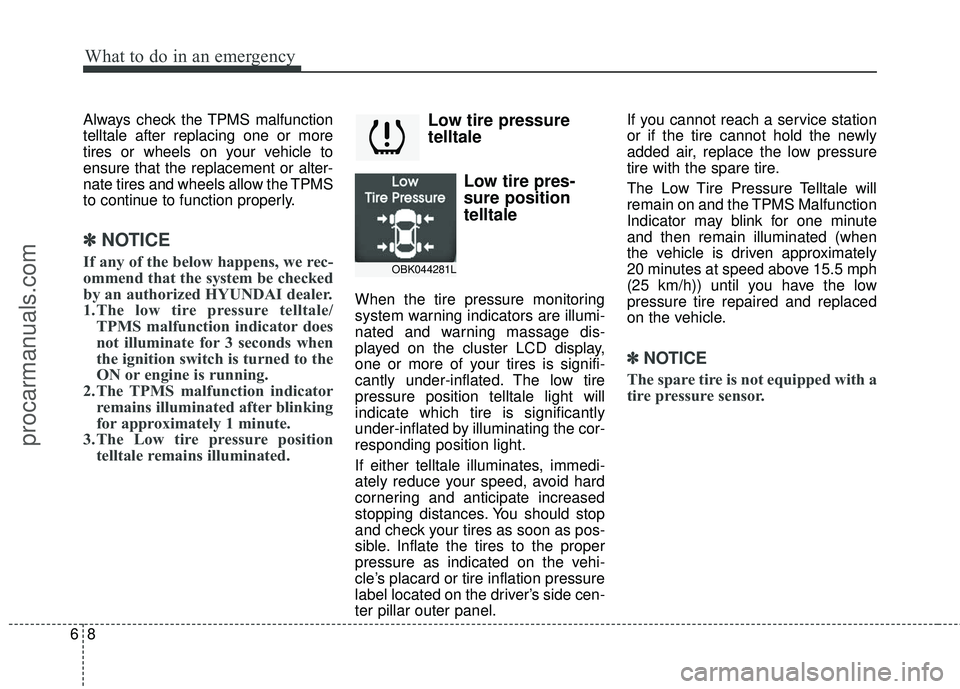
Low tire pressure
telltale
Low tire pres-
sure position
telltale
When the tire pressure monitoring
system warning indicators are illumi-
nated and warning massage dis-
played on the cluster LCD display,
one or more of your tires is signifi-
cantly under-inflated. The low tire
pressure position telltale light will
indicate which tire is significantly
under-inflated by illuminating the cor-
responding position light.
If either telltale illuminates, immedi-
ately reduce your speed, avoid hard
cornering and anticipate increased
stopping distances. You should stop
and check your tires as soon as pos-
sible. Inflate the tires to the proper
pressure as indicated on the vehi-
cle’s placard or tire inflation pressure
label located on the driver’s side cen-
ter pillar outer panel. If you cannot reach a service station
or if the tire cannot hold the newly
added air, replace the low pressure
tire with the spare tire.
The Low Tire Pressure Telltale will
remain on and the TPMS Malfunction
Indicator may blink for one minute
and then remain illuminated (when
the vehicle is driven approximately
20 minutes at speed above 15.5 mph
(25 km/h)) until you have the low
pressure tire repaired and replaced
on the vehicle.
✽ ✽
NOTICE
The spare tire is not equipped with a
tire pressure sensor.
OBK044281L
procarmanuals.com
Page 354 of 475
69
What to do in an emergency
TPMS (Tire Pressure
Monitoring System)
malfunction indicator
The TPMS malfunction indicator will
illuminate after it blinks for approxi-
mately one minute when there is a
problem with the Tire Pressure
Monitoring System.
Have the system checked by an
authorized HYUNDAI dealer as soon
as possible to determine the cause
of the problem.
✽ ✽NOTICE
If there is a malfunction with the
TPMS, the low tire pressure position
telltale will not be displayed even
though the vehicle has an under-
inflated tire.
WARNING- Low pressure
damage
Significantly low tire pressure
makes the vehicle unstable and
can contribute to loss of vehicle
control and increased braking
distances.
Continued driving on low pres-
sure tires can cause the tires to
overheat and fail.CAUTION
In winter or cold weather, the low tire pressure telltale may beilluminated if the tire pressurewas adjusted to the recom-mended tire inflation pressurein warm weather. It does notmean your TPMS is malfunction-ing because the decreased tem-perature leads to a proportionallowering of tire pressure.
When you drive your vehiclefrom a warm area to a cold areaor from a cold area to a warmarea, or the outside temperatureis greatly higher or lower, youshould check the tire inflationpressure and adjust the tires tothe recommended tire inflationpressure.
procarmanuals.com
Page 417 of 475
Maintenance
48
7
91 - Load Index, a numerical code
associated with the maximum
load the tire can carry.
V - Speed Rating Symbol. See the speed rating chart in this section
for additional information.
Wheel size designation
Wheels are also marked with impor-
tant information that you need if you
ever have to replace one. The follow-
ing explains what the letters and
numbers in the wheel size designa-
tion mean.
Example wheel size designation:
7.5JX18
7.5 - Rim width in inches.
J - Rim contour designation.
18 - Rim diameter in inches. Tire speed ratings
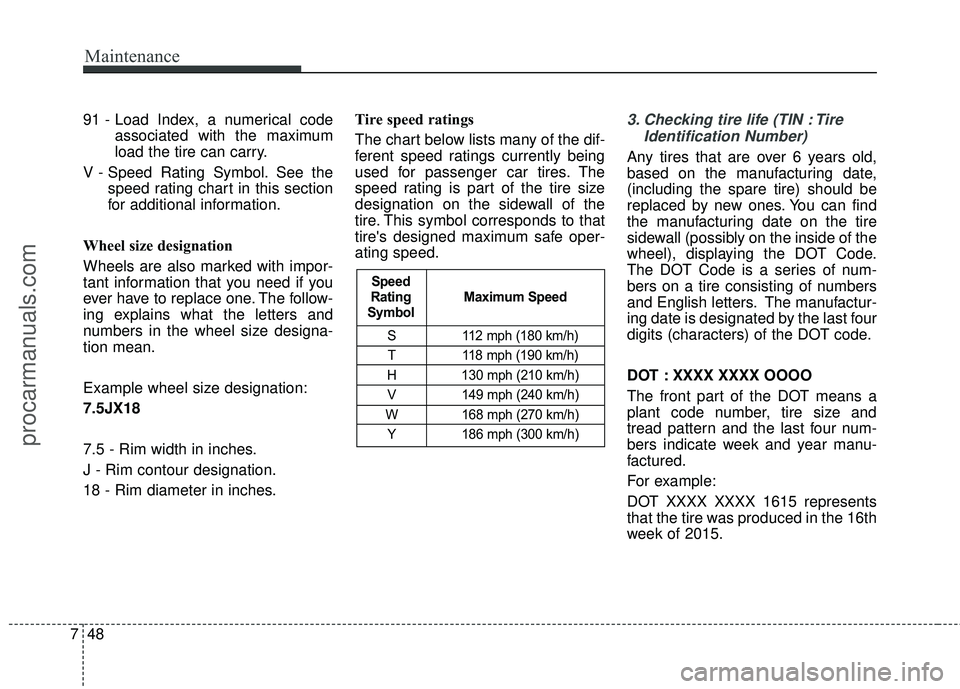
The chart below lists many of the dif-
ferent speed ratings currently being
used for passenger car tires. The
speed rating is part of the tire size
designation on the sidewall of the
tire. This symbol corresponds to that
tire's designed maximum safe oper-
ating speed.3. Checking tire life (TIN : Tire
Identification Number)
Any tires that are over 6 years old,
based on the manufacturing date,
(including the spare tire) should be
replaced by new ones. You can find
the manufacturing date on the tire
sidewall (possibly on the inside of the
wheel), displaying the DOT Code.
The DOT Code is a series of num-
bers on a tire consisting of numbers
and English letters. The manufactur-
ing date is designated by the last four
digits (characters) of the DOT code.
DOT : XXXX XXXX OOOO
The front part of the DOT means a
plant code number, tire size and
tread pattern and the last four num-
bers indicate week and year manu-
factured.
For example:
DOT XXXX XXXX 1615 represents
that the tire was produced in the 16th
week of 2015.
S 112 mph (180 km/h)
T 118 mph (190 km/h)
H 130 mph (210 km/h) V 149 mph (240 km/h)
W 168 mph (270 km/h) Y 186 mph (300 km/h)
Maximum Speed
Speed
Rating
Symbol
procarmanuals.com
Page 468 of 475
··················\
··········4-117
Defroster (Front window) Front windshield deicer ··················\
······")
Index
4I
Defogging logic (Windshield)··················\
··········4-117
Defroster (Front window) Front windshield deicer ··················\
···············4-91
Defroster (Rear window) ··················\
················ ·4-91
Defrosting (Windshield) ··················\
·················4-114
Digital clock ··················\
··················\
··········· ·4-124
Dimensions ··················\
··················\
·················8-2
Display illumination, see instrument panel illumination · · ·4-46
Displays, see instrument cluster ··················\
·········4-45
Door locks ··················\
··················\
··············· ·4-16
Central door lock switch ··················\
··············4-18
Speed sensing door lock system ··················\
·····4-19
Drinks holders, see cup holders ··················\
········4-122
Driver's 3-point seat belt ··················\
················· ·3-18
Driver's and passenger's front air bag ··················\
···3-48
Driving at night ··················\
··················\
········· ·5-44
Driving in flooded areas ··················\
················· ·5-46
Driving in the rain ··················\
··················\
······ ·5-45
Driving off-road ··················\
··················\
········· ·5-46
DRL ··················\
··················\
··················\
···· ·4-83
Economical operation ··················\
··················\
·· ·5-41
Electric chromic mirror (ECM) ··················\
··········4-35
Electronic stability program (ESC) ··················\
·····5-31
Emergency fuel filler lid release ··················\
·········4-29 Emergency starting
Jump starting ··················\
··················\
·········· ·6-4
Push starting ··················\
··················\
··········· ·6-5
Emergency while driving ··················\
················· ·6-2
Emission control system ··················\
················· ·7-83
Crankcase emission control system ··················\
··7-83
Evaporative emission control System ·················7-83
Exhaust emission control system ··················\
····7-84
Engine compartment ··················\
················· ·2-6, 7-3
Engine compartment fuse label ··················\
··········7-60
Engine compartment panel fuse ··················\
·········7-57
Engine coolant ··················\
··················\
·········· ·7-25
Engine coolcant temperature gauge ··················\
·····4-47
Engine number ··················\
··················\
··········· ·8-7
Engine oil ··················\
··················\
·················7-23
Engine overheats ··················\
··················\
········· ·6-6
Engine Specification ··················\
··················\
····· ·8-2
Engine start/stop button ··················\
··················\
· ·5-8
Engine will not start ··················\
··················\
····· ·6-3
Escort function ··················\
··················\
·········· ·4-83
Evaporative emission control system ··················\
···7-83
Exhaust emission control system ··················\
········7-84
Explanation of scheduled maintenance items ···········7-20
Exterior care ··················\
··················\
··············7-76
Exterior overview (front) ··················\
················· ·2-2
Exterior overview (rear) ··················\
··················\
· ·2-3
E
procarmanuals.com
Page 470 of 475

Index
6I
Headlight escort function··················\
················ ·4-82
Headrest ··················\
··················\
··················\
··3-7
Highway driving ··················\
··················\
·········5-46
HomeLink system ··················\
··················\
······ ·4-38
Hood ··················\
··················\
··················\
···· ·4-26
Horn ··················\
··················\
··················\
···· ·4-34
How to use this manual ··················\
··················\
··1-2
Immobilizer system ··················\
··················\
·······4-4
Indicator symbols on the instrument cluster ··············1-8
Indicators and warnings ··················\
················· ·4-61
Inside rearview mirror ··················\
··················\
· ·4-35
Instrument cluster ··················\
··················\
······· ·4-45
Engine coolant temperature gauge ··················\
···4-47
Fuel gauge ··················\
··················\
············ ·4-48
Instrument panel illumination ··················\
········4-46
LCD display warning ··················\
················· ·4-56
Odometer ··················\
··················\
··············4-49
Speedometer ··················\
··················\
········· ·4-46
Tachometer ··················\
··················\
··········· ·4-47
Trip computer ··················\
··················\
·········4-49
User setting mode ··················\
··················\
··· ·4-53
Warning and indicators ··················\
··············· ·4-61
Instrument panel fuse ··················\
··················\
·· ·7-56
Instrument panel fuse label ··················\
···············7-59 Instrument panel illumination
··················\
············4-46
Instrument panel overview ··················\
················ ·2-5
Interior care ··················\
··················\
·············· ·7-82
Interior features ··················\
··················\
·········4-121
Ashtray ··················\
··················\
·············· ·4-122
Aux, USB and iPod port ··················\
············ ·4-127
Cigarette lighter ··················\
··················\
···· ·4-121
Cup holder ··················\
··················\
·········· ·4-122
Digital clock ··················\
··················\
······· ·4-124
Floor mat anchor(s) ··················\
··················\
·4-125
Outside thermometer ··················\
················ ·4-125
Power outlet ··················\
··················\
·········4-124
Sunvisor ··················\
··················\
··············4-123
Interior light ··················\
··················\
··············4-89
Glove box lamp ··················\
··················\
······ ·4-90
Map lamp ··················\
··················\
··············4-89
T
runk room lamp ··················\
··················\
···· ·4-90
Vanity mirror lamp ··················\
··················\
·· ·4-90
Interior overview ··················\
··················\
········· ·2-4
IPOD ··················\
··················\
··················\
···4-170
Jack and tools ··················\
··················\
··········· ·6-12
Jump starting ··················\
··················\
·············· ·6-4
J
I
procarmanuals.com
Page 471 of 475

I7
Index
Key positions··················\
··················\
··············5-5
Keys ··················\
··················\
··················\
·······4-3
Immobilizer key ··················\
··················\
········4-4
Remote key battery replacement ··················\
·····4-13
Smart key battery replacement ··················\
·········4-8
Label Air bag warning labels ··················\
··············· ·3-63
Engine compartment fuse label ··················\
······7-60
Instrument panel fuse label ··················\
···········7-59
Refrigerant label ··················\
··················\
·······8-7
Tire sidewall labeling ··················\
················· ·7-47
Tire specification and pressure label ··················\
··8-7
Vehicle certification label ··················\
···············8-6
LCD display warning ··················\
··················\
·· ·4-57
Light bulbs ··················\
··················\
··············· ·7-66
Lighting ··················\
··················\
··················\
·4-82
Battery saver function ··················\
················ ·4-82
Daytime running light (DRL) ··················\
········4-83
Headlamp welcome function ··················\
·········4-82
Headlight escort function ··················\
·············4-82
Lighting control ··················\
··················\
····· ·4-83
Lighting control ··················\
··················\
········· ·4-83Lower anchor
··················\
··················\
············ ·3-34
Lubricants and capacities ··················\
················· ·8-4
Luggage net ··················\
··················\
············ ·4-126
Lumbar support ··················\
··················\
··········· ·3-9
Maintenance Explanation of scheduled maintenance items · · · · · · · ·7-20
Maintenance services ··················\
··················\
· ·7-4
Maintenance under severe usage conditions ·········7-19
Normal maintenance schedule ··················\
·········7-8
Owner maintenance ··················\
··················\
·· ·7-5
Scheduled maintenance service ··················\
········7-7
Tire maintenance ··················\
··················\
···· ·7-47
Maintenance schedule ··················\
··················\
··· ·7-7
Maintenance under severe usage conditions ·········7-19
Normal maintenance schedule ··················\
·········7-8
Maintenance services ··················\
··················\
···· ·7-4
Manual climate control system ··················\
·········
·4-92
Air conditioning ··················\
··················\
····· ·4-98
Climate control air filter
· · · ··················\
··· ·4-100, 112
Heating and air conditioning ··················\
·········4-93
Manual tranmission ··················\
··················\
···· ·5-13
Manual tranmission fluid ··················\
················ ·7-30
Map lamp ··················\
··················\
·················4-89
K
L
M
procarmanuals.com