lock HYUNDAI COUPE 2016 Repair Manual
[x] Cancel search | Manufacturer: HYUNDAI, Model Year: 2016, Model line: COUPE, Model: HYUNDAI COUPE 2016Pages: 475, PDF Size: 14.78 MB
Page 207 of 475
Features of your vehicle
124
4
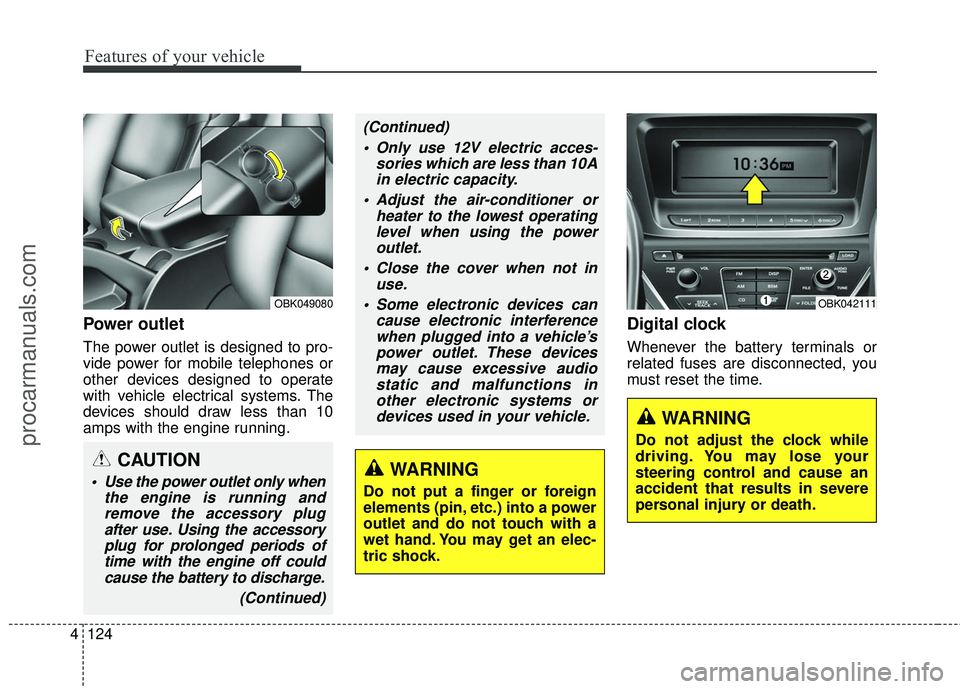
Power outlet
The power outlet is designed to pro-
vide power for mobile telephones or
other devices designed to operate
with vehicle electrical systems. The
devices should draw less than 10
amps with the engine running.
Digital clock
Whenever the battery terminals or
related fuses are disconnected, you
must reset the time.
WARNING
Do not adjust the clock while
driving. You may lose your
steering control and cause an
accident that results in severe
personal injury or death.
OBK042111OBK049080
CAUTION
Use the power outlet only when
the engine is running andremove the accessory plugafter use. Using the accessoryplug for prolonged periods oftime with the engine off couldcause the battery to discharge.
(Continued)
(Continued) Only use 12V electric acces- sories which are less than 10Ain electric capacity.
Adjust the air-conditioner or heater to the lowest operatinglevel when using the poweroutlet.
Close the cover when not in use.
Some electronic devices can cause electronic interferencewhen plugged into a vehicle’spower outlet. These devicesmay cause excessive audiostatic and malfunctions inother electronic systems ordevices used in your vehicle.
WARNING
Do not put a finger or foreign
elements (pin, etc.) into a power
outlet and do not touch with a
wet hand. You may get an elec-
tric shock.
procarmanuals.com
Page 208 of 475
![HYUNDAI COUPE 2016 Repair Manual 4125
Features of your vehicle
Setup the clock
With audio off
1. Press the [SETUP] or [Clock] but-ton(1) until the clock of the display
blinks.
2. Set the clock by turning the knob(2) and press it.
Wit](/img/35/57912/w960_57912-207.png "HYUNDAI COUPE 2016 Repair Manual 4125
Features of your vehicle
Setup the clock
With audio off
1. Press the [SETUP] or [Clock] but-ton(1) until the clock of the display
blinks.
2. Set the clock by turning the knob(2) and press it.
Wit")
4125
Features of your vehicle
Setup the clock
With audio off
1. Press the [SETUP] or [Clock] but-ton(1) until the clock of the display
blinks.
2. Set the clock by turning the knob(2) and press it.
With audio on
1. Press the [SETUP] or [Clock] but- ton (1).
2. Select the clock menu by turning the knob (2).
3. Set the clock by turning the knob(2) and press it.
Outside thermometer
The current outside temperature is
displayed in 1°F (1°C) increments.
The temperature range is between -
30°F~140°F (-30°C ~ 60°C).
The outside temperature on the dis-
play may not change immediately
like a general thermometer to pre-
vent the driver from being inattentive.
Floor mat anchor(s)
When using a floor mat on the front
floor carpet, make sure it attaches to
the floor mat anchor(s) in your vehi-
cle. This keeps the floor mat from
sliding forward.
OBK049112NOXM049228
■Type A■Type B
procarmanuals.com
Page 214 of 475
4131
Features of your vehicle
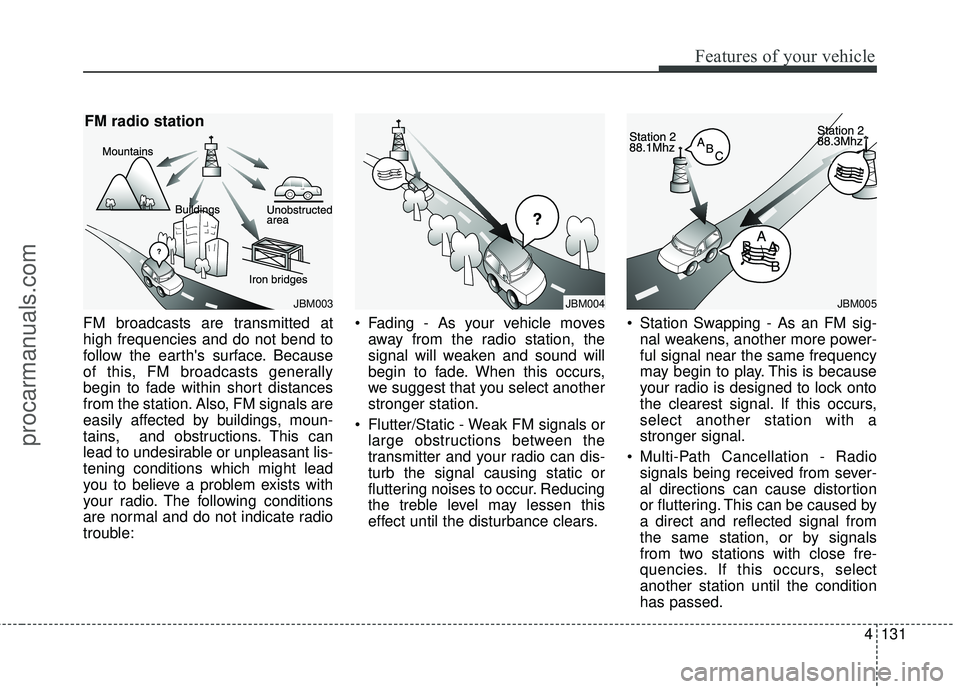
FM broadcasts are transmitted at
high frequencies and do not bend to
follow the earth's surface. Because
of this, FM broadcasts generally
begin to fade within short distances
from the station. Also, FM signals are
easily affected by buildings, moun-
tains, and obstructions. This can
lead to undesirable or unpleasant lis-
tening conditions which might lead
you to believe a problem exists with
your radio. The following conditions
are normal and do not indicate radio
trouble: Fading - As your vehicle moves
away from the radio station, the
signal will weaken and sound will
begin to fade. When this occurs,
we suggest that you select another
stronger station.
Flutter/Static - Weak FM signals or large obstructions between the
transmitter and your radio can dis-
turb the signal causing static or
fluttering noises to occur. Reducing
the treble level may lessen this
effect until the disturbance clears. Station Swapping - As an FM sig-
nal weakens, another more power-
ful signal near the same frequency
may begin to play. This is because
your radio is designed to lock onto
the clearest signal. If this occurs,
select another station with a
stronger signal.
Multi-Path Cancellation - Radio signals being received from sever-
al directions can cause distortion
or fluttering. This can be caused by
a direct and reflected signal from
the same station, or by signals
from two stations with close fre-
quencies. If this occurs, select
another station until the condition
has passed.
JBM003
FM radio station
JBM005
¢¢¢
JBM004
procarmanuals.com
Page 215 of 475
XM RADIO MODE
Features of your vehicle
Satellite radio reception
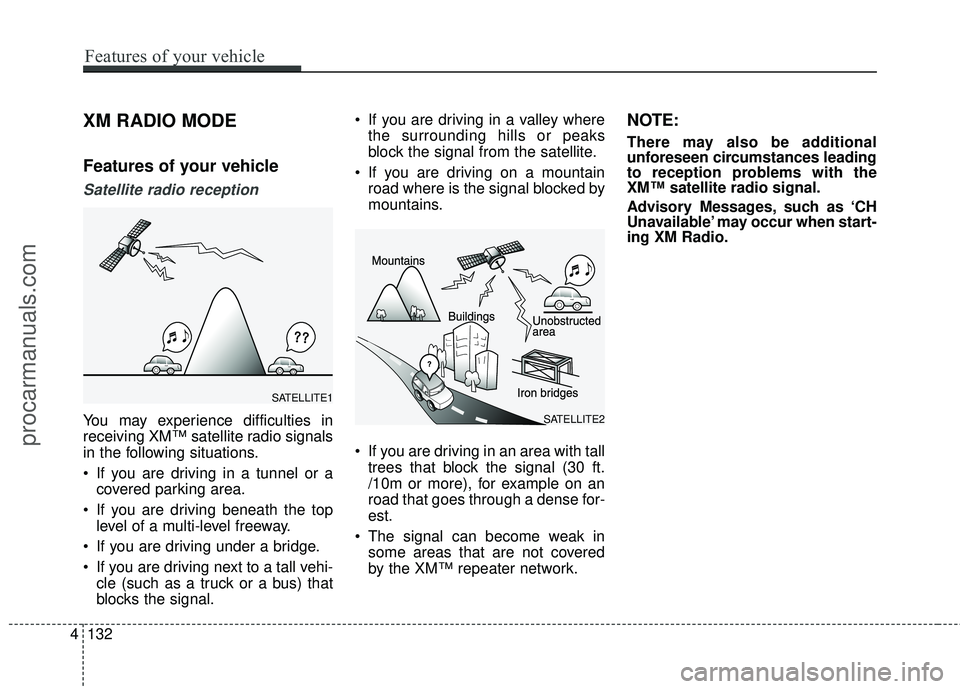
You may experience difficulties in
receiving XM™ satellite radio signals
in the following situations.
If you are driving in a tunnel or acovered parking area.
If you are driving beneath the top level of a multi-level freeway.
If you are driving under a bridge.
If you are driving next to a tall vehi- cle (such as a truck or a bus) that
blocks the signal. If you are driving in a valley where
the surrounding hills or peaks
block the signal from the satellite.
If you are driving on a mountain road where is the signal blocked by
mountains.
If you are driving in an area with tall trees that block the signal (30 ft.
/10m or more), for example on an
road that goes through a dense for-
est.
The signal can become weak in some areas that are not covered
by the XM™ repeater network.
NOTE:
There may also be additional
unforeseen circumstances leading
to reception problems with the
XM™ satellite radio signal.
Advisory Messages, such as ‘CH
Unavailable’ may occur when start-
ing XM Radio.
4132
Features of your vehicle
SATELLITE2
SATELLITE1
procarmanuals.com
Page 222 of 475
(Continued)
• Avoid use of USBmemory products
that can also be used
as key chains or
mobile phone acces-
sories. Use of such products may
cause damage to the USB jack.
• Connecting an MP3 device or phone through various chan-
nels, such as AUX/BT or Audio/
USB mode may result in pop
noises or abnormal operation.
• USB memory without the certi- fication mark may not be recog-
nized.
(Continued)
• Charging through the USB may
not work for some mobile
devices.
• The device may not support normal operation when using a
USB memory type besides
(Metal Cover Type) USB
Memory.
• The device may not support normal operation when using
formats such as HDD Type, CF,
or SD Memory.
• The device will not support files locked by DRM (Digital Rights
Management.)
• USB memory sticks used by connecting an Adaptor (SD
Type or CF Type) may not be
properly recognized.
• The device may not operate properly when using USB HDDs
or USBs subject to connection
failures caused by vehicle vibra-
tions. (e.g. i-stick type) (Continued)
Features of your vehicle
139
4
procarmanuals.com
Page 229 of 475
4146
Features of your vehicle
SYSTEM CONTROLLERS
AND FUNCTIONS
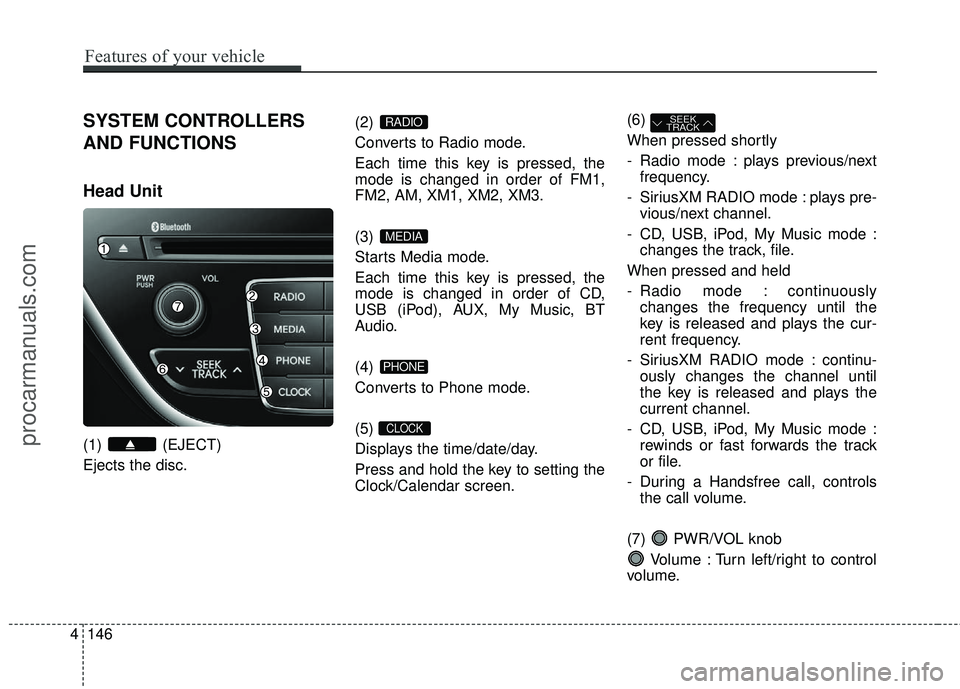
Head Unit
(1) (EJECT)
Ejects the disc.(2)
Converts to Radio mode.
Each time this key is pressed, the
mode is changed in order of FM1,
FM2, AM, XM1, XM2, XM3.
(3)
Starts Media mode.
Each time this key is pressed, the
mode is changed in order of CD,
USB (iPod), AUX, My Music, BT
Audio.
(4)
Converts to Phone mode.
(5)
Displays the time/date/day.
Press and hold the key to setting the
Clock/Calendar screen.(6)
When pressed shortly
- Radio mode : plays previous/next
frequency.
- SiriusXM RADIO mode : plays pre- vious/next channel.
- CD, USB, iPod, My Music mode : changes the track, file.
When pressed and held
- Radio mode : continuously changes the frequency until the
key is released and plays the cur-
rent frequency.
- SiriusXM RADIO mode : continu- ously changes the channel until
the key is released and plays the
current channel.
- CD, USB, iPod, My Music mode : rewinds or fast forwards the track
or file.
- During a Handsfree call, controls the call volume.
(7) PWR/VOL knob Volume : Turn left/right to control
volume.
SEEK
TRACK
CLOCK
PHONE
MEDIA
RADIO
procarmanuals.com
Page 279 of 475
![HYUNDAI COUPE 2016 Repair Manual Features of your vehicle
196
4
SETUP
Starting Mode
Press the key to display the
Setup screen.
You can select and control options
related to [Display], [Sound], [Clock /
Calendar], [Phone] and [System](/img/35/57912/w960_57912-278.png "HYUNDAI COUPE 2016 Repair Manual Features of your vehicle
196
4
SETUP
Starting Mode
Press the key to display the
Setup screen.
You can select and control options
related to [Display], [Sound], [Clock /
Calendar], [Phone] and [System")
Features of your vehicle
196
4
SETUP
Starting Mode
Press the key to display the
Setup screen.
You can select and control options
related to [Display], [Sound], [Clock /
Calendar], [Phone] and [System].
✽ ✽
NOTICE
Once settings have been changed,
press the key to return to the
previous menu.
Display Settings
Adjusting the Brightness
Press the key Select [Display]
Select [Brightness]
Use the TUNE knob to adjust the
screen brightness or set the
Brightness on Automatic, Daylight, or
Night mode.
(1) Automatic : Adjusts the bright- ness automatically
(2) Day : Always maintains the bright- ness on high
(3) Night : Always maintains the brightness on low
Mode Pop-up
Press the key Select [Display]
Select [Mode Pop up]
This feature is used to display the
Mode Pop-up screen when entering
radio and media modes.
When this feature is turned on,
pressing the or key
will display the Mode Pop-up screen.
✽ ✽ NOTICE
The media Mode Pop-up screen can
be displayed only when two or more
media modes have been connected.
MEDIA RADIO
SETUP
SETUP
MENU
SETUP
procarmanuals.com
Page 282 of 475
![HYUNDAI COUPE 2016 Repair Manual 4199
Features of your vehicle
Clock/Calendar Setting
Clock Setting
Press the key Select [Clock/
Calendar] Select [Clock Settings]
Use the TUNE knob to select the
Hour, Minutes and AM/PM setting
and](/img/35/57912/w960_57912-281.png "HYUNDAI COUPE 2016 Repair Manual 4199
Features of your vehicle
Clock/Calendar Setting
Clock Setting
Press the key Select [Clock/
Calendar] Select [Clock Settings]
Use the TUNE knob to select the
Hour, Minutes and AM/PM setting
and")
4199
Features of your vehicle
Clock/Calendar Setting
Clock Setting
Press the key Select [Clock/
Calendar] Select [Clock Settings]
Use the TUNE knob to select the
Hour, Minutes and AM/PM setting
and use TUNE knob to change
settings.
Calendar Setting
Press the key Select [Clock/
Calendar] Select [Calendar Settings]
Use the TUNE knob to select the
Month, Day, and Year and use TUNE knob to change settings.
Time Format
Press the key Select [Clock/
Calendar] Select [Time Format]
This feature is used to change the
clock format between 12hr or 24hr.
Clock Display
Press the key Select [Clock/
Calendar] Select [Clock Display
(Power off)]
This feature is used to display a clock
on the screen when the audio sys-
tem is turned off.SETUP
SETUP SETUP
SETUP
procarmanuals.com
Page 291 of 475
Before starting
Close and lock all doors.
Position the seat so that all con-trols are easily reached.
Adjust the inside and outside rearview mirrors.
Be sure that all lights work.
Check all gauges.
Check the operation of warning lights when the ignition switch is
turned to the ON position.
Release the parking brake and make sure the brake warning light
goes out.
For safe operation, be sure you are
familiar with your vehicle and its
equipment.
Driving your vehicle
45
WARNING
When you intend to park or stop the vehicle with the
engine on, be careful not to
depress the accelerator pedal
for a long period of time. It may
overheat the engine or exhaust
system and cause a fire.
When you make a sudden stop or turn the steering wheel rap-
idly, loose objects may drop on
the floor and it could interfere
with the operation of the foot
pedals, possibly causing an
accident. Keep all things in the
vehicle safely stored.
If you do not focus on driving, it may cause an accident. Be
careful when operating what
may disturb driving such as
audio or heater. It is the
responsibility of the driver to
always drive safely.
WARNING
All passengers must be proper-
ly belted whenever the vehicle
is moving. Refer to “Seat belts”
in section 3 for more informa-
tion on their proper use.
WARNING- Driving under
the influence of alcohol or
drugs
Drinking and driving is danger-
ous. Drunk driving is the num-
ber one contributor to the high-
way death toll each year. Even a
small amount of alcohol will
affect your reflexes, percep-
tions and judgment. Driving
while under the influence of
drugs is as dangerous or more
dangerous than driving drunk.
You are much more likely to
have a serious accident if you
drink or take drugs and drive.
If you are drinking or taking
drugs, don’t drive. Do not ride
with a driver who has been drink-
ing or taking drugs. Choose a
designated driver or call a cab.
WARNING
Always check the surrounding
areas near your vehicle for peo-
ple, especially children, before
putting a car into D (Drive) or R
(Reverse).
procarmanuals.com
Page 292 of 475
55
Driving your vehicle
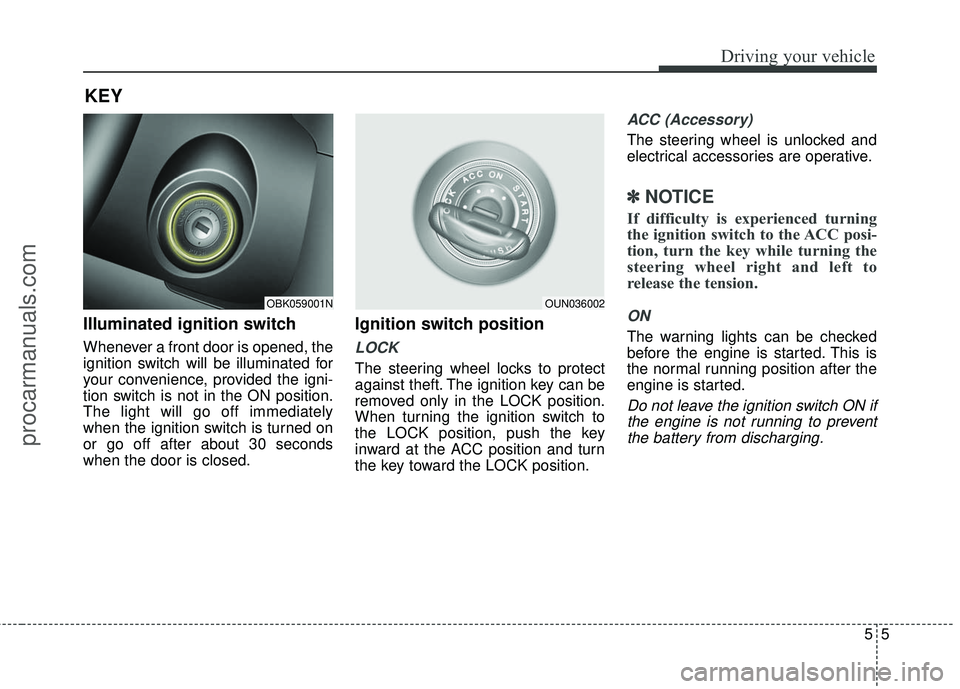
Illuminated ignition switch
Whenever a front door is opened, the
ignition switch will be illuminated for
your convenience, provided the igni-
tion switch is not in the ON position.
The light will go off immediately
when the ignition switch is turned on
or go off after about 30 seconds
when the door is closed.
Ignition switch position
LOCK
The steering wheel locks to protect
against theft. The ignition key can be
removed only in the LOCK position.
When turning the ignition switch to
the LOCK position, push the key
inward at the ACC position and turn
the key toward the LOCK position.
ACC (Accessory)
The steering wheel is unlocked and
electrical accessories are operative.
✽ ✽NOTICE
If difficulty is experienced turning
the ignition switch to the ACC posi-
tion, turn the key while turning the
steering wheel right and left to
release the tension.
ON
The warning lights can be checked
before the engine is started. This is
the normal running position after the
engine is started.
Do not leave the ignition switch ON if
the engine is not running to preventthe battery from discharging.
KEY
OBK059001NOUN036002
procarmanuals.com