service Hyundai Creta 2016 User Guide
[x] Cancel search | Manufacturer: HYUNDAI, Model Year: 2016, Model line: Creta, Model: Hyundai Creta 2016Pages: 512, PDF Size: 11.54 MB
Page 149 of 512
3-55
Convenient features of your vehicle
3
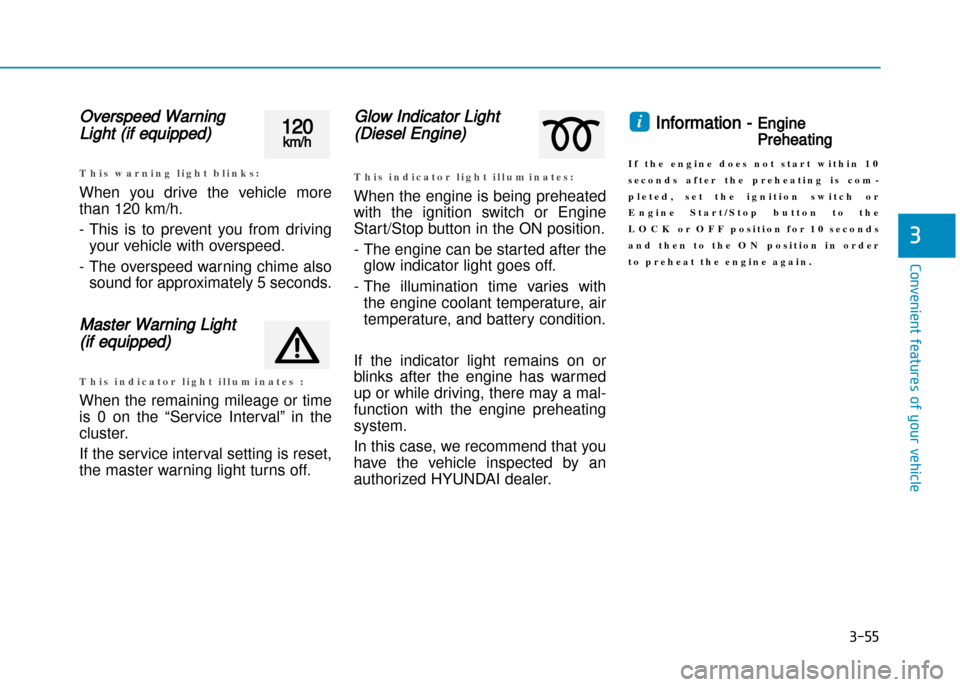
Overspeed Warning
Light (if equipped)
T h i s w a r n i n g l i g h t b l i n k s :
When you drive the vehicle more
than 120 km/h.
This is to prevent you from drivingyour vehicle with overspeed.
The overspeed warning chime also sound for approximately 5 seconds.
Master Warning Light
(if equipped)
T h i s i n d i c a t o r l i g h t i l l u m i n a t e s :
When the remaining mileage or time
is 0 on the “Service Interval” in the
cluster.
If the service interval setting is reset,
the master warning light turns off.
Glow Indicator Light
(Diesel Engine)
T h i s i n d i c a t o r l i g h t i l l u m i n a t e s :
When the engine is being preheated
with the ignition switch or Engine
Start/Stop button in the ON position.
The engine can be started after theglow indicator light goes off.
The illumination time varies with the engine coolant temperature, air
temperature, and battery condition.
If the indicator light remains on or
blinks after the engine has warmed
up or while driving, there may a mal
function with the engine preheating
system.
In this case, we recommend that you
have the vehicle inspected by an
authorized HYUNDAI dealer.
Information Engine
Preheating
I f t h e e n g i n e d o e s n o t s t a r t w i t h i n 1 0
s e c o n d s a f t e r t h e p r e h e a t i n g i s c o m
p l e t e d , s e t t h e i g n i t i o n s w i t c h o r
E n g i n e S t a r t / S t o p b u t t o n t o t h e
L O C K o r O F F p o s i t i o n f o r 1 0 s e c o n d s
a n d t h e n t o t h e O N p o s i t i o n i n o r d e r
t o p r e h e a t t h e e n g i n e a g a i n .
i120km/h
Page 157 of 512
3-63
Convenient features of your vehicle
3
LCD display (if equipped)
LCD display control
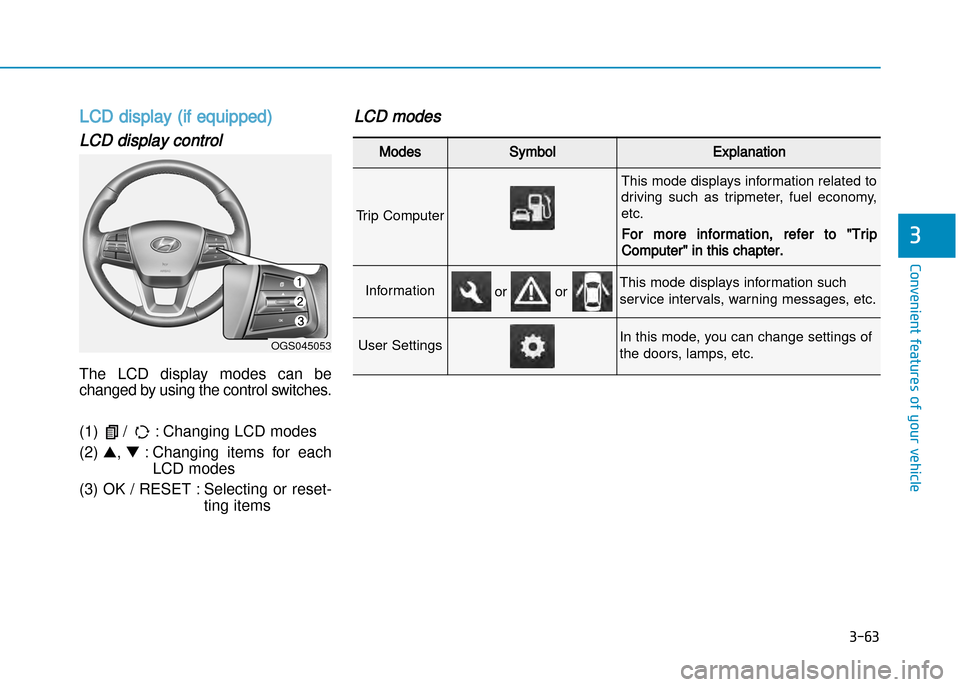
The LCD display modes can be
changed by using the control switches.
(1) / : Changing LCD modes (2) ▲, ▼ : Changing items for each
LCD modes
(3) OK / RESET : Selecting or reset ting items
LCD modes
Modes SymbolExplanation
Trip Computer
This mode displays information related to
driving such as tripmeter, fuel economy,etc.
For more information, refer to "Trip
Computer" in this chapter.
InformationThis mode displays information such
service intervals, warning messages, etc.
User SettingsIn this mode, you can change settings of
the doors, lamps, etc.
or or
OGS045053
Page 158 of 512
3-64
Convenient features of your vehicle
Cannot edit settings while driving
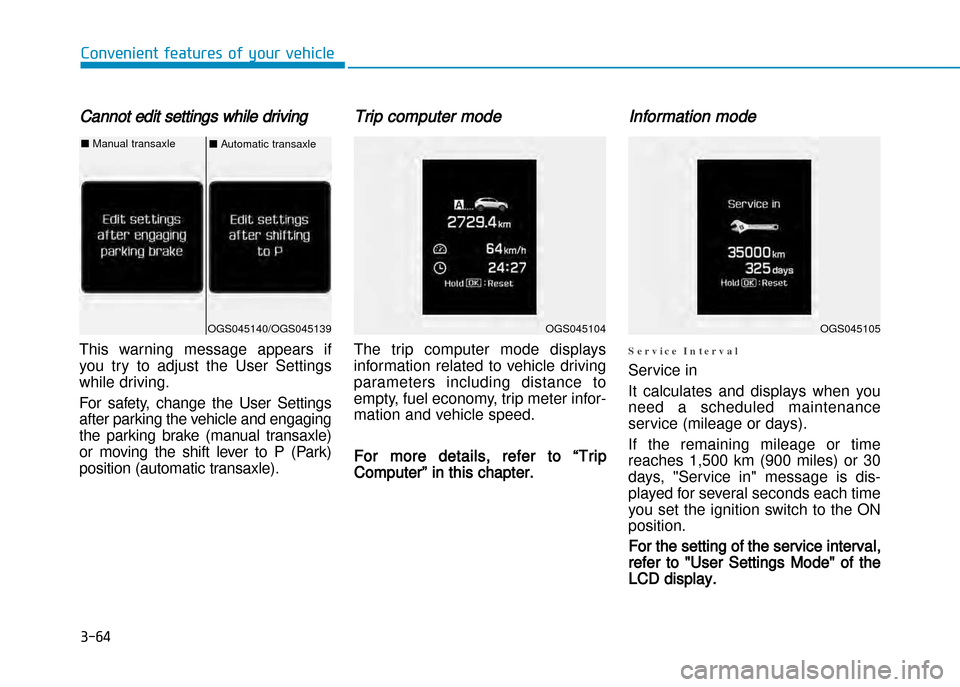
This warning message appears if
you try to adjust the User Settings
while driving.
For safety, change the User Settings
after parking the vehicle and engaging
the parking brake (manual transaxle)
or moving the shift lever to P (Park)
position (automatic transaxle).
Trip computer mode
The trip computer mode displays
information related to vehicle driving
parameters including distance to
empty, fuel economy, trip meter infor
mation and vehicle speed.
For more details, refer to “Trip
Computer” in this chapter.
Information mode
S e r v i c e I n t e r v a l
Service in
It calculates and displays when you
need a scheduled maintenance
service (mileage or days).
If the remaining mileage or time
reaches 1,500 km (900 miles) or 30
days, "Service in" message is dis
played for several seconds each time
you set the ignition switch to the ONposition.
For the setting of the service interval,
refer to "User Settings Mode" of the
LCD display.
OGS045104OGS045105OGS045140/OGS045139
■ Automatic transaxle■Manual transaxle
Page 159 of 512
3-65
Convenient features of your vehicle
3
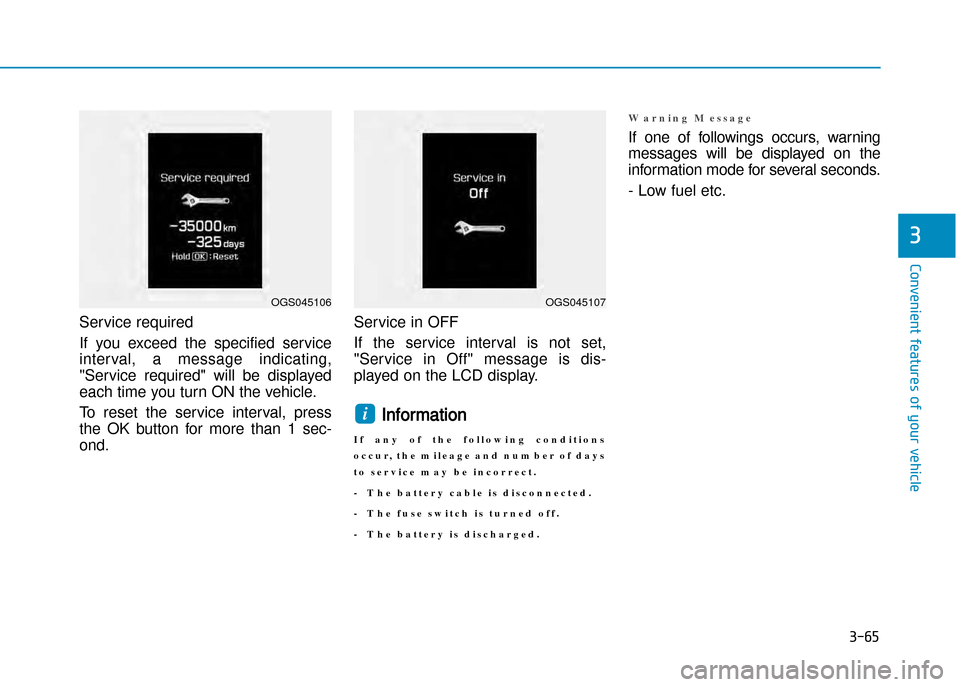
Service required
If you exceed the specified serviceinterval, a message indicating,
"Service required" will be displayed
each time you turn ON the vehicle.
To reset the service interval, press
the OK button for more than 1 sec
ond. Service in OFF
If the service interval is not set,
"Service in Off" message is dis
played on the LCD display.
Information
I f a n y o f t h e f o l l o w i n g c o n d i t i o n s
o c c u r , t h e m i l e a g e a n d n u m b e r o f d a y s
t o s e r v i c e m a y b e i n c o r r e c t .
T h e b a t t e r y c a b l e i s d i s c o n n e c t e d .
T h e f u s e s w i t c h i s t u r n e d o f f .
T h e b a t t e r y i s d i s c h a r g e d .
W a r n i n g M e s s a g e
If one of followings occurs, warning
messages will be displayed on the
information mode for several seconds.
Low fuel etc.
i
OGS045106OGS045107
Page 162 of 512
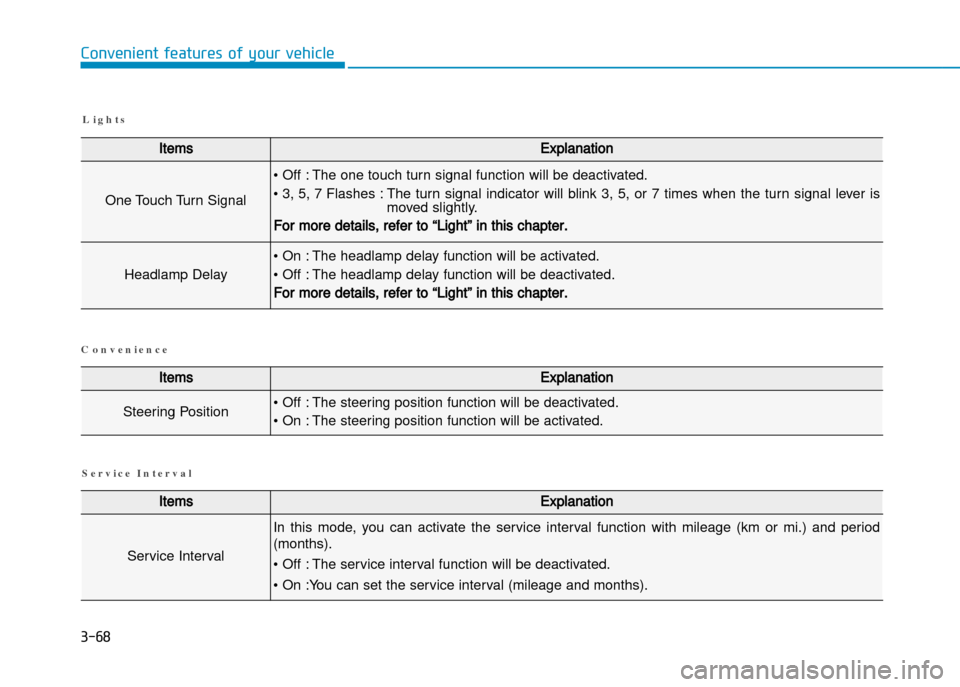
3-68
Convenient features of your vehicle
L i g h t s
ItemsExplanation
One Touch Turn Signal
• Off : The one touch turn signal function will be deactivated.
• 3, 5, 7 Flashes : The turn signal indicator will blink 3, 5, or 7 times when the turn signal lever ismoved slightly.
For more details, refer to “Light” in this chapter.
Headlamp Delay
• On : The headlamp delay function will be activated.
• Off : The headlamp delay function will be deactivated.
For more details, refer to “Light” in this chapter.
ItemsExplanation
Steering Position• Off : The steering position function will be deactivated.
• On : The steering position function will be activated.
ItemsExplanation
Service Interval
In this mode, you can activate the service interval function with mileage (km or mi.) and period
(months).
• Off : The service interval function will be deactivated.
• On :You can set the service interval (mileage and months).
S e r v i c e I n t e r v a l
C o n v e n i e n c e
Page 191 of 512

3-97
Convenient features of your vehicle
If the air flow rate suddenly decreas
es, we recommend the system be
checked at an authorized HYUNDAI
dealer.Checking the amount of air
conditioner refrigerant and com
pressor lubricant
When the amount of refrigerant is
low, the performance of the air con
ditioning is reduced. Overfilling also
has a bad influence on the air condi
tioning system.
Therefore, if abnormal operation is
found, we recommend that the system
be inspected by an authorized
HYUNDAI dealer.
Information
It is important that the correct type
and amount of oil and refrigerant is
used. Otherwise, damage to the com
pressor and abnormal system opera
tion may occur. We recommend the air conditioning
system be serviced by an authorized
HYUNDAI dealer.i
Because the refriger
ant is at very high pres
sure, the air condition
ing system should only
be serviced by trained
and certified technicians. It is
important that the correct type and
amount of oil and refrigerant is
used, otherwise damage to the
vehicle and personal injury may
occur.
WARNING
Page 202 of 512
3-108
Convenient features of your vehicle
3
System maintenance
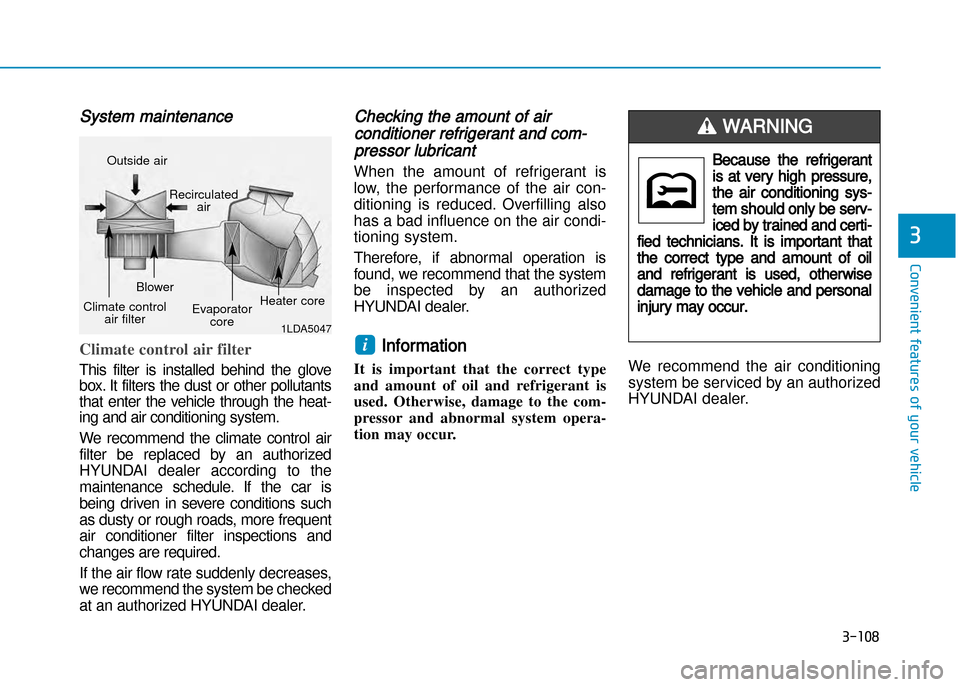
Climate control air filter
This filter is installed behind the glove
box. It filters the dust or other pollutants
that enter the vehicle through the heat
ing and air conditioning system.
We recommend the climate control airfilter be replaced by an authorized
HYUNDAI dealer according to the
maintenance schedule. If the car is being driven in severe conditions such as dusty or rough roads, more frequentair conditioner filter inspections and
changes are required.
If the air flow rate suddenly decreases,we recommend the system be checked
at an authorized HYUNDAI dealer.
Checking the amount of air
conditioner refrigerant and com
pressor lubricant
When the amount of refrigerant is
low, the performance of the air con
ditioning is reduced. Overfilling also
has a bad influence on the air condi
tioning system.
Therefore, if abnormal operation is
found, we recommend that the system
be inspected by an authorized
HYUNDAI dealer.
Information
It is important that the correct type
and amount of oil and refrigerant is
used. Otherwise, damage to the com
pressor and abnormal system opera
tion may occur. We recommend the air conditioning
system be serviced by an authorized
HYUNDAI dealer.i
1LDA5047
Outside air
Recirculatedair
Climate control air filter Blower
Evaporatorcore Heater core
Because the refrigerant
is at very high pressure,
the air conditioning sys
tem should only be serv
iced by trained and certi
fied technicians. It is important that
the correct type and amount of oil
and refrigerant is used, otherwise
damage to the vehicle and personal
injury may occur.
WARNING
Page 221 of 512
Antenna
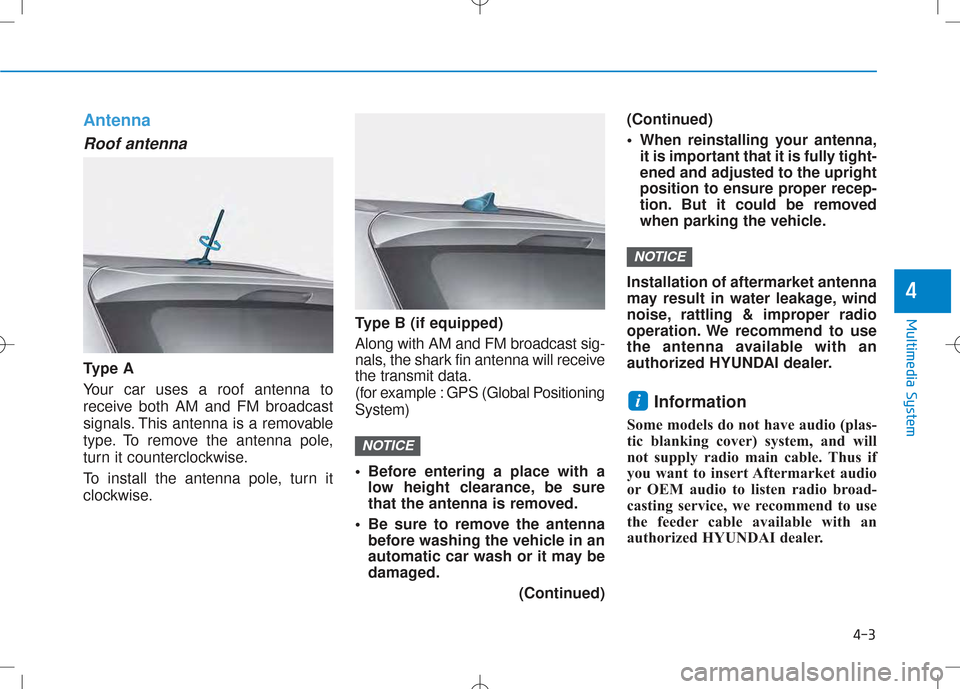
Roof antenna
Ty p e A Your car uses a roof antenna to
receive both AM and FM broadcast
signals. This antenna is a removable
type. To remove the antenna pole,
turn it counterclockwise.
To install the antenna pole, turn it
clockwise. Type B (if equipped) Along with AM and FM broadcast sig-
nals, the shark fin antenna will receive
the transmit data.
(for example : GPS (Global PositioningSystem)
• Before entering a place with a
low height clearance, be sure
that the antenna is removed.
• Be sure to remove the antenna before washing the vehicle in an
automatic car wash or it may be
damaged.
(Continued)(Continued)
• When reinstalling your antenna,
it is important that it is fully tight- ened and adjusted to the upright
position to ensure proper recep-
tion. But it could be removed
when parking the vehicle.
Installation of aftermarket antenna
may result in water leakage, wind
noise, rattling & improper radio
operation. We recommend to use
the antenna available with an
authorized HYUNDAI dealer. Information
Some models do not have audio (plas-
tic blanking cover) system, and will
not supply radio main cable. Thus if
you want to insert Aftermarket audio
or OEM audio to listen radio broad-
casting service, we recommend to use
the feeder cable available with an
authorized HYUNDAI dealer.
i
NOTICE
NOTICE
4-3
Multimedia System
4
Page 229 of 512
4-11
Multimedia System
4
(Continued)
•Do not place beverages close
to the audio system. Spilling
beverages may lead to systemmalfunction.
•In case of product malfunc-
tion, please contact your place
of purchase or After Service
center.
•Placing the audio system with-
in an electromagnetic environ-
ment may result in noise inter-
ference.
•Prevent caustic solutions such as perfume and cosmetic oil
from contacting the dashboard
because they may cause dam-
age or discoloration.
•Do not stare at the screen
while driving. Staring at the
screen for prolonged periodsof time could lead to trafficaccidents.
•Do not disassemble, assemble, or modify the audio system.
Such acts could result in acci-
dents, fire, or electric shock.
•Using the phone while driving
may lead to a lack of attentionof traffic conditions andincrease the likelihood of
accidents. Use the phone fea-
ture after parking the vehicle.
•Heed caution not to spill water
or introduce foreign objects
into the device. Such acts
could lead to smoke, fire, or
product malfunction.
WARNING
Operating the device while driv- ing could lead to accidents due
to a lack of attention to external
surroundings. First park the
vehicle before operating the
device.
•Adjust the volume to levels
that allow the driver to hear
sounds from outside of the
vehicle. Driving in a state
where external sounds cannot
be heard may lead to acci-dents.
•Pay attention to the volume setting when turning the
device on. A sudden output of
extreme volume upon turning
the device on could lead to
hearing impairment. (Adjust
the volume to a suitable levels
before turning off the device.)(Continued)
CAUTION
Page 366 of 512
When using tire chains:
•Wrong size chains or improperly
installed chains can damage your
vehicle's brake lines, suspension,
body and wheels.
•Use SAE “S” class or wire chains.
•If you hear noise caused by chains
contacting the body, retighten the
chain to prevent contact with the
vehicle body.
•To prevent body damage, retighten
the chains after driving 0.5~1.0 km
(0.3~0.6 miles).
•Do not use tire chains on vehicles
equipped with aluminum wheels. If
unavoidable, use a wire type
chain.
•Use wire chains less than 15 mm
(0.59 in) wide to prevent damage
to the chain’s connection.
Winter precautions
Use high quality ethylene glycol
coolant
Your vehicle is delivered with high
quality ethylene glycol coolant in the
cooling system. It is the only type of
coolant that should be used because
it helps prevent corrosion in the cool
ing system, lubricates the water
pump and prevents freezing. Be sure
to replace or replenish your coolant
in accordance with the maintenance
schedule in chapter 7. Before winter,
have your coolant tested to assure
that its freezing point is sufficient for
the temperatures anticipated during
the winter.
Check battery and cables
Winter puts additional burdens on
the battery system. Visually inspect
the battery and cables as described
in chapter 7. The level of charge in
your battery can be checked by an
authorized HYUNDAI dealer or a
service station.
Change to "winter weight" oil if
necessary
In some climates it is recommended
that a lower viscosity "winter weight"
oil be used during cold weather. See
chapter 8 for recommendations. If
you aren't sure what weight oil you
should use, we recommend that you
consult with an authorized HYUNDAI
dealer.
Check spark plugs and ignition
system
Inspect your spark plugs as
described in chapter 7 and replace
them if necessary. Also check all
ignition wiring and components to be
sure they are not cracked, worn or
damaged in any way.
NOTICE
Driving your vehicle
5-54