steering Hyundai Creta 2016 Owner's Guide
[x] Cancel search | Manufacturer: HYUNDAI, Model Year: 2016, Model line: Creta, Model: Hyundai Creta 2016Pages: 512, PDF Size: 11.54 MB
Page 162 of 512
3-68
Convenient features of your vehicle
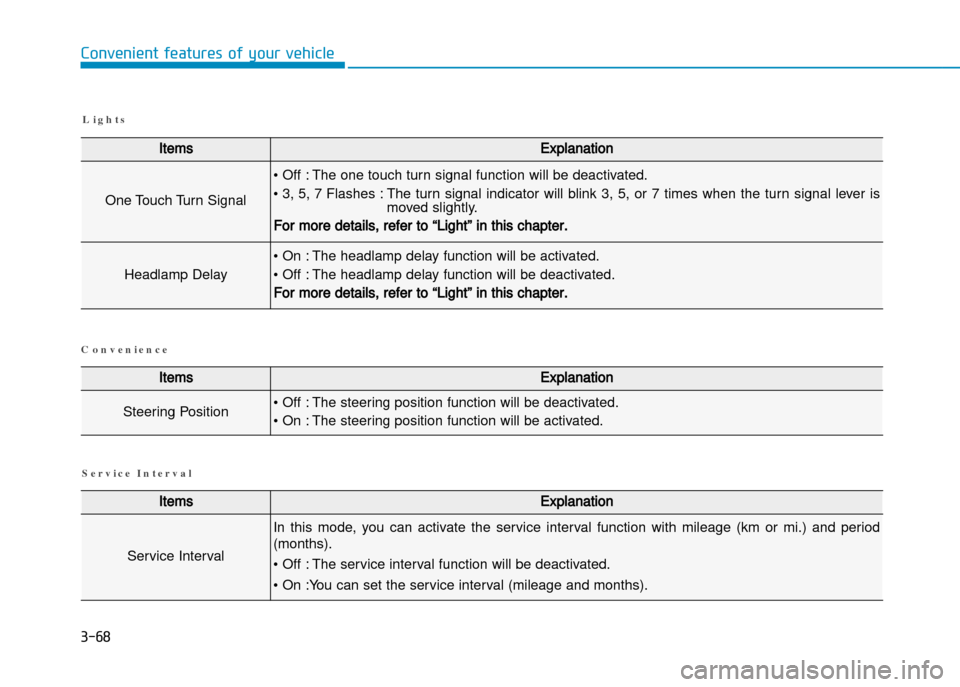
L i g h t s
ItemsExplanation
One Touch Turn Signal
• Off : The one touch turn signal function will be deactivated.
• 3, 5, 7 Flashes : The turn signal indicator will blink 3, 5, or 7 times when the turn signal lever ismoved slightly.
For more details, refer to “Light” in this chapter.
Headlamp Delay
• On : The headlamp delay function will be activated.
• Off : The headlamp delay function will be deactivated.
For more details, refer to “Light” in this chapter.
ItemsExplanation
Steering Position• Off : The steering position function will be deactivated.
• On : The steering position function will be activated.
ItemsExplanation
Service Interval
In this mode, you can activate the service interval function with mileage (km or mi.) and period
(months).
• Off : The service interval function will be deactivated.
• On :You can set the service interval (mileage and months).
S e r v i c e I n t e r v a l
C o n v e n i e n c e
Page 164 of 512
3-70
Convenient features of your vehicle
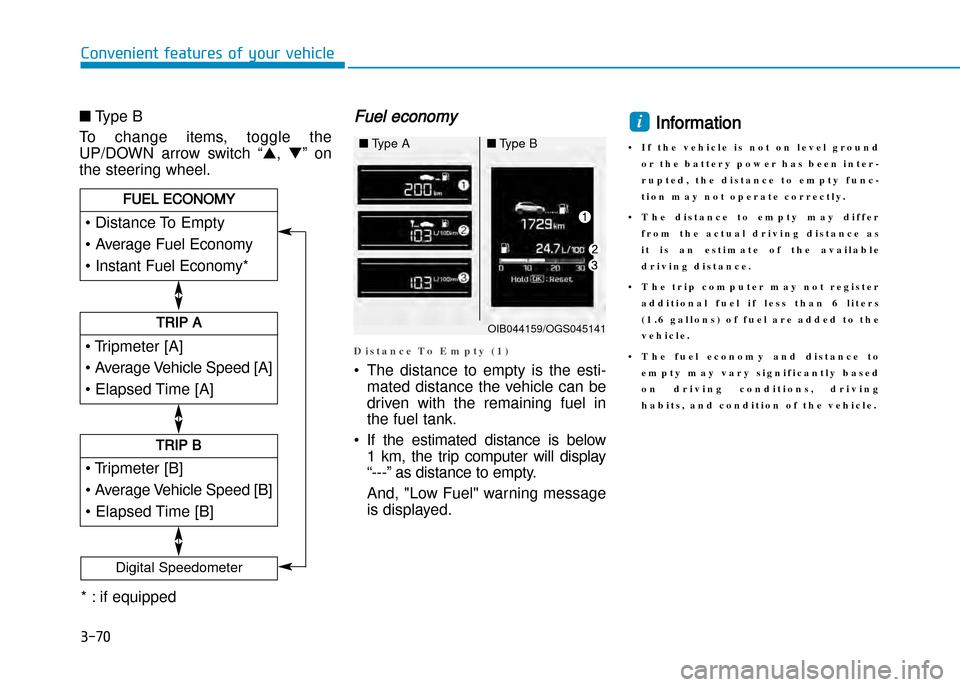
■Type B
To change items, toggle the
UP/DOWN arrow switch “ ▲,▼ ” on
the steering wheel.Fuel economy
D i s t a n c e T o E m p t y ( 1 )
• The distance to empty is the esti mated distance the vehicle can be
driven with the remaining fuel in
the fuel tank.
• If the estimated distance is below 1 km, the trip computer will display
“” as distance to empty.
And, "Low Fuel" warning message
is displayed.
Information
• I f t h e v e h i c l e i s n o t o n l e v e l g r o u n d o r t h e b a t t e r y p o w e r h a s b e e n i n t e r
r u p t e d , t h e d i s t a n c e t o e m p t y f u n c
t i o n m a y n o t o p e r a t e c o r r e c t l y .
• T h e d i s t a n c e t o e m p t y m a y d i f f e r f r o m t h e a c t u a l d r i v i n g d i s t a n c e a s
i t i s a n e s t i m a t e o f t h e a v a i l a b l e
d r i v i n g d i s t a n c e .
• T h e t r i p c o m p u t e r m a y n o t r e g i s t e r a d d i t i o n a l f u e l i f l e s s t h a n 6 l i t e r s
( 1 . 6 g a l l o n s ) o f f u e l a r e a d d e d t o t h e
v e h i c l e .
• T h e f u e l e c o n o m y a n d d i s t a n c e t o e m p t y m a y v a r y s i g n i f i c a n t l y b a s e d
o n d r i v i n g c o n d i t i o n s , d r i v i n g
h a b i t s , a n d c o n d i t i o n o f t h e v e h i c l e .i
• Tripmeter [A]
• Average Vehicle Speed [A]
• Elapsed Time [A]
TRIP A
• Tripmeter [B]
• Average Vehicle Speed [B]
• Elapsed Time [B]
TRIP B
• Distance To Empty
• Average Fuel Economy
• Instant Fuel Economy*
FUEL ECONOMY
Digital Speedometer
OIB044159/OGS045141
■Type A■Type B
* : if equipped
Page 165 of 512
3-71
Convenient features of your vehicle
3
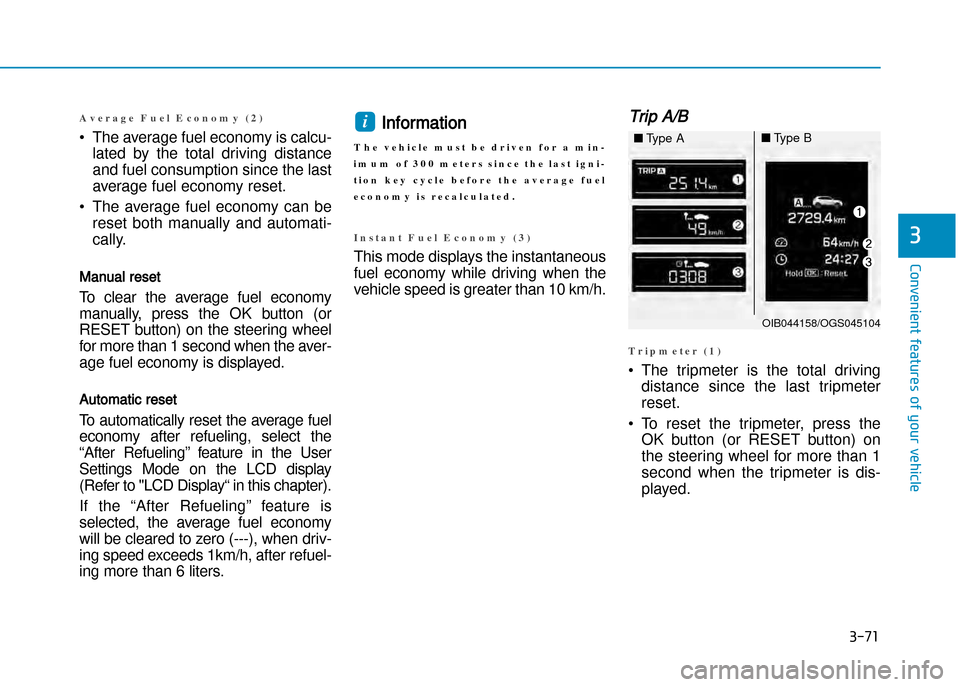
A v e r a g e F u e l E c o n o m y ( 2 )
•The average fuel economy is calcu
lated by the total driving distance
and fuel consumption since the last
average fuel economy reset.
• The average fuel economy can be reset both manually and automati
cally.
Manual reset
To clear the average fuel economy
manually, press the OK button (or
RESET button) on the steering wheel
for more than 1 second when the aver
age fuel economy is displayed.
Automatic reset
To automatically reset the average fuel
economy after refueling, select the
“After Refueling” feature in the User
Settings Mode on the LCD display
(Refer to "LCD Display“ in this chapter).
If the “After Refueling” feature is selected, the average fuel economy
will be cleared to zero (), when driv
ing speed exceeds 1km/h, after refuel
ing more than 6 liters.
Information
T h e v e h i c l e m u s t b e d r i v e n f o r a m i n
i m u m o f 3 0 0 m e t e r s s i n c e t h e l a s t i g n i
t i o n k e y c y c l e b e f o r e t h e a v e r a g e f u e l
e c o n o m y i s r e c a l c u l a t e d .
I n s t a n t F u e l E c o n o m y ( 3 )
This mode displays the instantaneous
fuel economy while driving when the
vehicle speed is greater than 10 km/h.
Trip A/B
T r i p m e t e r ( 1 )
• The tripmeter is the total driving distance since the last tripmeter reset.
• To reset the tripmeter, press the OK button (or RESET button) on
the steering wheel for more than 1
second when the tripmeter is dis
played.
i
OIB044158/OGS045104
■Type A■Type B
Page 166 of 512
3-72
Convenient features of your vehicle
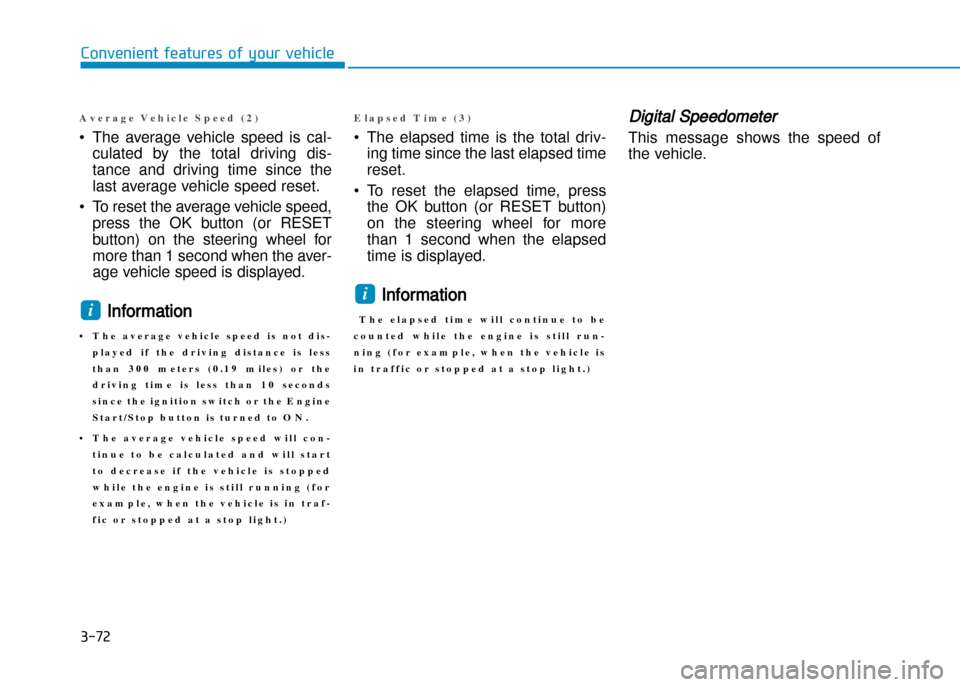
A v e r a g e V e h i c l e S p e e d ( 2 )
•The average vehicle speed is cal
culated by the total driving dis
tance and driving time since the
last average vehicle speed reset.
• To reset the average vehicle speed, press the OK button (or RESET
button) on the steering wheel for
more than 1 second when the aver
age vehicle speed is displayed.
Information
• T h e a v e r a g e v e h i c l e s p e e d i s n o t d i s p l a y e d i f t h e d r i v i n g d i s t a n c e i s l e s s
t h a n 3 0 0 m e t e r s ( 0 . 1 9 m i l e s ) o r t h e
d r i v i n g t i m e i s l e s s t h a n 1 0 s e c o n d s
s i n c e t h e i g n i t i o n s w i t c h o r t h e E n g i n e
S t a r t / S t o p b u t t o n i s t u r n e d t o O N .
• T h e a v e r a g e v e h i c l e s p e e d w i l l c o n t i n u e t o b e c a l c u l a t e d a n d w i l l s t a r t
t o d e c r e a s e i f t h e v e h i c l e i s s t o p p e d
w h i l e t h e e n g i n e i s s t i l l r u n n i n g ( f o r
e x a m p l e , w h e n t h e v e h i c l e i s i n t r a f
f i c o r s t o p p e d a t a s t o p l i g h t . )
E l a p s e d T i m e ( 3 )
• The elapsed time is the total driving time since the last elapsed time reset.
• To reset the elapsed time, press the OK button (or RESET button)
on the steering wheel for more
than 1 second when the elapsed
time is displayed.
Information
T h e e l a p s e d t i m e w i l l c o n t i n u e t o b e
c o u n t e d w h i l e t h e e n g i n e i s s t i l l r u n
n i n g ( f o r e x a m p l e , w h e n t h e v e h i c l e i s
i n t r a f f i c o r s t o p p e d a t a s t o p l i g h t . )
Digital Speedometer
This message shows the speed of
the vehicle.
i
i
Page 171 of 512
3-77
Convenient features of your vehicle
Battery saver function
The purpose of this feature is to pre
vent the battery from being dis
charged. The system automatically
turns off the parking lights when the
driver removes the ignition key or
turns the engine off (for smart key)
and opens the driverside door.
With this feature, the parking lights
will turn off automatically if the driver
parks on the side of road at night.
If necessary, to keep the lights on
when the ignition key is removed or
the engine is turned off (for smart
key), perform the following:
1) Open the driverside door.
2) Turn the parking lights OFF andON again using the light switch on
the steering column.
Headlamp delay function
(if equipped)
If the key is removed from the ignition
switch or placed in the ACC or
LOCK/OFF position with the head
lights ON, the headlights (and/or
parking lights) remain on for about 5
minutes. However, with the engine off
if the driver’s door is opened and
closed, the headlights (and/or parking
lights) are turned off after 15 seconds.
The headlights (and/or parking
lights) can be turned off by pressing
the lock button on the remote key (or
smart key) twice or turning the light
switch to the OFF or AUTO position.
However, if you turn the light switch
to the AUTO position when it is dark
outside, the headlights will not be
turned off.If the driver gets out of the vehicle
through other doors (except driver's
door), the battery saver function
does not operate and the headlamp
delay function does not turn off auto
matically. Therefore, It causes the
battery to be discharged. In this
case, make sure to turn off the lamp
before getting out of the vehicle.
NOTICE
Page 209 of 512
3-115
Convenient features of your vehicle
iNtERioR FEAtURES
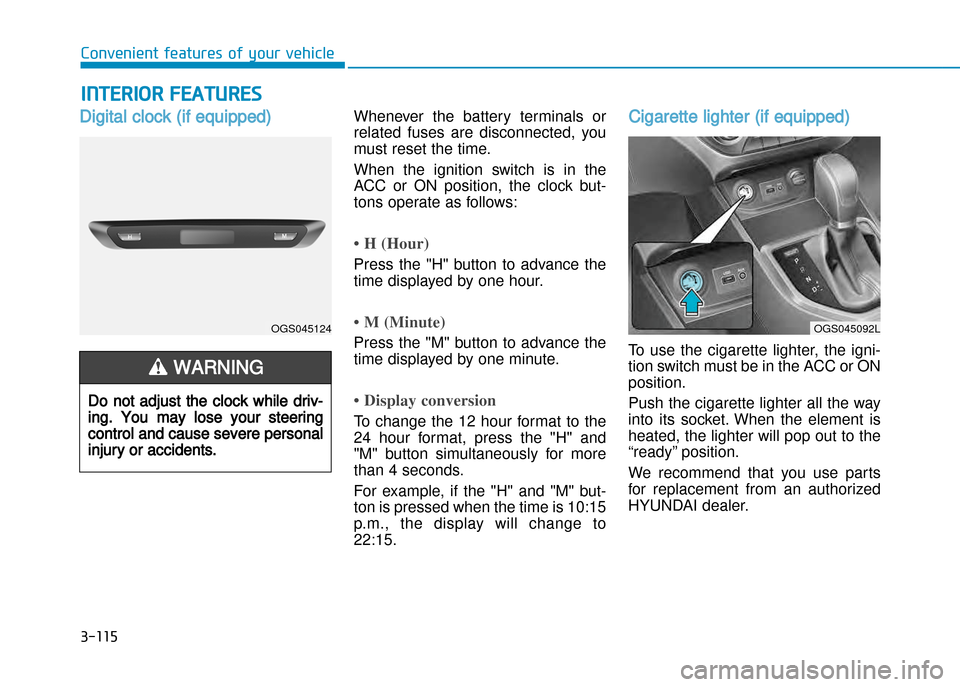
Digital clock (if equipped)Whenever the battery terminals or
related fuses are disconnected, you
must reset the time.
When the ignition switch is in the
ACC or ON position, the clock but
tons operate as follows:
• H (Hour)
Press the "H" button to advance the
time displayed by one hour.
• M (Minute)
Press the "M" button to advance the
time displayed by one minute.
• Display conversion
To change the 12 hour format to the
24 hour format, press the "H" and
"M" button simultaneously for more
than 4 seconds.
For example, if the "H" and "M" but
ton is pressed when the time is 10:15
p.m., the display will change to22:15.
Cigarette lighter (if equipped)
To use the cigarette lighter, the igni
tion switch must be in the ACC or ONposition.
Push the cigarette lighter all the way
into its socket. When the element is
heated, the lighter will pop out to the
“ready” position.
We recommend that you use parts
for replacement from an authorized
HYUNDAI dealer.
Do not adjust the clock while driv
ing. You may lose your steering
control and cause severe personal
injury or accidents.
WARNING
OGS045124OGS045092L
Page 219 of 512
Multimedia System
Multimedia system .................................................4-2AUX, USB and iPod ®
port ...............................................4-2
Antenna ...............................................................................4-3
Steering wheel audio control .........................................4-4
How vehicle audio works ................................................4-5
Caring for disc....................................................................4-7
System controllers and functions .....................4-18 Audio Head Unit (For RDS model) ..............................4-18
Audio Head Unit (Except RDS model) ........................4-20
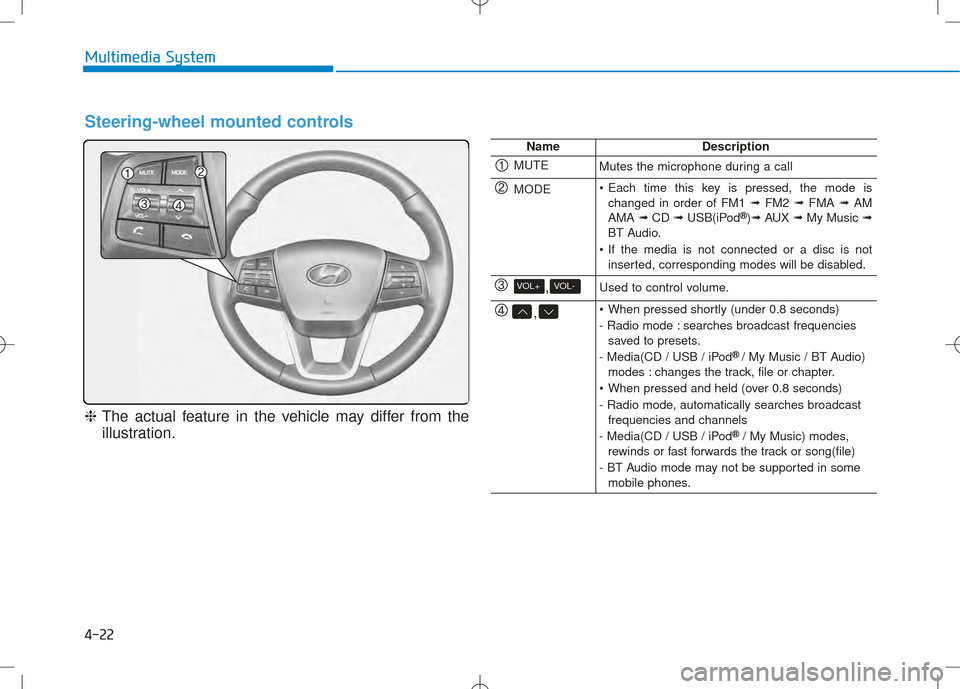
Steering-wheel mounted controls ..............................4-22
RADIO MODE (For RDS model)....................................4-24
RADIO MODE (Except RDS model) .............................4-28
RADIO MODE (For Colombia Model) ..........................4-30
MEDIA MODE ...................................................................4-32
AUDIO CD MODE .............................................................4-33
MP3 CD MODE .................................................................4-36
USB MODE ........................................................................4-39
iPod ®
MODE .....................................................................4-42
AUX MODE........................................................................4-45
MY MUSIC MODE............................................................4-46
Bluetooth®Wireless Technology AUDIO MODE......4-49
Bluetooth®Wireless Technology ................................4-50
SETUP (For RDS model) ................................................4-70
SETUP (Except RDS model) ..........................................4-76
REAR VIEW CAMERA .....................................................4-82 System controllers and functions .....................4-83
Audio Head Unit ..............................................................4-83
Caring for disc .................................................................4-86
BASIC METHOD OF USE : CD .......................................4-87
BASIC METHOD OF USE : USB / iPod .......................4-92
AUX .....................................................................................4-94
4
Page 222 of 512
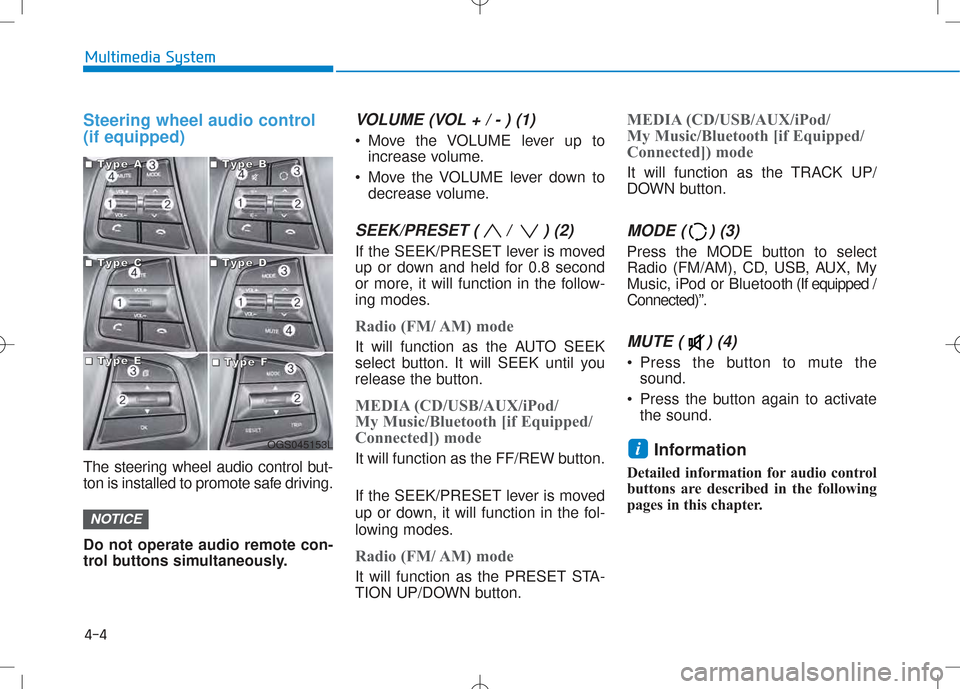
Steering wheel audio control (if equipped)
The steering wheel audio control but-
ton is installed to promote safe driving. Do not operate audio remote con-
trol buttons simultaneously.
VOLUME (VOL + / - ) (1)
Move the VOLUME lever up toincrease volume.
Move the VOLUME lever down to decrease volume.
SEEK/PRESET ( / ) (2)
If the SEEK/PRESET lever is moved
up or down and held for 0.8 second
or more, it will function in the follow-
ing modes.
Radio (FM/ AM) mode
It will function as the AUTO SEEK
select button. It will SEEK until you
release the button.
MEDIA (CD/USB/AUX/iPod/
My Music/Bluetooth [if Equipped/
Connected]) mode
It will function as the FF/REW button.
If the SEEK/PRESET lever is moved
up or down, it will function in the fol-
lowing modes.
Radio (FM/ AM) mode
It will function as the PRESET STA-
TION UP/DOWN button.
MEDIA (CD/USB/AUX/iPod/
My Music/Bluetooth [if Equipped/
Connected]) mode
It will function as the TRACK UP/
DOWN button.
MODE ( ) (3)
Press the MODE button to select
Radio (FM/AM), CD, USB, AUX, My
Music, iPod or Bluetooth (If equipped /
Connected)”.
MUTE ( ) (4)
Press the button to mute the sound.
Press the button again to activate the sound.
Information
Detailed information for audio control
buttons are described in the following
pages in this chapter.
i
NOTICE
4-4
Multimedia System
OGS045153L
■■■■TTTTyyyyppppeeee AAAA■■■■TTTTyyyyppppeeee BBBB
■■■■TTTTyyyyppppeeee CCCC■■■■TTTTyyyyppppeeee DDDD
■■■■TTTTyyyyppppeeee EEEE■■■■TTTTyyyyppppeeee FFFF
Page 240 of 512
4-22
Multimedia System
Steering-wheel mounted controls
❈The actual feature in the vehicle may differ from the
illustration.
NameDescription
MUTEMutes the microphone during a call
MODE Each time this key is pressed, the mode is changed in order of FM1 ➟FM2 ➟FMA ➟AM
AMA ➟CD ➟USB(iPod ®
)➟ AUX ➟My Music ➟
BT Audio.
If the media is not connected or a disc is not inserted, corresponding modes will be disabled.
,VOL-VOL+Used to control volume.
, When pressed shortly (under 0.8 seconds)
- Radio mode : searches broadcast frequenciessaved to presets.
- Media(CD / USB / iPod ®
/ My Music / BT Audio)
modes : changes the track, file or chapter.
When pressed and held (over 0.8 seconds)
- Radio mode, automatically searches broadcast frequencies and channels
- Media(CD / USB / iPod ®
/ My Music) modes,
rewinds or fast forwards the track or song(file)
- BT Audio mode may not be supported in some mobile phones.
Page 271 of 512
4-53
Multimedia System
4
Pairing a Bluetooth®Wireless
Technology Device (For RDS Model)
What is Bluetooth®Wireless
Technology Pairing?
Pairing refers to the process of syn-
chronizing your
Bluetooth®Wireless
Technology phone or device with the
car audio system for connection.
Pairing is necessary to connect anduse the
Bluetooth®Wireless
Technology feature.
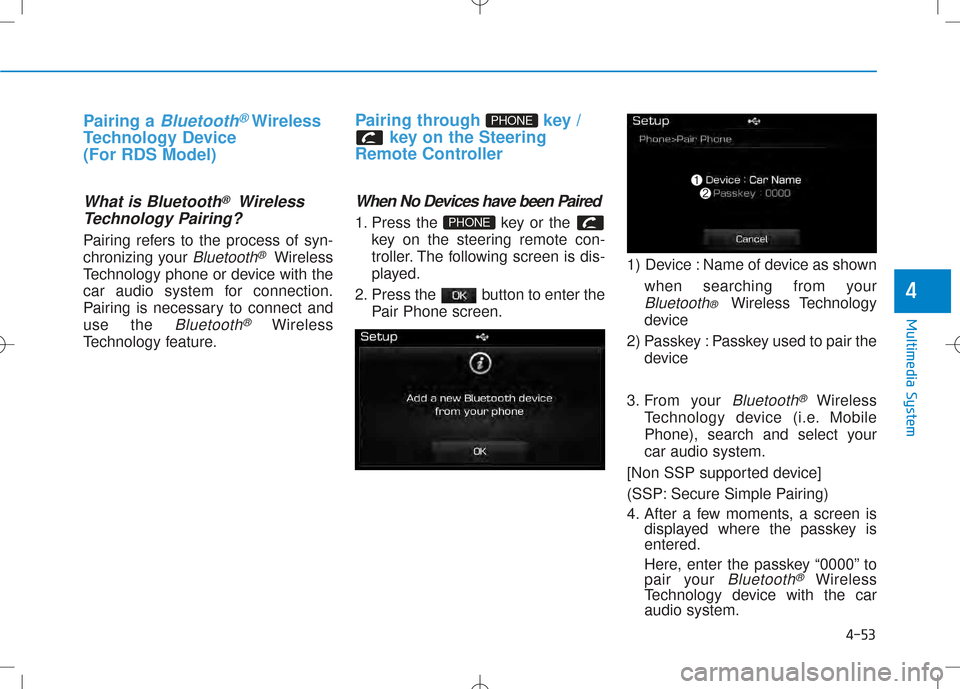
Pairing through key / key on the Steering
Remote Controller
When No Devices have been Paired
1. Press the key or the key on the steering remote con-
troller. The following screen is dis-
played.
2. Press the button to enter the Pair Phone screen. 1) Device : Name of device as shown
when searching from your
Bluetooth® Wireless Technology
device
2) Passkey : Passkey used to pair the device
3. From your
Bluetooth®Wireless
Technology device (i.e. Mobile
Phone), search and select yourcar audio system.
[Non SSP supported device]
(SSP: Secure Simple Pairing)
4. After a few moments, a screen is displayed where the passkey is entered.
Here, enter the passkey “0000” to
pair your
Bluetooth®Wireless
Technology device with the caraudio system.
PHONE
PHONE