ECU Hyundai Creta 2016 Owner's Guide
[x] Cancel search | Manufacturer: HYUNDAI, Model Year: 2016, Model line: Creta, Model: Hyundai Creta 2016Pages: 512, PDF Size: 11.54 MB
Page 279 of 512
4-61
Multimedia System
4
Pairing a Bluetooth®
Wireless
Technology Device (Except RDS Model)
What is Bluetooth®Wireless
Technology Pairing?
Pairing refers to the process of syn-
chronizing your
Bluetooth®Wireless
Technology phone or device with the
car audio system for connection.
Pairing is necessary to connect anduse the
Bluetooth®Wireless
Technology feature.
Pairing through key / key on the Steering Remote
Controller
When No Devices have been Paired
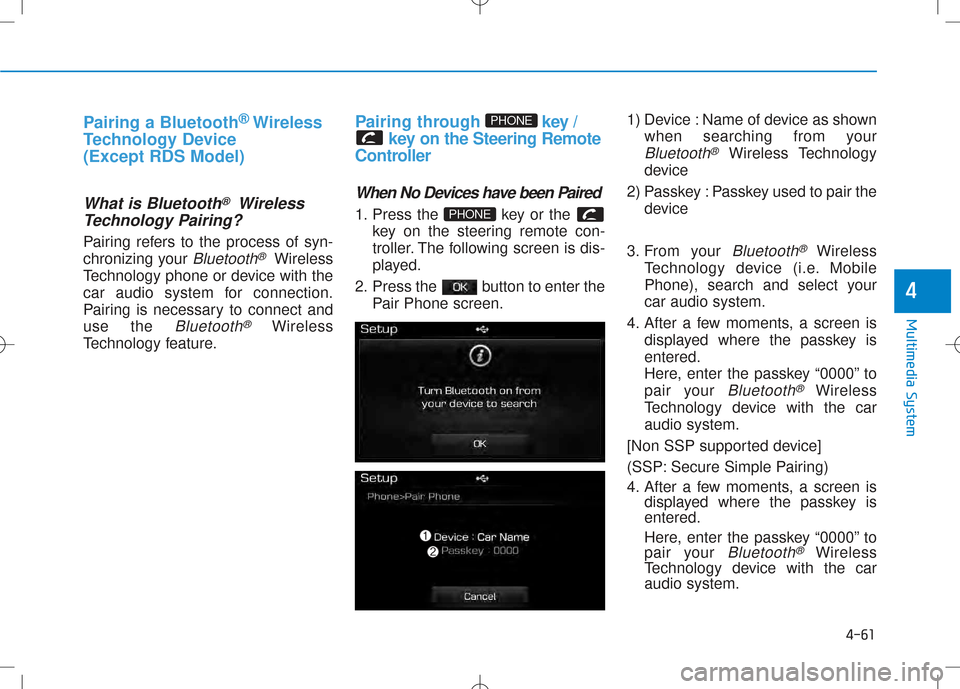
1. Press the key or the key on the steering remote con-
troller. The following screen is dis-
played.
2. Press the button to enter the Pair Phone screen. 1) Device : Name of device as shown
when searching from your
Bluetooth®Wireless Technology
device
2) Passkey : Passkey used to pair the device
3. From your
Bluetooth®Wireless
Technology device (i.e. Mobile
Phone), search and select yourcar audio system.
4. After a few moments, a screen is displayed where the passkey isentered.
Here, enter the passkey “0000” to
pair your
Bluetooth®Wireless
Technology device with the caraudio system.
[Non SSP supported device]
(SSP: Secure Simple Pairing)
4. After a few moments, a screen is displayed where the passkey is entered.
Here, enter the passkey “0000” to
pair your
Bluetooth®Wireless
Technology device with the caraudio system.
PHONE
PHONE
Page 315 of 512
Before entering the vehicle
• Be sure all windows, outside mirror(s), and outside lights are clean
and unobstructed.
• Remove frost, snow, or ice.
• Visually check the tires for uneven wear and damage.
• Check under the vehicle for any sign of leaks.
• Be sure there are no obstacles behind you if you intend to back up.
Before starting
• Make sure the hood, the tailgate,and the doors are securely closed
and locked.
• Adjust the position of the seat and steering wheel.
• Adjust the inside and outside rearview mirrors.
• Verify all the lights work.
• Fasten your seatbelt. Check that all passengers have fastened their
seatbelts. • Check the gauges and indicators in
the instrument panel and the mes
sages on the instrument display
when the ignition switch is in the
ON position.
• Check that any items you are car rying are stored properly or fas
tened down securely.
BEFORE DRIVING
5-3
Driving your vehicle
5
Page 339 of 512
5-27
Driving your vehicle
5
(Continued)
• If the driver presses the lever to + (Up) or (Down) position, the
transaxle may not make the request
ed gear change if the next gear is
outside of the allowable engine rpm
range. The driver must execute
upshifts in accordance with road
conditions, taking care to keep the
engine rpms below the red zone.
• When accelerating from a stop on a slippery road, push the shift lever
forward into the + (Up) position.
This allows the transaxle to shift
into the 2nd gear which is better for
smooth driving on a slippery road.
Push the shift lever to the (Down)
side to shift back to the 1st gear.Shiftlock system
For your safety, the automatic
transaxle has a shiftlock system
which prevents shifting the transaxle
from P (Park) into R (Reverse)
unless the brake pedal is depressed.
To shift the transaxle from P (Park)
into R (Reverse):
1. Depress and hold the brake pedal.
2. Start the engine or place the igni tion switch in the ON position.
3. Move the shift lever.
Shiftlock release
If the shift lever cannot be moved
from the P (Park) position into R
(Reverse) position with the brake
pedal depressed, continue depress
ing the brake, and then do the following:
Page 388 of 512
6-20
What to do in an emergency
If you have a tire gauge, check the
tire pressure (see “Tires and Wheels”
in chapter 8 for tire pressure instruc
tions.). If the pressure is lower or
higher than recommended, drive
slowly to the nearest service station
and adjust it to the recommended
pressure. Always reinstall the valve
cap after checking or adjusting tire
pressure. If the cap is not replaced,
air may leak from the tire. If you lose
a valve cap, buy another and install it
as soon as possible. After changing
tires, secure the flat tire and return
the jack and tools to their proper stor
age locations.
Information
Check the tire pressure as soon as pos
sible after installing a spare tire.
Adjust it to the recommended pres
sure.
Your vehicle has metric threads on
the studs and lug nuts. Make certain
during tire changing that the same
nuts that were removed are rein
stalled. If you have to replace your
lug nuts make sure they have metric
threads to avoid damaging the studs
and ensure the wheel is properly
secured to the hub. We recommend
that you consult an authorized
HYUNDAI dealer for assistance.
If any of the equipment such as the
jack, lug nuts, studs, or other equip
ment is damaged or in poor condi
tion, do not attempt to change the
tire and call for assistance.
i
NOTICE
Page 391 of 512
6-23
What to do in an emergency
6
When towing your vehicle in an
emergency without wheel dollies:
1. Place the ignition switch in the ACC position.
2. Place the shift lever in N (Neutral).
3. Release the parking brake.
Failure to place the shift lever in N
(Neutral) when being towed with the
front wheels on the ground can
cause internal damage to the
transaxle.
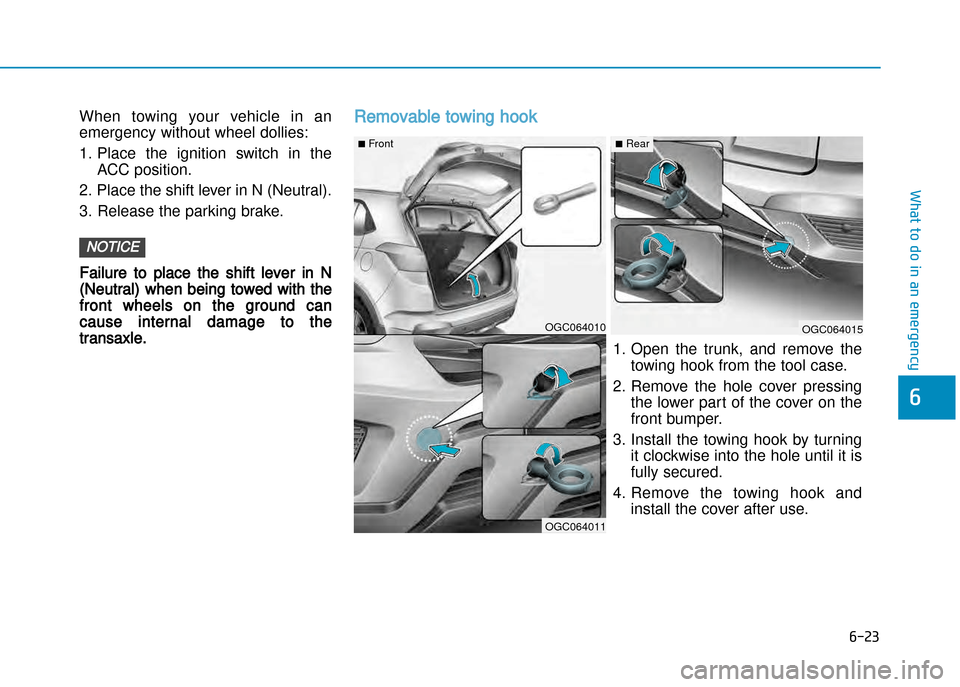
Removable towing hook
NOTICE
OGC064010OGC064015
OGC064011
n Frontn Rear
1. Open the trunk, and remove the
towing hook from the tool case.
2. Remove the hole cover pressing the lower part of the cover on the
front bumper.
3. Install the towing hook by turning it clockwise into the hole until it is
fully secured.
4. Remove the towing hook and install the cover after use.
Page 392 of 512
6-24
What to do in an emergency
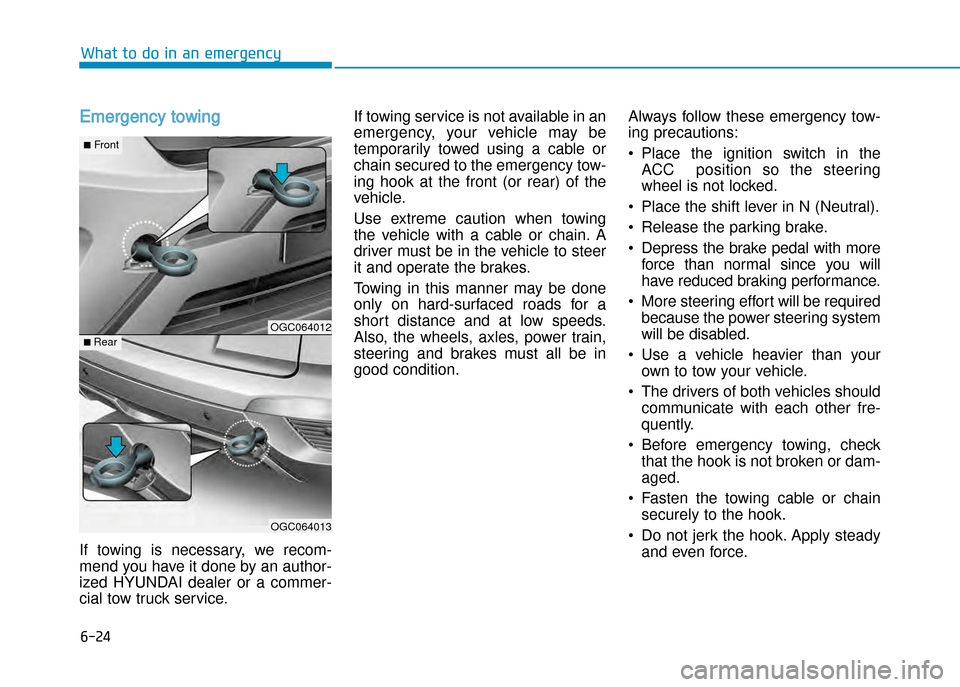
Emergency towing
If towing is necessary, we recom
mend you have it done by an author
ized HYUNDAI dealer or a commer
cial tow truck service. If towing service is not available in an
emergency, your vehicle may be
temporarily towed using a cable or
chain secured to the emergency tow
ing hook at the front (or rear) of the
vehicle.
Use extreme caution when towing
the vehicle with a cable or chain. A
driver must be in the vehicle to steer
it and operate the brakes.
Towing in this manner may be done
only on hardsurfaced roads for a
short distance and at low speeds.
Also, the wheels, axles, power train,
steering and brakes must all be in
good condition.
Always follow these emergency tow
ing precautions:
• Place the ignition switch in the
ACC position so the steering
wheel is not locked.
• Place the shift lever in N (Neutral).
• Release the parking brake.
• Depress the brake pedal with more force than normal since you will
have reduced braking performance.
• More steering effort will be required because the power steering system
will be disabled.
• Use a vehicle heavier than your own to tow your vehicle.
• The drivers of both vehicles should communicate with each other fre
quently.
• Before emergency towing, check that the hook is not broken or damaged.
• Fasten the towing cable or chain securely to the hook.
• Do not jerk the hook. Apply steady and even force.
OGC064012
OGC064013
nFront
n Rear
Page 401 of 512
7-7
7
Maintenance
Diesel Engine
Never work on injection system
with engine running or within 30
seconds after shutting off engine.
Highpressure pump, rail, injectors
and highpressure pipes are sub
ject to high pressure even after
the engine stopped. The fuel jet
produced by fuel leaks may cause
serious injury, if it touches the
body. People using pacemakers
should not move more than 30cm
closer to the ECU or wiring har
ness within the engine room while
engine is running, since the high
currents in the electronic engine
control system produce consider
able magnetic fields.
WARNING (Continued)
•When you remove the interior trim
cover with a flat head () driver, be
careful not to damage the cover.
•Be careful when you replace and
clean bulbs to avoid burns or elec
trical shock.
Page 422 of 512
7-28
Maintenance
EXPlANATION OF SChEdulEd MAINTENANCE ITEMS
Engine oil and filter
The engine oil and filter should be
changed at the intervals specified in
the maintenance schedule. If the car
is being driven in severe conditions,
more frequent oil and filter changes
are required.
Drive belts
Inspect all drive belts for evidence of
cuts, cracks, excessive wear or oil
saturation and replace if necessary.
Drive belts should be checked peri
odically for proper tension and
adjusted as necessary.
When you are inspecting the belt,
place the ignition switch in the
LOCK/OFF or ACC position.
Fuel filter
A clogged filter can limit the speed at
which the vehicle may be driven,
damage the emission system and
cause multiple issues such as hard
starting. If an excessive amount of
foreign matter accumulates in the
fuel tank, the filter may require
replacement more frequently.
After installing a new filter, run the
engine for several minutes, and
check for leaks at the connections.
We recommend that the fuel filter be
replaced by an authoized HYUNDAI
dealer.
Fuel lines, fuel hoses and con
nections
Check the fuel lines, fuel hoses and
connections for leakage and dam
age. We recommend that the fuel
lines, fuel hoses and connections be
replaced by an authoized HYUNDAI
dealer.
NOTICE
Diesel Engine
Never work on injection system
with engine running or within 30
seconds after shutting off engine.
High pressure pump, rail, injectors
and high pressure pipes are sub
ject to high pressure even after
the engine stopped. The fuel jet
produced by fuel leaks may cause
serious injury, if it touch the body.
People using pacemakers should
not move than 30cm closer to the
ECU or wiring harness within the
engine room while engine is run
ning, since the high currents in the
Common Rail system produce
considerable magnetic fields.
WARNING
Page 423 of 512
7-29
7
Maintenance
Vapor hose and fuel filler cap
The vapor hose and fuel filler cap
should be inspected at those inter
vals specified in the maintenance
schedule. Make sure that a new
vapor hose or fuel filler cap is cor
rectly replaced.
Vacuum crankcase ventilation
hoses (if equipped)
Inspect the surface of hoses for evi
dence of heat and/or mechanical
damage. Hard and brittle rubber,
cracking, tears, cuts, abrasions, and
excessive swelling indicate deterio
ration. Particular attention should be
paid to examine those hose surfaces
nearest to high heat sources, such
as the exhaust manifold.
Inspect the hose routing to assure
that the hoses do not come in con
tact with any heat source, sharpedges or moving component which
might cause heat damage or
mechanical wear. Inspect all hose
connections, such as clamps and
couplings, to make sure they are
secure, and that no leaks are pres
ent. Hoses should be replaced
immediately if there is any evidence
of deterioration or damage.
Air cleaner filter
We recommend that the air cleaner
filter be replaced by an authorized
HYUNDAI dealer.
Spark plugs
(For gasoline engine)
Make sure to install new spark plugs
of the correct heat range.
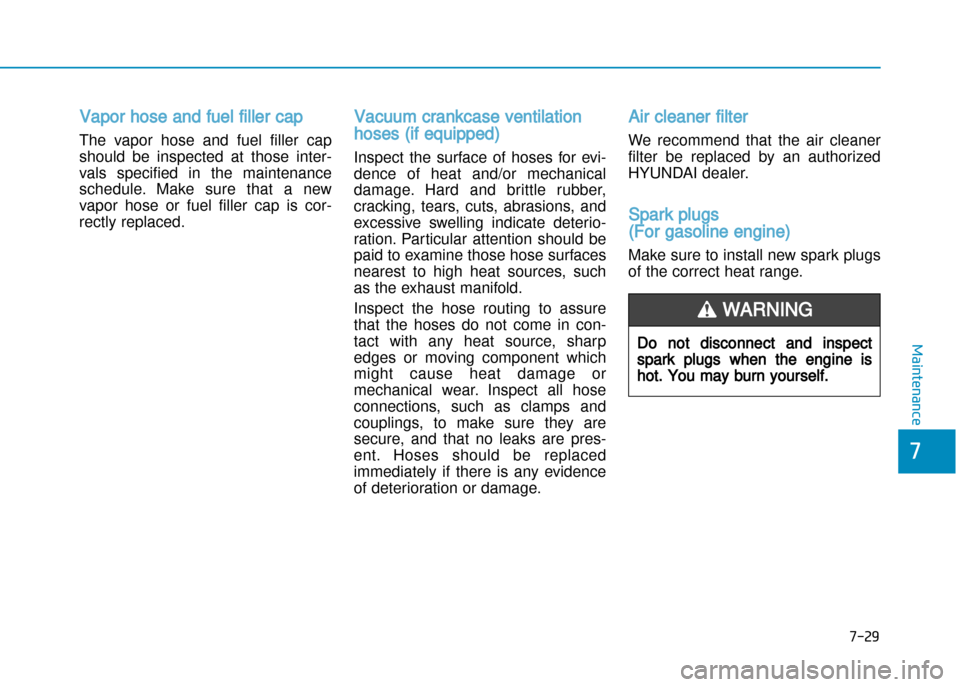
Do not disconnect and inspect
spark plugs when the engine is
hot. You may burn yourself.
WARNING
Page 433 of 512
7-39
7
Maintenance
WAShER FluId
Checking the washer fluid level
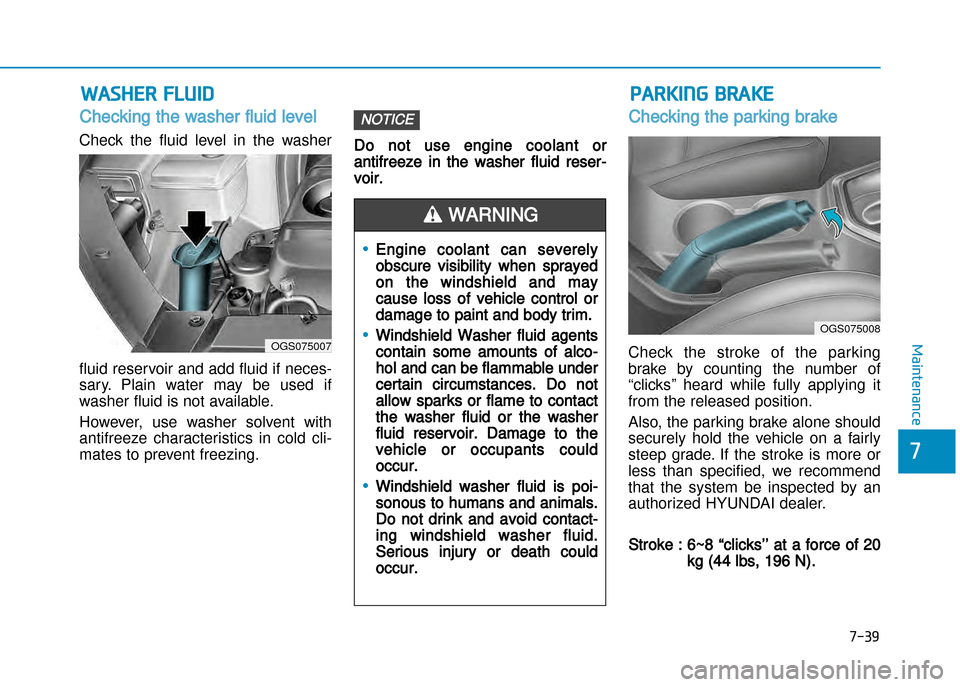
Check the fluid level in the washer
fluid reservoir and add fluid if neces
sary. Plain water may be used if
washer fluid is not available.
However, use washer solvent with
antifreeze characteristics in cold cli
mates to prevent freezing. Do not use engine coolant or
antifreeze in the washer fluid reser
voir.
Checking the parking brake
Check the stroke of the parking
brake by counting the number of
“clicks’’ heard while fully applying it
from the released position.
Also, the parking brake alone should
securely hold the vehicle on a fairly
steep grade. If the stroke is more or
less than specified, we recommend
that the system be inspected by an
authorized HYUNDAI dealer.
Stroke : 6~8 “clicks’’ at a force of 20
kg (44 lbs, 196 N).
NOTICE
OGS075007
OGS075008
•Engine coolant can severely
obscure visibility when sprayed
on the windshield and may
cause loss of vehicle control or
damage to paint and body trim.
•Windshield Washer fluid agents
contain some amounts of alco
hol and can be flammable under
certain circumstances. Do not
allow sparks or flame to contact
the washer fluid or the washer
fluid reservoir. Damage to the
vehicle or occupants could
occur.
•Windshield washer fluid is poi
sonous to humans and animals.
Do not drink and avoid contact
ing windshield washer fluid.
Serious injury or death could
occur.
WARNING
PARKING BRAKE