ad blue Hyundai Creta 2016 Owner's Guide
[x] Cancel search | Manufacturer: HYUNDAI, Model Year: 2016, Model line: Creta, Model: Hyundai Creta 2016Pages: 512, PDF Size: 11.54 MB
Page 291 of 512
![Hyundai Creta 2016 Owners Guide 4-73
Multimedia System
4
Viewing Paired Phone List
Press the key Select
[Phone] Select [Paired Phone List]
This feature is used to view mobile
phones that have been paired with
the audio system. U](/img/35/14533/w960_14533-290.png "Hyundai Creta 2016 Owners Guide 4-73
Multimedia System
4
Viewing Paired Phone List
Press the key Select
[Phone] Select [Paired Phone List]
This feature is used to view mobile
phones that have been paired with
the audio system. U")
4-73
Multimedia System
4
Viewing Paired Phone List
Press the key Select
[Phone] Select [Paired Phone List]
This feature is used to view mobile
phones that have been paired with
the audio system. Upon selecting a
paired phone, the setup menu is dis-
played.
For more information, refer to the “Setting
Bluetooth®Wireless
Technology Connection” section with-in
Bluetooth®Wireless Technology. 1) : Moves to the previous
screen
2) : Connect/disconnects cur- rently selected phone
3) : Deletes the currently selected phone
4) : Sets currently selected phone to highest connection priority Information
- BEFORE DOWNLOADING
PHONE BOOKS
Only phone books within connected phones can be downloaded. Also
check to see that your mobile phone
supports the download feature.
To learn more about whether your mobile phone supports phone book
downloads, refer to your mobile
phone user’s manual.
The Phone book for only the con- nected phone can be downloaded.
Before downloading, check to see
whether your phone supports the
download feature.
iSETUP
Page 292 of 512
![Hyundai Creta 2016 Owners Guide 4-74
Multimedia System
Downloading Phone books
Press the key Select
[Phone] Select [Phone book
Download]
The Phone book is downloaded from
the mobile phone and the download
progress is displayed.I](/img/35/14533/w960_14533-291.png "Hyundai Creta 2016 Owners Guide 4-74
Multimedia System
Downloading Phone books
Press the key Select
[Phone] Select [Phone book
Download]
The Phone book is downloaded from
the mobile phone and the download
progress is displayed.I")
4-74
Multimedia System
Downloading Phone books
Press the key Select
[Phone] Select [Phone book
Download]
The Phone book is downloaded from
the mobile phone and the download
progress is displayed.Information
Up to 1,000 phone book entries can be copied into car phone book.
Up to 1,000 phone book entries can be saved for each paired device.
Upon downloading phone book data, previously saved phone book
data will be deleted. However,
Phone book entries saved to other
paired phones are not deleted.
Auto Download (Phone Book)
Press the key Select
[Phone] Select [Auto Download]
This feature is used to automatically
download mobile phone book entriesonce a
Bluetooth®Wireless Technology
phone is connected.
Information
The Auto Download feature will download mobile phone book
entries every time the phone is con-
nected. The download time may dif-
fer depending on the number of
saved phone book entries and the
communication state.
When downloading a phone book, first check to see that your mobile
phone supports the phone book
download feature.
Outgoing Volume
Press the key Select
[Phone] Select [Outgoing Volume]
Use the , buttons to adjust
the outgoing volume level.SETUP
i
SETUP
i
SETUP
Page 293 of 512
![Hyundai Creta 2016 Owners Guide 4-75
Multimedia System
4
Turning Bluetooth System Off
Press the key Select
[Phone] Select [Bluetooth SystemOff] Once
Bluetooth®Wireless Technology
is turned off,
Bluetooth®Wireless
Technology re](/img/35/14533/w960_14533-292.png "Hyundai Creta 2016 Owners Guide 4-75
Multimedia System
4
Turning Bluetooth System Off
Press the key Select
[Phone] Select [Bluetooth SystemOff] Once
Bluetooth®Wireless Technology
is turned off,
Bluetooth®Wireless
Technology re")
4-75
Multimedia System
4
Turning Bluetooth System Off
Press the key Select
[Phone] Select [Bluetooth SystemOff] Once
Bluetooth®Wireless Technology
is turned off,
Bluetooth®Wireless
Technology related features will not be
supported within the audio system. Information
To turn Bluetooth ®
Wireless Technology
back on, go to [Phone] and
press “Yes”.
System Setting
Memory Information
Press the key Select
[System] Select [Memory Information]
This feature displays information
related to system memory.
1) Using : Displays capacity currently in use
2) Capacity : Displays total capacity
SETUP
SETUP
i
SETUP
Page 297 of 512
![Hyundai Creta 2016 Owners Guide 4-79
Multimedia System
4
Bluetooth®Wireless
Technology Setting
Pairing a New Device
Press the key Select
[Phone] Select [Pair Phone]
Bluetooth®Wireless Technology
devices can be paired with the au](/img/35/14533/w960_14533-296.png "Hyundai Creta 2016 Owners Guide 4-79
Multimedia System
4
Bluetooth®Wireless
Technology Setting
Pairing a New Device
Press the key Select
[Phone] Select [Pair Phone]
Bluetooth®Wireless Technology
devices can be paired with the au")
4-79
Multimedia System
4
Bluetooth®Wireless
Technology Setting
Pairing a New Device
Press the key Select
[Phone] Select [Pair Phone]
Bluetooth®Wireless Technology
devices can be paired with the audiosystem.
For more information, refer to the
“Pairing through Phone Setup” sec-tion within
Bluetooth®Wireless
Technology.
Viewing Paired Phone List
Press the key Select
[Phone] Select [Paired Phone List]
This feature is used to view mobile
phones that have been paired with
the audio system. Upon selecting a
paired phone, the setup menu is dis-
played.
For more information, refer to the “Setting
Bluetooth®Wireless
Technology Connection” section with-in
Bluetooth®Wireless Technology. 1) : Moves to the previous
screen
2) Connect/Disconnect Phone : Connect/disconnects currently selected phone
3) Delete : Deletes the currently selected phone
4) Change Priority : Sets currently selected phone to highest connec-
tion priority
Information
- BEFORE DOWNLOADING Contacts
Only contacts within connected phones can be downloaded. Also
check to see that your mobile phone
supports the download feature.
To learn more about whether your mobile phone supports contacts
downloads, refer to your mobile
phone user’s manual.
The contacts for only the connected phone can be downloaded. Before
downloading, check to see whether
your phone supports the download
feature.
i
SETUP
SETUP
Page 298 of 512
![Hyundai Creta 2016 Owners Guide 4-80
Multimedia System
Downloading Contacts
Press the key Select
[Phone] Select [Contacts Download]
The contacts is downloaded from the
mobile phone and the download
progress is displayed.Informat](/img/35/14533/w960_14533-297.png "Hyundai Creta 2016 Owners Guide 4-80
Multimedia System
Downloading Contacts
Press the key Select
[Phone] Select [Contacts Download]
The contacts is downloaded from the
mobile phone and the download
progress is displayed.Informat")
4-80
Multimedia System
Downloading Contacts
Press the key Select
[Phone] Select [Contacts Download]
The contacts is downloaded from the
mobile phone and the download
progress is displayed.Information
Up to 1,000 contacts entries can be copied into car contacts.
Up to 1,000 contacts entries can be saved for each paired device.
Upon downloading contacts data, previously saved contacts data will
be deleted. However, contacts
entries saved to other paired phones
are not deleted.
Auto Download (Contacts)
(If equipped)
Press the key Select
[Phone] Select [Auto Download]
This feature is used to automatically
download mobile contacts entriesonce a
Bluetooth®Wireless
Technology phone is connected.
Information
The Auto Download feature will download mobile contacts entries
every time the phone is connected.
The download time may differ
depending on the number of saved
contacts entries and the communi-
cation state.
When downloading a contacts, first check to see that your mobile phone
supports the contacts download fea-
ture.
Outgoing Volume
Press the key Select
[Phone] Select [Outgoing Volume]
Use the , buttons to adjust the
outgoing volume level.
Turning Bluetooth System Off
Press the key Select
[Phone] Select [Bluetooth SystemOff] Once
Bluetooth®Wireless Technology
is turned off,
Bluetooth®Wireless
Technology related features will not be
supported within the audio system.
SETUP
SETUP
i
SETUP
i
SETUP
Page 299 of 512
![Hyundai Creta 2016 Owners Guide 4-81
Multimedia System
4
Information
To turn Bluetooth ®
Wireless Technology
back on, go to [Phone] and
press “Yes”.
System Setting
Memory Information
Press the key Select
[System] Select [M](/img/35/14533/w960_14533-298.png "Hyundai Creta 2016 Owners Guide 4-81
Multimedia System
4
Information
To turn Bluetooth ®
Wireless Technology
back on, go to [Phone] and
press “Yes”.
System Setting
Memory Information
Press the key Select
[System] Select [M")
4-81
Multimedia System
4
Information
To turn Bluetooth ®
Wireless Technology
back on, go to [Phone] and
press “Yes”.
System Setting
Memory Information
Press the key Select
[System] Select [Memory Information]
This feature displays information
related to system memory.
1) Using : Displays capacity currently in use
2) Capacity : Displays total capacity
Language (For Colombia Model)
Press the key Select
[System] Select [Language] ❈ This feature is used to change the
system and voice recognition lan-
guage.
❈ if the language is changed, the
system will restart and apply the
selected language.SETUP
SETUP
SETUP
i
Page 324 of 512
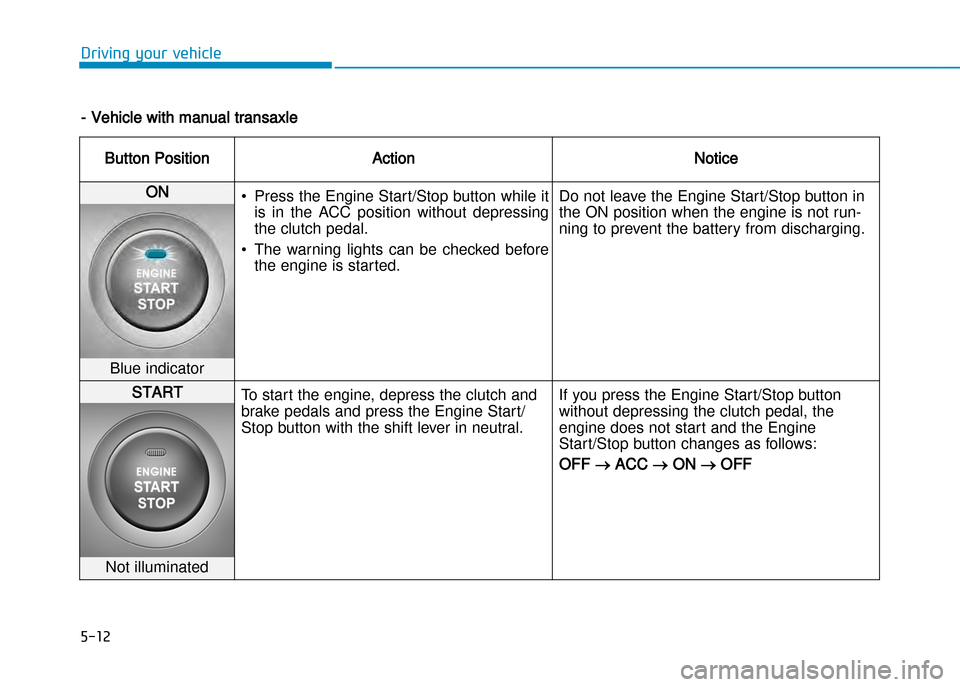
5-12
Driving your vehicle
Button PositionActionNotice
ON • Press the Engine Start/Stop button while it
is in the ACC position without depressing
the clutch pedal.
• The warning lights can be checked before the engine is started. Do not leave the Engine Start/Stop button in
the ON position when the engine is not run
ning to prevent the battery from discharging.
Blue indicator
START
To start the engine, depress the clutch and
brake pedals and press the Engine Start/
Stop button with the shift lever in neutral. If you press the Engine Start/Stop button
without depressing the clutch pedal, the
engine does not start and the Engine
Start/Stop button changes as follows:
OFF ACC ON OFF
Not illuminated
Vehicle with manual transaxle
Page 326 of 512
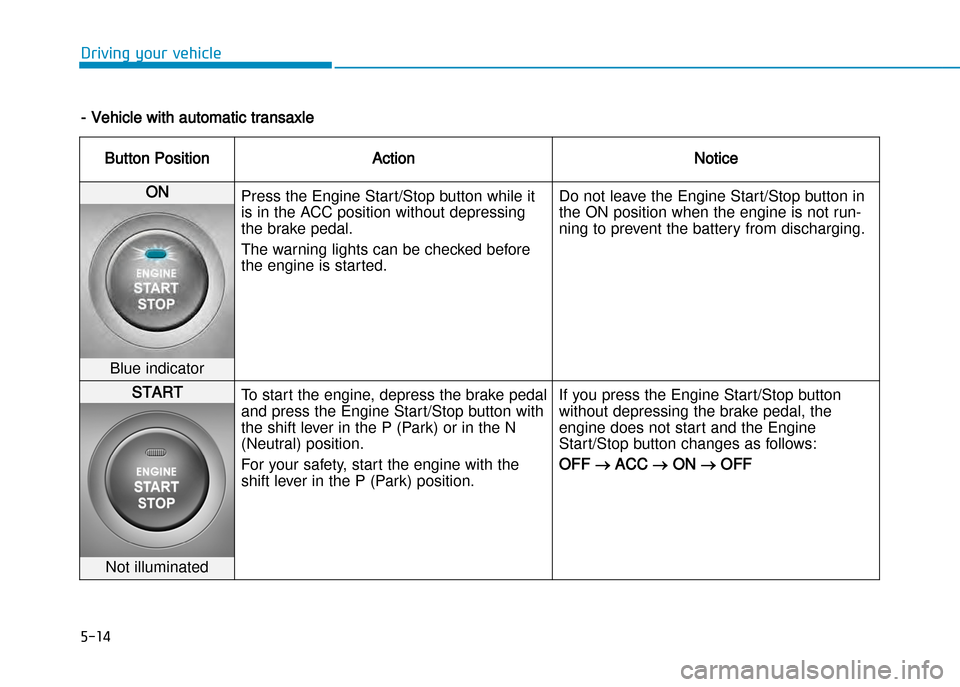
5-14
Driving your vehicle
Vehicle with automatic transaxle
Button PositionActionNotice
ON Press the Engine Start/Stop button while it
is in the ACC position without depressing
the brake pedal.
The warning lights can be checked before
the engine is started. Do not leave the Engine Start/Stop button in
the ON position when the engine is not run
ning to prevent the battery from discharging.
Blue indicator
START
To start the engine, depress the brake pedal
and press the Engine Start/Stop button with
the shift lever in the P (Park) or in the N
(Neutral) position.
For your safety, start the engine with the
shift lever in the P (Park) position. If you press the Engine Start/Stop button
without depressing the brake pedal, the
engine does not start and the Engine
Start/Stop button changes as follows:
OFF ACC ON OFF
Not illuminated