engine Hyundai Creta 2019 User Guide
[x] Cancel search | Manufacturer: HYUNDAI, Model Year: 2019, Model line: Creta, Model: Hyundai Creta 2019Pages: 472, PDF Size: 13.39 MB
Page 20 of 472
1-9
Your vehicle at a glance
E EN
NG
GI
IN
NE
E
C
CO
OM
MP
PA
AR
RT
TM
ME
EN
NT
T
(
(I
II
I)
)
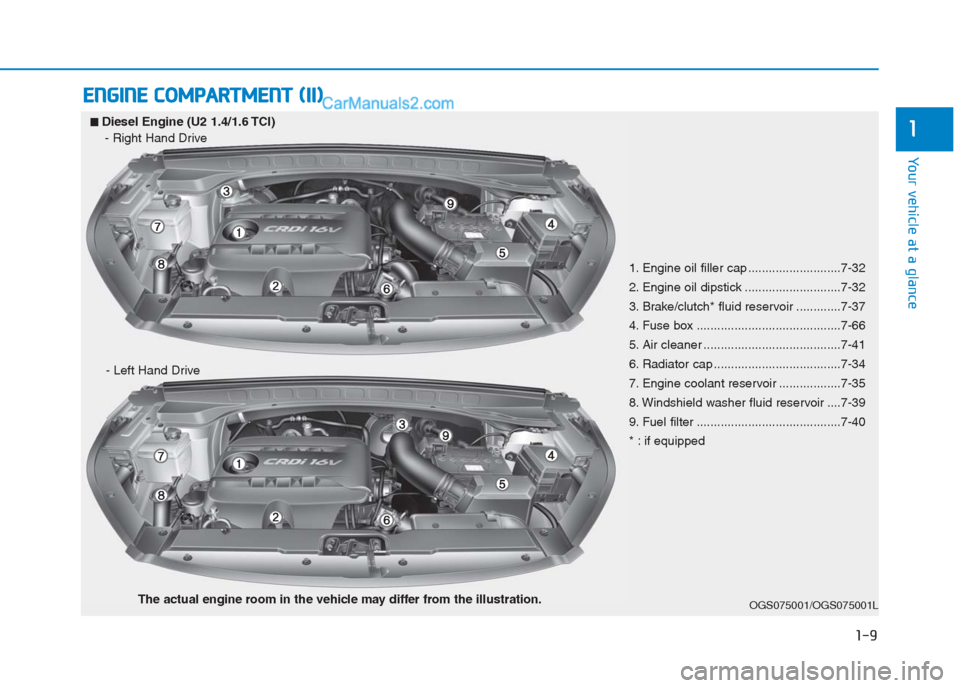
1■ ■Diesel Engine (U2 1.4/1.6 TCI)
- Right Hand Drive
- Left Hand Drive
OGS075001/OGS075001L
1. Engine oil filler cap ...........................7-32
2. Engine oil dipstick ............................7-32
3. Brake/clutch* fluid reservoir .............7-37
4. Fuse box ..........................................7-66
5. Air cleaner ........................................7-41
6. Radiator cap .....................................7-34
7. Engine coolant reservoir ..................7-35
8. Windshield washer fluid reservoir ....7-39
9. Fuel filter ..........................................7-40
* : if equipped
The actual engine room in the vehicle may differ from the illustration.
Page 28 of 472
2-8
Safety system of your vehicle
3. Release the lever and make sure
the seatback is locked in place.
(The lever MUST return to its orig-
inal position for the seatback to
lock.)
Seat cushion height
(for driver’s seat, if equipped)
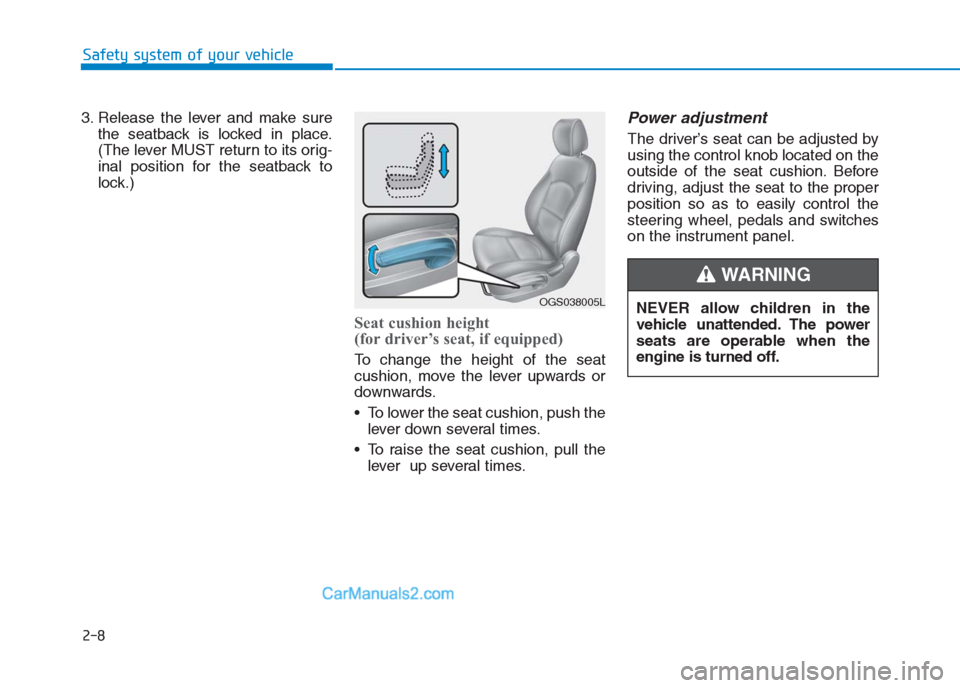
To change the height of the seat
cushion, move the lever upwards or
downwards.
• To lower the seat cushion, push the
lever down several times.
To raise the seat cushion, pull the
lever up several times.
Power adjustment
The driver’s seat can be adjusted by
using the control knob located on the
outside of the seat cushion. Before
driving, adjust the seat to the proper
position so as to easily control the
steering wheel, pedals and switches
on the instrument panel.
OGS038005LNEVER allow children in the
vehicle unattended. The power
seats are operable when the
engine is turned off.
WARNING
Page 29 of 472
2-9
Safety system of your vehicle
2
To prevent damage to the seats:
Always stop adjusting the seats
when the seat has been adjust-
ed as far forward or rearward as
possible.
Do not adjust the seats longer
than necessary when the engine
is turned off. This may result in
unnecessary battery drain.
Do not operate two or more
seats at the same time. This may
result in an electrical malfunc-
tion.
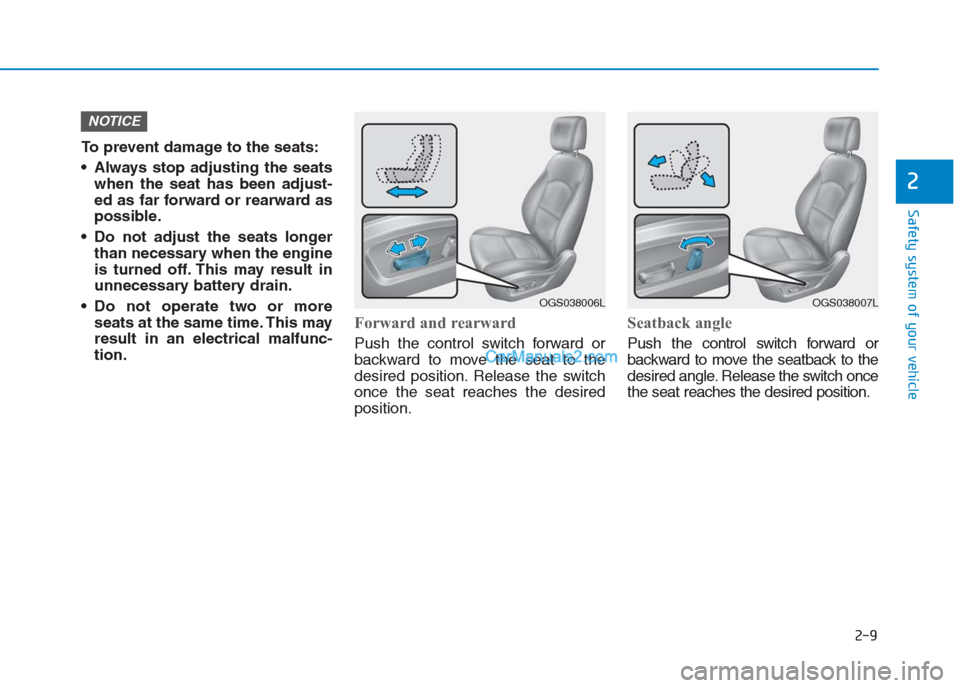
Forward and rearward
Push the control switch forward or
backward to move the seat to the
desired position. Release the switch
once the seat reaches the desired
position.
Seatback angle
Push the control switch forward or
backward to move the seatback to the
desired angle. Release the switch once
the seat reaches the desired position.
NOTICE
OGS038006LOGS038007L
Page 38 of 472
2-18
Safety system of your vehicle
When returning the rear seat-
backs to the upright position,
remember to return the rear
shoulder belts to their proper
position.
Routing the seat belt webbing
through the rear seat belt guides
will help keep the seat belts from
being trapped behind or under
the seats.
NOTICE
Cargo
Cargo should always be secured
to prevent it from being thrown
about the vehicle in a collision
and causing injury to the vehicle
occupants. Do not place objects
in the rear seats, since they can-
not be properly secured and may
hit the front seat occupants in a
collision.
WARNING
When you return the rear seat-
back to its upright position after
being folded down:
Be careful not to damage the
seat belt webbing or buckle. Do
not allow the seat belt webbing
or buckle to get caught or
pinched in the rear seat. Ensure
that the seatback is completely
locked into its upright position
by pushing on the top of the
seatback. Otherwise, in an acci-
dent or sudden stop, the seat
could fold down and allow
cargo to enter the passenger
compartment, which could
result in serious injury or death.
WARNING
Cargo loading
Make sure the engine is off, the
manual transaxle is in R
(Reverse) or 1st, and the parking
brake is securely applied when-
ever loading or unloading cargo.
Failure to take these steps may
allow the vehicle to move if the
shift lever is inadvertently moved
to another position.
WARNING
Page 83 of 472
2-63
Safety system of your vehicle
2
SRS Care
The SRS is virtually maintenance-
free and so there are no parts you
can safely service by yourself. If the
SRS air bag warning light does not
illuminate, or continuously remains
on, we recommend that the system
be inspected by an authorized
HYUNDAI dealer.
We recommend that the any work on
the SRS system, such as removing,
installing, repairing, or any work on
the steering wheel, the front passen-
ger's panel, front seats and roof rails
be performed by an authorized
HYUNDAI dealer. Improper handling
of the SRS system may result in seri-
ous personal injury.(Continued)If the air bags inflate, we rec-
ommend that the system be
replaced by an authorized
HYUNDAI dealer.
Do not tamper with or discon-
nect SRS wiring, or other
components of the SRS sys-
tem. Doing so could result in
injury, due to accidental infla-
tion of the air bags or by ren-
dering the SRS inoperative.
If components of the air bag
system must be discarded, or if
the vehicle must be scrapped,
certain safety precautions
must be observed. An author-
ized HYUNDAI dealer knows
these precautions and can
give you the necessary infor-
mation. Failure to follow these
precautions and procedures
could increase the risk of per-
sonal injury.
If your car was flooded and
has soaked carpeting or water
on the flooring, you shouldn't
try to start the engine; we rec-
ommend that you contact an
authorized HYUNDAI dealer.
Modification to SRS compo-
nents or wiring, including the
addition of any kind of badges
to the pad covers or modifica-
tions to the body structure,
can adversely affect SRS per-
formance and lead to possible
injury.
For cleaning the air bag pad
covers, use only a soft, dry
cloth or one which has been
moistened with plain water.
Solvents or cleaners could
adversely affect the air bag
covers and proper deploy-
ment of the system.
No objects should be placed
over or near the air bag mod-
ules on the steering wheel,
instrument panel, and the
front passenger's panel above
the glove box, because any
such object could cause harm
if the vehicle is in a crash
severe enough to cause the
air bags to inflate.
(Continued)
WARNING
Page 88 of 472
3-3
Convenient features of your vehicle
3
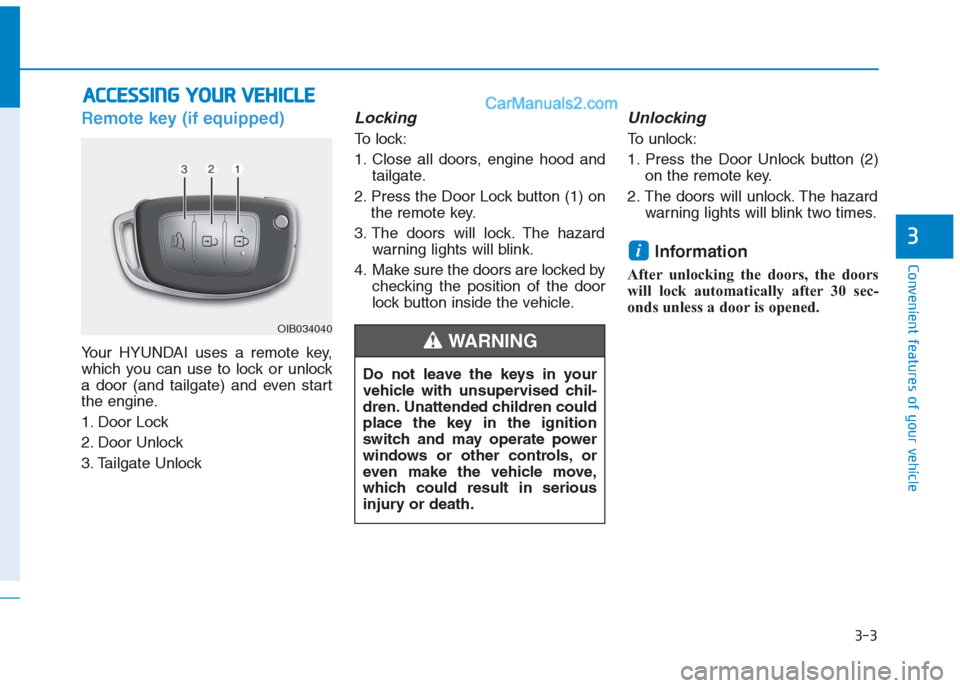
Remote key (if equipped)
Your HYUNDAI uses a remote key,
which you can use to lock or unlock
a door (and tailgate) and even start
the engine.
1. Door Lock
2. Door Unlock
3. Tailgate Unlock
Locking
To lock:
1. Close all doors, engine hood and
tailgate.
2. Press the Door Lock button (1) on
the remote key.
3. The doors will lock. The hazard
warning lights will blink.
4. Make sure the doors are locked by
checking the position of the door
lock button inside the vehicle.
Unlocking
To unlock:
1. Press the Door Unlock button (2)
on the remote key.
2. The doors will unlock. The hazard
warning lights will blink two times.
Information
After unlocking the doors, the doors
will lock automatically after 30 sec-
onds unless a door is opened.
i
A AC
CC
CE
ES
SS
SI
IN
NG
G
Y
YO
OU
UR
R
V
VE
EH
HI
IC
CL
LE
E
Do not leave the keys in your
vehicle with unsupervised chil-
dren. Unattended children could
place the key in the ignition
switch and may operate power
windows or other controls, or
even make the vehicle move,
which could result in serious
injury or death.
WARNING OIB034040
Page 92 of 472
3-7
Convenient features of your vehicle
3
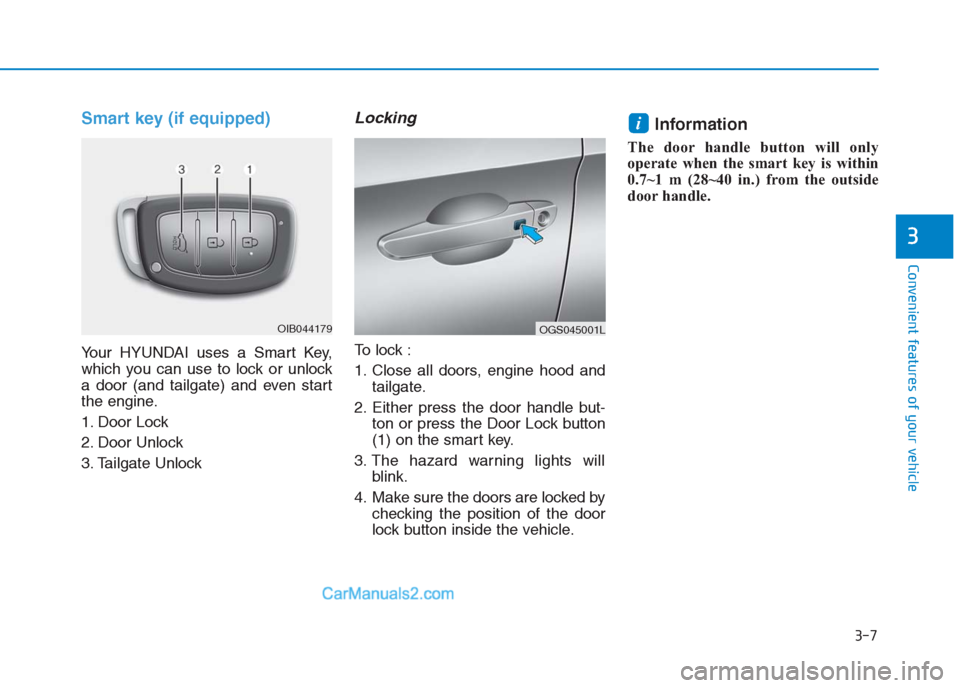
Smart key (if equipped)
Your HYUNDAI uses a Smart Key,
which you can use to lock or unlock
a door (and tailgate) and even start
the engine.
1. Door Lock
2. Door Unlock
3. Tailgate Unlock
Locking
To lock :
1. Close all doors, engine hood and
tailgate.
2. Either press the door handle but-
ton or press the Door Lock button
(1) on the smart key.
3. The hazard warning lights will
blink.
4. Make sure the doors are locked by
checking the position of the door
lock button inside the vehicle.
Information
The door handle button will only
operate when the smart key is within
0.7~1 m (28~40 in.) from the outside
door handle.
i
OIB044179OGS045001L
Page 93 of 472
3-8
Convenient features of your vehicle
Even though you press the outside
door handle button, the doors will not
lock and the chime will sound for
three seconds if any of the following
occur:
The Smart Key is in the vehicle.
The Engine Start/Stop button is in
ACC or ON position.
Any door except the tailgate is
open.
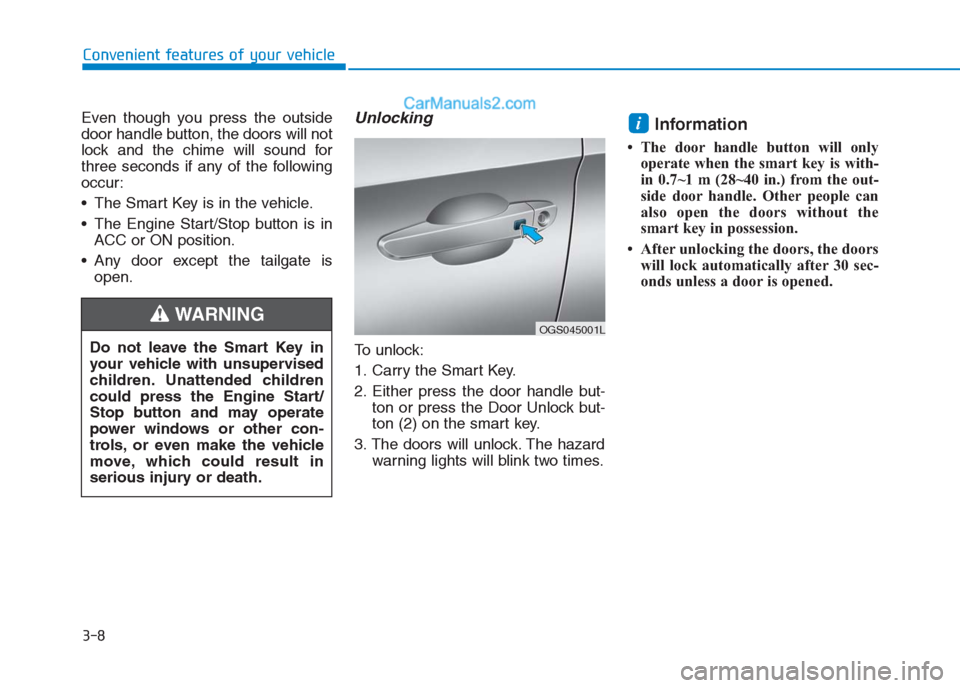
Unlocking
To unlock:
1. Carry the Smart Key.
2. Either press the door handle but-
ton or press the Door Unlock but-
ton (2) on the smart key.
3. The doors will unlock. The hazard
warning lights will blink two times.
Information
• The door handle button will only
operate when the smart key is with-
in 0.7~1 m (28~40 in.) from the out-
side door handle. Other people can
also open the doors without the
smart key in possession.
• After unlocking the doors, the doors
will lock automatically after 30 sec-
onds unless a door is opened.
i
Do not leave the Smart Key in
your vehicle with unsupervised
children. Unattended children
could press the Engine Start/
Stop button and may operate
power windows or other con-
trols, or even make the vehicle
move, which could result in
serious injury or death.
WARNING OGS045001L
Page 94 of 472
3-9
Convenient features of your vehicle
3
Tailgate unlocking
To unlock:
1. Carry the smart key.
2. Either press the tailgate handle
button or press the Tailgate Unlock
button (3) on the smart key for
more than one second.
3. The hazard warning lights will
blink two times.
Once the tailgate is opened and then
closed, the tailgate will lock automat-
ically.
Information
After unlocking the tailgate, the tail-
gate will lock automatically after 30
seconds unless the tailgate is opened.
Start-up
You can start the engine without
inserting the key. For detailed infor-
mation refer to the Engine Start/Stop
button in chapter 5.
To prevent damaging the smart
key:
Keep the smart key away from
water or any liquid. If the smart
key is inoperative due to expo-
sure to water or other liquids, it
will not be covered by your man-
ufacturer’s vehicle warranty.
Avoid dropping or throwing the
smart key.
Protect the smart key from
extreme temperatures.
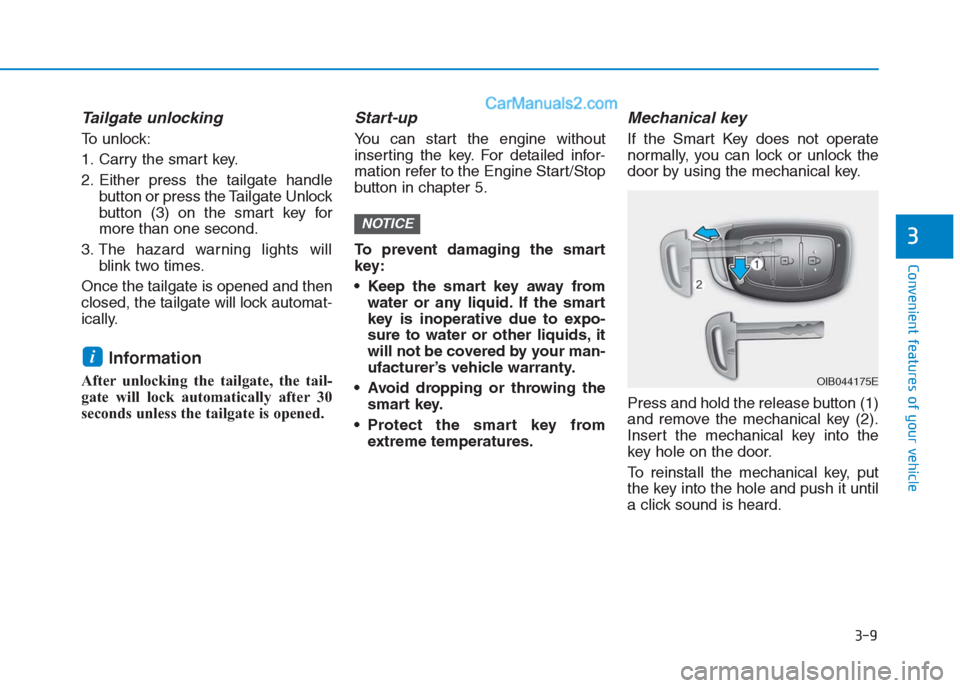
Mechanical key
If the Smart Key does not operate
normally, you can lock or unlock the
door by using the mechanical key.
Press and hold the release button (1)
and remove the mechanical key (2).
Insert the mechanical key into the
key hole on the door.
To reinstall the mechanical key, put
the key into the hole and push it until
a click sound is heard.
NOTICE
i
OIB044175E
Page 97 of 472
3-12
Convenient features of your vehicle
Immobilizer system
(if equipped)
The immobilizer system protects your
vehicle from theft. If an improperly
coded key (or other device) is used,
the engine’s fuel system is disabled.
When the ignition switch is placed in
the ON position, the immobilizer sys-
tem indicator should come on briefly,
then go off. If the indicator starts to
blink, the system does not recognize
the coding of the key.
Place the ignition switch to the
LOCK/OFF position, then place the
ignition switch to the ON position
again.
The system may not recognize your
key’s coding if another immobilizer
key or other metal object (i.e., key
chain) is near the key. The engine
may not start because the metal may
interrupt the transponder signal from
transmitting normally.
If the system repeatedly does not
recognize the coding of the key, it is
recommended that you contact your
HYUNDAI dealer.Do not attempt to alter this system or
add other devices to it. Electrical
problems could result that may make
your vehicle inoperable.
The transponder in your key is an
important part of the immobilizer
system. It is designed to give
years of trouble-free service, how-
ever you should avoid exposure to
moisture, static electricity and
rough handling. Immobilizer sys-
tem malfunction could occur.
NOTICE
In order to prevent theft of your
vehicle, do not leave spare keys
anywhere in your vehicle. Your
immobilizer password is a cus-
tomer unique password and
should be kept confidential.
WARNING