air condition Hyundai Creta 2019 Owner's Guide
[x] Cancel search | Manufacturer: HYUNDAI, Model Year: 2019, Model line: Creta, Model: Hyundai Creta 2019Pages: 472, PDF Size: 13.39 MB
Page 197 of 472
3-112
Convenient features of your vehicle
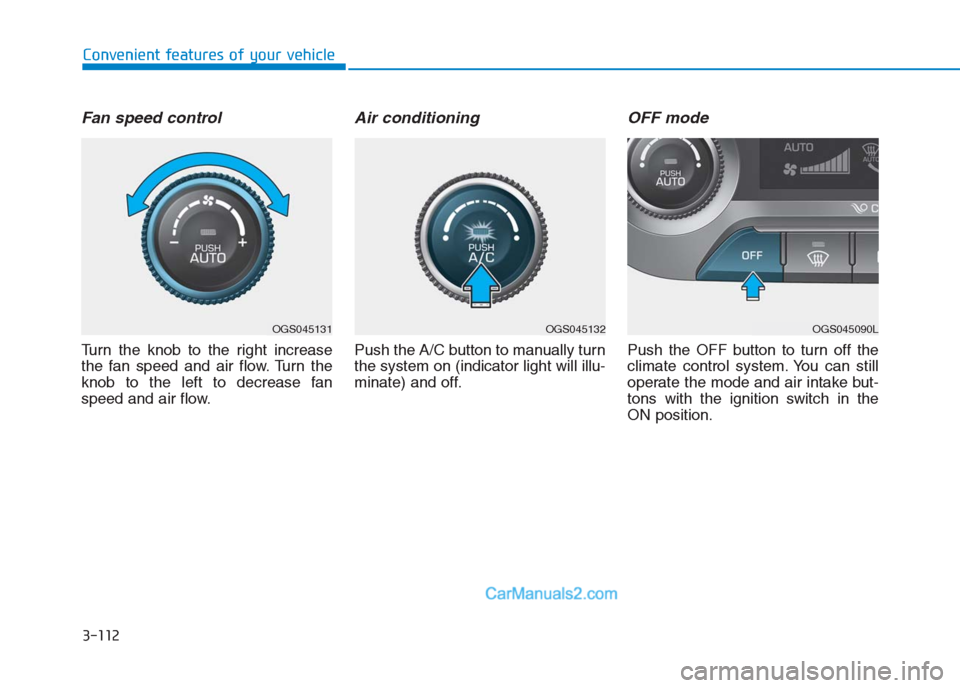
Fan speed control
Turn the knob to the right increase
the fan speed and air flow. Turn the
knob to the left to decrease fan
speed and air flow.
Air conditioning
Push the A/C button to manually turn
the system on (indicator light will illu-
minate) and off.
OFF mode
Push the OFF button to turn off the
climate control system. You can still
operate the mode and air intake but-
tons with the ignition switch in the
ON position.
OGS045131OGS045132OGS045090L
Page 198 of 472
3-113
Convenient features of your vehicle
3
System operation
Ventilation
1. Select the Face Level mode.
2. Set the air intake control to the
outside (fresh) air position.
3. Set the temperature control to the
desired position.
4. Set the fan speed control to the
desired speed.
Heating
1. Select the Floor Level mode.
2. Set the air intake control to the
outside (fresh) air position.
3. Set the temperature control to the
desired position.
4. Set the fan speed control to the
desired speed.
5. If dehumidified heating is desired,
turn the air conditioning system (if
equipped) on.
If the windshield fogs up, select the
Front Defroster mode.Operation Tips
To keep dust or unpleasant fumes
from entering the car through the
ventilation system, temporarily set
the air intake control to the recircu-
lated air position. Return the con-
trol to the fresh air position when
the irritation has passed. This will
help keep the driver alert and com-
fortable.
To prevent inside of the windshield
from fogging, set the air intake con-
trol to the fresh air position and fan
speed to the desired position, turn
on the air conditioning system, and
adjust the temperature control to
desired temperature.
Air conditioning (if equipped)
HYUNDAI Air Conditioning Systems
are filled with a R-134a refrigerant.
1. Start the engine.
2. Push the air conditioning button.
3. Set the mode to the Face Level
mode.
4. Set the air intake control to the
recirculated air position. However,
prolonged operation of the recircu-
lated air position will excessively
dry the air. In this case, change the
air position.
5. Adjust the fan speed control and
temperature control to maintain
maximum comfort.
When maximum cooling is desired,
set the temperature control to the
lowest setting (LO) then set the fan
speed control to the highest speed.
Page 199 of 472
3-114
Convenient features of your vehicle
When using the air conditioning
system, monitor the temperature
gauge closely while driving up hills
or in heavy traffic when outside
temperatures are high. Air condi-
tioning system operation may
cause engine overheating.
Continue to use the blower fan but
turn the air conditioning system off
if the engine temperature gauge
indicates engine overheating.
Air conditioning system operation
tips
If the vehicle has been parked in
direct sunlight during hot weather,
open the windows for a short time
to let the hot air inside the vehicle
escape.
After sufficient cooling has been
achieved, switch back from the
recirculated air to the fresh outside
air position.
To help reduce moisture inside of
the windows on rainy or humid
days, decrease the humidity inside
the vehicle by operating the air
conditioning system with the win-
dows closed.
Use the air conditioning system
every month only for a few minutes
to ensure maximum system per-
formance. If you operate air conditioner
excessively, the difference between
the temperature of the outside air
and that of the windshield could
cause the outer surface of the
windshield to fog up, causing loss
of visibility. In this case, set the
mode selection knob or button to
the position and fan speed
control to the lower speed.
NOTICE
Page 200 of 472
3-115
Convenient features of your vehicle
3
System maintenance
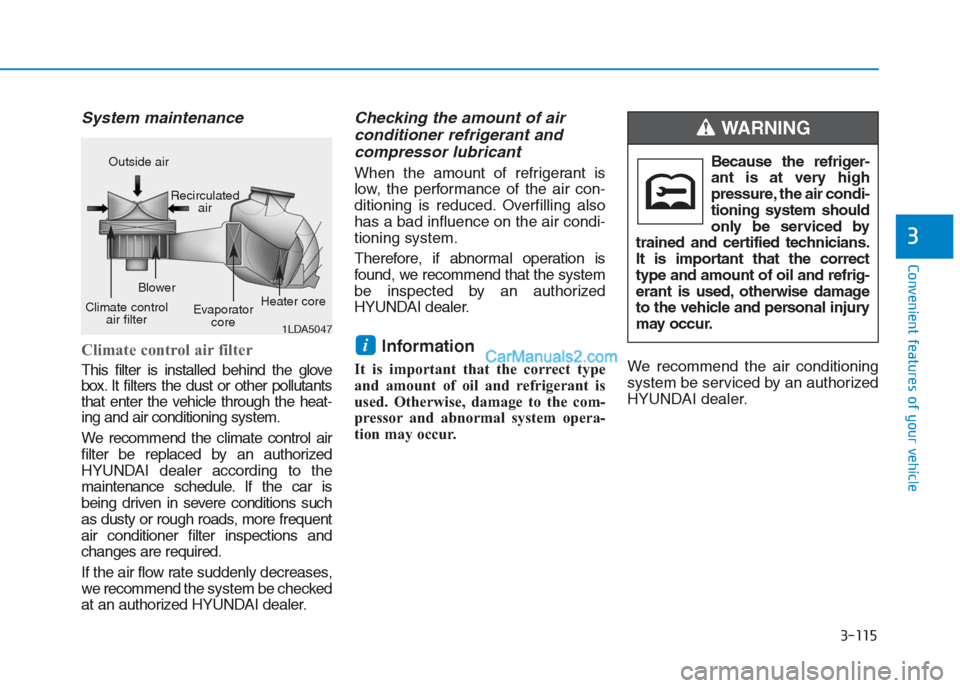
Climate control air filter
This filter is installed behind the glove
box. It filters the dust or other pollutants
that enter the vehicle through the heat-
ing and air conditioning system.
We recommend the climate control air
filter be replaced by an authorized
HYUNDAI dealer according to the
maintenance schedule. If the car is
being driven in severe conditions such
as dusty or rough roads, more frequent
air conditioner filter inspections and
changes are required.
If the air flow rate suddenly decreases,
we recommendthe system be checked
at an authorized HYUNDAI dealer.
Checking the amount of air
conditioner refrigerant and
compressor lubricant
When the amount of refrigerant is
low, the performance of the air con-
ditioning is reduced. Overfilling also
has a bad influence on the air condi-
tioning system.
Therefore, if abnormal operation is
found, we recommend that the system
be inspected by an authorized
HYUNDAI dealer.
Information
It is important that the correct type
and amount of oil and refrigerant is
used. Otherwise, damage to the com-
pressor and abnormal system opera-
tion may occur.We recommend the air conditioning
system be serviced by an authorized
HYUNDAI dealer.
i
1LDA5047
Outside air
Recirculated
air
Climate control
air filterBlower
Evaporator
coreHeater coreBecause the refriger-
ant is at very high
pressure, the air condi-
tioning system should
only be serviced by
trained and certified technicians.
It is important that the correct
type and amount of oil and refrig-
erant is used, otherwise damage
to the vehicle and personal injury
may occur.
WARNING
Page 201 of 472
3-116
Convenient features of your vehicle
Windshield defrosting and
defogging For maximum defrosting, set the
temperature control to the extreme
right/hot position and the fan speed
control to the highest speed.
If warm air to the floor is desired
while defrosting or defogging, set
the mode to the floor-defrost posi-
tion.
Before driving, clear all snow and
ice from the windshield, rear win-
dow, outside rear view mirrors, and
all side windows.
Clear all snow and ice from the
hood and air inlet at the buttom of
the windshield.
If the engine temperature is still
cold after starting, then a brief
engine warm up period may be
required for the vented air flow to
become warm or hot.Manual climate control system
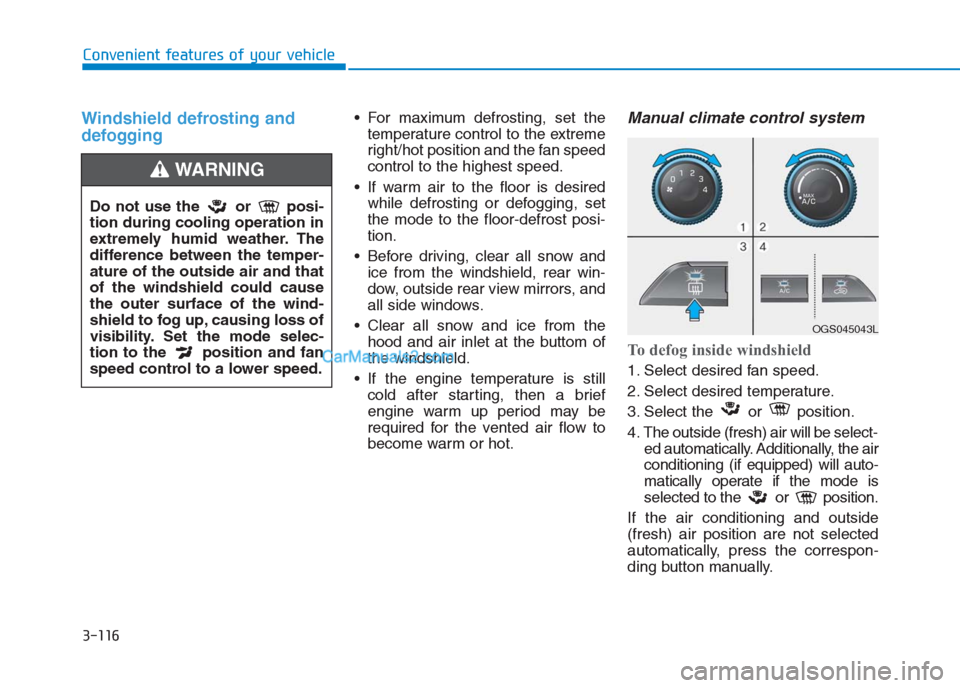
To defog inside windshield
1. Select desired fan speed.
2. Select desired temperature.
3. Select the or position.
4. The outside (fresh) air will be select-
ed automatically. Additionally, the air
conditioning (if equipped) will auto-
matically operate if the mode is
selected to the or position.
If the air conditioning and outside
(fresh) air position are not selected
automatically, press the correspon-
ding button manually.
Do not use the or posi-
tion during cooling operation in
extremely humid weather. The
difference between the temper-
ature of the outside air and that
of the windshield could cause
the outer surface of the wind-
shield to fog up, causing loss of
visibility. Set the mode selec-
tion to the position and fan
speed control to a lower speed.
WARNING
OGS045043L
Page 202 of 472
3-117
Convenient features of your vehicle
3
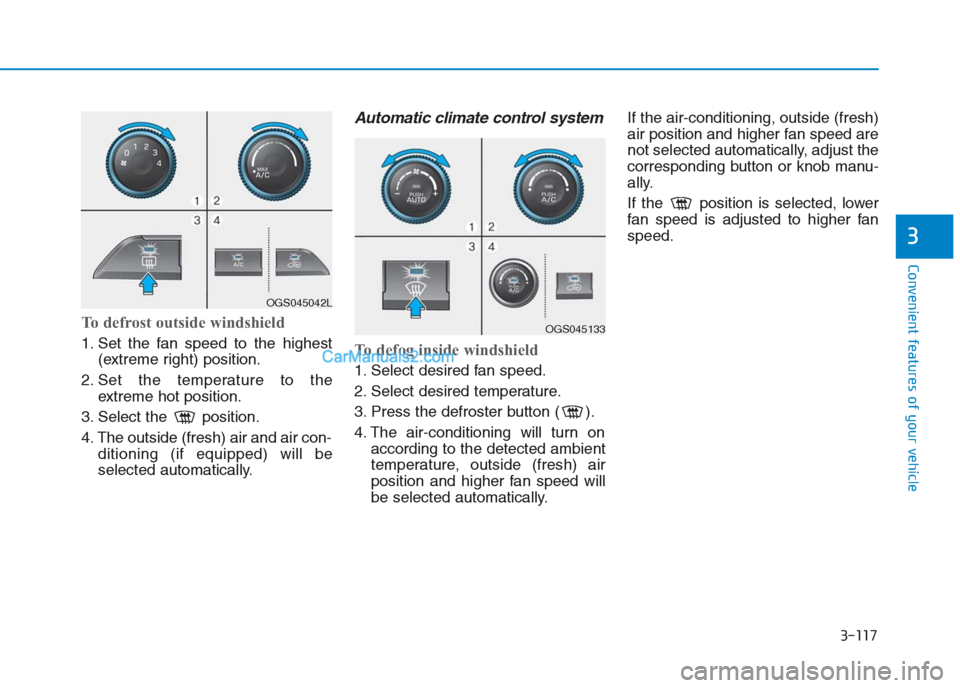
To defrost outside windshield
1. Set the fan speed to the highest
(extreme right) position.
2. Set the temperature to the
extreme hot position.
3. Select the position.
4. The outside (fresh) air and air con-
ditioning (if equipped) will be
selected automatically.
Automatic climate control system
To defog inside windshield
1. Select desired fan speed.
2. Select desired temperature.
3. Press the defroster button ( ).
4. The air-conditioning will turn on
according to the detected ambient
temperature, outside (fresh) air
position and higher fan speed will
be selected automatically.If the air-conditioning, outside (fresh)
air position and higher fan speed are
not selected automatically, adjust the
corresponding button or knob manu-
ally.
If the position is selected, lower
fan speed is adjusted to higher fan
speed.
OGS045042L
OGS045133
Page 203 of 472
3-118
Convenient features of your vehicle
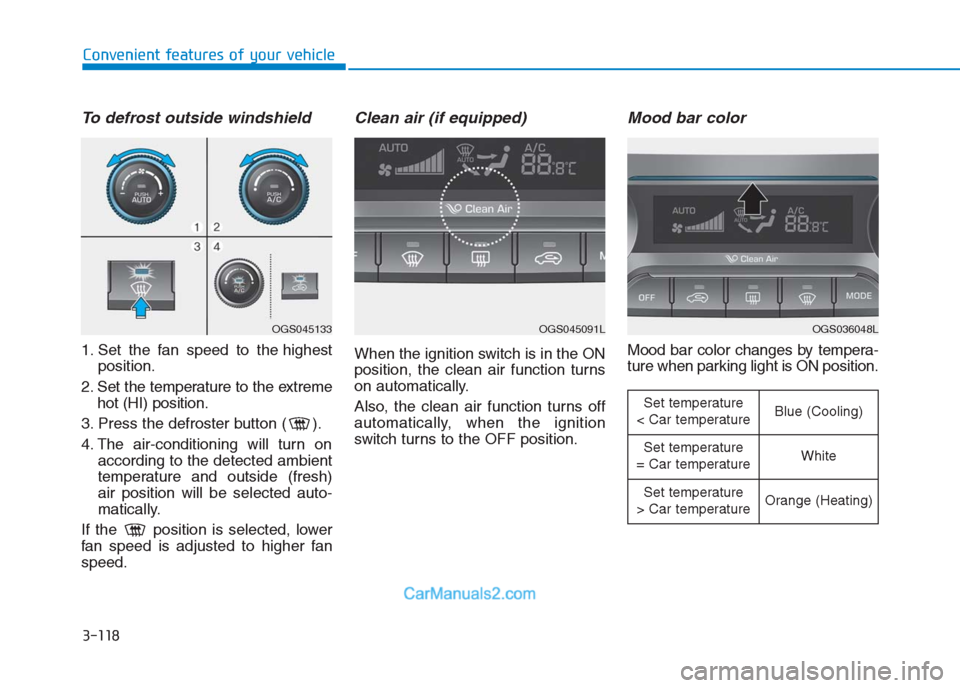
To defrost outside windshield
1. Set the fan speed to the highest
position.
2. Set the temperature to the extreme
hot (HI) position.
3. Press the defroster button ( ).
4. The air-conditioning will turn on
according to the detected ambient
temperature and outside (fresh)
air position will be selected auto-
matically.
If the position is selected, lower
fan speed is adjusted to higher fan
speed.
Clean air (if equipped)
When the ignition switch is in the ON
position, the clean air function turns
on automatically.
Also, the clean air function turns off
automatically, when the ignition
switch turns to the OFF position.
Mood bar color
Mood bar color changes by tempera-
ture when parking light is ON position.
OGS045133OGS045091LOGS036048L
Set temperature
< Car temperatureBlue (Cooling)
Set temperature
= Car temperatureWhite
Set temperature
> Car temperatureOrange (Heating)
Page 204 of 472
3-119
Convenient features of your vehicle
3
Auto defogging system
(only for automatic climate
control system, if equipped)
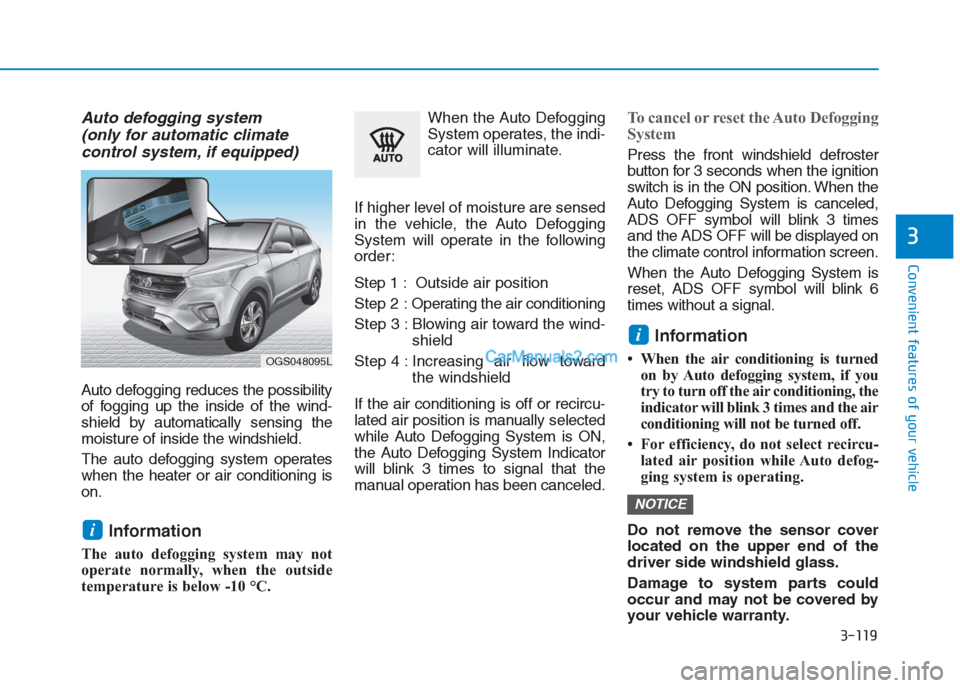
Auto defogging reduces the possibility
of fogging up the inside of the wind-
shield by automatically sensing the
moisture of inside the windshield.
The auto defogging system operates
when the heater or air conditioning is
on.
Information
The auto defogging system may not
operate normally, when the outside
temperature is below -10 °C.When the Auto Defogging
System operates, the indi-
cator will illuminate.
If higher level of moisture are sensed
in the vehicle, the Auto Defogging
System will operate in the following
order:
Step 1 : Outside air position
Step 2 :Operating the air conditioning
Step 3 : Blowing air toward the wind-
shield
Step 4 : Increasing air flow toward
the windshield
If the air conditioning is off or recircu-
lated air position is manually selected
while Auto Defogging System is ON,
the Auto Defogging System Indicator
will blink 3 times to signal that the
manual operation has been canceled.
To cancel or reset the Auto Defogging
System
Press the front windshield defroster
button for 3 seconds when the ignition
switch is in the ON position. When the
Auto Defogging System is canceled,
ADS OFF symbol will blink 3 times
and the ADS OFF will be displayed on
the climate control information screen.
When the Auto Defogging System is
reset, ADS OFF symbol will blink 6
times without a signal.
Information
• When the air conditioning is turned
on by Auto defogging system, if you
try to turn off the air conditioning, the
indicator will blink 3 times and the air
conditioning will not be turned off.
• For efficiency, do not select recircu-
lated air position while Auto defog-
ging system is operating.
Do not remove the sensor cover
located on the upper end of the
driver side windshield glass.
Damage to system parts could
occur and may not be covered by
your vehicle warranty.
NOTICE
i
i
OGS048095L
Page 211 of 472
3-126
Convenient features of your vehicle
To prevent damage to the Power
outlet:
Use the power outlet only when
the engine is running and
remove the accessory plug after
use. Using the accessory plug
for prolonged periods of time
with the engine off could cause
the battery to discharge.
Only use 12V electric acces-
sories which are less than 180W
(Watt) in electric capacity.
Adjust the air-conditioner or
heater to the lowest operating
level when using the power outlet.
(Continued)(Continued)
Close the cover when not in use.
Some electronic devices can
cause electronic interference
when plugged into a vehicle’s
power outlet. These devices may
cause excessive audio static
and malfunctions in other elec-
tronic systems or devices used
in your vehicle.
Push the plug in as far as it will
go. If good contact is not made,
the plug may overheat or the
internal temperature fuse may
open.
Plug in battery equipped electri-
cal/electronic devices with
reverse current protection. The
current from the battery may
flow into the vehicle's electri-
cal/electronic system and cause
system malfunction.
NOTICE
Avoid electrical shocks. Do not
place your fingers or foreign
objects (pin, etc.) into a power
outlet or touch the power outlet
with a wet hand.
WARNING
Page 226 of 472
4-12
Multimedia System
- Press in Bluetooth
®Handsfree
mode to switch to the waiting call.
When pressed and held (more
than 1.0 seconds)
- If not in Bluetooth
®Handsfree
mode or receiving a phone call,
the most recently Dialed Call
number is dialed.
- When pressed in Bluetooth
®
Handsfree mode to switch the
call to your cell phone.
- When pressed in cell phone
mode to switch to Bluetooth
®
Handsfree mode.
- If Bluetooth
®is not connected,
displays Bluetooth®Pair/
Connection screen.
(6) END
When pressed during a call, ends
the phone call.
When pressed in the incoming call
screen, rejects the call. Do not stare at the screen
while driving. Staring at the
screen for prolonged periods
of time could lead to traffic
accidents.
Do not disassemble, assem-
ble, or modify the audio sys-
tem. Such acts could result in
accidents, fire, or electric
shock.
Using the phone while driving
may lead to a lack of attention
of traffic conditions and
increase the likelihood of
accidents. Use the phone fea-
ture after parking the vehicle.
Exercise caution not to spill
water or introduce foreign
objects into the device. Such
acts could lead to smoke, fire,
or product malfunction.
(Continued)
WARNING(Continued)
Please refrain from use if the
screen is blank or no sound
can be heard as these signs
may indicate product malfunc-
tion. Continued use in such
conditions could lead to acci-
dents (fires, electric shock) or
product malfunctions.
Do not touch the antenna dur-
ing thunder or lightning
because such an act may
cause electric shock.
Do not stop or park in park-
ing-restricted areas to operate
the product. Such acts could
lead to traffic accidents.
Use the system with the vehicle
engine turned on. Prolonged
use with the ignition turned
on only could result in battery
discharge.