display Hyundai Elantra 2003 Owner's Manual
[x] Cancel search | Manufacturer: HYUNDAI, Model Year: 2003, Model line: Elantra, Model: Hyundai Elantra 2003Pages: 172, PDF Size: 2.82 MB
Page 43 of 172
FEATURES OF YOUR HYUNDAI FEATURES OF YOUR HYUNDAIFEATURES OF YOUR HYUNDAI FEATURES OF YOUR HYUNDAI
FEATURES OF YOUR HYUNDAI
1- 34
HLZ.079T
B310B01E
1
2
3
Reset switch
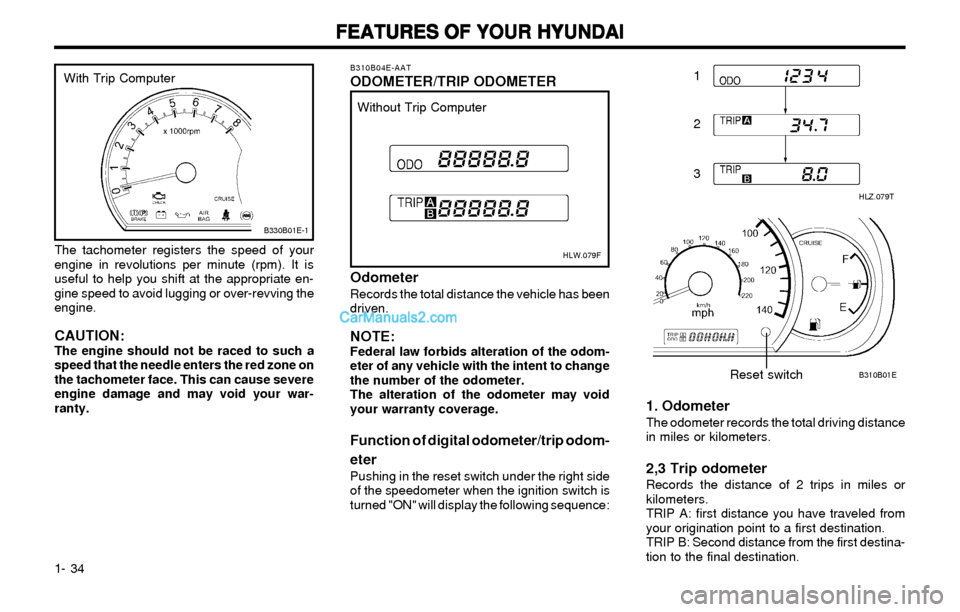
B310B04E-AATODOMETER/TRIP ODOMETER
HLW.079F
Without Trip Computer
OdometerRecords the total distance the vehicle has been
driven.
NOTE:Federal law forbids alteration of the odom-
eter of any vehicle with the intent to change
the number of the odometer.
The alteration of the odometer may void
your warranty coverage.
Function of digital odometer/trip odom-
eter
Pushing in the reset switch under the right side
of the speedometer when the ignition switch is
turned "ON" will display the following sequence:
1. OdometerThe odometer records the total driving distance
in miles or kilometers.
2,3 Trip odometerRecords the distance of 2 trips in miles or
kilometers.
TRIP A: first distance you have traveled from
your origination point to a first destination.
TRIP B: Second distance from the first destina-
tion to the final destination. The tachometer registers the speed of your
engine in revolutions per minute (rpm). It is
useful to help you shift at the appropriate en-
gine speed to avoid lugging or over-revving the
engine.
CAUTION:The engine should not be raced to such a
speed that the needle enters the red zone on
the tachometer face. This can cause severe
engine damage and may void your war-
ranty.
B330B01E-1
With Trip Computer
Page 44 of 172
FEATURES OF YOUR HYUNDAI FEATURES OF YOUR HYUNDAIFEATURES OF YOUR HYUNDAI FEATURES OF YOUR HYUNDAI
FEATURES OF YOUR HYUNDAI
1- 35
B310A01S-AAT
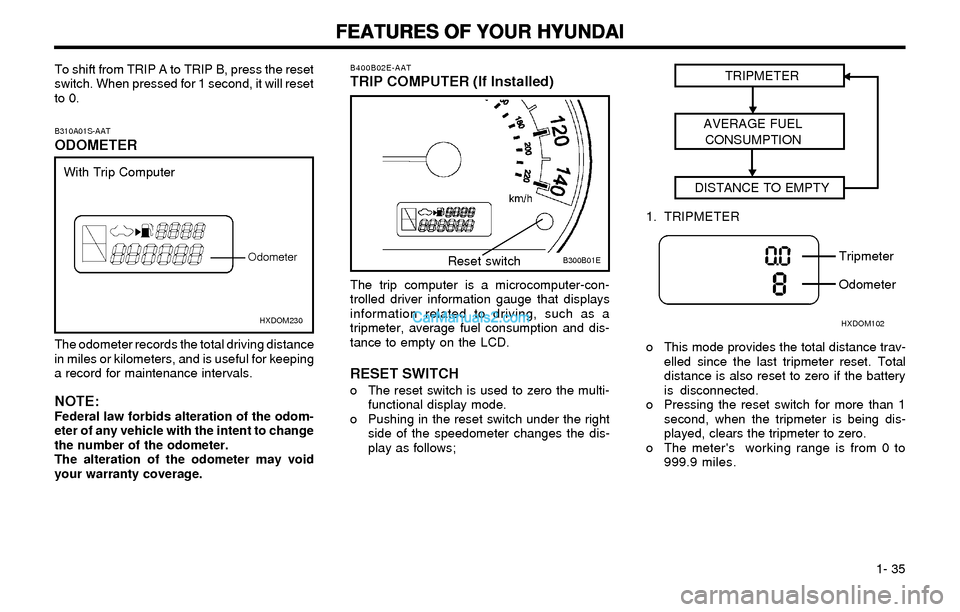
ODOMETER
The odometer records the total driving distance
in miles or kilometers, and is useful for keeping
a record for maintenance intervals.
NOTE:Federal law forbids alteration of the odom-
eter of any vehicle with the intent to change
the number of the odometer.
The alteration of the odometer may void
your warranty coverage.
HXDOM230
With Trip Computer
Odometer
To shift from TRIP A to TRIP B, press the reset
switch. When pressed for 1 second, it will reset
to 0.
The trip computer is a microcomputer-con-
trolled driver information gauge that displays
information related to driving, such as a
tripmeter, average fuel consumption and dis-
tance to empty on the LCD.
RESET SWITCHo The reset switch is used to zero the multi-
functional display mode.
o Pushing in the reset switch under the right
side of the speedometer changes the dis-
play as follows;
B300B01E B400B02E-AAT
TRIP COMPUTER (If Installed)
Reset switchTRIPMETER
AVERAGE FUEL
CONSUMPTION
DISTANCE TO EMPTY
o This mode provides the total distance trav-
elled since the last tripmeter reset. Total
distance is also reset to zero if the battery
is disconnected.
o Pressing the reset switch for more than 1
second, when the tripmeter is being dis-
played, clears the tripmeter to zero.
o The meter's working range is from 0 to
999.9 miles.
HXDOM102
Tripmeter
Odometer 1. TRIPMETER
Page 69 of 172
FEATURES OF YOUR HYUNDAI FEATURES OF YOUR HYUNDAIFEATURES OF YOUR HYUNDAI FEATURES OF YOUR HYUNDAI
FEATURES OF YOUR HYUNDAI
1- 60
B970A01Y-AATAUTOMATIC HEATING AND COOLING
CONTROL SYSTEM (If lnstalled)
Your Hyundai is equipped with an automatic
heating and cooling control system controlled
by simply setting the desired temperature.
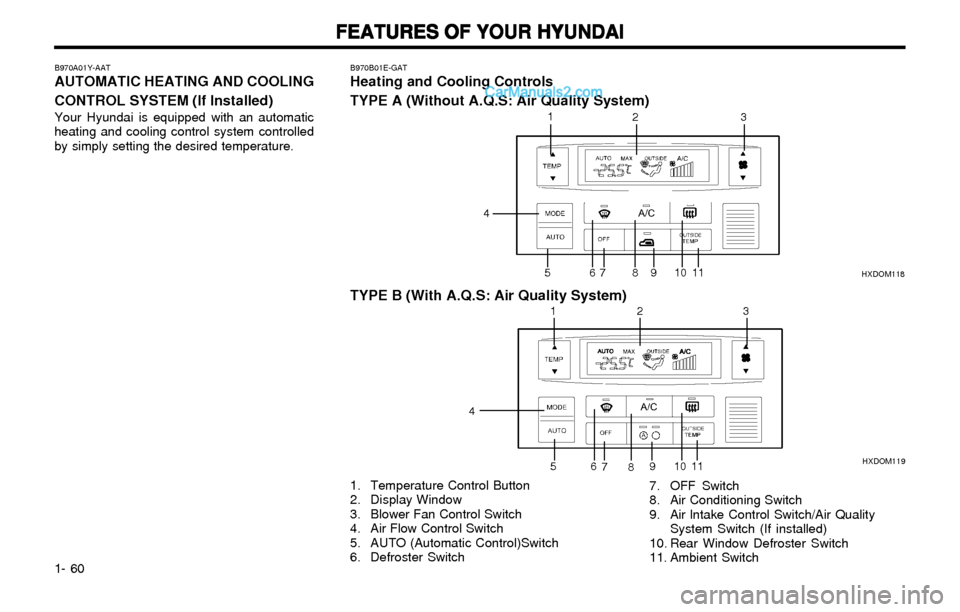
1. Temperature Control Button
2. Display Window
3. Blower Fan Control Switch
4. Air Flow Control Switch
5. AUTO (Automatic Control)Switch
6. Defroster Switch7. OFF Switch
8. Air Conditioning Switch
9. Air lntake Control Switch/Air Quality
System Switch (If installed)
10. Rear Window Defroster Switch
11. Ambient Switch
B970B01E-GATHeating and Cooling Controls
TYPE A (Without A.Q.S: Air Quality System)
1
2
3
4
567891011
12 3
4
5
6
7
891011HXDOM119 HXDOM118
TYPE B (With A.Q.S: Air Quality System)
Page 70 of 172
FEATURES OF YOUR HYUNDAI FEATURES OF YOUR HYUNDAIFEATURES OF YOUR HYUNDAI FEATURES OF YOUR HYUNDAI
FEATURES OF YOUR HYUNDAI
1- 61
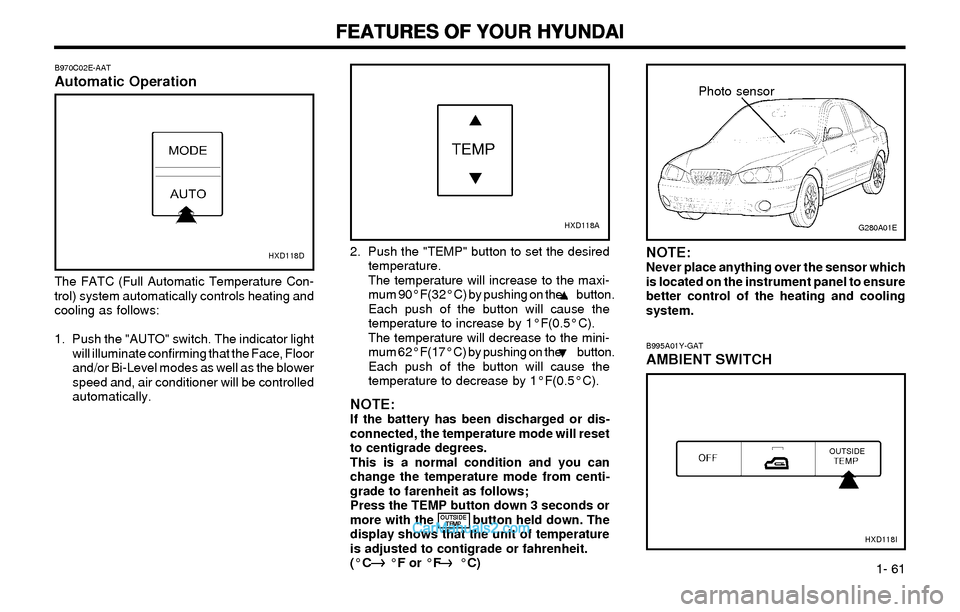
B970C02E-AATAutomatic Operation
HXD118D
The FATC (Full Automatic Temperature Con-
trol) system automatically controls heating and
cooling as follows:
1. Push the "AUTO" switch. The indicator light
will illuminate confirming that the Face, Floor
and/or Bi-Level modes as well as the blower
speed and, air conditioner will be controlled
automatically.2. Push the "TEMP" button to set the desired
temperature.
The temperature will increase to the maxi-
mum 90°F(32°C) by pushing on the button.
Each push of the button will cause the
temperature to increase by 1°F(0.5°C).
The temperature will decrease to the mini-
mum 62°F(17°C) by pushing on the button.
Each push of the button will cause the
temperature to decrease by 1°F(0.5°C).
NOTE:If the battery has been discharged or dis-
connected, the temperature mode will reset
to centigrade degrees.
This is a normal condition and you can
change the temperature mode from centi-
grade to farenheit as follows;
Press the TEMP button down 3 seconds or
more with the button held down. The
display shows that the unit of temperature
is adjusted to contigrade or fahrenheit.
(°C °F or °F °C)
G280A01E
B995A01Y-GAT
AMBIENT SWITCH
HXD118I
Photo sensor
HXD118A
NOTE:Never place anything over the sensor which
is located on the instrument panel to ensure
better control of the heating and cooling
system.
OUTSIDE
TEMP
Page 71 of 172
FEATURES OF YOUR HYUNDAI FEATURES OF YOUR HYUNDAIFEATURES OF YOUR HYUNDAI FEATURES OF YOUR HYUNDAI
FEATURES OF YOUR HYUNDAI
1- 62
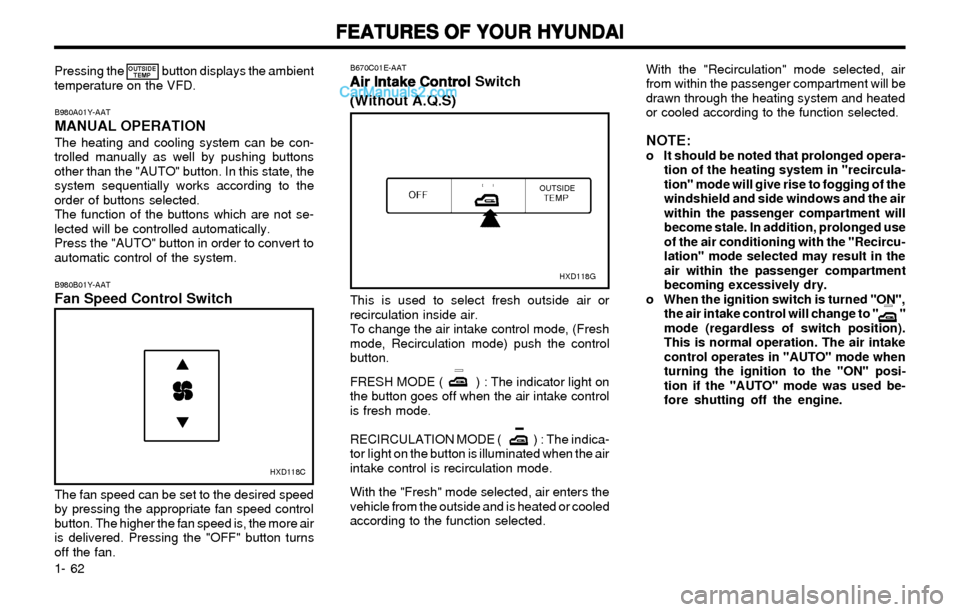
B980B01Y-AATFan Speed Control Switch
HXD118C
The fan speed can be set to the desired speed
by pressing the appropriate fan speed control
button. The higher the fan speed is, the more air
is delivered. Pressing the "OFF" button turns
off the fan.
B670C01E-AAT
Air Intake Control Air Intake ControlAir Intake Control Air Intake Control
Air Intake Control Switch
(Without A.Q.S)
HXD118G
This is used to select fresh outside air or
recirculation inside air.
To change the air intake control mode, (Fresh
mode, Recirculation mode) push the control
button.
FRESH MODE ( ) : The indicator light on
the button goes off when the air intake control
is fresh mode.
RECIRCULATION MODE ( ) : The indica-
tor light on the button is illuminated when the air
intake control is recirculation mode.
With the "Fresh" mode selected, air enters the
vehicle from the outside and is heated or cooled
according to the function selected.
With the "Recirculation" mode selected, air
from within the passenger compartment will be
drawn through the heating system and heated
or cooled according to the function selected.
NOTE:o It should be noted that prolonged opera-
tion of the heating system in "recircula-
tion" mode will give rise to fogging of the
windshield and side windows and the air
within the passenger compartment will
become stale. In addition, prolonged use
of the air conditioning with the "Recircu-
lation" mode selected may result in the
air within the passenger compartment
becoming excessively dry.
o When the ignition switch is turned "ON",
the air intake control will change to " "
mode (regardless of switch position).
This is normal operation. The air intake
control operates in "AUTO" mode when
turning the ignition to the "ON" posi-
tion if the "AUTO" mode was used be-
fore shutting off the engine.
B980A01Y-AATMANUAL OPERATIONThe heating and cooling system can be con-
trolled manually as well by pushing buttons
other than the "AUTO" button. In this state, the
system sequentially works according to the
order of buttons selected.
The function of the buttons which are not se-
lected will be controlled automatically.
Press the "AUTO" button in order to convert to
automatic control of the system. Pressing the button displays the ambient
temperature on the VFD.
OUTSIDE
TEMP
Page 78 of 172
FEATURES OF YOUR HYUNDAI FEATURES OF YOUR HYUNDAIFEATURES OF YOUR HYUNDAI FEATURES OF YOUR HYUNDAI
FEATURES OF YOUR HYUNDAI
1- 69
FAD (Fader Control) KnobPull the treble control knob further out.
Turn the control knob counterclockwise to em-
phasize front speaker sound. (Rear speaker
sound will be attenuated)
When the control knob is turned clockwise, rear
speaker sound will be emphasized.
(Front speaker sound will be attenuated)
4. TUNE (Manual) Select ButtonPress the side or side to increase or to
decrease the frequency. Press either button
and hold down to continuously scroll. Release
button once the desired station is reached.
SEEK Operation (Automatic Channel
Selection)
Press the TUNE select button 0.5 sec or more.
Releasing it will automatically tune to the next
available station with a beep sound.
When the side is pressed longer than 0.5
second, releasing will automatically tune to the
next higher frequency and when the side is
pressed longer than 0.5 second, releasing will
automatically tune to the next lower frequency.
5. BAND SelectorPressing the button changes the AM, FM1
and FM2 bands. The mode selected is dis-
played on LCD.
6. PRESET STATION SELECT ButtonSix (6) stations for AM, FM and FM2 respective-
ly can be preset in the electronic memory circuit
on this unit.
HOW TO PRESET STATIONSSix AM and twelve FM stations may be pro-
grammed into the memory of the radio. Then,
by simply pressing the band select button and/
or one of the six station select buttons, you may
recall any of these stations instantly. To pro-
gram the stations, follow these steps:
o Press band selector to set the band for AM,
FM, or FM2.
o Select the desired station to be stored by
seek or manual tuning.
o Determine the preset station select button
you wish to use to access that station.
o Press the station select button for more than
two seconds. A select button indicator will
show in the display indicating which select
button you have depressed. The frequency
display will flash after it has been stored into
the memory with a beep sound. You should
then release the button, and proceed to
program the next desired station. A total of
18 stations can be programmed by select-
ing one AM and two FM stations per button.
o When completed, any preset station may be
recalled by selecting AM, FM or FM2 band
and the appropriate station button.
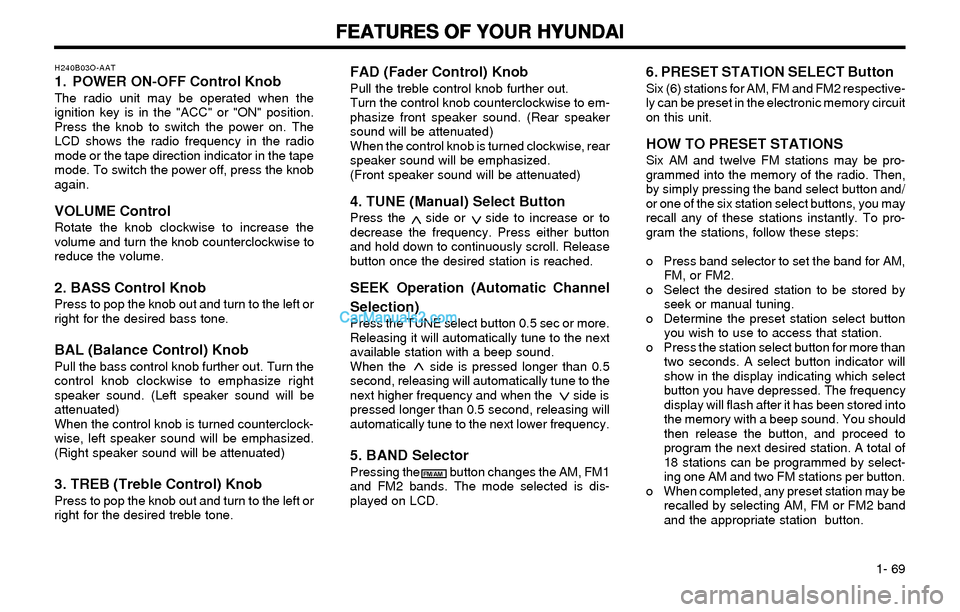
H240B03O-AAT1. POWER ON-OFF Control KnobThe radio unit may be operated when the
ignition key is in the "ACC" or "ON" position.
Press the knob to switch the power on. The
LCD shows the radio frequency in the radio
mode or the tape direction indicator in the tape
mode. To switch the power off, press the knob
again.
VOLUME ControlRotate the knob clockwise to increase the
volume and turn the knob counterclockwise to
reduce the volume.
2. BASS Control KnobPress to pop the knob out and turn to the left or
right for the desired bass tone.
BAL (Balance Control) KnobPull the bass control knob further out. Turn the
control knob clockwise to emphasize right
speaker sound. (Left speaker sound will be
attenuated)
When the control knob is turned counterclock-
wise, left speaker sound will be emphasized.
(Right speaker sound will be attenuated)
3. TREB (Treble Control) KnobPress to pop the knob out and turn to the left or
right for the desired treble tone.
FM/AM
Page 81 of 172
FEATURES OF YOUR HYUNDAI FEATURES OF YOUR HYUNDAIFEATURES OF YOUR HYUNDAI FEATURES OF YOUR HYUNDAI
FEATURES OF YOUR HYUNDAI
1- 72
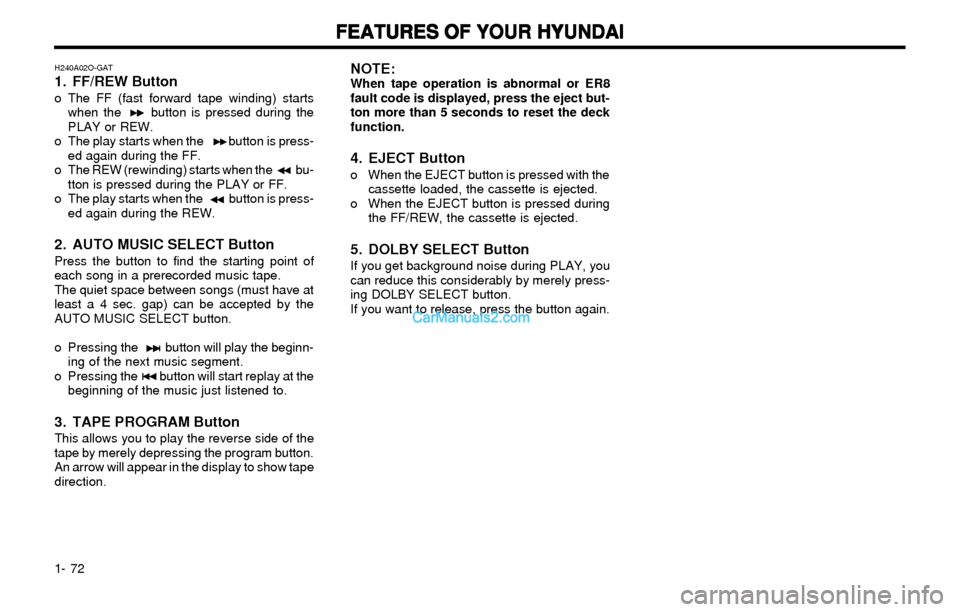
H240A02O-GAT1. FF/REW Buttono The FF (fast forward tape winding) starts
when the button is pressed during the
PLAY or REW.
o The play starts when the button is press-
ed again during the FF.
o The REW (rewinding) starts when the bu-
tton is pressed during the PLAY or FF.
o The play starts when the button is press-
ed again during the REW.
2. AUTO MUSIC SELECT ButtonPress the button to find the starting point of
each song in a prerecorded music tape.
The quiet space between songs (must have at
least a 4 sec. gap) can be accepted by the
AUTO MUSIC SELECT button.
o Pressing the button will play the beginn-
ing of the next music segment.
o Pressing the button will start replay at the
beginning of the music just listened to.
3. TAPE PROGRAM ButtonThis allows you to play the reverse side of the
tape by merely depressing the program button.
An arrow will appear in the display to show tape
direction.
NOTE:When tape operation is abnormal or ER8
fault code is displayed, press the eject but-
ton more than 5 seconds to reset the deck
function.
4. EJECT Buttono When the EJECT button is pressed with the
cassette loaded, the cassette is ejected.
o When the EJECT button is pressed during
the FF/REW, the cassette is ejected.
5. DOLBY SELECT ButtonIf you get background noise during PLAY, you
can reduce this considerably by merely press-
ing DOLBY SELECT button.
If you want to release, press the button again.
Page 83 of 172
FEATURES OF YOUR HYUNDAI FEATURES OF YOUR HYUNDAIFEATURES OF YOUR HYUNDAI FEATURES OF YOUR HYUNDAI
FEATURES OF YOUR HYUNDAI
1- 74
3. BASS Control KnobPress to pop the knob out and turn to the left or
right for the desired bass tone.
TREB (Treble Control) KnobPull the bass control knob further out. Turn to
the left or right for the desired treble tone.
4. SCAN ButtonWhen the scan button is pressed, the fre-
quency will increase and the receivable sta-
tions will be tuned in one after another, receiv-
ing each station for 5 seconds. To stop scan-
ning, press the scan button again.
5. TUNE (Manual) Select ButtonPress the ( ) side or ( ) side to increase or to
decrease the frequency. Press either button
and hold down to continuously scroll. Release
button once the desired station is reached.
SEEK Operation (Automatic Channel
Selection)
Press the TUNE select button for 0.5 sec or
more. Releasing it will automatically tune to the
next available station with a beep sound.
When the ( ) side is pressed longer than 0.5
second, releasing will automatically tune to the
next higher frequency and when the ( ) side is
pressed longer than 0.5 second, releasing will
automatically tune to the next lower frequency.
6. BAND SelectorPressing the button changes the AM, FM1
and FM2 bands. The mode selected is dis-
played on LCD.
7. PRESET STATION SELECT ButtonSix (6) stations for AM, FM or FM2 respectively
can be preset in the electronic memory circuit
on this unit.
HOW TO PRESET STATIONSSix AM and twelve FM stations may be pro-
grammed into the memory of the radio. Then,
by simply pressing the band select button and/
or one of the six station select buttons, you may
recall any of these stations instantly. To pro-
gram the stations, follow these steps:
o Press band selector to set the band for AM,
FM or FM2.
o Select the desired station to be stored by
seek, scan or manual tuning.
o Determine the preset station select button
you wish to use to access that station.
o Press the station select button for more than
two seconds. A select button indicator will
show in the display indicating which select
button you have depressed. The frequency
display will flash after it has been stored into
the memory.
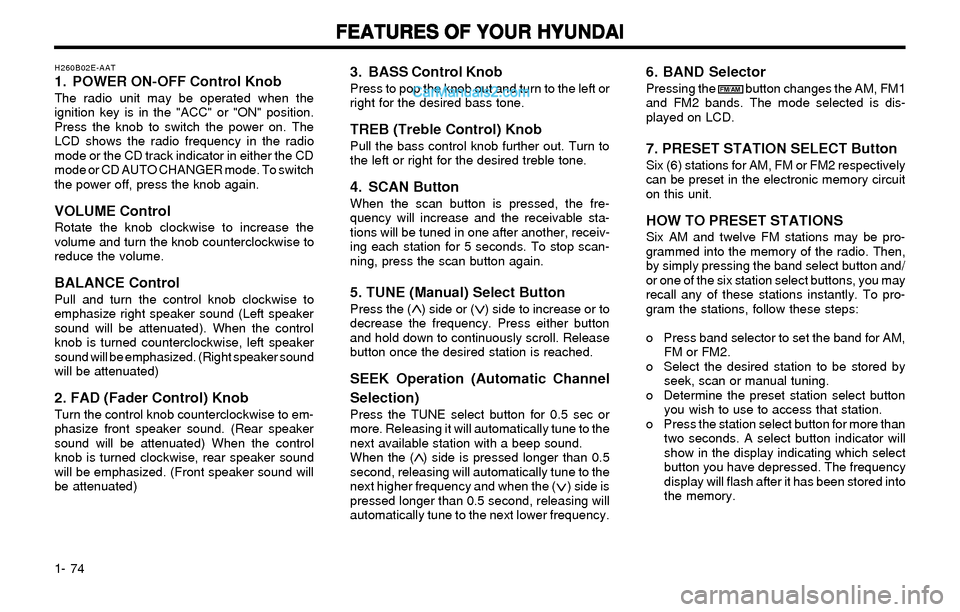
H260B02E-AAT1. POWER ON-OFF Control KnobThe radio unit may be operated when the
ignition key is in the "ACC" or "ON" position.
Press the knob to switch the power on. The
LCD shows the radio frequency in the radio
mode or the CD track indicator in either the CD
mode or CD AUTO CHANGER mode. To switch
the power off, press the knob again.
VOLUME ControlRotate the knob clockwise to increase the
volume and turn the knob counterclockwise to
reduce the volume.
BALANCE ControlPull and turn the control knob clockwise to
emphasize right speaker sound (Left speaker
sound will be attenuated). When the control
knob is turned counterclockwise, left speaker
sound will be emphasized. (Right speaker sound
will be attenuated)
2. FAD (Fader Control) KnobTurn the control knob counterclockwise to em-
phasize front speaker sound. (Rear speaker
sound will be attenuated) When the control
knob is turned clockwise, rear speaker sound
will be emphasized. (Front speaker sound will
be attenuated)
FM/AM
Page 86 of 172
FEATURES OF YOUR HYUNDAI FEATURES OF YOUR HYUNDAIFEATURES OF YOUR HYUNDAI FEATURES OF YOUR HYUNDAI
FEATURES OF YOUR HYUNDAI
1- 77
B260D02O-AAT
1. Playing CDo Insert the CD with the label facing upward.
o Insert the CD to start CD playback, during
radio operation.
o When a disc is in the CD deck, if you press
the play button, the CD player will begin
playing even if the radio is being used.
o The CD player can be used when the igni-
tion switch is in either the "ON" or "ACC"
position.
2. FF/REW ( / )If you want to fast forward or reverse through
the compact disc track, push and hold in the FF
( ) or REW ( ) button.
When you release the button, the compact disc
player will resume playing.
3. TRACK UP/DOWNo The desired track on the disc currently being
played can be selected using the track
number.
o Press once to skip forward to the beginn-
ing of the next track. Press once to skip
back to the beginning of the track.
4. SCAN Buttono Press the SCAN button to playback the first
10 seconds of each track.
o Press the SCAN button again within 10 sec.
for the desired track.
5. REPEAT Buttono To repeat the music you are listening to,
press the RPT button. To cancel , press
again.
o If you do not release RPT operation, when
the track ends, it will automatically be re-
played.
This process will be continued until you
push the button again.
6. EJECT ButtonWhen the EJECT button is pressed with the
CD loaded, the CD is ejected.
NOTE:o oo o
o
If the CD does not operate properly or if If the CD does not operate properly or ifIf the CD does not operate properly or if If the CD does not operate properly or if
If the CD does not operate properly or if
the ER2 fault code is displayed, use one the ER2 fault code is displayed, use onethe ER2 fault code is displayed, use one the ER2 fault code is displayed, use one
the ER2 fault code is displayed, use one
of two methods to reset the CD deck of two methods to reset the CD deckof two methods to reset the CD deck of two methods to reset the CD deck
of two methods to reset the CD deck
function. function.function. function.
function.
- -- -
-
Remove the audio fuse for 5 minutes. Remove the audio fuse for 5 minutes.Remove the audio fuse for 5 minutes. Remove the audio fuse for 5 minutes.
Remove the audio fuse for 5 minutes.
Then, reinstall the audio fuse. Then, reinstall the audio fuse.Then, reinstall the audio fuse. Then, reinstall the audio fuse.
Then, reinstall the audio fuse.
- -- -
-
Disconnect the negative terminal of Disconnect the negative terminal ofDisconnect the negative terminal of Disconnect the negative terminal of
Disconnect the negative terminal of
the battery and wait 5 minutes. the battery and wait 5 minutes.the battery and wait 5 minutes. the battery and wait 5 minutes.
the battery and wait 5 minutes.
Then reconnect the negative battery Then reconnect the negative batteryThen reconnect the negative battery Then reconnect the negative battery
Then reconnect the negative battery
terminal. terminal.terminal. terminal.
terminal.
o oo o
o
To assure proper operation of the unit, To assure proper operation of the unit,To assure proper operation of the unit, To assure proper operation of the unit,
To assure proper operation of the unit,
keep the vehicle interior temperature keep the vehicle interior temperaturekeep the vehicle interior temperature keep the vehicle interior temperature
keep the vehicle interior temperature
within a normal range by using the within a normal range by using thewithin a normal range by using the within a normal range by using the
within a normal range by using the
vehicle's air conditioning or heating vehicle's air conditioning or heatingvehicle's air conditioning or heating vehicle's air conditioning or heating
vehicle's air conditioning or heating
system. system.system. system.
system.
o oo o
o
When replacing the fuse, replace it with When replacing the fuse, replace it withWhen replacing the fuse, replace it with When replacing the fuse, replace it with
When replacing the fuse, replace it with
a fuse having the correct capacity. a fuse having the correct capacity.a fuse having the correct capacity. a fuse having the correct capacity.
a fuse having the correct capacity.
o oo o
o
The preset station frequencies are all The preset station frequencies are allThe preset station frequencies are all The preset station frequencies are all
The preset station frequencies are all
erased when the car battery is discon- erased when the car battery is discon-erased when the car battery is discon- erased when the car battery is discon-
erased when the car battery is discon-
nected. Therefore, all data will have to nected. Therefore, all data will have tonected. Therefore, all data will have to nected. Therefore, all data will have to
nected. Therefore, all data will have to
be set again if this should occur. be set again if this should occur.be set again if this should occur. be set again if this should occur.
be set again if this should occur.
o oo o
o
Do not add any oil to the rotating parts. Do not add any oil to the rotating parts.Do not add any oil to the rotating parts. Do not add any oil to the rotating parts.
Do not add any oil to the rotating parts.
Keep magnets, screwdrivers and other Keep magnets, screwdrivers and otherKeep magnets, screwdrivers and other Keep magnets, screwdrivers and other
Keep magnets, screwdrivers and other
metallic objects away from the tape metallic objects away from the tapemetallic objects away from the tape metallic objects away from the tape
metallic objects away from the tape
mechanism and head. mechanism and head.mechanism and head. mechanism and head.
mechanism and head.
o This equipment is designed to be used
only in a 12 volt DC battery system with
negative ground.
o This unit is made of precision parts. Do
not attempt to disassemble or adjust any
parts.
o When driving your vehicle, be sure to
keep the volume of the unit set low enough
to allow you to hear sounds coming from
the outside.
o Do not expose this equipment (including
the speakers) to water or excessive mois-
ture.
Page 88 of 172
FEATURES OF YOUR HYUNDAI FEATURES OF YOUR HYUNDAIFEATURES OF YOUR HYUNDAI FEATURES OF YOUR HYUNDAI
FEATURES OF YOUR HYUNDAI
1- 79
B260F01E-AATThe CD auto changer is located in the left side
of the trunk.
o To use the CD auto changer.
1. Open the sliding lid of the CD auto chang-
er.
2. To eject the compact disc magazine,
press the EJECT button located inside
the CD auto changer.
3. Insert the discs into the magazine.
4. Push the magazine into the CD auto
changer and close the sliding lid.
o The CD auto changer can be used when the
ignition switch is in either the "ON" or "ACC"
position.
1. CD Select ButtonWhen the CD changer magazine contains discs,
press the "CD" button and the CD changer can
be used even if the radio is being used. The
Hyundai CD changer can hold up to eight discs.
The disc number will be lit, and the track
number, and elapsed time will be displayed.
2. DISC Select ButtonTo select the CD you want, push " " to
change the disc number.
3. TRACK UP/DOWNo The desired track on the disc currently being
played can be selected using the track
number.
o Press once to skip forward to the begin-
ning of the next track. Press once to skip
back to the beginning of the track.
4. FF/REW ( / )If you want to fast forward or reverse through
the compact disc track, push and hold in the FF
( ) or REW ( ) button.
When you release the button, the compact disc
player will resume playing.
5. REPEATo To repeat the music you are listening to,
press the RPT button. To cancel , press
again.
o If you do not release RPT operation when
the track ends, it will automatically be re-
played.
This process will be continued until you
push the button again.
6. SCAN Buttono Press the SCAN button to playback the first
10 seconds of each track.
o Press the SCAN button again within 10 sec.
for the desired track.
NOTE:o When replacing the fuse, replace it with a
fuse having the correct capacity.
o This equipment is designed to be used
only in a 12 volt DC battery system with
negative ground.
o This unit is made of precision parts. Do
not attempt to disassemble or adjust any
parts.
o When driving your vehicle, be sure to
keep the volume of the unit set low enough
to allow you to hear sounds coming from
the outside.
TUNE
DISC