reset Hyundai Elantra 2004 Owner's Manual
[x] Cancel search | Manufacturer: HYUNDAI, Model Year: 2004, Model line: Elantra, Model: Hyundai Elantra 2004Pages: 241, PDF Size: 6.5 MB
Page 53 of 241
1FEATURES OF YOUR HYUNDAI
42
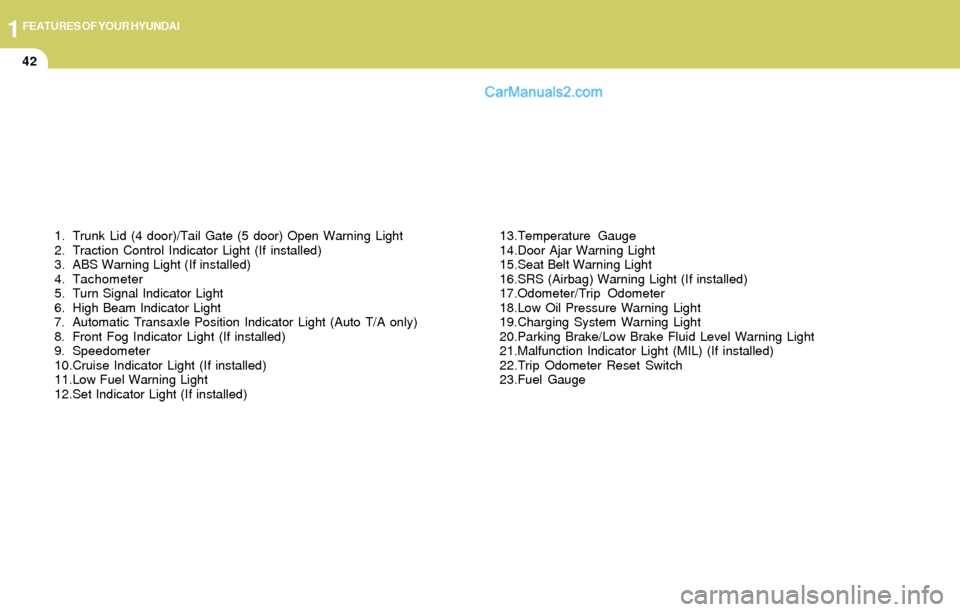
1. Trunk Lid (4 door)/Tail Gate (5 door) Open Warning Light
2. Traction Control Indicator Light (If installed)
3. ABS Warning Light (If installed)
4. Tachometer
5. Turn Signal Indicator Light
6. High Beam Indicator Light
7. Automatic Transaxle Position Indicator Light (Auto T/A only)
8. Front Fog Indicator Light (If installed)
9. Speedometer
10.Cruise Indicator Light (If installed)
11.Low Fuel Warning Light
12.Set Indicator Light (If installed)13.Temperature Gauge
14.Door Ajar Warning Light
15.Seat Belt Warning Light
16.SRS (Airbag) Warning Light (If installed)
17.Odometer/Trip Odometer
18.Low Oil Pressure Warning Light
19.Charging System Warning Light
20.Parking Brake/Low Brake Fluid Level Warning Light
21.Malfunction Indicator Light (MIL) (If installed)
22.Trip Odometer Reset Switch
23.Fuel Gauge
Page 62 of 241
1FEATURES OF YOUR HYUNDAI
51
HXDFL077-1
Function of digital odometer/trip odom-
eter
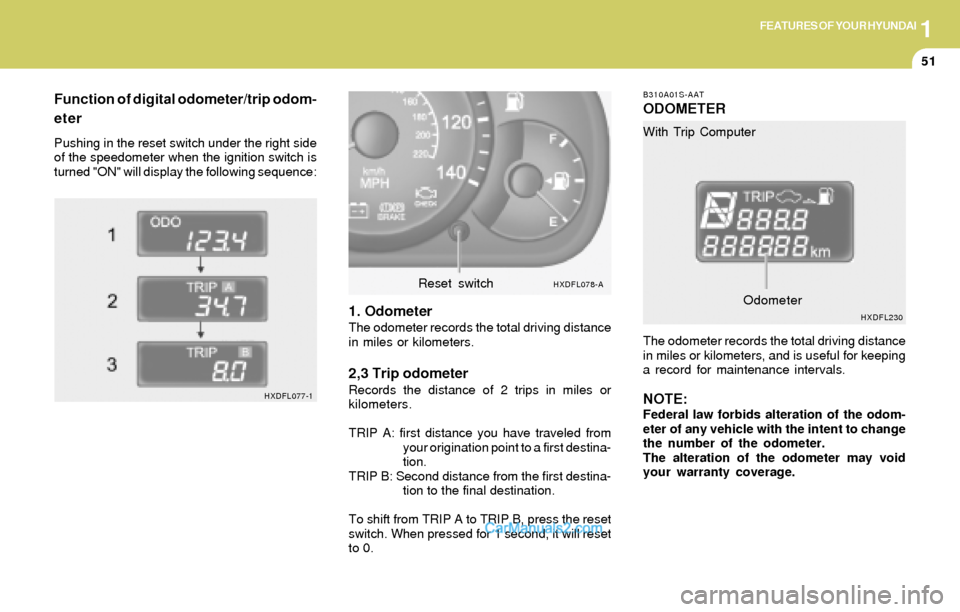
Pushing in the reset switch under the right side
of the speedometer when the ignition switch is
turned "ON" will display the following sequence:
1. OdometerThe odometer records the total driving distance
in miles or kilometers.
2,3 Trip odometerRecords the distance of 2 trips in miles or
kilometers.
TRIP A: first distance you have traveled from
your origination point to a first destina-
tion.
TRIP B: Second distance from the first destina-
tion to the final destination.
To shift from TRIP A to TRIP B, press the reset
switch. When pressed for 1 second, it will reset
to 0.
B310A01S-AAT
ODOMETER
The odometer records the total driving distance
in miles or kilometers, and is useful for keeping
a record for maintenance intervals.
NOTE:Federal law forbids alteration of the odom-
eter of any vehicle with the intent to change
the number of the odometer.
The alteration of the odometer may void
your warranty coverage. With Trip Computer
HXDFL078-AReset switch
HXDFL230Odometer
Page 63 of 241
1FEATURES OF YOUR HYUNDAI
52
B400B03E-AAT
TRIP COMPUTER (If Installed)
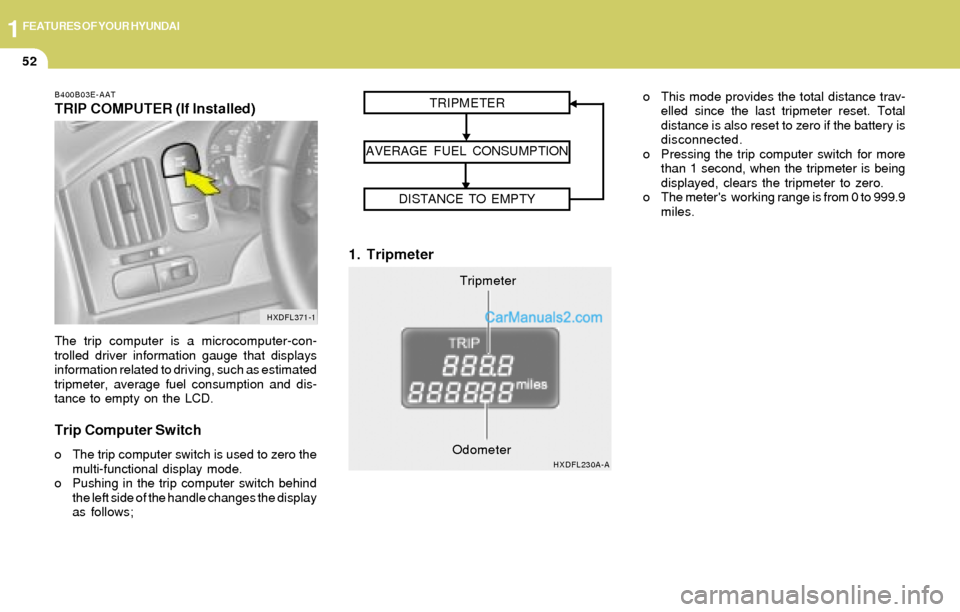
The trip computer is a microcomputer-con-
trolled driver information gauge that displays
information related to driving, such as estimated
tripmeter, average fuel consumption and dis-
tance to empty on the LCD.
Trip Computer Switch
o The trip computer switch is used to zero the
multi-functional display mode.
o Pushing in the trip computer switch behind
the left side of the handle changes the display
as follows;
1. Tripmeter
o This mode provides the total distance trav-
elled since the last tripmeter reset. Total
distance is also reset to zero if the battery is
disconnected.
o Pressing the trip computer switch for more
than 1 second, when the tripmeter is being
displayed, clears the tripmeter to zero.
o The meter's working range is from 0 to 999.9
miles.
HXDFL371-1
Tripmeter TRIPMETER
AVERAGE FUEL CONSUMPTION
DISTANCE TO EMPTY
HXDFL230A-AOdometer
Page 64 of 241
1FEATURES OF YOUR HYUNDAI
53
2. Average Fuel Consumption3. Distance to Empty
NOTE:
o The distance to empty can differ from
the actual tripmeter according to driving
conditions.
o The distance to empty can vary accord-
ing to the driving conditions, driving
pattern or vehicle speed. Distance to emptyDistance to empty symbol
HXDFL230B-AOdometerOdometerHXDFL1026-A
Distance to empty FLASHING
Distance to empty symbol
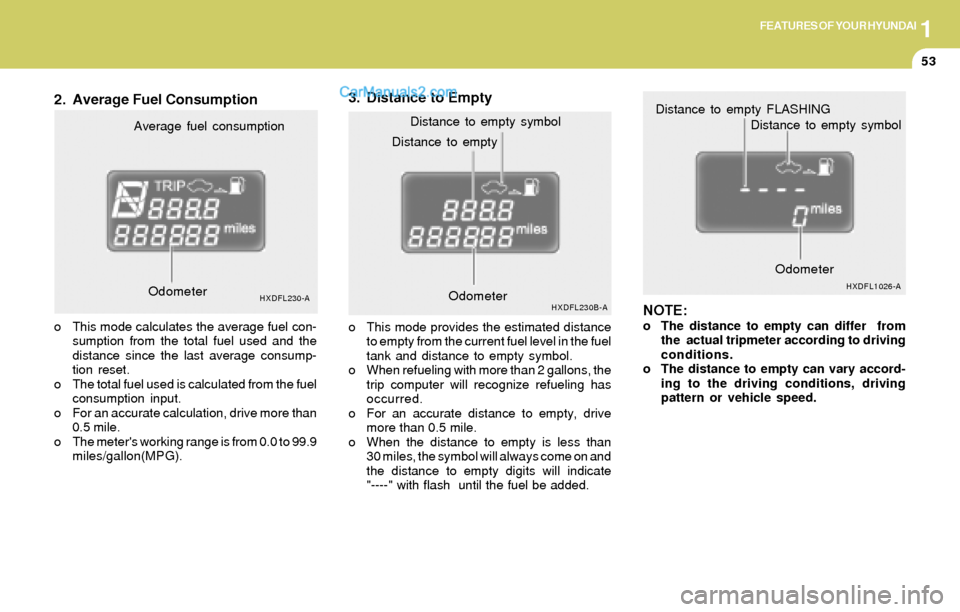
Average fuel consumption
HXDFL230-A
o This mode calculates the average fuel con-
sumption from the total fuel used and the
distance since the last average consump-
tion reset.
o The total fuel used is calculated from the fuel
consumption input.
o For an accurate calculation, drive more than
0.5 mile.
o The meter's working range is from 0.0 to 99.9
miles/gallon(MPG).o This mode provides the estimated distance
to empty from the current fuel level in the fuel
tank and distance to empty symbol.
o When refueling with more than 2 gallons, the
trip computer will recognize refueling has
occurred.
o For an accurate distance to empty, drive
more than 0.5 mile.
o When the distance to empty is less than
30 miles, the symbol will always come on and
the distance to empty digits will indicate
"----" with flash until the fuel be added. Odometer
Page 70 of 241

1FEATURES OF YOUR HYUNDAI
59
B410A01A-AAT
B410A01E-A
INSTRUMENT PANEL LIGHT
CONTROL (RHEOSTAT)
The instrument panel lights can be made brighter
or dimmer by turning the instrument panel light
control knob.
DIGITAL CLOCK
B400A01A-AAT
There are three control buttons for the digital
clock. Their functions are:
HOUR - Push "H" to advance the hour indi-
cated.
MIN - Push "M" to advance the minute indicated.
RESET - Push "R" to reset minutes to ":00" to
facilitate resetting the clock to the correct time.
When this is done:
Pressing "R" between 10 : 30 and 11 : 29
changes the readout to 11 : 00.
Pressing "R" between 11 : 30 and 12 : 29
changes the readout to 12 : 00.
HXDFL400
HAZARD WARNING SYSTEM
B370A01A-AAT
The hazard warning system should be used
whenever you find it necessary to stop the car
in a hazardous location. When you must make
such an emergency stop, always pull off the
road as far as possible.
The hazard warning lights are turned on by
pushing in the hazard switch. This causes all
turn signal lights to blink. The hazard warning
lights will operate even though the key is not in
the ignition.
To turn the hazard warning lights off, push the
switch a second time.
HXDFL371
Page 88 of 241
1FEATURES OF YOUR HYUNDAI
77
!
5. To increase speed, depress the accelerator
pedal enough for the vehicle to exceed the
preset speed. When you remove your foot
from the accelerator pedal, the vehicle will
return to the speed you have set.
WARNING:To avoid accidental cruise control engage-
ment, keep the cruise control main switch
off when not using the cruise control.
CRUISE CONTROL
B660A01S-AAT
(If Installed)
B660B02E-AAT
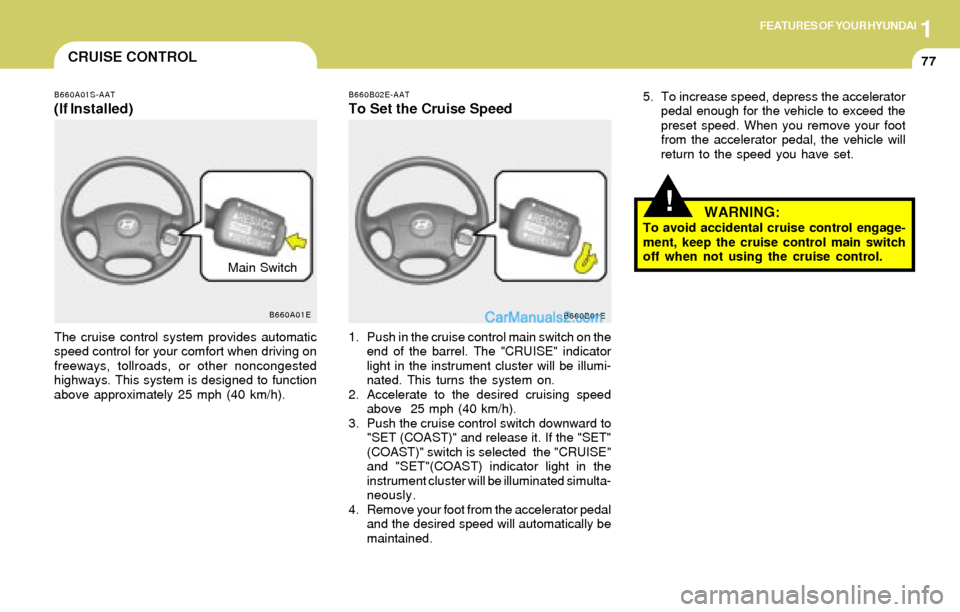
To Set the Cruise Speed
The cruise control system provides automatic
speed control for your comfort when driving on
freeways, tollroads, or other noncongested
highways. This system is designed to function
above approximately 25 mph (40 km/h).1. Push in the cruise control main switch on the
end of the barrel. The "CRUISE" indicator
light in the instrument cluster will be illumi-
nated. This turns the system on.
2. Accelerate to the desired cruising speed
above 25 mph (40 km/h).
3. Push the cruise control switch downward to
"SET (COAST)" and release it. If the "SET"
(COAST)" switch is selected the "CRUISE"
and "SET"(COAST) indicator light in the
instrument cluster will be illuminated simulta-
neously.
4. Remove your foot from the accelerator pedal
and the desired speed will automatically be
maintained.
B660A01E
B660B01E
Main Switch
Page 89 of 241
1FEATURES OF YOUR HYUNDAI
78
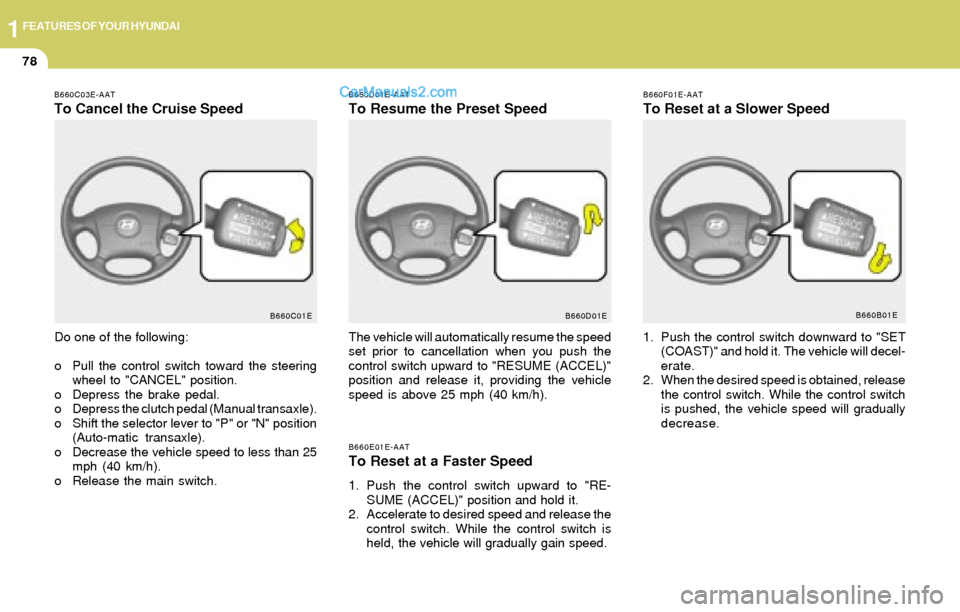
B660D01E-AAT
To Resume the Preset Speed
B660E01E-AAT
To Reset at a Faster Speed
1. Push the control switch upward to "RE-
SUME (ACCEL)" position and hold it.
2. Accelerate to desired speed and release the
control switch. While the control switch is
held, the vehicle will gradually gain speed.
B660C03E-AAT
To Cancel the Cruise Speed
Do one of the following:
o Pull the control switch toward the steering
wheel to "CANCEL" position.
o Depress the brake pedal.
o Depress the clutch pedal (Manual transaxle).
o Shift the selector lever to "P" or "N" position
(Auto-matic transaxle).
o Decrease the vehicle speed to less than 25
mph (40 km/h).
o Release the main switch.The vehicle will automatically resume the speed
set prior to cancellation when you push the
control switch upward to "RESUME (ACCEL)"
position and release it, providing the vehicle
speed is above 25 mph (40 km/h).
B660C01E B660D01EB660F01E-AAT
To Reset at a Slower Speed
1. Push the control switch downward to "SET
(COAST)" and hold it. The vehicle will decel-
erate.
2. When the desired speed is obtained, release
the control switch. While the control switch
is pushed, the vehicle speed will gradually
decrease.
B660B01E
Page 102 of 241
1FEATURES OF YOUR HYUNDAI
91
NOTE:If the battery has been discharged or dis-
connected, the temperature mode will reset
to centigrade degrees.
This is a normal condition and you can
change the temperature mode from centi-
grade to farenheit as follows;
Press the TEMP button down 3 seconds or
more with the button held down. The
display shows that the unit of temperature
is adjusted to centigrade or fahrenheit.
(°C
→ → → →
→ °F or °F → →→ →
→ °C)
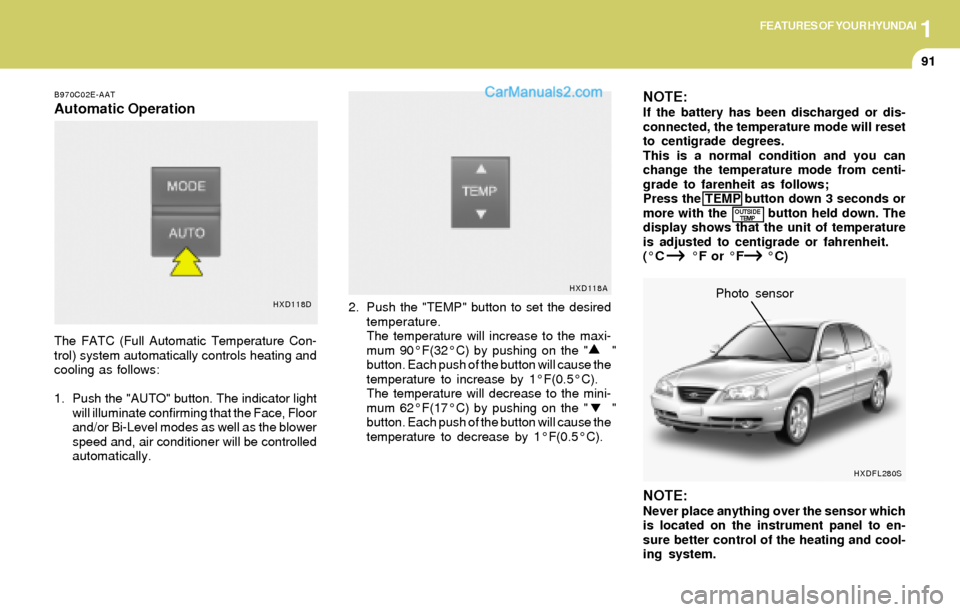
B970C02E-AAT
Automatic Operation
The FATC (Full Automatic Temperature Con-
trol) system automatically controls heating and
cooling as follows:
1. Push the "AUTO" button. The indicator light
will illuminate confirming that the Face, Floor
and/or Bi-Level modes as well as the blower
speed and, air conditioner will be controlled
automatically.2. Push the "TEMP" button to set the desired
temperature.
The temperature will increase to the maxi-
mum 90°F(32°C) by pushing on the " "
button. Each push of the button will cause the
temperature to increase by 1°F(0.5°C).
The temperature will decrease to the mini-
mum 62°F(17°C) by pushing on the " "
button. Each push of the button will cause the
temperature to decrease by 1°F(0.5°C).
NOTE:Never place anything over the sensor which
is located on the instrument panel to en-
sure better control of the heating and cool-
ing system.Photo sensor
HXD118DHXD118A
OUTSIDE
TEMP
HXDFL280S
Page 111 of 241
1FEATURES OF YOUR HYUNDAI
100CAR AUDIO SYSTEM
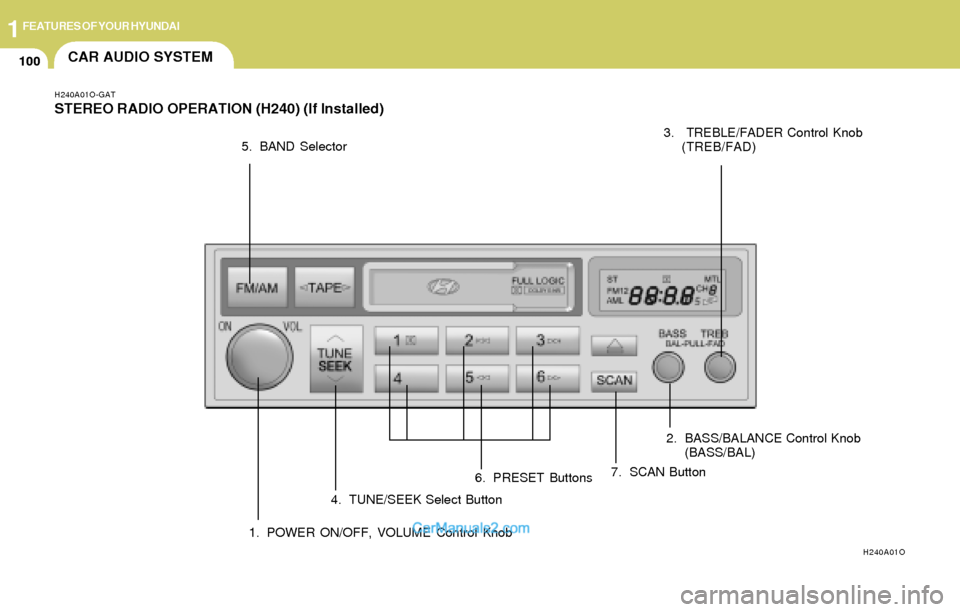
H240A01O-GAT
STEREO RADIO OPERATION (H240) (If Installed)
H240A01O
1. POWER ON/OFF, VOLUME Control Knob2. BASS/BALANCE Control Knob
(BASS/BAL) 3. TREBLE/FADER Control Knob
(TREB/FAD)
4. TUNE/SEEK Select Button 5. BAND Selector
6. PRESET Buttons7. SCAN Button
Page 112 of 241
1FEATURES OF YOUR HYUNDAI
101
H240B03O-AAT
1. POWER ON-OFF Control Knob
The radio unit may be operated when the ignition
key is in the "ACC" or "ON" position. Press the
knob to switch the power on. The LCD shows
the radio frequency in the radio mode or the tape
direction indicator in the tape mode. To switch
the power off, press the knob again.
VOLUME Control
Rotate the knob clockwise to increase the
volume and turn the knob counterclockwise to
reduce the volume.
2. BASS Control Knob
Press to pop the knob out and turn to the left or
right for the desired bass tone.
BAL (Balance Control) Knob
Pull the bass control knob further out. Turn the
control knob clockwise to emphasize right
speaker sound (left speaker sound will be
attenuated).
When the control knob is turned counterclock-
wise, left speaker sound will be emphasized
(right speaker sound will be attenuated).
3. TREB (Treble Control) Knob
Press to pop the knob out and turn to the left or
right for the desired treble tone.
FAD (Fader Control) Knob
Pull the treble control knob further out.
Turn the control knob counterclockwise to
emphasize front speaker sound (rear speaker
sound will be attenuated).
When the control knob is turned clockwise, rear
speaker sound will be emphasized (front
speaker sound will be attenuated).
4. TUNE (Manual) Select Button
Press the ( ) side or ( ) side to increase or to
decrease the frequency. Press either button
and hold down to continuously scroll. Release
button once the desired station is reached.
SEEK Operation
(Automatic Channel Selection)
Press the TUNE select button 0.5 sec or more.
Releasing it will automatically tune to the next
available station with a beep sound.
When the ( ) side is pressed longer than 0.5
second, releasing will automatically tune to the
next higher frequency and when the ( ) side
is pressed longer than 0.5 second, releasing will
automatically tune to the next lower frequency.
5. BAND Selector
Pressing the button changes the AM,
FM1 and FM2 bands. The mode selected is
displayed on LCD.
6. PRESET STATION SELECT Button
Six (6) stations for AM, FM and FM2 respec-
tively can be preset in the electronic memory
circuit on this unit.
FM/AM