clock Hyundai Elantra 2009 Owner's Manual
[x] Cancel search | Manufacturer: HYUNDAI, Model Year: 2009, Model line: Elantra, Model: Hyundai Elantra 2009Pages: 345, PDF Size: 19.91 MB
Page 18 of 345
23
Your vehicle at a glance
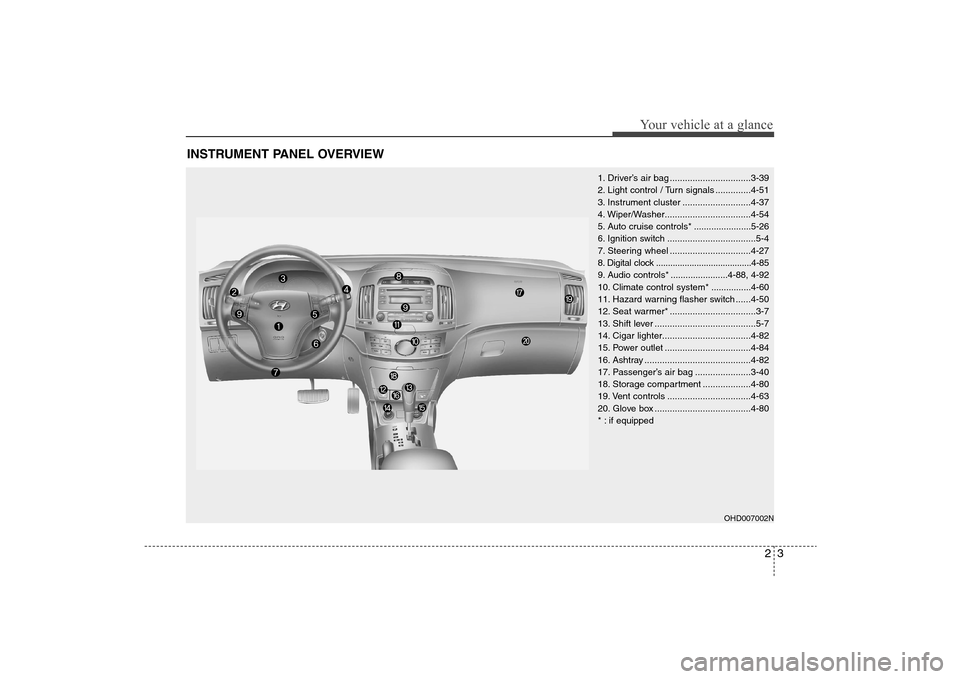
INSTRUMENT PANEL OVERVIEW
1. Driver’s air bag ................................3-39
2. Light control / Turn signals ..............4-51
3. Instrument cluster ...........................4-37
4. Wiper/Washer..................................4-54
5. Auto cruise controls* .......................5-26
6. Ignition switch ...................................5-4
7. Steering wheel ................................4-27
8. Digital clock ........................................4-85
9. Audio controls* .......................4-88, 4-92
10. Climate control system*................4-60
11. Hazard warning flasher switch ......4-50
12. Seat warmer* ..................................3-7
13. Shift lever ........................................5-7
14. Cigar lighter...................................4-82
15. Power outlet ..................................4-84
16. Ashtray ..........................................4-82
17. Passenger’s air bag ......................3-40
18. Storage compartment ...................4-80
19. Vent controls .................................4-63
20. Glove box ......................................4-80
* : if equipped
OHD007002N
Page 86 of 345
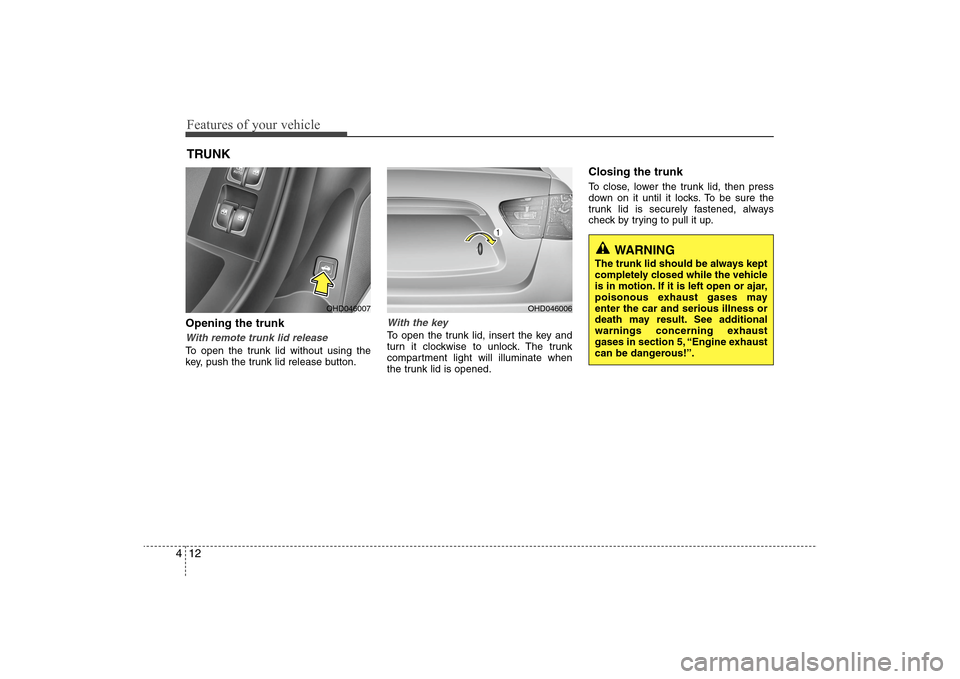
Features of your vehicle12 4Opening the trunkWith remote trunk lid releaseTo open the trunk lid without using the
key, push the trunk lid release button.
With the keyTo open the trunk lid, insert the key and
turn it clockwise to unlock. The trunk
compartment light will illuminate when
the trunk lid is opened.
Closing the trunkTo close, lower the trunk lid, then press
down on it until it locks. To be sure the
trunk lid is securely fastened, always
check by trying to pull it up.
TRUNK
OHD046007
OHD046006
WARNING
The trunk lid should be always kept
completely closed while the vehicle
is in motion. If it is left open or ajar,
poisonous exhaust gases may
enter the car and serious illness or
death may result. See additional
warnings concerning exhaust
gases in section 5, “Engine exhaust
can be dangerous!”.
Page 91 of 345
417
Features of your vehicle
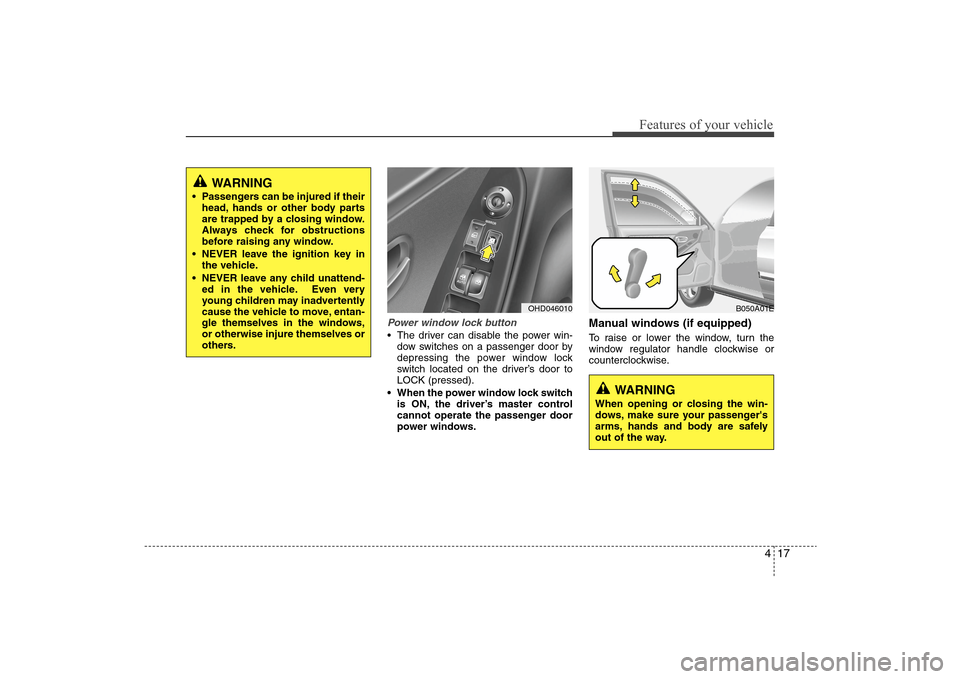
Power window lock button The driver can disable the power win-
dow switches on a passenger door by
depressing the power window lock
switch located on the driver’s door to
LOCK (pressed).
When the power window lock switch
is ON, the driver’s master control
cannot operate the passenger door
power windows.
Manual windows (if equipped)To raise or lower the window, turn the
window regulator handle clockwise or
counterclockwise.
OHD046010
WARNING
When opening or closing the win-
dows, make sure your passenger's
arms, hands and body are safely
out of the way.
B050A01E
WARNING
Passengers can be injured if their
head, hands or other body parts
are trapped by a closing window.
Always check for obstructions
before raising any window.
NEVER leave the ignition key in
the vehicle.
NEVER leave any child unattend-
ed in the vehicle. Even very
young children may inadvertently
cause the vehicle to move, entan-
gle themselves in the windows,
or otherwise injure themselves or
others.
Page 94 of 345
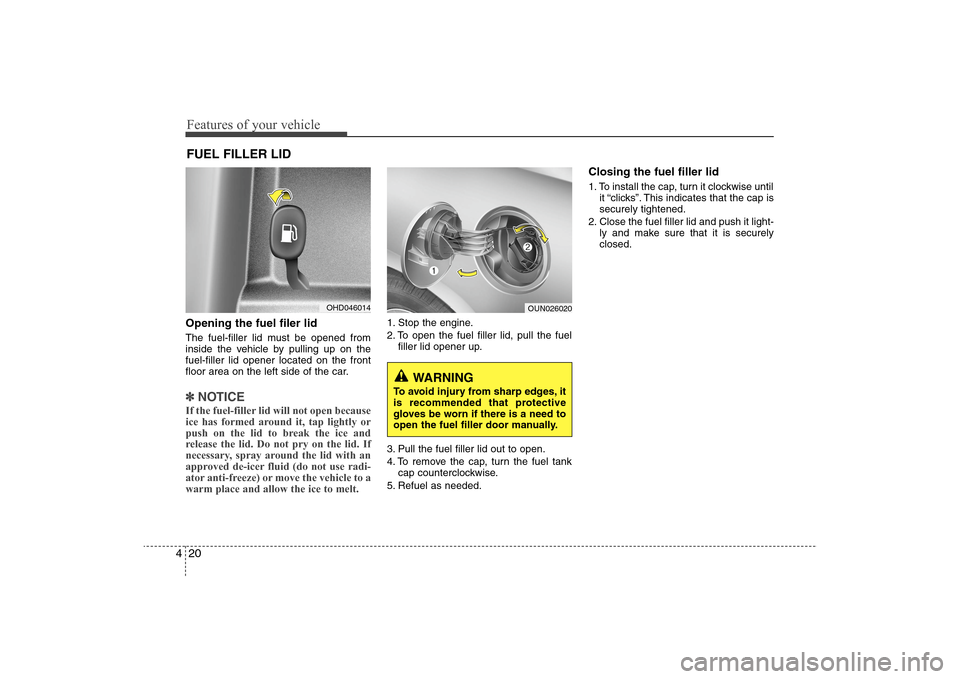
Features of your vehicle20 4Opening the fuel filer lidThe fuel-filler lid must be opened from
inside the vehicle by pulling up on the
fuel-filler lid opener located on the front
floor area on the left side of the car.✽ ✽
NOTICEIf the fuel-filler lid will not open because
ice has formed around it, tap lightly or
push on the lid to break the ice and
release the lid. Do not pry on the lid. If
necessary, spray around the lid with an
approved de-icer fluid (do not use radi-
ator anti-freeze) or move the vehicle to a
warm place and allow the ice to melt.
1. Stop the engine.
2. To open the fuel filler lid, pull the fuel
filler lid opener up.
3. Pull the fuel filler lid out to open.
4. To remove the cap, turn the fuel tank
cap counterclockwise.
5. Refuel as needed.
Closing the fuel filler lid1. To install the cap, turn it clockwise until
it “clicks”. This indicates that the cap is
securely tightened.
2. Close the fuel filler lid and push it light-
ly and make sure that it is securely
closed.
FUEL FILLER LID
OHD046014
OUN026020
WARNING
To avoid injury from sharp edges, it
is recommended that protective
gloves be worn if there is a need to
open the fuel filler door manually.
Page 159 of 345
485
Features of your vehicle
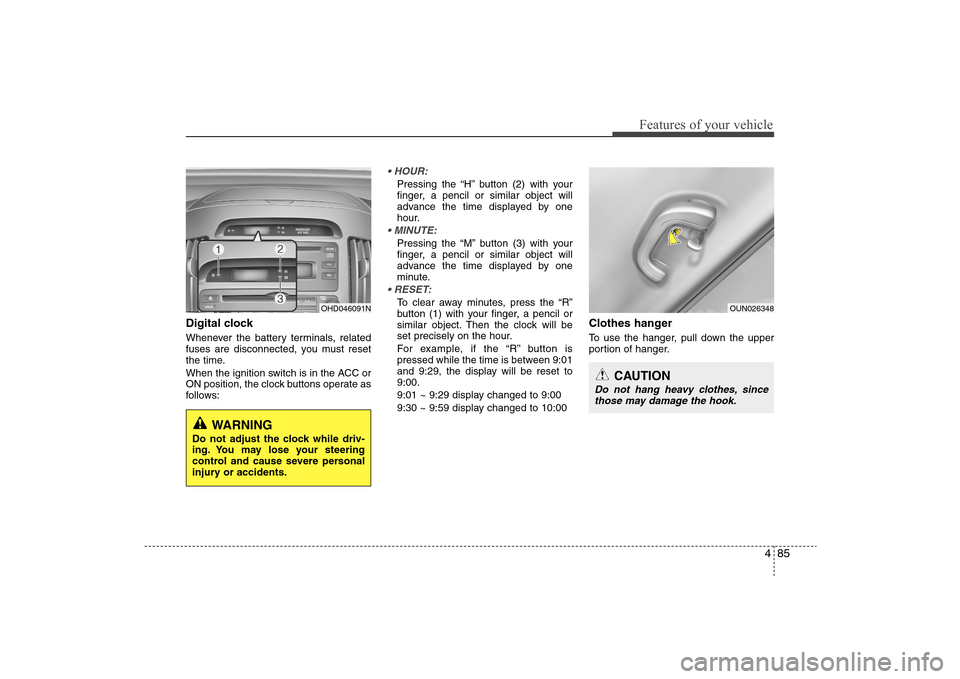
Digital clockWhenever the battery terminals, related
fuses are disconnected, you must reset
the time.
When the ignition switch is in the ACC or
ON position, the clock buttons operate as
follows:
Pressing the “H” button (2) with your
finger, a pencil or similar object will
advance the time displayed by one
hour.Pressing the “M” button (3) with your
finger, a pencil or similar object will
advance the time displayed by one
minute.To clear away minutes, press the “R”
button (1) with your finger, a pencil or
similar object. Then the clock will be
set precisely on the hour.
For example, if the “R” button is
pressed while the time is between 9:01
and 9:29, the display will be reset to
9:00.
9:01 ~ 9:29 display changed to 9:00
9:30 ~ 9:59 display changed to 10:00
Clothes hangerTo use the hanger, pull down the upper
portion of hanger.
OHD046091N
WARNING
Do not adjust the clock while driv-
ing. You may lose your steering
control and cause severe personal
injury or accidents.
OUN026348
CAUTION
Do not hang heavy clothes, since
those may damage the hook.
Page 161 of 345
487
Features of your vehicle
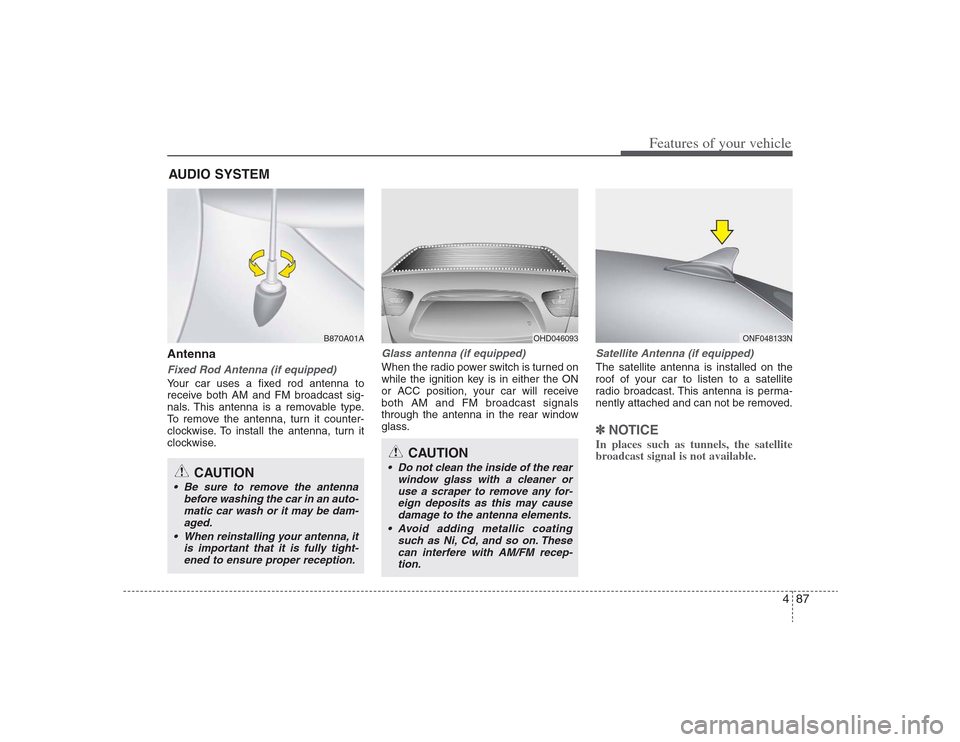
AntennaFixed Rod Antenna (if equipped)Your car uses a fixed rod antenna to
receive both AM and FM broadcast sig-
nals. This antenna is a removable type.
To remove the antenna, turn it counter-
clockwise. To install the antenna, turn it
clockwise.
Glass antenna (if equipped)When the radio power switch is turned on
while the ignition key is in either the ON
or ACC position, your car will receive
both AM and FM broadcast signals
through the antenna in the rear window
glass.
Satellite Antenna (if equipped)The satellite antenna is installed on the
roof of your car to listen to a satellite
radio broadcast. This antenna is perma-
nently attached and can not be removed.✽ ✽
NOTICEIn places such as tunnels, the satellite
broadcast signal is not available.
AUDIO SYSTEM
OHD046093
ONF048133N
CAUTION
• Do not clean the inside of the rear
window glass with a cleaner or
use a scraper to remove any for-
eign deposits as this may cause
damage to the antenna elements.
Avoid adding metallic coating
such as Ni, Cd, and so on. These
can interfere with AM/FM recep-
tion.
B870A01A
CAUTION
Be sure to remove the antenna
before washing the car in an auto-
matic car wash or it may be dam-
aged.
When reinstalling your antenna, it
is important that it is fully tight-
ened to ensure proper reception.
HD HMA 4-87~.qxd 8/14/2008 11:43 AM Page 87
Page 169 of 345
495
Features of your vehicle
1. Power ON/OFF Button &
Volume Control KnobTurns the set on/off when the ignition
switch is on ACC or ON. If the button is
turned to the right, it increases the vol-
ume and left,decreases the volume.2. AM/FM Selection ButtonTurns to FM or AM mode, and toggles in
the order of FM1
➟ FM2
➟ AM
➟ FM1...
when the button is pressed each time.
3. Automatic Channel Selection
Button ] button is pressed,
it increases the band frequency to auto-
matically select a channel.
Stops at the previous frequency if no
channel is found.
] button is press-
ed, it reduces the band frequency to
automatically select a channel.
Stops at the previous frequency if no
channel is found.
4. Preset ButtonPush [1]~[6] buttons less than 0.8 sec-
ond to play the channel saved in each
button. Push [PRESET] button for 0.8
second or longer to save current channel
to the respective button with a beep.5. Manual Channel Selection
Knob & SETUP ButtonManual Channel Selection knob
Turn this knob while listening to a radio
channel to manually adjust frequency.
Turn clockwise to increase frequency and
counterclockwise to reduce frequency.
SETUP Button
Press this button to turn to the XM
option, SCROLL and adjustment mode. If
no action is taken for 5 seconds after
pressing the button, it will return to the
play mode.(After entering SETUP mode,
move between items using the left, right
and PUSH functions of the [TUNE] but-
ton.)
The setup item changes from SCROLL
➟
TONE
➟ POSITION...Audio Control Knob
In SETUP mode, SCROLL, XM option or
TONE, POSITION settings can be adjust-
ed. After selecting each mode by pushing
Sound Control knob, rotate the knob to
adjust and push again to changes take
effect.
SCROLL option
When "ON" is selected, long file name
scrolls continuously while playing.
TONE adjustment
Sound tone(BASS/MIDDLE/TREBLE) can
be adjusted by rotating the knob. To select
next item, press the knob again.
POSITION adjustment
Sound position(FADER/BALANCE) can
be adjusted by rotating the knob. FADER
adjusts FRONT/REAR position, and BAL-
ANCE adjusts LEFT/RIGHT position of
the speaker sound. To select next item,
press the knob again.
XM option
Selects default information of channel
displayed in XM mode. Category/Channel
or Artist/Title can be selected.
HD HMA 4-87~.qxd 8/14/2008 11:43 AM Page 95
Page 175 of 345
4101
Features of your vehicle
8. CD Indicator(CDP Only)If the CD is loaded, mark is dis-
played. If the CD is ejected, this mark dis-
appears.9. SCAN Play ButtonPlays first 10 seconds of each song in
the CD. To cancel the mode, press the
button once again.10. INFO ButtonDisplays the information of the current
CD TRACK(FILE) as below when the
button is pressed each time.
DISC TITLE
➟ DISC ARTIST
➟
TRACK TITLE
➟
TRACK ARTIST
➟
TOTAL TRACK...
FILE NAME
➟
TITLE
➟
ARTIST
➟ ALBUME
➟ FOLDER NAME
➟
TOTAL FILE... (not displayed if the
information is not available on the
DISC.)
11. SEARCH Knob & ENTER
ButtonTurn this knob clockwise to display the
songs next to the currently played song.
Turn the knob counterclockwise to dis-
play the songs before the currently
played song. Press the button to skip and
play the selected song.12. FOLDER Moving Button ] button child folder of
the current folder and displays the first
song in the folder. Press TUNE/ENTER
knob to move to the folder displayed. It
will play the first song in the folder.
] button parent folder
and displays the first song in the folder.
Press TUNE/ENTER knob to move to
the folder displayed.13. DISC Selection Button ] Change button
Changes disc to the previous disc.
] Change button
Changes disc to the next disc.
14. CD LOAD ButtonPush [LOAD] button to load CDs to avail-
able CDC deck (from 1~6).
Push [LOAD] button for more than 2 sec-
onds to load into all available decks.
The last CD will play. 10 seconds idle sta-
tus will disable loading process.
HD HMA 4-87~.qxd 8/14/2008 11:43 AM Page 101
Page 180 of 345
Features of your vehicle106 41. INFO Selection ButtonDisplays the information of the file cur-
rently played in the order of FILE NAME➟ TITLE
➟ ARTIST
➟ ALBUM
➟ FOLD-
ER
➟ TOTAL FILE
➟ NORMAL DISPLAY
➟ FILE NAME
➟... (Displays no informa-
tion if the file has no song information.)
2. TRACK Moving Button ] button for less
than 0.8 second to play from the begin-
ning of the song currently played. Press
the button for less than 0.8 second and
press it again within 1 seconds to move
and play the previous track.
] button for less
than 0.8 second to move to the next-
track.3. RANDOM Playback ButtonPress this button for less than 0.8 second
to activate 'RDM' mode and more than
0.8 second to activate 'ALL RDM' mode.
Only files in a folder are played
back in a random sequence.
ALL RDM : All files in a USB memory are
played back in the random sequence.
4. REPEAT ButtonPress this button for less than 0.8 second
to activate 'RPT' mode and more than
0.8 second to activate 'FLD RPT' mode.
Only a file is repeatedly played
back.
Only files in a folder are
repeatedly played back.5. USB Selection ButtonIf USB is connected, it switches to the
USB mode from the other mode to play
the song files stored in the USB.
If no CD and auxiliary device is not con-
nected, it displays "No Media" for 3 sec-
onds and returns to the previous mode.6. FOLDER Moving Button ] button sub folder of
the current folder and displays the first
song in the folder.
Press TUNE/ENTER knob to move to
the folder displayed. It will play the first
song in the folder.
] button main folder and
displays the first song in the folder.
Press TUNE/ENTER knob to move to
the folder displayed.
7. SEARCH Knob & ENTER
ButtonTurn this knob clockwise to display the
songs next to the currently played song.
Turn the button counterclockwise to dis-
play the songs before the currently
played song.
Press the knob to skip and play the
selected song.8. SCAN Play ButtonPlays 10 seconds of each song in the
USB device.
Press the button once again to cancel
scanning.9. Fast Search ButtonPush [FF] button for 0.8 second or longer
to initiate high speed sound search of
current song.
Push [REW] button for 0.8 second or
longer to initiate reverse direction high
speed sound search of current song.
HD HMA 4-87~.qxd 8/14/2008 11:44 AM Page 106
Page 183 of 345
4109
Features of your vehicle
Using an iPod when the exclusive cable is
connected to the multimedia terminal
inside the console on the right hand side
of the driver's seat.
When the iPod is connected, the 'iPod'
icon will be displayed on the top left cor-
ner of the display screen.1. INFO Selection ButtonDisplays the information of the file cur-
rently played in the order of TITLE
➟
ARTIST
➟ ALBUM
➟ NORMAL DISPLAY
➟ TITLE
➟... (Displays no information if
the file has no song information.)
2. TRACK Moving Button ] button for less
than 0.8 second to play from the begin-
ning of the song currently played. Press
the button for less than 0.8 second and
press it again within 1 seconds to move
and play the previous track.
] button for less
than 0.8 second to move to the next
track.
3. RANDOM Playback ButtonPress the button for less than 0.8 second
to activate or deactivate the random play-
back of the songs within the current cat-
egory. Press the button for longer than
0.8 second to randomly play all songs in
the entire album of the iPod.
Press the button once again to cancel
the mode.4. REPEAT ButtonRepeats the song currently played.5. iPod Selection ButtonIf iPod is connected, it switches to the
iPod mode from the CD mode to play the
song files stored in the iPod. If no CD and
auxiliary device is connected, it displays
"No Media" for 3 seconds and returns to
the previous mode.6. CATEGORY Selection ButtonMoves to the upper category from cur-
rentlyplayed category of the iPod.
To move to the category displayed, press
SEARCH/ENTER knob. You will be able
to search through the lower category of
the selected category.
The order of iPod's category is SONG,
ALBUMS, ARTISTS, GENRES, and iPod.
7. SEARCH Knob & ENTER
ButtonWhen you turn the knob clockwise, it will
display the songs(category) next to the
song currently played(category in the
same level).
Also, when you turn the knob counter-
clockwise, it will display the songs(cate-
gory) before the song currently played
(category in the same level).
If you want to listen to the song displayed
in the song category, press the button,
then it will skip to the selected song and
play.8. Fast Search Button
longer to initiate high speed sound
search of current song.
longer to initiate reverse direction high
speed sound search of current song.
HD HMA 4-87~.qxd 8/14/2008 11:44 AM Page 109