reset Hyundai Elantra 2010 User Guide
[x] Cancel search | Manufacturer: HYUNDAI, Model Year: 2010, Model line: Elantra, Model: Hyundai Elantra 2010Pages: 348, PDF Size: 5.78 MB
Page 167 of 348
Features of your vehicle
94
4
If the SEEK button is pressed for less
than 0.8 second, it will work as follows in
each mode.
RADIO mode
It will function as the PRESET STATION
select buttons.
TAPE mode
It will function as the AUTO MUSIC
Search(AMS) button.
CDP mode
It will function as the TRACK UP/DOWN
button.
CDC mode
It will function as the TRACK UP/DOWN
button.
Detailed information for audio control
buttons is described in the following
pages in this section.
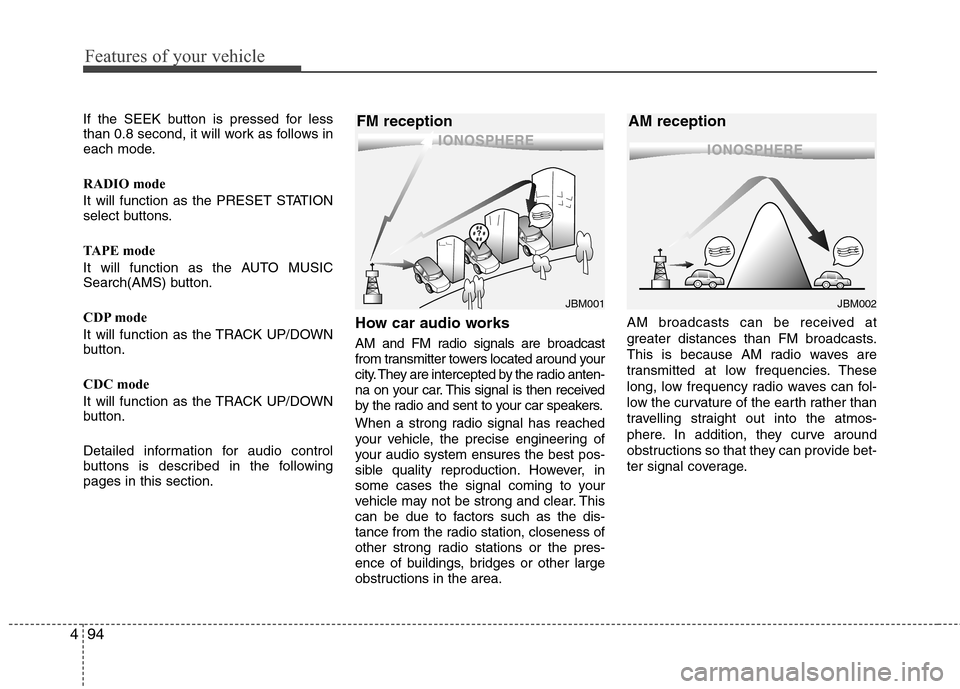
How car audio works
AM and FM radio signals are broadcast
from transmitter towers located around your
city. They are intercepted by the radio anten-
na on your car. This signal is then received
by the radio and sent to your car speakers.
When a strong radio signal has reached
your vehicle, the precise engineering of
your audio system ensures the best pos-
sible quality reproduction. However, in
some cases the signal coming to your
vehicle may not be strong and clear. This
can be due to factors such as the dis-
tance from the radio station, closeness of
other strong radio stations or the pres-
ence of buildings, bridges or other large
obstructions in the area. AM broadcasts can be received at
greater distances than FM broadcasts.
This is because AM radio waves are
transmitted at low frequencies. These
long, low frequency radio waves can fol-
low the curvature of the earth rather than
travelling straight out into the atmos-
phere. In addition, they curve around
obstructions so that they can provide bet-
ter signal coverage.
¢¢¢
JBM001
¢¢¢¢¢¢
JBM002
FM reception AM reception
Page 171 of 348
Features of your vehicle
98
4
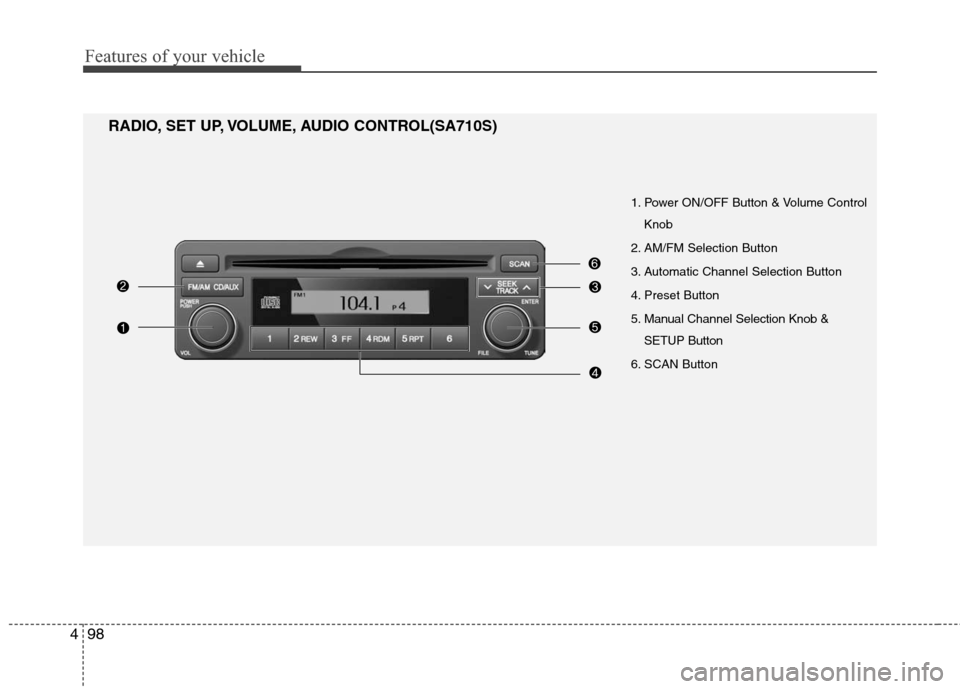
1. Power ON/OFF Button & Volume Control
Knob
2. AM/FM Selection Button
3. Automatic Channel Selection Button
4. Preset Button
5. Manual Channel Selection Knob & SETUP Button
6. SCAN Button
RADIO, SET UP, VOLUME, AUDIO CONTROL(SA710S)
Page 172 of 348
499
Features of your vehicle
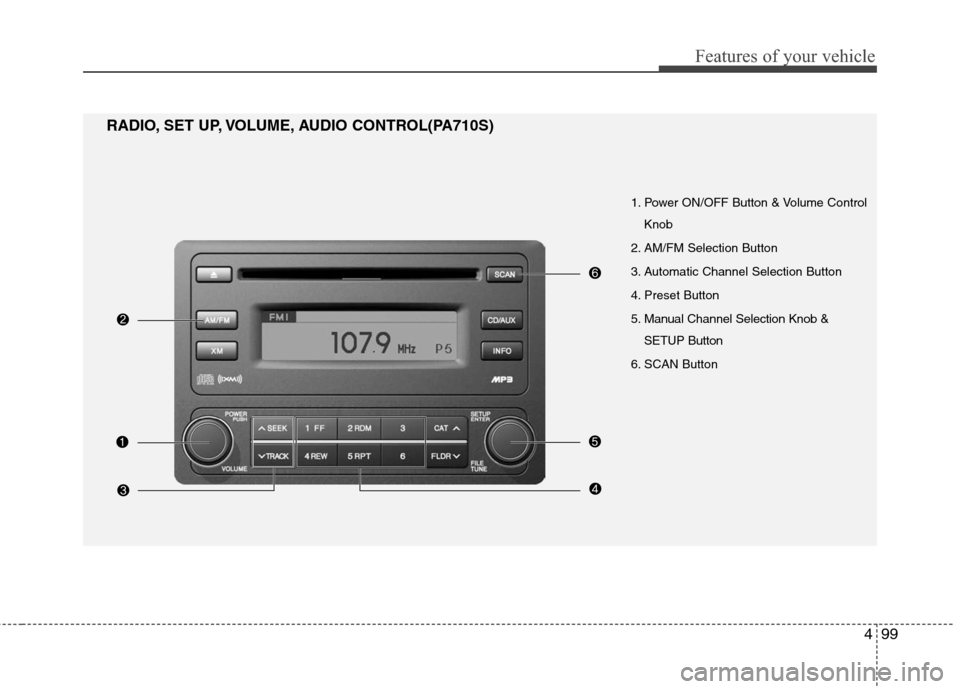
1. Power ON/OFF Button & Volume ControlKnob
2. AM/FM Selection Button
3. Automatic Channel Selection Button
4. Preset Button
5. Manual Channel Selection Knob & SETUP Button
6. SCAN Button
RADIO, SET UP, VOLUME, AUDIO CONTROL(PA710S)
Page 173 of 348
Features of your vehicle
100
4
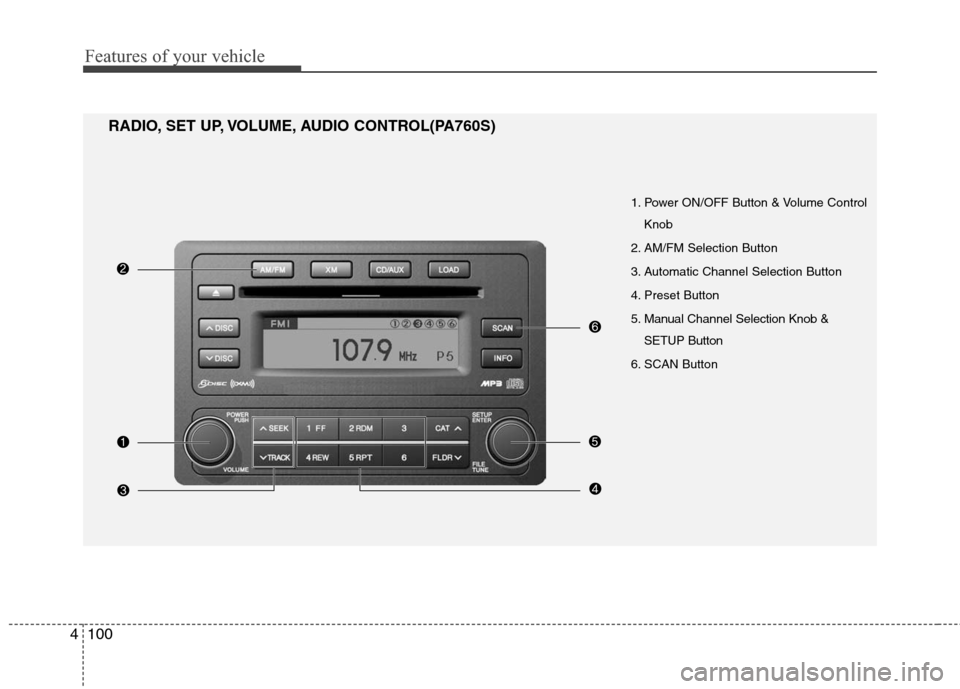
1. Power ON/OFF Button & Volume Control
Knob
2. AM/FM Selection Button
3. Automatic Channel Selection Button
4. Preset Button
5. Manual Channel Selection Knob & SETUP Button
6. SCAN Button
RADIO, SET UP, VOLUME, AUDIO CONTROL(PA760S)
Page 174 of 348
4101
Features of your vehicle
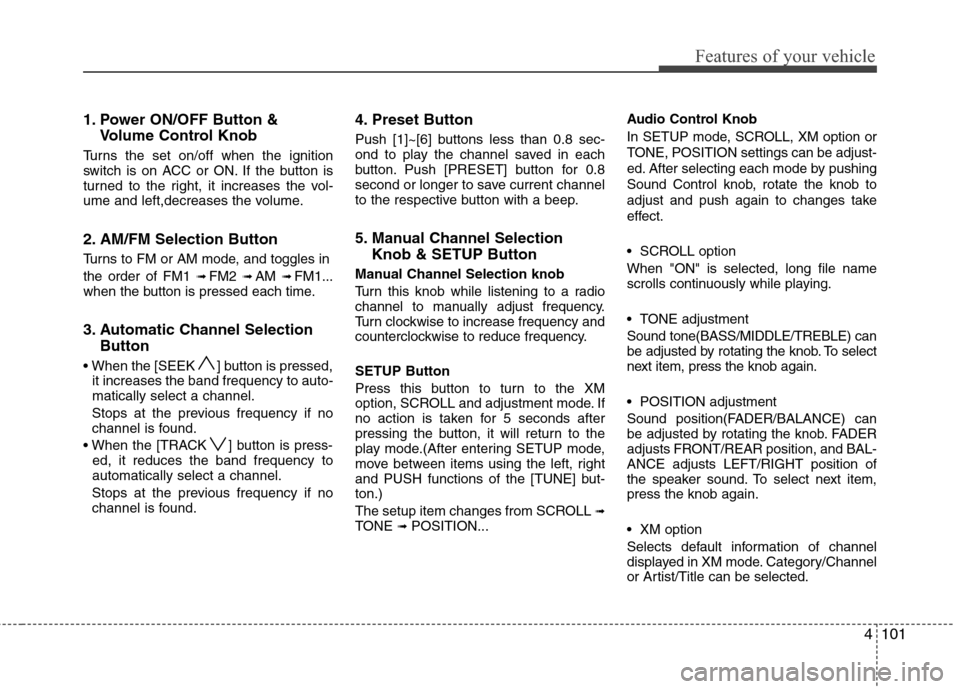
1. Power ON/OFF Button &Volume Control Knob
Turns the set on/off when the ignition
switch is on ACC or ON. If the button is
turned to the right, it increases the vol-
ume and left,decreases the volume.
2. AM/FM Selection Button
Turns to FM or AM mode, and toggles in
the order of FM1
➟ FM2 ➟ AM ➟ FM1...
when the button is pressed each time.
3. Automatic Channel Selection Button
] button is pressed,
it increases the band frequency to auto-
matically select a channel.
Stops at the previous frequency if no
channel is found.
] button is press- ed, it reduces the band frequency to
automatically select a channel.
Stops at the previous frequency if no
channel is found.
4. Preset Button
Push [1]~[6] buttons less than 0.8 sec-
ond to play the channel saved in each
button. Push [PRESET] button for 0.8
second or longer to save current channel
to the respective button with a beep.
5. Manual Channel Selection Knob & SETUP Button
Manual Channel Selection knob
Turn this knob while listening to a radio
channel to manually adjust frequency.
Turn clockwise to increase frequency and
counterclockwise to reduce frequency.
SETUP Button
Press this button to turn to the XM
option, SCROLL and adjustment mode. If
no action is taken for 5 seconds after
pressing the button, it will return to the
play mode.(After entering SETUP mode,
move between items using the left, right
and PUSH functions of the [TUNE] but-
ton.)
The setup item changes from SCROLL
➟TONE ➟ POSITION... Audio Control Knob
In SETUP mode, SCROLL, XM option or
TONE, POSITION settings can be adjust-
ed. After selecting each mode by pushing
Sound Control knob, rotate the knob to
adjust and push again to changes take
effect.
SCROLL option
When "ON" is selected, long file name
scrolls continuously while playing.
TONE adjustment
Sound tone(BASS/MIDDLE/TREBLE) can
be adjusted by rotating the knob. To select
next item, press the knob again.
POSITION adjustment
Sound position(FADER/BALANCE) can
be adjusted by rotating the knob. FADER
adjusts FRONT/REAR position, and BAL-
ANCE adjusts LEFT/RIGHT position of
the speaker sound. To select next item,
press the knob again.
XM option
Selects default information of channel
displayed in XM mode. Category/Channel
or Artist/Title can be selected.
Page 189 of 348
Features of your vehicle
116
4
✽
✽
NOTICE FOR USING iPod
DEVICE
• Some iPod models might not sup- port the communication protocol
and the files will not be played.
(iPod models supported: Mini, 4G,
Photo, Nano, 5G)
• The order of search or playback of songs in the iPod can be different
from the order searched in the
audio system.
• If the iPod crashes due to its own trouble, reset the iPod. (Reset:
Refer to iPod manual)
• An iPod may not operate normally on low battery.
• Some iPods may discharge the internal battery if left connected to
the vehicle when parked. If this
occurs, the vehicle audio system
may cycle between modes for the
first few moments when the vehicle
is started, as the iPod is charged. It
is recommended that the iPod be
disconnected from the cable, and
the cable be disconnected from the
vehicle, when the vehicle is parked.
CAUTION IN USING
iPod DEVICE
Purchase an iPod interface cable
from your local dealership. Use ofany other cable is not recom-mended, and may not functioncorrectly.
When connecting the device with an iPod cable, push in the jackfully to not to interfere with com-munication.
When adjusting the sound effects of an iPod and the audio system,the sound effects of both deviceswill overlap and might reduce or distort the quality of the sound.
Deactivate (turn off) the equalizer function of an iPod when adjust-ing the audio system’s volume,and turn off the equalizer of theaudio system when using theequalizer of an iPod.
(Continued)
(Continued) When the iPod cable is connected, the system can be switched to theAUX mode even without the iPoddevice and can cause noise.Disconnect the iPod cable whenyou are not using the iPod device.
When the iPod is not used for the audio system, the iPod cable hasto be separate from iPod devies.Origin display of iPod may not bedisplayed.
Page 190 of 348
4117
Features of your vehicle
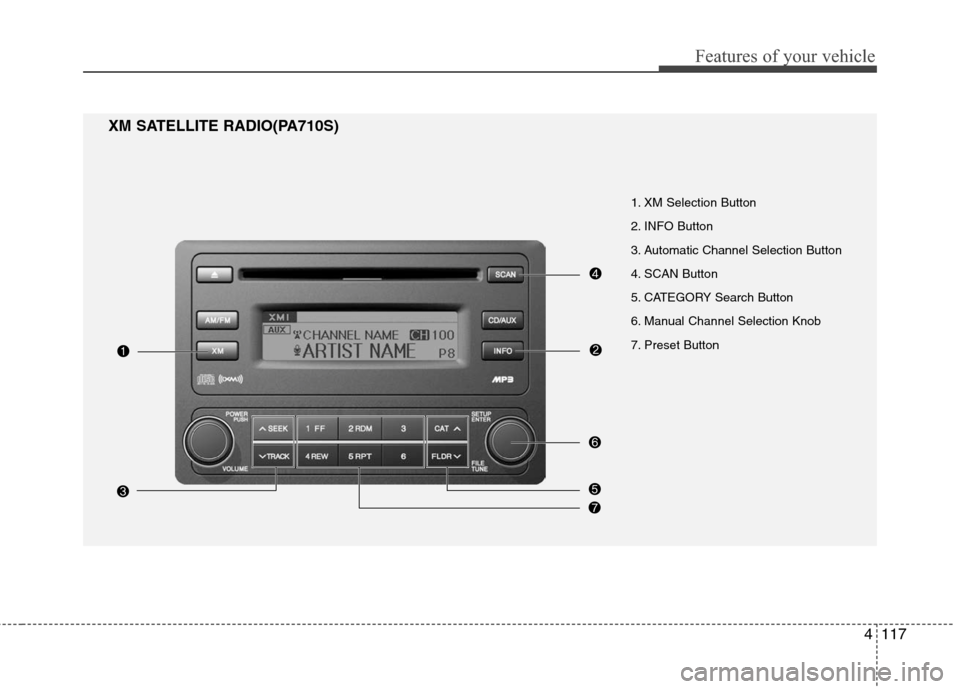
1. XM Selection Button
2. INFO Button
3. Automatic Channel Selection Button
4. SCAN Button
5. CATEGORY Search Button
6. Manual Channel Selection Knob
7. Preset Button
XM SATELLITE RADIO(PA710S)
Page 191 of 348
Features of your vehicle
118
4
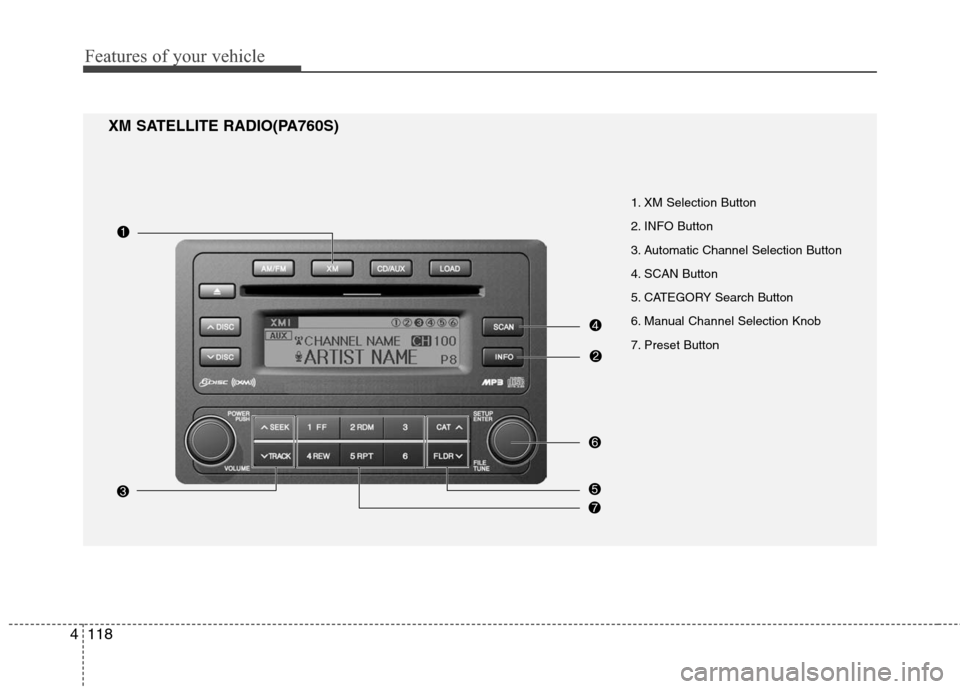
XM SATELLITE RADIO(PA760S)
1. XM Selection Button
2. INFO Button
3. Automatic Channel Selection Button
4. SCAN Button
5. CATEGORY Search Button
6. Manual Channel Selection Knob
7. Preset Button
Page 192 of 348
4119
Features of your vehicle
1. XM Selection Button
Turns to XM Satellite Radio Mode. XM
mode toggles in order to XM1 ➟ XM2 ➟XM3 ➟ XM1... when the button is
pressed each time.
2. INFO Button
Displays the information of the current
channel in the order of Artist/Song title ➟Category/Channel name ➟ Current Play
Channel ➟ Artist/Song title ➟ Category/
Channel name... when the button is
pressed each time. If it can not display
the whole text information, rotate the
tune button to see the next page.
3. Automatic Channel Selection Button
] button for less than
0.8 second to select previous channel.
] button for less than 0.8 second to select next channel.
Seek or Tune to XM channel 0 to display the Radio ID.
4. SCAN Button
Press to hear a brief sampling of all
channels.
To cancel the scan mode, press the but-
ton once again.
5. CATEGORY Search Button
Push [FLDR ] button to search previ-ous category.
] button to search next category. To listen to the displayed cat-
egory, press the TUNE/ENTER knob. To
scan channel in displayed category,
press the [SCAN] button.
To search channel in displayed category,
press [SEEK] buttons or turn the tune
button clockwise/counterclockwise.
(CATEGORY icon will be turned on in
Category mode)
6. Manual Channel Selection Knob
While listening to XM broadcast, rotate
this knob clockwise or counterclockwise
to search other channels while listening
to current channel. (Turn clockwise to
search higher channels, and counter-
clockwise to lower channels.)
7. Preset Button
Push [1]~[6] buttons less than 0.8 sec-
ond to play the channel saved in each
button. Push [PRESET] button for 0.8
second or longer to save current channel
to the respective button with a beep.
Page 220 of 348
Driving your vehicle
28
5
To temporarily accelerate with the
cruise control on:
If you want to speed up temporarily when
the cruise control is on, depress the
accelerator pedal. Increased speed will
not interfere with cruise control operation
or change the set speed.
To return to the set speed, take your foot
off the accelerator.
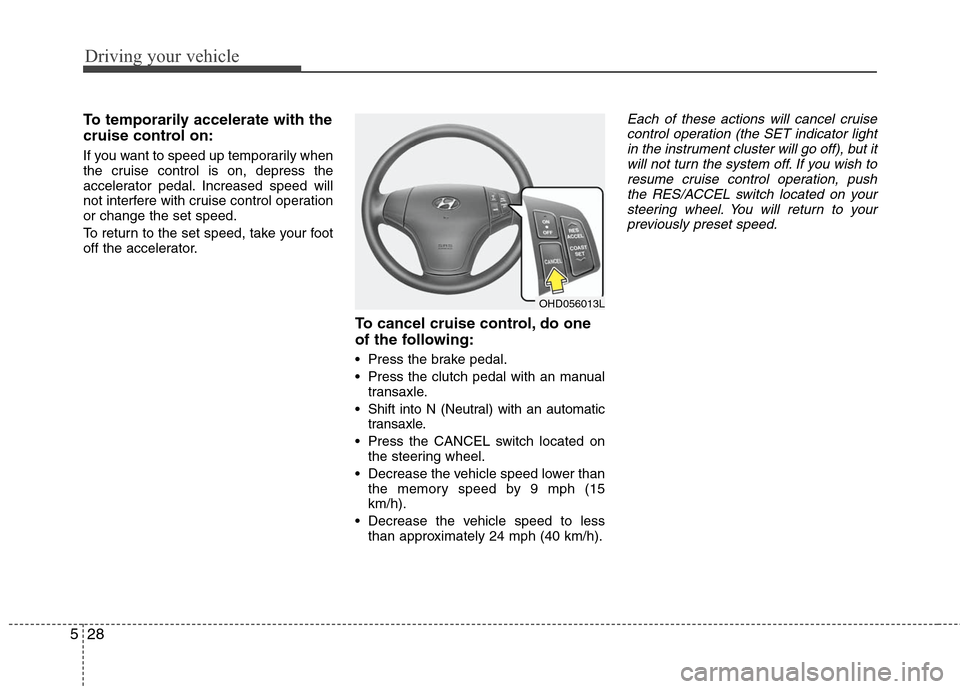
To cancel cruise control, do one
of the following:
Press the brake pedal.
Press the clutch pedal with an manual
transaxle.
Shift into N (Neutral) with an automatic transaxle.
Press the CANCEL switch located on the steering wheel.
Decrease the vehicle speed lower than the memory speed by 9 mph (15
km/h).
Decrease the vehicle speed to less than approximately 24 mph (40 km/h).
Each of these actions will cancel cruisecontrol operation (the SET indicator light in the instrument cluster will go off), but itwill not turn the system off. If you wish to resume cruise control operation, pushthe RES/ACCEL switch located on yoursteering wheel. You will return to yourpreviously preset speed.
OHD056013L