change time Hyundai Elantra 2013 User Guide
[x] Cancel search | Manufacturer: HYUNDAI, Model Year: 2013, Model line: Elantra, Model: Hyundai Elantra 2013Pages: 383, PDF Size: 8.94 MB
Page 200 of 383
Features of your vehicle
122 4
■Talking on the Phone
When talking on the phone, “Active Call”
message and the other party’s phone
number (if available) are displayed on the
audio.
- Press button on the steering wheel.
✽ ✽
NOTICE
In the following situations, you or the
other party may have difficulty hearing
each other:
1. Speaking at the same time, your voice
may not reach each other parties. (This
is not a malfunction.) Speak alternate-
ly with the other party on the phone.
2. Keep the Bluetooth
®volume to a low
level. High-level volume may result in
distortion and echo.
3. When driving on a rough road.
4. When driving at high speeds.
5. When the window is open.
6. When the air conditioning vents are
facing the microphone.
7. When the sound of the air condition-
ing fan is loud.
■Bluetooth®Audio Music Streaming
The audio system supports Bluetooth®
A2DP (Audio Advanced Distribution
Profile) and AVRCP (Audio Video
Remote Control Profile) technologies.
Both profiles provide steaming of music
via compatible “PAIRED” Bluetooth
®
Cellular phone.
To stream music from the Bluetooth® cel-
lular phone, play your music files on your
cellular phone according to your cellular
phone user’s manual and press the
button on the audio system until
“MP3 play” is displayed on the LCD.
The audio system head unit displays
‘MP3 MODE’.
NOTE:
all music and sound files your cellu-
lar phone supports can be played
by the audio system.
®compatible cellular
phones must include A2DP and
AVRCP capabilities.
AVRCP compatible
Bluetooth
®cellular phones may not
play music through the audio sys-
tem initially. These cellular phones
may need to have the Bluetooth
®
streaming enabled, for example;
i.e : Menu
➟Filemanager➟Music➟Option➟Play via Bluetooth
cellular phone for more information.
To cancel Bluetooth
®cellular phone
music streaming, stop music play-
back on the cellular phone or
change the audio mode to AM/FM,
XM, CD, iPod, ect.
CD/AUX
Page 201 of 383
4123
Features of your vehicle
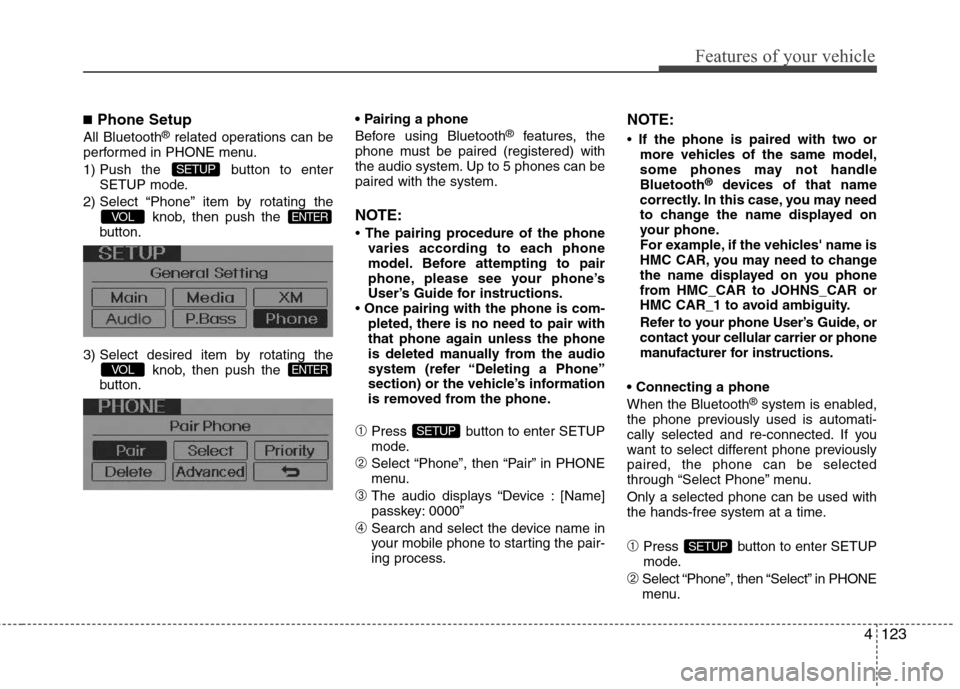
■Phone Setup
All Bluetooth®related operations can be
performed in PHONE menu.
1) Push the button to enter
SETUP mode.
2) Select “Phone” item by rotating the
knob, then push the
button.
3) Select desired item by rotating the
knob, then push the
button.
Before using Bluetooth®features, the
phone must be paired (registered) with
the audio system. Up to 5 phones can be
paired with the system.
NOTE:
• The pairing procedure of the phone
varies according to each phone
model. Before attempting to pair
phone, please see your phone’s
User’s Guide for instructions.
• Once pairing with the phone is com-
pleted, there is no need to pair with
that phone again unless the phone
is deleted manually from the audio
system (refer “Deleting a Phone”
section) or the vehicle’s information
is removed from the phone.
➀Press button to enter SETUP
mode.
➁Select “Phone”, then “Pair” in PHONE
menu.
➂The audio displays “Device : [Name]
passkey: 0000”
➃Search and select the device name in
your mobile phone to starting the pair-
ing process.
NOTE:
• If the phone is paired with two or
more vehicles of the same model,
some phones may not handle
Bluetooth
®devices of that name
correctly. In this case, you may need
to change the name displayed on
your phone.
For example, if the vehicles' name is
HMC CAR, you may need to change
the name displayed on you phone
from HMC_CAR to JOHNS_CAR or
HMC CAR_1 to avoid ambiguity.
Refer to your phone User’s Guide, or
contact your cellular carrier or phone
manufacturer for instructions.
When the Bluetooth
®system is enabled,
the phone previously used is automati-
cally selected and re-connected. If you
want to select different phone previously
paired, the phone can be selected
through “Select Phone” menu.
Only a selected phone can be used with
the hands-free system at a time.
➀Press button to enter SETUP
mode.
➁Select “Phone”, then “Select” in PHONE
menu.
SETUP
SETUP
ENTERVOL
ENTERVOL
SETUP
Page 203 of 383
4125
Features of your vehicle
Language of Bluetooth®voice recognition
While in ADVANCED menu, press
“Language”. To change the language,
select the desired language and press
the button.
Bluetooth
®system off
While in ADVANCED menu, select
“BT Off ” to turn off the Bluetooth
®System.
■Voice Recognition Activation
in the Bluetooth®System can be acti-
vated in the following conditions:
- Button Activation
The voice recognition system will be
active when the button is pressed
and after the sound of a Beep.
- Active Listening
The voice recognition system will be
active for a period of time when the
Voice Recognition system has asked
for a customer response.
from zero to nine while number greater
than ten will not be recognized.
tion mode in following cases : When
pressing the button and saying
cancel following the beep. When not
making a call and pressing the
button. When voice recognition has
failed 3 consecutive times.
will announce what commands are
available.
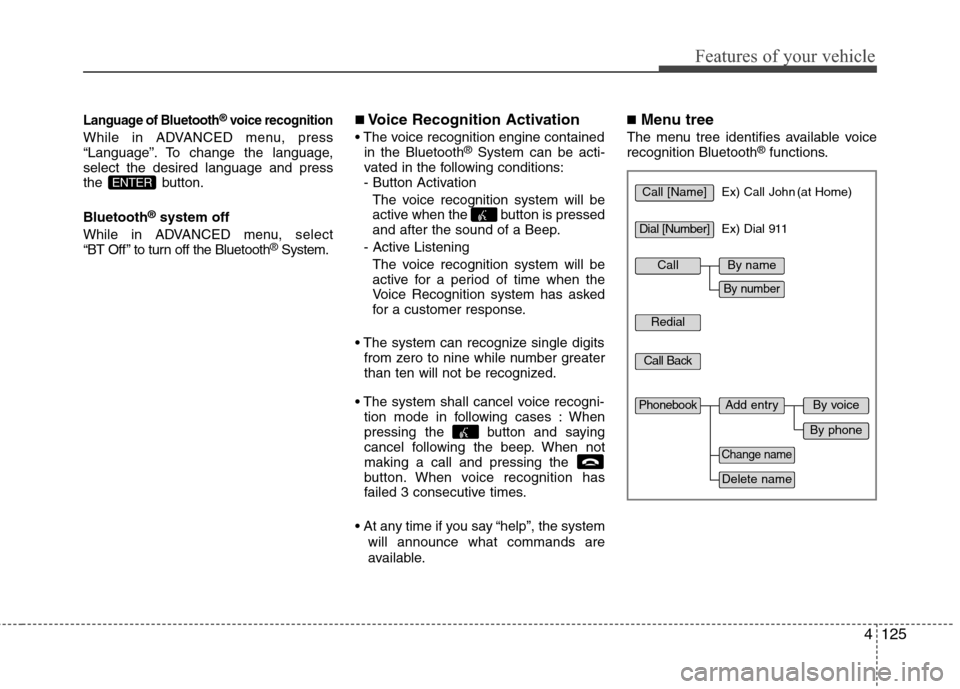
■Menu tree
The menu tree identifies available voice
recognition Bluetooth®functions.
ENTERCall [Name]Ex) Call John (at Home)
Ex) Dial 911
Dial [Number]
Redial
Call Back
Add entryPhonebook
Change name
Delete name
By phone
By voice
CallBy name
By number
Page 209 of 383
Driving your vehicle
2 5
WARNING- ENGINE EXHAUST CAN BE DANGEROUS!
Engine exhaust fumes can be extremely dangerous. If, at any time, you smell exhaust fumes inside the vehicle, open the win-
dows immediately.
• Do not inhale exhaust fumes.
Exhaust fumes contain carbon monoxide, a colorless, odorless gas that can cause unconsciousness and death by asphyxia-
tion.
The exhaust system should be checked whenever the vehicle is raised to change the oil or for any other purpose. If you hear
a change in the sound of the exhaust or if you drive over something that strikes the underneath side of the car, have the
exhaust system checked as soon as possible by an authorized HYUNDAI dealer.
Letting the engine idle in your garage, even with the garage door open, is a hazardous practice. Never run the engine in your
garage any longer than it takes to start the engine and back the car out.
If it is necessary to idle the engine for a prolonged period with people inside the car, be sure to do so only in an open area
with the air intake set at "Fresh" and fan operating at one of the higher speeds so fresh air is drawn into the interior.
If you must drive with the trunk lid open because you are carrying objects that make this necessary:
1. Close all windows.
2. Open side vents.
3. Set the air intake control at "Fresh", the air flow control at "Floor" or "Face" and the fan at one of the higher speeds.
To assure proper operation of the ventilation system, be sure the ventilation air intakes located just in front of the windshield are
kept clear of snow, ice, leaves or other obstructions.
Page 216 of 383
59
Driving your vehicle
ACC(Accessory)
• with manual transaxle
Press the engine start/stop button when
the button is in the OFF position without
depressing the clutch pedal.
• with automatic transaxle
Press the engine start/stop button when
the button is in the OFF position without
depressing the brake pedal.
If you leave the engine start/stop button
in the ACC position for more than 1 hour,
the button is turned off automatically to
prevent the battery from discharging.
ON
• with manual transaxle
Press the engine start/stop button when
the button is in the ACC position without
depressing the clutch pedal.
• with automatic transaxle
Press the engine start/stop button when
the button is in the ACC position without
depressing the brake pedal.
The warning lights can be checked
before the engine is started. Do not leave
the button in the ON position if the engine
is not running to prevent the battery from
discharging.
START
• with manual transaxle
To start the engine, depress the clutch
pedal and brake pedal, then press the
engine start/stop button with the shift
lever in the N(Neutral) position.
• with automatic transaxle
To start the engine, depress the brake
pedal and press the engine start/stop
button with the shift lever in the P(Park)
or the N (Neutral) position.
✽ ✽
NOTICE
• If you press the engine start/stop but-
ton without depressing the clutch
pedal on manual transaxle vehicles or
without depressing the brake pedal on
automatic transaxle vehicles, the
engine will not start and the engine
start/stop button changes as follows:
OFF→ →
ACC → →
ON → →
OFF
• If you leave the engine start/stop but-
ton in the ACC or the ON position for
a long time, the battery may be dis-
charged.
Page 229 of 383
Driving your vehicle
22 5
Disc brakes wear indicator
(if equipped)
Your vehicle has disc brakes.
When your brake pads are worn and new
pads are required, you will hear a high-
pitched warning sound from your front
brakes or rear brakes. You may hear this
sound come and go or it may occur
whenever you depress the brake pedal.
Please remember that some driving con-
ditions or climates may cause a brake
squeal when you first apply (or lightly
apply) the brakes. This is normal and does
not indicate a problem with your brakes.
Rear drum brakes (if equipped)
Your rear drum brakes do not have wear
indicators.Therefore, have the rear brake
linings inspected if you hear a rear brake
rubbing noise. Also have your rear
brakes inspected each time you change
or rotate your tires and when you have
the front brakes replaced.
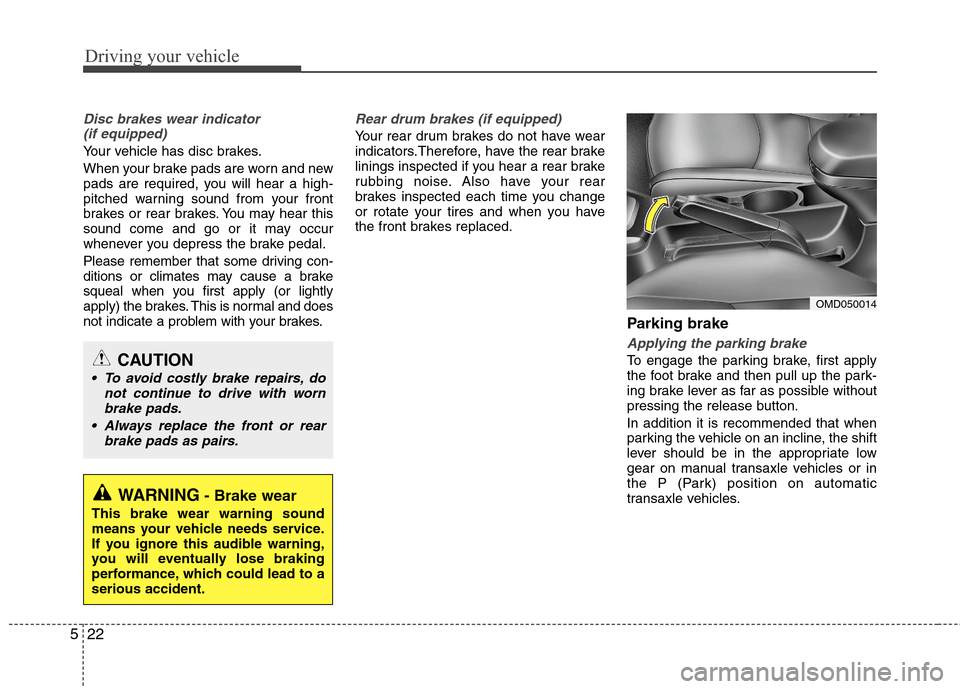
Parking brake
Applying the parking brake
To engage the parking brake, first apply
the foot brake and then pull up the park-
ing brake lever as far as possible without
pressing the release button.
In addition it is recommended that when
parking the vehicle on an incline, the shift
lever should be in the appropriate low
gear on manual transaxle vehicles or in
the P (Park) position on automatic
transaxle vehicles.
WARNING- Brake wear
This brake wear warning sound
means your vehicle needs service.
If you ignore this audible warning,
you will eventually lose braking
performance, which could lead to a
serious accident.
CAUTION
To avoid costly brake repairs, do
not continue to drive with worn
brake pads.
Always replace the front or rear
brake pads as pairs.
OMD050014
Page 240 of 383
533
Driving your vehicle
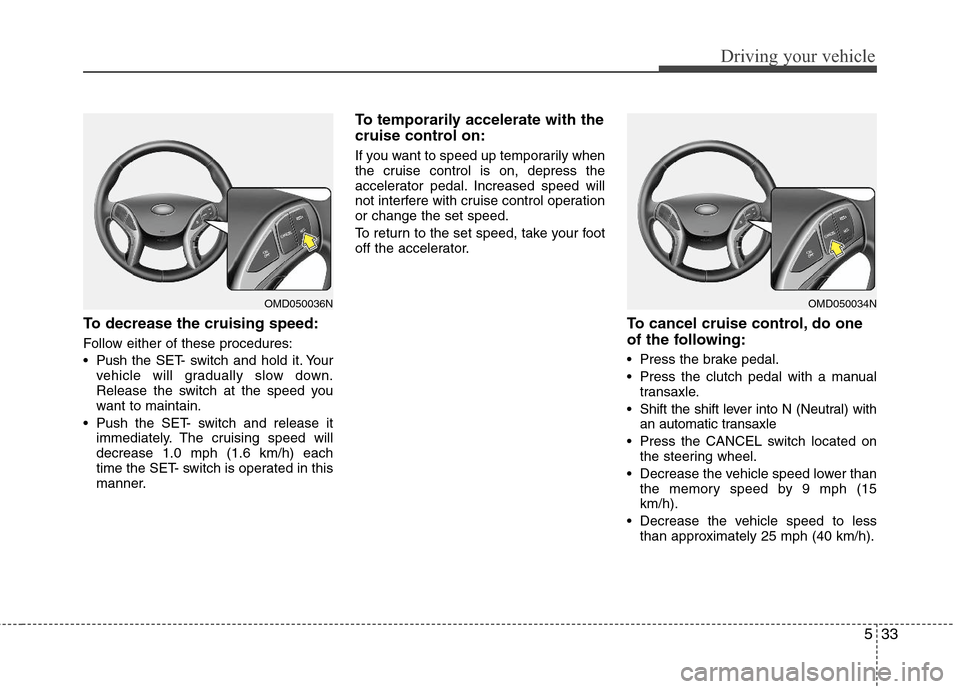
To decrease the cruising speed:
Follow either of these procedures:
Pushthe SET- switch and hold it. Your
vehicle will gradually slow down.
Release the switch at the speed you
want to maintain.
Push the SET- switch and release it
immediately. The cruising speed will
decrease 1.0 mph (1.6 km/h) each
time the SET- switch is operated in this
manner.
To temporarily accelerate with the
cruise control on:
If you want to speed up temporarily when
the cruise control is on, depress the
accelerator pedal. Increased speed will
not interfere with cruise control operation
or change the set speed.
To return to the set speed, take your foot
off the accelerator.
To cancel cruise control, do one
of the following:
Press the brake pedal.
Press the clutch pedal with a manual
transaxle.
Shift the shift lever into N (Neutral) with
an automatic transaxle
Press the CANCEL switch located on
the steering wheel.
Decrease the vehicle speed lower than
the memory speed by 9 mph (15
km/h).
Decrease the vehicle speed to less
than approximately 25 mph (40 km/h).
OMD050034NOMD050036N
Page 251 of 383
Driving your vehicle
44 5
Use high quality ethylene glycol
coolant
Your vehicle is delivered with high quality
ethylene glycol coolant in the cooling
system. It is the only type of coolant that
should be used because it helps prevent
corrosion in the cooling system, lubri-
cates the water pump and prevents
freezing. Be sure to replace or replenish
your coolant in accordance with the
maintenance schedule in section 7.
Before winter, have your coolant tested to
assure that its freezing point is sufficient
for the temperatures anticipated during
the winter.
Check battery and cables
Winter puts additional burdens on the
battery system. Visually inspect the bat-
tery and cables as described in section
7. The level of charge in your battery can
be checked by an authorized HYUNDAI
dealer or a service station.
Change to "winter weight" oil if
necessary
In some climates it is recommended that
a lower viscosity "winter weight" oil be
used during cold weather. See section 8
for recommendations. If you aren't sure
what weight oil you should use, consult
an authorized HYUNDAI dealer.
Check spark plugs and ignition
system
Inspect your spark plugs as described in
section 7 and replace them if necessary.
Also check all ignition wiring and compo-
nents to be sure they are not cracked,
worn or damaged in any way.
WARNING- Tire chains
The use of chains may adversely
affect vehicle handling.
Do not exceed 20 mph (30 km/h)
or the chain manufacturer’s rec-
ommended speed limit, whichev-
er is lower.
Drive carefully and avoid bumps,
holes, sharp turns, and other
road hazards, which may cause
the vehicle to bounce.
Avoid sharp turns or locked-
wheel braking.
CAUTION
Chains that are the wrong size or
improperly installed can damage
your vehicle's brake lines, sus-
pension, body and wheels.
Stop driving and retighten the
chains any time you hear them
hitting the vehicle.
Page 310 of 383
Maintenance
22 7
Changing the engine oil and filter
Have engine oil and filter changed by an
authorized HYUNDAI dealer according to
the Maintenance Schedule at the begin-
ning of this section.The high-pressure cooling system has a
reservoir filled with year-round antifreeze
coolant. The reservoir is filled at the factory.
Check the antifreeze protection and
coolant level at least once a year, at the
beginning of the winter season, and
before traveling to a colder climate.
Checking the coolant level
CALIFORNIA PROPOSI-
TION 65 WARNING
Engine oil contains chemicals
known to the State of California to
cause cancer, birth defects, and
reproductive harm.
Used engine oil may cause irrita-
tion or cancer of the skin if left in
contact with the skin for prolonged
periods of time. Used engine oil
contains chemicals that have
caused cancer in laboratory ani-
mals. Always protect your skin by
washing your hands thoroughly
with soap and warm water as soon
as possible after handling used oil.
ENGINE COOLANT
WARNING
Removing radiator
cap
Never attempt to remove the radi-
ator cap while the engine is oper-
ating or hot. Doing so might lead
to cooling system and engine
damage and could result in seri-
ous personal injury from escap-
ing hot coolant or steam.
(Continued)