stop Hyundai Elantra 2013 Service Manual
[x] Cancel search | Manufacturer: HYUNDAI, Model Year: 2013, Model line: Elantra, Model: Hyundai Elantra 2013Pages: 383, PDF Size: 8.94 MB
Page 169 of 383
491
Features of your vehicle
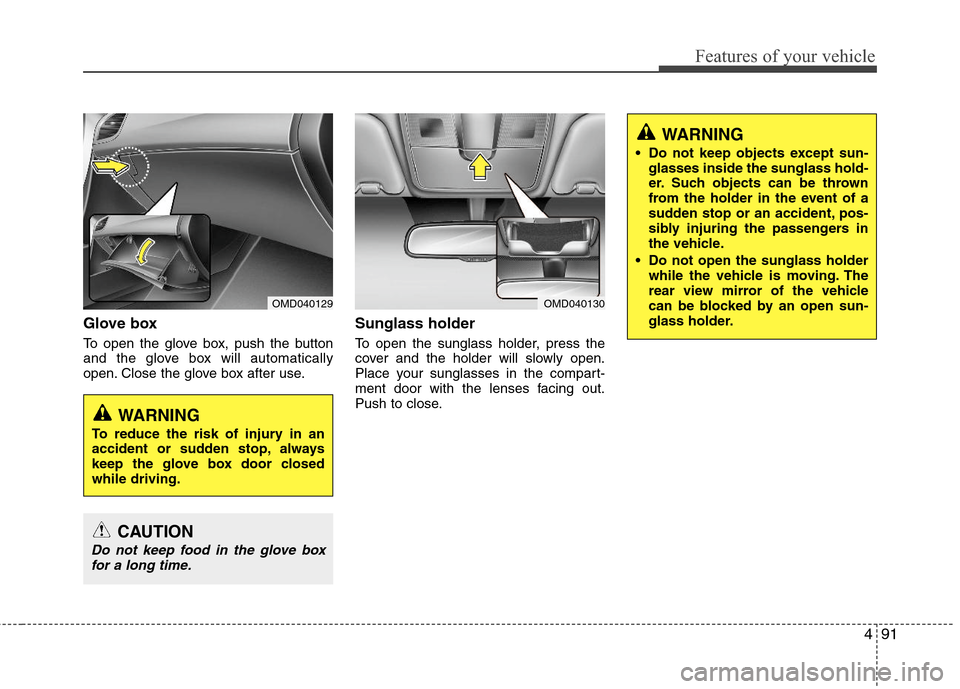
Glove box
To open the glove box, push the button
and the glove box will automatically
open. Close the glove box after use.
Sunglass holder
To open the sunglass holder, press the
cover and the holder will slowly open.
Place your sunglasses in the compart-
ment door with the lenses facing out.
Push to close.
OMD040130
WARNING
Do not keep objects except sun-
glasses inside the sunglass hold-
er. Such objects can be thrown
from the holder in the event of a
sudden stop or an accident, pos-
sibly injuring the passengers in
the vehicle.
Do not open the sunglass holder
while the vehicle is moving. The
rear view mirror of the vehicle
can be blocked by an open sun-
glass holder.
OMD040129
WARNING
To reduce the risk of injury in an
accident or sudden stop, always
keep the glove box door closed
while driving.
CAUTION
Do not keep food in the glove box
for a long time.
Page 171 of 383
493
Features of your vehicle
INTERIOR FEATURES
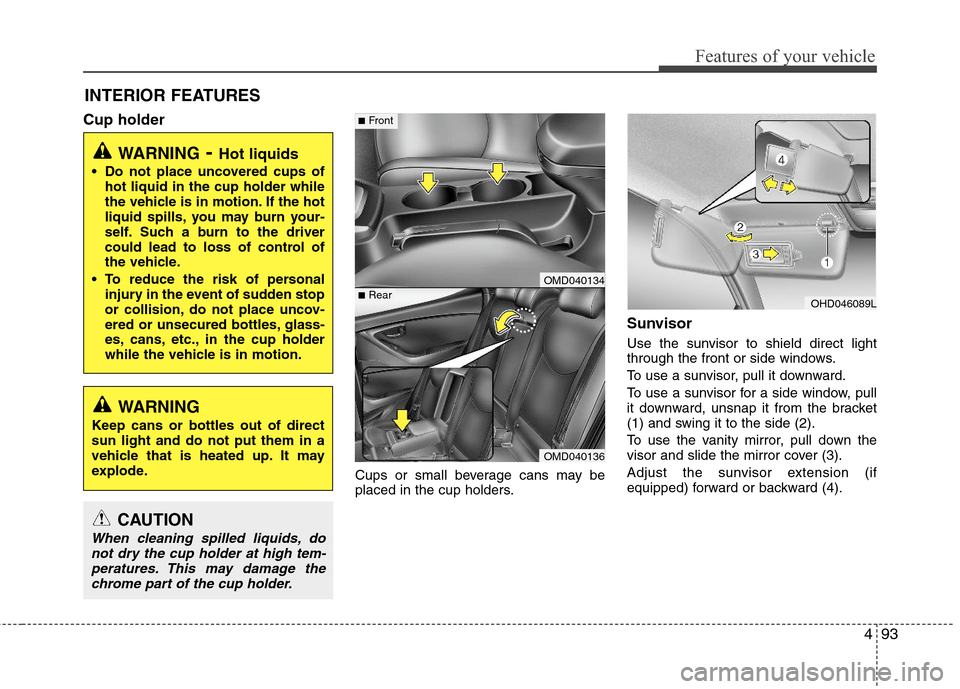
Cup holder
Cups or small beverage cans may be
placed in the cup holders.
Sunvisor
Use the sunvisor to shield direct light
through the front or side windows.
To use a sunvisor, pull it downward.
To use a sunvisor for a side window, pull
it downward, unsnap it from the bracket
(1) and swing it to the side (2).
To use the vanity mirror, pull down the
visor and slide the mirror cover (3).
Adjust the sunvisor extension (if
equipped) forward or backward (4).
WARNING- Hot liquids
Do not place uncovered cups of
hot liquid in the cup holder while
the vehicle is in motion. If the hot
liquid spills, you may burn your-
self. Such a burn to the driver
could lead to loss of control of
the vehicle.
To reduce the risk of personal
injury in the event of sudden stop
or collision, do not place uncov-
ered or unsecured bottles, glass-
es, cans, etc., in the cup holder
while the vehicle is in motion.
OMD040134
OMD040136
■Rear
■Front
OHD046089L
WARNING
Keep cans or bottles out of direct
sun light and do not put them in a
vehicle that is heated up. It may
explode.
CAUTION
When cleaning spilled liquids, do
not dry the cup holder at high tem-
peratures. This may damage the
chrome part of the cup holder.
Page 181 of 383
4103
Features of your vehicle
Using a cellular phone or a two-way
radio
When a cellular phone is used inside the
vehicle, noise may be produced from the
audio equipment. This does not mean
that something is wrong with the audio
equipment. In such a case, use the cellu-
lar phone at a place as far as possible
from the audio equipment.
Care of disc
If the temperature inside the car is too
high, open the car windows for ventilation
before using your car audio.
It is illegal to copy and use MP3/WMA
files without permission. Use CDs that
are created only by lawful means.
Do not apply volatile agents such as
benzene and thinner, normal cleaners
and magnetic sprays made for ana-
logue disc onto CDs.
To prevent the disc surface from get-
ting damaged. Hold and carry CDs by
the edges or the edges of the center
hole only.
Clean the disc surface with a piece of
soft cloth before playback (wipe it from
the center to the outside edge).
Do not damage the disc surface or
attach pieces of sticky tape or paper
onto it.
Make sure on undesirable matter other
than CDs are inserted into the CD
player (Do not insert more than one
CD at a time). Keep CDs in their cases after use to
protect them from scratches or dirt.
Depending on the type of CD-R/CD-
RW CDs, certain CDs may not operate
normally according to manufacturing
companies or making and recording
methods. In such circumstances, if you
still continue to use those CDs, they
may cause the malfunction of your car
audio system.
✽ ✽
NOTICE- Playing an
Incompatible Copy
Protected Audio CD
Some copy protected CDs, which do not
comply with the international audio CD
standards (Red Book), may not play on
your car audio. Please note that if you
try to play copy protected CDs and the
CD player does not perform correctly
the CDs maybe defective, not the CD
player.
CAUTION
When using a communication sys-
tem such a cellular phone or a radio
set inside the vehicle, a separate
external antenna must be fitted.
When a cellular phone or a radio set
is used with an internal antenna
alone, it may interfere with the vehi-
cle's electrical system and adverse-
ly affect safe operation of the vehi-
cle.
WARNING
Do not use a cellular phone while
driving. Stop at a safe location to
use a cellular phone.
Page 183 of 383
4105
Features of your vehicle
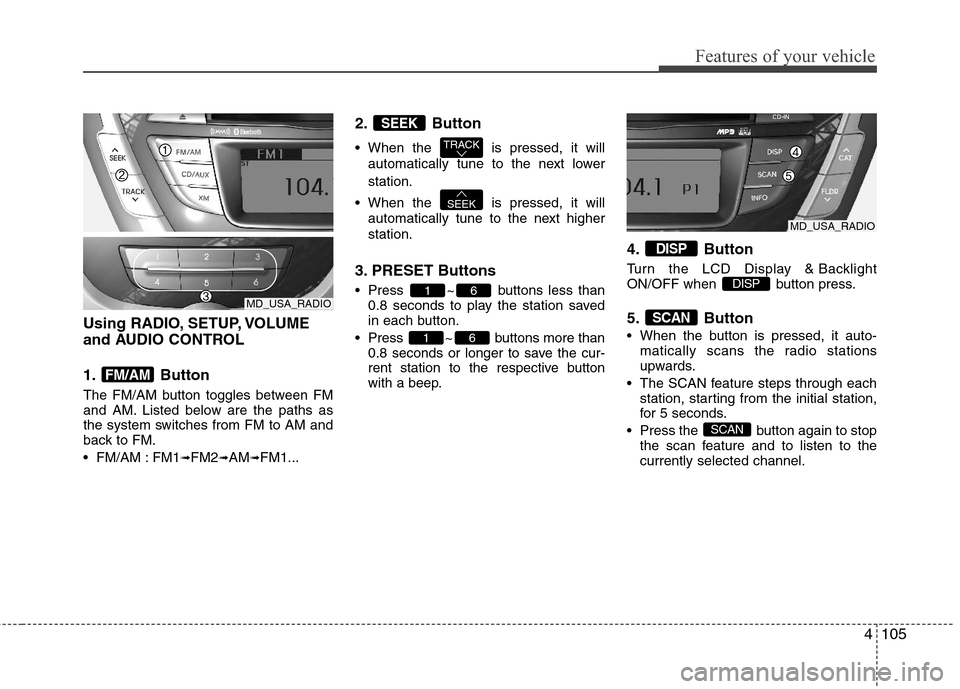
Using RADIO, SETUP, VOLUME
and AUDIO CONTROL
1. Button
The FM/AM button toggles between FM
and AM. Listed below are the paths as
the system switches from FM to AM and
back to FM.
FM/AM : FM1
➟FM2➟AM➟FM1...
2. Button
When the is pressed, it will
automatically tune to the next lower
station.
When the is pressed, it will
automatically tune to the next higher
station.
3. PRESET Buttons
Press ~ buttons less than
0.8 seconds to play the station saved
in each button.
Press ~ buttons more than
0.8 seconds or longer to save the cur-
rent station to the respective button
with a beep.
4. Button
Turn the LCD Display & Backlight
ON/OFF when button press.
5. Button
When the button is pressed, it auto-
matically scans the radio stations
upwards.
The SCAN feature steps through each
station, starting from the initial station,
for 5 seconds.
Press the button again to stop
the scan feature and to listen to the
currently selected channel.
SCAN
SCAN
DISP
DISP
61
61
SEEK
TRACK
SEEK
FM/AM
MD_USA_RADIO
MD_USA_RADIO
Page 200 of 383
Features of your vehicle
122 4
■Talking on the Phone
When talking on the phone, “Active Call”
message and the other party’s phone
number (if available) are displayed on the
audio.
- Press button on the steering wheel.
✽ ✽
NOTICE
In the following situations, you or the
other party may have difficulty hearing
each other:
1. Speaking at the same time, your voice
may not reach each other parties. (This
is not a malfunction.) Speak alternate-
ly with the other party on the phone.
2. Keep the Bluetooth
®volume to a low
level. High-level volume may result in
distortion and echo.
3. When driving on a rough road.
4. When driving at high speeds.
5. When the window is open.
6. When the air conditioning vents are
facing the microphone.
7. When the sound of the air condition-
ing fan is loud.
■Bluetooth®Audio Music Streaming
The audio system supports Bluetooth®
A2DP (Audio Advanced Distribution
Profile) and AVRCP (Audio Video
Remote Control Profile) technologies.
Both profiles provide steaming of music
via compatible “PAIRED” Bluetooth
®
Cellular phone.
To stream music from the Bluetooth® cel-
lular phone, play your music files on your
cellular phone according to your cellular
phone user’s manual and press the
button on the audio system until
“MP3 play” is displayed on the LCD.
The audio system head unit displays
‘MP3 MODE’.
NOTE:
all music and sound files your cellu-
lar phone supports can be played
by the audio system.
®compatible cellular
phones must include A2DP and
AVRCP capabilities.
AVRCP compatible
Bluetooth
®cellular phones may not
play music through the audio sys-
tem initially. These cellular phones
may need to have the Bluetooth
®
streaming enabled, for example;
i.e : Menu
➟Filemanager➟Music➟Option➟Play via Bluetooth
cellular phone for more information.
To cancel Bluetooth
®cellular phone
music streaming, stop music play-
back on the cellular phone or
change the audio mode to AM/FM,
XM, CD, iPod, ect.
CD/AUX
Page 208 of 383
5
Before driving / 5-3
Key / 5-5
Engine start/stop button / 5-8
Manual transaxle /5-12
Automatic transaxle / 5-15
Brake system / 5-21
Cruise control system / 5-31
Active ECO system / 5-35
Economical operation / 5-36
Special driving conditions / 5-38
Winter driving / 5-42
Vehicle load limit / 5-46
Vehicle weight / 5-51
Trailer towing / 5-52
Driving your vehicle
Page 211 of 383
Driving your vehicle
4 5
Before starting
Close and lock all doors.
Position the seat so that all controls are
easily reached.
Adjust the inside and outside rearview
mirrors.
Be sure that all lights work.
Check all gauges.
Check the operation of warning lights
when the ignition switch is turned to
the ON position.
Release the parking brake and make
sure the brake warning light goes out.
For safe operation, be sure you are famil-
iar with your vehicle and its equipment.WARNING
Always check the surrounding
areas near your vehicle for people,
especially children, before putting a
car into D (Drive) or R (Reverse).
WARNING- Driving under
the influence of alcohol or
drugs
Drinking and driving is dangerous.
Drunk driving is the number one
contributor to the highway death
toll each year. Even a small amount
of alcohol will affect your reflexes,
perceptions and judgment. Driving
while under the influence of drugs
is as dangerous or more dangerous
than driving drunk.
You are much more likely to have a
serious accident if you drink or
take drugs and drive.
If you are drinking or taking drugs,
don’t drive. Do not ride with a driv-
er who has been drinking or taking
drugs. Choose a designated driver
or call a cab.
WARNING
When you intend to park or stop
the vehicle with the engine on, be
careful not to depress the accel-
erator pedal for a long period of
time. It may overheat the engine
or exhaust system and cause fire.
When you make a sudden stop or
turn the steering wheel rapidly,
loose objects may drop on the
floor and it could interfere with
the operation of the foot pedals,
possibly causing an accident.
Keep all things in the vehicle
safely stored.
If you do not focus on driving, it
may cause an accident. Be care-
ful when operating what may dis-
turb driving such as audio or
heater. It is the responsibility of
the driver to always drive safely.
WARNING
All passengers must be properly
belted whenever the vehicle is mov-
ing. Refer to “Seat belts” in section
3 for more information on their
proper use.
Page 215 of 383
Driving your vehicle
8 5
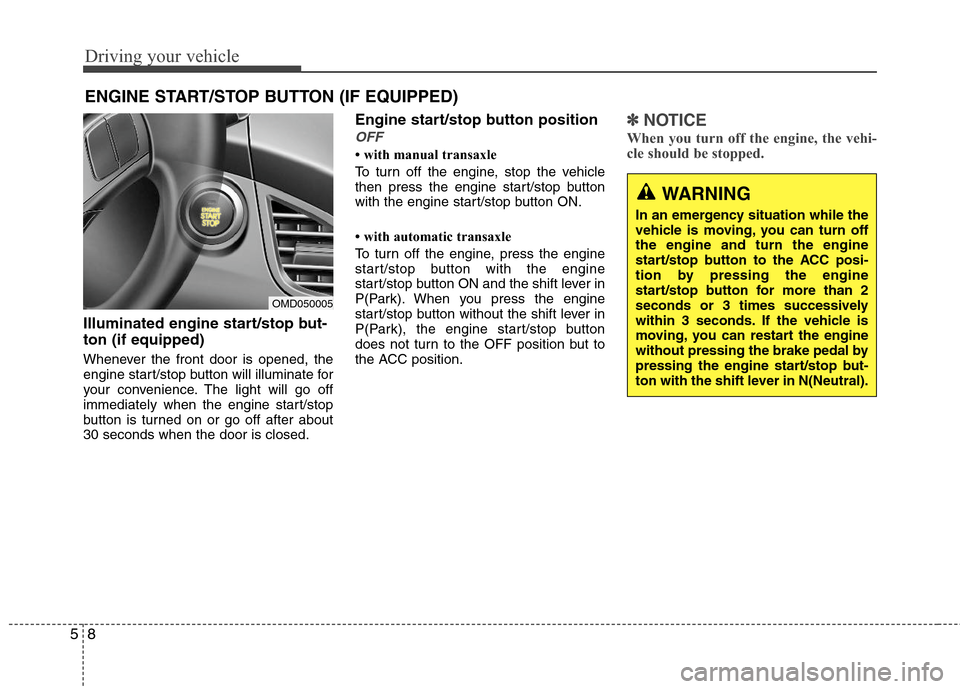
Illuminated engine start/stop but-
ton (if equipped)
Whenever the front door is opened, the
engine start/stop button will illuminate for
your convenience. The light will go off
immediately when the engine start/stop
button is turned on or go off after about
30 seconds when the door is closed.
Engine start/stop button position
OFF
• with manual transaxle
To turn off the engine, stop the vehicle
then press the engine start/stop button
with the engine start/stop button ON.
• with automatic transaxle
To turn off the engine, press the engine
start/stop button with the engine
start/stop button ON and the shift lever in
P(Park). When you press the engine
start/stop button without the shift lever in
P(Park), the engine start/stop button
does not turn to the OFF position but to
the ACC position.
✽ ✽
NOTICE
When you turn off the engine, the vehi-
cle should be stopped.
ENGINE START/STOP BUTTON (IF EQUIPPED)
OMD050005
WARNING
In an emergency situation while the
vehicle is moving, you can turn off
the engine and turn the engine
start/stop button to the ACC posi-
tion by pressing the engine
start/stop button for more than 2
seconds or 3 times successively
within 3 seconds. If the vehicle is
moving, you can restart the engine
without pressing the brake pedal by
pressing the engine start/stop but-
ton with the shift lever in N(Neutral).
Page 216 of 383
59
Driving your vehicle
ACC(Accessory)
• with manual transaxle
Press the engine start/stop button when
the button is in the OFF position without
depressing the clutch pedal.
• with automatic transaxle
Press the engine start/stop button when
the button is in the OFF position without
depressing the brake pedal.
If you leave the engine start/stop button
in the ACC position for more than 1 hour,
the button is turned off automatically to
prevent the battery from discharging.
ON
• with manual transaxle
Press the engine start/stop button when
the button is in the ACC position without
depressing the clutch pedal.
• with automatic transaxle
Press the engine start/stop button when
the button is in the ACC position without
depressing the brake pedal.
The warning lights can be checked
before the engine is started. Do not leave
the button in the ON position if the engine
is not running to prevent the battery from
discharging.
START
• with manual transaxle
To start the engine, depress the clutch
pedal and brake pedal, then press the
engine start/stop button with the shift
lever in the N(Neutral) position.
• with automatic transaxle
To start the engine, depress the brake
pedal and press the engine start/stop
button with the shift lever in the P(Park)
or the N (Neutral) position.
✽ ✽
NOTICE
• If you press the engine start/stop but-
ton without depressing the clutch
pedal on manual transaxle vehicles or
without depressing the brake pedal on
automatic transaxle vehicles, the
engine will not start and the engine
start/stop button changes as follows:
OFF→ →
ACC → →
ON → →
OFF
• If you leave the engine start/stop but-
ton in the ACC or the ON position for
a long time, the battery may be dis-
charged.
Page 217 of 383
Driving your vehicle
10 5
Starting the engine1. Carry the smart key or leave it inside
the vehicle.
2. Make sure the parking brake is firmly
applied.
3.Manual Transaxle- Depress the
clutch pedal fully and shift the
transaxle into Neutral. Depress the
brake and clutch pedal fully.
Automatic Transaxle- Place the
transaxle shift lever in P (Park).
Depress the brake pedal fully.
You can also start the engine when the
shift lever is in the N (Neutral) position.
4. Press the engine start/stop button.
5. In extremely cold weather (below -
18°C / 0°F) or after the vehicle has not
been operated for several days, let the
engine warm up without depressing
the accelerator.
Whether the engine is cold or warm, it
should be started without depressing
the accelerator.
WARNING
Never press the engine start/stop
button while the vehicle is in
motion. This would result in loss
of directional control and braking
function, which could cause an
accident.
Before leaving the driver’s seat,
always make sure the shift lever
is engaged in 1st gear for the
manual transaxle or P
(Park) for
the automatic transaxle,set the
parking brake fully and shut the
engine off. Unexpected and sud-
den vehicle movement may occur
if these precautions are not taken.
Never reach for the engine
start/stop button, or any other con-
trols through the steering wheel
while the vehicle is in motion. The
presence of your hand or arm in
this area could cause a loss of
vehicle control, an accident and
serious bodily injury or death.
Do not place any movable objects
around the driver’s seat as they
may move while driving, interfere
with the driver and lead to an
accident.
WARNING
Always wear appropriate shoes
when operating your vehicle.
Unsuitable shoes (high heels, ski
boots, etc.) may interfere with your
ability to use the brake, accelerator
and clutch pedal (if equipped).