battery Hyundai Elantra 2014 Owner's Guide
[x] Cancel search | Manufacturer: HYUNDAI, Model Year: 2014, Model line: Elantra, Model: Hyundai Elantra 2014Pages: 668, PDF Size: 35.58 MB
Page 213 of 668
4127
Features of your vehicle
(Continued) Turn on the car ignition before using this device. Do not oper-ate the audio system for longperiods of time with the ignitionturned off as such operationsmay lead to battery discharge.
Do not subject the device to severe shock or impact. Directpressure onto the front side ofthe monitor may cause dam-age to the LCD or touchscreen.
When cleaning the device, make sure to turn off thedevice and use a dry andsmooth cloth. Never usetough materials, chemicalcloths, or solvents (alcohol,benzene, thinners, etc.) assuch materials may damagethe device panel or causecolor/quality deterioration.
(Continued)CAUTION
Operating the device whiledriving could lead to accidentsdue to a lack of attention toexternal surroundings. Firstpark the vehicle before operat-ing the device.
Adjust the volume to levels that allow the driver to hear soundsfrom outside of the vehicle.Driving in a state where exter-nal sounds cannot be heardmay lead to accidents.
Pay attention to the volume set- ting when turning the deviceon. A sudden output of extremevolume upon turning thedevice on could lead to hearingimpairment. (Adjust the volumeto a suitable levels before turn-ing off the device.)
(Continued)
(Continued) Do not place beverages close to the audio system. Spillingbeverages may lead to systemmalfunction.
In case of product malfunc- tion, please contact your clos-est authorized Hyundai dealer.
Placing the audio system within an electromagneticenvironment may result innoise interference.
Prevent caustic solutions such as perfume and cosmetic oilfrom contacting the dashboardbecause they may cause dam-age or discoloration.
Page 216 of 668
Features of your vehicle
130
4
✽
✽
NOTICE - USING THE
iPod®DEVICE
• Some iPod®models may not
support communication proto-
col and files may not properly
play.
Supported iPod
®models:
- iPhone®3GS/4
- iPod®touch 1st~4th generation
- iPod®nano 1st~6th generation
- iPod®classic
• The order of search or playback of songs in the iPod
®can be dif-
ferent from the order searched
in the audio system.
• If the iPod
®is disabled due to its
own malfunction, reset the
iPod
®. (Reset: Refer to iPod®
manual)
• An iPod®may not operate nor-
mally on low battery. (Continued)(Continued)
• Some iPod
®devices, such as the
iPhone®, can be connected
through the Bluetooth®Wireless
Technology interface. The
device must have audio
Bluetooth
®Wireless Technology
capability (such as for stereo
headphone Bluetooth
®Wireless
Technology).
The device can play, but it will
not be controlled by the audio
system.
• To use iPod
®features within the
audio, use the cable provided
upon purchasing an iPod
®
device.
• Skipping or improper operation may occur depending on the
characteristics of your iPod
®/
iPhone®device.
• If your iPhone®is connected to
both the Bluetooth®Wireless
Technology and USB, the sound
may not be properly played. In
your iPhone
®, select the Dock
connector or Bluetooth®
Wireless Technology to change
the sound output (source).
(Continued)(Continued)
• When connecting iPod
®with the
iPod®Power Cable, insert the
connector to the multimedia
socket completely. If not insert-
ed completely, communications
between iPod
®and audio may
be interrupted.
• When adjusting the sound effects of the iPod
®and the
audio system, the sound effects
of both devices will overlap and
might reduce or distort the
quality of the sound.
• Deactivate (turn off) the equal- izer function of an iPod
®when
adjusting the audio system’s
volume, and turn off the equal-
izer of the audio system when
using the equalizer of an iPod
®.
• When not using iPod®with car
audio, detach the iPod®cable
from iPod®. Otherwise, iPod®
may remain in accessory mode,
and may not work properly.
Page 218 of 668
Features of your vehicle
132
4
✽
✽
NOTICE - WHEN CON-
NECTING A
Bluetooth®
PHONE
• Before connecting the head unit
with the mobile phone, check to
see that the mobile phone supports
Bluetooth
®features.
• Even if the phone supports Bluetooth
®, the phone will not be
found during device searches if the
phone has been set to hidden state
or the Bluetooth
®power is turned
off. Disable the hidden state or
turn on the Bluetooth
®power
prior to searching/connecting with
the Head unit.
• Bluetooth phone is automatically connected when the ignition is
turned on.
• If you do not want automatic con- nection with your Bluetooth
®
device, turn off the Bluetooth®fea-
ture within your mobile phone.
• The Handsfree call volume and quality may differ depending on
the mobile phone. (Continued)(Continued)
• Park the vehicle when connecting
the head unit with the mobile
phone.
• Bluetooth
®connection may
become intermittently disconnect-
ed in some mobile phones. Follow
these steps to try again. 1.Within the mobile phone, turn the Bluetooth
®function off/on
and try again.
2.Turn the mobile phone power Off/On and try again.
3.Completely remove the mobile phone battery, reboot, and then
again.
4.Reboot the Audio System and try again.
5. Delete all paired devices, pair and try again.
• Handsfree call quality and volume may differ depending on the
model of your mobile phone.
Page 297 of 668
4211
Features of your vehicle
✽
✽NOTICE - USING THE
iPod®DEVICE
• iPod®is a registered trademark
of Apple Inc.
• In order to use the iPod
®while
operating the keys, you must use
a dedicated iPod
®cable. (the
cable that is supplied when pur-
chasing iPod
®/iPhone®prod-
ucts)
• If the iPod
®is connected to the
vehicle while it is playing, a high
pitch sound could occur for
approximately 1-2 seconds
immediately after connecting. If
possible, connect the iPod to the
vehicle with the iPod
®stopped/
paused.
• During ACC ON state, connect- ing the iPod
®through the iPod®
cable will charge the iPod®
through the car audio system.
• When connecting with the iPod®
cable, make sure to fully insert
the jack to prevent communica-
tion interference. (Continued)(Continued)
• When the EQ features of an
external device, such as the
iPod
®, and the audio system are
both active, EQ effects could
overlap and cause sound deteri-
oration and distortion.
Whenever possible, turn off the
EQ feature within the external
device upon use by connecting
with the audio system.
• Noise may occur when an iPod
®
or AUX device is connected.
When such devices are not being
used, disconnect the device for
storage.
• When the iPod
®or AUX device
power is connected to the power
jack, playing the external device
may result in noise. In such
cases, disconnect the power con-
nection before use.
• Skipping or improper operation may occur depending on the
characteristics of your iPod
®
/Phone®device. (Continued) (Continued)
• If your iPhone
®is connected to
both the Bluetooth®Wireless
Technology and USB, the sound
may not be properly played. In
your iPhone
®, select the Dock
connector or Bluetooth®Wireless
Technology to change the sound
output (source).
• iPod mode cannot be operated when the iPod
®cannot be recog-
nized due to versions that do not
support communication proto-
cols.
• For fifth generation iPod
®Nano
devices, the iPod®may not be
recognized when the battery
level is low. Please charge the
iPod
®for use.
• Search/play orders shown with- in the iPod
®device may differ
with the orders shown within
the audio system.
• If the iPod
®malfunctions due to
an iPod®device defect, reset the
iPod®and try again. (To learn
more, refer to your iPod®manual)
(Continued)
Page 415 of 668
4329
Features of your vehicle
✽
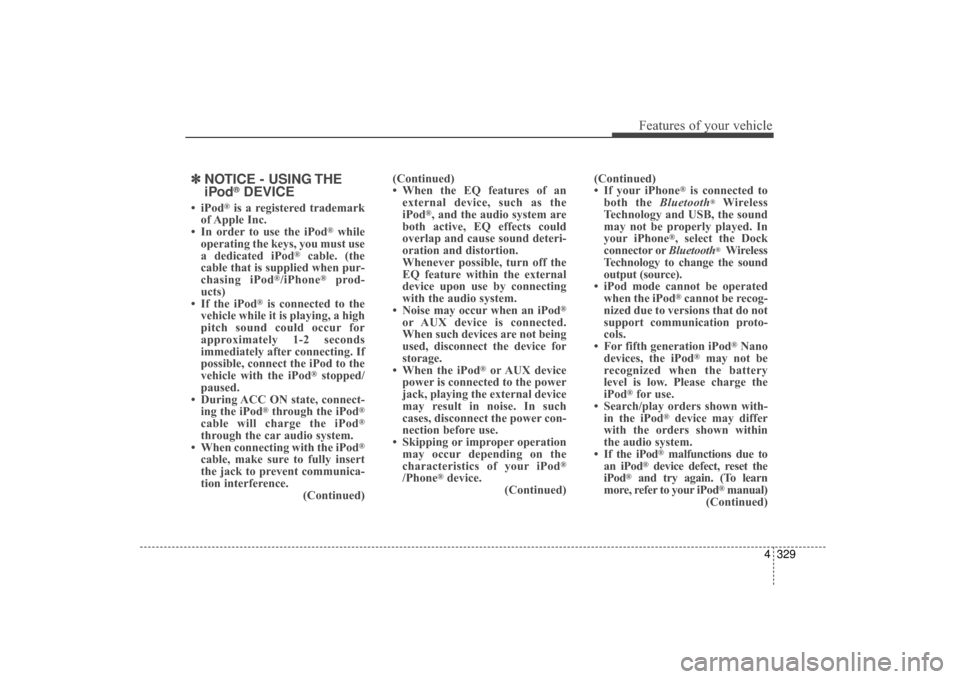
✽NOTICE - USING THE
iPod®DEVICE
• iPod®is a registered trademark
of Apple Inc.
• In order to use the iPod
®while
operating the keys, you must use
a dedicated iPod
®cable. (the
cable that is supplied when pur-
chasing iPod
®/iPhone®prod-
ucts)
• If the iPod
®is connected to the
vehicle while it is playing, a high
pitch sound could occur for
approximately 1-2 seconds
immediately after connecting. If
possible, connect the iPod to the
vehicle with the iPod
®stopped/
paused.
• During ACC ON state, connect- ing the iPod
®through the iPod®
cable will charge the iPod®
through the car audio system.
• When connecting with the iPod®
cable, make sure to fully insert
the jack to prevent communica-
tion interference. (Continued)(Continued)
• When the EQ features of an
external device, such as the
iPod
®, and the audio system are
both active, EQ effects could
overlap and cause sound deteri-
oration and distortion.
Whenever possible, turn off the
EQ feature within the external
device upon use by connecting
with the audio system.
• Noise may occur when an iPod
®
or AUX device is connected.
When such devices are not being
used, disconnect the device for
storage.
• When the iPod
®or AUX device
power is connected to the power
jack, playing the external device
may result in noise. In such
cases, disconnect the power con-
nection before use.
• Skipping or improper operation may occur depending on the
characteristics of your iPod
®
/Phone®device. (Continued) (Continued)
• If your iPhone
®is connected to
both the Bluetooth®Wireless
Technology and USB, the sound
may not be properly played. In
your iPhone
®, select the Dock
connector or Bluetooth®Wireless
Technology to change the sound
output (source).
• iPod mode cannot be operated when the iPod
®cannot be recog-
nized due to versions that do not
support communication proto-
cols.
• For fifth generation iPod
®Nano
devices, the iPod®may not be
recognized when the battery
level is low. Please charge the
iPod
®for use.
• Search/play orders shown with- in the iPod
®device may differ
with the orders shown within
the audio system.
• If the iPod
®malfunctions due to
an iPod®device defect, reset the
iPod®and try again. (To learn
more, refer to your iPod®manual)
(Continued)
UD(FL) HMA 4C(254~AUDIO2).QXP 8/28/2014 5:28 PM Page 329
Page 457 of 668
Driving your vehicle
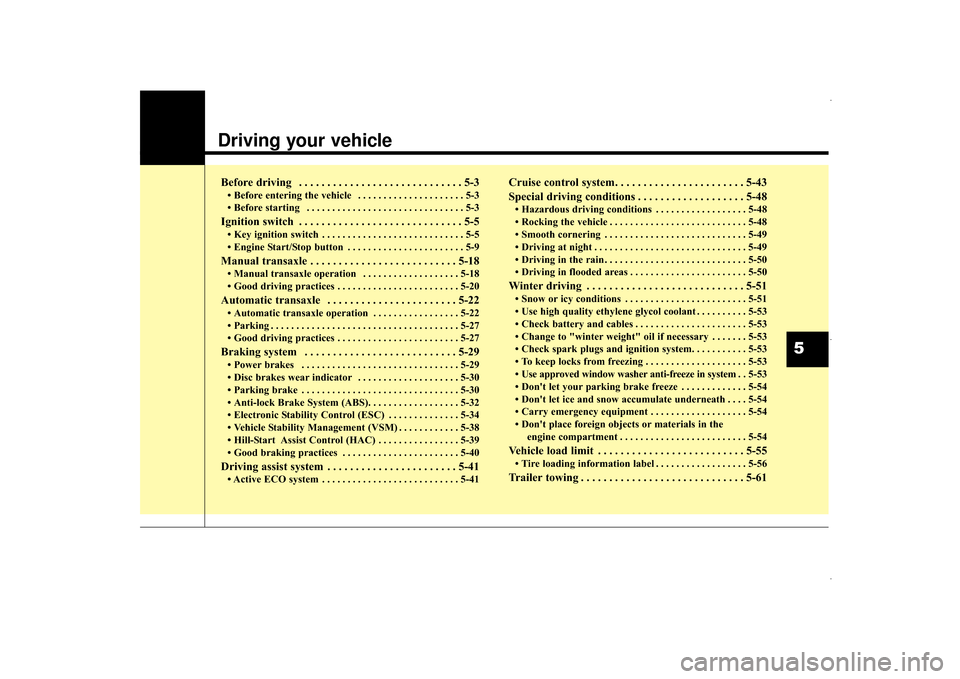
Before driving . . . . . . . . . . . . . . . . . . . . . . . . . . . . . 5-3
• Before entering the vehicle . . . . . . . . . . . . . . . . . . . . . 5-3
• Before starting . . . . . . . . . . . . . . . . . . . . . . . . . . . . . . . 5-3
Ignition switch . . . . . . . . . . . . . . . . . . . . . . . . . . . . . 5-5
• Key ignition switch . . . . . . . . . . . . . . . . . . . . . . . . . . . . 5-5
• Engine Start/Stop button . . . . . . . . . . . . . . . . . . . . . . . 5-9
Manual transaxle . . . . . . . . . . . . . . . . . . . . . . . . . . 5-18
• Manual transaxle operation . . . . . . . . . . . . . . . . . . . 5-18
• Good driving practices . . . . . . . . . . . . . . . . . . . . . . . . 5-20
Automatic transaxle . . . . . . . . . . . . . . . . . . . . . . . 5-22
• Automatic transaxle operation . . . . . . . . . . . . . . . . . 5-22
• Parking . . . . . . . . . . . . . . . . . . . . . . . . . . . . . . . . . . . . \
. 5-27
• Good driving practices . . . . . . . . . . . . . . . . . . . . . . . . 5-27
Braking system . . . . . . . . . . . . . . . . . . . . . . . . . . . 5-29
• Power brakes . . . . . . . . . . . . . . . . . . . . . . . . . . . . . . . 5-29
• Disc brakes wear indicator . . . . . . . . . . . . . . . . . . . . 5-30
• Parking brake . . . . . . . . . . . . . . . . . . . . . . . . . . . . . . . 5-30
• Anti-lock Brake System (ABS). . . . . . . . . . . . . . . . . . 5-32
• Electronic Stability Control (ESC) . . . . . . . . . . . . . . 5-34
• Vehicle Stability Management (VSM) . . . . . . . . . . . . 5-38
• Hill-Start Assist Control (HAC) . . . . . . . . . . . . . . . . 5-39
• Good braking practices . . . . . . . . . . . . . . . . . . . . . . . 5-40
Driving assist system . . . . . . . . . . . . . . . . . . . . . . . 5-41
• Active ECO system . . . . . . . . . . . . . . . . . . . . . . . . . . . 5-41
Cruise control system. . . . . . . . . . . . . . . . . . . . . . . 5-43
Special driving conditions . . . . . . . . . . . . . . . . . . . 5-48
• Hazardous driving conditions . . . . . . . . . . . . . . . . . . 5-48
• Rocking the vehicle . . . . . . . . . . . . . . . . . . . . . . . . . . . 5-48
• Smooth cornering . . . . . . . . . . . . . . . . . . . . . . . . . . . . 5-49
• Driving at night . . . . . . . . . . . . . . . . . . . . . . . . . . . . . . 5-49
• Driving in the rain . . . . . . . . . . . . . . . . . . . . . . . . . . . . 5-50
• Driving in flooded areas . . . . . . . . . . . . . . . . . . . . . . . 5-50
Winter driving . . . . . . . . . . . . . . . . . . . . . . . . . . . . 5-51
• Snow or icy conditions . . . . . . . . . . . . . . . . . . . . . . . . 5-51
• Use high quality ethylene glycol coolant . . . . . . . . . . 5-53
• Check battery and cables . . . . . . . . . . . . . . . . . . . . . . 5-53
• Change to "winter weight" oil if necessary . . . . . . . 5-53
• Check spark plugs and ignition system. . . . . . . . . . . 5-53
• To keep locks from freezing . . . . . . . . . . . . . . . . . . . . 5-53
• Use approved window washer anti-freeze in system . . 5-53
• Don't let your parking brake freeze . . . . . . . . . . . . . 5-54
• Don't let ice and snow accumulate underneath . . . . 5-54
• Carry emergency equipment . . . . . . . . . . . . . . . . . . . 5-54
• Don't place foreign objects or materials in the engine compartment . . . . . . . . . . . . . . . . . . . . . . . . . 5-54
Vehicle load limit . . . . . . . . . . . . . . . . . . . . . . . . . . 5-55
• Tire loading information label . . . . . . . . . . . . . . . . . . 5-56
Trailer towing . . . . . . . . . . . . . . . . . . . . . . . . . . . . . 5-61
5
UD(FL) HMA 5.qxp 8/6/2014 12:26 PM Page 1
Page 463 of 668
57
Driving your vehicle
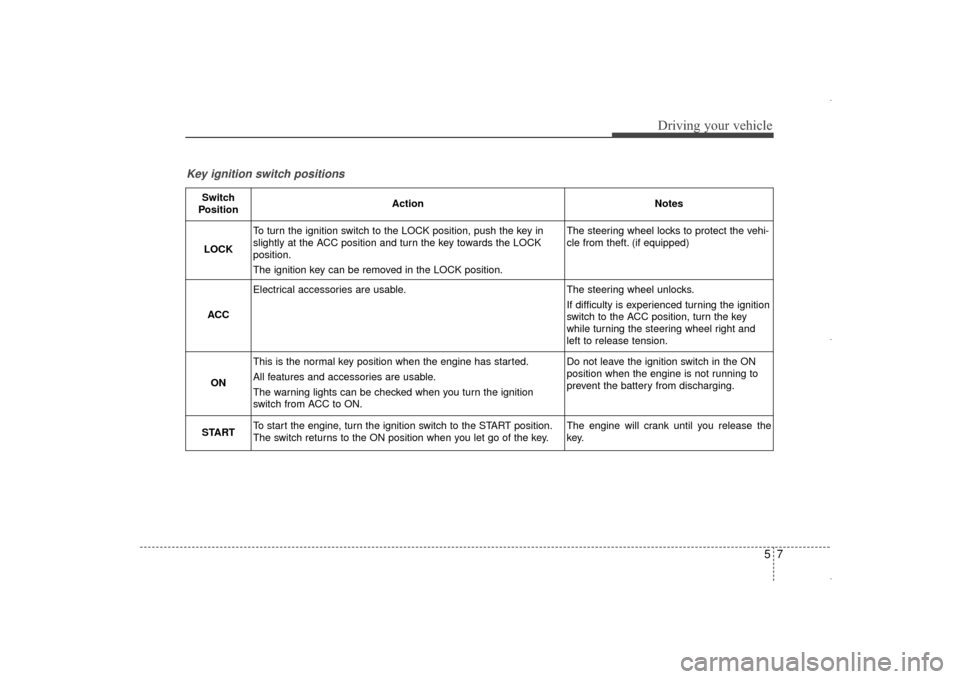
Key ignition switch positions
Switch
PositionActionNotes
LOCK
To turn the ignition switch to the LOCK position, push the key in
slightly at the ACC position and turn the key towards the LOCK
position.
The ignition key can be removed in the LOCK position.The steering wheel locks to protect the vehi-
cle from theft. (if equipped)
ACC
Electrical accessories are usable.The steering wheel unlocks.
If difficulty is experienced turning the ignition
switch to the ACC position, turn the key
while turning the steering wheel right and
left to release tension.
ON
This is the normal key position when the engine has started.
All features and accessories are usable.
The warning lights can be checked when you turn the ignition
switch from ACC to ON.Do not leave the ignition switch in the ON
position when the engine is not running to
prevent the battery from discharging.
STARTTo start the engine, turn the ignition switch to the START position.
The switch returns to the ON position when you let go of the key.The engine will crank until you release the
key.
UD(FL) HMA 5.qxp 6/26/2014 3:21 PM Page 7
Page 467 of 668
511
Driving your vehicle
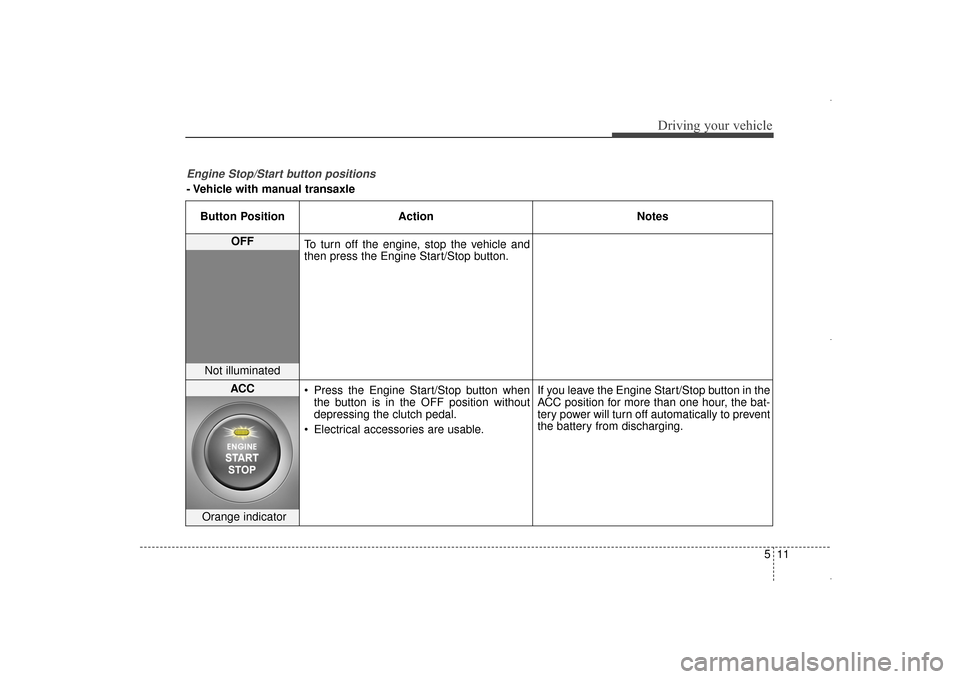
Engine Stop/Start button positions
- Vehicle with manual transaxleButton Position Action Notes
OFF
To turn off the engine, stop the vehicle and
then press the Engine Start/Stop button.
Not illuminated
ACC Press the Engine Start/Stop button when
the button is in the OFF position without
depressing the clutch pedal.
Electrical accessories are usable. If you leave the Engine Start/Stop button in the
ACC position for more than one hour, the bat-
tery power will turn off automatically to prevent
the battery from discharging.
Orange indicator
UD(FL) HMA 5.qxp 6/26/2014 3:21 PM Page 11
Page 468 of 668
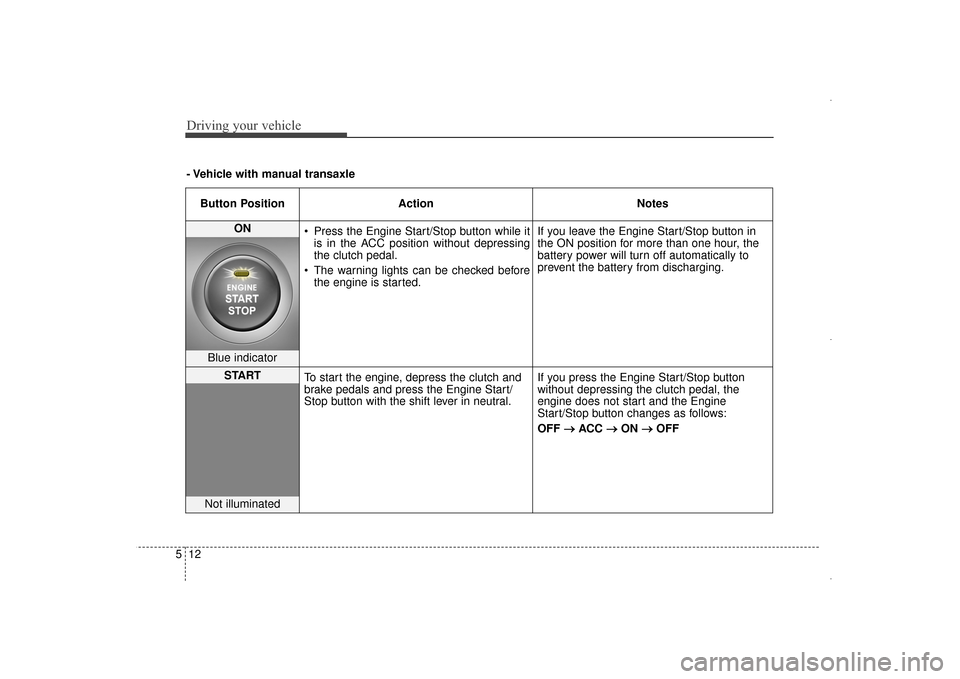
Driving your vehicle
12
5
Button Position Action Notes
ON
Press the Engine Start/Stop button while it
is in the ACC position without depressing
the clutch pedal.
The warning lights can be checked before the engine is started. If you leave the Engine Start/Stop button in
the ON position for more than one hour, the
battery power will turn off automatically to
prevent the battery from discharging.
Blue indicator
START
To start the engine, depress the clutch and
brake pedals and press the Engine Start/
Stop button with the shift lever in neutral. If you press the Engine Start/Stop button
without depressing the clutch pedal, the
engine does not start and the Engine
Start/Stop button changes as follows:
OFF
→ →
ACC →
→
ON →
→
OFF
Not illuminated
- Vehicle with manual transaxle
UD(FL) HMA 5.qxp 6/26/2014 3:21 PM Page 12
Page 469 of 668
513
Driving your vehicle
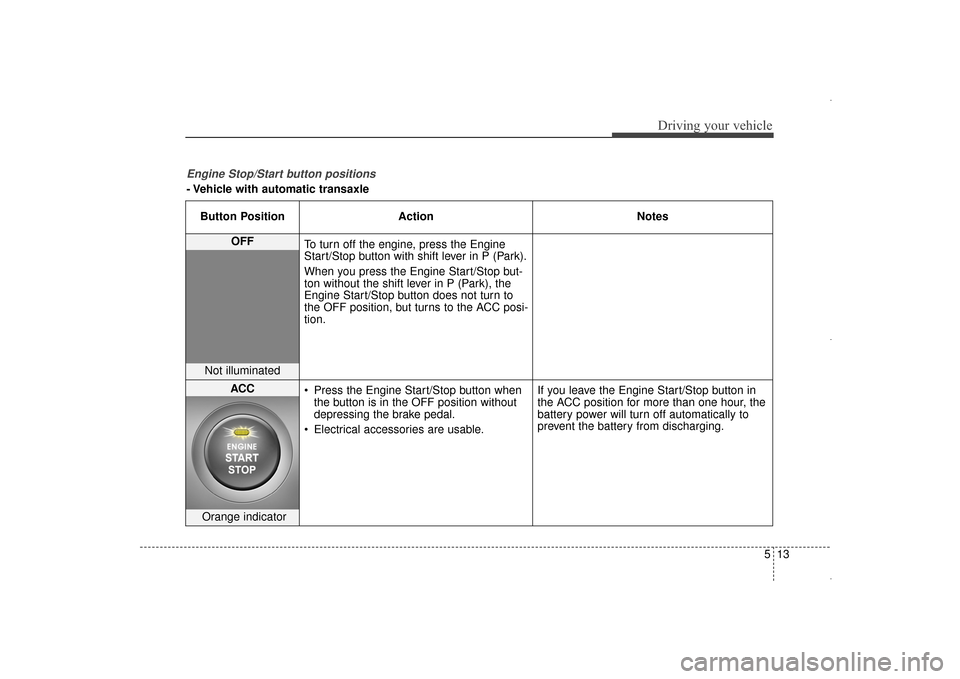
Engine Stop/Start button positions
- Vehicle with automatic transaxleButton Position Action Notes
OFF
To turn off the engine, press the Engine
Start/Stop button with shift lever in P (Park).
When you press the Engine Start/Stop but-
ton without the shift lever in P (Park), the
Engine Start/Stop button does not turn to
the OFF position, but turns to the ACC posi-
tion.
Not illuminated
ACC Press the Engine Start/Stop button when
the button is in the OFF position without
depressing the brake pedal.
Electrical accessories are usable. If you leave the Engine Start/Stop button in
the ACC position for more than one hour, the
battery power will turn off automatically to
prevent the battery from discharging.
Orange indicator
UD(FL) HMA 5.qxp 6/26/2014 3:21 PM Page 13