display Hyundai Elantra 2016 - RHD (UK. Australia) User Guide
[x] Cancel search | Manufacturer: HYUNDAI, Model Year: 2016, Model line: Elantra, Model: Hyundai Elantra 2016Pages: 498, PDF Size: 9.45 MB
Page 144 of 498
Features of your vehicle
64 4
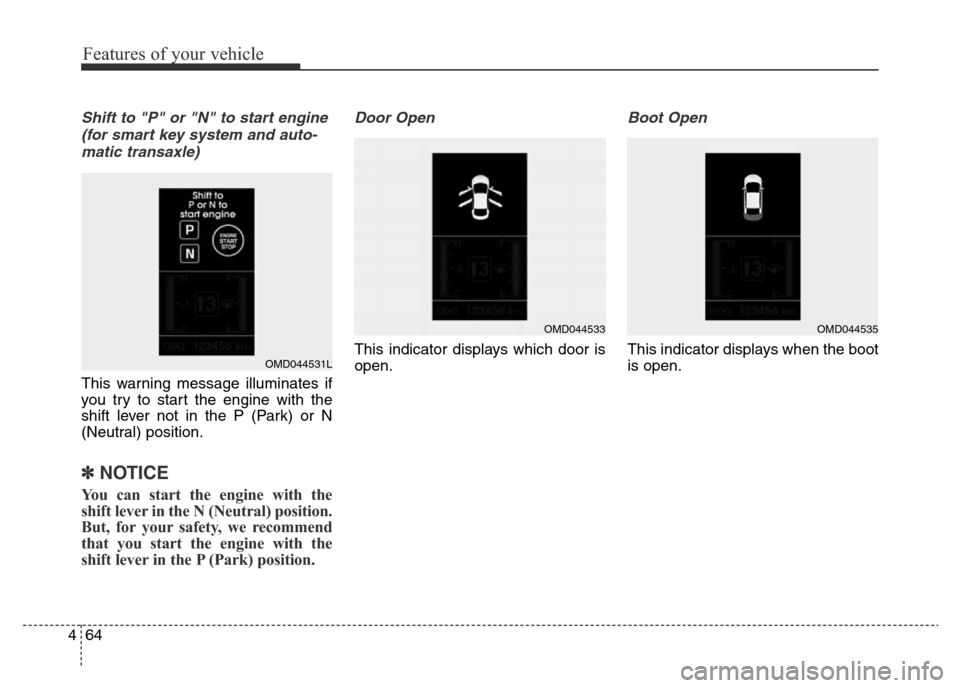
Shift to "P" or "N" to start engine
(for smart key system and auto-
matic transaxle)
This warning message illuminates if
you try to start the engine with the
shift lever not in the P (Park) or N
(Neutral) position.
✽NOTICE
You can start the engine with the
shift lever in the N (Neutral) position.
But, for your safety, we recommend
that you start the engine with the
shift lever in the P (Park) position.
Door Open
This indicator displays which door is
open.
Boot Open
This indicator displays when the boot
is open.OMD044531L
OMD044533OMD044535
Page 145 of 498
465
Features of your vehicle
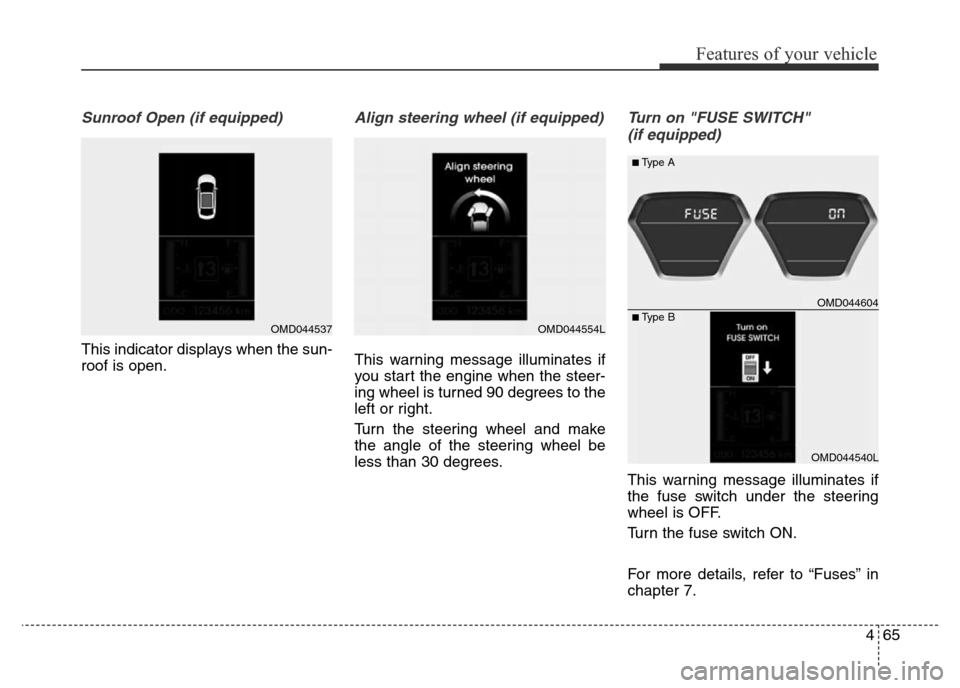
Sunroof Open (if equipped)
This indicator displays when the sun-
roof is open.
Align steering wheel (if equipped)
This warning message illuminates if
you start the engine when the steer-
ing wheel is turned 90 degrees to the
left or right.
Turn the steering wheel and make
the angle of the steering wheel be
less than 30 degrees.
Turn on "FUSE SWITCH"
(if equipped)
This warning message illuminates if
the fuse switch under the steering
wheel is OFF.
Turn the fuse switch ON.
For more details, refer to “Fuses” in
chapter 7.
OMD044537OMD044554L
OMD044604
OMD044540L
■Type A
■Type B
Page 154 of 498
Features of your vehicle
74 4
ECO indicator
(if equipped)
The ECO indicator is a system that
informs you to drive economically.
When ON, it is displayed when you
drive fuel efficiently.
• The ECO indicator (green) will turn
on when you are driving fuel effi-
ciently in the ECO ON mode.
If you don't want the indicator dis-
played, turn the ECO ON mode to
OFF mode by pressing the RESET
button of the trip computer for more
than 1 second.
• Fuel-efficiency can be altered by
the driver's driving habits and road
conditions.
• It does not function when in P
(Park), N (Neutral), R (Reverse) or
sports mode.
• Whilst the instant fuel consumption
mode is displayed on the LCD
screen, the ECO indicator turns off.
Immobiliser Indicator
Light (without smart
key) (if equipped)
This indicator light illuminates:
When the vehicle detects the immo-
biliser in your key whilst the ignition
switch is ON.
- At this time, you can start the
engine.
- The indicator light goes off after
starting the engine.
This indicator light blinks:
When there is a malfunction with the
immobiliser system.
In this case, we recommend that you
have the vehicle inspected by an
authorised HYUNDAI dealer.
ECOWARNING
Don't keep watching the indica-
tor whilst driving. It will distract
you whilst driving and cause an
accident that may result in
severe personal injury.
Page 183 of 498
4103
Features of your vehicle
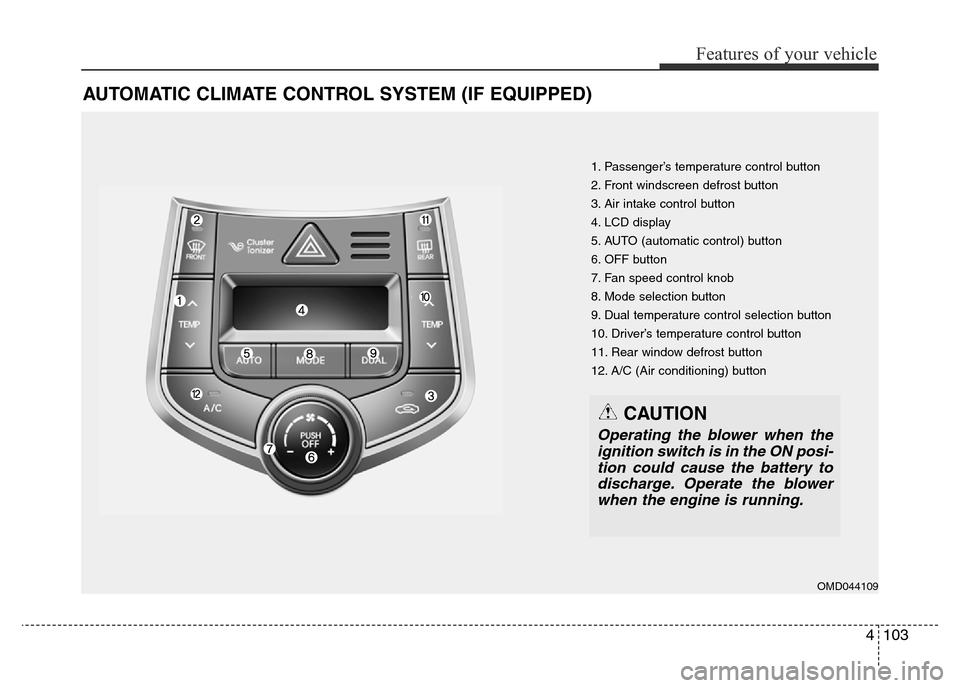
AUTOMATIC CLIMATE CONTROL SYSTEM (IF EQUIPPED)
1. Passenger’s temperature control button
2. Front windscreen defrost button
3. Air intake control button
4. LCD display
5. AUTO (automatic control) button
6. OFF button
7. Fan speed control knob
8. Mode selection button
9. Dual temperature control selection button
10. Driver’s temperature control button
11. Rear window defrost button
12. A/C (Air conditioning) button
OMD044109
CAUTION
Operating the blower when the
ignition switch is in the ON posi-
tion could cause the battery to
discharge. Operate the blower
when the engine is running.
Page 184 of 498
Features of your vehicle
104 4
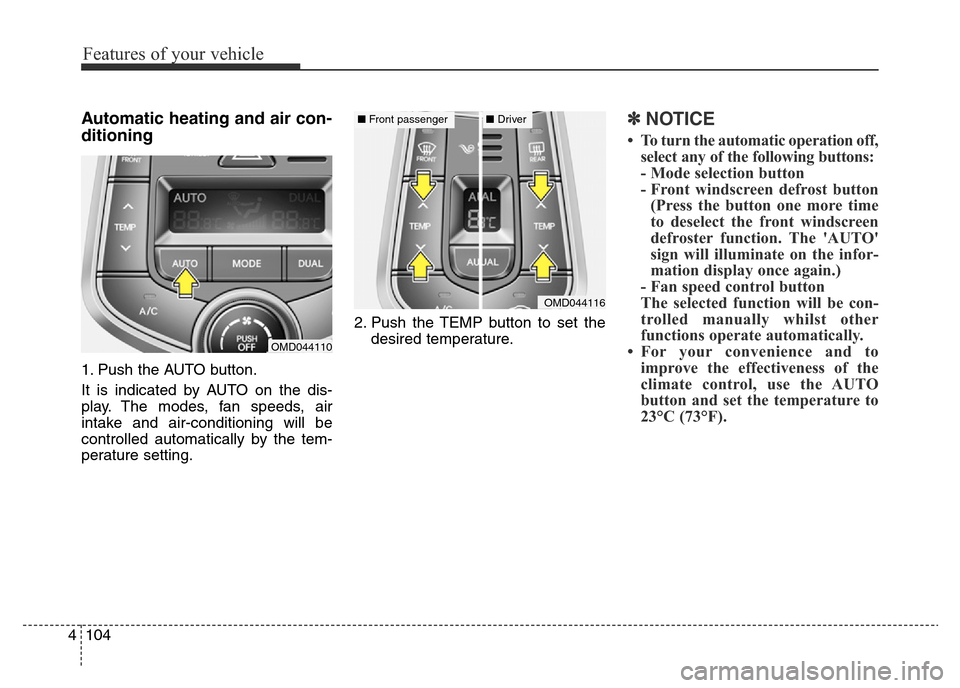
Automatic heating and air con-
ditioning
1. Push the AUTO button.
It is indicated by AUTO on the dis-
play. The modes, fan speeds, air
intake and air-conditioning will be
controlled automatically by the tem-
perature setting.2. Push the TEMP button to set the
desired temperature.
✽NOTICE
• To turn the automatic operation off,
select any of the following buttons:
- Mode selection button
- Front windscreen defrost button
(Press the button one more time
to deselect the front windscreen
defroster function. The 'AUTO'
sign will illuminate on the infor-
mation display once again.)
- Fan speed control button
The selected function will be con-
trolled manually whilst other
functions operate automatically.
• For your convenience and to
improve the effectiveness of the
climate control, use the AUTO
button and set the temperature to
23°C (73°F).
OMD044110
OMD044116
■Front passenger■Driver
Page 188 of 498
Features of your vehicle
108 4
Adjusting the driver and passenger
side temperature equally
1. Press the DUAL button again to
deactivate DUAL mode. The pas-
senger side temperature will be
set to the same temperature as
the driver side temperature.
2. Press the driver side temperature
control button. The driver and pas-
senger side temperature will be
adjusted equally.
Temperature conversion
If the battery has been discharged or
disconnected, the temperature mode
display will reset to Centigrade.
This is a normal condition. You can
switch the temperature mode between
Centigrade and Fahrenheit as follows:
Whilst pressing the OFF button,
press the AUTO button for 3 seconds
or more. The display will change from
Centigrade to Fahrenheit, or from
Fahrenheit to Centigrade.Air intake control
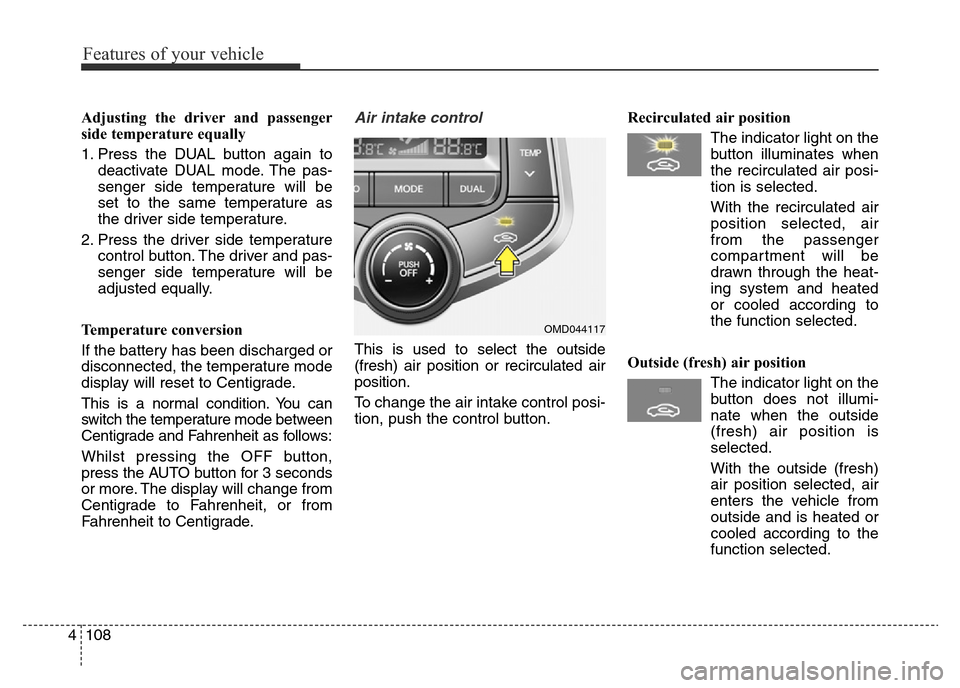
This is used to select the outside
(fresh) air position or recirculated air
position.
To change the air intake control posi-
tion, push the control button.Recirculated air position
The indicator light on the
button illuminates when
the recirculated air posi-
tion is selected.
With the recirculated air
position selected, air
from the passenger
compartment will be
drawn through the heat-
ing system and heated
or cooled according to
the function selected.
Outside (fresh) air position
The indicator light on the
button does not illumi-
nate when the outside
(fresh) air position is
selected.
With the outside (fresh)
air position selected, air
enters the vehicle from
outside and is heated or
cooled according to the
function selected.
OMD044117
Page 201 of 498
4121
Features of your vehicle
INTERIOR FEATURES
LCD monitor (Clock and out-
side temperature) (if equipped)
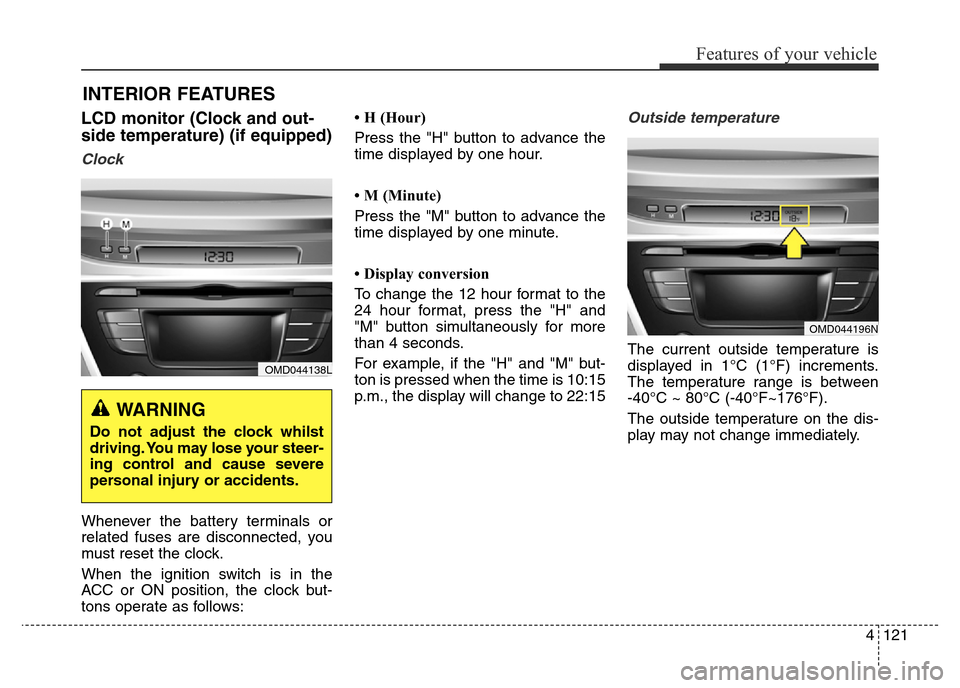
Clock
Whenever the battery terminals or
related fuses are disconnected, you
must reset the clock.
When the ignition switch is in the
ACC or ON position, the clock but-
tons operate as follows:• H (Hour)
Press the "H" button to advance the
time displayed by one hour.
• M (Minute)
Press the "M" button to advance the
time displayed by one minute.
• Display conversion
To change the 12 hour format to the
24 hour format, press the "H" and
"M" button simultaneously for more
than 4 seconds.
For example, if the "H" and "M" but-
ton is pressed when the time is 10:15
p.m., the display will change to 22:15
Outside temperature
The current outside temperature is
displayed in 1°C (1°F) increments.
The temperature range is between
-40°C ~ 80°C (-40°F~176°F).
The outside temperature on the dis-
play may not change immediately.
OMD044138L
WARNING
Do not adjust the clock whilst
driving. You may lose your steer-
ing control and cause severe
personal injury or accidents.
OMD044196N
Page 214 of 498
Features of your vehicle
134 4
• Depending on the type of CD-
R/CD-RW CDs, certain CDs may
not operate normally according to
manufacturing companies or mak-
ing and recording methods. In such
circumstances, continued use may
cause malfunctions to your audio
system.
✽NOTICE - Playing an
Incompatible Copy
Protected Audio CD
Some copy protected CDs, which do
not comply with international audio
CD standards (Red Book), may not
play on your vehicle's audio system.
Please note that inabilities to prop-
erly play a copy protected CD may
indicate that the CD is defective, not
the CD player.
✽NOTICE
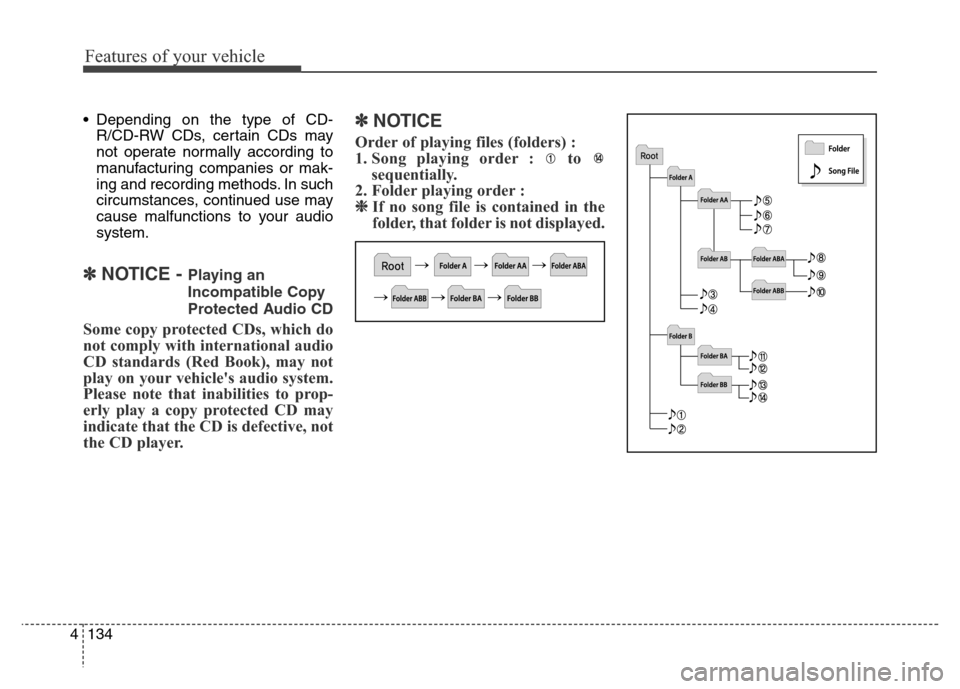
Order of playing files (folders) :
1. Song playing order : to
sequentially.
2. Folder playing order :
❈If no song file is contained in the
folder, that folder is not displayed.
Page 221 of 498
4141
Features of your vehicle
SYSTEM CONTROLS AND
FUNCTIONS
❈Display and settings may differ
depending on the selected audio.
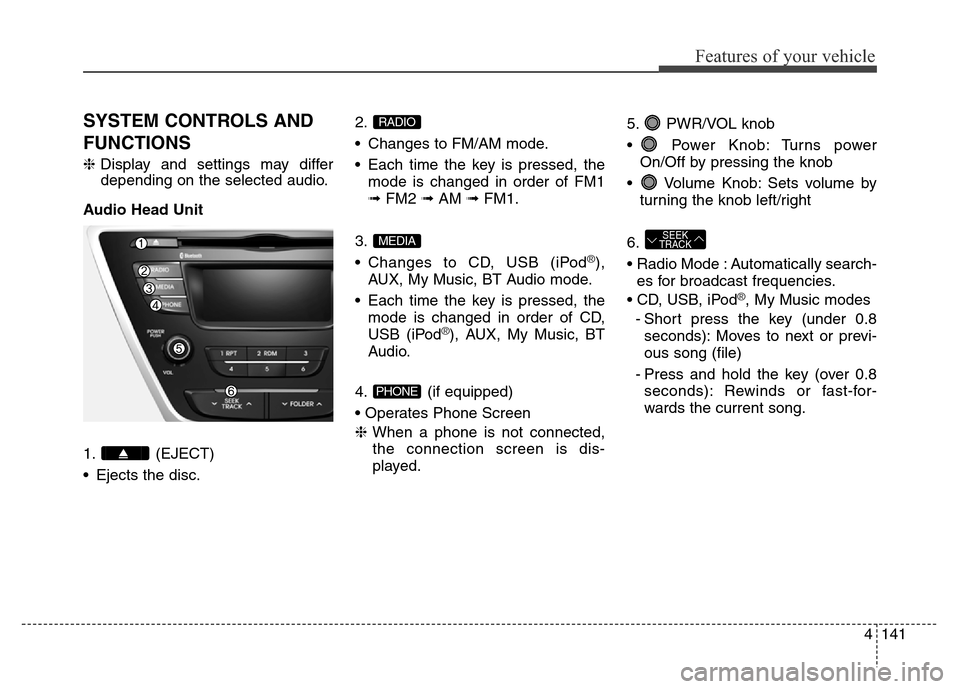
Audio Head Unit
1. (EJECT)
• Ejects the disc.2.
• Changes to FM/AM mode.
• Each time the key is pressed, the
mode is changed in order of FM1
➟FM2 ➟AM ➟FM1.
3.
• Changes to CD, USB (iPod
®),
AUX, My Music, BT Audio mode.
• Each time the key is pressed, the
mode is changed in order of CD,
USB (iPod
®), AUX, My Music, BT
Audio.
4. (if equipped)
• Operates Phone Screen
❈When a phone is not connected,
the connection screen is dis-
played.5. PWR/VOL knob
• Power Knob: Turns power
On/Off by pressing the knob
• Volume Knob: Sets volume by
turning the knob left/right
6.
• Radio Mode : Automatically search-
es for broadcast frequencies.
• CD, USB, iPod
®, My Music modes
- Short press the key (under 0.8
seconds): Moves to next or previ-
ous song (file)
- Press and hold the key (over 0.8
seconds): Rewinds or fast-for-
wards the current song.
SEEK
TRACK
PHONE
MEDIA
RADIO
Page 222 of 498
Features of your vehicle
142 4
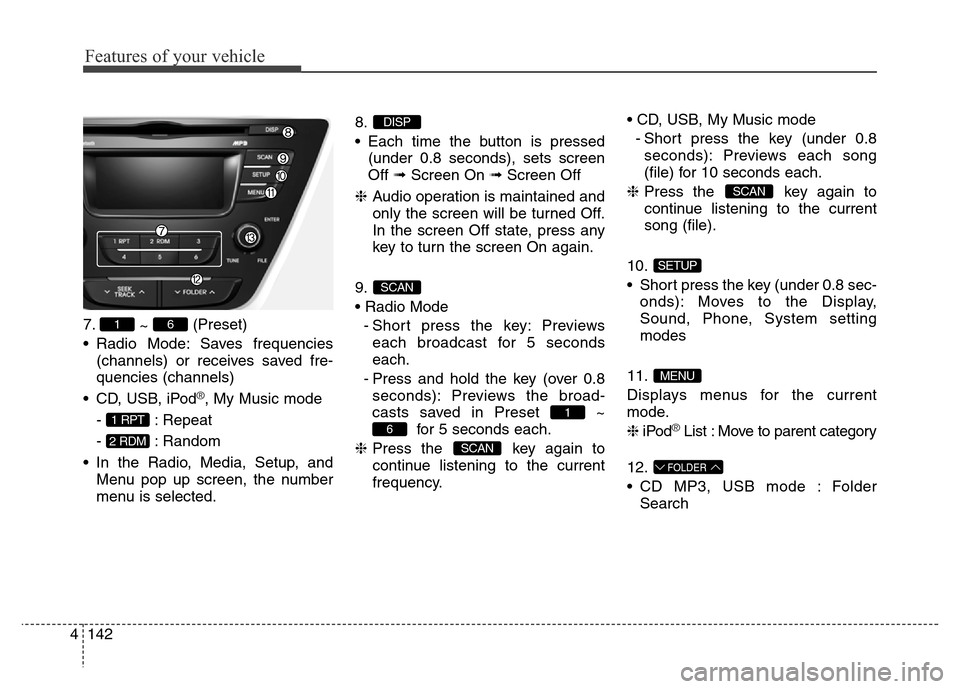
7.
~ (Preset)
• Radio Mode: Saves frequencies
(channels) or receives saved fre-
quencies (channels)
• CD, USB, iPod
®, My Music mode
- : Repeat
- : Random
• In the Radio, Media, Setup, and
Menu pop up screen, the number
menu is selected.8.
• Each time the button is pressed
(under 0.8 seconds), sets screen
Off ➟Screen On ➟Screen Off
❈Audio operation is maintained and
only the screen will be turned Off.
In the screen Off state, press any
key to turn the screen On again.
9.
• Radio Mode
- Short press the key: Previews
each broadcast for 5 seconds
each.
- Press and hold the key (over 0.8
seconds): Previews the broad-
casts saved in Preset ~
for 5 seconds each.
❈Press the key again to
continue listening to the current
frequency.• CD, USB, My Music mode
- Short press the key (under 0.8
seconds): Previews each song
(file) for 10 seconds each.
❈Press the key again to
continue listening to the current
song (file).
10.
• Short press the key (under 0.8 sec-
onds): Moves to the Display,
Sound, Phone, System setting
modes
11.
Displays menus for the current
mode.
❈iPod
®List : Move to parent category
12.
• CD MP3, USB mode : Folder
Search
FOLDER
MENU
SETUP
SCAN
SCAN
6
1
SCAN
DISP
2 RDM
1 RPT
61