page 12 Hyundai Elantra 2016 User Guide
[x] Cancel search | Manufacturer: HYUNDAI, Model Year: 2016, Model line: Elantra, Model: Hyundai Elantra 2016Pages: 669, PDF Size: 31.96 MB
Page 251 of 669
![Hyundai Elantra 2016 User Guide 4165
Features of your vehicle
Pairing through [PHONE]
Setup
Press the key Select
[Phone] Select [Pair Phone]
Select TUNE knob
1.The following steps are the sameas those described in the section
"Wh](/img/35/14551/w960_14551-250.png "Hyundai Elantra 2016 User Guide 4165
Features of your vehicle
Pairing through [PHONE]
Setup
Press the key Select
[Phone] Select [Pair Phone]
Select TUNE knob
1.The following steps are the sameas those described in the section
\"Wh")
4165
Features of your vehicle
Pairing through [PHONE]
Setup
Press the key Select
[Phone] Select [Pair Phone]
Select TUNE knob
1.The following steps are the sameas those described in the section
"When No Devices have been
Paired" on the previous page.
✽ ✽ NOTICE
•Bluetooth®Wireless Technology
features supported within the
vehicle are as follows. Some fea-
tures may not be supported
depending on your Bluetooth
®
Wireless Technology device.
- Outgoing/Incoming Handsfree
calls (Continued)(Continued)
- Operations during a call (Switchto Private, Switch to call waiting,
MIC on/off)
- Downloading Call History
- Downloading Mobile Contacts
- Bluetooth
®Wireless Technology
device auto connection
- Bluetooth Audio Streaming
• Up to five Bluetooth
®Wireless
Technology devices can be paired
to the Car Handsfree system.
• Only one Bluetooth
®Wireless
Technology device can be connect-
ed at a time.
• Other devices cannot be paired while a Bluetooth
®Wireless
Technology device is connected.
• Only Bluetooth
®Wireless
Technology Handsfree and
Bluetooth audio related features
are supported.
• Bluetooth related operations are possible only within devices that
support Handsfree or audio fea-
tures, such as a Bluetooth
®
Wireless Technology mobile phone
or a Bluetooth audio device. (Continued)(Continued)
• If a connected Bluetooth
® Wireless
Technology device becomes dis-
connected due to being out of com-
munication range, turning the
device OFF, or a Bluetooth
®
Wireless Technology communica-
tion error, corresponding
Bluetooth
®Wireless Technology
devices are automatically searched
and reconnected.
• If the system becomes unstable due to communication errors
between the car Handsfree and the
Bluetooth
®Wireless Technology
device, reset the device by turning
off and back on again. Upon reset-
ting Bluetooth
®Wireless
Technology device, the system will
be restored.
• After pairing is complete, a con- tacts download request is sent
once to the mobile phone. Some
mobile phones may require confir-
mation upon receiving a download
request, ensure your mobile phone
accepts the connection. Refer to
your phones user’s manual for
additional information regarding
phone pairing and connections.
SETUP
Page 312 of 669
![Hyundai Elantra 2016 User Guide Features of your vehicle
226
4
[Non SSP supported device]
(SSP: Secure Simple Pairing)
4. After a few moments, a screen is
displayed where the passkey is
entered.
Hear, enter the passkey “0000” to](/img/35/14551/w960_14551-311.png "Hyundai Elantra 2016 User Guide Features of your vehicle
226
4
[Non SSP supported device]
(SSP: Secure Simple Pairing)
4. After a few moments, a screen is
displayed where the passkey is
entered.
Hear, enter the passkey “0000” to")
Features of your vehicle
226
4
[Non SSP supported device]
(SSP: Secure Simple Pairing)
4. After a few moments, a screen is
displayed where the passkey is
entered.
Hear, enter the passkey “0000” to
pair your
Bluetooth®Wireless
Technology device with the car
audio system.
[SSP supported device]
4. After a few moments, a screen is displayed 6 digits passkey.
Hear, check the passkey on your
Bluetooth®Wireless Technology
device and confirm.
5. Once pairing is complete, the fol- lowing screen is displayed.
✽ ✽NOTICE
If Bluetooth®Wireless Technology
devices are paired but none are cur-
rently connected, pressing the key or the key on the
steering wheel displays the following
screen. Press the [Pair] button to
pair a new device or press the
[Connect] to connect a previously
paired device.
Pairing through [PHONE]
Setup
Press the key Select
[Phone] Select [Pair Phone]
Select TUNE knob
(For USA)
(For CANADA)
1.The following steps are the same
as those described in the section
"When No Devices have been
Paired" on the previous page.
SETUP
PHONE
Page 369 of 669
![Hyundai Elantra 2016 User Guide 4283
Features of your vehicle
Pairing through [PHONE]
Setup
Press the key Select
[Phone] Select [Pair Phone]
Select TUNE knob
1.The following steps are the sameas those described in the section
"Wh](/img/35/14551/w960_14551-368.png "Hyundai Elantra 2016 User Guide 4283
Features of your vehicle
Pairing through [PHONE]
Setup
Press the key Select
[Phone] Select [Pair Phone]
Select TUNE knob
1.The following steps are the sameas those described in the section
\"Wh")
4283
Features of your vehicle
Pairing through [PHONE]
Setup
Press the key Select
[Phone] Select [Pair Phone]
Select TUNE knob
1.The following steps are the sameas those described in the section
"When No Devices have been
Paired" on the previous page.
✽ ✽ NOTICE
•Bluetooth®Wireless Technology
features supported within the
vehicle are as follows. Some fea-
tures may not be supported
depending on your Bluetooth
®
Wireless Technology device.
- Outgoing/Incoming Handsfree
calls (Continued)(Continued)
- Operations during a call (Switchto Private, Switch to call waiting,
MIC on/off)
- Downloading Call History
- Downloading Mobile Contacts
- Bluetooth
®Wireless Technology
device auto connection
- Bluetooth Audio Streaming
• Up to five Bluetooth
®Wireless
Technology devices can be paired
to the Car Handsfree system.
• Only one Bluetooth
®Wireless
Technology device can be connect-
ed at a time.
• Other devices cannot be paired while a Bluetooth
®Wireless
Technology device is connected.
• Only Bluetooth
®Wireless
Technology Handsfree and
Bluetooth audio related features
are supported.
• Bluetooth related operations are possible only within devices that
support Handsfree or audio fea-
tures, such as a Bluetooth
®
Wireless Technology mobile phone
or a Bluetooth audio device. (Continued)(Continued)
• If a connected Bluetooth®
Wireless Technology device
becomes disconnected due to
being out of communication
range, turning the device OFF, or
a Bluetooth
®Wireless Technology
communication error, correspon-
ding Bluetooth
®Wireless
Technology devices are automati-
cally searched and reconnected.
• If the system becomes unstable due to communication errors
between the car Handsfree and the
Bluetooth
®Wireless Technology
device, reset the device by turning
off and back on again. Upon reset-
ting Bluetooth
®Wireless
Technology device, the system will
be restored.
• After pairing is complete, a con- tacts download request is sent
once to the mobile phone. Some
mobile phones may require confir-
mation upon receiving a download
request, ensure your mobile phone
accepts the connection. Refer to
your phones user’s manual for
additional information regarding
phone pairing and connections.
SETUP
Page 428 of 669
![Hyundai Elantra 2016 User Guide [Non SSP supported device]
(SSP: Secure Simple Pairing)
4. After a few moments, a screen isdisplayed where the passkey is
entered.
Hear, enter the passkey “0000” to
pair your
Bluetooth®Wireless](/img/35/14551/w960_14551-427.png "Hyundai Elantra 2016 User Guide [Non SSP supported device]
(SSP: Secure Simple Pairing)
4. After a few moments, a screen isdisplayed where the passkey is
entered.
Hear, enter the passkey “0000” to
pair your
Bluetooth®Wireless")
[Non SSP supported device]
(SSP: Secure Simple Pairing)
4. After a few moments, a screen isdisplayed where the passkey is
entered.
Hear, enter the passkey “0000” to
pair your
Bluetooth®Wireless
Technology device with the car
audio system.
[SSP supported device]
4. After a few moments, a screen is displayed 6 digits passkey.
Hear, check the passkey on your
Bluetooth®Wireless Technology
device and confirm.
5. Once pairing is complete, the fol- lowing screen is displayed.
✽ ✽NOTICE
If Bluetooth®Wireless Technology
devices are paired but none are cur-
rently connected, pressing the key or the key on the
steering wheel displays the following
screen. Press the [Pair] button to
pair a new device or press the
[Connect] to connect a previously
paired device.
Pairing through [PHONE]
Setup
Press the key Select
[Phone] Select [Pair Phone]
Select TUNE knob
1.The following steps are the same
as those described in the section
"When No Devices have been
Paired" on the previous page.SETUP
PHONE
4342
Features of your vehicle
Page 454 of 669
Features of your vehicle
368
4
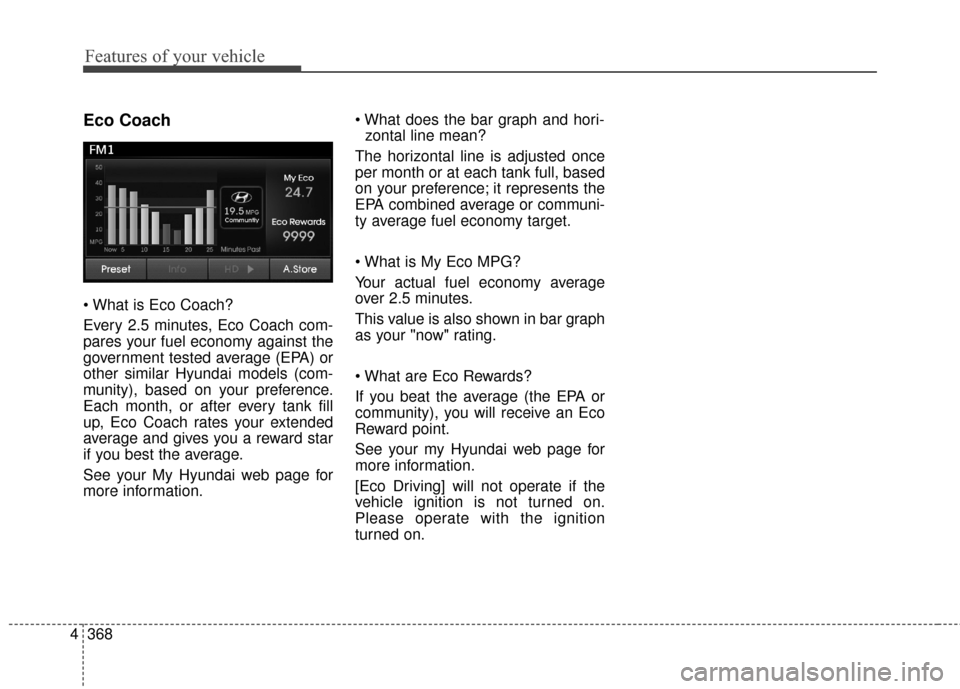
Eco Coach
Every 2.5 minutes, Eco Coach com-
pares your fuel economy against the
government tested average (EPA) or
other similar Hyundai models (com-
munity), based on your preference.
Each month, or after every tank fill
up, Eco Coach rates your extended
average and gives you a reward star
if you best the average.
See your My Hyundai web page for
more information.
zontal line mean?
The horizontal line is adjusted once
per month or at each tank full, based
on your preference; it represents the
EPA combined average or communi-
ty average fuel economy target.
Your actual fuel economy average
over 2.5 minutes.
This value is also shown in bar graph
as your "now" rating.
If you beat the average (the EPA or
community), you will receive an Eco
Reward point.
See your my Hyundai web page for
more information.
[Eco Driving] will not operate if the
vehicle ignition is not turned on.
Please operate with the ignition
turned on.
Page 458 of 669
Driving your vehicle
Before driving . . . . . . . . . . . . . . . . . . . . . . . . . . . . . 5-3
• Before entering the vehicle . . . . . . . . . . . . . . . . . . . . . 5-3
• Before starting . . . . . . . . . . . . . . . . . . . . . . . . . . . . . . . 5-3
Ignition switch . . . . . . . . . . . . . . . . . . . . . . . . . . . . . 5-5
• Key ignition switch . . . . . . . . . . . . . . . . . . . . . . . . . . . . 5-5
• Engine Start/Stop button . . . . . . . . . . . . . . . . . . . . . . . 5-9
Manual transaxle . . . . . . . . . . . . . . . . . . . . . . . . . . 5-18
• Manual transaxle operation . . . . . . . . . . . . . . . . . . . 5-18
• Good driving practices . . . . . . . . . . . . . . . . . . . . . . . . 5-20
Automatic transaxle . . . . . . . . . . . . . . . . . . . . . . . 5-22
• Automatic transaxle operation . . . . . . . . . . . . . . . . . 5-22
• Parking . . . . . . . . . . . . . . . . . . . . . . . . . . . . . . . . . . . . \
. 5-27
• Good driving practices . . . . . . . . . . . . . . . . . . . . . . . . 5-27
Braking system . . . . . . . . . . . . . . . . . . . . . . . . . . . 5-29
• Power brakes . . . . . . . . . . . . . . . . . . . . . . . . . . . . . . . 5-29
• Disc brakes wear indicator . . . . . . . . . . . . . . . . . . . . 5-30
• Parking brake . . . . . . . . . . . . . . . . . . . . . . . . . . . . . . . 5-30
• Anti-lock Brake System (ABS). . . . . . . . . . . . . . . . . . 5-32
• Electronic Stability Control (ESC) . . . . . . . . . . . . . . 5-34
• Vehicle Stability Management (VSM) . . . . . . . . . . . . 5-38
• Hill-Start Assist Control (HAC) . . . . . . . . . . . . . . . . 5-39
• Good braking practices . . . . . . . . . . . . . . . . . . . . . . . 5-40
Driving assist system . . . . . . . . . . . . . . . . . . . . . . . 5-41
• Active ECO system . . . . . . . . . . . . . . . . . . . . . . . . . . . 5-41
Cruise control system. . . . . . . . . . . . . . . . . . . . . . . 5-43
Special driving conditions . . . . . . . . . . . . . . . . . . . 5-48
• Hazardous driving conditions . . . . . . . . . . . . . . . . . . 5-48
• Rocking the vehicle . . . . . . . . . . . . . . . . . . . . . . . . . . . 5-48
• Smooth cornering . . . . . . . . . . . . . . . . . . . . . . . . . . . . 5-49
• Driving at night . . . . . . . . . . . . . . . . . . . . . . . . . . . . . . 5-49
• Driving in the rain . . . . . . . . . . . . . . . . . . . . . . . . . . . . 5-50
• Driving in flooded areas . . . . . . . . . . . . . . . . . . . . . . . 5-50
Winter driving . . . . . . . . . . . . . . . . . . . . . . . . . . . . 5-51
• Snow or icy conditions . . . . . . . . . . . . . . . . . . . . . . . . 5-51
• Use high quality ethylene glycol coolant . . . . . . . . . . 5-53
• Check battery and cables . . . . . . . . . . . . . . . . . . . . . . 5-53
• Change to "winter weight" oil if necessary . . . . . . . 5-53
• Check spark plugs and ignition system. . . . . . . . . . . 5-53
• To keep locks from freezing . . . . . . . . . . . . . . . . . . . . 5-53
• Use approved window washer anti-freeze in system . . 5-53
• Don't let your parking brake freeze . . . . . . . . . . . . . 5-54
• Don't let ice and snow accumulate underneath . . . . 5-54
• Carry emergency equipment . . . . . . . . . . . . . . . . . . . 5-54
• Don't place foreign objects or materials in the engine compartment . . . . . . . . . . . . . . . . . . . . . . . . . 5-54
Vehicle load limit . . . . . . . . . . . . . . . . . . . . . . . . . . 5-55
• Tire loading information label . . . . . . . . . . . . . . . . . . 5-56
Trailer towing . . . . . . . . . . . . . . . . . . . . . . . . . . . . . 5-61
5
UD(FL) HMA 5.qxp 8/6/2014 12:26 PM Page 1
Page 459 of 669
Driving your vehicle
25
WARNING
Carbon monoxide (CO) gas is toxic. Breathing CO can cause unconsciousness and death.
Engine exhaust contains carbon monoxide which cannot be seen or smelled.
Do not inhale engine exhaust.
If at any time you smell engine exhaust inside the vehicle, open the windows immediately. Exposure to CO can cause
unconsciousness and death by asphyxiation.
Be sure the exhaust system does not leak.
The exhaust system should be checked whenever the vehicle is raised to change the oil or for any other purpose. If
you hear a change in the sound of the exhaust or if you drive over something that strikes the underneath side of the
vehicle, have the exhaust system checked as soon as possible by an authorized HYUNDAI dealer.
Do not run the engine in an enclosed area.
Letting the engine idle in your garage, even with the garage door open, is a hazardous practice. Run the engine only
long enough to start the engine and to move the vehicle out of the garage.
Avoid idling the engine for prolonged periods with people inside the vehicle.
If it is necessary to idle the engine for a prolonged period with people inside the vehicle , be sure to do so only in an
open area with the air intake set at "Fresh" and fan control set to high so fresh air is drawn into the interior.
Keep the air intakes clear.
To assure proper operation of the ventilation system, keep the ventilation air intakes located in front of the windshield
clear of snow, ice, leaves, or other obstructions.
If you must drive with the trunk open:
Close all windows.
Open instrument panel air vents.
Set the air intake control at "Fresh", the air flow control at "Floor" or "Face", and the fan control set to high.
UD(FL) HMA 5.qxp 6/26/2014 3:21 PM Page 2
Page 460 of 669
Before entering the vehicle
• Be sure all windows, outside mir-ror(s), and outside lights are clean
and unobstructed.
Remove frost, snow, or ice.
Visually check the tires for uneven wear and damage.
Check under the vehicle for any sign of leaks.
Be sure there are no obstacles behind you if you intend to back up.
Before starting
Make sure the hood, the trunk, andthe doors are securely closed and
locked.
Adjust the position of the seat and steering wheel.
Adjust the inside and outside rearview mirrors.
Verify all the lights work.
Fasten your seatbelt. Check that all passengers have fastened their
seatbelts.
Check the gauges and indicators in the instrument panel and the mes-
sages on the instrument display
when the ignition switch is in the
ON position.
Check that any items you are car- rying are stored properly or fas-
tened down securely.
53
Driving your vehicle
WARNING - CALIFORNIA
PROPOSITION 65 WARNING
Engine exhaust and a wide vari-
ety of automobile components
including components found in
the interior furnishings in a
vehicle, contain or emit harmful
chemicals known to the State of
California to cause cancer and
birth defects and reproductive
harm. In addition, certain fluids
contained in vehicles and cer-
tain products of components
contain or emit chemicals
known to the State of California
to cause cancer and birth
defects or other reproductive
harm.
BEFORE DRIVING
UD(FL) HMA 5.qxp 6/26/2014 3:21 PM Page 3
Page 461 of 669
Driving your vehicle
45
WARNING
NEVER drink or take drugs and
drive. Drinking or taking drugs
and driving is dangerous and
may result in an accident and
SERIOUS INJURY or DEATH.
Drunk driving is the number
one contributor to the highway
death toll each year. Even a
small amount of alcohol will
affect your reflexes, percep-
tions and judgment. Just one
drink can reduce your ability to
respond to changing conditions
and emergencies and your reac-
tion time gets worse with each
additional drink.
Driving while under the influ-
ence of drugs is as dangerous
or more dangerous than driving
under the influence of alcohol.(Continued)
(Continued)
You are much more likely to
have a serious accident if you
drink or take drugs and drive. If
you are drinking or taking
drugs, don’t drive. Do not ride
with a driver who has been
drinking or taking drugs.
Choose a designated driver or
call a taxi.WARNING
To reduce the risk of SERIOUS
INJURY or DEATH, take the fol-
lowing precautions:
ALWAYS wear your seat belt.All passengers must be prop-
erly belted whenever the vehi-
cle is moving. For more infor-
mation, refer to “Seat Belts” in
chapter 3.
Always drive defensively. Assume other drivers or
pedestrians may be careless
and make mistakes.
Stay focused on the task of driving. Driver distraction can
cause accidents.
Leave plenty of space between you and the vehicle
in front of you.
UD(FL) HMA 5.qxp 6/26/2014 3:21 PM Page 4
Page 462 of 669
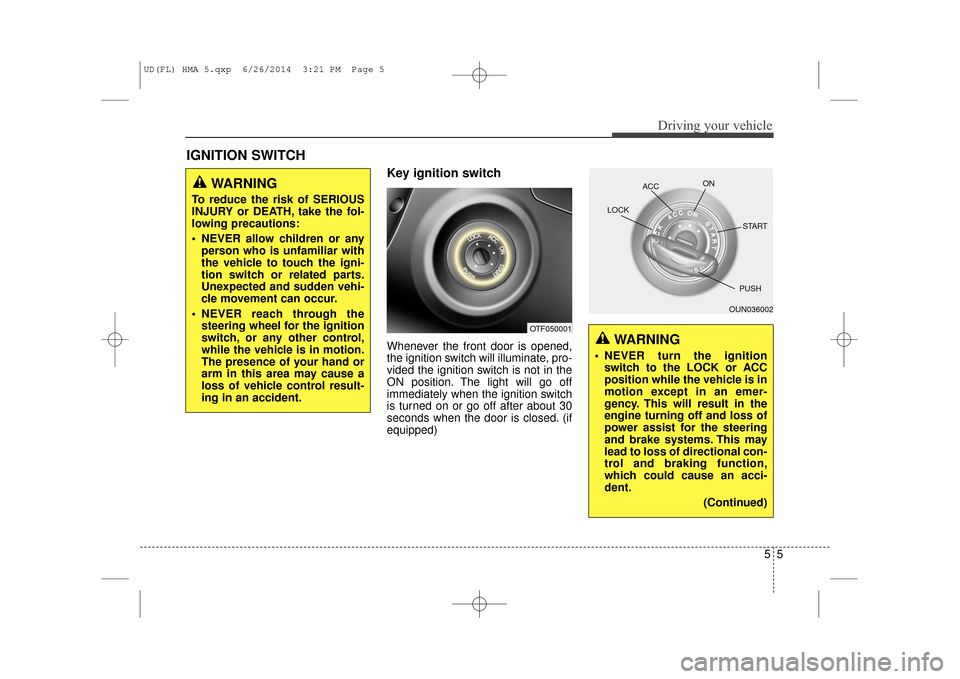
Key ignition switch
Whenever the front door is opened,
the ignition switch will illuminate, pro-
vided the ignition switch is not in the
ON position. The light will go off
immediately when the ignition switch
is turned on or go off after about 30
seconds when the door is closed. (if
equipped)
IGNITION SWITCH
55
Driving your vehicle
WARNING
To reduce the risk of SERIOUS
INJURY or DEATH, take the fol-
lowing precautions:
NEVER allow children or anyperson who is unfamiliar with
the vehicle to touch the igni-
tion switch or related parts.
Unexpected and sudden vehi-
cle movement can occur.
NEVER reach through the steering wheel for the ignition
switch, or any other control,
while the vehicle is in motion.
The presence of your hand or
arm in this area may cause a
loss of vehicle control result-
ing in an accident.
OTF050001
OUN036002
ACC
ON
START
LOCK
PUSH
WARNING
NEVER turn the ignition
switch to the LOCK or ACC
position while the vehicle is in
motion except in an emer-
gency. This will result in the
engine turning off and loss of
power assist for the steering
and brake systems. This may
lead to loss of directional con-
trol and braking function,
which could cause an acci-
dent.
(Continued)
UD(FL) HMA 5.qxp 6/26/2014 3:21 PM Page 5