change time Hyundai Elantra 2017 - RHD (UK. Australia) User Guide
[x] Cancel search | Manufacturer: HYUNDAI, Model Year: 2017, Model line: Elantra, Model: Hyundai Elantra 2017Pages: 571, PDF Size: 65.66 MB
Page 219 of 571
3-127
Convenient features of your vehicle
3
•The refrigerant system should
only be serviced by trained and
certified technicians to insure
proper and safe operation.
•The refrigerant system should
be serviced in a well-ventilated
place.
•The air conditioning evaporator
(cooling coil) shall never be
repaired or replaced with one
removed from a used or sal-
vaged vehicle and new replace-
ment MAC evaporators shall be
certified (and labelled) as meet-
ing SAE Standard J2842.
Information
• When using the air conditioning sys-
tem, monitor the temperature gauge
closely whilst driving up hills or in
heavy traffic when outside tempera-
tures are high. Air conditioning sys-
tem operation may cause engine
overheating. Continue to use the
blower fan but turn the air condi-
tioning system off if the temperature
gauge indicates engine overheating.
•When opening the windows in
humid weather, air conditioning
may create water droplets inside the
vehicle. Since excessive water
droplets may cause damage to elec-
trical equipment, air conditioning
should only be used with the win-
dows closed.
Air conditioning system operation
tips
•If the vehicle has been parked in
direct sunlight during hot weather,
open the windows for a short time
to let the hot air inside the vehicle
escape.
•To help reduce moisture inside of
the windows on rainy or humid
days, decrease the humidity inside
the vehicle by operating the air
conditioning system.
•During air conditioning system
operation, you may occasionally
notice a slight change in engine
speed as the air conditioning com-
pressor cycles. This is a normal
system operation characteristic.
•Use the air conditioning system
ever y month only for a few minutes
to ensure maximum system per-
for mance.
•When using the air conditioning
system, you may notice clear water
dripping (or even puddling) on the
ground under the vehicle. This is a
normal system operation charac-
teristic.
iNOTICE
Page 220 of 571

3-128
Convenient features of your vehicle
•Operating the air conditioning sys-
tem in the recirculated air position
provides maximum cooling, how-
ever, continual operation in this
mode may cause the air inside the
vehicle to become stale.
•During cooling operation, you may
occasionally notice a misty air flow
because of rapid cooling and
humid air intake. This is a normal
system operation characteristic.
System maintenance
Climate control air filter
The climate control air filter installed
behind the glove box filters the dust
or other pollutants that come into the
vehicle from the outside through the
heating and air conditioning system.
If dust or other pollutants accumulate
in the filter over a period of time, the
air flow from the air vents may
decrease, resulting in moisture accu-
mulation on the inside of the wind-
screen even when the outside (fresh)
air position is selected. If this hap-
pens, we recommend that the cli-
mate control air filter be replaced by
an authorised HYUNDAI dealer.
Information
• Replace the filter according to the
Maintenance Schedule.
If the vehicle is being driven in
severe conditions such as dusty,
rough roads, more frequent climate
control air filter inspections and
changes are required.
• When the air flow rate suddenly
decreases, we recommend that the
system be checked by an authorised
HYUNDAI dealer.
Information
It is important that the correct type
and amount of oil and refrigerant is
used. Otherwise, damage to the com-
pressor and abnormal system opera-
tion may occur.
i
i
1LDA5047
Outside air
Recirculatedair
Climate controlair filter
Blower
Evaporatorcore
Heater core
We recommend that the air con-
ditioning system be serviced by
an authorised HYUNDAI dealer.
Improper service may cause
serious injury to the person per-
forming the service.
WA R N I N G
Page 232 of 571

3-140
Convenient features of your vehicle
•The refrigerant system should
only be serviced by trained and
certified technicians to insure
proper and safe operation.
•The refrigerant system should
be serviced in a well-ventilated
place.
•The air conditioning evaporator
(cooling coil) shall never be
repaired or replaced with one
removed from a used or sal-
vaged vehicle and new replace-
ment MAC evaporators shall be
certified (and labelled) as meet-
ing SAE Standard J2842.
Information
• When using the air conditioning sys-
tem, monitor the temperature gauge
closely whilst driving up hills or in
heavy traffic when outside tempera-
tures are high. Air conditioning sys-
tem operation may cause engine
overheating. Continue to use the
blower fan but turn the air condi-
tioning system off if the temperature
gauge indicates engine overheating.
•When opening the windows in
humid weather, air conditioning
may create water droplets inside the
vehicle. As excessive water droplets
may cause damage to electrical
equipment, air conditioning should
only be used with the windows
closed.
Air conditioning system operation
tips
•If the vehicle has been parked in
direct sunlight during hot weather,
open the windows for a short time
to let the hot air inside the vehicle
escape.
•Use air conditioning to reduce
humidity and moisture inside the
vehicle on rainy or humid days.
•During air conditioning system
operation, you may occasionally
notice a slight change in engine
speed as the air conditioning com-
pressor cycles. This is a normal
system operation characteristic.
•Use the air conditioning system
ever y month only for a few minutes
to ensure maximum system per-
for mance.
•When using the air conditioning
system, you may notice clear water
dripping (or even puddling) on the
ground under the vehicle. This is a
normal system operation charac-
teristic.
iNOTICE
Page 233 of 571

3-141
Convenient features of your vehicle
3
•Operating the air conditioning sys-
tem in the recirculated air position
provides maximum cooling, how-
ever, continual operation in this
mode may cause the air inside the
vehicle to become stale.
•During cooling operation, you may
occasionally notice a misty air flow
because of rapid cooling and
humid air intake. This is a normal
system operation characteristic.
System maintenance
Climate control air filter
The climate control air filter installed
behind the glove box filters the dust
or other pollutants that come into the
vehicle from the outside through the
heating and air conditioning system.
If dust or other pollutants accumulate
in the filter over a period of time, the
air flow from the air vents may
decrease, resulting in moisture accu-
mulation on the inside of the wind-
screen even when the outside (fresh)
air position is selected. If this hap-
pens, we recommend that the cli-
mate control air filter be replaced by
an authorised HYUNDAI dealer.
Information
• Replace the filter according to the
Maintenance Schedule.
If the vehicle is being driven in
severe conditions such as dusty,
rough roads, more frequent climate
control air filter inspections and
changes are required.
• When the air flow rate suddenly
decreases, we recommend that the
system be checked by an authorised
HYUNDAI dealer.
i
1LDA5047
Outside air
Recirculatedair
Climate controlair filter
Blower
Evaporatorcore
Heater core
Page 259 of 571
4-10
Multimedia System
Features of Your Audio
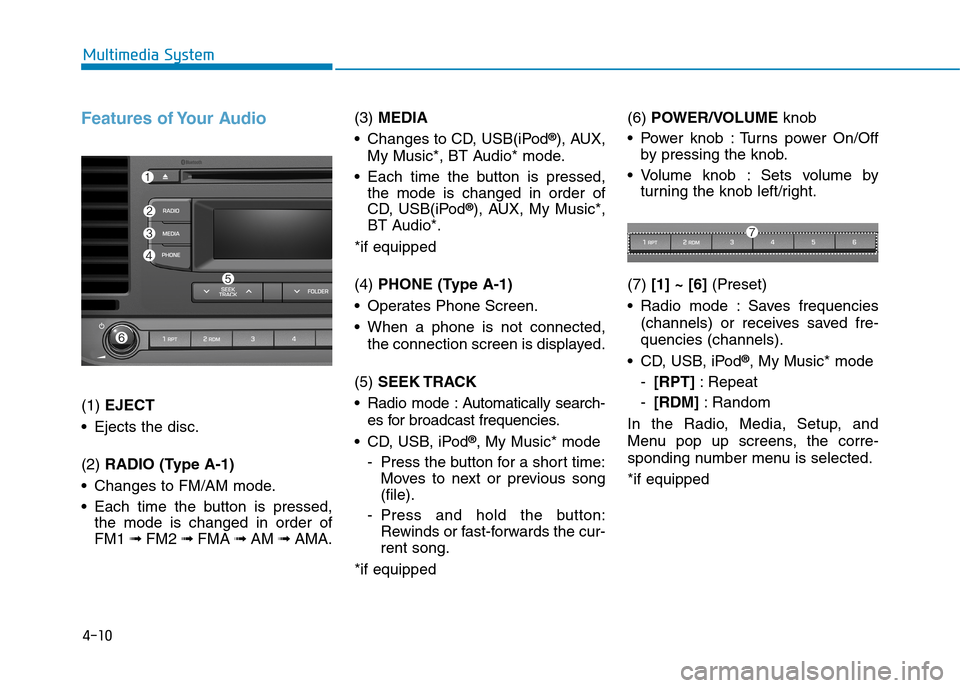
(1) EJECT
•Ejects the disc.
(2) RADIO (Type A-1)
•Changes to FM/AM mode.
•Each time the buttonis pressed,
the mode is changed in order of
FM1 ➟ FM2 ➟FMA ➟AM ➟AMA.
(3) MEDIA
•Changes to CD, USB(iPod®), AUX,
My Music*, BT Audio* mode.
•Each time the buttonis pressed,
the mode is changed in order of
CD, USB(iPod®), AUX, My Music*,
BT Audio*.
*if equipped
(4) PHONE (Type A-1)
•Operates Phone Screen.
•When a phone is not connected,
the connection screen is displayed.
(5) SEEK TRACK
•Radio mode :Automatically search-
es for broadcast frequencies.
•CD, USB, iPod®, My Music* mode
-Press the button for a short time:
Moves to next or previous song
(file).
-Press and hold the button:
Rewinds or fast-forwards the cur-
rent song.
*if equipped
(6) POWER/VOLUMEknob
•Power knob :Turns power On/Off
by pressing the knob.
•Volume knob : Sets volume by
turning the knob left/right.
(7) [1] ~ [6](Preset)
•Radio mode :Saves frequencies
(channels) or receives saved fre-
quencies (channels).
•CD, USB, iPod®, My Music* mode
-[RPT]:Repeat
-[RDM]:Random
In the Radio, Media, Setup, and
Menu pop up screens, the corre-
sponding number menu is selected.
*if equipped
Page 260 of 571
4-11
Multimedia System
4
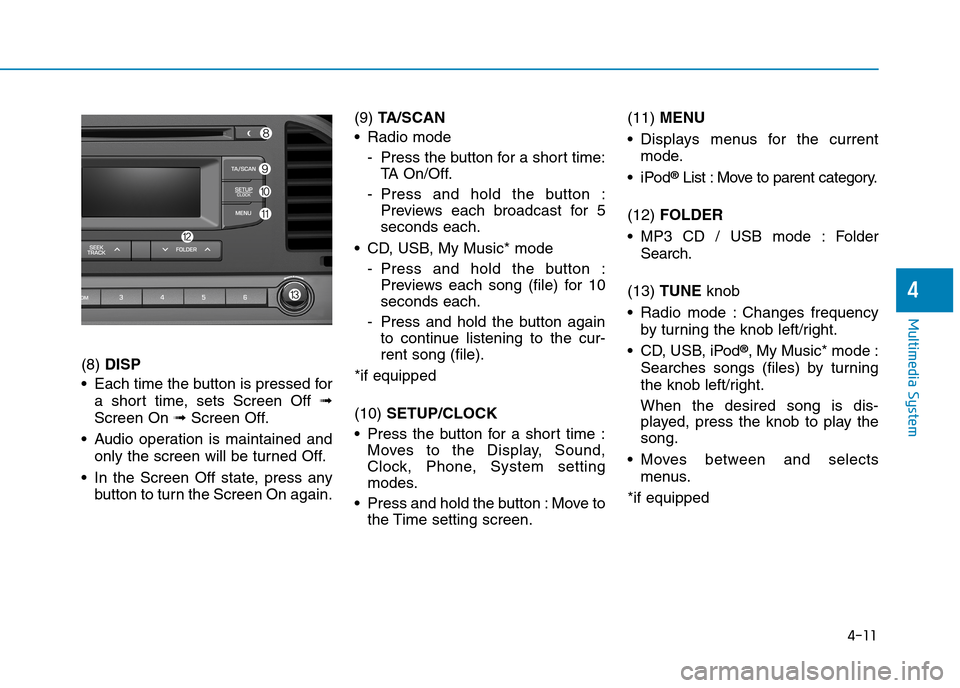
(8) DISP
•Each time the buttonis pressed for
a short time, sets Screen Off ➟
Screen On ➟Screen Off.
•Audio operation is maintained and
only the screen will be turned Off.
•In the Screen Off state, press any
button to turn the Screen On again.
(9) TA / S C A N
•Radio mode
-Press the button for a short time:
TA O n / O f f .
-Press and hold the button :
Previews each broadcast for 5
seconds each.
•CD, USB, My Music*mode
-Press and hold the button :
Previews each song (file) for 10
seconds each.
-Press and hold the buttonagain
to continue listening to the cur-
rent song (file).
*if equipped
(10) SETUP/CLOCK
•Press the button for a short time :
Moves to the Display, Sound,
Clock, Phone, System setting
modes.
•Press and hold the button:Move to
the Time setting screen.
(11) MENU
•Displays menus for the current
mode.
•iPod®List : Move to parent category.
(12) FOLDER
•MP3 CD / USB mode : Folder
Search.
(13) TUNE knob
•Radio mode :Changes frequency
by turning the knob left/right.
•CD, USB, iPod®, My Music* mode :
Searches songs (files) by turning
the knob left/right.
When the desired song is dis-
played, press the knob to play the
song.
•Moves between and selects
menus.
*if equipped
Page 261 of 571
4-12
Multimedia System
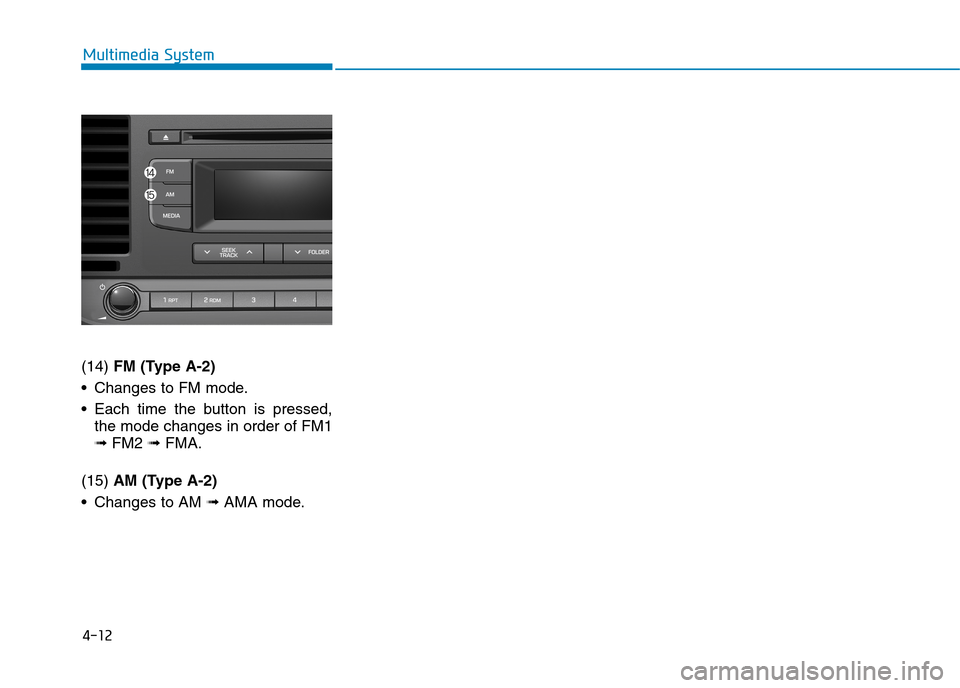
(14) FM (Type A-2)
•Changes to FM mode.
•Each time the buttonis pressed,
the mode changes in order of FM1
➟ FM2 ➟ FMA.
(15) AM (Type A-2)
•Changes to AM ➟ AMA mode.
Page 263 of 571
4-14
Multimedia System
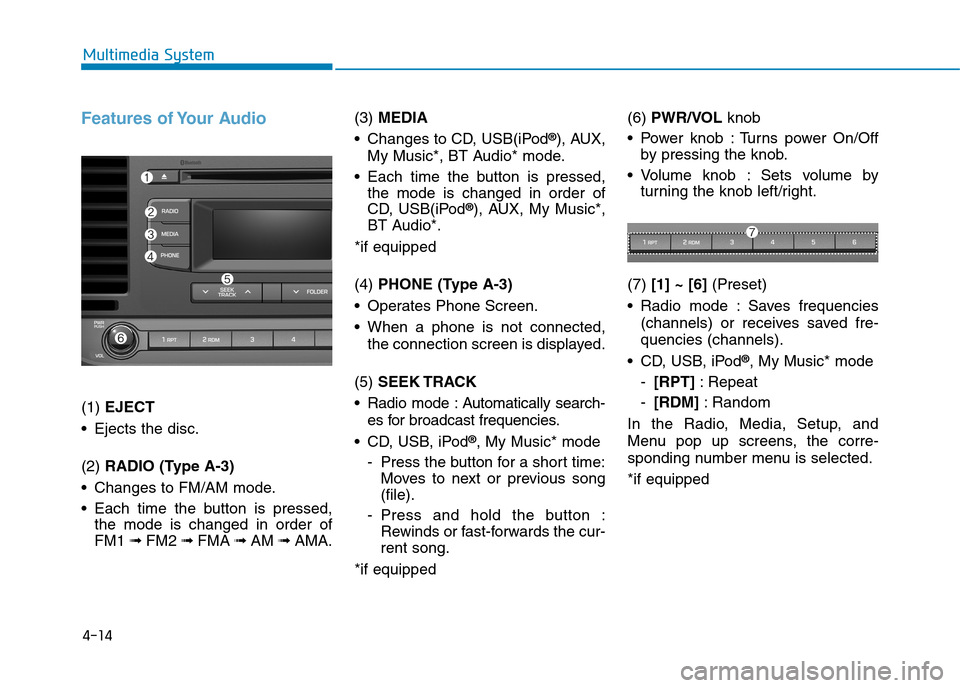
Features of Your Audio
(1) EJECT
•Ejects the disc.
(2) RADIO (Type A-3)
•Changes to FM/AM mode.
•Each time the button is pressed,
the mode is changed in order of
FM1 ➟ FM2 ➟FMA ➟AM ➟AMA.
(3) MEDIA
•Changes to CD, USB(iPod®), AUX,
My Music*, BT Audio* mode.
•Each time the button is pressed,
the mode is changed in order of
CD, USB(iPod®), AUX, My Music*,
BT Audio*.
*if equipped
(4) PHONE (Type A-3)
•Operates Phone Screen.
•When a phone is not connected,
the connection screen is displayed.
(5) SEEK TRACK
•Radio mode :Automatically search-
es for broadcast frequencies.
•CD, USB, iPod®, My Music* mode
-Press the button for a short time:
Moves to next or previous song
(file).
-Press and hold the button :
Rewinds or fast-forwards the cur-
rent song.
*if equipped
(6) PWR/VOL knob
•Power knob :Turns power On/Off
by pressing the knob.
•Volume knob : Sets volume by
turning the knob left/right.
(7) [1] ~ [6](Preset)
•Radio mode :Saves frequencies
(channels) or receives saved fre-
quencies (channels).
•CD, USB, iPod®, My Music* mode
-[RPT]:Repeat
-[RDM]:Random
In the Radio, Media, Setup, and
Menu pop up screens, the corre-
sponding number menu is selected.
*if equipped
Page 264 of 571
4-15
Multimedia System
4
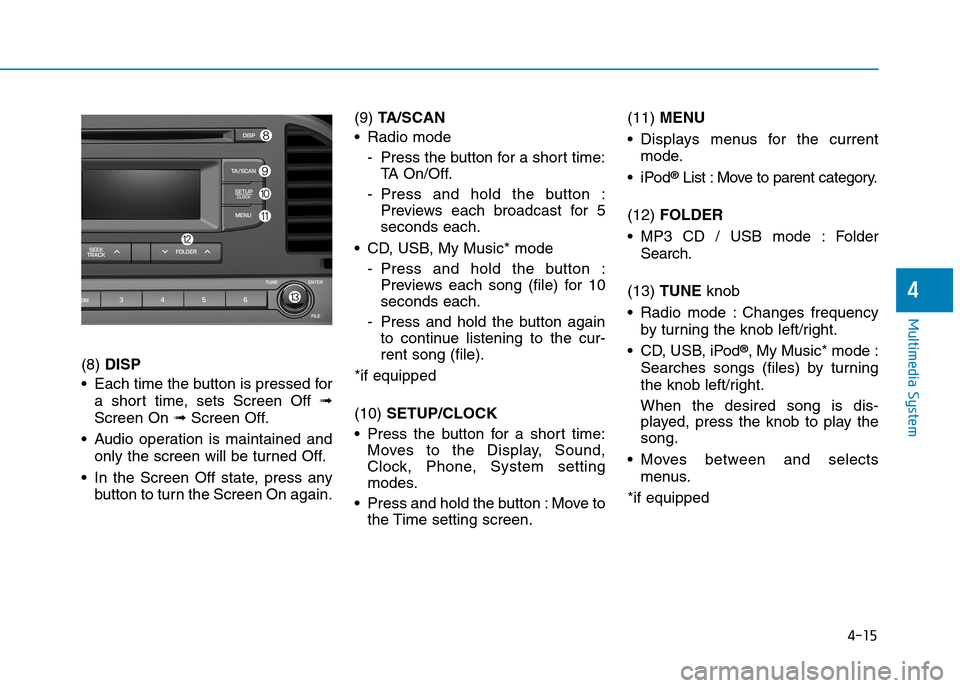
(8) DISP
•Each time the button is pressed for
a short time, sets Screen Off ➟
Screen On ➟Screen Off.
•Audio operation is maintained and
only the screen will be turned Off.
•In the Screen Off state, press any
button to turn the Screen On again.
(9) TA / S C A N
•Radio mode
-Press the button for a short time:
TA O n / O f f .
-Press and hold the button :
Previews each broadcast for 5
seconds each.
•CD, USB, My Music* mode
-Press and hold the button :
Previews each song (file) for 10
seconds each.
-Press and hold the button again
to continue listening to the cur-
rent song (file).
*if equipped
(10) SETUP/CLOCK
•Press the button for a short time:
Moves to the Display, Sound,
Clock, Phone, System setting
modes.
•Press and hold the button :Move to
the Time setting screen.
(11) MENU
•Displays menus for the current
mode.
•iPod®List : Move to parent category.
(12) FOLDER
•MP3 CD / USB mode : Folder
Search.
(13) TUNE knob
•Radio mode :Changes frequency
by turning the knob left/right.
•CD, USB, iPod®, My Music* mode :
Searches songs (files) by turning
the knob left/right.
When the desired song is dis-
played, press the knob to play the
song.
•Moves between and selects
menus.
*if equipped
Page 265 of 571
4-16
Multimedia System
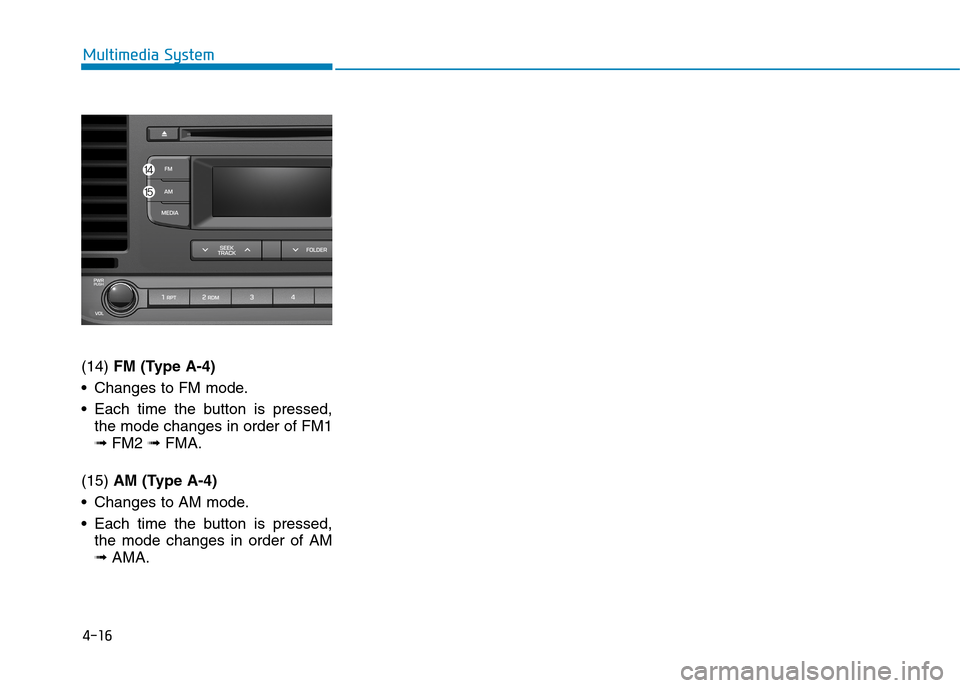
(14) FM (Type A-4)
•Changes to FM mode.
•Each time the button is pressed,
the mode changes in order of FM1
➟ FM2 ➟FMA.
(15) AM (Type A-4)
•Changes to AM mode.
•Each time the button is pressed,
the mode changes in order of AM
➟AMA.