Auto start Hyundai Elantra 2017 Service Manual
[x] Cancel search | Manufacturer: HYUNDAI, Model Year: 2017, Model line: Elantra, Model: Hyundai Elantra 2017Pages: 637, PDF Size: 15.02 MB
Page 401 of 637
5-15
Driving your vehicle
5
- Vehicle with automatic transmission/dual clutch transmission
Button Position Action Notes
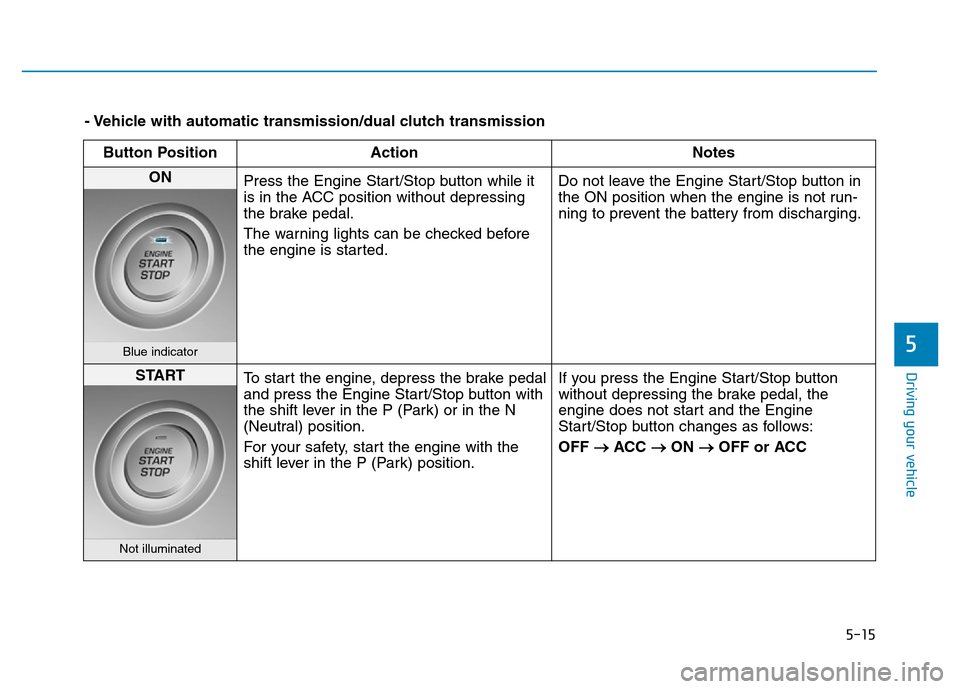
ON
Press the Engine Start/Stop button while it
is in the ACC position without depressing
the brake pedal.
The warning lights can be checked before
the engine is started.Do not leave the Engine Start/Stop button in
the ON position when the engine is not run-
ning to prevent the battery from discharging.
Blue indicator
START
To start the engine, depress the brake pedal
and press the Engine Start/Stop button with
the shift lever in the P (Park) or in the N
(Neutral) position.
For your safety, start the engine with the
shift lever in the P (Park) position.If you press the Engine Start/Stop button
without depressing the brake pedal, the
engine does not start and the Engine
Start/Stop button changes as follows:
OFF
→ACC →ON →OFF or ACC
Not illuminated
Page 402 of 637
5-16
Driving your vehicle
Starting the engine Information
• The engine will start by pressing the
Engine Start/Stop button, only when
the smart key is in the vehicle.
• Even if the smart key is in the vehi-
cle, if it is far away from the driver,
the engine may not start.
• When the Engine Start/Stop button
is in the ACC or ON position, if any
door is open, the system checks for
the smart key. If the smart key is not
in the vehicle, the " " indicator
will blink and the warning "Key not
in vehicle" will come on, and if all
doors are closed, the chime will also
sound for about 5 seconds. Keep the
smart key in the vehicle when using
the ACC position or if the vehicle
engine is ON.
Starting the gasoline engine
Vehicle with manual transmission:
1. Always carry the smart key with
you.
2. Make sure the parking brake is
applied.
3. Make sure the shift lever is in neu-
tral.
4. Depress the clutch and brake ped-
als.
5. Press the Engine Start/Stop but-
ton.
Vehicle with automatic transmis-
sion/dual clutch transmission:
1. Always carry the smart key with
you.
2. Make sure the parking brake is
applied.
3. Make sure the shift lever is in P
(Park).
4. Depress the brake pedal.
5 Press the Engine Start/Stop but-
ton.i
•Always wear appropriate
shoes when operating your
vehicle. Unsuitable shoes,
such as high heels, ski boots,
sandals, flip-flops, etc., may
interfere with your ability to
use the brake, accelerator and
clutch pedals.
•Do not start the vehicle with the
accelerator pedal depressed.
The vehicle can move and lead
to an accident.
•Wait until the engine rpm is
normal. The vehicle may sud-
denly move if the brake pedal
is released when the rpm is
high.
WARNING
Page 412 of 637
5-26
Driving your vehicle
R (Reverse)
Use this position to drive the vehicle
backward.
Always come to a complete stop
before shifting into or out of R
(Reverse); you may damage the
transmission if you shift into R
(Reverse) while the vehicle is in
motion.
N (Neutral)
The wheels and transmission are not
engaged.
Use N (Neutral) if you need to restart
a stalled engine, or if it is necessary
to stop with the engine ON. Shift into
P (Park) if you need to leave your
vehicle for any reason.
Always depress the brake pedal
when you are shifting from N
(Neutral) to another gear.
D (Drive)
This is the normal driving position.
The transmission will automatically
shift through a 6-gear sequence, pro-
viding the best fuel economy and
power.
For extra power when passing anoth-
er vehicle or driving uphill, depress
the accelerator fully. The transmis-
sion will automatically downshift to
the next lower gear (or gears, as
appropriate).
The DRIVE MODE switch, located on
the shift lever console, allows the driv-
er to switch from NORMAL mode to
ECO or SPORT mode. (if equipped)
For more information, refer to
"Drive Mode Integrated Control
System" later in this chapter.
NOTICE
Do not shift into gear unless
your foot is firmly on the brake
pedal. Shifting into gear when
the engine is running at high
speed can cause the vehicle to
move very rapidly. You could
lose control of the vehicle and
hit people or objects.
WARNING
Page 414 of 637
5-28
Driving your vehicle
Shift-lock system
For your safety, the automatic trans-
mission has a shift-lock system
which prevents shifting the transmis-
sion from P (Park) into R (Reverse)
unless the brake pedal is depressed.
To shift the transmission from P
(Park) into R (Reverse):
1. Depress and hold the brake pedal.
2. Start the engine or place the igni-
tion switch in the ON position.
3. Move the shift lever.
Shift-lock release
If the shift lever cannot be moved
from the P (Park) position into R
(Reverse) position with the brake
pedal depressed, continue depress-
ing the brake, and then do the follow-
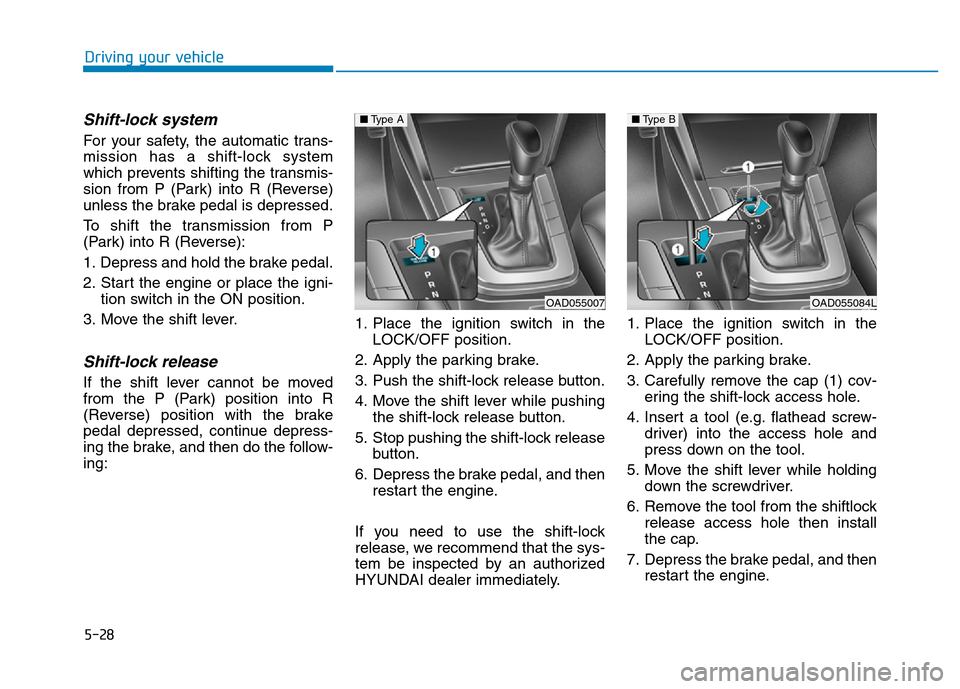
ing:1. Place the ignition switch in the
LOCK/OFF position.
2. Apply the parking brake.
3. Push the shift-lock release button.
4. Move the shift lever while pushing
the shift-lock release button.
5. Stop pushing the shift-lock release
button.
6. Depress the brake pedal, and then
restart the engine.
If you need to use the shift-lock
release, we recommend that the sys-
tem be inspected by an authorized
HYUNDAI dealer immediately.1. Place the ignition switch in the
LOCK/OFF position.
2. Apply the parking brake.
3. Carefully remove the cap (1) cov-
ering the shift-lock access hole.
4. Insert a tool (e.g. flathead screw-
driver) into the access hole and
press down on the tool.
5. Move the shift lever while holding
down the screwdriver.
6. Remove the tool from the shiftlock
release access hole then install
the cap.
7. Depress the brake pedal, and then
restart the engine.
OAD055007
■Type A
OAD055084L
■Type B
Page 422 of 637
5-36
R (Reverse)
Use this position to drive the vehicle
backward.
Always come to a complete stop
before shifting into or out of R
(Reverse); you may damage the
transmission if you shift into R
(Reverse) while the vehicle is in
motion.
N (Neutral)
The wheels and transmission are not
engaged.
Use N (Neutral) if you need to restart
a stalled engine, or if it is necessary
to stop with the engine ON. Shift into
P (Park) if you need to leave your
vehicle for any reason.
Always depress the brake pedal
when you are shifting from N
(Neutral) to another gear.
D (Drive)
This is the normal driving position.
The transmission will automatically
shift through a 7-gear sequence, pro-
viding the best fuel economy and
power.
For extra power when passing anoth-
er vehicle or driving uphill, depress
the accelerator fully. The transmis-
sion will automatically downshift to
the next lower gear (or gears, as
appropriate).
The DRIVE MODE switch, located on
the shift lever console, allows the driv-
er to switch from NORMAL mode to
ECO or SPORT mode. (if equipped)
For more information, refer to
"Drive Mode Integrated Control
System" later in this chapter.
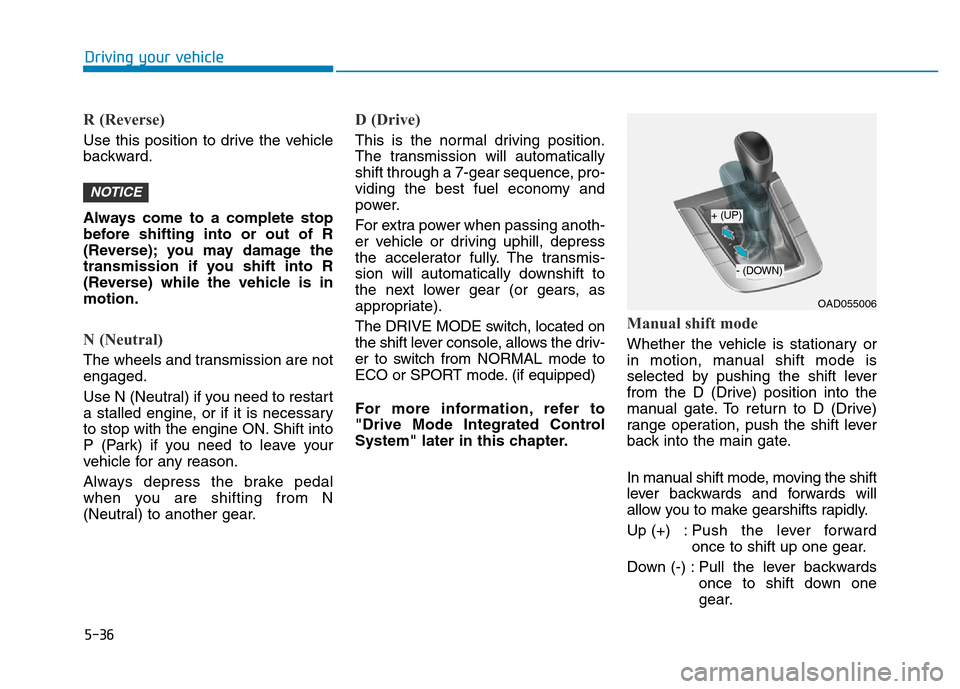
Manual shift mode
Whether the vehicle is stationary or
in motion, manual shift mode is
selected by pushing the shift lever
from the D (Drive) position into the
manual gate. To return to D (Drive)
range operation, push the shift lever
back into the main gate.
In manual shift mode, moving the shift
lever backwards and forwards will
allow you to make gearshifts rapidly.
Up (+) : Push the lever forward
once to shift up one gear.
Down (-) : Pull the lever backwards
once to shift down one
gear.
NOTICE
Driving your vehicle
OAD055006
+ (UP)
- (DOWN)
Page 423 of 637
5-37
Driving your vehicle
Information
• Only the seven forward gears can be
selected. To reverse or park the
vehicle, move the shift lever to the R
(Reverse) or P (Park) position as
required.
• Downshifts are made automatically
when the vehicle slows down. When
the vehicle stops, 1
stgear is automat-
ically selected.
• When the engine rpm approaches
the red zone the transmission will
upshift automatically.
• If the driver presses the lever to
+ (Up) or - (Down) position, the
transmission may not make the
requested gear change if the next
gear is outside of the allowable
engine rpm range. The driver must
execute upshifts in accordance with
road conditions, taking care to keep
the engine rpms below the red zone.
(Continued)(Continued)
• When driving on a slippery road,
push the shift lever forward into the
+ (Up) position. This causes the
transmission to shift into the 2
nd
gear which is better for smooth driv-
ing on a slippery road. Push the shift
lever to the - (Down) side to shift
back to the 1
stgear.
• When driving in manual shift mode,
slow down before shifting to a lower
gear. Otherwise, the lower gear may
not be engaged if the engine rpms
are outside of the allowable range.
Shift-lock system
For your safety, the dual clutch trans-
mission has a shift-lock system
which prevents shifting the transmis-
sion from P (Park) into R (Reverse)
unless the brake pedal is depressed.
To shift the transmission from P
(Park) into R (Reverse):
1. Depress and hold the brake pedal.
2. Start the engine or place the igni-
tion switch in the ON position.
3. Move the shift lever.
Shift-lock release
If the shift lever cannot be moved
from the P (Park) position into R
(Reverse) position with the brake
pedal depressed, continue depress-
ing the brake, and then do the follow-
ing:
i
5
Page 434 of 637
5-48
Driving your vehicle
When operating
When the ESC is in opera-
tion, the ESC indicator light
blinks:
• When you apply your brakes under
conditions which may lock the
wheels, you may hear sounds from
the brakes, or feel a corresponding
sensation in the brake pedal. This is
normal and it means your ESC is
active.
• When the ESC activates, the
engine may not respond to the
accelerator as it does under routine
conditions.
• If the Cruise Control was in use
when the ESC activates, the Cruise
Control automatically disengages.
The Cruise Control can be reen-
gaged when the road conditions
allow.See "Cruise Control System"
later in this chapter.(if equipped)
• When moving out of the mud or
driving on a slippery road, the
engine rpm (revolutions per minute)
may not increase even if you press
the accelerator pedal deeply. This is
to maintain the stability and traction
of the vehicle and does not indicate
a problem.
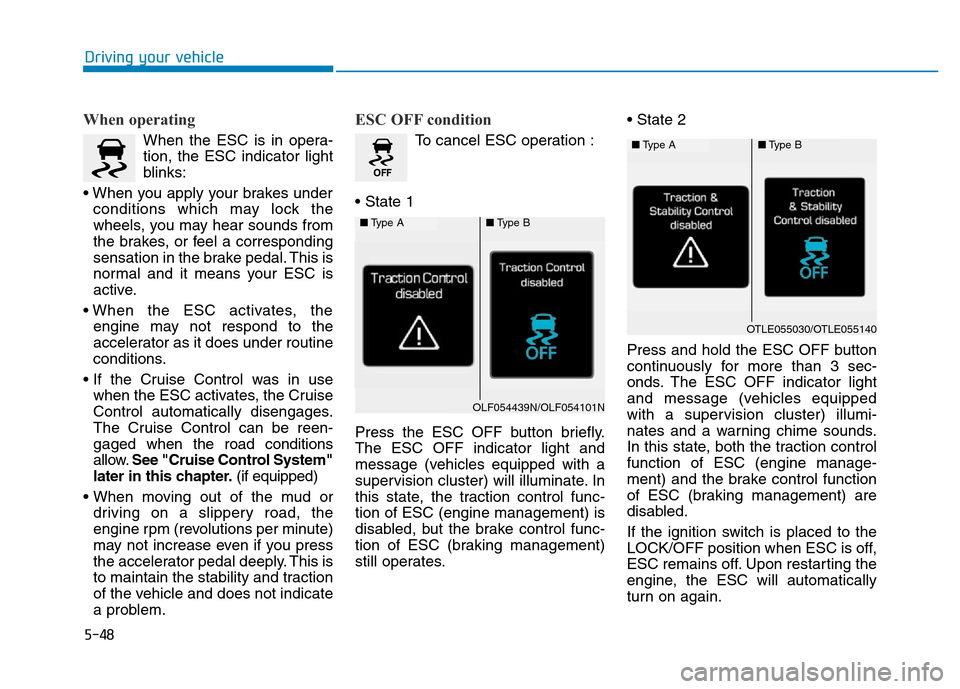
ESC OFF condition
To cancel ESC operation :
• State 1
Press the ESC OFF button briefly.
The ESC OFF indicator light and
message (vehicles equipped with a
supervision cluster) will illuminate. In
this state, the traction control func-
tion of ESC (engine management) is
disabled, but the brake control func-
tion of ESC (braking management)
still operates.• State 2
Press and hold the ESC OFF button
continuously for more than 3 sec-
onds. The ESC OFF indicator light
and message (vehicles equipped
with a supervision cluster) illumi-
nates and a warning chime sounds.
In this state, both the traction control
function of ESC (engine manage-
ment) and the brake control function
of ESC (braking management) are
disabled.
If the ignition switch is placed to the
LOCK/OFF position when ESC is off,
ESC remains off. Upon restarting the
engine, the ESC will automatically
turn on again.
■Type A■Type B
OLF054439N/OLF054101N
■Type A■Type B
OTLE055030/OTLE055140
Page 438 of 637
5-52
Driving your vehicle
Hill-Start Assist Control (HAC)
(if equipped)
helps prevent has the tendency to
slide backwards on a steep slope,
before depressing the accelerator
after a stop. The HAC prevents the
vehicle from sliding backwards and
releases the brake after 2 seconds or
when the accelerator pedal is
depressed.
Information
• The HAC does not operate when the
shift lever is in P (Park) or N (Neutral).
• The HAC activates even when the
ESC (Electronic Stability Control) is
off. However, it does not activate,
when the ESC does not normally
operate.
Emergency Stop Signal (ESS)
(if equipped)
The Emergency Stop Signal system
alerts the driver behind by blinking
the stop lights, while sharply and
severely braking.
The system is activated when:
• The vehicle suddenly stops. (The
deceleration power exceeds 7 m/s
2,
and the driving speed exceeds 55
km/h (34 mph).)
• The ABS is activated.
The hazard warning flasher automat-
ically turns ON after blinking the stop
lights, when the driving speeds is
decelerated under 40 km/h (25 mph),
when the ABS is deactivated, and
when the sudden braking situation is
over.
i
The HAC is activated only for
about 2 seconds, so always
depress the accelerator pedal
to begin driving upwards after a
stop.
WARNING
Page 440 of 637
5-54
The ISG system is to reduce the fuel
consumption by automatically shut-
ting down the engine, when the vehi-
cle is at a standstill (i.e. red stop light,
stop sign, and traffic jam).
The engine is automatically started
upon satisfying the starting condi-
tions.
The ISG system is always active,
when the engine is running.
Information
When the engine is automatically
started by the ISG system, some warn-
ing lights (i.e. ABS, ESC, ESC OFF,
EPS, and parking brake warning
light) may illuminate for a few sec-
onds due to the low battery voltage.
However, it does not indicate a mal-
function with the ISG system.
To activate the ISG system
Auto stop
To stop the engine in idle stop mode
1. Decrease the vehicle speed to
0km/h.
2. Shift to D (Drive) or N (Neutral).
3. Press the brake pedal.
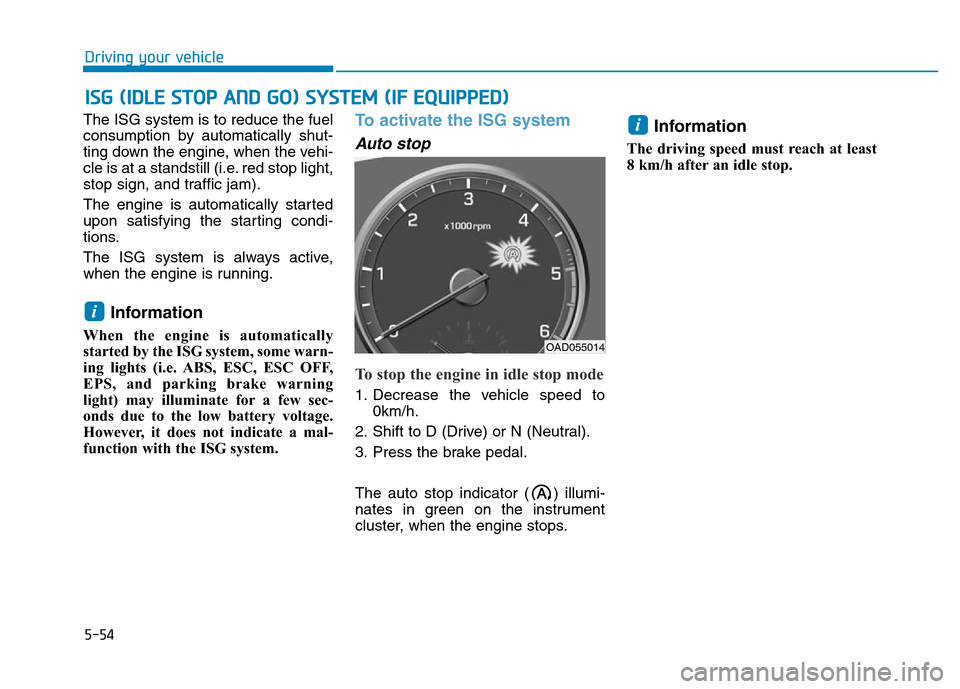
The auto stop indicator ( ) illumi-
nates in green on the instrument
cluster, when the engine stops.
Information
The driving speed must reach at least
8 km/h after an idle stop.
i
i
ISG (IDLE STOP AND GO) SYSTEM (IF EQUIPPED)
Driving your vehicle
OAD055014
Page 441 of 637
5-55
Driving your vehicle
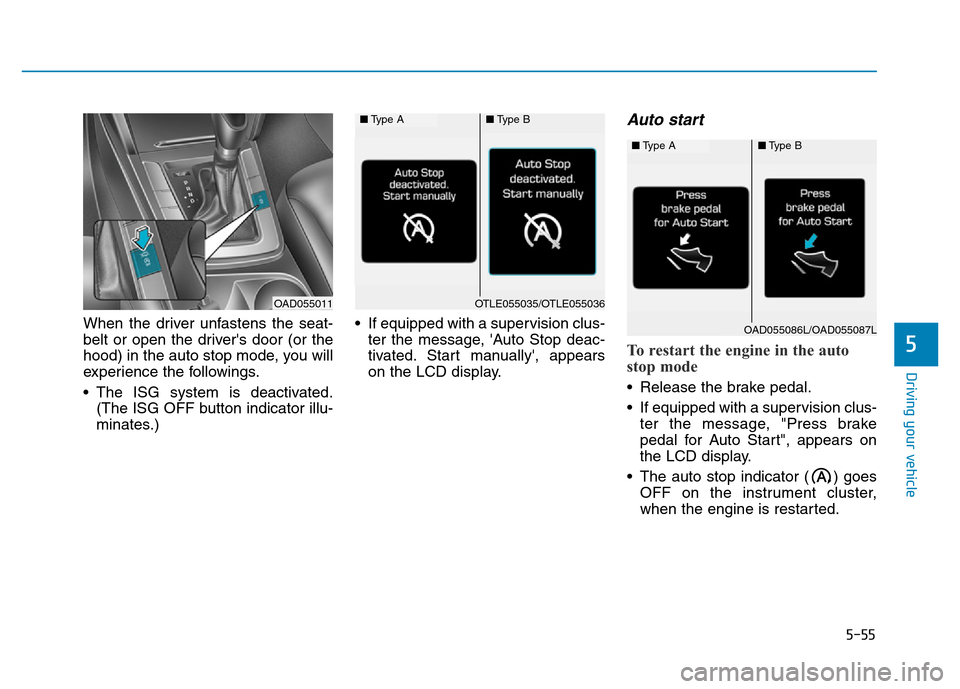
When the driver unfastens the seat-
belt or open the driver's door (or the
hood) in the auto stop mode, you will
experience the followings.
• The ISG system is deactivated.
(The ISG OFF button indicator illu-
minates.)• If equipped with a supervision clus-
ter the message, 'Auto Stop deac-
tivated. Start manually', appears
on the LCD display.
Auto start
To restart the engine in the auto
stop mode
• Release the brake pedal.
• If equipped with a supervision clus-
ter the message, "Press brake
pedal for Auto Start", appears on
the LCD display.
• The auto stop indicator ( ) goes
OFF on the instrument cluster,
when the engine is restarted.
5
OAD055011
■Type A■Type B
OTLE055035/OTLE055036
■Type A■Type B
OAD055086L/OAD055087L