gear lever Hyundai Elantra 2017 Owner's Manual
[x] Cancel search | Manufacturer: HYUNDAI, Model Year: 2017, Model line: Elantra, Model: Hyundai Elantra 2017Pages: 637, PDF Size: 15.02 MB
Page 113 of 637
3-18
Convenient features of your vehicle
Auto door lock/unlock features
Impact sensing door unlock
system (if equipped)
All doors will be automatically
unlocked when an impact causes the
air bags to deploy.
Speed sensing door lock system
(if equipped)
All doors will be automatically locked
when vehicle speed exceeds 15
km/h (9 mph).
You can activate or deactivate the
Auto Door Lock/Unlock features from
the User Settings Mode on the LCD
display.For more details, refer to
"LCD Display" in this chapter. Always secure your vehicle
Leaving your vehicle unlocked
increases the potential risk to
you or others from someone
hiding in your vehicle.
To secure your vehicle, while
depressing the brake, move the
shift lever to the P (Park) posi-
tion (for automatic transmis-
sion/dual clutch transmission)
or first gear or R (Reverse, for
manual transmission), engage
the parking brake, and place the
ignition switch in the LOCK/OFF
position, close all windows,
lock all doors, and always take
the key with you.
WARNING
Opening a door when something
is approaching may cause dam-
age or injury. Be careful when
opening doors and watch for
vehicles, motorcycles, bicycles
or pedestrians approaching the
vehicle in the path of the door.
WARNING
Page 119 of 637

3-24
Convenient features of your vehicle
Tilt steering / Telescope steering
Information
After adjustment, sometimes the lock-
release lever may not lock the steering
wheel.
It is not a malfunction. This occurs
when two gears are not engaged cor-
rectly. In this case, adjust the steering
wheel again and then lock the steering
wheel.
Pull down the lock-release lever (1) on
the steering wheel column and adjust
the steering wheel angle (2) and posi-
tion (3, if equipped). Move the steer-
ing wheel, so it points toward your
chest, not toward your face.Make sure you can see the instrument
panel warning lights and gauges.
After adjusting, pull up the lock-
release lever (1) to lock the steering
wheel in place. Push the steering
wheel both up and down to be cer-
tain it is locked in position. Always
adjust the position of the steering
wheel before driving.
i
Never adjust the steering wheel
while driving. You may lose
steering control and cause
severe personal injury, death or
accidents.
WARNING
OAD045006
OAD045006R
■Right-hand drive
■Left-hand drive
Page 138 of 637
3-43
Convenient features of your vehicle
3
Trunk
Opening the trunk
1. Make sure the shift lever is in P
(Park, for automatic transmission)
or first gear or R (Reverse, for
manual transmission) and set the
parking brake.
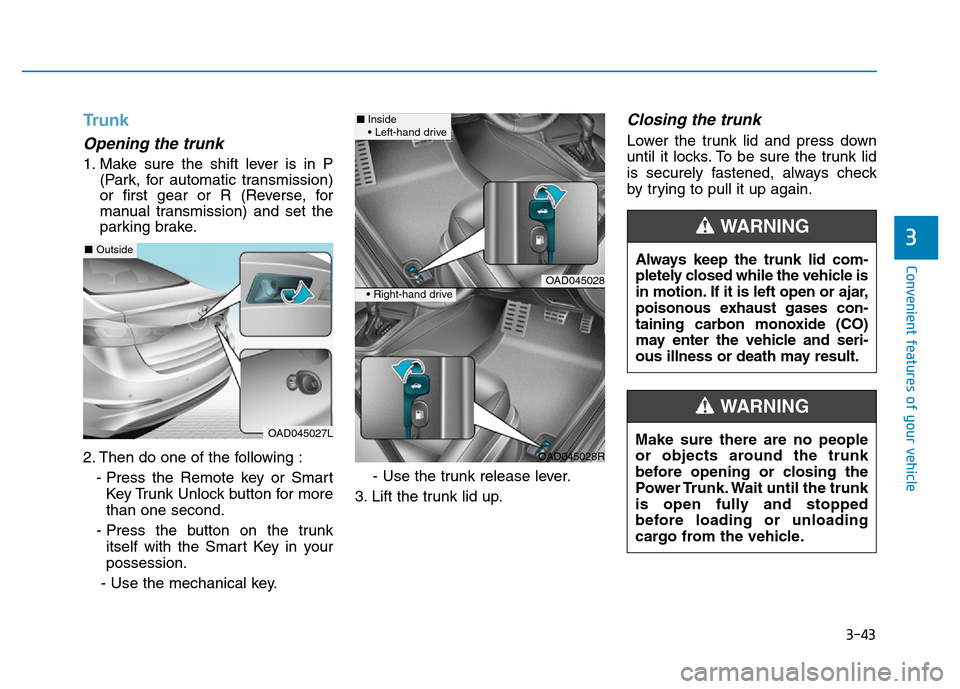
2. Then do one of the following :
- Press the Remote key or Smart
Key Trunk Unlock button for more
than one second.
- Press the button on the trunk
itself with the Smart Key in your
possession.
- Use the mechanical key.- Use the trunk release lever.
3. Lift the trunk lid up.
Closing the trunk
Lower the trunk lid and press down
until it locks. To be sure the trunk lid
is securely fastened, always check
by trying to pull it up again.
Always keep the trunk lid com-
pletely closed while the vehicle is
in motion. If it is left open or ajar,
poisonous exhaust gases con-
taining carbon monoxide (CO)
may enter the vehicle and seri-
ous illness or death may result.
WARNING
Make sure there are no people
or objects around the trunk
before opening or closing the
Power Trunk. Wait until the trunk
is open fully and stopped
before loading or unloading
cargo from the vehicle.
WARNING
OAD045027L
■Outside
OAD045028
OAD045028R
■Inside
• Left-hand drive
• Right-hand drive
Page 145 of 637
3-50
Convenient features of your vehicle
Information
Make sure to refuel your vehicle
according to the "Fuel Requirements"
suggested in the Introduction chapter.
• Do not spill fuel on the exterior
surfaces of the vehicle. Any type
of fuel spilled on painted sur-
faces may damage the paint.
• If the fuel filler cap requires
replacement, use only a genuine
HYUNDAI cap or the equivalent
specified for your vehicle. An
incorrect fuel filler cap can
result in a serious malfunction
of the fuel system or emission
control system.
NOTICE
i
(Continued)
•Do not use matches or a
lighter and do not smoke or
leave a lit cigarette in your
vehicle while at a gas station,
especially during refueling.
•Do not over-fill or top-off your
vehicle tank, which can cause
gasoline spillage.
•If a fire breaks out during refu-
eling, leave the vicinity of the
vehicle, and immediately con-
tact the manager of the gas
station and then contact the
local fire department. Follow
any safety instructions they
provide.
•If pressurized fuel sprays out,
it can cover your clothes or
skin and thus subject you to
the risk of fire and burns.
Always remove the fuel cap
carefully and slowly. If the cap
is venting fuel or if you hear a
hissing sound, wait until the
condition stops before com-
pletely removing the cap.
(Continued)
(Continued)
•Always check that the fuel cap
is installed securely to prevent
fuel spillage in the event of an
accident.
(Continued)
•When refueling, always move
the shift lever to the P (Park)
position (for automatic trans-
mission) or first gear or R
(Reverse, for manual trans-
mission), set the parking
brake, and place the ignition
switch to the LOCK/OFF posi-
tion. Sparks produced by
electrical components related
to the engine can ignite fuel
vapors causing a fire.
•When using an approved
portable fuel container, be sure
to place the container on the
ground prior to refueling. Static
electricity discharge from the
container can ignite fuel vapors
causing a fire. Once refueling
has begun, contact between
your bare hand and the vehicle
should be maintained until the
filling is complete.
•Use only approved portable
plastic fuel containers designed
to carry and store gasoline.
(Continued)
Page 172 of 637
3-77
Convenient features of your vehicle
3
Transmission shift indicator
Automatic Transmission Shift
Indicator (if equipped)
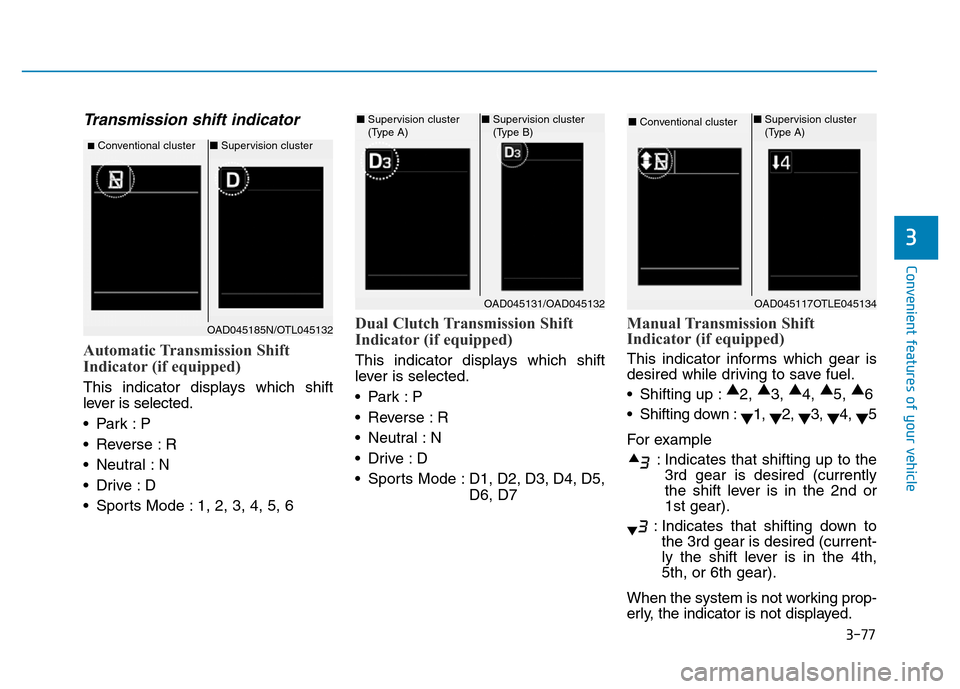
This indicator displays which shift
lever is selected.
•Park :P
• Reverse : R
• Neutral : N
•Drive :D
• Sports Mode : 1, 2, 3, 4, 5, 6
Dual Clutch Transmission Shift
Indicator (if equipped)
This indicator displays which shift
lever is selected.
•Park :P
• Reverse : R
• Neutral : N
•Drive :D
• Sports Mode : D1, D2, D3, D4, D5,
D6, D7
Manual Transmission Shift
Indicator (if equipped)
This indicator informs which gear is
desired while driving to save fuel.
• Shifting up :▲
2, ▲
3, ▲
4, ▲
5, ▲
6
• Shifting down :
▼1,
▼2,
▼3,
▼4,
▼5
For example
: Indicates that shifting up to the
3rd gear is desired (currently
the shift lever is in the 2nd or
1st gear).
: Indicates that shifting down to
the 3rd gear is desired (current-
ly the shift lever is in the 4th,
5th, or 6th gear).
When the system is not working prop-
erly, the indicator is not displayed.
■Conventional cluster■Supervision cluster
OAD045131/OAD045132
■Supervision cluster
(Type A)■Supervision cluster
(Type B)
OAD045117OTLE045134
■Conventional cluster ■Supervision cluster
(Type A)
OAD045185N/OTL045132
Page 183 of 637
3-88
Convenient features of your vehicle
ItemsExplanation
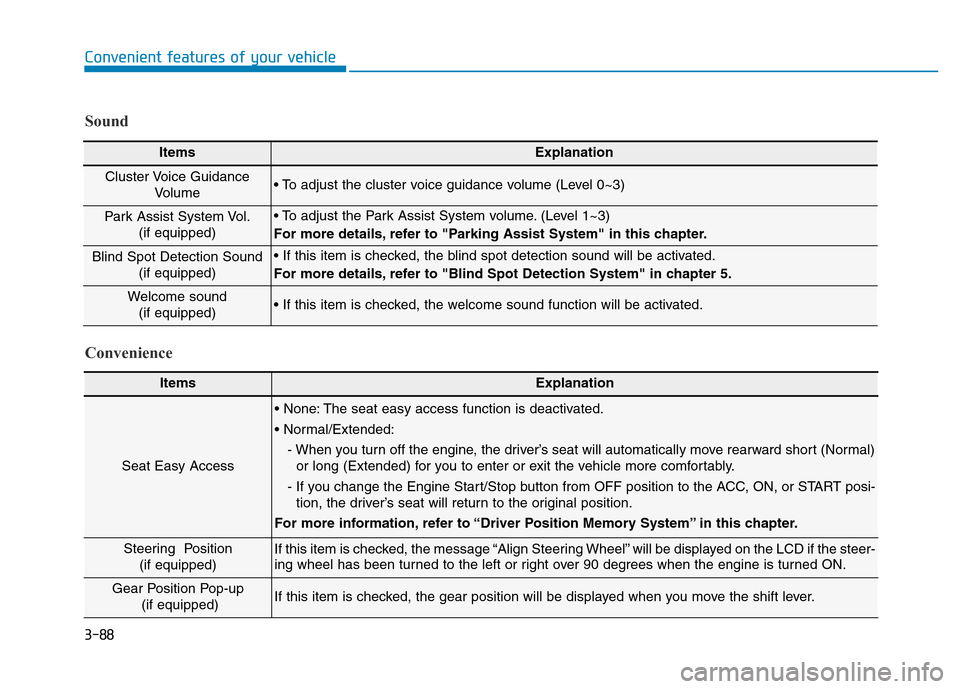
Seat Easy Access
• None: The seat easy access function is deactivated.
• Normal/Extended:
- When you turn off the engine, the driver’s seat will automatically move rearward short (Normal)
or long (Extended) for you to enter or exit the vehicle more comfortably.
- If you change the Engine Start/Stop button from OFF position to the ACC, ON, or START posi-
tion, the driver’s seat will return to the original position.
For more information, refer to “Driver Position Memory System” in this chapter.
Steering Position
(if equipped) If this item is checked, the message “Align Steering Wheel” will be displayed on the LCD if the steer-
ing wheel has been turned to the left or right over 90 degrees when the engine is turned ON.
Gear Position Pop-up
(if equipped)If this item is checked, the gear position will be displayed when you move the shift lever.
Convenience Sound
ItemsExplanation
Cluster Voice Guidance
Volume • To adjust the cluster voice guidance volume (Level 0~3)
Park Assist System Vol.
(if equipped)• To adjust the Park Assist System volume. (Level 1~3)
For more details, refer to "Parking Assist System" in this chapter.
Blind Spot Detection Sound
(if equipped)• If this item is checked, the blind spot detection sound will be activated.
For more details, refer to "Blind Spot Detection System" in chapter 5.
Welcome sound
(if equipped)• If this item is checked, the welcome sound function will be activated.
Page 392 of 637
5-6
Driving your vehicle
Key ignition switch
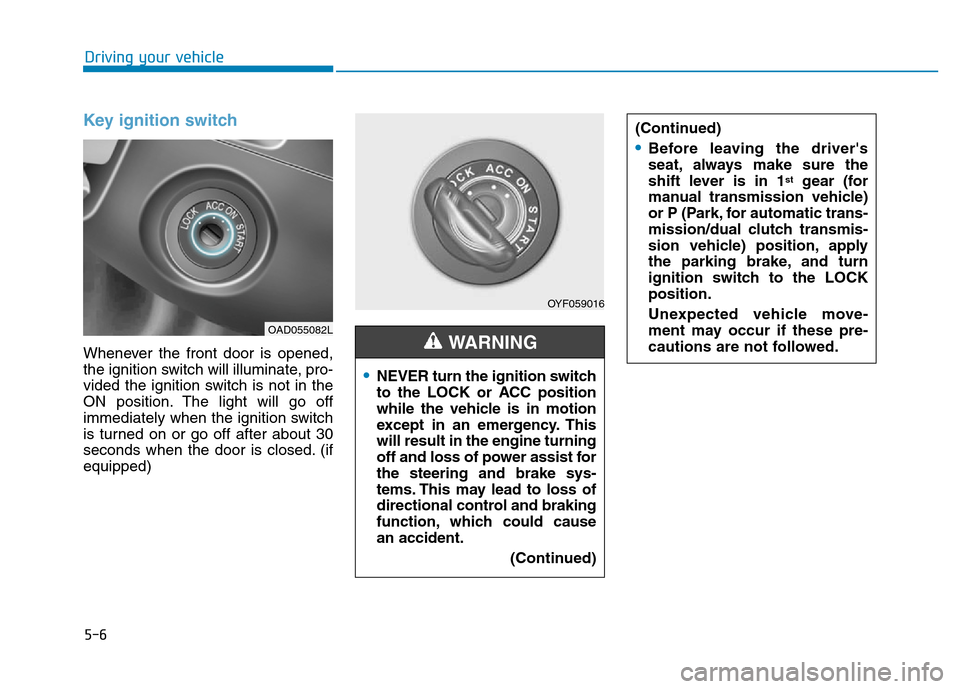
Whenever the front door is opened,
the ignition switch will illuminate, pro-
vided the ignition switch is not in the
ON position. The light will go off
immediately when the ignition switch
is turned on or go off after about 30
seconds when the door is closed. (if
equipped)
OYF059016
•NEVER turn the ignition switch
to the LOCK or ACC position
while the vehicle is in motion
except in an emergency. This
will result in the engine turning
off and loss of power assist for
the steering and brake sys-
tems. This may lead to loss of
directional control and braking
function, which could cause
an accident.
(Continued)
WARNING
(Continued)
•Before leaving the driver's
seat, always make sure the
shift lever is in 1
stgear (for
manual transmission vehicle)
or P (Park, for automatic trans-
mission/dual clutch transmis-
sion vehicle) position, apply
the parking brake, and turn
ignition switch to the LOCK
position.
Unexpected vehicle move-
ment may occur if these pre-
cautions are not followed.
OAD055082L
Page 406 of 637
5-20
Driving your vehicle
Manual transmission opera-
tion
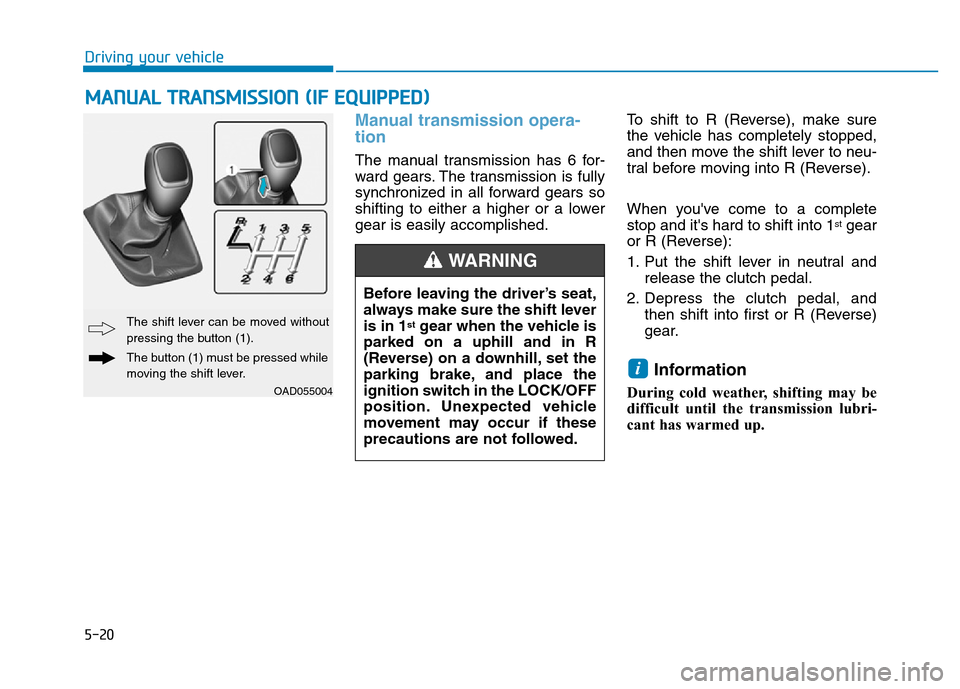
The manual transmission has 6 for-
ward gears. The transmission is fully
synchronized in all forward gears so
shifting to either a higher or a lower
gear is easily accomplished.To shift to R (Reverse), make sure
the vehicle has completely stopped,
and then move the shift lever to neu-
tral before moving into R (Reverse).
When you've come to a complete
stop and it's hard to shift into 1
stgear
or R (Reverse):
1. Put the shift lever in neutral and
release the clutch pedal.
2. Depress the clutch pedal, and
then shift into first or R (Reverse)
gear.
Information
During cold weather, shifting may be
difficult until the transmission lubri-
cant has warmed up.
i
MANUAL TRANSMISSION (IF EQUIPPED)
Before leaving the driver’s seat,
always make sure the shift lever
is in 1
stgear when the vehicle is
parked on a uphill and in R
(Reverse) on a downhill, set the
parking brake, and place the
ignition switch in the LOCK/OFF
position. Unexpected vehicle
movement may occur if these
precautions are not followed.
WARNING
OAD055004
The shift lever can be moved without
pressing the button (1).
The button (1) must be pressed while
moving the shift lever.
Page 408 of 637
5-22
Driving your vehicle
To prevent damage to the engine,
clutch and transmission:
• When downshifting from 5
thgear
to 4thgear, be careful not to inad-
vertently push the shift lever
sideways engaging the 2
ndgear.
A drastic downshift may cause
the engine speed to increase to
the point the tachometer will
enter the red-zone and may
cause engine damage.
• Do not downshift more than two
gear at a time or downshift the
gear when the engine is running
at high speed (5,000 RPM or
higher). Such downshifting may
damage the engine, clutch and
the transmission.
Good driving practices
• Never take the vehicle out of gear
and coast down a hill. This is
extremely dangerous.
• Don't "ride" the brakes. This can
cause the brakes and related parts
to overheat and malfunction.
When you are driving down a long
hill, slow down and shift to a lower
gear. Engine braking will help slow
down the vehicle.
• Slow down before shifting to a
lower gear. This will help avoid
over-revving the engine, which can
cause damage.
• Slow down when you encounter
cross winds. This gives you much
better control of your vehicle.
• Be sure the vehicle is completely
stopped before you shift into R
(Reverse) to prevent damage to
the transmission.• Exercise extreme caution when
driving on a slippery surface. Be
especially careful when braking,
accelerating or shifting gears. On a
slippery surface, an abrupt change
in vehicle speed can cause the
drive wheels to lose traction and
may cause loss of vehicle control
resulting in an accident
NOTICE
Do not use the engine brake
(shifting from a higher gear to
lower gear) rapidly on slippery
roads. The vehicle may slip
causing an accident.
WARNING
Page 411 of 637
5-25
Driving your vehicle
5
Shift lever position
The indicator in the instrument clus-
ter displays the shift lever position
when the ignition switch is in the ON
position.
P (Park)
Always come to a complete stop
before shifting into P (Park).
To shift from P (Park), you must
depress firmly on the brake pedal
and make sure your foot is off the
accelerator pedal.
If you have done all of the above
and still cannot shift the lever out of
P (Park), see "Shift-Lock Release"
in this chapter.
The shift lever must be in P (Park)
before turning the engine off. To reduce the risk of serious
injury or death:
•ALWAYS check the surround-
ing areas near your vehicle for
people, especially children,
before shifting a vehicle into
D (Drive) or R (Reverse).
•Before leaving the driver's
seat, always make sure the
shift lever is in the P (Park)
position, then set the parking
brake, and place the ignition
switch in the LOCK/OFF posi-
tion. Unexpected and sudden
vehicle movement can occur
if these precautions are not
followed.
•When using Manual Shift
Mode, do not use engine brak-
ing (shifting from a high gear
to lower gear) rapidly on slip-
pery roads. The vehicle may
slip causing an accident.
WARNING
•Shifting into P (Park) while the
vehicle is in motion may
cause you to lose control of
the vehicle.
•After the vehicle has stopped,
always make sure the shift
lever is in P (Park), apply the
parking brake, and turn the
engine off.
•Do not use the P (Park) posi-
tion in place of the parking
brake.
WARNING