3-1 Hyundai Elantra 2018 User Guide
[x] Cancel search | Manufacturer: HYUNDAI, Model Year: 2018, Model line: Elantra, Model: Hyundai Elantra 2018Pages: 526, PDF Size: 17.2 MB
Page 92 of 526
3-15
Convenient features of your vehicle
T
TH
H E
EF
FT
T -
-A
A L
LA
A R
RM
M
S
S Y
Y S
ST
T E
EM
M
3
Child-Protector Rear Door
locks
The child safety lock is provided to help
prevent children seated in the rear from
accidentally opening the rear doors. The
rear door safety locks should be used
whenever children are in the vehicle.
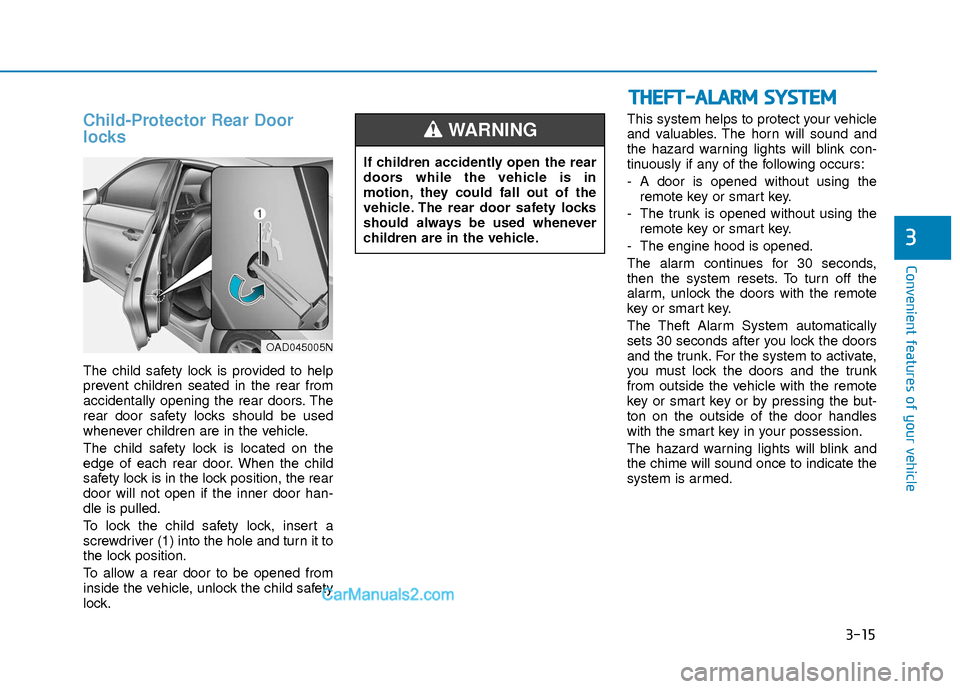
The child safety lock is located on the
edge of each rear door. When the child
safety lock is in the lock position, the rear
door will not open if the inner door han-
dle is pulled.
To lock the child safety lock, insert a
screwdriver (1) into the hole and turn it to
the lock position.
To allow a rear door to be opened from
inside the vehicle, unlock the child safety
lock. This system helps to protect your vehicle
and valuables. The horn will sound and
the hazard warning lights will blink con-
tinuously if any of the following occurs:
- A door is opened without using the
remote key or smart key.
- The trunk is opened without using the remote key or smart key.
- The engine hood is opened.
The alarm continues for 30 seconds,
then the system resets. To turn off the
alarm, unlock the doors with the remote
key or smart key.
The Theft Alarm System automatically
sets 30 seconds after you lock the doors
and the trunk. For the system to activate,
you must lock the doors and the trunk
from outside the vehicle with the remote
key or smart key or by pressing the but-
ton on the outside of the door handles
with the smart key in your possession.
The hazard warning lights will blink and
the chime will sound once to indicate the
system is armed.
If children accidently open the rear
doors while the vehicle is in
motion, they could fall out of the
vehicle. The rear door safety locks
should always be used whenever
children are in the vehicle.
WARNING
OAD045005N
Page 93 of 526
3-16
Convenient features of your vehicle
Once the security system is set, opening
any door, the trunk, or the hood without
using the remote key or smart key will
cause the alarm to activate.
The Theft Alarm System will not set if the
hood, the trunk, or any door is not fully
closed. If the system will not set, check
the hood, the trunk, or the doors are fully
closed.
Do not attempt to alter this system or add
other devices to it.
Information
• Do not lock the doors until all passen-gers have left the vehicle. If the remain-
ing passenger leaves the vehicle when
the system is armed, the alarm will be
activated.
• If the vehicle is not disarmed with the remote key or smart key, open the doors
by using the mechanical key and place
the ignition switch in the ON position
(for remote key) or start the engine (for
smart key) by directly pressing the igni-
tion switch with the smart key.
• When the system is disarmed but a door or trunk is not opened within 30 sec-
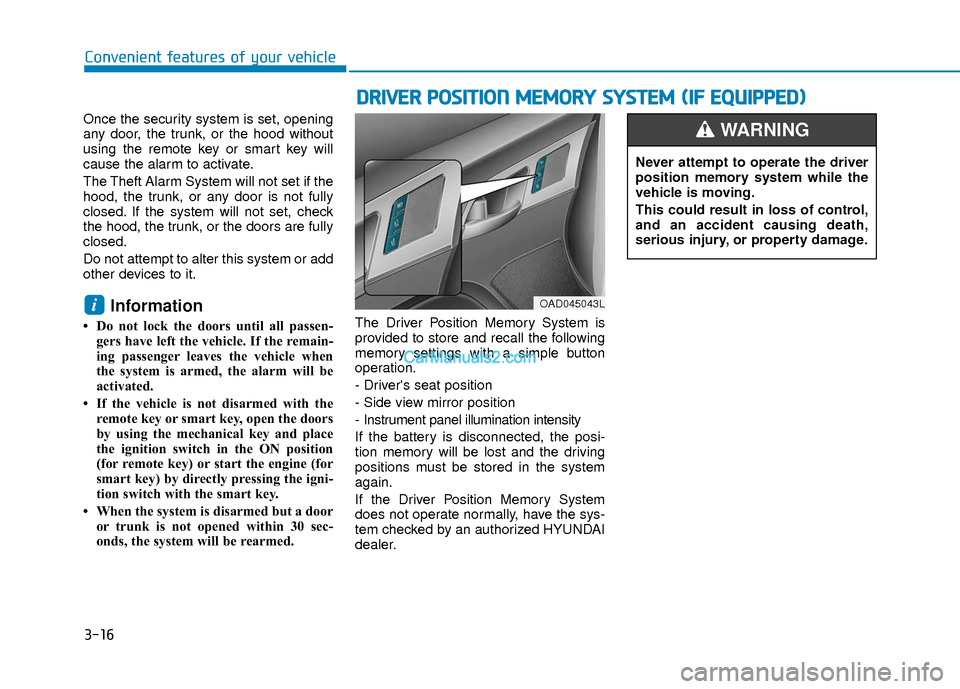
onds, the system will be rearmed. The Driver Position Memory System is
provided to store and recall the following
memory settings with a simple button
operation.
- Driver's seat position
- Side view mirror position
- Instrument panel illumination intensity
If the battery is disconnected, the posi-
tion memory will be lost and the driving
positions must be stored in the system
again.
If the Driver Position Memory System
does not operate normally, have the sys-
tem checked by an authorized HYUNDAI
dealer.
i
D D
R
RI
IV
V E
ER
R
P
P O
O S
SI
IT
T I
IO
O N
N
M
M E
EM
M O
OR
RY
Y
S
S Y
Y S
ST
T E
EM
M
(
( I
IF
F
E
E Q
Q U
UI
IP
P P
PE
ED
D )
)
OAD045043L
Never attempt to operate the driver
position memory system while the
vehicle is moving.
This could result in loss of control,
and an accident causing death,
serious injury, or property damage.
WARNING
Page 94 of 526
3-17
Convenient features of your vehicle
3
Storing Positions into Memory
1. Check that the shift lever is in P (Park)while the ignition switch is in the ON
position.
2. Adjust the driver’s seat position, side view mirror position and instrument
panel illumination intensity to posi-
tions comfortable for the driver.
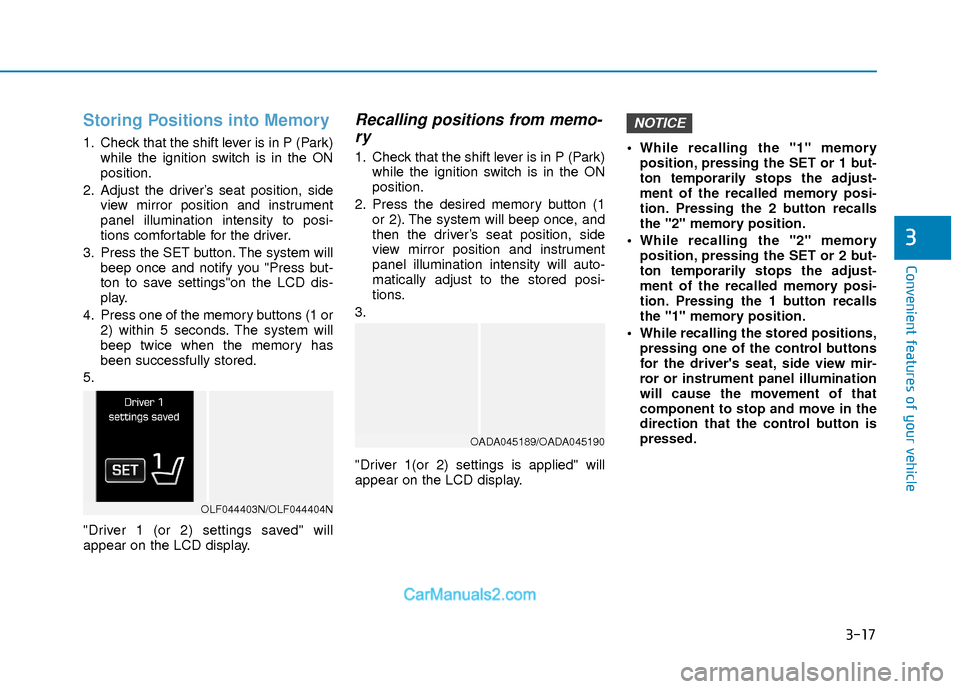
3. Press the SET button. The system will beep once and notify you "Press but-
ton to save settings"on the LCD dis-
play.
4. Press one of the memory buttons (1 or 2) within 5 seconds. The system will
beep twice when the memory has
been successfully stored.
5.
"Driver 1 (or 2) settings saved" will
appear on the LCD display.
Recalling positions from memo- ry
1. Check that the shift lever is in P (Park)
while the ignition switch is in the ON
position.
2. Press the desired memory button (1 or 2). The system will beep once, and
then the driver’s seat position, side
view mirror position and instrument
panel illumination intensity will auto-
matically adjust to the stored posi-
tions.
3.
"Driver 1(or 2) settings is applied" will
appear on the LCD display. While recalling the "1" memory
position, pressing the SET or 1 but-
ton temporarily stops the adjust-
ment of the recalled memory posi-
tion. Pressing the 2 button recalls
the "2" memory position.
While recalling the "2" memory position, pressing the SET or 2 but-
ton temporarily stops the adjust-
ment of the recalled memory posi-
tion. Pressing the 1 button recalls
the "1" memory position.
While recalling the stored positions, pressing one of the control buttons
for the driver's seat, side view mir-
ror or instrument panel illumination
will cause the movement of that
component to stop and move in the
direction that the control button is
pressed.
NOTICE
OLF044403N/OLF044404N
OADA045189/OADA045190
Page 95 of 526
3-18
S
ST
T E
EE
ER
R I
IN
N G
G
W
W H
HE
EE
EL
L
Convenient features of your vehicle
If the Electric Power Steering
System does not operate normally,
the warning light ( ) will illumi-
nate on the instrument cluster. You
may steer the vehicle, but it will
require increased steering efforts.
Take your vehicle to an authorized
HYUNDAI dealer and have the sys-
tem checked as soon as possible.
CAUTION
Easy Access Function
When exiting the vehicle the driver’s seat
will move rearward when the engine is
turned off and the shift lever in P (Park).
When entering the vehicle the driver’s
seat will move forward when the ignition
switch is placed to the ACC position.
You can activate or deactivate the Easy
Access Function from the User Settings
Mode on the LCD display.
For more information, refer to the
"LCD Display" section in this chapter.
Electric Power Steering (EPS)
The system assists you with steering the
vehicle. If the engine is turned off or if the
power steering system becomes inoper-
ative, you may still steer the vehicle, but
it will require increased steering effort.
Should you notice any change in the
effort required to steer during normal
vehicle operation, have the system
checked by an authorized HYUNDAI
dealer.
Information
The following symptoms may occur dur-
ing normal vehicle operation:
• The steering effort may be high immedi-
ately after placing the ignition switch in
the ON position.
This happens as the system performs the
EPS system diagnostics. When the diag-
nostics is completed, the steering wheel
will return to its normal condition.
• A click noise may be heard from the EPS relay after the ignition switch is in
the ON or OFF position.
• Motor noise may be heard when the vehicle is at a stop or at a low driving
speed.
• When you operate the steering wheel in low temperature, abnormal noise may
occur. If temperature rises, the noise will
disappear. This is a normal condition.
• When an error is detected from the EPS, the warning light will illuminate on the
instrument cluster and the steering
efforts may be increased. When the fol-
lowing symptoms occur, immediately
drive the vehicle to a safe area and
check it.
i
Page 96 of 526
3-19
Convenient features of your vehicle
3
Tilt Steering/Telescope Steering
Adjust the steering wheel so it points
toward your chest, not toward your face.
Make sure you can see the instrument
cluster warning lights and gauges. After
adjusting, push the steering wheel both
up and down to be certain it is locked in
position. Always adjust the position of the
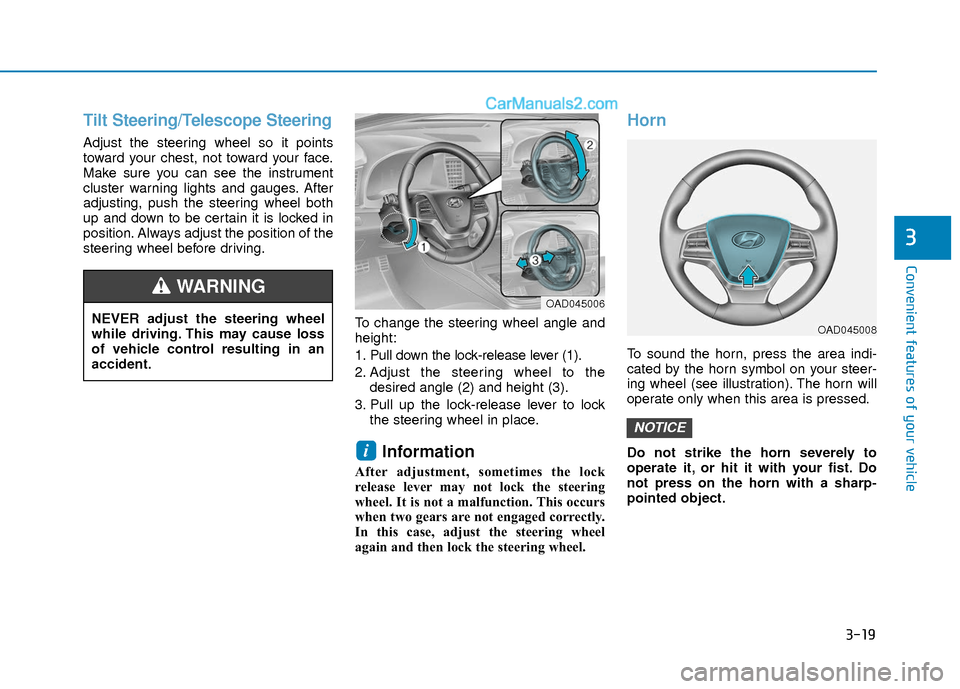
steering wheel before driving.To change the steering wheel angle and
height:
1. Pull down the lock-release lever (1).
2. Adjust the steering wheel to thedesired angle (2) and height (3).
3. Pull up the lock-release lever to lock the steering wheel in place.
Information
After adjustment, sometimes the lock
release lever may not lock the steering
wheel. It is not a malfunction. This occurs
when two gears are not engaged correctly.
In this case, adjust the steering wheel
again and then lock the steering wheel.
Horn
To sound the horn, press the area indi-
cated by the horn symbol on your steer-
ing wheel (see illustration). The horn will
operate only when this area is pressed.
Do not strike the horn severely to
operate it, or hit it with your fist. Do
not press on the horn with a sharp-
pointed object.
NOTICE
i
NEVER adjust the steering wheel
while driving. This may cause loss
of vehicle control resulting in an
accident.
WARNING OAD045006
OAD045008
Page 177 of 526
3-100
Convenient features of your vehicle
High beam operation
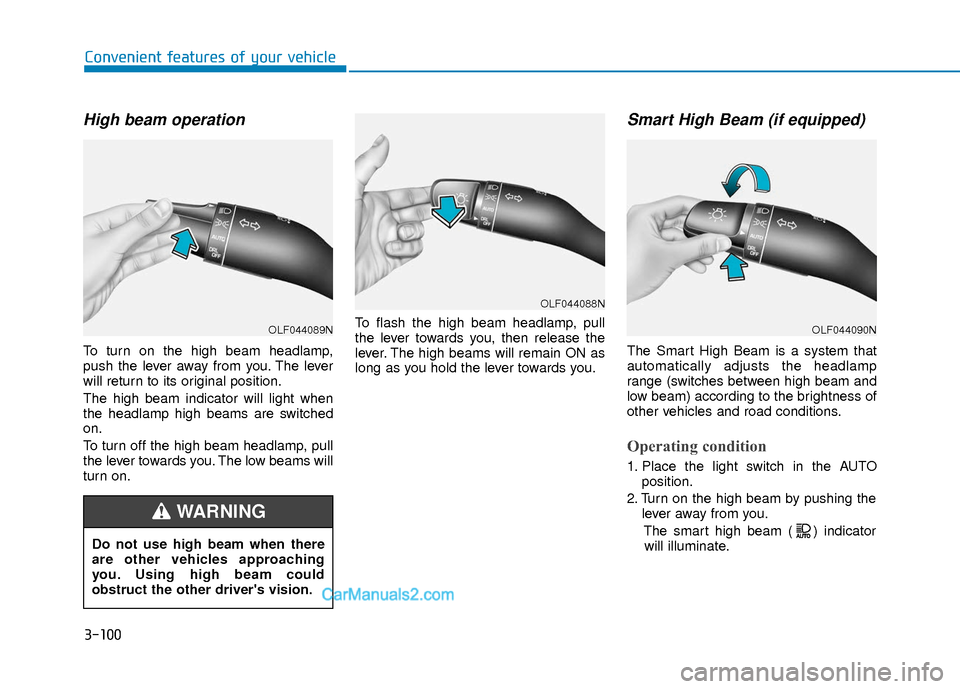
To turn on the high beam headlamp,
push the lever away from you. The lever
will return to its original position.
The high beam indicator will light when
the headlamp high beams are switched
on.
To turn off the high beam headlamp, pull
the lever towards you. The low beams will
turn on.To flash the high beam headlamp, pull
the lever towards you, then release the
lever. The high beams will remain ON as
long as you hold the lever towards you.
Smart High Beam (if equipped)
The Smart High Beam is a system that
automatically adjusts the headlamp
range (switches between high beam and
low beam) according to the brightness of
other vehicles and road conditions.
Operating condition
1. Place the light switch in the AUTO
position.
2. Turn on the high beam by pushing the lever away from you.
The smart high beam ( ) indicatorwill illuminate.
Do not use high beam when there
are other vehicles approaching
you. Using high beam could
obstruct the other driver's vision.
WARNING
OLF044089N
OLF044088N
OLF044090N
Page 178 of 526
3-101
Convenient features of your vehicle
3
3. The Smart High Beam will turn onwhen vehicle speed is above
25 mph (40km/h).
Smart High Beam is operating, the
Smart High Beam will turn off and the
high beam will be on continuously. The
smart high beam ( ) indicator will
turn off.
when the Smart High Beam is oper-
ating, the Smart High Beam will turn
off.
4. If the light switch is placed to the head- lamp position, the Smart High Beam
will turn off and the low beam will be
on continuously.
The high beam switches to low beam in
the below conditions.
- When the Smart High Beam is off.
- When the light switch is not in the AUTO position.
- When the headlamp is detected from the on-coming vehicle.
- When the tail lamp is detected from the front vehicle.
- When the surrounding is bright enough high beams are not needed.
- When streetlights or other lights are detected.
- When vehicle speed is below 15 mph (24 km/h).
Warning light and message
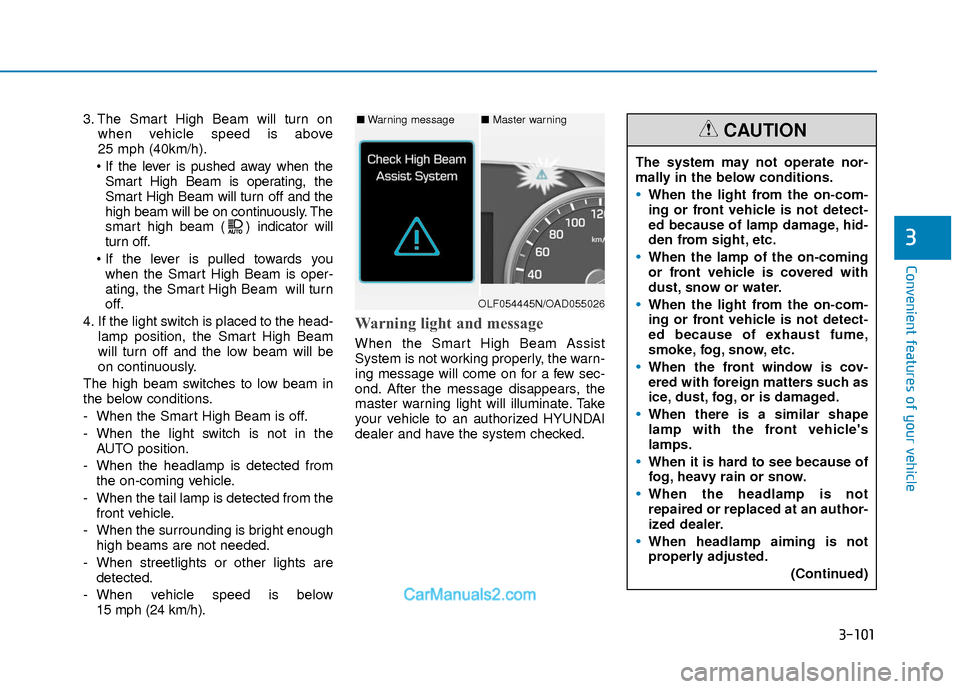
When the Smart High Beam Assist
System is not working properly, the warn-
ing message will come on for a few sec-
ond. After the message disappears, the
master warning light will illuminate. Take
your vehicle to an authorized HYUNDAI
dealer and have the system checked.
The system may not operate nor-
mally in the below conditions.
When the light from the on-com-
ing or front vehicle is not detect-
ed because of lamp damage, hid-
den from sight, etc.
When the lamp of the on-coming
or front vehicle is covered with
dust, snow or water.
When the light from the on-com-
ing or front vehicle is not detect-
ed because of exhaust fume,
smoke, fog, snow, etc.
When the front window is cov-
ered with foreign matters such as
ice, dust, fog, or is damaged.
When there is a similar shape
lamp with the front vehicle's
lamps.
When it is hard to see because of
fog, heavy rain or snow.
When the headlamp is not
repaired or replaced at an author-
ized dealer.
When headlamp aiming is not
properly adjusted.
(Continued)
CAUTION■Warning message■ Master warning
OLF054445N/OAD055026
Page 179 of 526
3-102
Convenient features of your vehicle
Turn signals and lane changesignals
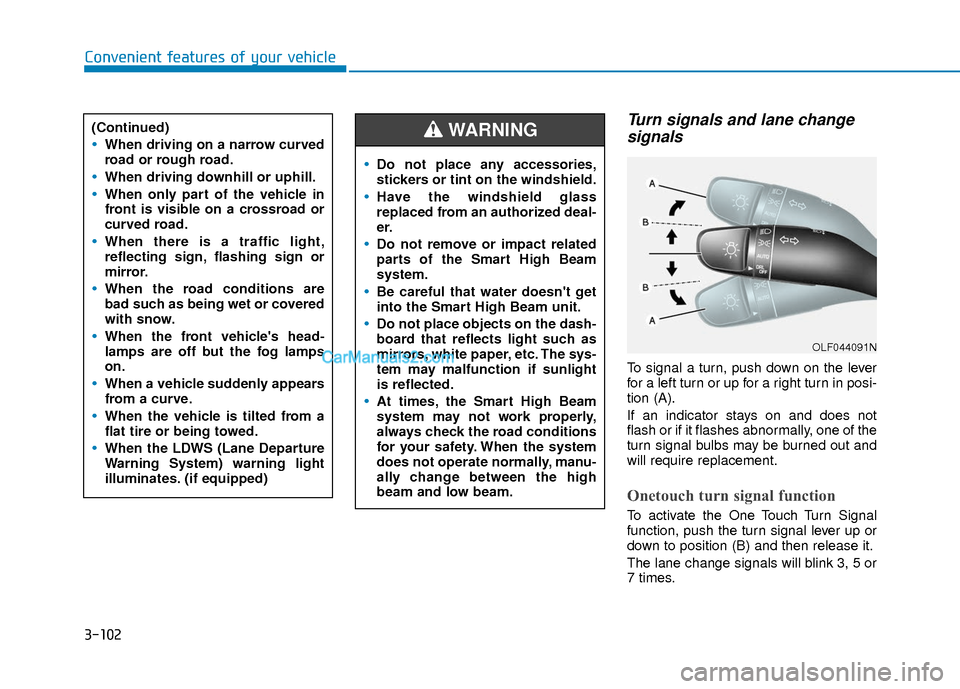
To signal a turn, push down on the lever
for a left turn or up for a right turn in posi-
tion (A).
If an indicator stays on and does not
flash or if it flashes abnormally, one of the
turn signal bulbs may be burned out and
will require replacement.
Onetouch turn signal function
To activate the One Touch Turn Signal
function, push the turn signal lever up or
down to position (B) and then release it.
The lane change signals will blink 3, 5 or
7 times.
(Continued)
When driving on a narrow curved
road or rough road.
When driving downhill or uphill.
When only part of the vehicle in
front is visible on a crossroad or
curved road.
When there is a traffic light,
reflecting sign, flashing sign or
mirror.
When the road conditions are
bad such as being wet or covered
with snow.
When the front vehicle's head-
lamps are off but the fog lamps
on.
When a vehicle suddenly appears
from a curve.
When the vehicle is tilted from a
flat tire or being towed.
When the LDWS (Lane Departure
Warning System) warning light
illuminates. (if equipped)
OLF044091N
Do not place any accessories,
stickers or tint on the windshield.
Have the windshield glass
replaced from an authorized deal-
er.
Do not remove or impact related
parts of the Smart High Beam
system.
Be careful that water doesn't get
into the Smart High Beam unit.
Do not place objects on the dash-
board that reflects light such as
mirrors, white paper, etc. The sys-
tem may malfunction if sunlight
is reflected.
At times, the Smart High Beam
system may not work properly,
always check the road conditions
for your safety. When the system
does not operate normally, manu-
ally change between the high
beam and low beam.
WARNING
Page 180 of 526
3-103
Convenient features of your vehicle
3
You can activate or deactivate the One
Touch Turn Signal function or choose the
number of blinking (3, 5, or 7) from the
User Settings Mode (Light) on the LCD
display.
For more information, refer to the
"LCD Display" section in this chapter.
Battery saver function
The purpose of this feature is to prevent
the battery from being discharged. The
system automatically turns off the park-
ing lamp when the key is removed
(remote key) or when the driver turns the
engine off (smart key) and opens the
driver-side door.
With this feature, the parking lamps will
turn off automatically if the driver parks
on the side of road at night.
If necessary, to keep the lamps on when
the engine is turned off, perform the fol-
lowing:
1) Open the driver-side door.
2) Turn the parking lamps OFF and ONagain using the light switch on the
steering column.
Headlamp delay function (if equipped)
If the key is removed from the ignition
switch or placed in the ACC position or
the LOCK/OFF position with the head-
lamps ON, the headlamps (and/or park-
ing lamps) remain on for about 5 min-
utes. However, if the driver’s door is
opened and closed, the headlights are
turned off after 15 seconds. Also, with the
engine off if the driver's door is opened
and closed, the headlamps (and/or park-
ing lamps) are turned off after 15 sec-
onds.
The headlamps (and/or parking lamps)
can be turned off by pressing the lock
button on the remote key or smart key
twice or turning the light switch to the
OFF or AUTO position.
You can activate or deactivate the
Headlamp Delay function from the User
Settings Mode (Light) on the LCD dis-
play.
For more information, refer to the
"LCD Display" section in this chapter. If the driver gets out of the vehicle
through other doors (except driver’s
door), the battery saver function does
not operate and the headlamp delay
function does not turn off automati-
cally. Therefore, It causes the battery
to be discharged. In this case, make
sure to turn off the lamp before get-
ting out of the vehicle.
NOTICE
Page 181 of 526
3-104
Convenient features of your vehicle
AFLS (Adaptive Front LightingSystem) a.k.a. DBL (DynamicBending Light) (if equipped)
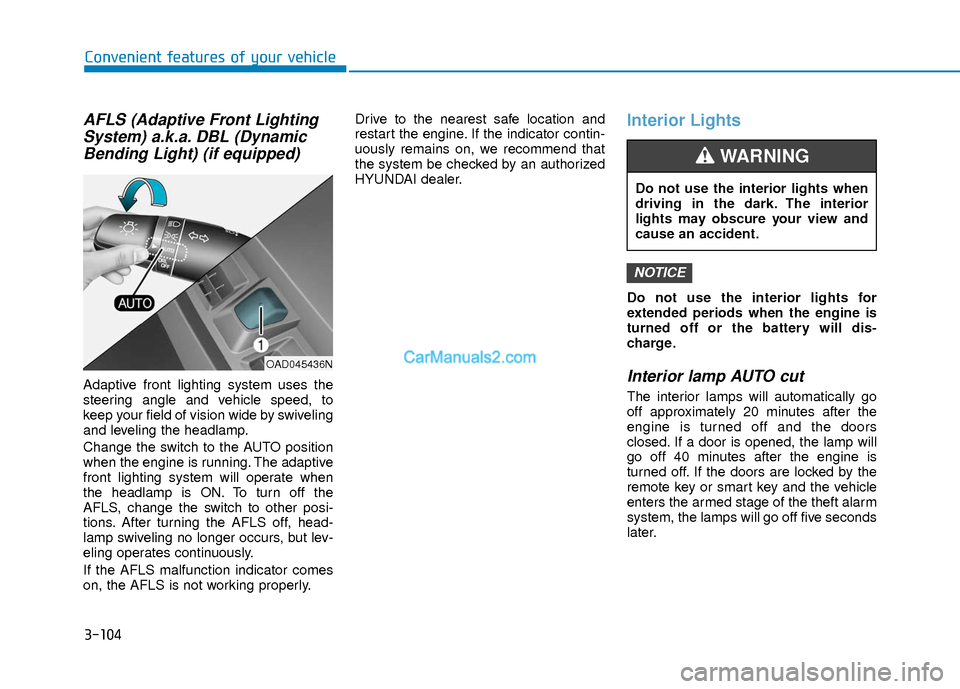
Adaptive front lighting system uses the
steering angle and vehicle speed, to
keep your field of vision wide by swiveling
and leveling the headlamp.
Change the switch to the AUTO position
when the engine is running. The adaptive
front lighting system will operate when
the headlamp is ON. To turn off the
AFLS, change the switch to other posi-
tions. After turning the AFLS off, head-
lamp swiveling no longer occurs, but lev-
eling operates continuously.
If the AFLS malfunction indicator comes
on, the AFLS is not working properly. Drive to the nearest safe location and
restart the engine. If the indicator contin-
uously remains on, we recommend that
the system be checked by an authorized
HYUNDAI dealer.
Interior Lights
Do not use the interior lights for
extended periods when the engine is
turned off or the battery will dis-
charge.
Interior lamp AUTO cut
The interior lamps will automatically go
off approximately 20 minutes after the
engine is turned off and the doors
closed. If a door is opened, the lamp will
go off 40 minutes after the engine is
turned off. If the doors are locked by the
remote key or smart key and the vehicle
enters the armed stage of the theft alarm
system, the lamps will go off five seconds
later.
NOTICE
OAD045436N
Do not use the interior lights when
driving in the dark. The interior
lights may obscure your view and
cause an accident.
WARNING