roof Hyundai Elantra 2018 User Guide
[x] Cancel search | Manufacturer: HYUNDAI, Model Year: 2018, Model line: Elantra, Model: Hyundai Elantra 2018Pages: 526, PDF Size: 17.2 MB
Page 120 of 526
3-43
Convenient features of your vehicle
3
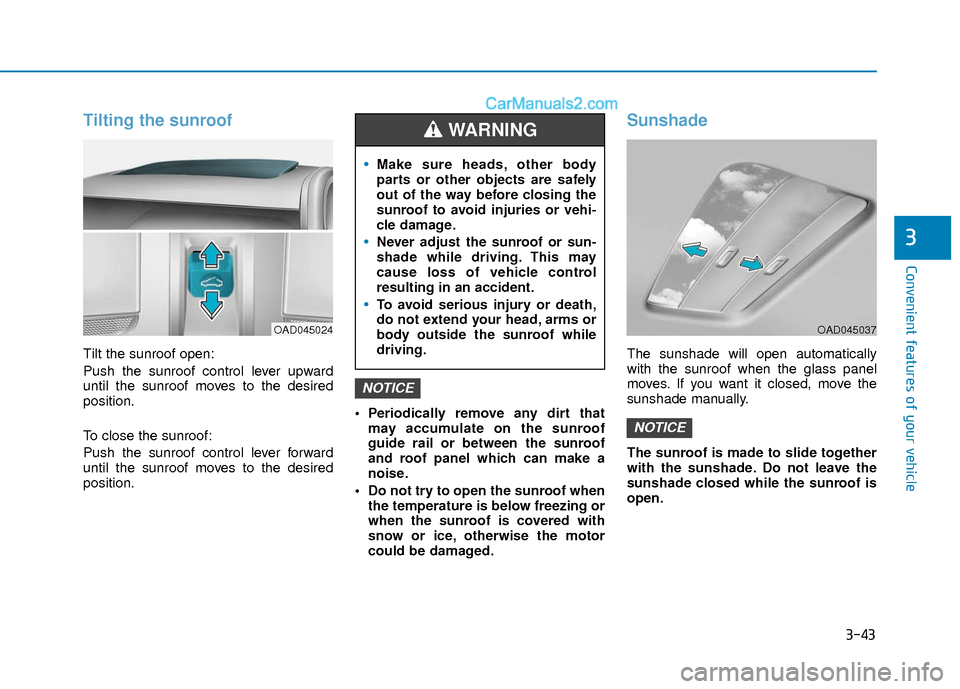
Tilting the sunroof
Tilt the sunroof open:
Push the sunroof control lever upward
until the sunroof moves to the desired
position.
To close the sunroof:
Push the sunroof control lever forward
until the sunroof moves to the desired
position. Periodically remove any dirt that
may accumulate on the sunroof
guide rail or between the sunroof
and roof panel which can make a
noise.
Do not try to open the sunroof when the temperature is below freezing or
when the sunroof is covered with
snow or ice, otherwise the motor
could be damaged.
Sunshade
The sunshade will open automatically
with the sunroof when the glass panel
moves. If you want it closed, move the
sunshade manually.
The sunroof is made to slide together
with the sunshade. Do not leave the
sunshade closed while the sunroof is
open.
NOTICE
NOTICE
OAD045024
Make sure heads, other body
parts or other objects are safely
out of the way before closing the
sunroof to avoid injuries or vehi-
cle damage.
Never adjust the sunroof or sun-
shade while driving. This may
cause loss of vehicle control
resulting in an accident.
To avoid serious injury or death,
do not extend your head, arms or
body outside the sunroof while
driving.
WARNING
OAD045037
Page 121 of 526
3-44
Convenient features of your vehicle
Resetting the sunroof
Sunroof needs to be reset if the following
occurs :
- Battery is discharged or disconnectedor the related fuse has been replaced
or disconnected
- The one-touch sliding function of the sunroof does not normally operate
Reset procedure :
1. Place the ignition switch to the ON position or start the engine. It is rec-
ommended to reset the sunroof while
the engine is running.
2. Push the control lever forward. The sunroof will close completely or tilt
depending on the condition of the sun-
roof.
3. Release the control lever when the sunroof stops moving.
4. Push the control lever forward about 10 seconds.
- When the sunroof is in the closed position :
The glass will tilt and slightly move up and down.
- When the sunroof is in the tilt posi- tion:
The glass will slightly move up and down. Do not release the lever until the opera-
tion is completed.
If you release the lever during operation,
start the procedure again from step 2.
5. Within 3 seconds, push and hold the
control lever forward until the sunroof
operates as follows:
Tilt down → Slide Open → Slide
Close.
Do not release the lever until the opera-
tion is completed.
If you release the lever during operation,
start the procedure again from step 2.
6. Release the sunroof control lever after all steps have completed. (The sun-
roof system has been reset.)
Information
• If the sunroof is not reset when the vehi-cle battery is disconnected or dis-
charged, or the sunroof fuse is blown,
the sunroof may not operate normally.
• For more detailed information, we rec- ommend that you contact an authorized
HYUNDAI dealer.
i
Page 152 of 526
3-75
Convenient features of your vehicle
3
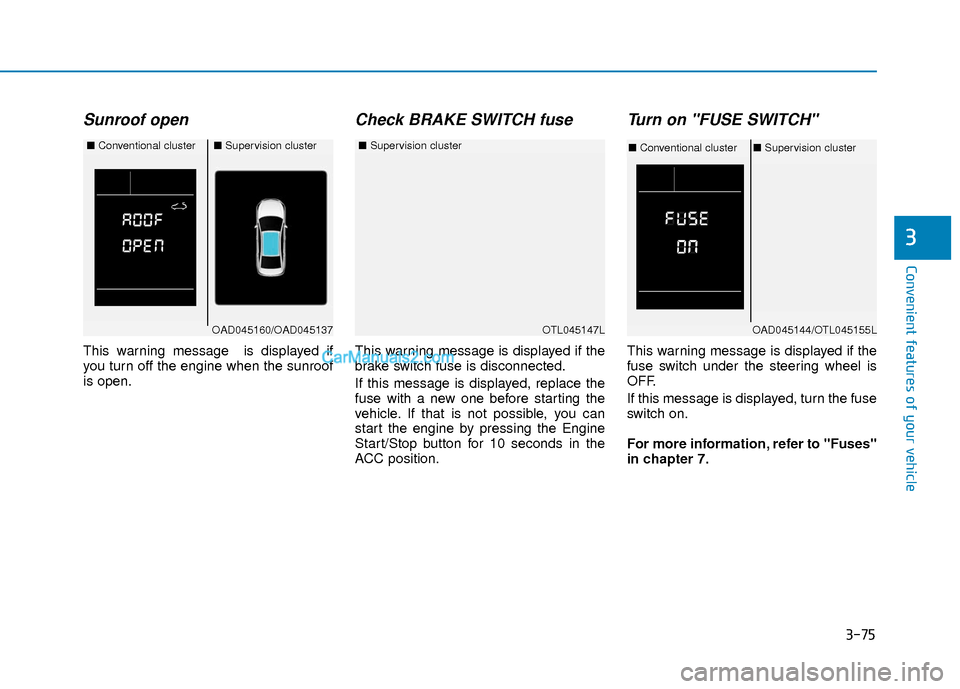
Sunroof open
This warning message is displayed if
you turn off the engine when the sunroof
is open.
Check BRAKE SWITCH fuse
This warning message is displayed if the
brake switch fuse is disconnected.
If this message is displayed, replace the
fuse with a new one before starting the
vehicle. If that is not possible, you can
start the engine by pressing the Engine
Start/Stop button for 10 seconds in the
ACC position.
Turn on "FUSE SWITCH"
This warning message is displayed if the
fuse switch under the steering wheel is
OFF.
If this message is displayed, turn the fuse
switch on.
For more information, refer to "Fuses"
in chapter 7.
OTL045147L
■Supervision cluster
OAD045160/OAD045137
■Conventional cluster■Supervision cluster
OAD045144/OTL045155L
■Conventional cluster ■Supervision cluster
Page 174 of 526
3-97
Convenient features of your vehicle
3
Digital speedometer
This message shows the speed of the
vehicle (in mph).
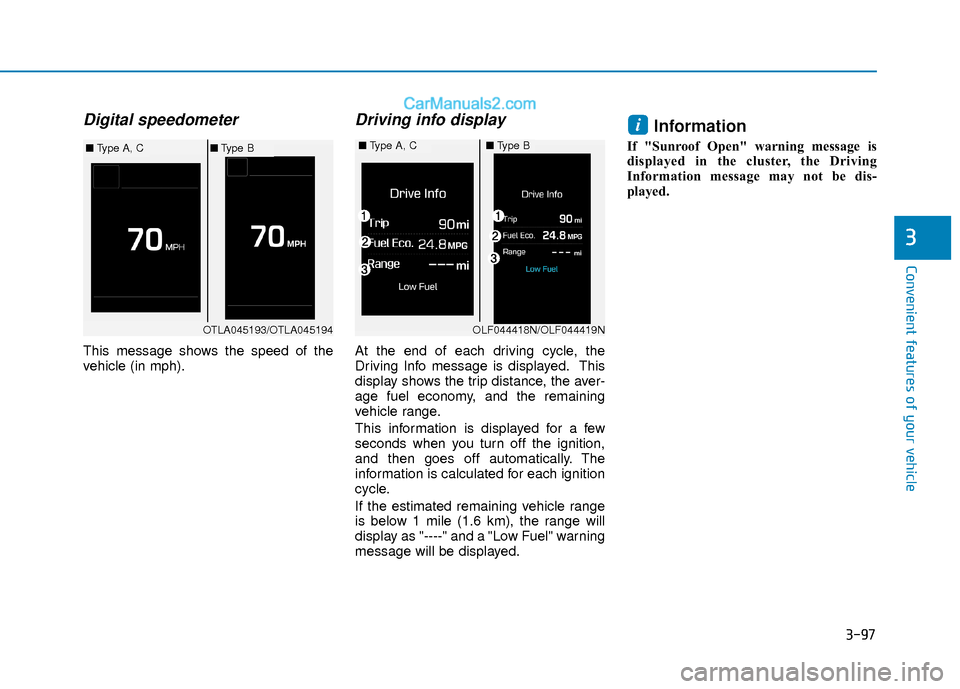
Driving info display
At the end of each driving cycle, the
Driving Info message is displayed. This
display shows the trip distance, the aver-
age fuel economy, and the remaining
vehicle range.
This information is displayed for a few
seconds when you turn off the ignition,
and then goes off automatically. The
information is calculated for each ignition
cycle.
If the estimated remaining vehicle range
is below 1 mile (1.6 km), the range will
display as "----" and a "Low Fuel" warning
message will be displayed.
Information
If "Sunroof Open" warning message is
displayed in the cluster, the Driving
Information message may not be dis-
played.
i
OTLA045193/OTLA045194
■Type A, C■Type B■Type A, C■Type B
OLF044418N/OLF044419N
Page 194 of 526
3-117
Convenient features of your vehicle
3
Operation Tips
To keep dust or unpleasant fumes fromentering the car through the ventilation
system, temporarily set the air intake
control to the recirculated air position.
Return the control to the fresh air posi-
tion when the irritation has passed.
This will help keep the driver alert and
comfortable.
To prevent the inside of the windshield from fogging, set the air intake control
to the fresh air position and fan speed
to the desired position, turn on the air
conditioning system, and adjust the
temperature control to desired temper-
ature.
Air conditioning
All HYUNDAI Air Conditioning Systems
are filled with environmentally friendly R-
134a refrigerant.
1. Start the engine.
2. Push the air conditioning button.
3. Set the mode to the Face Level mode.
4. Set the air intake control to the recir- culated air position. However, pro-
longed operation of the recirculated air
position will excessively dry the air. In
this case, change the air position.
5. Adjust the fan speed control and tem- perature control to maintain maximum
comfort.
When maximum cooling is desired, set
the temperature control to the extreme
left position then set the fan speed con-
trol to the highest speed.
When using the air conditioning sys-
tem, monitor the engine temperature
gauge closely while driving up hills or
in heavy traffic when outside temper-
atures are high. Air conditioning sys-
tem operation can cause engine over-
heating. Continue to use the blower
fan, but turn the air conditioning sys-
tem off if the engine temperature
gauge indicates engine overheating.
Air conditioning system operation
tips
If the vehicle has been parked in direct sunlight during hot weather, open the
windows for a short time to let the hot
air inside the vehicle escape.
After sufficient cooling has been achieved, switch back from the recircu-
lated air to the fresh outside air posi-
tion.
To help reduce moisture inside of the windows on rainy or humid days,
decrease the humidity inside the vehi-
cle by operating the air conditioning
system with the windows and sunroof
closed.
Use the air conditioning system every month only for a few minutes to ensure
maximum system performance.
If you operate air conditioner exces- sively, the difference between the tem-
perature of the outside air and that of
the windshield could cause the outer
surface of the windshield to fog up,
causing loss of visibility. In this case,
set the mode selection knob or button
to the position and fan speed con-
trol to the lower speed.
NOTICE
Page 206 of 526
3-129
Convenient features of your vehicle
3
Air conditioning
All HYUNDAI Air Conditioning Systems
are filled with environmentally friendly R-
134a refrigerant.
1. Start the engine.
2. Push the air conditioning button.
3. Set the mode to the Face Level mode.
4. Set the air intake control to the recir- culated air position. However, pro-
longed operation of the recirculated air
position will excessively dry the air. In
this case, change the air position.
5. Adjust the fan speed control and tem- perature control to maintain maximum
comfort.
When maximum cooling is desired, set
the temperature control to the extreme
left position then set the fan speed con-
trol to the highest speed. When using the air conditioning sys-
tem, monitor the engine temperature
gauge closely while driving up hills or
in heavy traffic when outside temper-
atures are high. Air conditioning sys-
tem operation can cause engine over-
heating. Continue to use the blower
fan, but turn the air conditioning sys-
tem off if the engine temperature
gauge indicates engine overheating.
Air conditioning system operation
tips
If the vehicle has been parked in direct
sunlight during hot weather, open the
windows for a short time to let the hot
air inside the vehicle escape.
After sufficient cooling has been achieved, switch back from the recircu-
lated air to the fresh outside air posi-
tion.
To help reduce moisture inside of the windows on rainy or humid days,
decrease the humidity inside the vehi-
cle by operating the air conditioning
system with the windows and sunroof
closed.
Use the air conditioning system every month only for a few minutes to ensure
maximum system performance.
If you operate air conditioner exces- sively, the difference between the tem-
perature of the outside air and that of
the windshield could cause the outer
surface of the windshield to fog up,
causing loss of visibility. In this case,
set the mode selection knob or button
to the position and fan speed con-
trol to the lower speed.
NOTICE
Page 212 of 526
3-135
Convenient features of your vehicle
3
C
CL
LI
IM
M A
AT
TE
E
C
C O
O N
NT
TR
R O
O L
L
A
A D
DD
DI
IT
T I
IO
O N
NA
AL
L
F
F E
E A
A T
TU
U R
RE
ES
S
(
( I
IF
F
E
E Q
Q U
UI
IP
P P
PE
ED
D )
)
Automatic Ventilation
(if equipped)
When the ignition switch is in the ON
position or when the engine is running
and temperature is below 59°F (15°C)
with the recirculated air position selected
more than five minutes, the air intake
position will automatically change to the
outside (fresh) air position.
To cancel or reset the Automatic
Ventilation
When the air conditioning system is on,
select Face Level mode and while
pressing the A/C button, press the recir-
culated air position button five times with-
in three seconds.
Sunroof Inside Air
Recirculation (if equipped)
When the heater or air conditioning sys-
tem is on with the sunroof opened, the
outside (fresh) air position will be auto-
matically selected. At this time, if you
press the recirculated air position button,
the recirculated air position will be select-
ed but will change back to the outside
(fresh) air position after 3 minutes.
When the sunroof is closed, the air intake
position will return to the original position
that was selected.
To avoid possible theft, do not leave
valuables in the storage compart-
ments.
NOTICE
S
ST
T O
O R
RA
A G
G E
E
C
C O
O M
M P
PA
A R
RT
TM
M E
EN
N T
T
Never store cigarette lighters,
propane cylinders, or other flamma-
ble/explosive materials in the vehi-
cle. These items may catch fire
and/or explode if the vehicle is
exposed to hot temperatures for
extended periods.
WARNING
ALWAYS keep the storage compart-
ment covers closed securely while
driving. Items inside your vehicle
are moving as fast as the vehicle. If
you have to stop or turn quickly, or
if there is a crash, the items may fly
out of the compartment and may
cause an injury if they strike the
driver or a passenger.
WARNING
Page 234 of 526
Information - Using the voicerecognition
• When using the voice recognition fea- ture, only commands listed within the
user's manual are supported.
• Be aware that during the operation of the voice recognition system, pressing
any key other than the key termi-
nate the voice recognition mode.
• For superior voice recognition perform- ance, position the microphone used for
voice recognition above the head of the
driver’s seat and maintain a proper
position when saying commands.
• Within the following situations, voice recognition may not function properly
due to external sound.
- When the windows and sunroof areopen
- When the wind of the cooling / heating device is strong
- When entering and passing through tunnels
(Continued)(Continued)
- When driving on rugged and unevenroads
- During severe rain (heavy rains, windstorms)
• Phone related voice commands can be used only when a Bluetooth
®Wireless
Technology device is connected.
• When making calls by stating a name, the corresponding contact must be
downloaded and stored within the audio
system.
• After downloading the Bluetooth
®
Wireless Technology phone book, it
takes some times to convert the phone
book data into voice information.
During this time, voice recognition may
not properly operate.
• Pronounce the voice commands natural- ly and clearly as if in a normal conver-
sation.
i
4-15
Multimedia System
4
Page 250 of 526
4-31
Multimedia System
4
Information
- Using Voice Recognition(if equipped)
• When using the voice recognition fea- ture, only commands listed within the
user's manual are supported.
• Be aware that when the voice recogni- tion system is active, pressing any but-
ton other than the button terminates
voice recognition mode.
• For optimal voice recognition perform- ance, position your head below the
microphone located above the driver’s
seat and maintain proper position when
speaking voice commands.
• Within the following situations, voice recognition may not function properly
due to external sound.
- When the windows and sunroof areopen
- When the blower AC/heater is set to high
- When entering and passing through tunnels
- When driving on rugged and uneven roads
(Continued)(Continued)
- During severe rain (heavy rains,windstorms)
• Phone related voice commands can be used only when a Bluetooth
®Wireless
Technology device is connected.
• When making calls by name, the corre- sponding contact must be downloaded
and stored within the audio system.
• After downloading the phone book, it takes some time to convert the phone
book data into voice information.
During this time, voice recognition may
not operate properly.
• Pressing and holding the button : While holding the button, frequency changes
without stopping. When the button is
released, the system automatically
searches for the next frequency from
that point.
i
Page 252 of 526
4-33
Multimedia System
4
SiriusXM®Satellite Radio
information (if equipped)
Satellite Radio channels :
Enjoy SiriusXM Satellite Radio with a 3-
month trial subscription to the SiriusXM
Select package. You’ll get over 140 chan-
nels, including commercial-free music,
plus all your favorite sports, exclusive
talk, entertainment, and a selection of
premium programming. For more infor-
mation and a complete list of SiriusXM
channels, visit siriusxm.com in the
United States, siriusxm.ca in Canada, or
call SiriusXM at 1-888-539-7474.
Satellite Radio reception factors :
To receive the satellite signal, your vehi-
cle has been equipped with a satellite
radio antenna located on the roof of your
vehicle. The vehicle roof provides the
best location for an unobstructed, open
view of the sky, a requirement of a satel-
lite radio system. Like AM/FM, there are
several factors that can affect satellite
radio reception performance :
Antenna obstructions : For optimal
reception performance, keep the
antenna clear of snow and ice build-up
and keep luggage and other material
as far away from the antenna as possi-
ble.
Terrain : Hills, mountains, tall buildings, bridges, tunnels, freeway overpasses,
parking garages, dense tree foliage
and thunderstorms can interfere with
your reception.
SiriusXM Satellite Radio service :
SiriusXM is a subscription-based satellite
radio service that broadcasts music,
sports, news and entertainment pro-
gramming to radio receivers, which are
available for installation in motor vehicles
or factory installed, as well as for the
home, portable and wireless devices,
and through an Internet connection on a
personal computer.
Vehicles that are equipped with a factory
installed SiriusXM Satellite Radio system
include :
Hardware and an introductory trial sub-scription term, which begins on the
date of sale or lease of the vehicle.
For a small upgrade fee, access to SiriusXM music channels, and other
select channels over the Internet using
any computer connected to the
Internet (U.S. customers only).
For information on extended subscrip-
tion terms, contact SiriusXM at 1-888-
539-7474.