sunroof Hyundai Elantra 2018 User Guide
[x] Cancel search | Manufacturer: HYUNDAI, Model Year: 2018, Model line: Elantra, Model: Hyundai Elantra 2018Pages: 526, PDF Size: 17.2 MB
Page 174 of 526
3-97
Convenient features of your vehicle
3
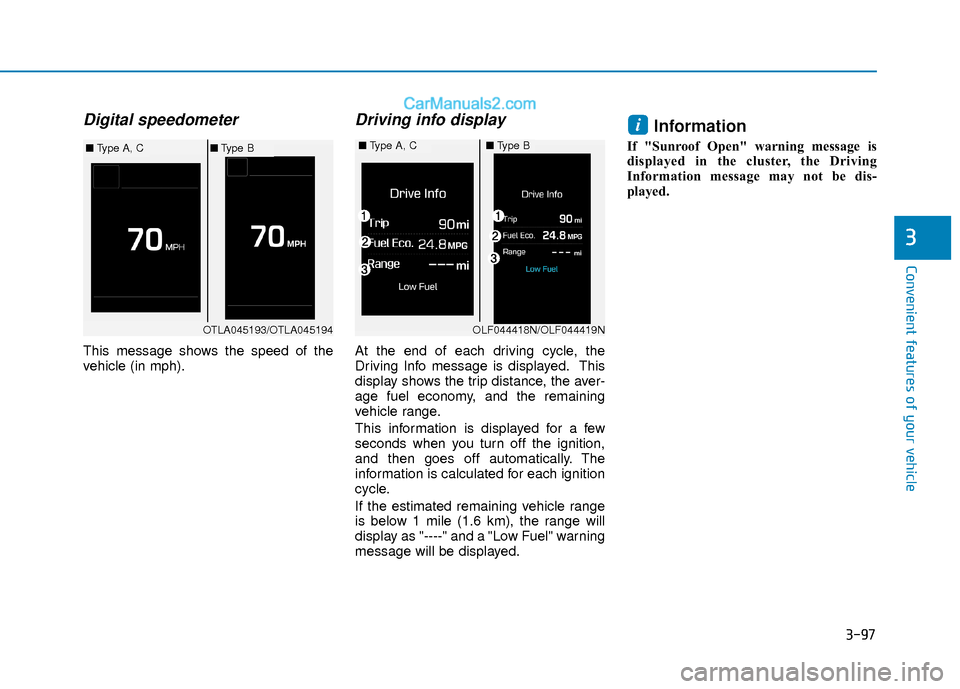
Digital speedometer
This message shows the speed of the
vehicle (in mph).
Driving info display
At the end of each driving cycle, the
Driving Info message is displayed. This
display shows the trip distance, the aver-
age fuel economy, and the remaining
vehicle range.
This information is displayed for a few
seconds when you turn off the ignition,
and then goes off automatically. The
information is calculated for each ignition
cycle.
If the estimated remaining vehicle range
is below 1 mile (1.6 km), the range will
display as "----" and a "Low Fuel" warning
message will be displayed.
Information
If "Sunroof Open" warning message is
displayed in the cluster, the Driving
Information message may not be dis-
played.
i
OTLA045193/OTLA045194
■Type A, C■Type B■Type A, C■Type B
OLF044418N/OLF044419N
Page 194 of 526
3-117
Convenient features of your vehicle
3
Operation Tips
To keep dust or unpleasant fumes fromentering the car through the ventilation
system, temporarily set the air intake
control to the recirculated air position.
Return the control to the fresh air posi-
tion when the irritation has passed.
This will help keep the driver alert and
comfortable.
To prevent the inside of the windshield from fogging, set the air intake control
to the fresh air position and fan speed
to the desired position, turn on the air
conditioning system, and adjust the
temperature control to desired temper-
ature.
Air conditioning
All HYUNDAI Air Conditioning Systems
are filled with environmentally friendly R-
134a refrigerant.
1. Start the engine.
2. Push the air conditioning button.
3. Set the mode to the Face Level mode.
4. Set the air intake control to the recir- culated air position. However, pro-
longed operation of the recirculated air
position will excessively dry the air. In
this case, change the air position.
5. Adjust the fan speed control and tem- perature control to maintain maximum
comfort.
When maximum cooling is desired, set
the temperature control to the extreme
left position then set the fan speed con-
trol to the highest speed.
When using the air conditioning sys-
tem, monitor the engine temperature
gauge closely while driving up hills or
in heavy traffic when outside temper-
atures are high. Air conditioning sys-
tem operation can cause engine over-
heating. Continue to use the blower
fan, but turn the air conditioning sys-
tem off if the engine temperature
gauge indicates engine overheating.
Air conditioning system operation
tips
If the vehicle has been parked in direct sunlight during hot weather, open the
windows for a short time to let the hot
air inside the vehicle escape.
After sufficient cooling has been achieved, switch back from the recircu-
lated air to the fresh outside air posi-
tion.
To help reduce moisture inside of the windows on rainy or humid days,
decrease the humidity inside the vehi-
cle by operating the air conditioning
system with the windows and sunroof
closed.
Use the air conditioning system every month only for a few minutes to ensure
maximum system performance.
If you operate air conditioner exces- sively, the difference between the tem-
perature of the outside air and that of
the windshield could cause the outer
surface of the windshield to fog up,
causing loss of visibility. In this case,
set the mode selection knob or button
to the position and fan speed con-
trol to the lower speed.
NOTICE
Page 206 of 526
3-129
Convenient features of your vehicle
3
Air conditioning
All HYUNDAI Air Conditioning Systems
are filled with environmentally friendly R-
134a refrigerant.
1. Start the engine.
2. Push the air conditioning button.
3. Set the mode to the Face Level mode.
4. Set the air intake control to the recir- culated air position. However, pro-
longed operation of the recirculated air
position will excessively dry the air. In
this case, change the air position.
5. Adjust the fan speed control and tem- perature control to maintain maximum
comfort.
When maximum cooling is desired, set
the temperature control to the extreme
left position then set the fan speed con-
trol to the highest speed. When using the air conditioning sys-
tem, monitor the engine temperature
gauge closely while driving up hills or
in heavy traffic when outside temper-
atures are high. Air conditioning sys-
tem operation can cause engine over-
heating. Continue to use the blower
fan, but turn the air conditioning sys-
tem off if the engine temperature
gauge indicates engine overheating.
Air conditioning system operation
tips
If the vehicle has been parked in direct
sunlight during hot weather, open the
windows for a short time to let the hot
air inside the vehicle escape.
After sufficient cooling has been achieved, switch back from the recircu-
lated air to the fresh outside air posi-
tion.
To help reduce moisture inside of the windows on rainy or humid days,
decrease the humidity inside the vehi-
cle by operating the air conditioning
system with the windows and sunroof
closed.
Use the air conditioning system every month only for a few minutes to ensure
maximum system performance.
If you operate air conditioner exces- sively, the difference between the tem-
perature of the outside air and that of
the windshield could cause the outer
surface of the windshield to fog up,
causing loss of visibility. In this case,
set the mode selection knob or button
to the position and fan speed con-
trol to the lower speed.
NOTICE
Page 212 of 526
3-135
Convenient features of your vehicle
3
C
CL
LI
IM
M A
AT
TE
E
C
C O
O N
NT
TR
R O
O L
L
A
A D
DD
DI
IT
T I
IO
O N
NA
AL
L
F
F E
E A
A T
TU
U R
RE
ES
S
(
( I
IF
F
E
E Q
Q U
UI
IP
P P
PE
ED
D )
)
Automatic Ventilation
(if equipped)
When the ignition switch is in the ON
position or when the engine is running
and temperature is below 59°F (15°C)
with the recirculated air position selected
more than five minutes, the air intake
position will automatically change to the
outside (fresh) air position.
To cancel or reset the Automatic
Ventilation
When the air conditioning system is on,
select Face Level mode and while
pressing the A/C button, press the recir-
culated air position button five times with-
in three seconds.
Sunroof Inside Air
Recirculation (if equipped)
When the heater or air conditioning sys-
tem is on with the sunroof opened, the
outside (fresh) air position will be auto-
matically selected. At this time, if you
press the recirculated air position button,
the recirculated air position will be select-
ed but will change back to the outside
(fresh) air position after 3 minutes.
When the sunroof is closed, the air intake
position will return to the original position
that was selected.
To avoid possible theft, do not leave
valuables in the storage compart-
ments.
NOTICE
S
ST
T O
O R
RA
A G
G E
E
C
C O
O M
M P
PA
A R
RT
TM
M E
EN
N T
T
Never store cigarette lighters,
propane cylinders, or other flamma-
ble/explosive materials in the vehi-
cle. These items may catch fire
and/or explode if the vehicle is
exposed to hot temperatures for
extended periods.
WARNING
ALWAYS keep the storage compart-
ment covers closed securely while
driving. Items inside your vehicle
are moving as fast as the vehicle. If
you have to stop or turn quickly, or
if there is a crash, the items may fly
out of the compartment and may
cause an injury if they strike the
driver or a passenger.
WARNING
Page 234 of 526
Information - Using the voicerecognition
• When using the voice recognition fea- ture, only commands listed within the
user's manual are supported.
• Be aware that during the operation of the voice recognition system, pressing
any key other than the key termi-
nate the voice recognition mode.
• For superior voice recognition perform- ance, position the microphone used for
voice recognition above the head of the
driver’s seat and maintain a proper
position when saying commands.
• Within the following situations, voice recognition may not function properly
due to external sound.
- When the windows and sunroof areopen
- When the wind of the cooling / heating device is strong
- When entering and passing through tunnels
(Continued)(Continued)
- When driving on rugged and unevenroads
- During severe rain (heavy rains, windstorms)
• Phone related voice commands can be used only when a Bluetooth
®Wireless
Technology device is connected.
• When making calls by stating a name, the corresponding contact must be
downloaded and stored within the audio
system.
• After downloading the Bluetooth
®
Wireless Technology phone book, it
takes some times to convert the phone
book data into voice information.
During this time, voice recognition may
not properly operate.
• Pronounce the voice commands natural- ly and clearly as if in a normal conver-
sation.
i
4-15
Multimedia System
4
Page 250 of 526
4-31
Multimedia System
4
Information
- Using Voice Recognition(if equipped)
• When using the voice recognition fea- ture, only commands listed within the
user's manual are supported.
• Be aware that when the voice recogni- tion system is active, pressing any but-
ton other than the button terminates
voice recognition mode.
• For optimal voice recognition perform- ance, position your head below the
microphone located above the driver’s
seat and maintain proper position when
speaking voice commands.
• Within the following situations, voice recognition may not function properly
due to external sound.
- When the windows and sunroof areopen
- When the blower AC/heater is set to high
- When entering and passing through tunnels
- When driving on rugged and uneven roads
(Continued)(Continued)
- During severe rain (heavy rains,windstorms)
• Phone related voice commands can be used only when a Bluetooth
®Wireless
Technology device is connected.
• When making calls by name, the corre- sponding contact must be downloaded
and stored within the audio system.
• After downloading the phone book, it takes some time to convert the phone
book data into voice information.
During this time, voice recognition may
not operate properly.
• Pressing and holding the button : While holding the button, frequency changes
without stopping. When the button is
released, the system automatically
searches for the next frequency from
that point.
i
Page 450 of 526
7-32
Maintenance
By jump starting
After a jump start from a good battery,
drive the vehicle for 20-30 minutes before
it is shutoff. The vehicle may not restart if
you shut it off before the battery had a
chance to adequately recharge. See
"Jump Starting" in chapter 6 for more
information on jump starting procedures.
Information
An inappropriately disposedbattery can be harmful to the
environment and human
health.
Dispose the battery according to your local
law(s) or regulation.
Reset Features
The following items may need to be reset
after the battery has been discharged or
the battery has been disconnected.
Power Windows
Trip Computer
Climate Control System
Clock
Audio System
Sunroof
i
(Continued)
The negative battery cable must
be removed first and installed
last when the battery is discon-
nected. Disconnect the battery
charger in the following order:
(1) Turn off the battery charger main switch.
(2) Unhook the negative clamp
from the negative battery ter-
minal.
(3) Unhook the positive clamp
from the positive battery ter-
minal.
Always use a genuine HYUNDAI
approved battery when you
replace the battery.
Page 472 of 526
7-54
Maintenance
Fuse Name Fuse rating Protected Component
HEATED MIRROR 10A Driver/Passenger Power Outside Mirror, A/C Control Module
WIPER 2 10A PCM, BCM
P/WINDOW RH 25A Power Window RH Relay
P/WINDOW LH 25A Power Window LH Relay, Driver Safety Power Window Module
CLUSTER 10A CLUSTER
DR LOCK 20A Door Lock/Unlock Relay, E/R Junction Block (Two Turn Unlock Relay)
MEMORY 1 10A Driver/Passenger Door Module, Driver IMS Module, A/C Control Module, Instrument Cluster,
Electro Chromic Mirror, BCM, Data Link Connector
S/HEATER RR 15A Rear Seat Warmer Control Module
TRUNK 10A Trunk Relay
INTERIOR LAMP 10A Room Lamp, Front Vanity Lamp LH/RH, Overhead Console Lamp, Ignition Key ILL. & Door Warning
Switch, Trunk Room Lamp
A/BAG IND 7.5A Instrument Cluster, A/C Control Module
MULTI MEDIA 15A CD Player, Audio, A/V & Navigation Head Unit
MEMORY 2 7.5A Not Used
AMP 25A AMP
P/SEAT DRV 30A Driver Seat Manual Switch, Driver IMS Module
MDPS 7.5A MDPS Unit
MODULE 1 7.5A Key Interlock, Driver/Passenger Smart Key Outside Handle, Driver/Passenger Door Module
SUNROOF 20A Sunroof Motor
SPARE 1 10A -
S/HEATER FRT 20A Front Seat Warmer Control Module
MODULE 7 7.5A Front Seat Warmer Control Module, Rear Seat Warmer Control Module, Sunroof Motor
PDM 3 7.5A Smart Key Control Module, Immobilizer Module
BRAKE SWITCH 7.5A Stop Lamp Switch, Smart Key Control Module
Page 475 of 526
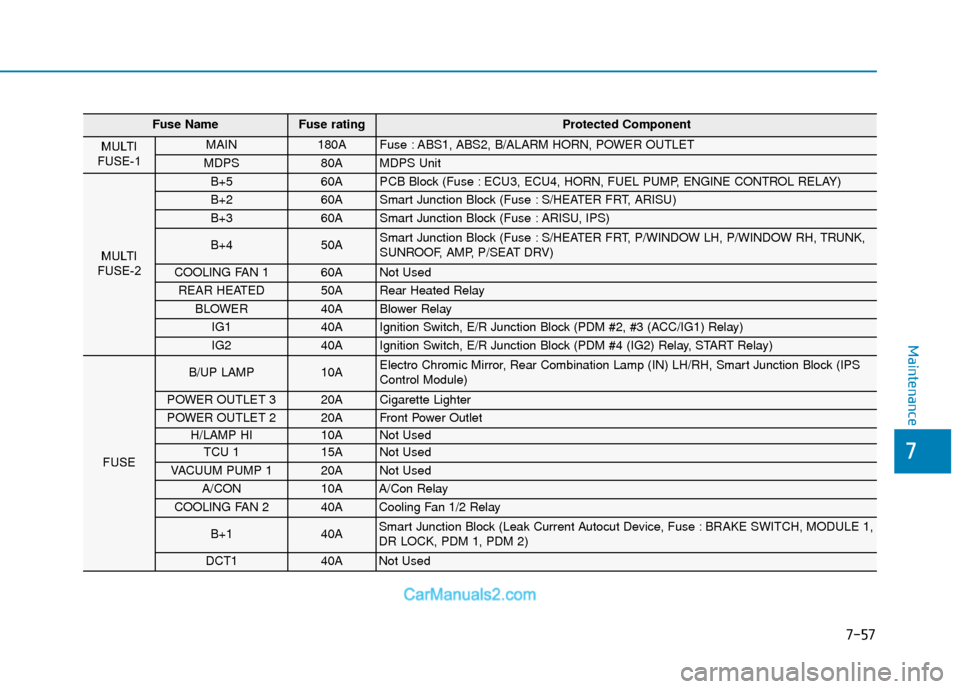
7-57
7
Maintenance
Fuse NameFuse rating Protected Component
MULTI
FUSE-1 MAIN 180A Fuse : ABS1, ABS2, B/ALARM HORN, POWER OUTLET
MDPS 80A MDPS Unit
MULTI
FUSE-2
B+5 60A PCB Block (Fuse : ECU3, ECU4, HORN, FUEL PUMP, ENGINE CONTROL RELAY)
B+2 60A Smart Junction Block (Fuse : S/HEATER FRT, ARISU)
B+3 60A Smart Junction Block (Fuse : ARISU, IPS)
B+4 50A Smart Junction Block (Fuse : S/HEATER FRT, P/WINDOW LH, P/WINDOW RH, TRUNK,
SUNROOF, AMP, P/SEAT DRV)
COOLING FAN 1 60A Not Used
REAR HEATED 50A Rear Heated Relay
BLOWER 40A Blower Relay
IG1 40A Ignition Switch, E/R Junction Block (PDM #2, #3 (ACC/IG1) Relay)
IG2 40A Ignition Switch, E/R Junction Block (PDM #4 (IG2) Relay, START Relay)
FUSE
B/UP LAMP 10A Electro Chromic Mirror, Rear Combination Lamp (IN) LH/RH, Smart Junction Block (IPS
Control Module)
POWER OUTLET 3 20A Cigarette Lighter
POWER OUTLET 2 20A Front Power Outlet
H/LAMP HI 10A Not Used
TCU 1 15A Not Used
VACUUM PUMP 1 20A Not Used
A/CON 10A A/Con Relay
COOLING FAN 2 40A Cooling Fan 1/2 Relay
B+1 40A Smart Junction Block (Leak Current Autocut Device, Fuse : BRAKE SWITCH, MODULE 1,
DR LOCK, PDM 1, PDM 2)
DCT1 40A Not Used
Page 520 of 526

I-3
Battery ........................................................................\
.....7-30Battery Recharging .....................................................7-31
For Best Battery Service ............................................7-31
Reset Features ............................................................7-32
Before Driving ..................................................................5-4 Before Entering the Vehicle .........................................5-4
Before Starting .............................................................5-4
Blind Spot Detection System (BSD) ..............................5-45 BSD (Blind Spot Detection) / LCA (Lane Change Assist) .....................................5-46
Limitations of the System ..........................................5-51
RCTA (Rear Cross Traffic Alert) ...............................5-49
Brake/Clutch Fluid..........................................................7-23 Checking the Brake/Clutch Fluid Level.....................7-23
Braking System ...............................................................5-33 Anti-lock Brake System (ABS)..................................5-36
Disc Brakes Wear Indicator........................................5-34
Electronic Stability Control (ESC).............................5-38
Good Braking Practices..............................................5-42
Hill-Start Assist Control (HAC) .................................5-42
Parking Brake .............................................................5-34
Power Brakes..............................................................5-33
Rear Drum Brakes ......................................................5-34
Vehicle Stability Management (VSM) .......................5-41
Bulb Wattage .....................................................................8-3\
California Perchlorate Notice .........................................7-86
Child restraint system (CRS) ..........................................2-28
Children Always in the Rear ......................................2-28
Installing a Child Restraint System (CRS) ................2-31
Selecting a Child Restraint System (CRS).................2-29
Climate Control Additional Features ............................3-135 Automatic Ventilation...............................................3-135
Sunroof Inside Air Recirculation .............................3-135
Climate Control Air Filter...............................................7-26 Filter Inspection..........................................................7-26
Consumer Information ....................................................8-12
Cruise Control .................................................................5-69 Cruise Control operation ............................................5-69
Declaration of conformity...............................................4-63 FCC ........................................................................\
....4-63
Defroster........................................................................\
3-110 Rear Window Defroster ............................................3-110
Dimensions .......................................................................8\
-2
Door Locks......................................................................3-\
11 Auto Door Lock/Unlock Features ..............................3-14
Child-Protector Rear Door locks................................3-15
Operating Door Locks from Inside the Vehicle .........3-12
Operating Door Locks from Outside the Vehicle.......3-11
I
Index
BC
D