mirror Hyundai Elantra 2018 Owner's Guide
[x] Cancel search | Manufacturer: HYUNDAI, Model Year: 2018, Model line: Elantra, Model: Hyundai Elantra 2018Pages: 526, PDF Size: 17.2 MB
Page 287 of 526
5-4
Driving your vehicle
Before Entering the Vehicle
• Be sure all windows, outside mirror(s),and outside lights are clean and unob-
structed.
Remove frost, snow, or ice.
Visually check the tires for uneven wear and damage.
Check under the vehicle for any sign of leaks.
Be sure there are no obstacles behind you if you intend to back up.
Before Starting
Make sure the hood, the trunk, and thedoors are securely closed and locked.
Adjust the position of the seat and steering wheel.
Adjust the inside and outside rearview mirrors.
Verify all the lights work.
Fasten your seatbelt. Check that all passengers have fastened their seat-
belts.
Check the gauges and indicators in the instrument panel and the messages on
the instrument display when the igni-
tion switch is in the ON position.
Check that any items you are carrying are stored properly or fastened down
securely.
CALIFORNIA PROPOSITION 65
WARNING
Engine exhaust and a wide variety
of automobile components includ-
ing components found in the interi-
or furnishings in a vehicle, contain
or emit harmful chemicals known to
the State of California to cause can-
cer and birth defects and reproduc-
tive harm. In addition, certain fluids
contained in vehicles and certain
products of components contain or
emit chemicals known to the State
of California to cause cancer and
birth defects or other reproductive
harm.WARNING
B B
E
EF
FO
O R
RE
E
D
D R
RI
IV
V I
IN
N G
G
Page 328 of 526
5-45
Driving your vehicle
5
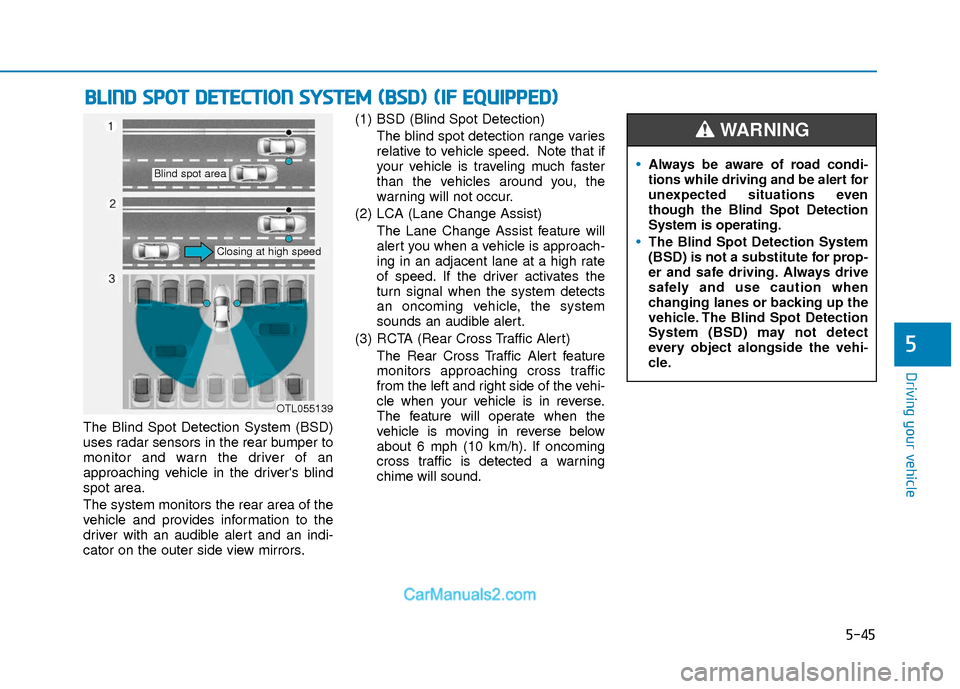
The Blind Spot Detection System (BSD)
uses radar sensors in the rear bumper to
monitor and warn the driver of an
approaching vehicle in the driver's blind
spot area.
The system monitors the rear area of the
vehicle and provides information to the
driver with an audible alert and an indi-
cator on the outer side view mirrors.(1) BSD (Blind Spot Detection)
The blind spot detection range varies
relative to vehicle speed. Note that if
your vehicle is traveling much faster
than the vehicles around you, the
warning will not occur.
(2) LCA (Lane Change Assist) The Lane Change Assist feature will
alert you when a vehicle is approach-
ing in an adjacent lane at a high rate
of speed. If the driver activates the
turn signal when the system detects
an oncoming vehicle, the system
sounds an audible alert.
(3) RCTA (Rear Cross Traffic Alert) The Rear Cross Traffic Alert feature
monitors approaching cross traffic
from the left and right side of the vehi-
cle when your vehicle is in reverse.
The feature will operate when the
vehicle is moving in reverse below
about 6 mph (10 km/h). If oncoming
cross traffic is detected a warning
chime will sound.
B BL
LI
IN
N D
D
S
S P
P O
O T
T
D
D E
ET
T E
EC
CT
T I
IO
O N
N
S
S Y
Y S
ST
T E
EM
M
(
( B
B S
SD
D )
)
(
( I
IF
F
E
E Q
Q U
UI
IP
P P
PE
ED
D )
)
OTL055139
Blind spot area
Closing at high speed
Always be aware of road condi-
tions while driving and be alert for
unexpected situations even
though the Blind Spot Detection
System is operating.
The Blind Spot Detection System
(BSD) is not a substitute for prop-
er and safe driving. Always drive
safely and use caution when
changing lanes or backing up the
vehicle. The Blind Spot Detection
System (BSD) may not detect
every object alongside the vehi-
cle.
WARNING
Page 329 of 526
5-46
Driving your vehicle
BSD (Blind Spot Detection) /
LCA (Lane Change Assist)
Operating conditions
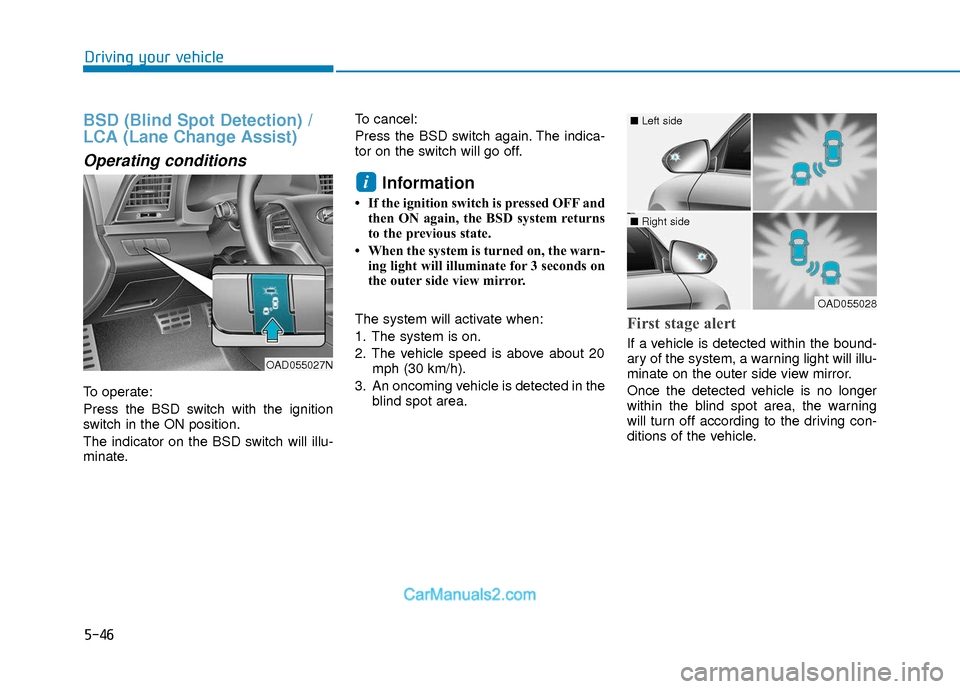
To operate:
Press the BSD switch with the ignition
switch in the ON position.
The indicator on the BSD switch will illu-
minate.To cancel:
Press the BSD switch again. The indica-
tor on the switch will go off.
Information
• If the ignition switch is pressed OFF and
then ON again, the BSD system returns
to the previous state.
• When the system is turned on, the warn- ing light will illuminate for 3 seconds on
the outer side view mirror.
The system will activate when:
1. The system is on.
2. The vehicle speed is above about 20 mph (30 km/h).
3. An oncoming vehicle is detected in the blind spot area.
First stage alert
If a vehicle is detected within the bound-
ary of the system, a warning light will illu-
minate on the outer side view mirror.
Once the detected vehicle is no longer
within the blind spot area, the warning
will turn off according to the driving con-
ditions of the vehicle.
i
OAD055027N
OAD055028
■ Left side
■ Right side
Page 330 of 526
5-47
Driving your vehicle
5
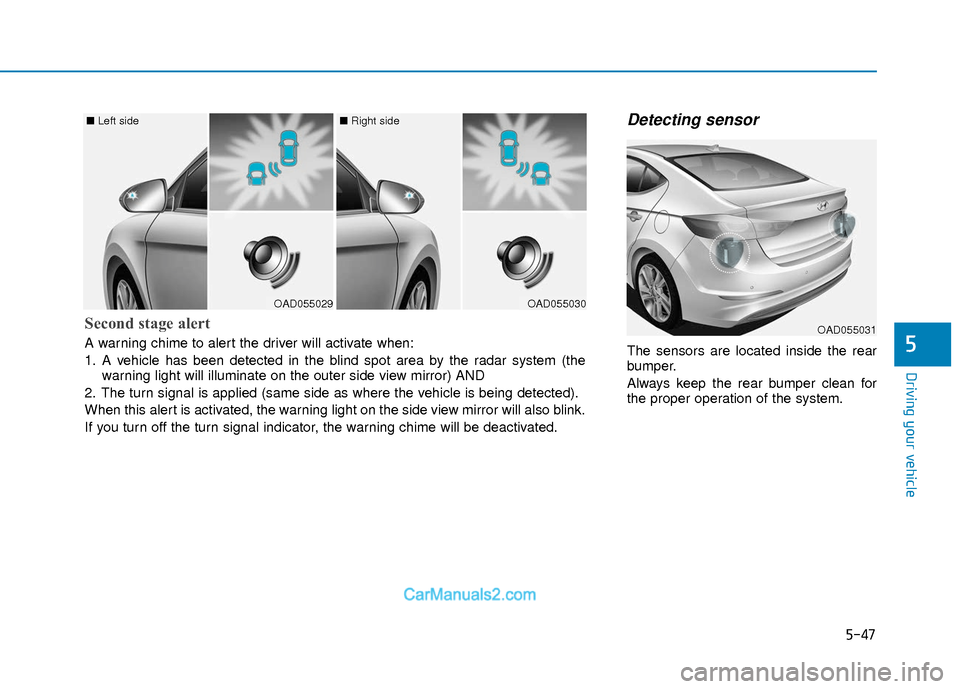
Detecting sensor
The sensors are located inside the rear
bumper.
Always keep the rear bumper clean for
the proper operation of the system.
OAD055029
■ Left side
OAD055030
■ Right side
Second stage alert
A warning chime to alert the driver will activate when:
1. A vehicle has been detected in the blind spot area by the radar system (the
warning light will illuminate on the outer side view mirror) AND
2. The turn signal is applied (same side as where the vehicle is being detected).
When this alert is activated, the warning light on the side view mirror will also blink.
If you turn off the turn signal indicator, the warning chime will be deactivated.OAD055031
Page 332 of 526
5-49
Driving your vehicle
5
RCTA (Rear Cross Traffic Alert)
The Rear Cross Traffic Alert feature mon-
itors approaching cross traffic from the
left and right side of the vehicle when
your vehicle is in reverse.
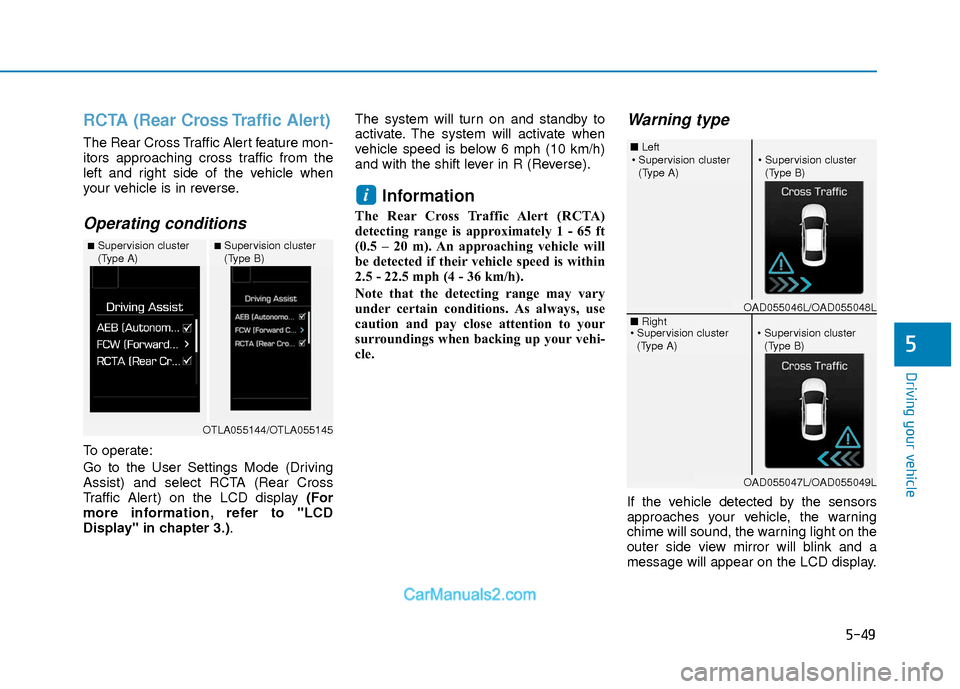
Operating conditions
To operate:
Go to the User Settings Mode (Driving
Assist) and select RCTA (Rear Cross
Traffic Alert) on the LCD display (For
more information, refer to "LCD
Display" in chapter 3.).The system will turn on and standby to
activate. The system will activate when
vehicle speed is below 6 mph (10 km/h)
and with the shift lever in R (Reverse).
Information
The Rear Cross Traffic Alert (RCTA)
detecting range is approximately 1 - 65 ft
(0.5 – 20 m). An approaching vehicle will
be detected if their vehicle speed is within
2.5 - 22.5 mph (4 - 36 km/h).
Note that the detecting range may vary
under certain conditions. As always, use
caution and pay close attention to your
surroundings when backing up your vehi-
cle.
Warning type
If the vehicle detected by the sensors
approaches your vehicle, the warning
chime will sound, the warning light on the
outer side view mirror will blink and a
message will appear on the LCD display.
i
■Supervision cluster
(Type A)■Supervision cluster
(Type B)
OTLA055144/OTLA055145
■
Left
■ Right
(Type A)(Type B)
OAD055046L/OAD055048L
OAD055047L/OAD055049L
(Type A)(Type B)
Page 333 of 526
5-50
Driving your vehicle
Information
• The warning chime will turn off whenthe detected vehicle moves out of the
sensing area or if your vehicle is moved
away from the detected vehicle.
• The system may not operate properly due to other factors or circumstances.
Always pay attention to your surround-
ings.
• If the sensing area near the rear bumper is blocked by either a wall or barrier or
by a parked vehicle, the system sensing
area may be reduced. The system may not work properly
when the bumper has been dam-
aged, or if the rear bumper has been
replaced or repaired.
The sensing range differs some- what according to the width of the
road. When the road is narrow, the
system may detect other vehicles in
the next lane.
The system may turn off due to strong electromagnetic waves.
Non-operating condition
The BSD indicator on the outer side
view mirror may not illuminate
properly when:
- The outer side view mirror housing isdamaged.
- The mirror is covered with dirt, snow, or debris.
- The window is covered with dirt, snow, or debris.
- The window is tinted.
NOTICEi
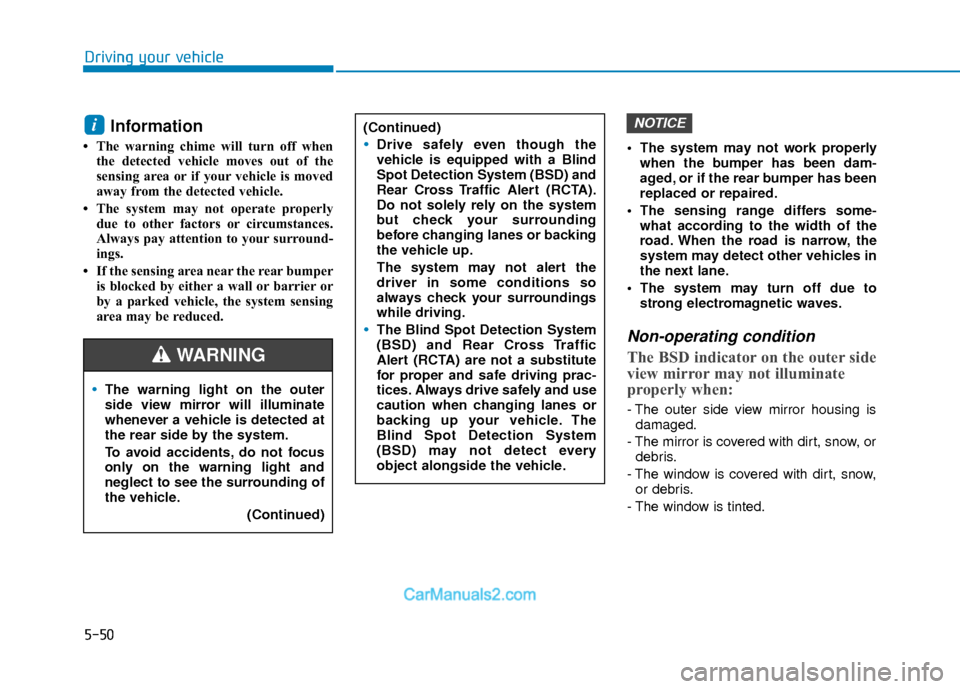
The warning light on the outer
side view mirror will illuminate
whenever a vehicle is detected at
the rear side by the system.
To avoid accidents, do not focus
only on the warning light and
neglect to see the surrounding of
the vehicle. (Continued)
(Continued)
Drive safely even though the
vehicle is equipped with a Blind
Spot Detection System (BSD) and
Rear Cross Traffic Alert (RCTA).
Do not solely rely on the system
but check your surrounding
before changing lanes or backing
the vehicle up.
The system may not alert the
driver in some conditions so
always check your surroundings
while driving.
The Blind Spot Detection System
(BSD) and Rear Cross Traffic
Alert (RCTA) are not a substitute
for proper and safe driving prac-
tices. Always drive safely and use
caution when changing lanes or
backing up your vehicle. The
Blind Spot Detection System
(BSD) may not detect every
object alongside the vehicle.
WARNING
Page 346 of 526
5-63
Driving your vehicle
5
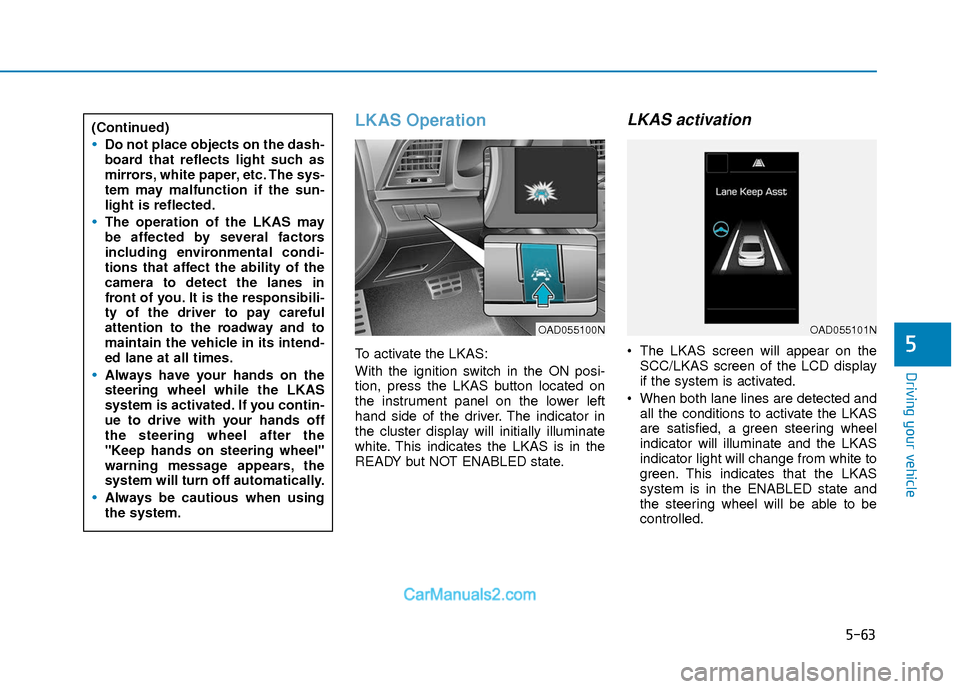
LKAS Operation
To activate the LKAS:
With the ignition switch in the ON posi-
tion, press the LKAS button located on
the instrument panel on the lower left
hand side of the driver. The indicator in
the cluster display will initially illuminate
white. This indicates the LKAS is in the
READY but NOT ENABLED state.
LKAS activation
The LKAS screen will appear on theSCC/LKAS screen of the LCD display
if the system is activated.
When both lane lines are detected and all the conditions to activate the LKAS
are satisfied, a green steering wheel
indicator will illuminate and the LKAS
indicator light will change from white to
green. This indicates that the LKAS
system is in the ENABLED state and
the steering wheel will be able to be
controlled.
(Continued)
Do not place objects on the dash-
board that reflects light such as
mirrors, white paper, etc. The sys-
tem may malfunction if the sun-
light is reflected.
The operation of the LKAS may
be affected by several factors
including environmental condi-
tions that affect the ability of the
camera to detect the lanes in
front of you. It is the responsibili-
ty of the driver to pay careful
attention to the roadway and to
maintain the vehicle in its intend-
ed lane at all times.
Always have your hands on the
steering wheel while the LKAS
system is activated. If you contin-
ue to drive with your hands off
the steering wheel after the
"Keep hands on steering wheel"
warning message appears, the
system will turn off automatically.
Always be cautious when using
the system.
OAD055100NOAD055101N
Page 371 of 526
5-88
Driving your vehicle
If you are still stuck after rocking the
vehicle a few times, have the vehicle
pulled out by a tow vehicle to avoid
engine overheating, possible damage
to the transmission, and tire damage.
See "Towing" in chapter 6.
Smooth Cornering
Avoid braking or gear changing in cor-
ners, especially when roads are wet.
Ideally, corners should always be taken
under gentle acceleration.
Driving at Night
Night driving presents more hazards
than driving in the daylight. Here are
some important tips to remember:
Slow down and keep more distancebetween you and other vehicles, as it
may be more difficult to see at night,
especially in areas where there may
not be any street lights.
Adjust your mirrors to reduce the glare from other driver's headlamps.
Keep your headlamps clean and prop- erly aimed. Dirty or improperly aimed
headlamps will make it much more dif-
ficult to see at night.
Avoid staring directly at the headlamps of oncoming vehicles. You could be
temporarily blinded, and it will take
several seconds for your eyes to read-
just to the darkness.
Driving in the Rain
Rain and wet roads can make driving
dangerous. Here are a few things to con-
sider when driving in the rain or on slick
pavement:
Slow down and allow extra followingdistance. A heavy rainfall makes it
harder to see and increases the dis-
tance needed to stop your vehicle.
Turn OFF your Cruise Control.
Replace your windshield wiper blades when they show signs of streaking or
missing areas on the windshield.
Tires should be properly maintained with at least 2/32nds of an inch of tread
depth. If your tires do not have enough
tread, making a quick stop on wet
pavement can cause a skid and possi-
bly lead to an accident. See "Tire
Tread" in chapter 7.
Turn on your headlamps to make it easier for others to see you.
Driving too fast through large puddles can affect your brakes. If you must go
through puddles, try to drive through
them slowly.
If you believe your brakes may be wet, apply them lightly while driving until
normal braking operation returns.
NOTICE
Page 472 of 526
7-54
Maintenance
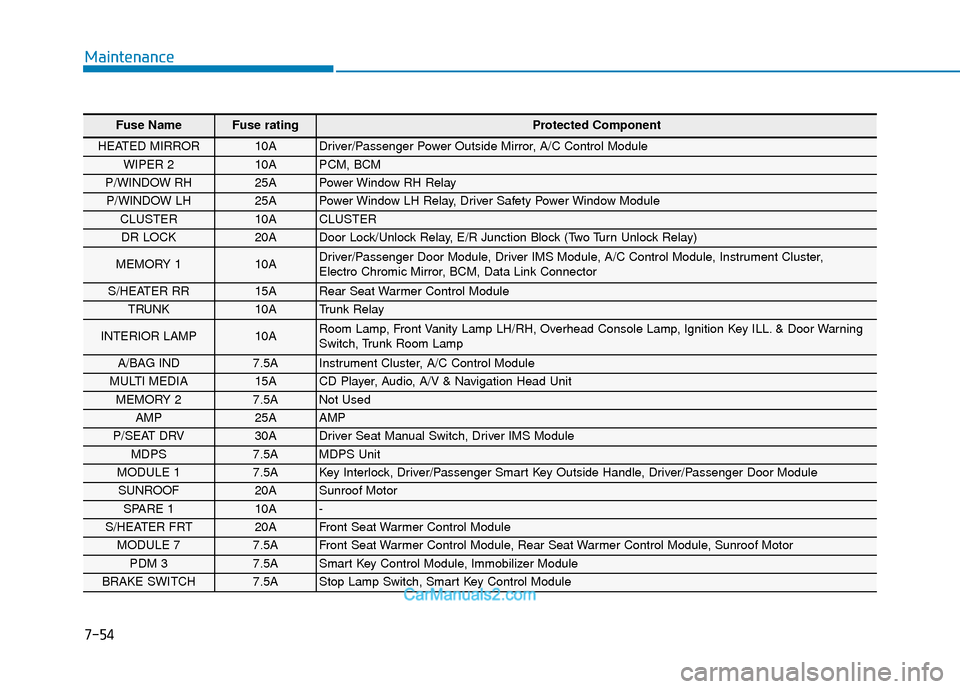
Fuse Name Fuse rating Protected Component
HEATED MIRROR 10A Driver/Passenger Power Outside Mirror, A/C Control Module
WIPER 2 10A PCM, BCM
P/WINDOW RH 25A Power Window RH Relay
P/WINDOW LH 25A Power Window LH Relay, Driver Safety Power Window Module
CLUSTER 10A CLUSTER
DR LOCK 20A Door Lock/Unlock Relay, E/R Junction Block (Two Turn Unlock Relay)
MEMORY 1 10A Driver/Passenger Door Module, Driver IMS Module, A/C Control Module, Instrument Cluster,
Electro Chromic Mirror, BCM, Data Link Connector
S/HEATER RR 15A Rear Seat Warmer Control Module
TRUNK 10A Trunk Relay
INTERIOR LAMP 10A Room Lamp, Front Vanity Lamp LH/RH, Overhead Console Lamp, Ignition Key ILL. & Door Warning
Switch, Trunk Room Lamp
A/BAG IND 7.5A Instrument Cluster, A/C Control Module
MULTI MEDIA 15A CD Player, Audio, A/V & Navigation Head Unit
MEMORY 2 7.5A Not Used
AMP 25A AMP
P/SEAT DRV 30A Driver Seat Manual Switch, Driver IMS Module
MDPS 7.5A MDPS Unit
MODULE 1 7.5A Key Interlock, Driver/Passenger Smart Key Outside Handle, Driver/Passenger Door Module
SUNROOF 20A Sunroof Motor
SPARE 1 10A -
S/HEATER FRT 20A Front Seat Warmer Control Module
MODULE 7 7.5A Front Seat Warmer Control Module, Rear Seat Warmer Control Module, Sunroof Motor
PDM 3 7.5A Smart Key Control Module, Immobilizer Module
BRAKE SWITCH 7.5A Stop Lamp Switch, Smart Key Control Module
Page 473 of 526
7-55
7
Maintenance
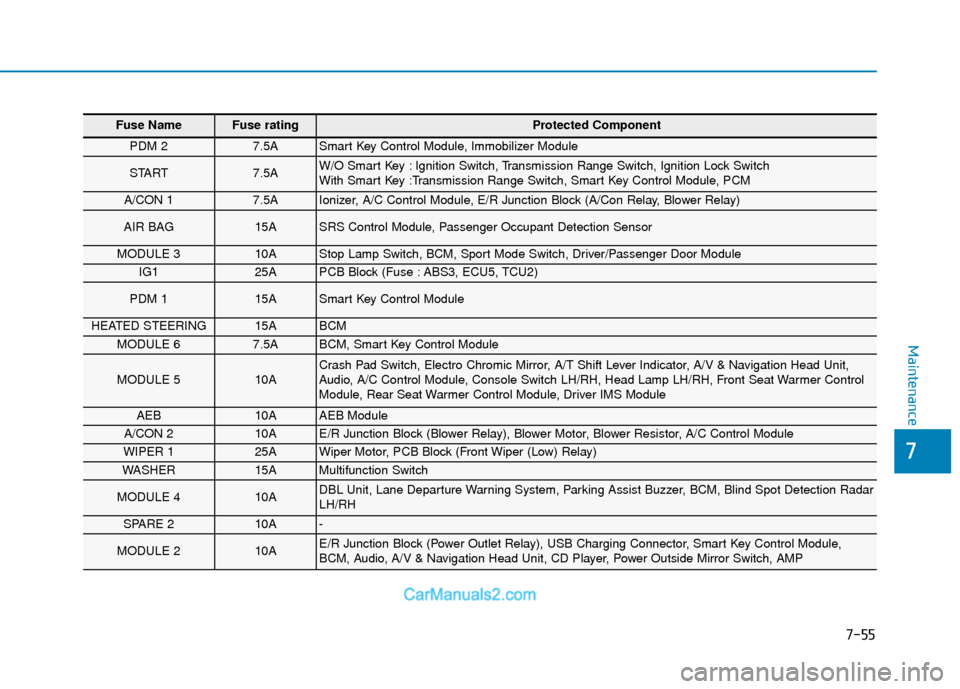
Fuse Name Fuse rating Protected Component
PDM 2 7.5A Smart Key Control Module, Immobilizer Module
START 7.5A W/O Smart Key : Ignition Switch, Transmission Range Switch, Ignition Lock Switch
With Smart Key :Transmission Range Switch, Smart Key Control Module, PCM
A/CON 1 7.5A Ionizer, A/C Control Module, E/R Junction Block (A/Con Relay, Blower Relay)
AIR BAG 15A SRS Control Module, Passenger Occupant Detection Sensor
MODULE 3 10A Stop Lamp Switch, BCM, Sport Mode Switch, Driver/Passenger Door Module
IG1 25A PCB Block (Fuse : ABS3, ECU5, TCU2)
PDM 1 15A Smart Key Control Module
HEATED STEERING 15A BCM
MODULE 6 7.5A BCM, Smart Key Control Module
MODULE 5 10A Crash Pad Switch, Electro Chromic Mirror, A/T Shift Lever Indicator, A/V & Navigation Head Unit,
Audio, A/C Control Module, Console Switch LH/RH, Head Lamp LH/RH, Front Seat Warmer Control
Module, Rear Seat Warmer Control Module, Driver IMS Module
AEB 10A AEB Module
A/CON 2 10A E/R Junction Block (Blower Relay), Blower Motor, Blower Resistor, A/C Control Module
WIPER 1 25A Wiper Motor, PCB Block (Front Wiper (Low) Relay)
WASHER 15A Multifunction Switch
MODULE 4 10A DBL Unit, Lane Departure Warning System, Parking Assist Buzzer, BCM, Blind Spot Detection Radar
LH/RH
SPARE 2 10A -
MODULE 2 10A E/R Junction Block (Power Outlet Relay), USB Charging Connector, Smart Key Control Module,
BCM, Audio, A/V & Navigation Head Unit, CD Player, Power Outside Mirror Switch, AMP