snow Hyundai Elantra 2018 Owner's Guide
[x] Cancel search | Manufacturer: HYUNDAI, Model Year: 2018, Model line: Elantra, Model: Hyundai Elantra 2018Pages: 526, PDF Size: 17.2 MB
Page 341 of 526
5-58
Driving your vehicle
Limitations of the System
The Automatic Emergency Braking
(AEB) system is designed to monitor the
vehicle ahead or a pedestrian in the
roadway through radar signals and cam-
era recognition to warn the driver that a
collision is imminent, and if necessary,
apply emergency braking.
In certain situations, the radar sensor or
the camera may not be able to detect the
vehicle or pedestrian ahead. In these
cases, the AEB system may not operate
normally. The driver must pay careful
attention in the following situations where
the AEB operation may be limited.
Detecting vehicles
The sensor may be limited when:
- The radar sensor or camera is blockedwith a foreign object or debris.
- Inclement weather such as heavy rain or snow obscures the field of view of
the radar sensor or camera.
- There is interference by electromag- netic waves.
- There is severe irregular reflection from the radar sensor.
- The vehicle in front is too small to be detected by the camera recognition
system (for example a motorcycle or a
bicycle, etc.).
- The vehicle in front is an oversize vehi- cle or trailer that is too big to be detect-
ed by the camera recognition system
(for example a tractor trailer, etc.).
- The driver's field of view is not well illu- minated (either too dark or too much
reflection or too much backlight that
obscures the field of view).
- The vehicle in front does not have their rear lights properly turned ON.
- The outside brightness changes sud- denly, for example when entering or
exiting a tunnel.
(Continued)The brake control may be insuffi-
cient, possibly causing a colli-
sion, if a vehicle in front abruptly
stops. Always pay extreme cau-
tion.
Occupants may get injured, if the
vehicle abruptly stops by the acti-
vated AEB system. Pay extreme
caution.
Page 349 of 526
5-66
Driving your vehicle
The LKAS system will not be in the
ENABLED state and the steering
wheel will not be assisted when:
Vehicle speed is below 40 mph (60 km/h) and over 110 mph (180
km/h).
Only one lane line is detected.
The turn signal is turned on before changing a lane. If you change lanes
without the turn signal on, the steering
wheel might be controlled.
The hazard warning flasher is on.
The width of the lane is below 10 feet (3.1 m) and over 15 feet (4.5
m).
ESC (Electronic Stability Control) is activated.
The vehicle is driven on a sharp curve.
The vehicle brakes suddenly.
The vehicle makes sharp lane changes.
Information
When the system is turned on or right
after changing a lane, drive in the middle
of the lane. If not, the system will not pro-
vide steering assist function.
Limitations of the System
The LKAS may operate prematurely
even if the vehicle does not depart from
the intended lane, OR, the LKAS may not
warn you if the vehicle leaves the intend-
ed lane under the following circum-
stances:
The lanes ahead are not visible due torain, snow, water on the road, dam-
aged or stained road surface, or other
factors.
The brightness outside changes sud- denly such as when entering or exiting
a tunnel.
The brightness outside is too low such as when the headlamps are not on at
night or the vehicle is going through a
tunnel.
It is difficult to distinguish the lane marking from the road surface or the
lane marking is faded or not clearly
marked.
Driving on a steep grade, over a hill, or when driving on a curved road.
When light coming from a street light or an oncoming vehicle is reflected on a
wet road surface such as a puddle in
the road.
The windshield or the LKAS camera lens is blocked with dirt or debris. The field of view in front is obstructed
by sun glare.
The lanes are incomplete or the area is in a construction zone.
There are more than two lane lines on the road in front of you.
The lane markings are not clearly visi- ble from the road.
The lane width is too wide or too nar- row. See previous page.
The windshield glass is fogged up; a clear view of the road is obstructed.
There are markings on the road sur- face that look like a lane line that is
inadvertently being detected by the
camera.
There is a boundary structure in the roadway such as a concrete barrier,
guardrail and reflector post that is
inadvertently being detected by the
camera.
There is not enough distance between you and the vehicle in front to be able
to detect the lane line or the vehicle
ahead is driving on the lane line.
The adverse road conditions cause excessive vehicle vibrations while driv-
ing.
i
Page 352 of 526
5-69
Driving your vehicle
5
Cruise Control operation
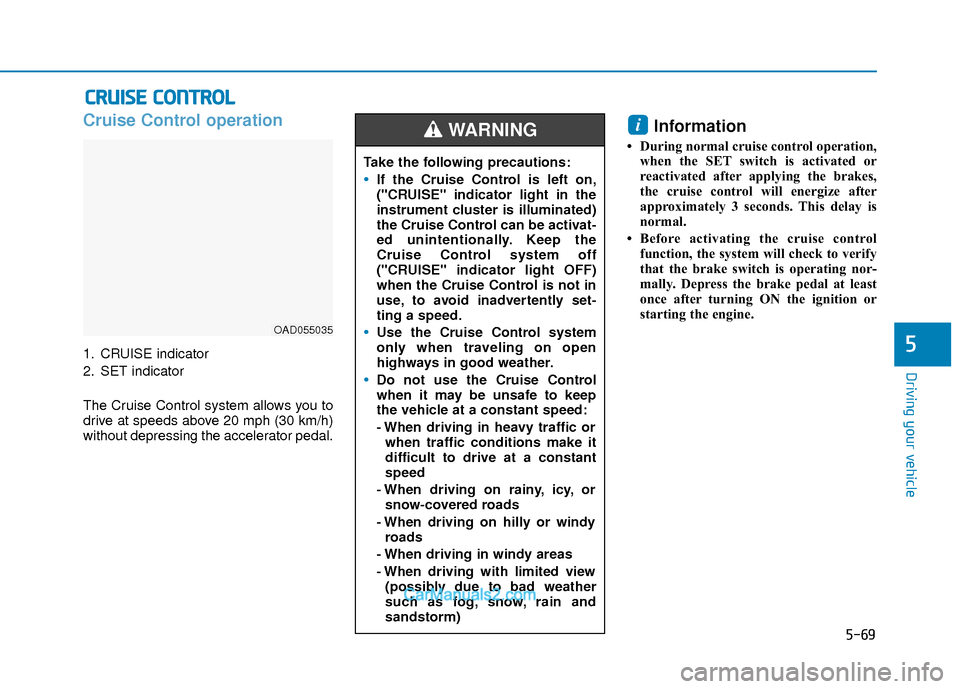
1. CRUISE indicator
2. SET indicator
The Cruise Control system allows you to
drive at speeds above 20 mph (30 km/h)
without depressing the accelerator pedal.
Information
• During normal cruise control operation,when the SET switch is activated or
reactivated after applying the brakes,
the cruise control will energize after
approximately 3 seconds. This delay is
normal.
• Before activating the cruise control function, the system will check to verify
that the brake switch is operating nor-
mally. Depress the brake pedal at least
once after turning ON the ignition or
starting the engine.
i
C CR
R U
U I
IS
S E
E
C
C O
O N
NT
TR
R O
O L
L
OAD055035
Take the following precautions:
If the Cruise Control is left on,
("CRUISE" indicator light in the
instrument cluster is illuminated)
the Cruise Control can be activat-
ed unintentionally. Keep the
Cruise Control system off
("CRUISE" indicator light OFF)
when the Cruise Control is not in
use, to avoid inadvertently set-
ting a speed.
Use the Cruise Control system
only when traveling on open
highways in good weather.
Do not use the Cruise Control
when it may be unsafe to keep
the vehicle at a constant speed:
- When driving in heavy traffic or
when traffic conditions make it
difficult to drive at a constant
speed
- When driving on rainy, icy, or snow-covered roads
- When driving on hilly or windy roads
- When driving in windy areas
- When driving with limited view (possibly due to bad weather
such as fog, snow, rain and
sandstorm)
WARNING
Page 356 of 526
5-73
Driving your vehicle
5
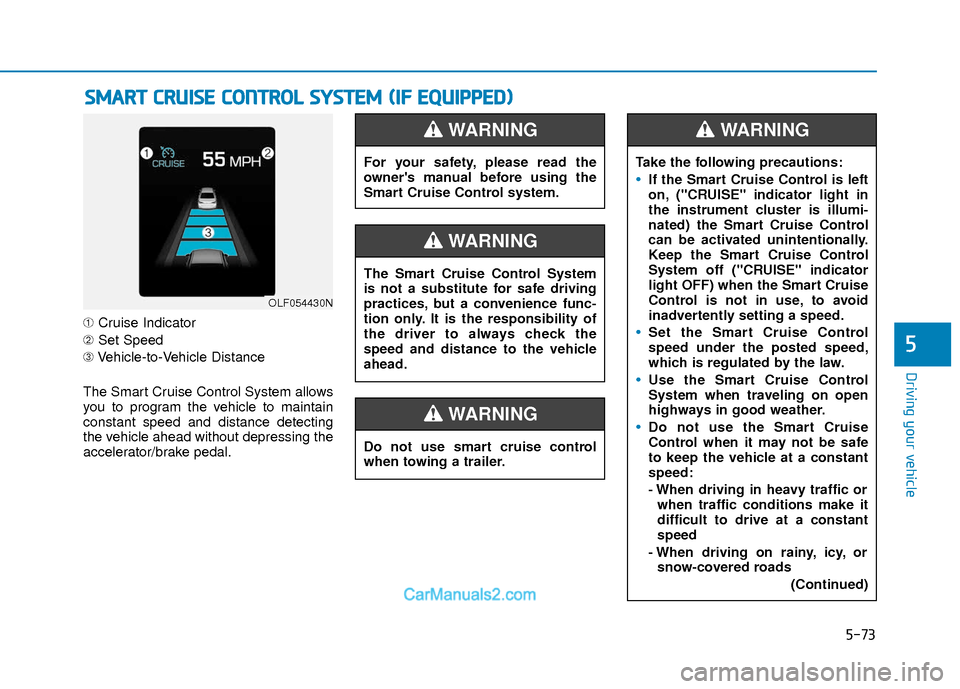
➀Cruise Indicator
➁ Set Speed
➂ Vehicle-to-Vehicle Distance
The Smart Cruise Control System allows
you to program the vehicle to maintain
constant speed and distance detecting
the vehicle ahead without depressing the
accelerator/brake pedal.
S S M
M A
AR
RT
T
C
C R
R U
U I
IS
S E
E
C
C O
O N
NT
TR
R O
O L
L
S
S Y
Y S
ST
T E
EM
M
(
( I
IF
F
E
E Q
Q U
UI
IP
P P
PE
ED
D )
)
OLF054430N
For your safety, please read the
owner's manual before using the
Smart Cruise Control system.
WARNING
Do not use smart cruise control
when towing a trailer.
WARNING
The Smart Cruise Control System
is not a substitute for safe driving
practices, but a convenience func-
tion only. It is the responsibility of
the driver to always check the
speed and distance to the vehicle
ahead.
WARNING
Take the following precautions:
If the Smart Cruise Control is left
on, ("CRUISE" indicator light in
the instrument cluster is illumi-
nated) the Smart Cruise Control
can be activated unintentionally.
Keep the Smart Cruise Control
System off ("CRUISE" indicator
light OFF) when the Smart Cruise
Control is not in use, to avoid
inadvertently setting a speed.
Set the Smart Cruise Control
speed under the posted speed,
which is regulated by the law.
Use the Smart Cruise Control
System when traveling on open
highways in good weather.
Do not use the Smart Cruise
Control when it may not be safe
to keep the vehicle at a constant
speed:
- When driving in heavy traffic or
when traffic conditions make it
difficult to drive at a constant
speed
- When driving on rainy, icy, or snow-covered roads
(Continued)
WARNING
Page 357 of 526
5-74
Driving your vehicle
To Adjust the Sensitivity of
Smart Cruise Control
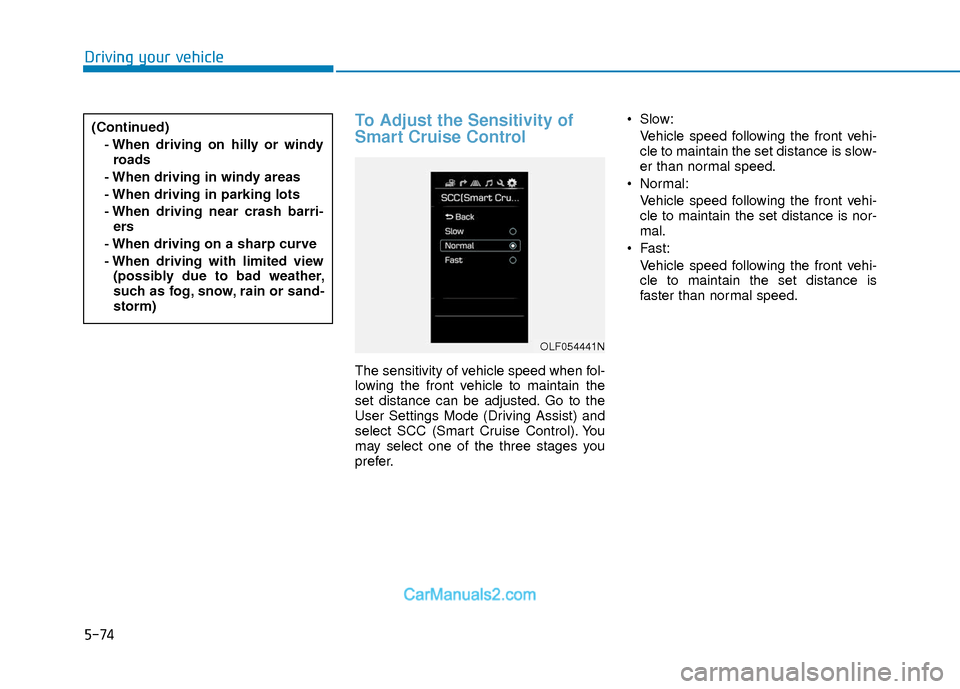
The sensitivity of vehicle speed when fol-
lowing the front vehicle to maintain the
set distance can be adjusted. Go to the
User Settings Mode (Driving Assist) and
select SCC (Smart Cruise Control). You
may select one of the three stages you
prefer. Slow:
Vehicle speed following the front vehi-
cle to maintain the set distance is slow-
er than normal speed.
Normal: Vehicle speed following the front vehi-
cle to maintain the set distance is nor-
mal.
Fast: Vehicle speed following the front vehi-
cle to maintain the set distance is
faster than normal speed.
(Continued)
- When driving on hilly or windyroads
- When driving in windy areas
- When driving in parking lots
- When driving near crash barri- ers
- When driving on a sharp curve
- When driving with limited view (possibly due to bad weather,
such as fog, snow, rain or sand-
storm)
OLF054441N
Page 364 of 526
5-81
Driving your vehicle
5
SCC Front Radar Sensor
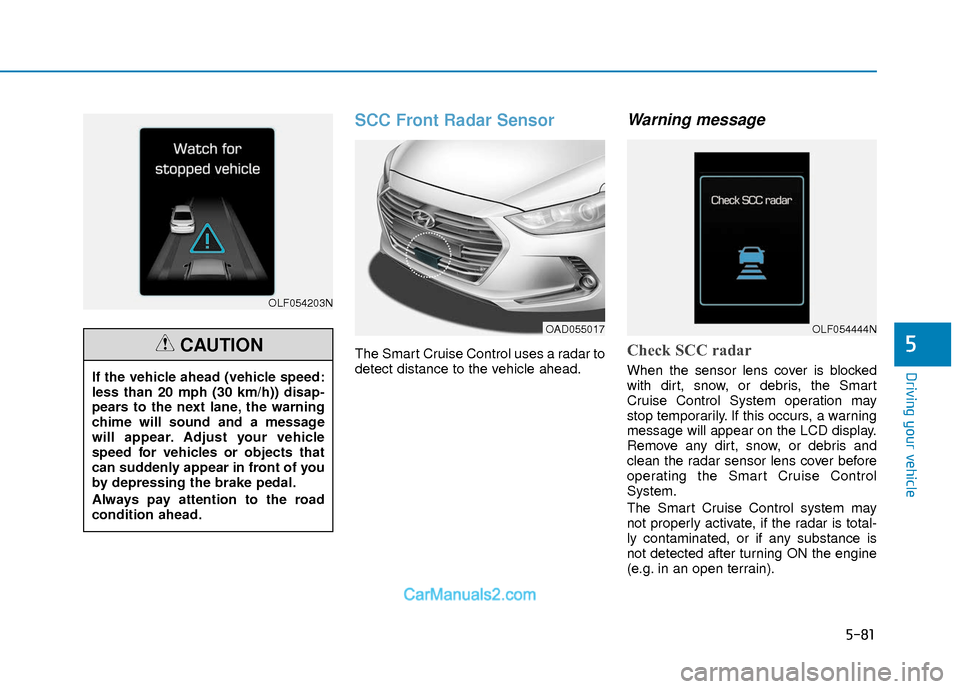
The Smart Cruise Control uses a radar to
detect distance to the vehicle ahead.
Warning message
Check SCC radar
When the sensor lens cover is blocked
with dirt, snow, or debris, the Smart
Cruise Control System operation may
stop temporarily. If this occurs, a warning
message will appear on the LCD display.
Remove any dirt, snow, or debris and
clean the radar sensor lens cover before
operating the Smart Cruise Control
System.
The Smart Cruise Control system may
not properly activate, if the radar is total-
ly contaminated, or if any substance is
not detected after turning ON the engine
(e.g. in an open terrain).
OLF054203N
If the vehicle ahead (vehicle speed:
less than 20 mph (30 km/h)) disap-
pears to the next lane, the warning
chime will sound and a message
will appear. Adjust your vehicle
speed for vehicles or objects that
can suddenly appear in front of you
by depressing the brake pedal.
Always pay attention to the road
condition ahead.
CAUTION
OAD055017OLF054444N
Page 370 of 526
5-87
Driving your vehicle
5
Hazardous Driving Conditions
When hazardous driving elements are
encountered such as water, snow, ice,
mud and sand, take the below sugges-
tions:
Drive cautiously and keep a longerbraking distance.
Avoid abrupt braking or steering.
When your vehicle is stuck in snow, mud, or sand, use second gear.
Accelerate slowly to avoid unneces-
sary wheel spin.
Put sand, rock salt, tire chains or other non-slip materials under the wheels to
provide additional traction while the
vehicle becomes stuck in ice, snow, or
mud.
Rocking the Vehicle
If it is necessary to rock the vehicle to
free it from snow, sand, or mud, first turn
the steering wheel right and left to clear
the area around your front wheels. Then,
shift back and forth between R (Reverse)
and a forward gear.
Try to avoid spinning the wheels, and do
not race the engine.
To prevent transmission wear, wait until
the wheels stop spinning before shifting
gears. Release the accelerator pedal
while shifting, and press lightly on the
accelerator pedal while the transmission
is in gear. Slowly spinning the wheels in
forward and reverse directions causes a
rocking motion that may free the vehicle.
Information
The ESC system must be turned OFF
before rocking the vehicle.
i
S SP
P E
EC
CI
IA
A L
L
D
D R
RI
IV
V I
IN
N G
G
C
C O
O N
ND
DI
IT
T I
IO
O N
NS
S
Downshifting with an automatic
transmission/dual clutch transmis-
sion while driving on slippery sur-
faces can cause an accident. The
sudden change in tire speed could
cause the tires to skid. Be careful
when downshifting on slippery sur-
faces.
WARNING
If the vehicle is stuck and excessive
wheel spin occurs, the temperature
in the tires can increase very quick-
ly. If the tires become damaged, a
tire blow out or tire explosion can
occur. This condition is dangerous -
you and others may be injured. Do
not attempt this procedure if people
or objects are anywhere near the
vehicle.
If you attempt to free the vehicle,
the vehicle can overheat quickly,
possibly causing an engine com-
partment fire or other damage. Try
to avoid spinning the wheels as
much as possible to prevent over-
heating of either the tires or the
engine. DO NOT allow the vehicle to
spin the wheels above 35 mph (56
km/h).
WARNING
Page 373 of 526
5-90
Driving your vehicle
W
WI
IN
N T
TE
ER
R
D
D R
RI
IV
V I
IN
N G
G
The severe weather conditions of winter
quickly wear out tires and cause other
problems. To minimize winter driving
problems, you should take the following
suggestions:
Snow or Icy Conditions
You need to keep sufficient distance
between your vehicle and the vehicle in
front of you.
Apply the brakes gently. Speeding, rapid
acceleration, sudden brake applications,
and sharp turns are potentially very haz-
ardous practices. During deceleration,
use engine braking to the fullest extent.
Sudden brake applications on snowy or
icy roads may cause the vehicle to skid.
To drive your vehicle in deep snow, it may
be necessary to use snow tires or to
install tire chains on your tires.
Always carry emergency equipment.
Some of the items you may want to carry
include tire chains, tow straps or chains,
a flashlight, emergency flares, sand, a
shovel, jumper cables, a window scraper,
gloves, ground cloth, coveralls, a blanket,
etc.
Snow tires
If you mount snow tires on your vehicle,
make sure to use radial tires of the same
size and load range as the original tires.
Mount snow tires on all four wheels to
balance your vehicle’s handling in all
weather conditions. The traction provided
by snow tires on dry roads may not be as
high as your vehicle's original equipment
tires. Check with the tire dealer for maxi-
mum speed recommendations.
Information
Do not install studded tires without first
checking local, state and municipal regula-
tions for possible restrictions against their
use.
Tire chains
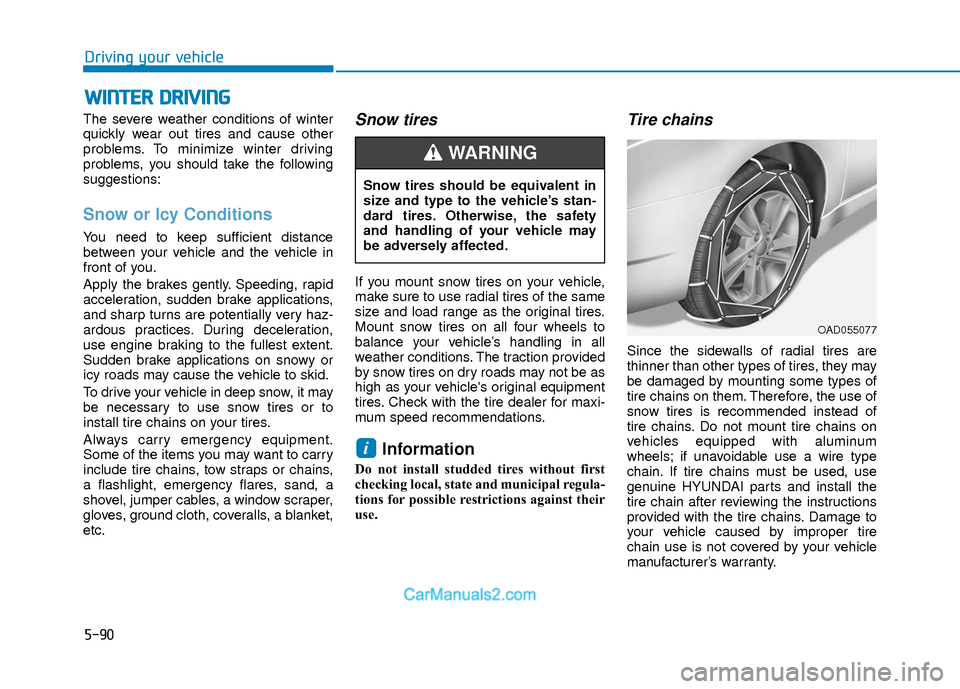
Since the sidewalls of radial tires are
thinner than other types of tires, they may
be damaged by mounting some types of
tire chains on them. Therefore, the use of
snow tires is recommended instead of
tire chains. Do not mount tire chains on
vehicles equipped with aluminum
wheels; if unavoidable use a wire type
chain. If tire chains must be used, use
genuine HYUNDAI parts and install the
tire chain after reviewing the instructions
provided with the tire chains. Damage to
your vehicle caused by improper tire
chain use is not covered by your vehicle
manufacturer’s warranty.
i
Snow tires should be equivalent in
size and type to the vehicle’s stan-
dard tires. Otherwise, the safety
and handling of your vehicle may
be adversely affected.
WARNING
OAD055077
Page 374 of 526
5-91
Driving your vehicle
5
Information
• Install tire chains on the front tires. Itshould be noted that installing tire
chains on the tires will provide a greater
driving force, but will not prevent side
skids.
• Do not install studded tires without first checking local, state and municipal reg-
ulations for possible restrictions against
their use.
Chain installation
When installing tire chains, follow the
manufacturer’s instructions and mount
them as tightly possible. Drive slowly
(less than 20 mph (30 km/h)) with chains
installed. If you hear the chains contact-
ing the body or chassis, stop and tighten
them. If they still make contact, slow
down until the noise stops. Remove the
tire chains as soon as you begin driving
on cleared roads.
When mounting snow chains, park the
vehicle on level ground away from traffic.
Turn on the vehicle Hazard Warning
Flasher and place a triangular emer-
gency warning device behind the vehicle
(if available). Always place the vehicle in
P (Park), apply the parking brake and
turn off the engine before installing snow
chains. - When using tire chains:
Wrong size chains or improperly
installed chains can damage your
vehicle's brake lines, suspension,
body and wheels.
Use SAE "S" class or wire chains.
If you hear noise caused by chains contacting the body, retighten the
chain to prevent contact with the
vehicle body.
To prevent body damage, retighten the chains after driving 0.3~0.6
miles (0.5~1.0 km).
Do not use tire chains on vehicles equipped with aluminum wheels. If
unavoidable, use a wire type chain.
Use wire chains less than 0.59 inch (15 mm) wide to prevent damage to
the chain’s connection.
NOTICEi
The use of tire chains may adverse-
ly affect vehicle handling:
Drive less than 20 mph
(30 km/h) or the chain manufac-
turer's recommended speed limit,
whichever is lower.
Drive carefully and avoid bumps,
holes, sharp turns, and other
road hazards, which may cause
the vehicle to bounce.
Avoid sharp turns or locked
wheel braking.
WARNING
If your vehicle has 225/40R18 size
tires, do not use tire chain; they can
damage your vehicle (wheel, sus-
pension and body).
CAUTION
Page 375 of 526
5-92
Driving your vehicle
Winter Precautions
Use high quality ethylene glycolcoolant
Your vehicle is delivered with high quality
ethylene glycol coolant in the cooling
system. It is the only type of coolant that
should be used because it helps prevent
corrosion in the cooling system, lubri-
cates the water pump and prevents
freezing. Be sure to replace or replenish
your coolant in accordance with the
maintenance schedule in chapter 7.
Before winter, have your coolant tested to
assure that its freezing point is sufficient
for the temperatures anticipated during
the winter.
Change to "winter weight" oil ifnecessary
In some climates it is recommended that
a lower viscosity "winter weight" oil be
used during cold weather. See chapter 8
for recommendations. If you aren't sure
what weight oil you should use, consult
an authorized HYUNDAI dealer.
Check battery and cables
Winter puts additional burdens on the
battery system. Visually inspect the bat-
tery and cables as described in chapter
7. The level of charge in your battery can
be checked by an authorized HYUNDAI
dealer or a service station.
Check spark plugs and ignitionsystem
Inspect your spark plugs as described in
chapter 7 and replace them if necessary.
Also check all ignition wiring and compo-
nents to be sure they are not cracked,
worn or damaged in any way.
Use approved window washeranti-freeze in system
To keep the water in the window washer
system from freezing, add an approved
window washer anti-freeze solution in
accordance with instructions on the con-
tainer. Window washer anti-freeze is
available from an authorized HYUNDAI
dealer and most auto parts outlets. Do
not use engine coolant or other types of
anti-freeze as these may damage the
paint finish.
Do not let your parking brakefreeze
Under some conditions your parking
brake can freeze in the engaged position.
This is most likely to happen when there
is an accumulation of snow or ice around
or near the rear brakes or if the brakes
are wet. If there is a risk the parking
brake may freeze, apply it only temporar-
ily while you put the gear selector lever in
P and block the rear wheels so the car
cannot roll. Then release the parking
brake.
Do not let ice and snow accu-mulate underneath
Under some conditions, snow and ice
can build up under the fenders and inter-
fere with the steering. When driving in
severe winter conditions where this may
happen, you should periodically check
underneath the car to be sure the move-
ment of the front wheels and the steering
components is not obstructed.