snow Hyundai Elantra 2018 User Guide
[x] Cancel search | Manufacturer: HYUNDAI, Model Year: 2018, Model line: Elantra, Model: Hyundai Elantra 2018Pages: 526, PDF Size: 17.2 MB
Page 252 of 526
4-33
Multimedia System
4
SiriusXM®Satellite Radio
information (if equipped)
Satellite Radio channels :
Enjoy SiriusXM Satellite Radio with a 3-
month trial subscription to the SiriusXM
Select package. You’ll get over 140 chan-
nels, including commercial-free music,
plus all your favorite sports, exclusive
talk, entertainment, and a selection of
premium programming. For more infor-
mation and a complete list of SiriusXM
channels, visit siriusxm.com in the
United States, siriusxm.ca in Canada, or
call SiriusXM at 1-888-539-7474.
Satellite Radio reception factors :
To receive the satellite signal, your vehi-
cle has been equipped with a satellite
radio antenna located on the roof of your
vehicle. The vehicle roof provides the
best location for an unobstructed, open
view of the sky, a requirement of a satel-
lite radio system. Like AM/FM, there are
several factors that can affect satellite
radio reception performance :
Antenna obstructions : For optimal
reception performance, keep the
antenna clear of snow and ice build-up
and keep luggage and other material
as far away from the antenna as possi-
ble.
Terrain : Hills, mountains, tall buildings, bridges, tunnels, freeway overpasses,
parking garages, dense tree foliage
and thunderstorms can interfere with
your reception.
SiriusXM Satellite Radio service :
SiriusXM is a subscription-based satellite
radio service that broadcasts music,
sports, news and entertainment pro-
gramming to radio receivers, which are
available for installation in motor vehicles
or factory installed, as well as for the
home, portable and wireless devices,
and through an Internet connection on a
personal computer.
Vehicles that are equipped with a factory
installed SiriusXM Satellite Radio system
include :
Hardware and an introductory trial sub-scription term, which begins on the
date of sale or lease of the vehicle.
For a small upgrade fee, access to SiriusXM music channels, and other
select channels over the Internet using
any computer connected to the
Internet (U.S. customers only).
For information on extended subscrip-
tion terms, contact SiriusXM at 1-888-
539-7474.
Page 285 of 526
5
Smart Cruise Control system..............................5-73
To Adjust the Sensitivity of Smart Cruise Control ....5-74
To Convert to Cruise Control Mode............................5-75
Smart Cruise Control Speed .........................................5-75
Smart Cruise Control Vehicle-to-Vehicle Distance...5-79
SCC Front Radar Sensor................................................5-81
Limitations of the System .............................................5-83
Special Driving Conditions ..................................5-87
Hazardous Driving Conditions ......................................5-87
Rocking the Vehicle ........................................................5-87
Smooth Cornering ...........................................................5-88
Driving at Night................................................................5-88
Driving in the Rain ..........................................................5-88
Driving in Flooded Areas ...............................................5-89
Highway Driving...............................................................5-89
Winter Driving ......................................................5-90
Snow or Icy Conditions ..................................................5-90
Winter Precautions .........................................................5-92
Vehicle Load Limit................................................5-93
Tire Loading Information Label ...................................5-94
Trailer Towing .......................................................5-98
Page 286 of 526
5-3
Driving your vehicle
5
Carbon monoxide (CO) gas is toxic. Breathing CO can cause unconsciousness and death.
Engine exhaust contains carbon monoxide which cannot be seen or smelled.
Do not inhale engine exhaust.
If at any time you smell engine exhaust inside the vehicle, open the windows immediately. Exposure to CO can cause uncon-
sciousness and death by asphyxiation.
Be sure the exhaust system does not leak.
The exhaust system should be checked whenever the vehicle is raised to change the oil or for any other purpose. If you hear a
change in the sound of the exhaust or if you drive over something that strikes the underneath side of the vehicle, have the
exhaust system checked as soon as possible by an authorized HYUNDAI dealer.
Do not run the engine in an enclosed area.
Letting the engine idle in your garage, even with the garage door open, is a hazardous practice. Run the engine only long enough
to start the engine and to move the vehicle out of the garage.
Avoid idling the engine for prolonged periods with people inside the vehicle.
If it is necessary to idle the engine for a prolonged period with people inside the vehicle, be sure to do so only in an open area
with the air intake set at "Fresh" and fan control set to high so fresh air is drawn into the interior.
Keep the air intakes clear.
To assure proper operation of the ventilation system, keep the ventilation air intakes located in front of the windshield clear of
snow, ice, leaves, or other obstructions.
If you must drive with the trunk open:
Close all windows.
Open instrument panel air vents.
Set the air intake control at "Fresh", the air flow control at "Floor" or "Face", and the fan control set to high.
WARNING
Page 287 of 526
5-4
Driving your vehicle
Before Entering the Vehicle
• Be sure all windows, outside mirror(s),and outside lights are clean and unob-
structed.
Remove frost, snow, or ice.
Visually check the tires for uneven wear and damage.
Check under the vehicle for any sign of leaks.
Be sure there are no obstacles behind you if you intend to back up.
Before Starting
Make sure the hood, the trunk, and thedoors are securely closed and locked.
Adjust the position of the seat and steering wheel.
Adjust the inside and outside rearview mirrors.
Verify all the lights work.
Fasten your seatbelt. Check that all passengers have fastened their seat-
belts.
Check the gauges and indicators in the instrument panel and the messages on
the instrument display when the igni-
tion switch is in the ON position.
Check that any items you are carrying are stored properly or fastened down
securely.
CALIFORNIA PROPOSITION 65
WARNING
Engine exhaust and a wide variety
of automobile components includ-
ing components found in the interi-
or furnishings in a vehicle, contain
or emit harmful chemicals known to
the State of California to cause can-
cer and birth defects and reproduc-
tive harm. In addition, certain fluids
contained in vehicles and certain
products of components contain or
emit chemicals known to the State
of California to cause cancer and
birth defects or other reproductive
harm.WARNING
B B
E
EF
FO
O R
RE
E
D
D R
RI
IV
V I
IN
N G
G
Page 319 of 526
5-36
Driving your vehicle
Check the Parking Brake
Warning Light by placing
the ignition switch to the
ON position (do not start
the engine).
This light will be illuminat-
ed when the parking brake is applied with
the ignition switch in the START or ON
position.
Before driving, be sure the parking brake
is released and the Brake Warning Light
is OFF.
If the Parking Brake Warning Light
remains on after the parking brake is
released while engine is running, there
may be a malfunction in the brake sys-
tem. Immediate attention is necessary.
If at all possible, cease driving the vehi-
cle immediately. If that is not possible,
use extreme caution while operating the
vehicle and only continue to drive the
vehicle until you can reach a safe loca-
tion.Anti-lock Brake System (ABS)
ABS is an electronic braking system that
helps prevent a braking skid. ABS allows
the driver to steer and brake at the same
time.
An Anti-Lock Braking System
(ABS) or an Electronic Stability
Control (ESC) system will not pre-
vent accidents due to improper or
dangerous driving maneuvers.
Even though vehicle control is
improved during emergency brak-
ing, always maintain a safe dis-
tance between you and objects
ahead of you. Vehicle speeds
should always be reduced during
extreme road conditions. The brak-
ing distance for cars equipped with
ABS or ESC may be longer than for
those without these systems in the
following road conditions.
Drive your vehicle at reduced
speeds during the following condi-
tions:
Rough, gravel or snow-covered
roads.
On roads where the road surface
is pitted or has different surface
height.
Tire chains are installed on your
vehicle.
(Continued)
WARNING
(Continued)
The safety features of an ABS or
ESC equipped vehicle should not
be tested by high speed driving or
cornering. This could endanger the
safety of yourself or others.
Page 323 of 526
5-40
Driving your vehicle
Driving with wheels and tires with dif-
ferent sizes may cause the ESC sys-
tem to malfunction. Before replacing
tires, make sure all four tires and
wheels are the same size. Never drive
the vehicle with different sized wheels
and tires installed.
ESC OFF usage
When Driving
The ESC OFF mode should only be used
briefly to help free the vehicle if stuck in
snow or mud by temporarily stopping
operation of the ESC to maintain wheel
torque.
To turn ESC off while driving, press the
ESC OFF button while driving on a flat
road surface. To prevent damage to the transmis-
sion:
Do not allow wheel(s) of one axle to
spin excessively while the ESC,
ABS, and parking brake warning
lights are displayed. The repairs
would not be covered by the vehicle
warranty. Reduce engine power and
do not spin the wheel(s) excessive-
ly while these lights are displayed.
When operating the vehicle on a dynamometer, make sure the ESC is
turned off (ESC OFF light illuminat-
ed).
Information
Turning the ESC off does not affect ABS
or standard brake system operation.
i
NOTICE
NOTICE
When the ESC is blinking, this indi-
cates the ESC is active:
Drive slowly and NEVER attempt to
accelerate. NEVER turn the ESC off
while the ESC indicator light is
blinking or you may lose control of
the vehicle resulting in an accident.
WARNING
Page 331 of 526
5-48
Driving your vehicle
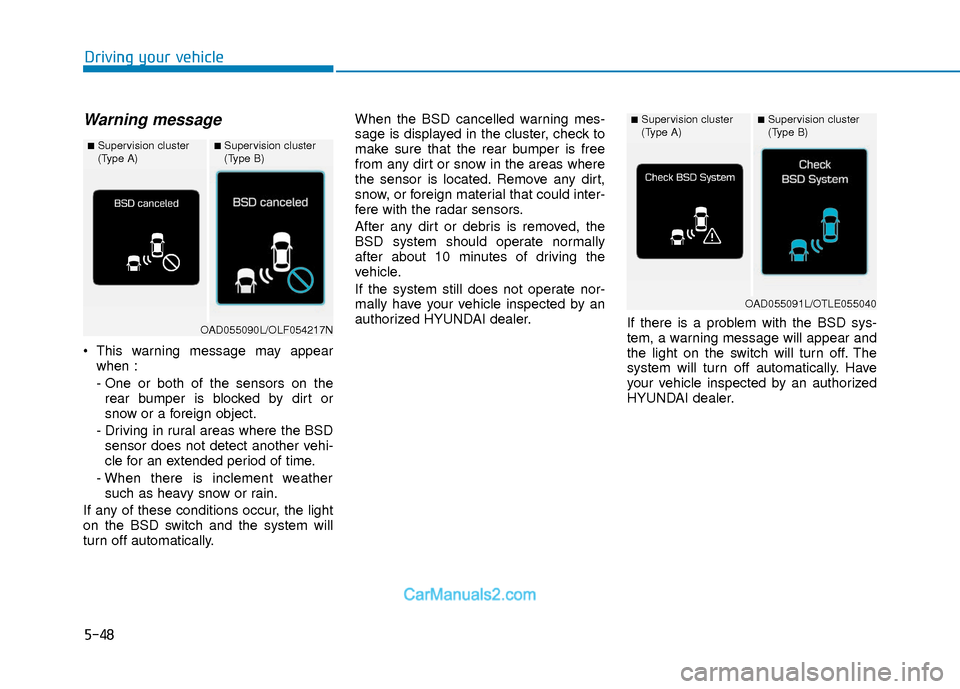
Warning message
This warning message may appearwhen :
- One or both of the sensors on therear bumper is blocked by dirt or
snow or a foreign object.
- Driving in rural areas where the BSD sensor does not detect another vehi-
cle for an extended period of time.
- When there is inclement weather such as heavy snow or rain.
If any of these conditions occur, the light
on the BSD switch and the system will
turn off automatically. When the BSD cancelled warning mes-
sage is displayed in the cluster, check to
make sure that the rear bumper is free
from any dirt or snow in the areas where
the sensor is located. Remove any dirt,
snow, or foreign material that could inter-
fere with the radar sensors.
After any dirt or debris is removed, the
BSD system should operate normally
after about 10 minutes of driving the
vehicle.
If the system still does not operate nor-
mally have your vehicle inspected by an
authorized HYUNDAI dealer.
If there is a problem with the BSD sys-
tem, a warning message will appear and
the light on the switch will turn off. The
system will turn off automatically. Have
your vehicle inspected by an authorized
HYUNDAI dealer.
■Supervision cluster
(Type A)■Supervision cluster
(Type B)
OAD055090L/OLF054217N
■Supervision cluster
(Type A)■Supervision cluster
(Type B)
OAD055091L/OTLE055040
Page 333 of 526
5-50
Driving your vehicle
Information
• The warning chime will turn off whenthe detected vehicle moves out of the
sensing area or if your vehicle is moved
away from the detected vehicle.
• The system may not operate properly due to other factors or circumstances.
Always pay attention to your surround-
ings.
• If the sensing area near the rear bumper is blocked by either a wall or barrier or
by a parked vehicle, the system sensing
area may be reduced. The system may not work properly
when the bumper has been dam-
aged, or if the rear bumper has been
replaced or repaired.
The sensing range differs some- what according to the width of the
road. When the road is narrow, the
system may detect other vehicles in
the next lane.
The system may turn off due to strong electromagnetic waves.
Non-operating condition
The BSD indicator on the outer side
view mirror may not illuminate
properly when:
- The outer side view mirror housing isdamaged.
- The mirror is covered with dirt, snow, or debris.
- The window is covered with dirt, snow, or debris.
- The window is tinted.
NOTICEi
The warning light on the outer
side view mirror will illuminate
whenever a vehicle is detected at
the rear side by the system.
To avoid accidents, do not focus
only on the warning light and
neglect to see the surrounding of
the vehicle. (Continued)
(Continued)
Drive safely even though the
vehicle is equipped with a Blind
Spot Detection System (BSD) and
Rear Cross Traffic Alert (RCTA).
Do not solely rely on the system
but check your surrounding
before changing lanes or backing
the vehicle up.
The system may not alert the
driver in some conditions so
always check your surroundings
while driving.
The Blind Spot Detection System
(BSD) and Rear Cross Traffic
Alert (RCTA) are not a substitute
for proper and safe driving prac-
tices. Always drive safely and use
caution when changing lanes or
backing up your vehicle. The
Blind Spot Detection System
(BSD) may not detect every
object alongside the vehicle.
WARNING
Page 334 of 526
5-51
Driving your vehicle
5
Limitations of the System
The driver must be cautious in the below
situations, because the system may not
detect other vehicles or objects in certain
circumstances.
- The vehicle drives on a curved road orthrough a tollgate.
- The sensor is polluted with rain, snow, mud, etc.
- The rear bumper where the sensor is located is covered with a foreign object
such as a bumper sticker, a bumper
guard, a bike rack, etc.
- The rear bumper is damaged, or the sensor is out of the original default posi-
tion.
- The vehicle height gets lower or higher due to heavy loading in a trunk, abnor-
mal tire pressure, etc.
- The vehicle drives in inclement weather such as heavy rain or snow.
- There is a fixed object near the vehicle, such as a guardrail.
- A big vehicle is near such as a bus or truck.
- A motorcycle or bicycle is near.
- A flat trailer is near. - If the vehicle has started at the same
time as the vehicle next to you and has
accelerated.
- When the other vehicle passes at a very fast speed.
- While changing lanes.
- While going down or up a steep road where the height of the lane is different.
- When the other vehicle approaches very close.
- When a trailer or carrier is installed.
- When the temperature near the rear bumper area is high or low.
- When the sensors are blocked by the other vehicles, walls or parking-lot pil-
lars.
- When the detected vehicle also moves back, as your vehicle drives back.
- If there are small objects in the detect- ing area such as a shopping cart or a
baby stroller.
- If there is a low height vehicle such as a sports car.
- When other vehicles are close to your vehicle.
- When the vehicle in the next lane moves two lanes away from you OR
when the vehicle two lanes away moves
to the next lane from you. - When driving through a narrow road
with many trees or bushes.
- When driving on wet surface.
Information
This device complies with Part 15 of the
FCC rules.
Operation is subject to the following two
conditions:
1. This device may not cause harmful interference, and
2. This device must accept any interfer- ence received, including interference
that may cause undesired operation.
i
Page 339 of 526
5-56
Driving your vehicle
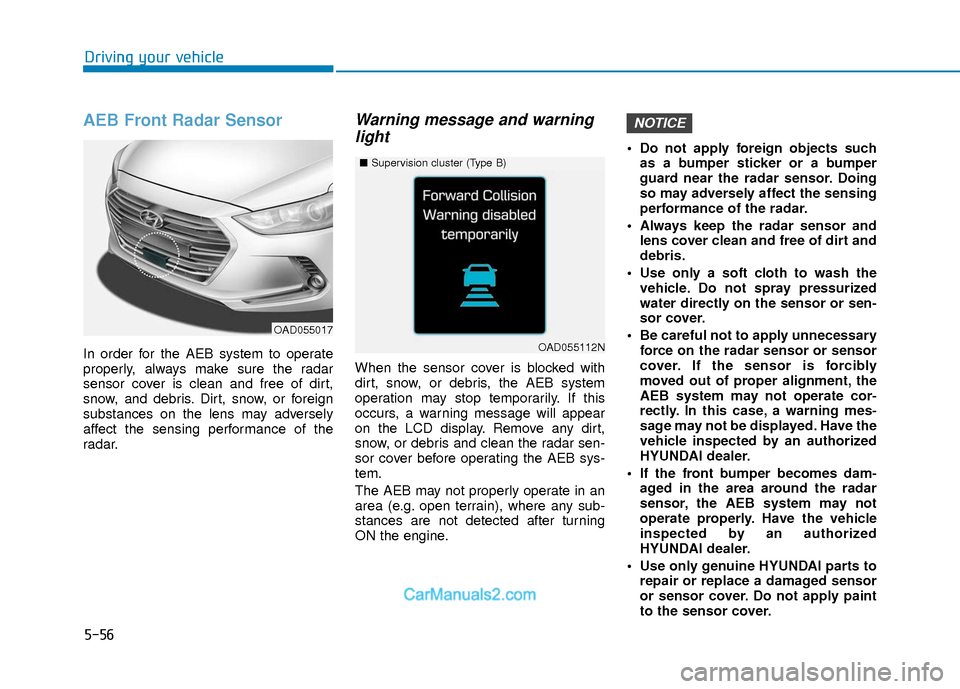
AEB Front Radar Sensor
In order for the AEB system to operate
properly, always make sure the radar
sensor cover is clean and free of dirt,
snow, and debris. Dirt, snow, or foreign
substances on the lens may adversely
affect the sensing performance of the
radar.
Warning message and warninglight
When the sensor cover is blocked with
dirt, snow, or debris, the AEB system
operation may stop temporarily. If this
occurs, a warning message will appear
on the LCD display. Remove any dirt,
snow, or debris and clean the radar sen-
sor cover before operating the AEB sys-
tem.
The AEB may not properly operate in an
area (e.g. open terrain), where any sub-
stances are not detected after turning
ON the engine. Do not apply foreign objects such
as a bumper sticker or a bumper
guard near the radar sensor. Doing
so may adversely affect the sensing
performance of the radar.
Always keep the radar sensor and lens cover clean and free of dirt and
debris.
Use only a soft cloth to wash the vehicle. Do not spray pressurized
water directly on the sensor or sen-
sor cover.
Be careful not to apply unnecessary force on the radar sensor or sensor
cover. If the sensor is forcibly
moved out of proper alignment, the
AEB system may not operate cor-
rectly. In this case, a warning mes-
sage may not be displayed. Have the
vehicle inspected by an authorized
HYUNDAI dealer.
If the front bumper becomes dam- aged in the area around the radar
sensor, the AEB system may not
operate properly. Have the vehicle
inspected by an authorized
HYUNDAI dealer.
Use only genuine HYUNDAI parts to repair or replace a damaged sensor
or sensor cover. Do not apply paint
to the sensor cover.
NOTICE
OAD055017
■ Supervision cluster (Type B)
OAD055112N