warning light Hyundai Elantra 2018 Owner's Guide
[x] Cancel search | Manufacturer: HYUNDAI, Model Year: 2018, Model line: Elantra, Model: Hyundai Elantra 2018Pages: 526, PDF Size: 17.2 MB
Page 96 of 526
3-19
Convenient features of your vehicle
3
Tilt Steering/Telescope Steering
Adjust the steering wheel so it points
toward your chest, not toward your face.
Make sure you can see the instrument
cluster warning lights and gauges. After
adjusting, push the steering wheel both
up and down to be certain it is locked in
position. Always adjust the position of the
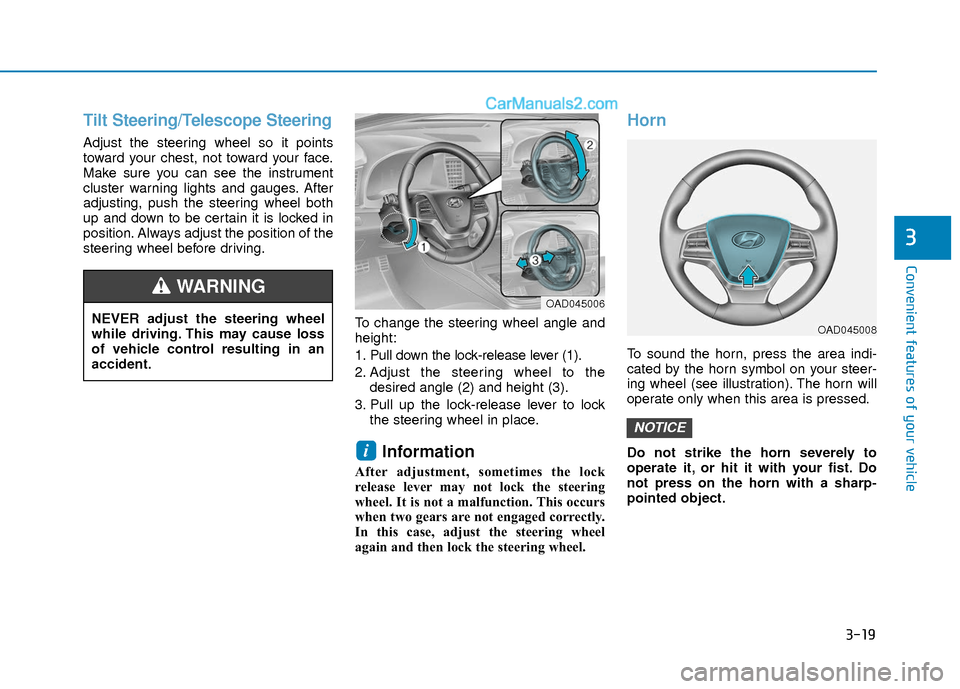
steering wheel before driving.To change the steering wheel angle and
height:
1. Pull down the lock-release lever (1).
2. Adjust the steering wheel to thedesired angle (2) and height (3).
3. Pull up the lock-release lever to lock the steering wheel in place.
Information
After adjustment, sometimes the lock
release lever may not lock the steering
wheel. It is not a malfunction. This occurs
when two gears are not engaged correctly.
In this case, adjust the steering wheel
again and then lock the steering wheel.
Horn
To sound the horn, press the area indi-
cated by the horn symbol on your steer-
ing wheel (see illustration). The horn will
operate only when this area is pressed.
Do not strike the horn severely to
operate it, or hit it with your fist. Do
not press on the horn with a sharp-
pointed object.
NOTICE
i
NEVER adjust the steering wheel
while driving. This may cause loss
of vehicle control resulting in an
accident.
WARNING OAD045006
OAD045008
Page 97 of 526
3-20
Convenient features of your vehicle
Inside Rearview Mirror
Before you start driving, adjust the
rearview mirror to the center on the view
through the rear window.When cleaning the mirror, use a paper
towel or similar material dampened
with glass cleaner. Do not spray glass
cleaner directly on the mirror as that
may cause the liquid cleaner to enter
the mirror housing.
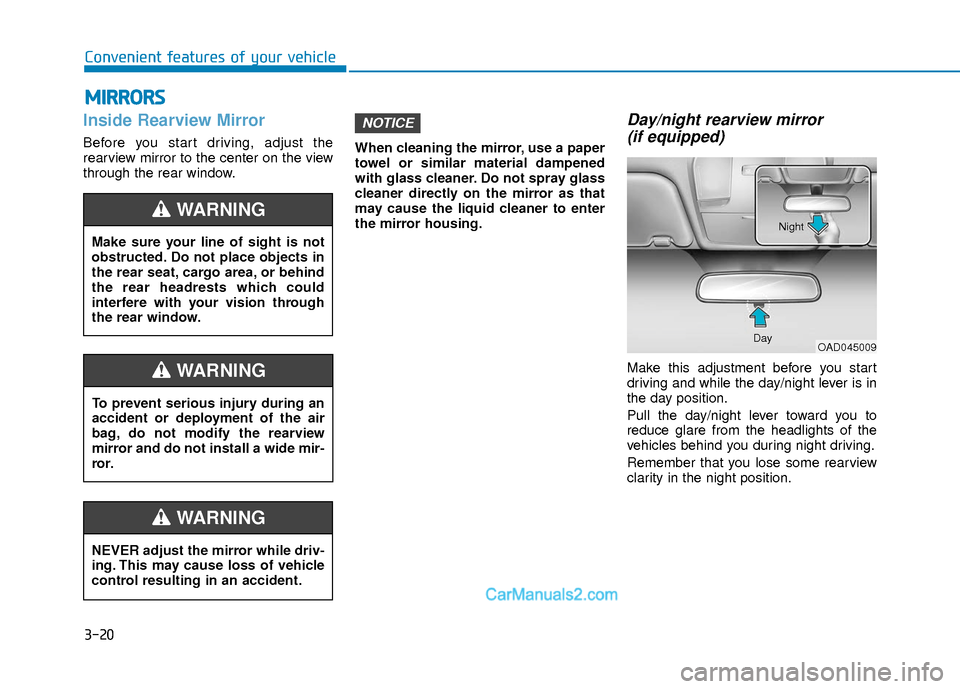
Day/night rearview mirror
(if equipped)
Make this adjustment before you start
driving and while the day/night lever is in
the day position.
Pull the day/night lever toward you to
reduce glare from the headlights of the
vehicles behind you during night driving.
Remember that you lose some rearview
clarity in the night position.
NOTICE
M M I
IR
R R
RO
O R
RS
S
Make sure your line of sight is not
obstructed. Do not place objects in
the rear seat, cargo area, or behind
the rear headrests which could
interfere with your vision through
the rear window.
WARNING
NEVER adjust the mirror while driv-
ing. This may cause loss of vehicle
control resulting in an accident.
WARNING
To prevent serious injury during an
accident or deployment of the air
bag, do not modify the rearview
mirror and do not install a wide mir-
ror.
WARNING
OAD045009
Day Night
Page 101 of 526
3-24
Convenient features of your vehicle
If you need to recalibrate the compass:
1. Press and hold the button for morethan 9 seconds. When the compass
memory is cleared a "C" will appear in
the display.
2. Drive the vehicle in 2 complete circles at less than 5 mph (8 km/h).Integrated HomeLink®Wireless
Control System
The HomeLink®Wireless Control
System can replace up to three hand-
held radio-frequency (RF) transmitters
with a single built-in device. This innova-
tive feature will learn the radio frequency
codes of most current transmitters to
operate devices such as gate operators,
garage door openers, entry door locks,
security systems, even home lighting.
Both standard and rolling code-equipped
transmitters can be programmed by fol-
lowing the outlined procedures.
Additional HomeLink
®information can
be found at: www.homelink.com or by
calling 1-800-355-3515.
Retain the original transmitter of the RF
device you are programming for use in
other vehicles as well as for future
HomeLink
®programming. It is also sug-
gested that upon the sale of the vehicle,
the programmed HomeLink
®buttons be
erased for security purposes.
Before programming HomeLink®to
a garage door opener or gate oper-
ator, make sure people and objects
are out of the way of the device to
prevent potential harm or damage.
Do not use the HomeLink
®with any
garage door opener that lacks the
safety stop and reverse features
required by U.S. federal safety stan-
dards (this includes any garage
door opener model manufactured
before April 1, 1982). A garage door
that cannot detect an object - sig-
naling the door to stop and reverse
- does not meet current U.S. federal
safety standards. Using a garage
door opener without these features
increases the risk of serious injury
or death.
WARNING
Page 107 of 526
3-30
Convenient features of your vehicle
To adjust the Zone setting:
1. Determine the desired Zone Numberbased upon your current location on
the Zone Map.
2. Press and hold the button for more than 3 but less than 6 seconds, the
current Zone Number will appear on
the display.
3. Pressing and holding the button again will cause the numbers to incre-
ment (Note: they will repeat …13, 14,
15, 1, 2, …). Releasing the button
when the desired Zone Number
appears on the display will set the new
Zone.
4. Within about 5 seconds the compass will start displaying a compass head-
ing again.
There are some conditions that can
cause changes to the vehicle magnets,
such as installing a ski rack or a CB
antenna. Body repair work on the vehicle
can also cause changes to the vehicle’s
magnetic field. In these situations, the
compass will need to be re-calibrated to
quickly correct these changes. If you need to recalibrate the compass:
1. Press and hold the button for more
than 6 seconds. When the compass
memory is cleared a "C" will appear in
the display.
2. Drive the vehicle in 2 complete circles at less than 5 mph (8 km/h).
Integrated HomeLink®Wireless
Control System
The HomeLink®Wireless Control System
can replace up to three hand-held radio-
frequency (RF) transmitters with a single
built-in device. This innovative feature will
learn the radio frequency codes of most
current transmitters to operate devices
such as gate operators, garage door
openers, entry door locks, security sys-
tems, even home lighting. Both standard
and rolling code-equipped transmitters
can be programmed by following the out-
lined procedures.
Additional HomeLink
®information can be
found at: www.homelink.com or by calling
1-800-355-3515.
Retain the original transmitter of the RF
device you are programming for use in
other vehicles as well as for future
HomeLink
®programming. It is also sug-
gested that upon the sale of the vehicle,
the programmed HomeLink
®buttons be
erased for security purposes.
Before programming HomeLink®to
a garage door opener or gate oper-
ator, make sure people and objects
are out of the way of the device to
prevent potential harm or damage.
Do not use the HomeLink
®with any
garage door opener that lacks the
safety stop and reverse features
required by U.S. federal safety stan-
dards (this includes any garage
door opener model manufactured
before April 1, 1982). A garage door
that cannot detect an object - sig-
naling the door to stop and reverse
- does not meet current U.S. federal
safety standards. Using a garage
door opener without these features
increases the risk of serious injury
or death.
WARNING
Page 115 of 526
3-38
Convenient features of your vehicle
Power Windows
The ignition switch must be in the ON
position to be able to raise or lower the
windows. Each door has a Power
Window switch to control that door's win-
dow. The driver has a Power Window
Lock switch which can block the opera-
tion of passenger windows. The power
windows will operate for approximately
30 seconds after the ignition switch is
placed in the ACC or LOCK/OFF posi-
tion. However, if the front doors are
opened, the Power Windows cannot be
operated even within the 30 second peri-
od.
Information
• In cold and wet climates, power win-dows may not work properly due to
freezing conditions.
• While driving with the rear windows down or with the sunroof (if equipped)
opened (or partially opened), your vehi-
cle may demonstrate a wind buffeting or
pulsation noise. This noise is normal and
can be reduced or eliminated by taking
the following actions. If the noise occurs
with one or both of the rear windows
down, partially lower both front win-
dows approximately 1 inch (2.5 cm). If
you experience the noise with the sun-
roof open, slightly close the sunroof.
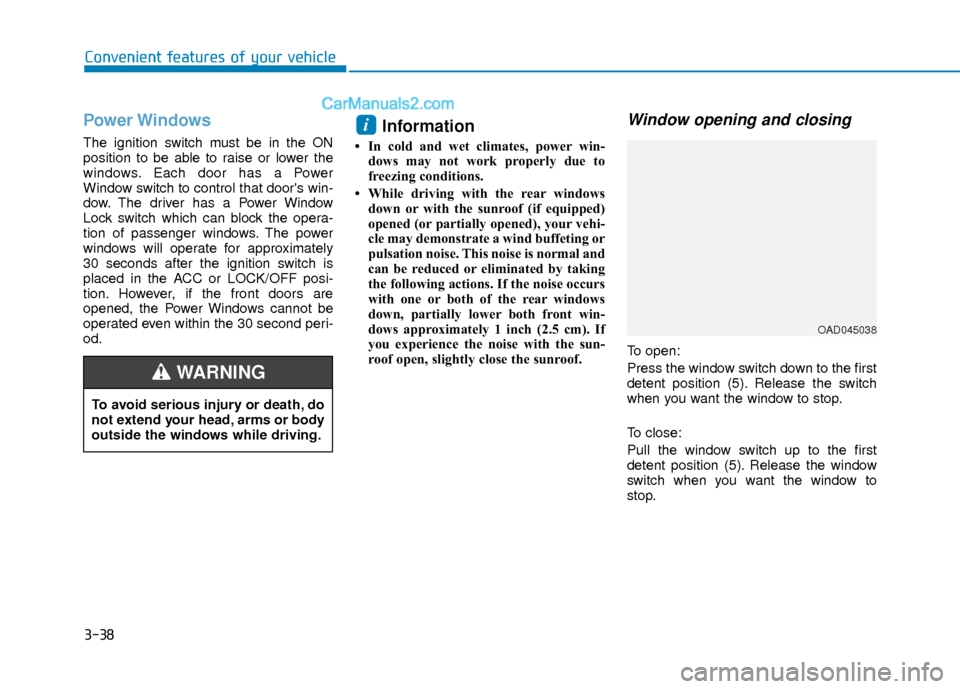
Window opening and closing
To open:
Press the window switch down to the first
detent position (5). Release the switch
when you want the window to stop.
To close:
Pull the window switch up to the first
detent position (5). Release the window
switch when you want the window to
stop.
i
To avoid serious injury or death, do
not extend your head, arms or body
outside the windows while driving.
WARNING
OAD045038
Page 122 of 526
3-45
Convenient features of your vehicle
3
E
EX
X T
TE
ER
R I
IO
O R
R
F
F E
E A
A T
TU
U R
RE
ES
S
Hood
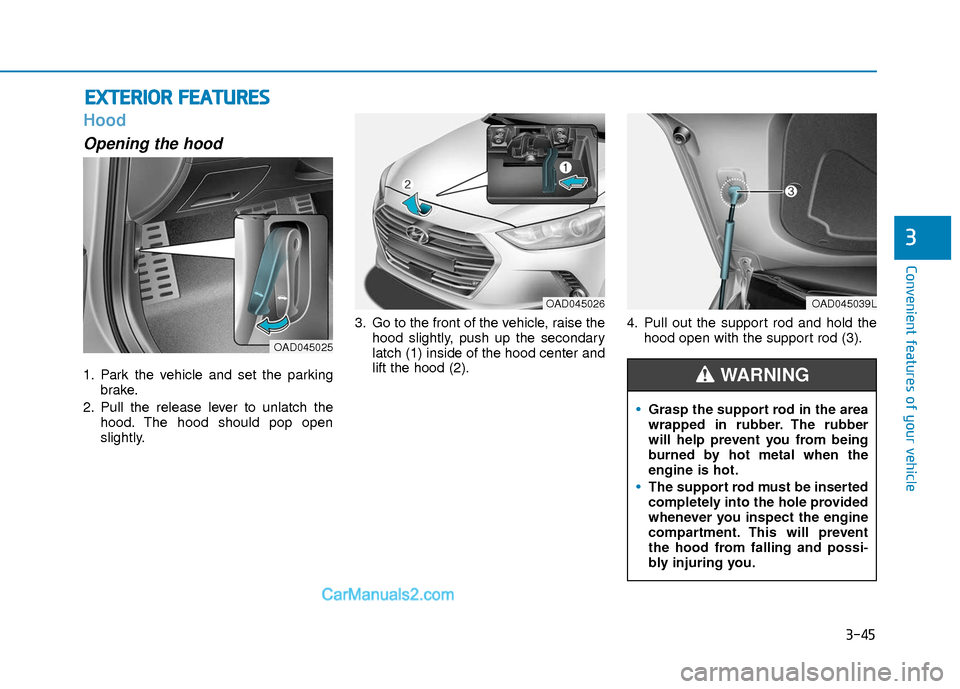
Opening the hood
1. Park the vehicle and set the parking
brake.
2. Pull the release lever to unlatch the hood. The hood should pop open
slightly. 3. Go to the front of the vehicle, raise the
hood slightly, push up the secondary
latch (1) inside of the hood center and
lift the hood (2). 4. Pull out the support rod and hold the
hood open with the support rod (3).
OAD045025
OAD045039L
Grasp the support rod in the area
wrapped in rubber. The rubber
will help prevent you from being
burned by hot metal when the
engine is hot.
The support rod must be inserted
completely into the hole provided
whenever you inspect the engine
compartment. This will prevent
the hood from falling and possi-
bly injuring you.
WARNING
OAD045026
Page 123 of 526
3-46
Convenient features of your vehicle
Closing the hood
1. Before closing the hood, check the fol-lowing:
must be correctly installed.
bustible material must be removed
from the engine compartment.
2. Return the support rod to its clip to prevent it from ratting.
3. Lower the hood halfway (lifted approx- imately 12 inches (30 cm) from the
closed position) and push down to
securely lock in place. Then double
check to be sure the hood is secure.
If the hood can slightly be raised, it is
not securely locked. Open it again and
close it with more force.
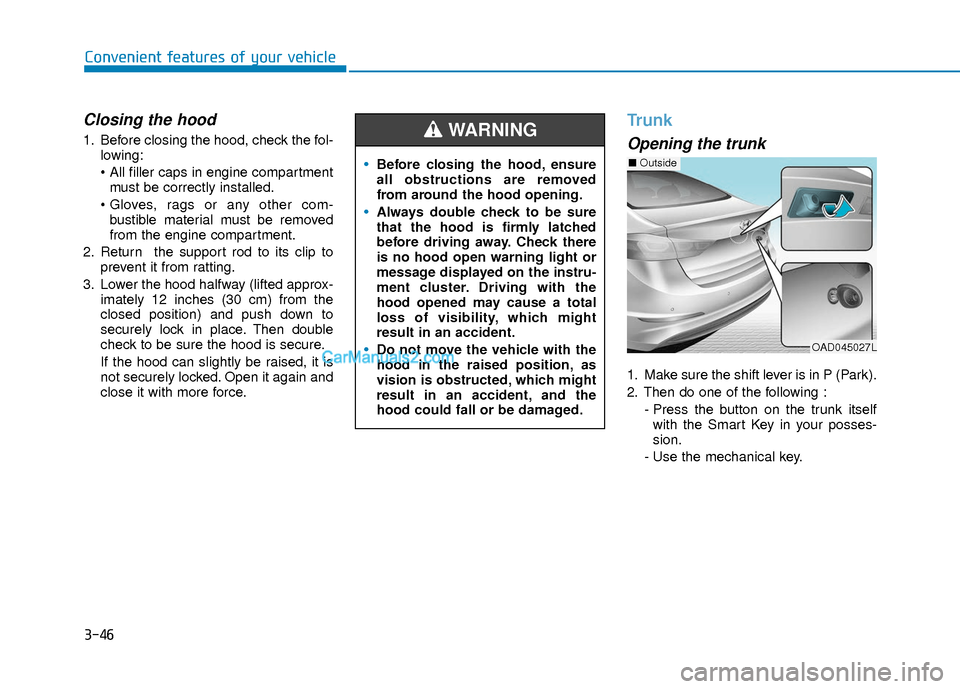
Trunk
Opening the trunk
1. Make sure the shift lever is in P (Park).
2. Then do one of the following :
- Press the button on the trunk itselfwith the Smart Key in your posses-
sion.
- Use the mechanical key.
Before closing the hood, ensure
all obstructions are removed
from around the hood opening.
Always double check to be sure
that the hood is firmly latched
before driving away. Check there
is no hood open warning light or
message displayed on the instru-
ment cluster. Driving with the
hood opened may cause a total
loss of visibility, which might
result in an accident.
Do not move the vehicle with the
hood in the raised position, as
vision is obstructed, which might
result in an accident, and the
hood could fall or be damaged.
WARNING
OAD045027L
■ Outside
Page 125 of 526
3-48
Convenient features of your vehicle
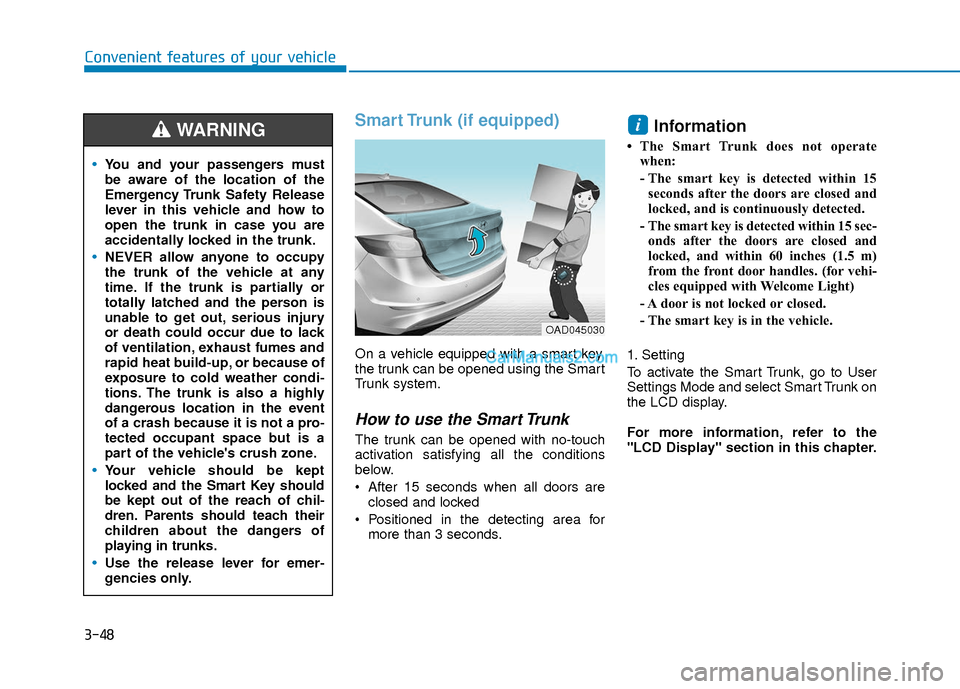
Smart Trunk (if equipped)
On a vehicle equipped with a smart key,
the trunk can be opened using the Smart
Trunk system.
How to use the Smart Trunk
The trunk can be opened with no-touch
activation satisfying all the conditions
below.
After 15 seconds when all doors areclosed and locked
Positioned in the detecting area for more than 3 seconds.
Information
• The Smart Trunk does not operatewhen:
- The smart key is detected within 15seconds after the doors are closed and
locked, and is continuously detected.
- The smart key is detected within 15 sec- onds after the doors are closed and
locked, and within 60 inches (1.5 m)
from the front door handles. (for vehi-
cles equipped with Welcome Light)
- A door is not locked or closed.
- The smart key is in the vehicle.
1. Setting
To activate the Smart Trunk, go to User
Settings Mode and select Smart Trunk on
the LCD display.
For more information, refer to the
"LCD Display" section in this chapter.
i
You and your passengers must
be aware of the location of the
Emergency Trunk Safety Release
lever in this vehicle and how to
open the trunk in case you are
accidentally locked in the trunk.
NEVER allow anyone to occupy
the trunk of the vehicle at any
time. If the trunk is partially or
totally latched and the person is
unable to get out, serious injury
or death could occur due to lack
of ventilation, exhaust fumes and
rapid heat build-up, or because of
exposure to cold weather condi-
tions. The trunk is also a highly
dangerous location in the event
of a crash because it is not a pro-
tected occupant space but is a
part of the vehicle's crush zone.
Your vehicle should be kept
locked and the Smart Key should
be kept out of the reach of chil-
dren. Parents should teach their
children about the dangers of
playing in trunks.
Use the release lever for emer-
gencies only.
WARNING
OAD045030
Page 126 of 526
3-49
Convenient features of your vehicle
3
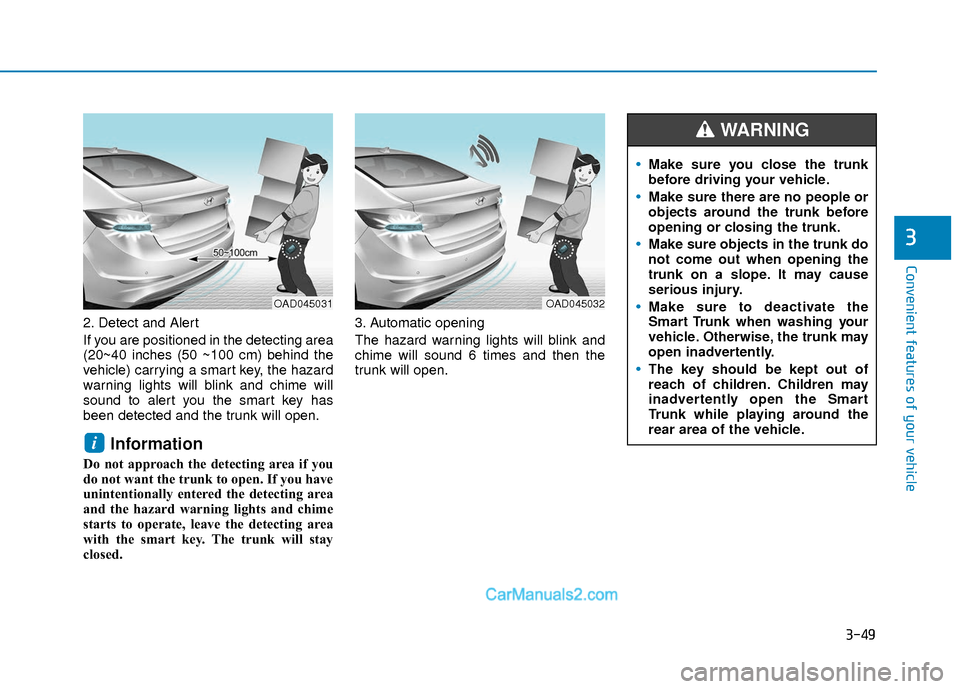
2. Detect and Alert
If you are positioned in the detecting area
(20~40 inches (50 ~100 cm) behind the
vehicle) carrying a smart key, the hazard
warning lights will blink and chime will
sound to alert you the smart key has
been detected and the trunk will open.
Information
Do not approach the detecting area if you
do not want the trunk to open. If you have
unintentionally entered the detecting area
and the hazard warning lights and chime
starts to operate, leave the detecting area
with the smart key. The trunk will stay
closed.3. Automatic opening
The hazard warning lights will blink and
chime will sound 6 times and then the
trunk will open.
i
OAD045032OAD045031
Make sure you close the trunk
before driving your vehicle.
Make sure there are no people or
objects around the trunk before
opening or closing the trunk.
Make sure objects in the trunk do
not come out when opening the
trunk on a slope. It may cause
serious injury.
Make sure to deactivate the
Smart Trunk when washing your
vehicle. Otherwise, the trunk may
open inadvertently.
The key should be kept out of
reach of children. Children may
inadvertently open the Smart
Trunk while playing around the
rear area of the vehicle.
WARNING
Page 129 of 526
3-52
Convenient features of your vehicle
Closing the fuel filler door
1. To install the fuel tank cap, turn itclockwise until it "clicks" one time.
2. Close the fuel filler door until it is latched securely.
Gasoline is highly flammable and
explosive. Failure to follow these
guidelines may result in SERIOUS
INJURY or DEATH:
Read and follow all warnings
posted at the gas station.
Before refueling, note the loca-
tion of the Emergency Gasoline
Shut-Off, if available, at the gas
station.
Before touching the fuel nozzle,
you should eliminate the poten-
tial build-up of static electricity
by touching a metal part of the
vehicle, a safe distance away
from the fuel filler neck, nozzle, or
other gas source, with your bare
hand. (Continued)
WARNING
(Continued)
Do not use cellular phones while
refueling. Electric current and/or
electronic interference from cel-
lular phones can potentially
ignite fuel vapors and cause a
fire.
Do not get back into a vehicle
once you have begun refueling.
You can generate a build-up of
static electricity by touching, rub-
bing or sliding against any item
or fabric capable of producing
static electricity. Static electricity
discharge can ignite fuel vapors
causing a fire. If you must re-
enter the vehicle, you should
once again eliminate potentially
dangerous static electricity dis-
charge by touching a metal part
of the vehicle, away from the fuel
filler neck, nozzle or other gaso-
line source, with your bare hand.
When using an approved
portable fuel container, be sure to
place the container on the
ground prior to refueling. Static
electricity discharge from the
container can ignite fuel vapors
causing a fire.(Continued)
(Continued)Once refueling has begun, con-
tact between your bare hand and
the vehicle should be maintained
until the filling is complete.
Use only approved portable plastic
fuel containers designed to carry
and store gasoline.
When refueling, always move the
shift lever to the P (Park) posi-
tion, set the parking brake, and
place the ignition switch to the
LOCK/OFF position. Sparks pro-
duced by electrical components
related to the engine can ignite
fuel vapors causing a fire.
Do not use matches or a lighter
and do not smoke or leave a lit
cigarette in your vehicle while at
a gas station, especially during
refueling.
Do not over-fill or top-off your
vehicle tank, which can cause
gasoline spillage. (Continued)