engine Hyundai Elantra 2018 Workshop Manual
[x] Cancel search | Manufacturer: HYUNDAI, Model Year: 2018, Model line: Elantra, Model: Hyundai Elantra 2018Pages: 526, PDF Size: 17.2 MB
Page 163 of 526
3-86
Convenient features of your vehicle
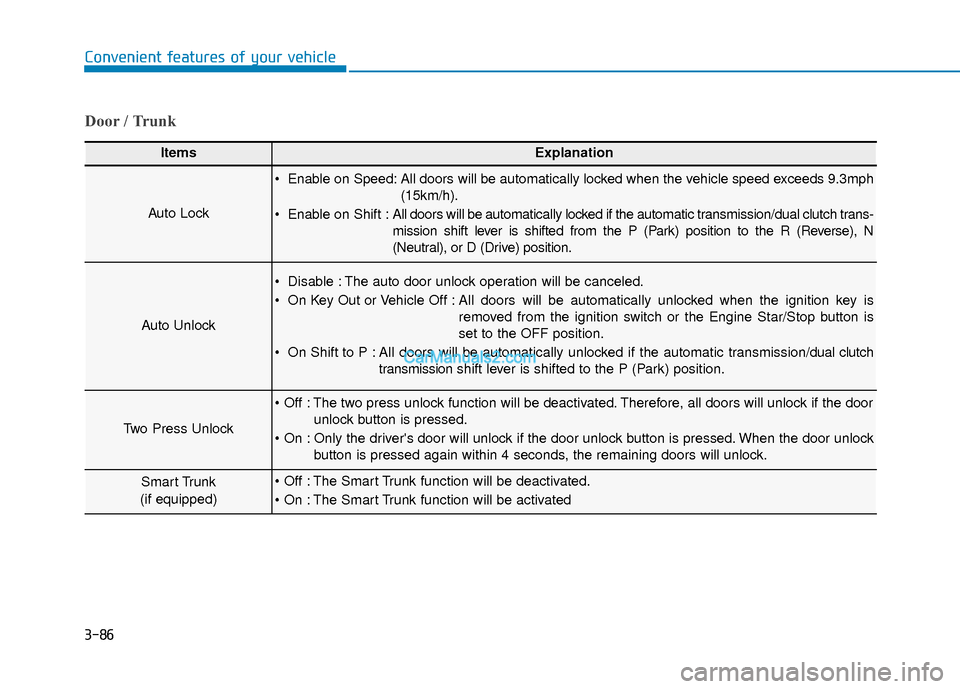
Door / Trunk
ItemsExplanation
Auto Lock
Enable on Speed: All doors will be automatically locked when the vehicle speed exceeds 9.3mph(15km/h).
Enable on Shift : All doors will be automatically locked if the automatic transmission/dual clutch trans-
mission shift lever is shifted from the P (Park) position to the R (Reverse), N
(Neutral), or D (Drive) position.
Auto Unlock
Disable : The auto door unlock operation will be canceled.
On Key Out or Vehicle Off : All doors will be automatically unlocked when the ignition key is
removed from the ignition switch or the Engine Star/Stop button is
set to the OFF position.
On Shift to P : All doors will be automatically unlocked if the automatic transmission/dual clutch transmission shift lever is shifted to the P (Park) position.
Two Press Unlock
The two press unlock function will be deactivated. Therefore, all doors will unlock if the door
unlock button is pressed.
Only the driver's door will unlock if the door unlock button is pressed. When the door unlock button is pressed again within 4 seconds, the remaining doors will unlock.
Smart Trunk
(if equipped) The Smart Trunk function will be deactivated.
The Smart Trunk function will be activated
Page 165 of 526
3-88
Convenient features of your vehicle
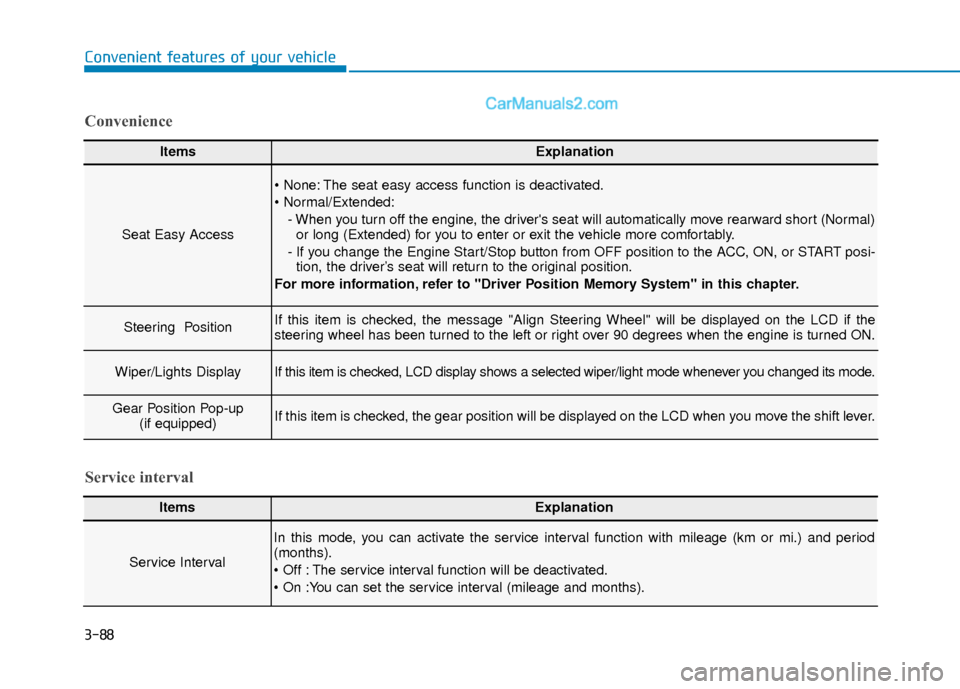
ItemsExplanation
Seat Easy Access
The seat easy access function is deactivated.
- When you turn off the engine, the driver's seat will automatically move rearward short (Normal)or long (Extended) for you to enter or exit the vehicle more comfortably.
- If you change the Engine Start/Stop button from OFF position to the ACC, ON, or START posi- tion, the driver’s seat will return to the original position.
For more information, refer to "Driver Position Memory System" in this chapter.
Steering Position If this item is checked, the message "Align Steering Wheel" will be displayed on the LCD if the
steering wheel has been turned to the left or right over 90 degrees when the engine is turned ON.
Wiper/Lights DisplayIf this item is checked, LCD display shows a selected wiper/light mode whenever you changed its mode.
Gear Position Pop-up (if equipped)If this item is checked, the gear position will be displayed on the LCD when you move the shift lever.
Convenience
ItemsExplanation
Service Interval
In this mode, you can activate the service interval function with mileage (km or mi.) and period
(months).
The service interval function will be deactivated.
Service interval
Page 169 of 526
3-92
Convenient features of your vehicle
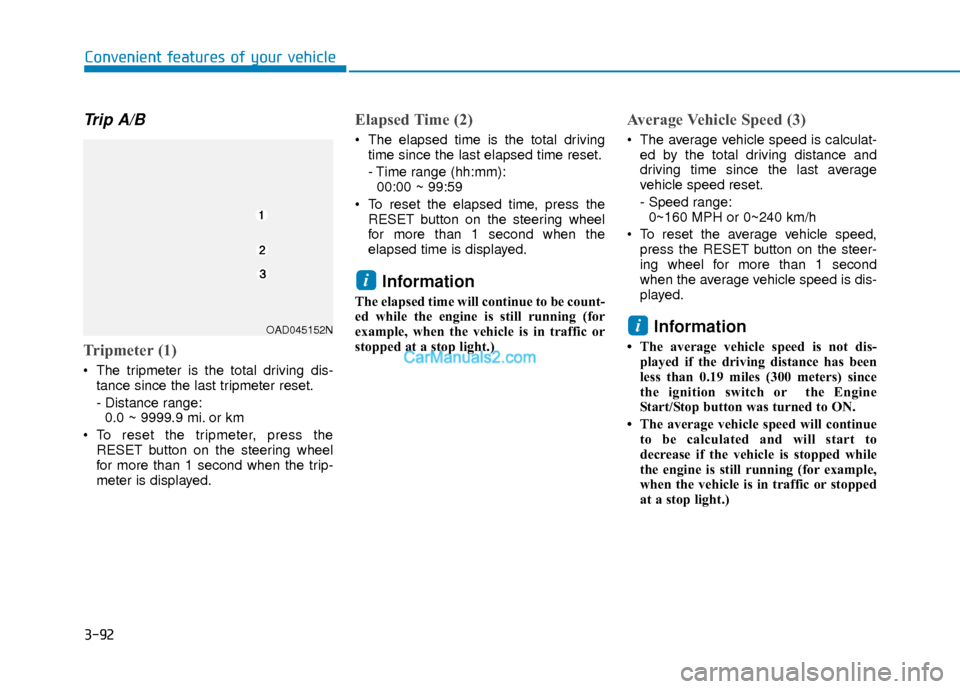
Trip A/B
Tripmeter (1)
The tripmeter is the total driving dis-tance since the last tripmeter reset.
- Distance range:0.0 ~ 9999.9 mi. or km
To reset the tripmeter, press the RESET button on the steering wheel
for more than 1 second when the trip-
meter is displayed.
Elapsed Time (2)
The elapsed time is the total drivingtime since the last elapsed time reset.
- Time range (hh:mm):00:00 ~ 99:59
To reset the elapsed time, press the RESET button on the steering wheel
for more than 1 second when the
elapsed time is displayed.
Information
The elapsed time will continue to be count-
ed while the engine is still running (for
example, when the vehicle is in traffic or
stopped at a stop light.)
Average Vehicle Speed (3)
The average vehicle speed is calculat-ed by the total driving distance and
driving time since the last average
vehicle speed reset.
- Speed range:0~160 MPH or 0~240 km/h
To reset the average vehicle speed, press the RESET button on the steer-
ing wheel for more than 1 second
when the average vehicle speed is dis-
played.
Information
• The average vehicle speed is not dis-played if the driving distance has been
less than 0.19 miles (300 meters) since
the ignition switch or the Engine
Start/Stop button was turned to ON.
• The average vehicle speed will continue to be calculated and will start to
decrease if the vehicle is stopped while
the engine is still running (for example,
when the vehicle is in traffic or stopped
at a stop light.)
i
i
OAD045152N
Page 170 of 526
3-93
Convenient features of your vehicle
3
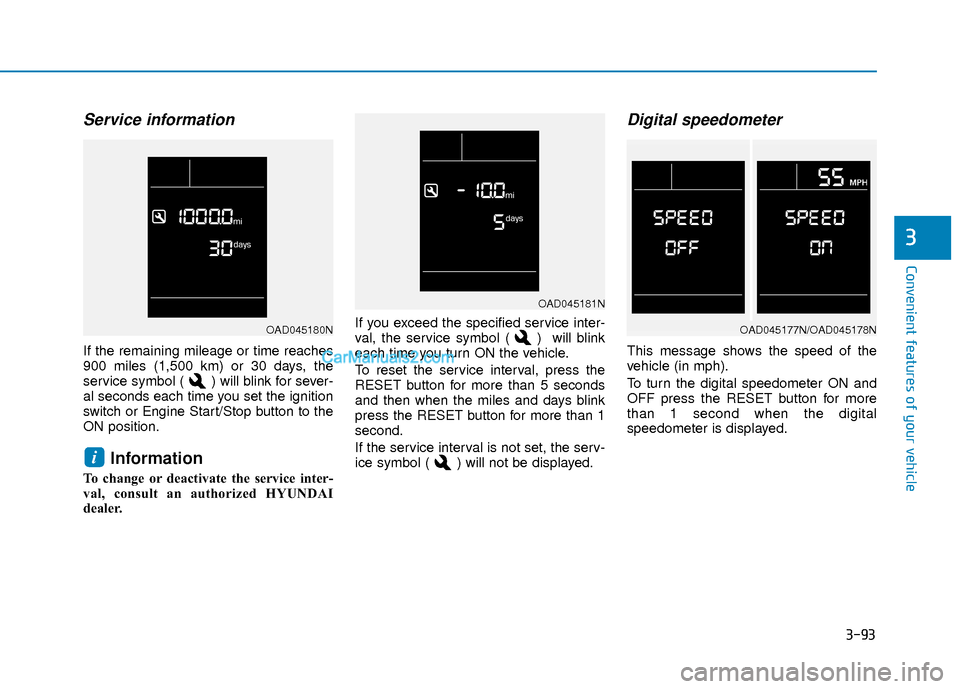
Service information
If the remaining mileage or time reaches
900 miles (1,500 km) or 30 days, the
service symbol ( ) will blink for sever-
al seconds each time you set the ignition
switch or Engine Start/Stop button to the
ON position.
Information
To change or deactivate the service inter-
val, consult an authorized HYUNDAI
dealer.If you exceed the specified service inter-
val, the service symbol ( ) will blink
each time you turn ON the vehicle.
To reset the service interval, press the
RESET button for more than 5 seconds
and then when the miles and days blink
press the RESET button for more than 1
second.
If the service interval is not set, the serv-
ice symbol ( ) will not be displayed.
Digital speedometer
This message shows the speed of the
vehicle (in mph).
To turn the digital speedometer ON and
OFF press the RESET button for more
than 1 second when the digital
speedometer is displayed.
i
OAD045181N
OAD045177N/OAD045178NOAD045180N
Page 173 of 526
3-96
Convenient features of your vehicle
Trip A/B
Information
If you press and hold the OK button when
viewing the tripmeter, the mileage, the
average vehicle speed, and the timer will
be reset simultaneously.
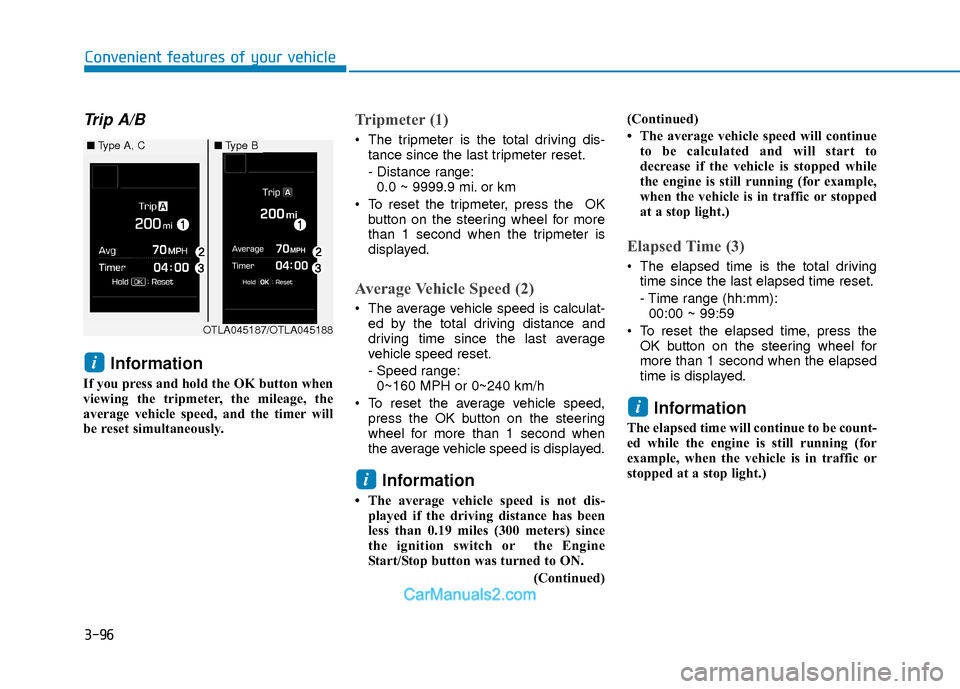
Tripmeter (1)
The tripmeter is the total driving dis-tance since the last tripmeter reset.
- Distance range:0.0 ~ 9999.9 mi. or km
To reset the tripmeter, press the OK button on the steering wheel for more
than 1 second when the tripmeter is
displayed.
Average Vehicle Speed (2)
The average vehicle speed is calculat-ed by the total driving distance and
driving time since the last average
vehicle speed reset.
- Speed range:0~160 MPH or 0~240 km/h
To reset the average vehicle speed, press the OK button on the steering
wheel for more than 1 second when
the average vehicle speed is displayed.
Information
• The average vehicle speed is not dis-played if the driving distance has been
less than 0.19 miles (300 meters) since
the ignition switch or the Engine
Start/Stop button was turned to ON.
(Continued)(Continued)
• The average vehicle speed will continue
to be calculated and will start to
decrease if the vehicle is stopped while
the engine is still running (for example,
when the vehicle is in traffic or stopped
at a stop light.)
Elapsed Time (3)
The elapsed time is the total drivingtime since the last elapsed time reset.
- Time range (hh:mm):00:00 ~ 99:59
To reset the elapsed time, press the OK button on the steering wheel for
more than 1 second when the elapsed
time is displayed.
Information
The elapsed time will continue to be count-
ed while the engine is still running (for
example, when the vehicle is in traffic or
stopped at a stop light.)
i
i
i
OTLA045187/OTLA045188
■ Type A, C■Type B
Page 175 of 526
3-98
Convenient features of your vehicle
L
LI
IG
G H
H T
T
Exterior Lights
Lighting control
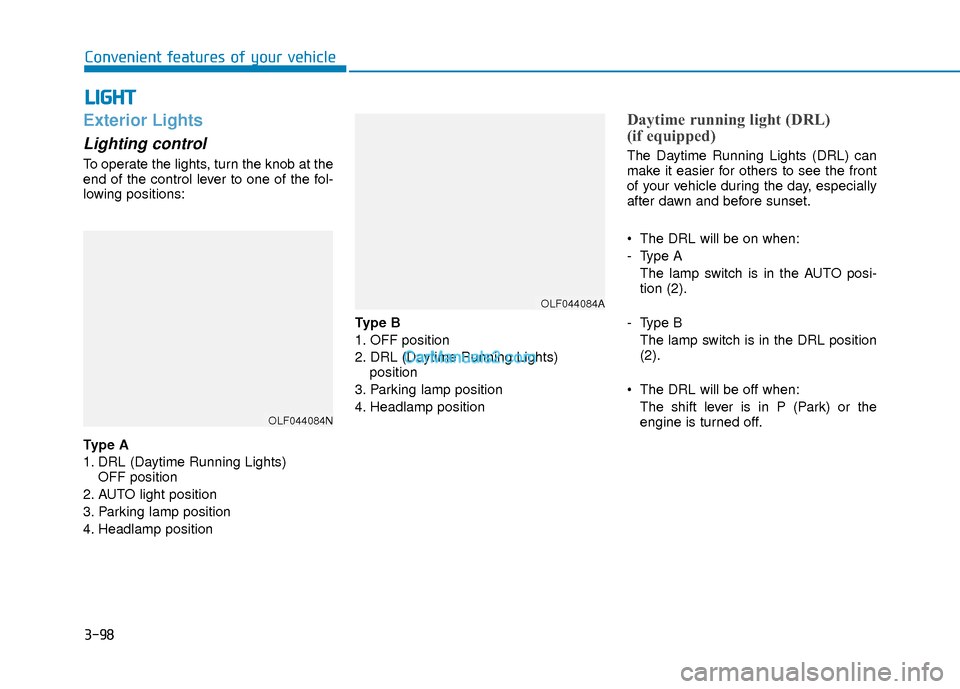
To operate the lights, turn the knob at the
end of the control lever to one of the fol-
lowing positions:
Type A
1. DRL (Daytime Running Lights)
OFF position
2. AUTO light position
3. Parking lamp position
4. Headlamp position Type B
1. OFF position
2. DRL (Daytime Running Lights)
position
3. Parking lamp position
4. Headlamp position
Daytime running light (DRL)
(if equipped)
The Daytime Running Lights (DRL) can
make it easier for others to see the front
of your vehicle during the day, especially
after dawn and before sunset.
• The DRL will be on when:
- Type A The lamp switch is in the AUTO posi-
tion (2).
- Type B The lamp switch is in the DRL position
(2).
The DRL will be off when: The shift lever is in P (Park) or the
engine is turned off.
OLF044084N
OLF044084A
Page 180 of 526
3-103
Convenient features of your vehicle
3
You can activate or deactivate the One
Touch Turn Signal function or choose the
number of blinking (3, 5, or 7) from the
User Settings Mode (Light) on the LCD
display.
For more information, refer to the
"LCD Display" section in this chapter.
Battery saver function
The purpose of this feature is to prevent
the battery from being discharged. The
system automatically turns off the park-
ing lamp when the key is removed
(remote key) or when the driver turns the
engine off (smart key) and opens the
driver-side door.
With this feature, the parking lamps will
turn off automatically if the driver parks
on the side of road at night.
If necessary, to keep the lamps on when
the engine is turned off, perform the fol-
lowing:
1) Open the driver-side door.
2) Turn the parking lamps OFF and ONagain using the light switch on the
steering column.
Headlamp delay function (if equipped)
If the key is removed from the ignition
switch or placed in the ACC position or
the LOCK/OFF position with the head-
lamps ON, the headlamps (and/or park-
ing lamps) remain on for about 5 min-
utes. However, if the driver’s door is
opened and closed, the headlights are
turned off after 15 seconds. Also, with the
engine off if the driver's door is opened
and closed, the headlamps (and/or park-
ing lamps) are turned off after 15 sec-
onds.
The headlamps (and/or parking lamps)
can be turned off by pressing the lock
button on the remote key or smart key
twice or turning the light switch to the
OFF or AUTO position.
You can activate or deactivate the
Headlamp Delay function from the User
Settings Mode (Light) on the LCD dis-
play.
For more information, refer to the
"LCD Display" section in this chapter. If the driver gets out of the vehicle
through other doors (except driver’s
door), the battery saver function does
not operate and the headlamp delay
function does not turn off automati-
cally. Therefore, It causes the battery
to be discharged. In this case, make
sure to turn off the lamp before get-
ting out of the vehicle.
NOTICE
Page 181 of 526
3-104
Convenient features of your vehicle
AFLS (Adaptive Front LightingSystem) a.k.a. DBL (DynamicBending Light) (if equipped)
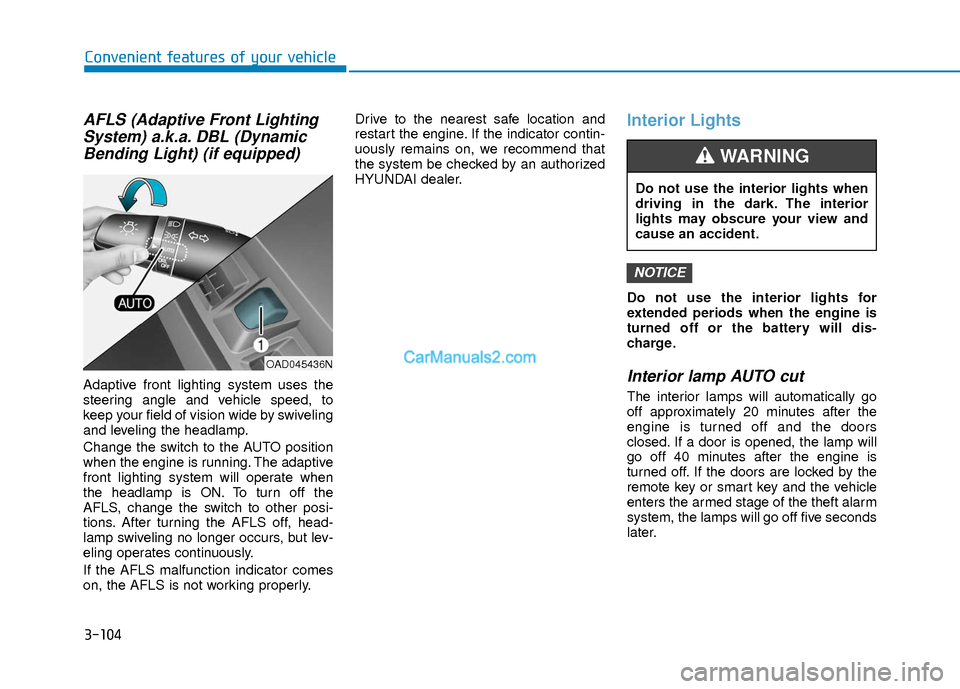
Adaptive front lighting system uses the
steering angle and vehicle speed, to
keep your field of vision wide by swiveling
and leveling the headlamp.
Change the switch to the AUTO position
when the engine is running. The adaptive
front lighting system will operate when
the headlamp is ON. To turn off the
AFLS, change the switch to other posi-
tions. After turning the AFLS off, head-
lamp swiveling no longer occurs, but lev-
eling operates continuously.
If the AFLS malfunction indicator comes
on, the AFLS is not working properly. Drive to the nearest safe location and
restart the engine. If the indicator contin-
uously remains on, we recommend that
the system be checked by an authorized
HYUNDAI dealer.
Interior Lights
Do not use the interior lights for
extended periods when the engine is
turned off or the battery will dis-
charge.
Interior lamp AUTO cut
The interior lamps will automatically go
off approximately 20 minutes after the
engine is turned off and the doors
closed. If a door is opened, the lamp will
go off 40 minutes after the engine is
turned off. If the doors are locked by the
remote key or smart key and the vehicle
enters the armed stage of the theft alarm
system, the lamps will go off five seconds
later.
NOTICE
OAD045436N
Do not use the interior lights when
driving in the dark. The interior
lights may obscure your view and
cause an accident.
WARNING
Page 182 of 526
3-105
Convenient features of your vehicle
3
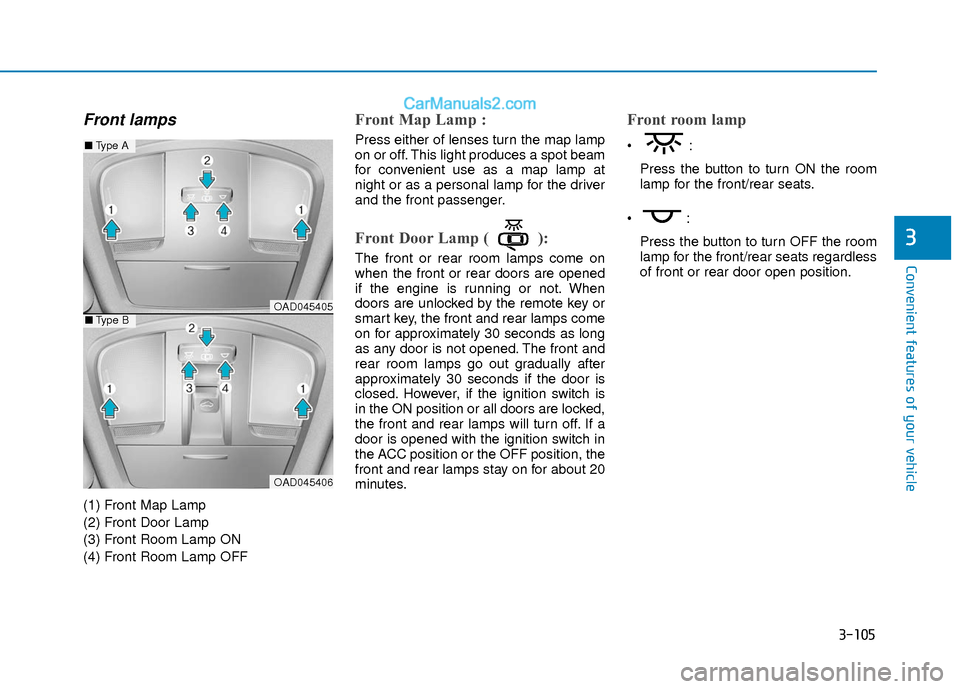
Front lamps
(1) Front Map Lamp
(2) Front Door Lamp
(3) Front Room Lamp ON
(4) Front Room Lamp OFF
Front Map Lamp :
Press either of lenses turn the map lamp
on or off. This light produces a spot beam
for convenient use as a map lamp at
night or as a personal lamp for the driver
and the front passenger.
Front Door Lamp ( ):
The front or rear room lamps come on
when the front or rear doors are opened
if the engine is running or not. When
doors are unlocked by the remote key or
smart key, the front and rear lamps come
on for approximately 30 seconds as long
as any door is not opened. The front and
rear room lamps go out gradually after
approximately 30 seconds if the door is
closed. However, if the ignition switch is
in the ON position or all doors are locked,
the front and rear lamps will turn off. If a
door is opened with the ignition switch in
the ACC position or the OFF position, the
front and rear lamps stay on for about 20
minutes.
Front room lamp
Press the button to turn ON the room
lamp for the front/rear seats.
Press the button to turn OFF the room
lamp for the front/rear seats regardless
of front or rear door open position.
OAD045405
OAD045406
■ Type A
■Type B
Page 186 of 526
3-109
Convenient features of your vehicle
3
D
DR
RI
IV
V E
ER
R
A
A S
SS
SI
IS
S T
T
S
S Y
Y S
ST
T E
EM
M
To prevent possible damage to the
washer pump, do not operate the
washer when the fluid reservoir is
empty.
To prevent possible damage to the wipers or windshield, do not oper-
ate the wipers when the windshield
is dry.
To prevent damage to the wiper arms and other components, do not
attempt to move the wipers manual-
ly.
To prevent possible damage to the wipers and washer system, use anti-
freezing washer fluids in the winter
season or cold weather.
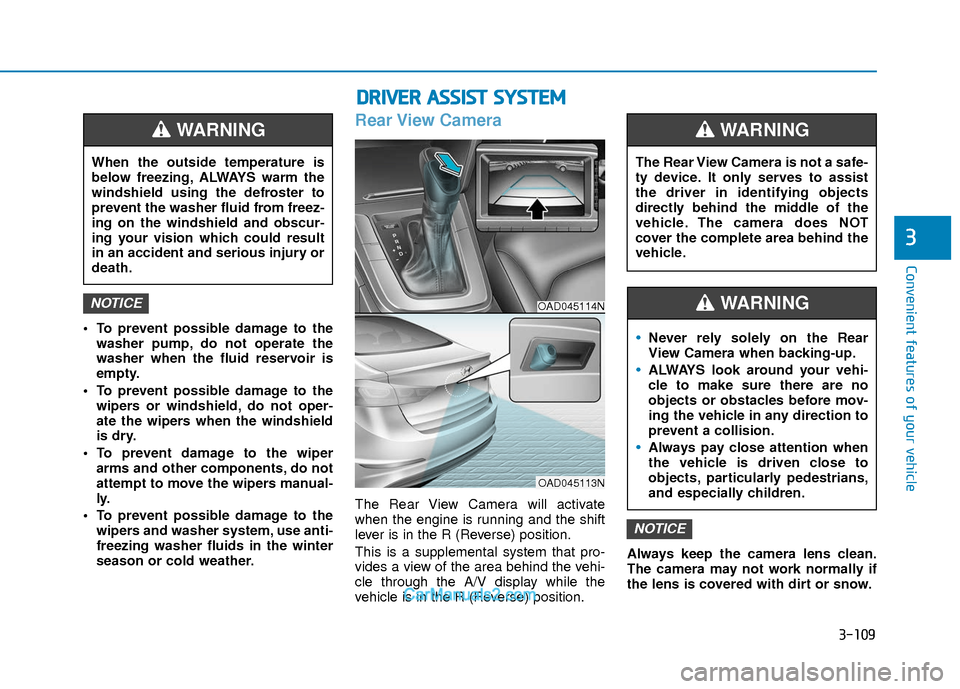
Rear View Camera
The Rear View Camera will activate
when the engine is running and the shift
lever is in the R (Reverse) position.
This is a supplemental system that pro-
vides a view of the area behind the vehi-
cle through the A/V display while the
vehicle is in the R (Reverse) position. Always keep the camera lens clean.
The camera may not work normally if
the lens is covered with dirt or snow.
NOTICE
NOTICE
When the outside temperature is
below freezing, ALWAYS warm the
windshield using the defroster to
prevent the washer fluid from freez-
ing on the windshield and obscur-
ing your vision which could result
in an accident and serious injury or
death.
WARNING
The Rear View Camera is not a safe-
ty device. It only serves to assist
the driver in identifying objects
directly behind the middle of the
vehicle. The camera does NOT
cover the complete area behind the
vehicle.
WARNING
Never rely solely on the Rear
View Camera when backing-up.
ALWAYS look around your vehi-
cle to make sure there are no
objects or obstacles before mov-
ing the vehicle in any direction to
prevent a collision.
Always pay close attention when
the vehicle is driven close to
objects, particularly pedestrians,
and especially children.
WARNING OAD045114N
OAD045113N