engine Hyundai Elantra 2018 Manual PDF
[x] Cancel search | Manufacturer: HYUNDAI, Model Year: 2018, Model line: Elantra, Model: Hyundai Elantra 2018Pages: 526, PDF Size: 17.2 MB
Page 224 of 526
How Vehicle Audio Works
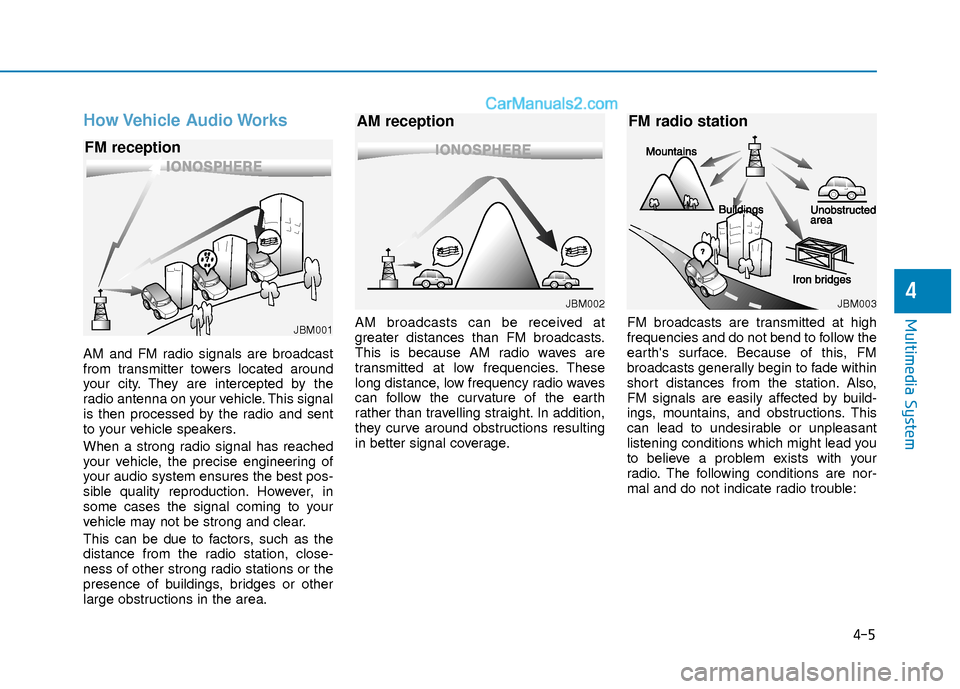
AM and FM radio signals are broadcast
from transmitter towers located around
your city. They are intercepted by the
radio antenna on your vehicle. This signal
is then processed by the radio and sent
to your vehicle speakers.
When a strong radio signal has reached
your vehicle, the precise engineering of
your audio system ensures the best pos-
sible quality reproduction. However, in
some cases the signal coming to your
vehicle may not be strong and clear.
This can be due to factors, such as the
distance from the radio station, close-
ness of other strong radio stations or the
presence of buildings, bridges or other
large obstructions in the area.AM broadcasts can be received at
greater distances than FM broadcasts.
This is because AM radio waves are
transmitted at low frequencies. These
long distance, low frequency radio waves
can follow the curvature of the earth
rather than travelling straight. In addition,
they curve around obstructions resulting
in better signal coverage.
FM broadcasts are transmitted at high
frequencies and do not bend to follow the
earth's surface. Because of this, FM
broadcasts generally begin to fade within
short distances from the station. Also,
FM signals are easily affected by build-
ings, mountains, and obstructions. This
can lead to undesirable or unpleasant
listening conditions which might lead you
to believe a problem exists with your
radio. The following conditions are nor-
mal and do not indicate radio trouble:
4-5
Multimedia System
4
JBM001
FM reception
JBM002
AM reception
JBM003
FM radio station
Page 230 of 526
Information -Using the USB
device
• Connect the USB device after turning on the engine. The USB device may become
damaged if it is already connected when
the ignition is turned on.The USB device
may not operate properly if the car igni-
tion is turned on or off with the USB
device connected.
• Heed caution to static electricity when connecting/disconnecting USB devices.
• Encoded MP3 Players will not be recog- nized when connected as an external
device.
• When connecting an external USB device, the device may not properly rec-
ognize the USB is in some states.
• Only products formatted with byte/sec- tors under 64Kbyte will be recognized.
• This device recognizes USB devices for- matted in FAT 12/16/32 file formats.
This device does not recognize files in
NTFS file format.
• Some USB devices may not be support- ed due to compatibility issues.
• Avoid contact between the USB connec- tor with bodily parts or foreign objects.
• Repeated connecting/disconnecting of USB devices within short periods of time
may result in product malfunction.
(Continued)(Continued)
• A strange noise may occur when discon- necting the USB.
• Make sure to connect/disconnect exter- nal USB devices with the audio power
turned off.
• The amount of time required to recog- nize the USB device may differ depend-
ing on the type, size or file formats
stored in the USB. Such differences in
time are not indications of malfunctions.
• The device only supports USB devices used to play music files.
• USB images and videos are not support- ed.
• Do not use the USB I/F to charge batter- ies or USB accessories that generate
heat. Such acts may lead to worsened
performance or damage to the device.
• The device may not recognize the USB device if separately purchased USB
hubs and extension cables are being
used. Connect the USB directly with the
multimedia terminal of the vehicle.
• When using mass storage USB devices with separate logical drives, only files
saved to the root drive can be played.
• Files may not properly operate if appli- cation programs are installed to the
USBs.
(Continued)(Continued)
• The device may not operate normally if MP3 Players, cellular phones, digital
cameras, or other electronic devices
(USB devices not recognized as portable
disk drives) are connected with the
device.
• Charging through the USB may not work for some mobile devices.
• The device may not support normal operation when using a USB memory
type besides (Metal Cover Type) USB
Memory.
• The device may not support normal operation when using formats such as
HDD Type, CF, or SD Memory.
• The device will not support files locked by DRM (Digital Rights Management.)
• USB memory sticks used by connecting an Adaptor (SD Type or CF Type) may
not be properly recognized.
• The device may not operate properly when using USB HDDs or USBs subject
to connection failures caused by vehicle
vibrations. (e.g. i-stick type)
(Continued)i
4-11
Multimedia System
4
Page 245 of 526
4-26
Multimedia System
Information
- Using the USB Devices
• To use an external USB device, make sure the device is not connected when
starting up the vehicle. Connect the
device after starting up.
• If you start the engine when the USB device is connected, it may damage the
USB device. (USB flashdrives are very
sensitive to electric shock.)
• If the engine is started up or turned off while the external USB device is con-
nected, the external USB device may not
work.
• The System may not play unauthenti- cated MP3 or WMA files.
1) It can only play MP3 files with the com- pression rate between 8Kbps ~
320Kbps.
2) It can only play WMA music files with the compression rate between 8Kbps ~
320Kbps.
• Take precautions for static electricity when connecting or disconnecting the
external USB device.
(Continued)(Continued)
• An encrypted MP3 PLAYER is not rec-
ognizable.
• Depending on the condition of the exter- nal USB device, the connected external
USB device can be unrecognizable.
• When the formatted byte/sector setting of External USB device is not either
512BYTE or 2048BYTE, then the device
will not be recognized.
• Use only a USB device formatted to FAT 12/16/32.
• USB devices without USB I/F authenti- cation may not be recognizable.
• Make sure the USB connection terminal does not come in contact with the
human body or other objects.
• If you repeatedly connect or disconnect the USB device in a short period of time,
it may break the device.
• You may hear a strange noise when con- necting or disconnecting a USB device.
• If you disconnect the external USB device during playback in USB mode,
the external USB device can be damaged
or may malfunction. Therefore, discon-
nect the external USB device when the
audio is turned off or in another mode.
(e.g, Radio)
(Continued)(Continued)
• Depending on the type and capacity of
the external USB device or the type of
files stored in the device, there is a dif-
ference in the time for recognition the
device.
• Do not use the USB device for purposes other than playing music files.
• Playing videos through the USB is not supported.
• Use of USB accessories such as recharg- ers or heaters using USB I/F may lower
performance or cause trouble.
• If you use devices such as a USB hub purchased separately, the vehicle’s
audio system may not recognize the USB
device. In this case, connect the USB
device directly to the multimedia termi-
nal of the vehicle.
• If the USB device is divided by logical drives, only the music files on the high-
est-priority drive are recognized by car
audio.
• Devices such as MP3 Player/ Cellular phone/Digital camera can be unrecog-
nizable by standard USB I/F.
• Charging through the USB may not be supported in some mobile devices.
• USB HDD or USB types liable to connec- tion failures due to vehicle vibrations are
not supported. (i-stick type)
(Continued)
i
Page 284 of 526
Driving your vehicle
5
Before Driving ........................................................5-4
Before Entering the Vehicle ...........................................5-4
Before Starting ..................................................................5-4
Ignition Switch ........................................................5-6
Key Ignition Switch ...........................................................5-6
Engine Start/Stop Button................................................5-9
Manual Transmission ...........................................5-16
Manual Transmission Operation ..................................5-16
Good Driving Practices ..................................................5-18
Automatic Transmission ......................................5-19
Automatic Transmission Operation .............................5-19
Good Driving Practices ..................................................5-23
Dual Clutch Transmission ....................................5-24
Dual Clutch Transmission Operation ..........................5-24
Good Driving Practices ..................................................5-32
Braking System ....................................................5-33
Power Brakes ...................................................................5-33
Disc Brakes Wear Indicator ..........................................5-34
Rear Drum Brakes...........................................................5-34
Parking Brake...................................................................5-34
Anti-lock Brake System (ABS) ....................................5-36
Electronic Stability Control (ESC)................................5-38
Vehicle Stability Management (VSM).........................5-41
Hill-Start Assist Control (HAC) ....................................5-42
Good Braking Practices .................................................5-42
Drive Mode Integrated Control System ............5-43
Blind Spot Detection System (BSD) ..................5-45
BSD (Blind Spot Detection) /
LCA (Lane Change Assist) .............................................5-46
RCTA (Rear Cross Traffic Alert) ..................................5-49
Limitations of the System .............................................5-51
Automatic Emergency Braking (AEB) ...............5-52
System Setting and Activation.....................................5-52
AEB Warning Message and System Control ............5-54
AEB Front Radar Sensor ...............................................5-56
System Malfunction .......................................................5-57
Limitations of the System .............................................5-58
Lane Keeping Assist System (LKAS) .................5-62
LKAS Operation ...............................................................5-63
Limitations of the System .............................................5-66
LKAS Malfunction ...........................................................5-67
LKAS Function Change ..................................................5-68
Cruise Control .......................................................5-69
Cruise Control operation ...............................................5-69
Page 286 of 526
5-3
Driving your vehicle
5
Carbon monoxide (CO) gas is toxic. Breathing CO can cause unconsciousness and death.
Engine exhaust contains carbon monoxide which cannot be seen or smelled.
Do not inhale engine exhaust.
If at any time you smell engine exhaust inside the vehicle, open the windows immediately. Exposure to CO can cause uncon-
sciousness and death by asphyxiation.
Be sure the exhaust system does not leak.
The exhaust system should be checked whenever the vehicle is raised to change the oil or for any other purpose. If you hear a
change in the sound of the exhaust or if you drive over something that strikes the underneath side of the vehicle, have the
exhaust system checked as soon as possible by an authorized HYUNDAI dealer.
Do not run the engine in an enclosed area.
Letting the engine idle in your garage, even with the garage door open, is a hazardous practice. Run the engine only long enough
to start the engine and to move the vehicle out of the garage.
Avoid idling the engine for prolonged periods with people inside the vehicle.
If it is necessary to idle the engine for a prolonged period with people inside the vehicle, be sure to do so only in an open area
with the air intake set at "Fresh" and fan control set to high so fresh air is drawn into the interior.
Keep the air intakes clear.
To assure proper operation of the ventilation system, keep the ventilation air intakes located in front of the windshield clear of
snow, ice, leaves, or other obstructions.
If you must drive with the trunk open:
Close all windows.
Open instrument panel air vents.
Set the air intake control at "Fresh", the air flow control at "Floor" or "Face", and the fan control set to high.
WARNING
Page 287 of 526
5-4
Driving your vehicle
Before Entering the Vehicle
• Be sure all windows, outside mirror(s),and outside lights are clean and unob-
structed.
Remove frost, snow, or ice.
Visually check the tires for uneven wear and damage.
Check under the vehicle for any sign of leaks.
Be sure there are no obstacles behind you if you intend to back up.
Before Starting
Make sure the hood, the trunk, and thedoors are securely closed and locked.
Adjust the position of the seat and steering wheel.
Adjust the inside and outside rearview mirrors.
Verify all the lights work.
Fasten your seatbelt. Check that all passengers have fastened their seat-
belts.
Check the gauges and indicators in the instrument panel and the messages on
the instrument display when the igni-
tion switch is in the ON position.
Check that any items you are carrying are stored properly or fastened down
securely.
CALIFORNIA PROPOSITION 65
WARNING
Engine exhaust and a wide variety
of automobile components includ-
ing components found in the interi-
or furnishings in a vehicle, contain
or emit harmful chemicals known to
the State of California to cause can-
cer and birth defects and reproduc-
tive harm. In addition, certain fluids
contained in vehicles and certain
products of components contain or
emit chemicals known to the State
of California to cause cancer and
birth defects or other reproductive
harm.WARNING
B B
E
EF
FO
O R
RE
E
D
D R
RI
IV
V I
IN
N G
G
Page 289 of 526
5-6
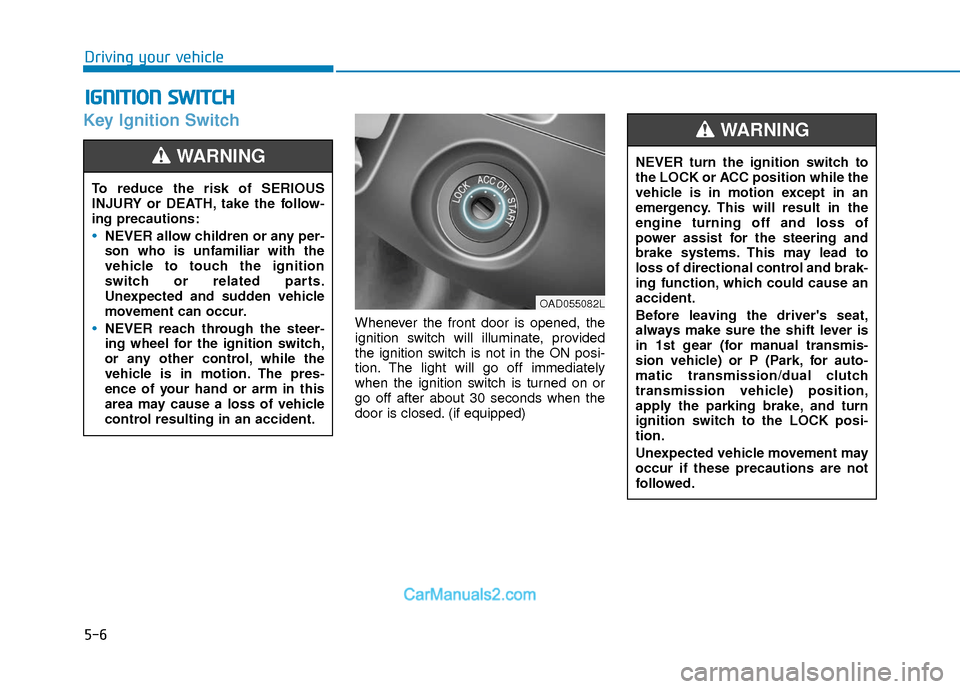
Key Ignition Switch
Whenever the front door is opened, the
ignition switch will illuminate, provided
the ignition switch is not in the ON posi-
tion. The light will go off immediately
when the ignition switch is turned on or
go off after about 30 seconds when the
door is closed. (if equipped)
I IG
G N
N I
IT
T I
IO
O N
N
S
S W
W I
IT
T C
CH
H
Driving your vehicle
To reduce the risk of SERIOUS
INJURY or DEATH, take the follow-
ing precautions:
NEVER allow children or any per-
son who is unfamiliar with the
vehicle to touch the ignition
switch or related parts.
Unexpected and sudden vehicle
movement can occur.
NEVER reach through the steer-
ing wheel for the ignition switch,
or any other control, while the
vehicle is in motion. The pres-
ence of your hand or arm in this
area may cause a loss of vehicle
control resulting in an accident.
WARNING NEVER turn the ignition switch to
the LOCK or ACC position while the
vehicle is in motion except in an
emergency. This will result in the
engine turning off and loss of
power assist for the steering and
brake systems. This may lead to
loss of directional control and brak-
ing function, which could cause an
accident.
Before leaving the driver's seat,
always make sure the shift lever is
in 1st gear (for manual transmis-
sion vehicle) or P (Park, for auto-
matic transmission/dual clutch
transmission vehicle) position,
apply the parking brake, and turn
ignition switch to the LOCK posi-
tion.
Unexpected vehicle movement may
occur if these precautions are not
followed.
WARNING
OAD055082L
Page 290 of 526
5-7
Driving your vehicle
5
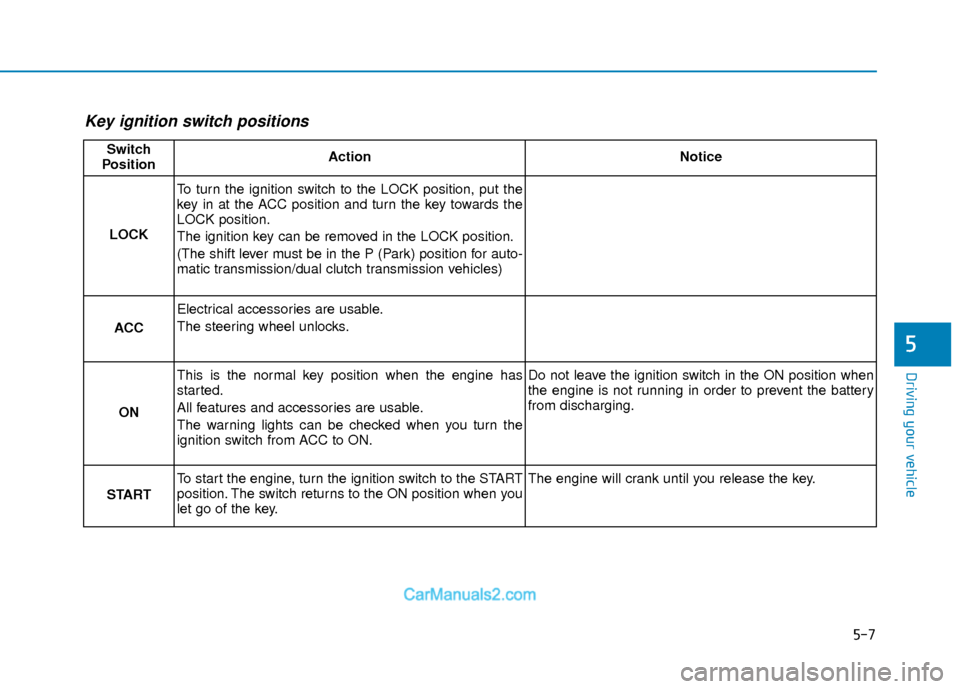
Key ignition switch positions
Switch
PositionActionNotice
LOCK
To turn the ignition switch to the LOCK position, put the
key in at the ACC position and turn the key towards the
LOCK position.
The ignition key can be removed in the LOCK position.
(The shift lever must be in the P (Park) position for auto-
matic transmission/dual clutch transmission vehicles)
ACC
Electrical accessories are usable.
The steering wheel unlocks.
ON
This is the normal key position when the engine has
started.
All features and accessories are usable.
The warning lights can be checked when you turn the
ignition switch from ACC to ON.Do not leave the ignition switch in the ON position when
the engine is not running in order to prevent the battery
from discharging.
START
To start the engine, turn the ignition switch to the START
position. The switch returns to the ON position when you
let go of the key.The engine will crank until you release the key.
Page 291 of 526
5-8
Starting the engine
Vehicle with manual transmission:
1. Make sure the parking brake isapplied.
2. Make sure the shift lever is in neutral.
3. Depress the clutch and brake pedals.
4. Turn the ignition switch to the START position. Hold the key (maximum of 10
seconds) until the engine starts and
release it.
Information
Depress the brake pedal and clutch pedal
until the engine starts. Vehicle with automatic transmission/ dual
clutch transmission:
1. Make sure the parking brake is
applied.
2. Make sure the shift lever is in P (Park).
3. Depress the brake pedal.
4. Turn the ignition switch to the START position. Hold the key (maximum of 10
seconds) until the engine starts and
release it.
Information
• It is best to maintain a moderate enginespeed until the vehicle engine comes up
to normal operating temperature. Avoid
harsh or abrupt acceleration or deceler-
ation while the engine is still cold.
• Whether the engine is cold or warm, always start the vehicle with your foot
on the brake pedal. Do not depress the
accelerator while starting the vehicle.
Do not race the engine while warming it
up. To prevent damage to the vehicle:
Do not hold the ignition key in the
START position for more than 10
seconds. Wait 5 to 10 seconds
before trying again.
Do not push or tow your vehicle to start the engine.
NOTICE
i
i
Driving your vehicle
Always wear appropriate shoes
when operating your vehicle.
Unsuitable shoes, such as high
heels, ski boots, sandals, flip-flops,
etc., may interfere with your ability
to use the brake and accelerator
pedals.
WARNING
Page 292 of 526
5-9
Driving your vehicle
5
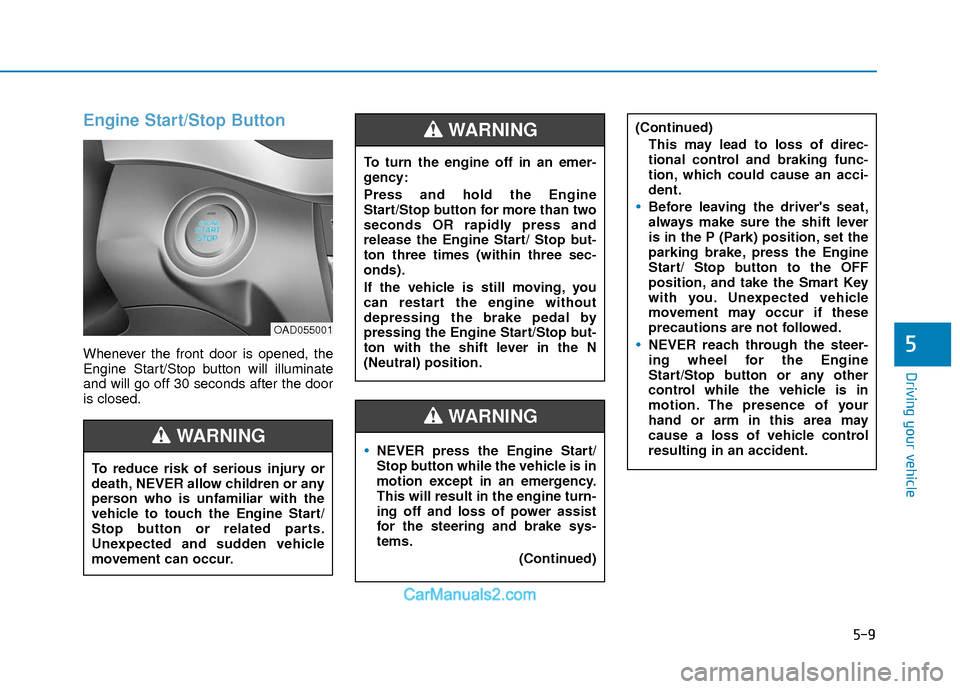
Engine Start/Stop Button
Whenever the front door is opened, the
Engine Start/Stop button will illuminate
and will go off 30 seconds after the door
is closed.
NEVER press the Engine Start/
Stop button while the vehicle is in
motion except in an emergency.
This will result in the engine turn-
ing off and loss of power assist
for the steering and brake sys-
tems.(Continued)
WARNING
To turn the engine off in an emer-
gency:
Press and hold the Engine
Start/Stop button for more than two
seconds OR rapidly press and
release the Engine Start/ Stop but-
ton three times (within three sec-
onds).
If the vehicle is still moving, you
can restart the engine without
depressing the brake pedal by
pressing the Engine Start/Stop but-
ton with the shift lever in the N
(Neutral) position.
(Continued)This may lead to loss of direc-
tional control and braking func-
tion, which could cause an acci-
dent.
Before leaving the driver's seat,
always make sure the shift lever
is in the P (Park) position, set the
parking brake, press the Engine
Start/ Stop button to the OFF
position, and take the Smart Key
with you. Unexpected vehicle
movement may occur if these
precautions are not followed.
NEVER reach through the steer-
ing wheel for the Engine
Start/Stop button or any other
control while the vehicle is in
motion. The presence of your
hand or arm in this area may
cause a loss of vehicle control
resulting in an accident.
WARNING
To reduce risk of serious injury or
death, NEVER allow children or any
person who is unfamiliar with the
vehicle to touch the Engine Start/
Stop button or related parts.
Unexpected and sudden vehicle
movement can occur.
WARNING
OAD055001