mileage Hyundai Elantra 2018 Owner's Manual
[x] Cancel search | Manufacturer: HYUNDAI, Model Year: 2018, Model line: Elantra, Model: Hyundai Elantra 2018Pages: 526, PDF Size: 17.2 MB
Page 160 of 526
3-83
Convenient features of your vehicle
3
SCC/LKAS mode (if equipped)
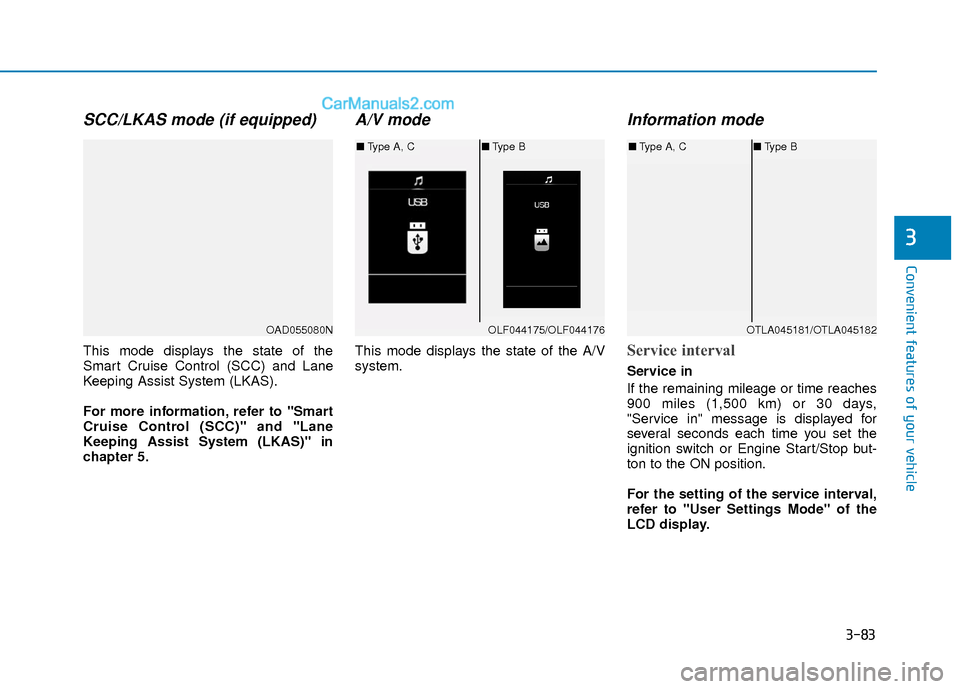
This mode displays the state of the
Smart Cruise Control (SCC) and Lane
Keeping Assist System (LKAS).
For more information, refer to "Smart
Cruise Control (SCC)" and "Lane
Keeping Assist System (LKAS)" in
chapter 5.
A/V mode
This mode displays the state of the A/V
system.
Information mode
Service interval
Service in
If the remaining mileage or time reaches
900 miles (1,500 km) or 30 days,
"Service in" message is displayed for
several seconds each time you set the
ignition switch or Engine Start/Stop but-
ton to the ON position.
For the setting of the service interval,
refer to "User Settings Mode" of the
LCD display.
OAD055080NOLF044175/OLF044176
■Type A, C ■Type B
OTLA045181/OTLA045182
■Type A, C ■Type B
Page 161 of 526
3-84
Convenient features of your vehicle
Service required
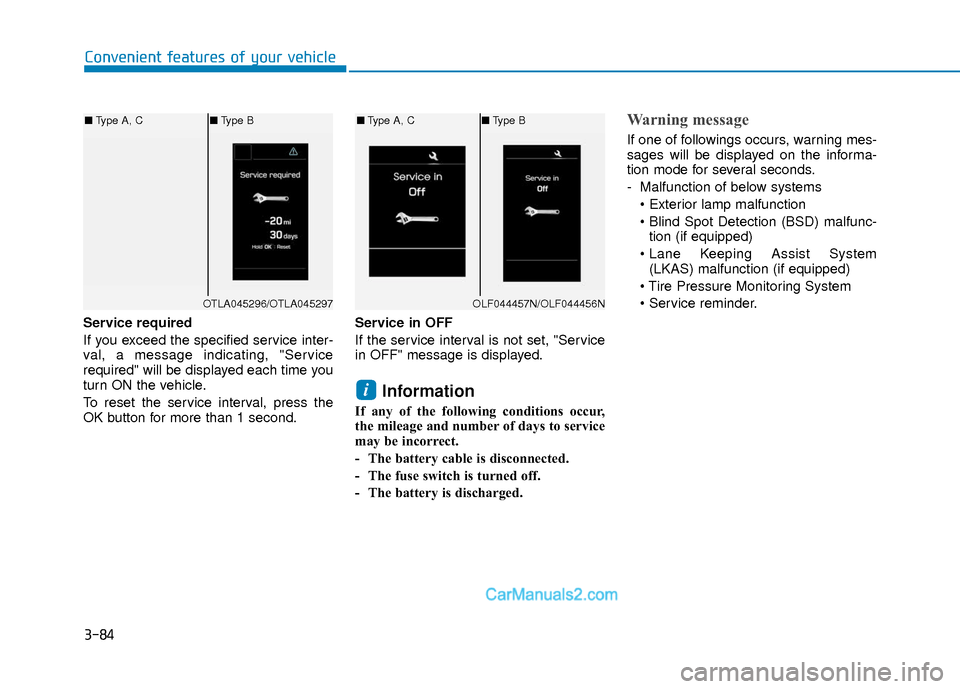
If you exceed the specified service inter-
val, a message indicating, "Service
required" will be displayed each time you
turn ON the vehicle.
To reset the service interval, press the
OK button for more than 1 second.Service in OFF
If the service interval is not set, "Service
in OFF" message is displayed.
Information
If any of the following conditions occur,
the mileage and number of days to service
may be incorrect.
- The battery cable is disconnected.
- The fuse switch is turned off.
- The battery is discharged.
Warning message
If one of followings occurs, warning mes-
sages will be displayed on the informa-
tion mode for several seconds.
- Malfunction of below systems
tion (if equipped)
(LKAS) malfunction (if equipped)
i
OTLA045296/OTLA045297
■ Type A, C ■Type B
OLF044457N/OLF044456N
■Type A, C ■Type B
Page 165 of 526
3-88
Convenient features of your vehicle
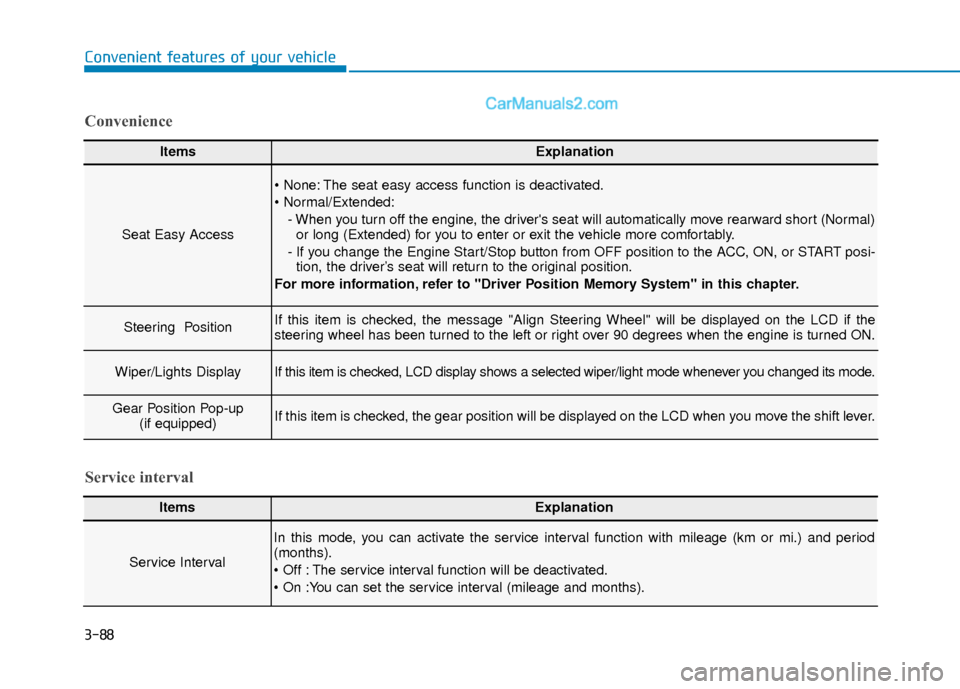
ItemsExplanation
Seat Easy Access
The seat easy access function is deactivated.
- When you turn off the engine, the driver's seat will automatically move rearward short (Normal)or long (Extended) for you to enter or exit the vehicle more comfortably.
- If you change the Engine Start/Stop button from OFF position to the ACC, ON, or START posi- tion, the driver’s seat will return to the original position.
For more information, refer to "Driver Position Memory System" in this chapter.
Steering Position If this item is checked, the message "Align Steering Wheel" will be displayed on the LCD if the
steering wheel has been turned to the left or right over 90 degrees when the engine is turned ON.
Wiper/Lights DisplayIf this item is checked, LCD display shows a selected wiper/light mode whenever you changed its mode.
Gear Position Pop-up (if equipped)If this item is checked, the gear position will be displayed on the LCD when you move the shift lever.
Convenience
ItemsExplanation
Service Interval
In this mode, you can activate the service interval function with mileage (km or mi.) and period
(months).
The service interval function will be deactivated.
Service interval
Page 170 of 526
3-93
Convenient features of your vehicle
3
Service information
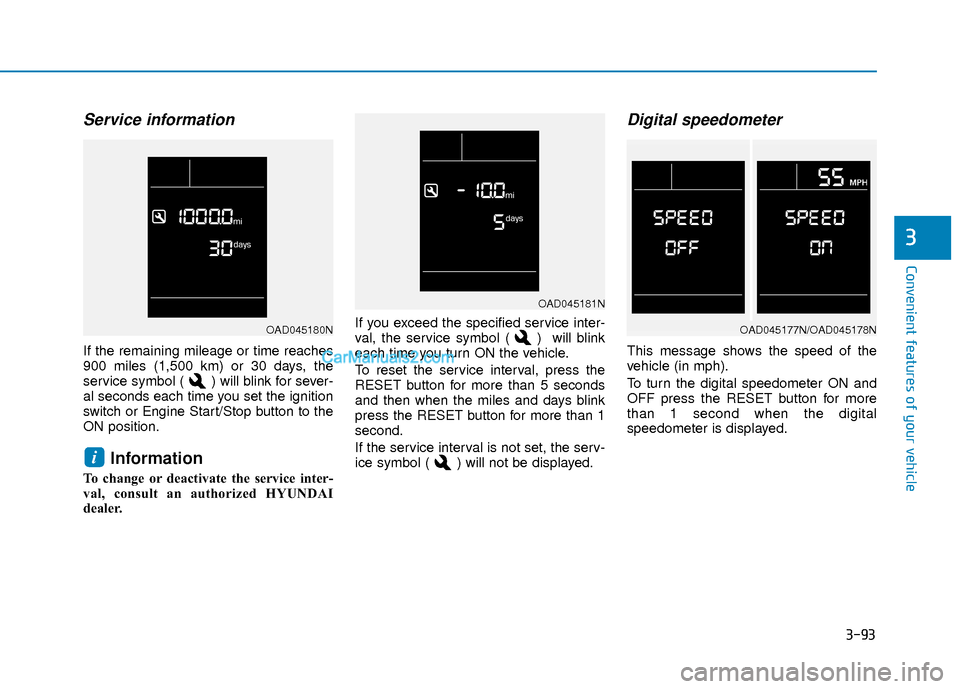
If the remaining mileage or time reaches
900 miles (1,500 km) or 30 days, the
service symbol ( ) will blink for sever-
al seconds each time you set the ignition
switch or Engine Start/Stop button to the
ON position.
Information
To change or deactivate the service inter-
val, consult an authorized HYUNDAI
dealer.If you exceed the specified service inter-
val, the service symbol ( ) will blink
each time you turn ON the vehicle.
To reset the service interval, press the
RESET button for more than 5 seconds
and then when the miles and days blink
press the RESET button for more than 1
second.
If the service interval is not set, the serv-
ice symbol ( ) will not be displayed.
Digital speedometer
This message shows the speed of the
vehicle (in mph).
To turn the digital speedometer ON and
OFF press the RESET button for more
than 1 second when the digital
speedometer is displayed.
i
OAD045181N
OAD045177N/OAD045178NOAD045180N
Page 173 of 526
3-96
Convenient features of your vehicle
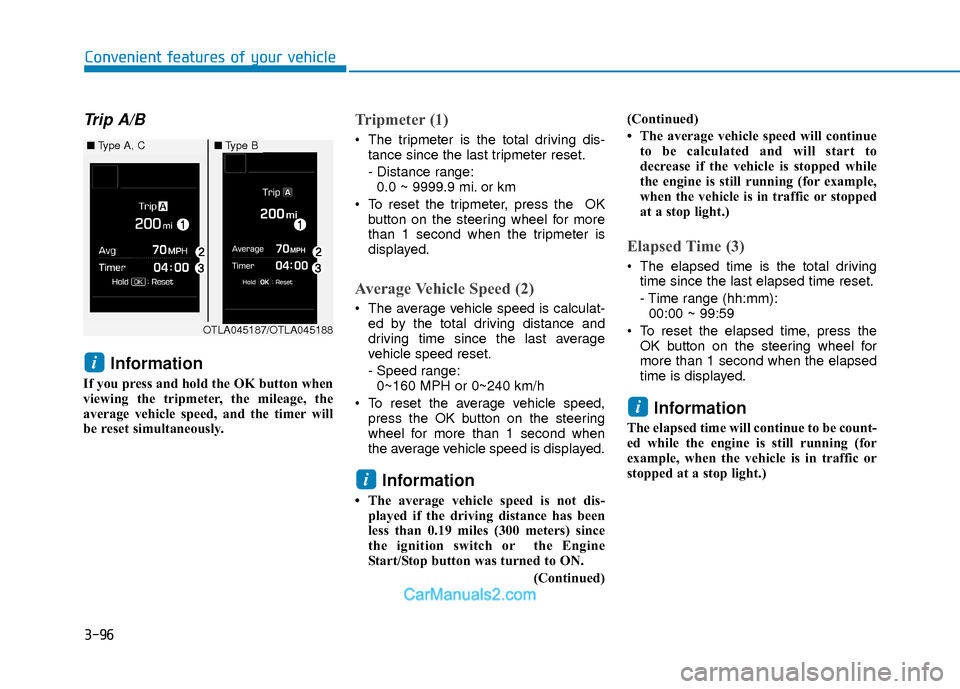
Trip A/B
Information
If you press and hold the OK button when
viewing the tripmeter, the mileage, the
average vehicle speed, and the timer will
be reset simultaneously.
Tripmeter (1)
The tripmeter is the total driving dis-tance since the last tripmeter reset.
- Distance range:0.0 ~ 9999.9 mi. or km
To reset the tripmeter, press the OK button on the steering wheel for more
than 1 second when the tripmeter is
displayed.
Average Vehicle Speed (2)
The average vehicle speed is calculat-ed by the total driving distance and
driving time since the last average
vehicle speed reset.
- Speed range:0~160 MPH or 0~240 km/h
To reset the average vehicle speed, press the OK button on the steering
wheel for more than 1 second when
the average vehicle speed is displayed.
Information
• The average vehicle speed is not dis-played if the driving distance has been
less than 0.19 miles (300 meters) since
the ignition switch or the Engine
Start/Stop button was turned to ON.
(Continued)(Continued)
• The average vehicle speed will continue
to be calculated and will start to
decrease if the vehicle is stopped while
the engine is still running (for example,
when the vehicle is in traffic or stopped
at a stop light.)
Elapsed Time (3)
The elapsed time is the total drivingtime since the last elapsed time reset.
- Time range (hh:mm):00:00 ~ 99:59
To reset the elapsed time, press the OK button on the steering wheel for
more than 1 second when the elapsed
time is displayed.
Information
The elapsed time will continue to be count-
ed while the engine is still running (for
example, when the vehicle is in traffic or
stopped at a stop light.)
i
i
i
OTLA045187/OTLA045188
■ Type A, C■Type B
Page 441 of 526
7-23
7
Maintenance
B
BR
RA
A K
KE
E/
/C
C L
LU
U T
TC
CH
H
F
F L
LU
U I
ID
D
Changing Engine Coolant
Have coolant changed by an authorized
HYUNDAI dealer according to the
Maintenance Schedule at the beginning
of this chapter.
To prevent damage to engine parts,
put a thick towel around the radiator
cap before refilling the coolant to pre-
vent the coolant from overflowing into
engine parts, such as the generator.
Checking the Brake/Clutch
Fluid Level
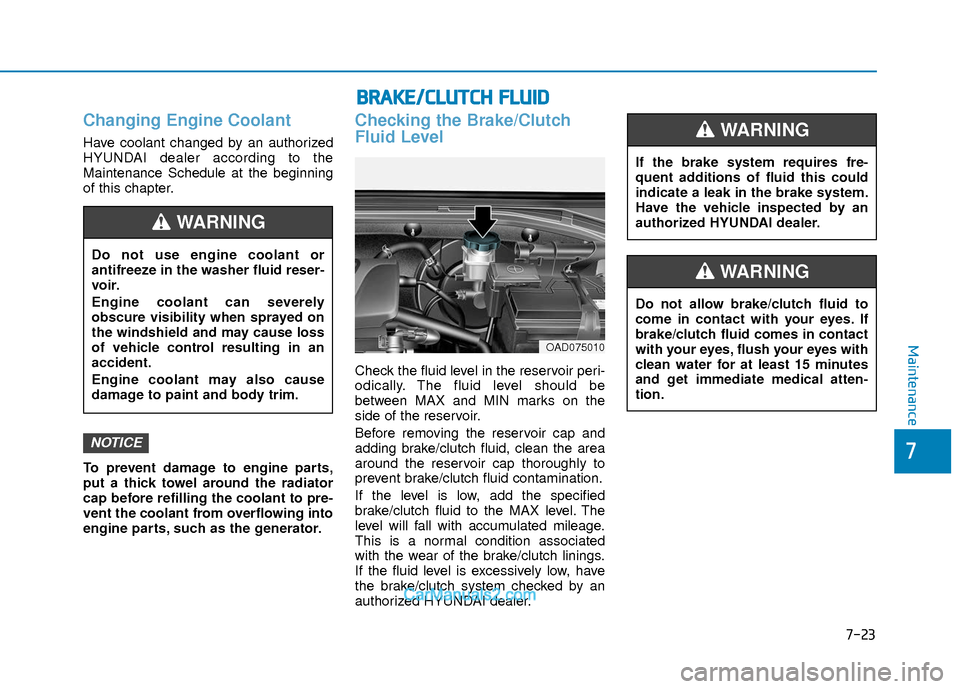
Check the fluid level in the reservoir peri-
odically. The fluid level should be
between MAX and MIN marks on the
side of the reservoir.
Before removing the reservoir cap and
adding brake/clutch fluid, clean the area
around the reservoir cap thoroughly to
prevent brake/clutch fluid contamination.
If the level is low, add the specified
brake/clutch fluid to the MAX level. The
level will fall with accumulated mileage.
This is a normal condition associated
with the wear of the brake/clutch linings.
If the fluid level is excessively low, have
the brake/clutch system checked by an
authorized HYUNDAI dealer.
NOTICE
Do not use engine coolant or
antifreeze in the washer fluid reser-
voir.
Engine coolant can severely
obscure visibility when sprayed on
the windshield and may cause loss
of vehicle control resulting in an
accident.
Engine coolant may also cause
damage to paint and body trim.
WARNING
If the brake system requires fre-
quent additions of fluid this could
indicate a leak in the brake system.
Have the vehicle inspected by an
authorized HYUNDAI dealer.
WARNING
Do not allow brake/clutch fluid to
come in contact with your eyes. If
brake/clutch fluid comes in contact
with your eyes, flush your eyes with
clean water for at least 15 minutes
and get immediate medical atten-
tion.
WARNING
OAD075010