tow Hyundai Elantra 2020 User Guide
[x] Cancel search | Manufacturer: HYUNDAI, Model Year: 2020, Model line: Elantra, Model: Hyundai Elantra 2020Pages: 535, PDF Size: 16.8 MB
Page 141 of 535
3-57
Convenient features of your vehicle
3
If the gauge pointer moves
beyond the normal range area
toward the "H" position, it indi-
cates overheating that may dam-
age the engine.
Do not continue driving with an
overheated engine. If your vehicle
overheats, refer to "If the Engine
Overheats" in chapter 6.
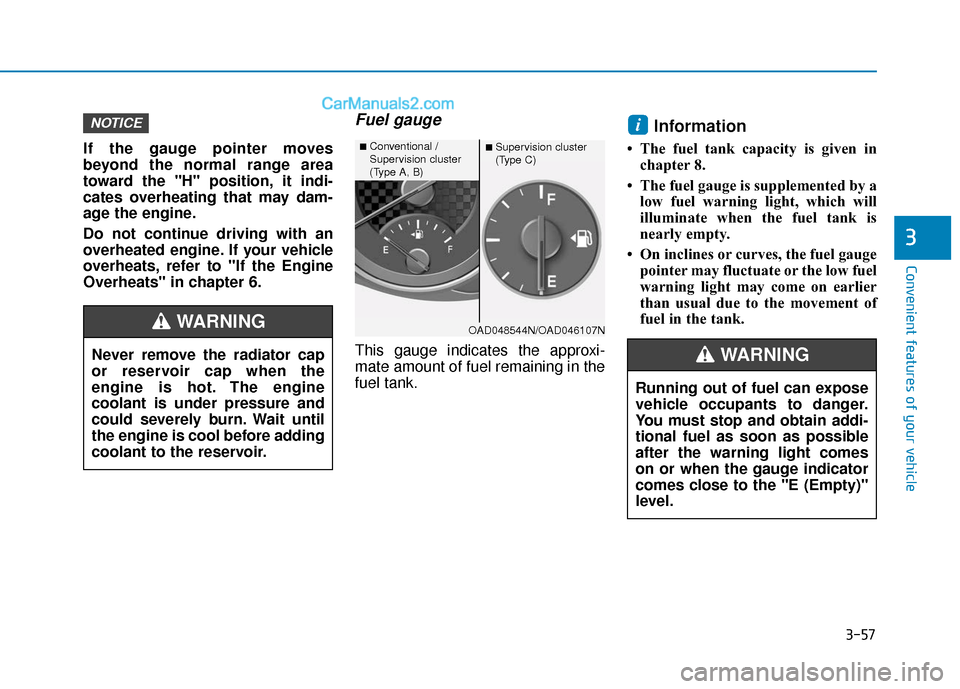
Fuel gauge
This gauge indicates the approxi-
mate amount of fuel remaining in the
fuel tank.
Information
• The fuel tank capacity is given inchapter 8.
• The fuel gauge is supplemented by a low fuel warning light, which will
illuminate when the fuel tank is
nearly empty.
• On inclines or curves, the fuel gauge pointer may fluctuate or the low fuel
warning light may come on earlier
than usual due to the movement of
fuel in the tank.
iNOTICE
OAD048544N/OAD046107N
■Conventional /
Supervision cluster
(Type A, B)■ Supervision cluster
(Type C)
Running out of fuel can expose
vehicle occupants to danger.
You must stop and obtain addi-
tional fuel as soon as possible
after the warning light comes
on or when the gauge indicator
comes close to the "E (Empty)"
level.
WARNINGNever remove the radiator cap
or reservoir cap when the
engine is hot. The engine
coolant is under pressure and
could severely burn. Wait until
the engine is cool before adding
coolant to the reservoir.
WARNING
Page 185 of 535
3-101
Convenient features of your vehicle
3
High beam operation
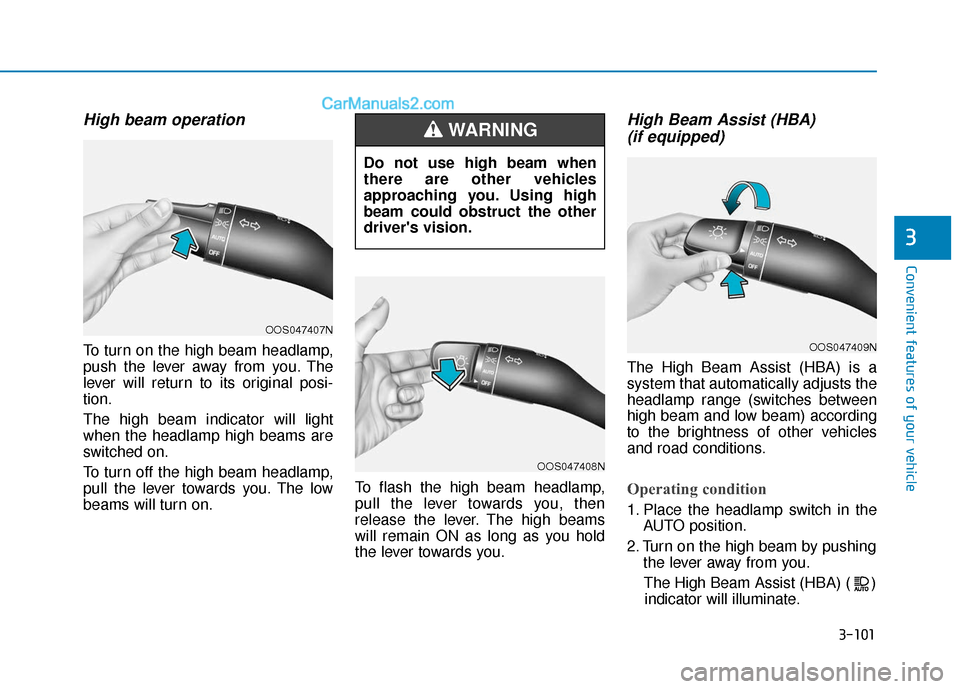
To turn on the high beam headlamp,
push the lever away from you. The
lever will return to its original posi-
tion.
The high beam indicator will light
when the headlamp high beams are
switched on.
To turn off the high beam headlamp,
pull the lever towards you. The low
beams will turn on.To flash the high beam headlamp,
pull the lever towards you, then
release the lever. The high beams
will remain ON as long as you hold
the lever towards you.
High Beam Assist (HBA)
(if equipped)
The High Beam Assist (HBA) is a
system that automatically adjusts the
headlamp range (switches between
high beam and low beam) according
to the brightness of other vehicles
and road conditions.
Operating condition
1. Place the headlamp switch in the
AUTO position.
2. Turn on the high beam by pushing the lever away from you.
The High Beam Assist (HBA) ( ) indicator will illuminate.
Do not use high beam when
there are other vehicles
approaching you. Using high
beam could obstruct the other
driver's vision.
WARNING
OOS047407N
OOS047408N
OOS047409N
Page 186 of 535
3-102
Convenient features of your vehicle
3. The High Beam Assist (HBA) will turn on when vehicle speed is
above 25 mph (40 km/h).
away when the High Beam Assist
(HBA) is operating, the High Beam
Assist (HBA) will turn off and the
high beam will be on continuously.
the headlamp switch is pulled
towards you when the high beam
is off, the high beam will turn on
without the High Beam Assist
(HBA) canceled. When you let go
of the light switch, the lever will
move to the middle and the high
beam will turn off.
the headlamp switch is pulled
towards you when the high beam
is on by the High Beam Assist
(HBA), the low beam will be on
and the High Beam Assist (HBA)
will turn off.
to the headlamp ON position, the
High Beam Assist (HBA) will turn
off and the low beam will be on
continuously. When the High Beam Assist (HBA) is
operating, the high beam switches to
low beam if any of the following con-
ditions occur :
- When the headlamp of an on-com-
ing vehicle is detected.
- When the tail lamp of a vehicle in front is detected.
- When the headlamp or tail lamp of a motorcycle or a bicycle is detect-
ed.
- When the surrounding ambient light is bright enough that high beams
are not required.
- When streetlights or other lights are detected.
- When the headlamp s witch is not in
the AUTO position.
- When the High Beam Assist (HBA) is off.
- When vehicle speed is below 22mph (35 km/h).
Warning light and message
When the High Beam Assist (HBA) is
not working properly, the Check High
Beam Assist warning message will
come on for a few second. After the
message disappears, the master
warning light ( ) will illuminate. Take
your vehicle to an authorized
HYUNDAI dealer and have the system
checked.
OIK047132N
Page 187 of 535
3-103
Convenient features of your vehicle
3
The system may not operate nor-
mally if any of the following con-
ditions should occur:
1) When the illumination froman on-coming vehicle or a
vehicle in front is dim. Such
examples may include:
When the headlamps of an on-
coming vehicle or the tail
lamps of a vehicle in front is
covered with dust, snow, or
water.
When the headlamps on an on-
coming vehicle are OFF, but the
fog lamps are ON.
2) When the High Beam Assist camera is adversely affected
by an external condition.
Such examples may include:
When the vehicle's head-
lamps have been damaged or
not repaired properly.
When the vehicle headlamps
are not aimed properly.
When the vehicle is driven on
a narrow curved road or rough
road
When the vehicle is driven on
an uphill road or downhill
road
When only part of the vehicle in
front is visible on a crossroad
or curved road.
When there is a traffic light,
reflecting sign, flashing sign or
mirror.
When the road conditions are
bad such as being wet or cov-
ered with snow.
When a vehicle suddenly
appears from a curve.
When the vehicle is tilted from
a flat tire or being towed.
When the Lane Keeping Assist
(LKA) system warning light
illuminates.
When the light from the on-
coming or front vehicle is not
detected because of exhaust
fume, smoke, fog, snow, etc.
When the front window is cov-
ered with foreign matters such
as ice, dust, fog, or is damaged.
3) When the forward visibility is poor. Such examples may
include:
When the headlamps of an on-
coming vehicle or a vehicle in
front is not detected due to
poor outside visibility (smog,
smoke, dust, fog, heavy rain,
snow, etc.).
When the lamp of the on-com-
ing or front vehicle is covered
with dust, snow or water.
When the windshield visibility
is poor.
WARNING
Page 195 of 535

3-111
Convenient features of your vehicle
3
Windshield Washers
In the OFF position, pull the lever
gently toward you to spray washer
fluid on the windshield and to run the
wipers 1-3 cycles. The spray and
wiper operation will continue until
you release the lever. If the washer
does not work, you may need to add
washer fluid to the washer fluid
reservoir. To prevent possible damage to
the washer pump, do not oper-
ate the washer when the fluid
reservoir is empty.
To prevent possible damage to the wipers or windshield, do not
operate the wipers when the
windshield is dry.
To prevent damage to the wiper arms and other components, do
not attempt to move the wipers
manually.
To prevent possible damage to the wipers and washer system,
use anti-freezing washer fluids
in the winter season or cold
weather.
NOTICE
When the outside temperature
is below freezing, ALWAYS
warm the windshield using the
defroster to prevent the washer
fluid from freezing on the wind-
shield and obscuring your
vision which could result in an
accident and serious injury or
death.
WARNING
OLF044095N
Page 200 of 535
3-116
Convenient features of your vehicle
Mode selection
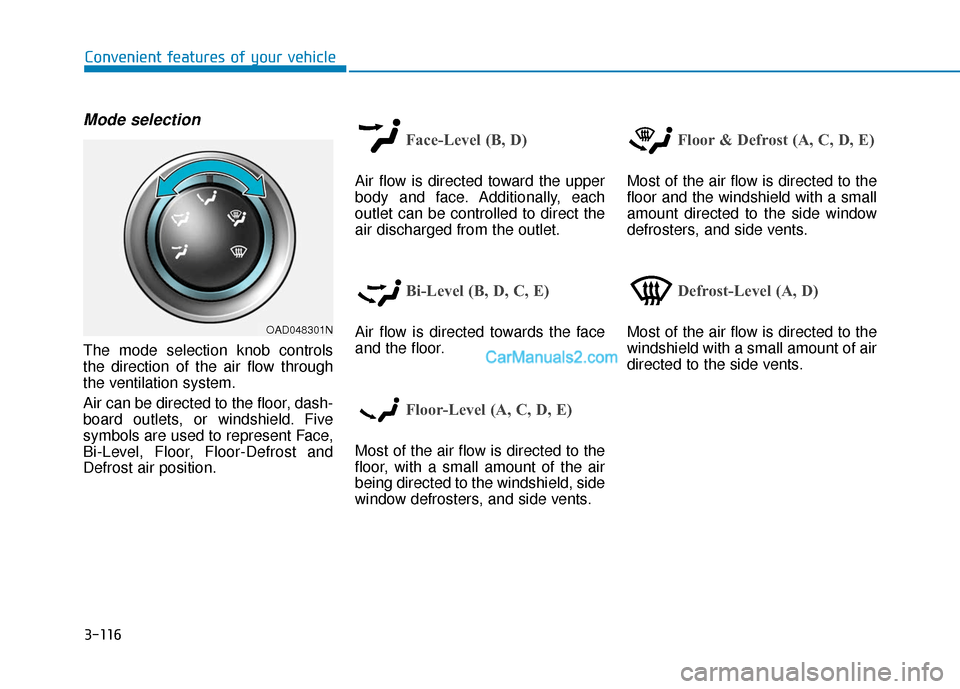
The mode selection knob controls
the direction of the air flow through
the ventilation system.
Air can be directed to the floor, dash-
board outlets, or windshield. Five
symbols are used to represent Face,
Bi-Level, Floor, Floor-Defrost and
Defrost air position.
Face-Level (B, D)
Air flow is directed toward the upper
body and face. Additionally, each
outlet can be controlled to direct the
air discharged from the outlet.
Bi-Level (B, D, C, E)
Air flow is directed towards the face
and the floor.
Floor-Level (A, C, D, E)
Most of the air flow is directed to the
floor, with a small amount of the air
being directed to the windshield, side
window defrosters, and side vents.
Floor & Defrost (A, C, D, E)
Most of the air flow is directed to the
floor and the windshield with a small
amount directed to the side window
defrosters, and side vents.
Defrost-Level (A, D)
Most of the air flow is directed to the
windshield with a small amount of air
directed to the side vents.OAD048301N
Page 201 of 535
3-117
Convenient features of your vehicle
3
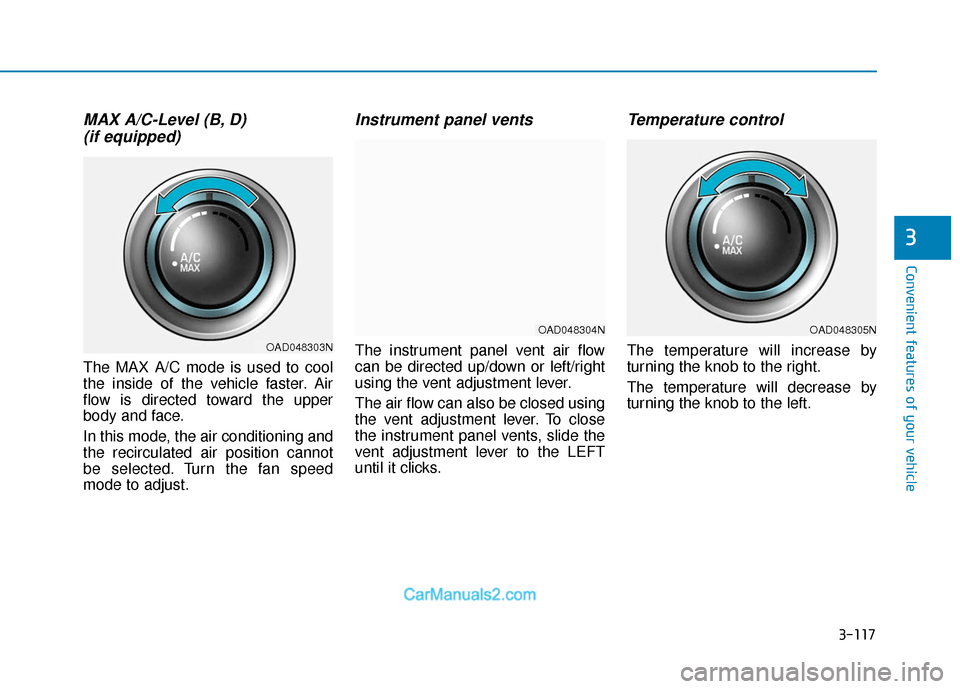
MAX A/C-Level (B, D) (if equipped)
The MAX A/C mode is used to cool
the inside of the vehicle faster. Air
flow is directed toward the upper
body and face.
In this mode, the air conditioning and
the recirculated air position cannot
be selected. Turn the fan speed
mode to adjust.
Instrument panel vents
The instrument panel vent air flow
can be directed up/down or left/right
using the vent adjustment lever.
The air flow can also be closed using
the vent adjustment lever. To close
the instrument panel vents, slide the
vent adjustment lever to the LEFT
until it clicks.
Temperature control
The temperature will increase by
turning the knob to the right.
The temperature will decrease by
turning the knob to the left.
OAD048305N
OAD048303N
OAD048304N
Page 211 of 535
3-127
Convenient features of your vehicle
3
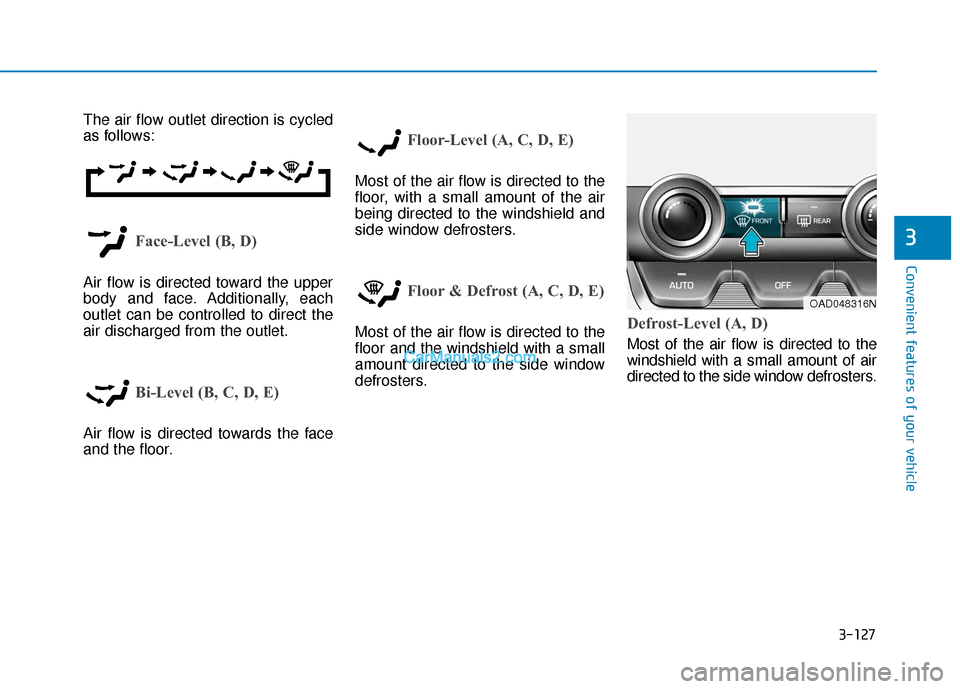
The air flow outlet direction is cycled
as follows:
Face-Level (B, D)
Air flow is directed toward the upper
body and face. Additionally, each
outlet can be controlled to direct the
air discharged from the outlet.
Bi-Level (B, C, D, E)
Air flow is directed towards the face
and the floor.
Floor-Level (A, C, D, E)
Most of the air flow is directed to the
floor, with a small amount of the air
being directed to the windshield and
side window defrosters.
Floor & Defrost (A, C, D, E)
Most of the air flow is directed to the
floor and the windshield with a small
amount directed to the side window
defrosters.Defrost-Level (A, D)
Most of the air flow is directed to the
windshield with a small amount of air
directed to the side window defrosters.
OAD048316N
Page 238 of 535
5
Forward Collision Avoidance (FCA) System
(with hyundai smart sense)................................5-86
System Setting and Activation.....................................5-86
FCA Warning Message and System Control ............5-89
FCA Sensor (Front Radar/Front Camera) .................5-91
System Malfunction .......................................................5-92
Limitations of the System .............................................5-94
Lane Keeping Assist (LKA) System .................5-100
LKA System Operation.................................................5-101
Warning Light and Message ......................................5-103
Limitations of the System...........................................5-106
LKA System Function Change ...................................5-108
Driver Attention Warning (DAW) System .......5-109
System Setting and Operation...................................5-109
Resetting the System ...................................................5-110
System Standby.............................................................5-111
System Malfunction .....................................................5-111
Cruise Control .....................................................5-113
Cruise Control Operation ............................................5-113
Smart Cruise Control System ...........................5-118
Smart Cruise Control Switch ......................................5-119
Smart Cruise Control Speed .......................................5-120
Smart Cruise Control Vehicle-to-Vehicle
Distance ........................................................................\
...5-124
Sensor to Detect Distance to the
Vehicle Ahead ................................................................5-126
To Adjust the Sensitivity of
Smart Cruise Control ....................................................5-128
To Convert to Cruise Control Mode .........................5-129
Limitations of the System...........................................5-129
Special Driving Conditions ................................5-134
Hazardous Driving Conditions....................................5-134
Rocking the Vehicle ......................................................5-134
Smooth Cornering .........................................................5-135
Driving at Night .............................................................5-135
Driving in the Rain ........................................................5-135
Driving in Flooded Areas.............................................5-136
Highway Driving ............................................................5-136
Winter Driving ....................................................5-137
Snow or Icy Conditions................................................5-137
Winter Precautions .......................................................5-139
Vehicle Load Limit..............................................5-141
Tire Loading Information Label .................................5-142
Trailer Towing .....................................................5-146
Page 243 of 535
5-7
Driving your vehicle
5
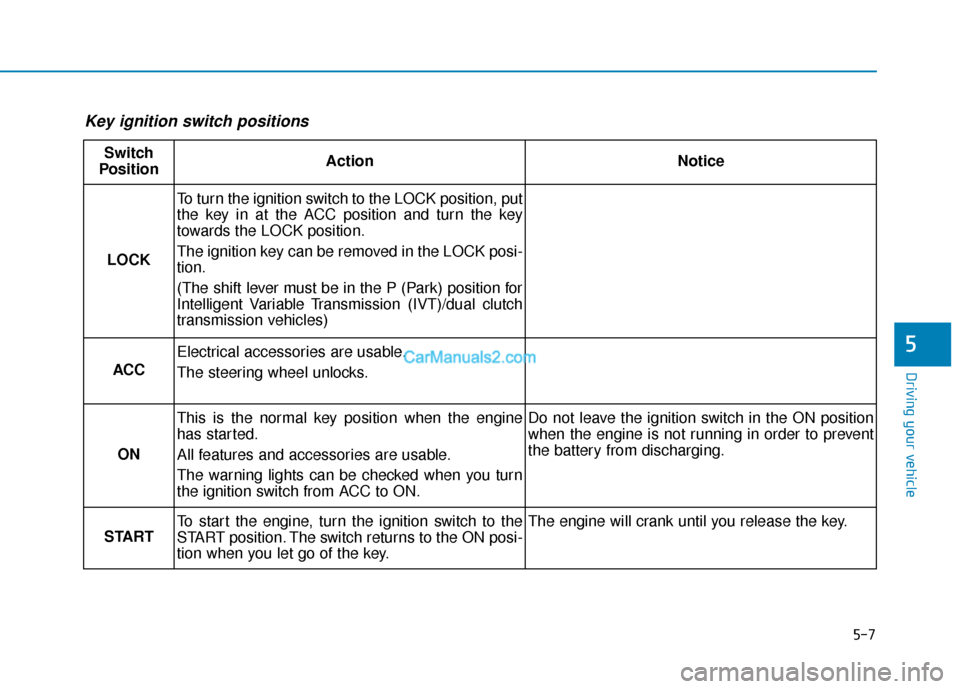
Key ignition switch positions
Switch
PositionActionNotice
LOCK
To turn the ignition switch to the LOCK position, put
the key in at the ACC position and turn the key
towards the LOCK position.
The ignition key can be removed in the LOCK posi-
tion.
(The shift lever must be in the P (Park) position for
Intelligent Variable Transmission (IVT)/dual clutch
transmission vehicles)
ACC
Electrical accessories are usable.
The steering wheel unlocks.
ON
This is the normal key position when the engine
has started.
All features and accessories are usable.
The warning lights can be checked when you turn
the ignition switch from ACC to ON.Do not leave the ignition switch in the ON position
when the engine is not running in order to prevent
the battery from discharging.
START
To start the engine, turn the ignition switch to the
START position. The switch returns to the ON posi-
tion when you let go of the key.The engine will crank until you release the key.