ad blue Hyundai Elantra Coupe 2014 Workshop Manual
[x] Cancel search | Manufacturer: HYUNDAI, Model Year: 2014, Model line: Elantra Coupe, Model: Hyundai Elantra Coupe 2014Pages: 550, PDF Size: 45.11 MB
Page 325 of 550
4239
Features of your vehicle
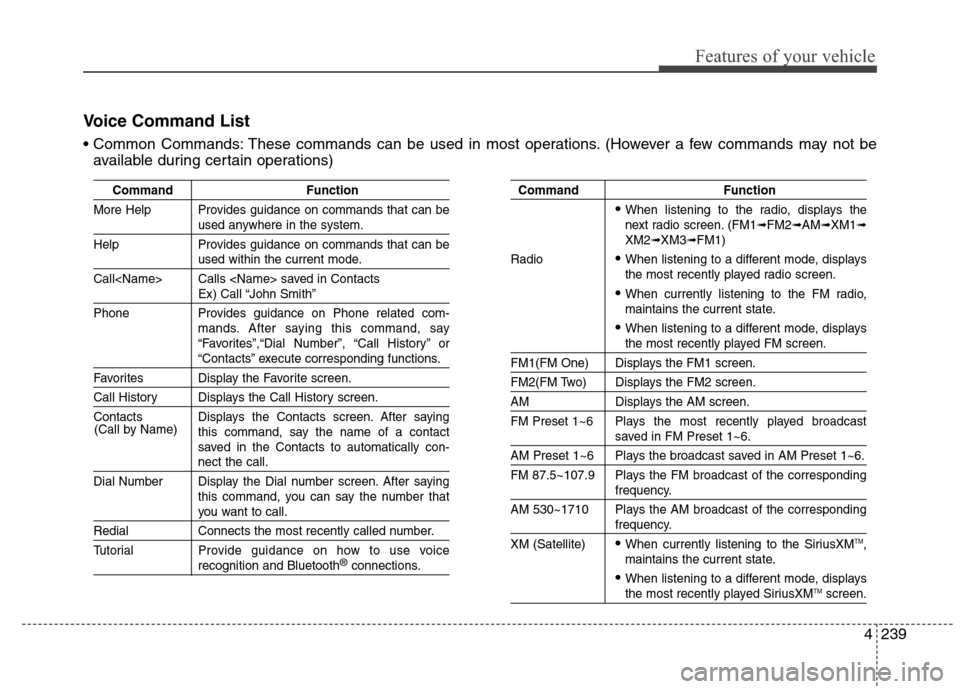
Command Function
More Help Provides guidance on commands that can be
used anywhere in the system.
Help Provides guidance on commands that can be
used within the current mode.
Call
Ex) Call “John Smith”
Phone Provides guidance on Phone related com-
mands. After saying this command, say
“Favorites”,“Dial Number”, “Call History” or
“Contacts” execute corresponding functions.
Favorites Display the Favorite screen.
Call History Displays the Call History screen.
Contacts Displays the Contacts screen. After saying
this command, say the name of a contact
saved in the Contacts to automatically con-
nect the call.
Dial Number Display the Dial number screen. After saying
this command, you can say the number that
you want to call.
Redial Connects the most recently called number.
Tutorial Provide guidance on how to use voice
recognition and Bluetooth®connections.
Command Function
When listening to the radio, displays the
next radio screen. (FM1➟FM2➟AM➟XM1➟XM2➟XM3➟FM1)
Radio
When listening to a different mode, displays
the most recently played radio screen.
When currently listening to the FM radio,
maintains the current state.
When listening to a different mode, displaysthe most recently played FM screen.
FM1(FM One) Displays the FM1 screen.
FM2(FM Two) Displays the FM2 screen.
AM Displays the AM screen.
FM Preset 1~6 Plays the most recently played broadcast
saved in FM Preset 1~6.
AM Preset 1~6 Plays the broadcast saved in AM Preset 1~6.
FM 87.5~107.9 Plays the FM broadcast of the corresponding
frequency.
AM 530~1710 Plays the AM broadcast of the corresponding
frequency.
XM (Satellite)
When currently listening to the SiriusXMTM,
maintains the current state.
When listening to a different mode, displaysthe most recently played SiriusXMTMscreen. (Call by Name)
Voice Command List
These commands can be used in most operations. (However a few commands may not be
available during certain operations)
Page 326 of 550
Features of your vehicle
240 4
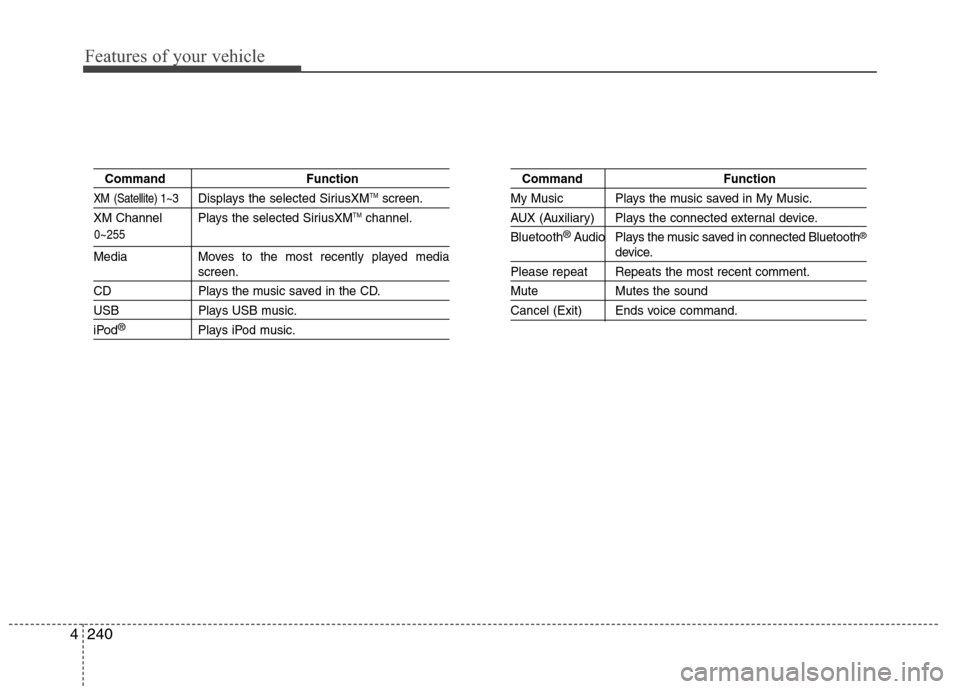
0~255
Command Function
XM (Satellite) 1~3Displays the selected SiriusXMTMscreen.
XM Channel Plays the selected SiriusXMTMchannel.
Media Moves to the most recently played mediascreen.
CD Plays the music saved in the CD.
USB Plays USB music.
iPod®Plays iPod music.
Command Function
My Music Plays the music saved in My Music.
AUX (Auxiliary) Plays the connected external device.
Bluetooth
®Audio Plays the music saved in connected Bluetooth®
device.
Please repeat Repeats the most recent comment.
Mute Mutes the sound
Cancel (Exit) Ends voice command.
Page 333 of 550
![Hyundai Elantra Coupe 2014 Workshop Manual 4247
Features of your vehicle
Touch Screen Beep
Press the key Select [Sound]
Select [Touch Screen Beep]
This feature is used to turn the touch
screen beep on/off.
Blue Link Voice Volume
Press the k](/img/35/14621/w960_14621-332.png "Hyundai Elantra Coupe 2014 Workshop Manual 4247
Features of your vehicle
Touch Screen Beep
Press the key Select [Sound]
Select [Touch Screen Beep]
This feature is used to turn the touch
screen beep on/off.
Blue Link Voice Volume
Press the k")
4247
Features of your vehicle
Touch Screen Beep
Press the key Select [Sound]
Select [Touch Screen Beep]
This feature is used to turn the touch
screen beep on/off.
Blue Link Voice Volume
Press the key Select [Sound]
Select [Blue Link Voice Vol.]
Turn the TUNE knob to adjust the
Blue Link Voice Volume.
❈Blue Link
®may differ depending
on the selected audio.
System Setting
Memory Information
Press the key Select
[System] Select [Memory Information]
This feature displays information
related to system memory.
1) Using : Displays capacity currently
in use
2) Capacity : Displays total capacity
SETUP
SETUP SETUP
Page 336 of 550
Features of your vehicle
250 4
Blue Link® (if equipped)
Hyundai aims to offer differentiated
customer values through a
‘Connected Car Life,’ which is to pro-
vide consumers with fast and reliable
IT technology. As consumers’ lifestyles
become more and more mobile in
thanks to remarkable advances in
smart phones, tablet PCs and overall
wireless telecommunication, new
lifestyle patterns demand seamless
connection between one’s office,
home, outdoors and automobiles.
Automobile companies are now faced
with the task of shifting their paradigm
from vehicle-centered services to cus-
tomer value-centered services, with
the ultimate goal of securing global
leadership in the field of vehicle IT and
telematics.
Hyundai plans to achieve this by real-
izing a terminal platform flexible to
changes in IT technology, cooperat-
ing with global IT companies, creat-
ing an eco-system and providing the
latest contents & services based on
an open environment.
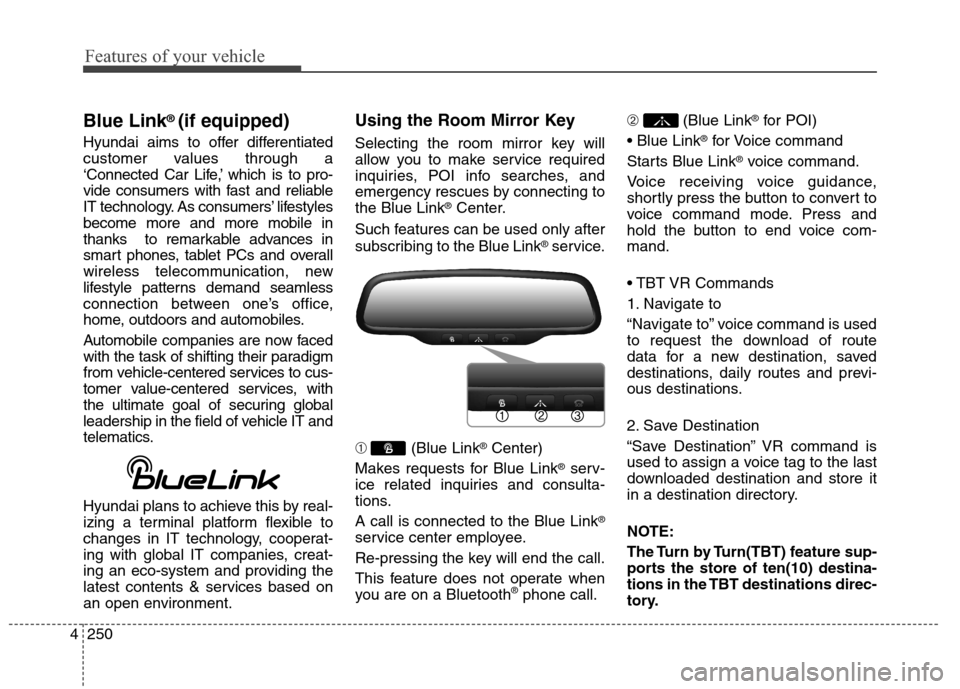
Using the Room Mirror Key
Selecting the room mirror key will
allow you to make service required
inquiries, POI info searches, and
emergency rescues by connecting to
the Blue Link
®Center.
Such features can be used only after
subscribing to the Blue Link
®service.
➀ (Blue Link
®Center)
Makes requests for Blue Link
®serv-
ice related inquiries and consulta-
tions.
A call is connected to the Blue Link
®
service center employee.
Re-pressing the key will end the call.
This feature does not operate when
you are on a Bluetooth
®phone call.➁ (Blue Link
®for POI)
®for Voice command
Starts Blue Link
®voice command.
Voice receiving voice guidance,
shortly press the button to convert to
voice command mode. Press and
hold the button to end voice com-
mand.
1. Navigate to
“Navigate to” voice command is used
to request the download of route
data for a new destination, saved
destinations, daily routes and previ-
ous destinations.
2. Save Destination
“Save Destination” VR command is
used to assign a voice tag to the last
downloaded destination and store it
in a destination directory.
NOTE:
The Turn by Turn(TBT) feature sup-
ports the store of ten(10) destina-
tions in the TBT destinations direc-
tory.
Page 337 of 550
4251
Features of your vehicle
3. Route Preview
“Route Preview” VR command allows
the user to preview the route instruc-
tions (upcoming maneuver instruc-
tions) at any time during the route
guidance.
4. Destinations List
“Destinations List” VR command
allows the user to preview and delete
the stored destinations with their
associated voice tags in the Turn by
Turn destinations directory.
5. Voice Guidance
“Voice Guidance” VR command allows
the user to mute/unmute the Turn by
Turn(TBT) direction announcements.
6. Suspend Route
“Suspend Route” VR command
allows the user to suspend and
pause Turn by Turn(TBT) route guid-
ance while in the guidance mode.7. Resume Route
“Resume Route” VR command
allows the user to resume Turn by
Turn(TBT) route guidance.
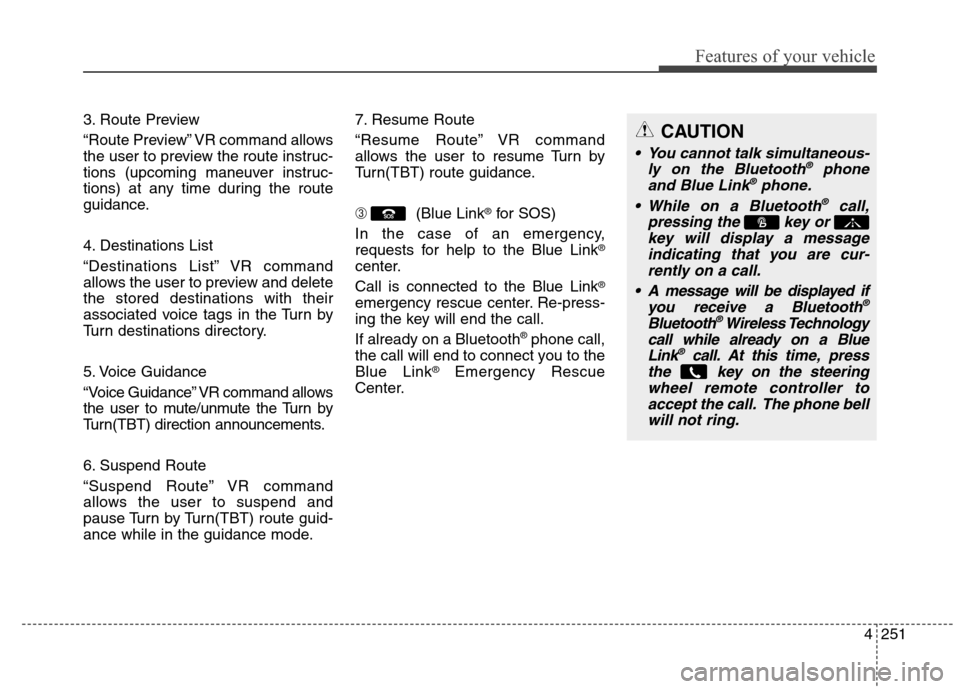
➂ (Blue Link
®for SOS)
In the case of an emergency,
requests for help to the Blue Link
®
center.
Call is connected to the Blue Link
®
emergency rescue center. Re-press-
ing the key will end the call.
If already on a Bluetooth
®phone call,
the call will end to connect you to the
Blue Link
®Emergency Rescue
Center.
CAUTION
You cannot talk simultaneous-
ly on the Bluetooth®phone
and Blue Link®phone.
While on a Bluetooth®call,
pressing the key or
key will display a message
indicating that you are cur-
rently on a call.
A message will be displayed if
you receive a Bluetooth
®
Bluetooth®Wireless Technology
call while already on a Blue
Link
®call. At this time,press
the key on the steering
wheel remote controller to
accept the call. The phone bell
will not ring.
Page 339 of 550
4253
Features of your vehicle
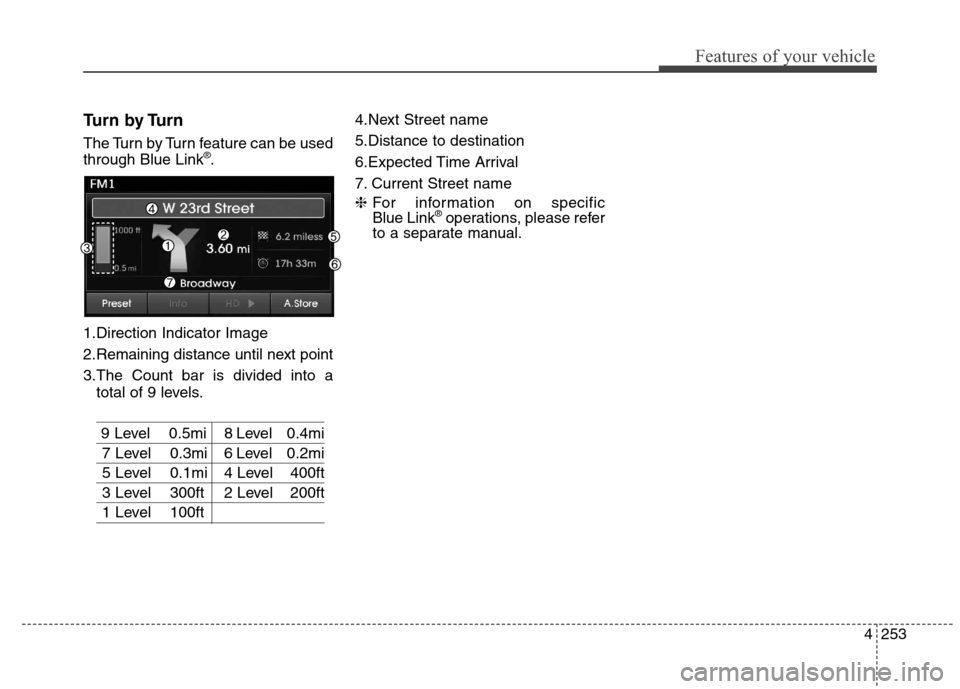
Turn by Turn
The Turn by Turn feature can be used
through Blue Link®.
1.Direction Indicator Image
2.Remaining distance until next point
3.The Count bar is divided into a
total of 9 levels.
9 Level 0.5mi 8 Level 0.4mi
7 Level 0.3mi 6 Level 0.2mi
5 Level 0.1mi 4 Level 400ft
3 Level 300ft 2 Level 200ft
1 Level 100ft4.Next Street name
5.Distance to destination
6.Expected Time Arrival
7. Current Street name
❈For information on specific
Blue Link
®operations, please refer
to a separate manual.
Page 351 of 550
Driving your vehicle
12 5
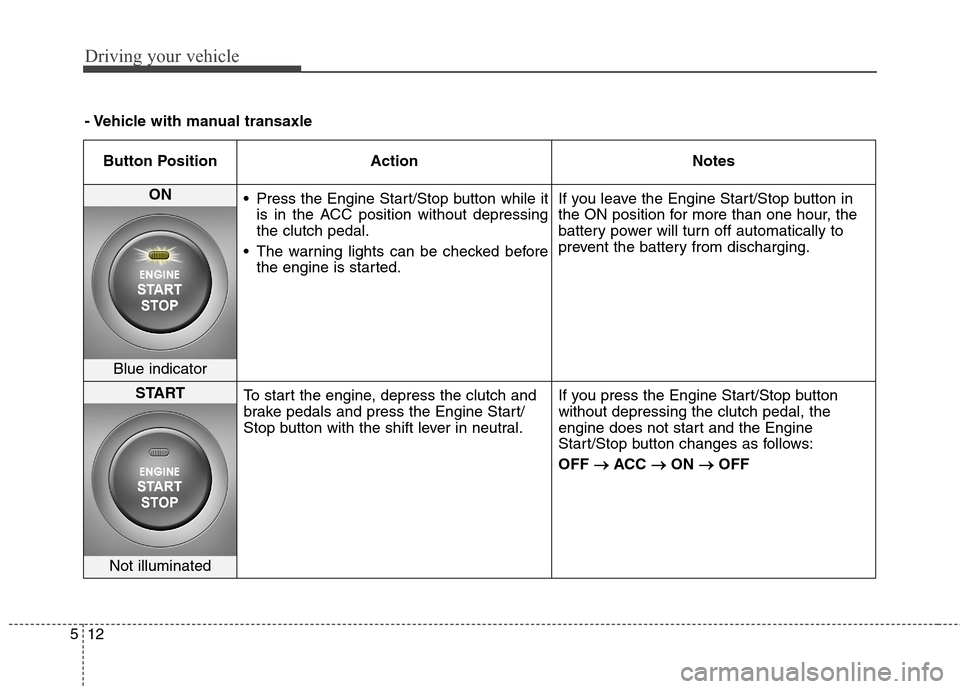
Button Position Action Notes
ON
Press the Engine Start/Stop button while it
is in the ACC position without depressing
the clutch pedal.
The warning lights can be checked before
the engine is started.If you leave the Engine Start/Stop button in
the ON position for more than one hour, the
battery power will turn off automatically to
prevent the battery from discharging.
Blue indicator
START
To start the engine, depress the clutch and
brake pedals and press the Engine Start/
Stop button with the shift lever in neutral.If you press the Engine Start/Stop button
without depressing the clutch pedal, the
engine does not start and the Engine
Start/Stop button changes as follows:
OFF → →
ACC → →
ON → →
OFF
Not illuminated
- Vehicle with manual transaxle
Page 353 of 550
Driving your vehicle
14 5
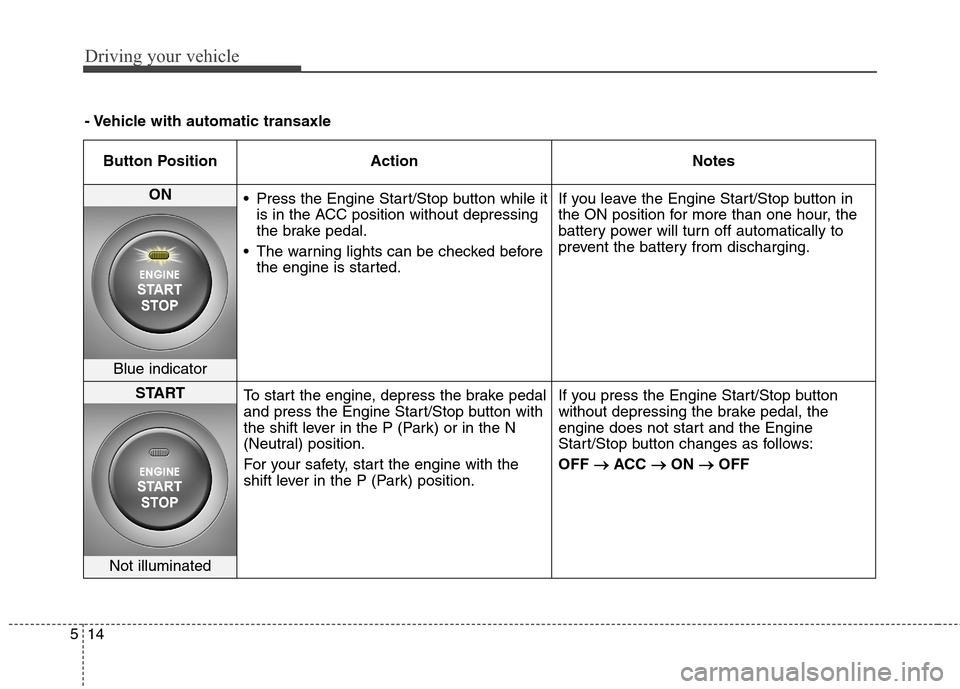
- Vehicle with automatic transaxle
Button Position Action Notes
ON
Press the Engine Start/Stop button while it
is in the ACC position without depressing
the brake pedal.
The warning lights can be checked before
the engine is started.If you leave the Engine Start/Stop button in
the ON position for more than one hour, the
battery power will turn off automatically to
prevent the battery from discharging.
Blue indicator
START
To start the engine, depress the brake pedal
and press the Engine Start/Stop button with
the shift lever in the P (Park) or in the N
(Neutral) position.
For your safety, start the engine with the
shift lever in the P (Park) position.If you press the Engine Start/Stop button
without depressing the brake pedal, the
engine does not start and the Engine
Start/Stop button changes as follows:
OFF → →
ACC → →
ON → →
OFF
Not illuminated
Page 540 of 550
I3
Index
Manual heating and air conditioning ..........................4-96
Mode selection ............................................................4-96
OFF mode ..................................................................4-101
Temperature control ....................................................4-97
Automatic transaxle ........................................................5-22
Good driving practices ................................................5-27
Ignition key interlock system ......................................5-27
Parking ........................................................................5-27
Shift lock system ........................................................5-25
Shift-lock release ........................................................5-26
Sports mode ................................................................5-24
Automatic turn off function ............................................4-78
Aux, USB and iPod ......................................................3-102Battery ............................................................................7-43
Battery recharging ......................................................7-45
Battery saver function ....................................................4-77
Before driving ..................................................................5-3
Blind zone mirror............................................................4-49
Blue Link
®center ..........................................................4-42
Brake system ..................................................................5-29
Anti-lock brake system (ABS) ....................................5-32
Disc brakes wear indicator ..........................................5-30
Electronic stability control (ESC) ..............................5-34
Good braking practices................................................5-39
Parking brake ..............................................................5-30
Power brakes ..............................................................5-29
Vehicle stability management (VSM) ........................5-38
Brake/clutch fluid ..........................................................7-35
Bulb replacement ............................................................7-76
Front side marker ........................................................7-79
Front turn signal light ..................................................7-79
High mounted stop light ..............................................7-84
Interior light ................................................................7-85
License plate light ......................................................7-85
Rear combination light ................................................7-81
Side repeater light ......................................................7-80
Bulb wattage ....................................................................8-2
Button start/stop, see engine start/stop button ..................5-9
B
Page 546 of 550
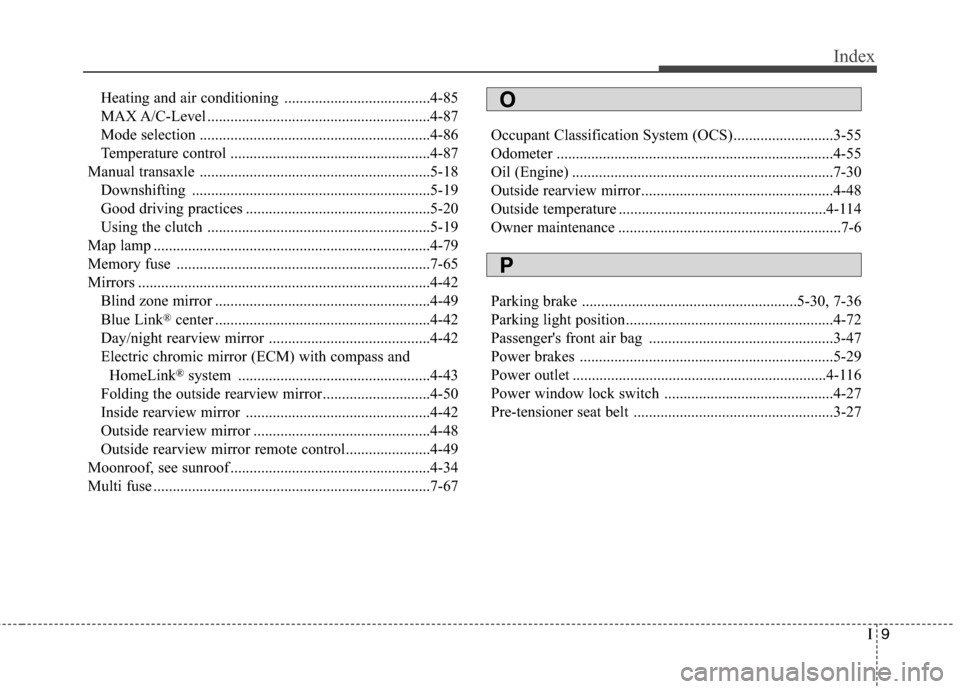
I9
Index
Heating and air conditioning ......................................4-85
MAX A/C-Level ..........................................................4-87
Mode selection ............................................................4-86
Temperature control ....................................................4-87
Manual transaxle ............................................................5-18
Downshifting ..............................................................5-19
Good driving practices ................................................5-20
Using the clutch ..........................................................5-19
Map lamp ........................................................................4-79
Memory fuse ..................................................................7-65
Mirrors ............................................................................4-42
Blind zone mirror ........................................................4-49
Blue Link
®center ........................................................4-42
Day/night rearview mirror ..........................................4-42
Electric chromic mirror (ECM) with compass and
HomeLink
®system ..................................................4-43
Folding the outside rearview mirror............................4-50
Inside rearview mirror ................................................4-42
Outside rearview mirror ..............................................4-48
Outside rearview mirror remote control......................4-49
Moonroof, see sunroof ....................................................4-34
Multi fuse ........................................................................7-67Occupant Classification System (OCS)..........................3-55
Odometer ........................................................................4-55
Oil (Engine) ....................................................................7-30
Outside rearview mirror..................................................4-48
Outside temperature ......................................................4-114
Owner maintenance ..........................................................7-6
Parking brake ........................................................5-30, 7-36
Parking light position......................................................4-72
Passenger's front air bag ................................................3-47
Power brakes ..................................................................5-29
Power outlet ..................................................................4-116
Power window lock switch ............................................4-27
Pre-tensioner seat belt ....................................................3-27
O
P